Information Exposure Through Directory Listing vulnerability on 8 vcache**.usw2.snappytv.com websites
Several vcache hosts exposed directory listings under /media/, letting anyone browse and download the files inside. The researcher did not inspect the files, but they could include private videos or photos.
 Originally disclosed on HackerOne
- Triaged in 4 days
- Fixed in 32 days
- Disclosed after 3 months
Summary: Researcher has found directory listing exposure to several vcache**.usw2.snappytv.com websites. A directory listing provides an attacker with the complete index of all the resources located inside of the directory as well as download or access its contents.
While the researcher did not dig deeper on to the available files, it might be possible that these websites host sensitive information like private videos which can publicly be downloaded or accessed by any user.
Steps To Reproduce:
Browse to the URLs below to see the vulnerability.
- http://vcache01.usw2.snappytv.com/media/
- http://vcache02.usw2.snappytv.com/media/
- http://vcache03.usw2.snappytv.com/media/
- http://vcache04.usw2.snappytv.com/media/
- http://vcache05.usw2.snappytv.com/media/
- http://vcache06.usw2.snappytv.com/media/
- http://vcache07.usw2.snappytv.com/media/
- http://vcache08.usw2.snappytv.com/media/
Impact:
A directory listing provides an attacker with the complete index of all the resources located inside of the directory. The specific risks and consequences vary depending on which files are listed and accessible. The files can possibly expose sensitive information as well as sensitive files like private videos or photos.
Supporting Material/References:
Proof
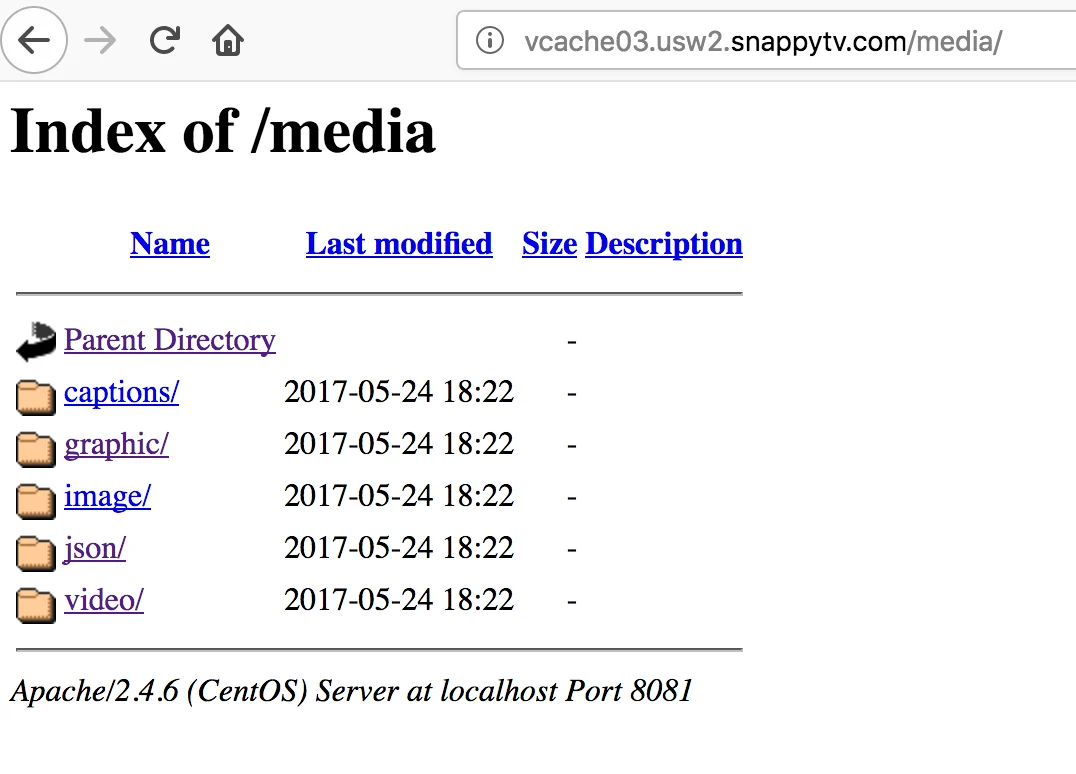
Impact
A directory listing provides an attacker with the complete index of all the resources located inside of the directory. The specific risks and consequences vary depending on which files are listed and accessible. The files can possibly expose sensitive information as well as sensitive files like private videos or photos.
Context
Snappytv.com runs a set of cache hosts under the usw2 region, named vcache01 through vcache08. Each host serves a /media/ path. Normally a web server should either serve a specific file from that path or refuse the request; it should not hand back a browsable index of everything stored there. The report is about exactly that: the /media/ directory on eight of these hosts returns a directory listing, so anyone who reaches the URL sees the full index of the resources inside the directory and can download or access them.
The weakness is classified as Information Exposure Through Directory Listing, with low severity. The researcher did not dig deeper into the files that were listed, so the report does not establish what those files actually are.
Setup
No account, role, tool or version is needed. The only precondition is network access to the eight hosts over plain HTTP. The researcher browsed to the URLs directly; there is no authentication step, no special header and no crafted payload in the report.
Finding it
The researcher found that the /media/ directory on several vcache**.usw2.snappytv.com websites exposes a directory listing. A directory listing gives an attacker the complete index of all the resources located inside the directory, together with the ability to download or access their contents. That is what made the behaviour look wrong: a path that should serve individual media files was instead disclosing its whole contents.
Exploitation
Step 1: Request the media directory on each cache host
Browse to the URLs below to see the vulnerability.
http://vcache01.usw2.snappytv.com/media/
http://vcache02.usw2.snappytv.com/media/
http://vcache03.usw2.snappytv.com/media/
http://vcache04.usw2.snappytv.com/media/
http://vcache05.usw2.snappytv.com/media/
http://vcache06.usw2.snappytv.com/media/
http://vcache07.usw2.snappytv.com/media/
http://vcache08.usw2.snappytv.com/media/
Each URL targets the /media/ directory on one of the eight cache hosts. The URLs request the /media/ directory on each host. The scheme is plain HTTP, so no TLS negotiation is involved.
Step 2: Read the returned index
The response is a directory listing: the complete index of the resources inside /media/ on that host. From that index an attacker can reach and download the listed contents. The researcher stopped at the listing and did not dig deeper into the available files.
Root cause
The report does not describe the server configuration or the code behind the behaviour. What it shows is that the web server answers a request for the /media/ directory with an auto-generated index instead of refusing it or serving a default document. That is the classic directory-listing behaviour of a web server whose index generation is left enabled for a directory that has no index file. The report does not state why the listing was enabled.
Impact
A directory listing provides an attacker with the complete index of all the resources located inside the directory. The specific risks and consequences vary depending on which files are listed and accessible. The files can possibly expose sensitive information, as well as sensitive files such as private videos or photos.
That last point is a hedge, not a finding: the researcher did not dig deeper into the available files, so the report does not confirm that any sensitive material, private videos included, is actually present on these hosts. What is established is that the /media/ directory on these hosts is publicly reachable over HTTP.
Fix
The report does not record a fix or a remediation step. The change that addresses the behaviour is to stop the server from generating indexes for /media/ on these hosts, for example by disabling directory listing for the path or by placing an index document in the directory, so that a request for /media/ no longer returns the contents.
Variants to test
- Request the directory without the trailing slash (
/media) and with a different case (/Media/,/MEDIA/) on each host. A positive result is an index page or a redirect that still ends in a listing. - Try sibling paths on the same hosts, such as other top-level directories that might hold uploaded or cached content. A positive result is the same auto-generated index rather than a 403 or a default page.
- Check the other hosts in the same naming scheme beyond the eight listed, since the pattern
vcache01tovcache08suggests a numbered fleet. A positive result is a ninth host returning the same listing. - Request a known file from the index directly, then request a path one level above it, to see whether parent directories are also listable. A positive result is a listing at the parent level.
- Repeat the request over HTTPS on the same hostnames. A positive result is the same index served over TLS, which shows the exposure is not limited to the HTTP listener.
Hunting notes
During recon, the signals are hostnames with numbered patterns (vcache01, vcache02 and so on) and paths such as /media/, /uploads/ or /static/ that return an HTML index rather than a file or an error. The check is cheap: request the directory with a trailing slash and look at whether the body is a generated file list.
On impact, the report is honest about its limits: the researcher showed that the index is reachable on all eight hosts but did not enumerate or open the files, so the claim about private videos and photos is framed as a possibility. That framing is what the write-up rests on.
What happened, in plain words
A website called snappytv.com runs a group of servers whose job is to store and hand out media files, such as videos. These servers have names like vcache01, vcache02 and so on up to vcache08, all in a region labelled usw2. Each one has a folder called /media/.
Normally, when you ask a web server for a folder, it should either give you one specific file or say no. It should not show you a list of everything inside the folder. On these servers, it did show the list. Anyone who typed the address into a browser could see an index of every resource stored in /media/, and could open or download those resources.
This kind of mistake is called Information Exposure Through Directory Listing. The report rates it as low severity. The researcher who wrote it did not open the listed files or look further into them, so we do not know from the report what those files actually are.
Setup
You need nothing special to repeat this: no account, no password, no hacking tool, no particular software version. All you need is a computer with a browser and an internet connection that can reach the eight servers over plain HTTP.
A few words that come up here:
- HTTP is the basic language browsers and web servers use to talk to each other. When the address starts with
http://, the conversation is not encrypted. When it starts withhttps://, it is encrypted. - A host is one machine on the internet, identified by its name, such as
vcache01.usw2.snappytv.com. - A directory is the same thing as a folder on your own computer. In a web address, it is the part that ends with a slash, like
/media/. - A directory listing is a web page a server can generate automatically that shows every file in a folder, like opening a folder in your file explorer and seeing all the files inside.
The researcher simply visited the addresses in a browser. There was no login step, no special request header and no crafted input of any kind.
Finding it
The researcher noticed that the /media/ folder on several vcache**.usw2.snappytv.com servers was showing its contents instead of hiding them. A directory listing hands an attacker the complete index of everything in the folder, plus the ability to download or open it. That is what made the behaviour look wrong: a path that should serve individual media files was instead revealing its whole contents.
Exploitation
Step 1: Request the media directory on each cache host
The report's reproduction step is literally to browse to the addresses below.
http://vcache01.usw2.snappytv.com/media/
http://vcache02.usw2.snappytv.com/media/
http://vcache03.usw2.snappytv.com/media/
http://vcache04.usw2.snappytv.com/media/
http://vcache05.usw2.snappytv.com/media/
http://vcache06.usw2.snappytv.com/media/
http://vcache07.usw2.snappytv.com/media/
http://vcache08.usw2.snappytv.com/media/
Line by line, in plain words:
- Each line is one full web address. The first part,
http://, says to use the unencrypted version of the web protocol. - The middle part, such as
vcache01.usw2.snappytv.com, is the name of one server. The eight lines differ only in the number:01through08. That is why the report calls them a set of cache hosts. - The last part,
/media/, is the folder being asked for. - Because the scheme is plain
http, there is no encryption handshake involved. The browser just sends the request and the server answers.
Step 2: Read the returned index
What comes back is a directory listing: the complete index of the resources inside /media/ on that server. From that page, a visitor can click through to the listed contents and download them. The researcher stopped at the listing and did not dig deeper into the files.
Root cause
A root cause is the underlying reason a bug exists, as opposed to the symptom you see.
The report does not describe the server configuration or the code behind the behaviour. What it shows is that the web server answers a request for the /media/ folder with an automatically generated index, instead of refusing the request or serving a default page. This is the classic directory-listing behaviour of a web server that has its index generation switched on for a folder that contains no index file.
To picture it: many web servers can be told "if someone asks for a folder and there is no home page inside it, build a list of the files and show that instead". That feature is convenient on a public download site and dangerous on a server holding private material. Why the existing defences did not prevent it is not stated in the report. The report does not state why the listing was enabled.
Impact
Impact means the harm that follows if someone abuses the bug.
A directory listing gives an attacker the complete index of all the resources inside the folder. The specific risks and consequences vary depending on which files are listed and whether they can be accessed. The files could expose sensitive information, including sensitive files such as private videos or photos.
That last point is a possibility, not a confirmed finding. The researcher did not dig deeper into the available files, so the report does not establish that any sensitive material, private videos included, is actually present on these servers. What is established is that the /media/ folder on these servers is publicly reachable over plain HTTP.
Fix
A fix is the change that removes the bug.
The report does not record a fix or a remediation step. The change that addresses the behaviour is to stop the server from generating indexes for /media/ on these hosts. Two common ways to do that are to switch directory listing off for the path, or to place an index document inside the folder, so that a request for /media/ no longer returns the contents.
Variants to test
A variant is a small change to the original request, made to see whether the same weakness appears in a slightly different form. These are follow-up checks a tester might run; the report itself does not record their results.
- Request the folder without the trailing slash (
/media) and with a different capitalisation (/Media/,/MEDIA/) on each host. A positive result is an index page, or a redirect that still ends in a listing. - Try neighbouring paths on the same hosts, such as other top-level folders that might hold uploaded or cached content. A positive result is the same auto-generated index rather than a 403 or a default page. A 403 is the standard HTTP status code for "forbidden", the server's way of saying you may not have this.
- Check other hosts in the same naming scheme beyond the eight listed, since the pattern
vcache01tovcache08suggests a numbered fleet. A positive result is a ninth host returning the same listing. - Request a known file from the index directly, then request the path one level above it, to see whether parent folders are also listable. A positive result is a listing at the parent level.
- Repeat the request over HTTPS on the same hostnames. A positive result is the same index served over the encrypted connection, which shows the exposure is not limited to the unencrypted listener.
Hunting notes
Hunting here means looking for this class of bug on other sites.
During recon (short for reconnaissance, the early stage of gathering information about a target), the signals are hostnames with numbered patterns (vcache01, vcache02 and so on) and paths such as /media/, /uploads/ or /static/ that return an HTML index rather than a file or an error. The check is cheap: request the folder with a trailing slash and look at whether the page body is a generated file list.
On impact, the report is honest about its limits. The researcher showed that the index is reachable on all eight hosts but did not list or open the files, so the claim about private videos and photos is framed as a possibility. That framing is what the write-up rests on.
Glossary
- HTTP: the basic language browsers and web servers use to exchange requests and responses; unencrypted when the address starts with
http://. - HTTPS: the encrypted version of HTTP, used when the address starts with
https://. - Host: one machine on the internet, identified by a name such as
vcache01.usw2.snappytv.com. - Directory: a folder; in a web address, the part that ends with a slash, like
/media/. - Directory listing: an automatically generated web page that shows every file inside a folder.
- Information Exposure Through Directory Listing: the weakness where a server reveals the contents of a folder that should have stayed hidden.
- Cache host: a server whose job is to store and serve content, often copies of media, close to where it is needed.
- Trailing slash: the
/at the end of a path such as/media/, which asks the server for the folder itself rather than a named file. - Index page: the default page a server returns for a folder, which may be a real home page or an auto-generated file list.
- Index document: a file placed in a folder so the server serves it instead of generating a list.
- Root cause: the underlying reason a bug exists, as opposed to the symptom you observe.
- Impact: the harm that follows if someone abuses the bug.
- Severity: a rating of how serious a bug is; this report is rated low.
- Fix: the change that removes the bug.
- Remediation: the act of applying a fix.
- Variant: a small change to a request, used to test whether the same weakness appears in another form.
- 403: the HTTP status code for "forbidden", meaning the server refuses to serve the request.
- Recon: reconnaissance, the early stage of gathering information about a target.
- Hunting: actively searching for a class of bug on other systems.
- TLS: the encryption technology behind HTTPS.
- Listener: the part of a server that waits for connections on a particular protocol, such as HTTP or HTTPS.