lack of input validation that can lead Denial of Service (DOS)
The username change form on the settings page did not validate or limit the input, so submitting an oversized or malformed value caused the server to return a 500 Internal Server Error. The reporter claims this could let an attacker cause a denial of service against the server side.

- Triaged in 3 days
- Fixed in 47 days
- Paid in 30 days
- Disclosed after 2 months
Hi Security Team,
Summary:
There is no limit to the number of characters in the issue comments, which allows a DoS attack. The DoS attack affects server-side.
Description
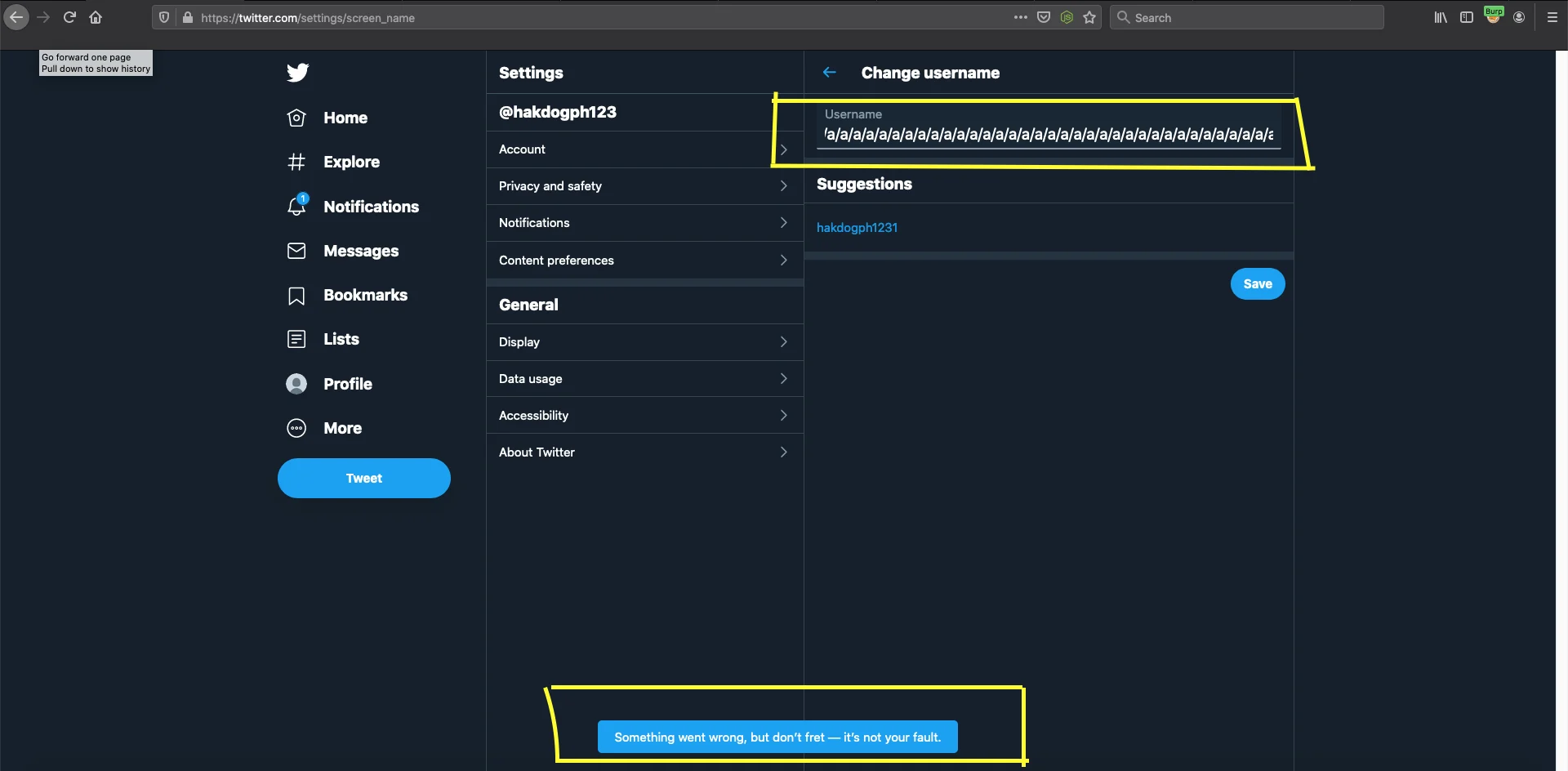
On the input form of Username in https://twitter.com/settings/screen_name there's no Input validation using this you can send more payload and may cause of Denial of service or error code 500 Internal Server Error/Internal Error
Proof of Concept
- First login your twitter account
- Go to the Settings of your account
- Click Username
- Change your username and put the payload then submit
And the response was pop up and say.
==Something went wrong, but don't fret --- it's not your fault.==
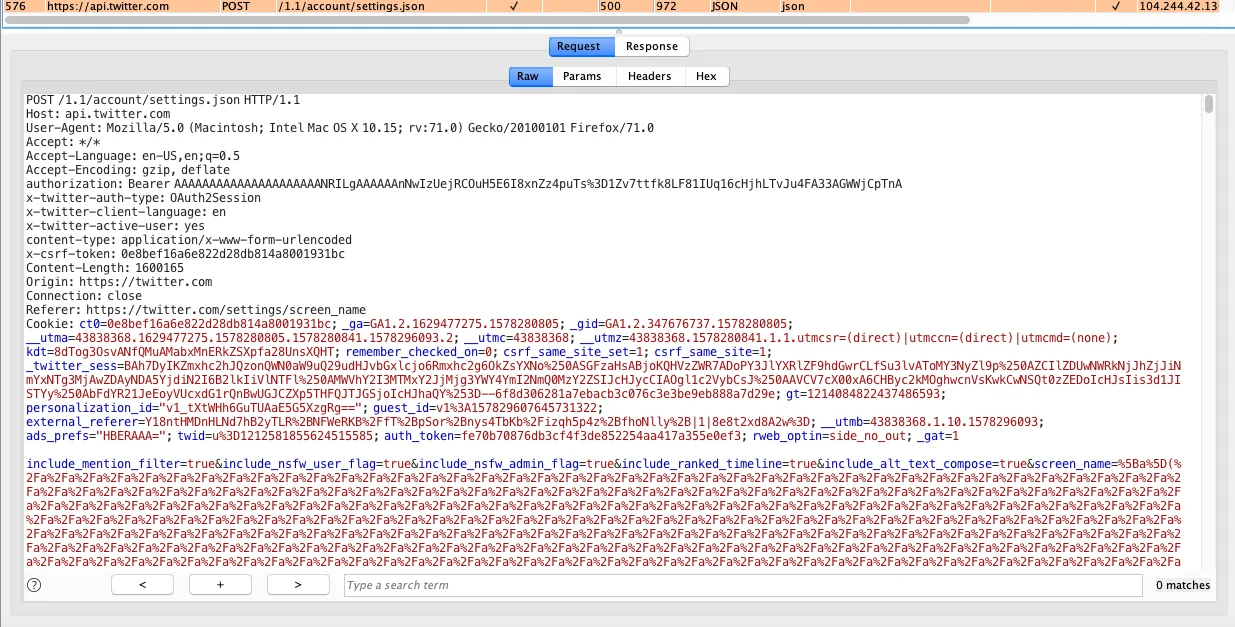
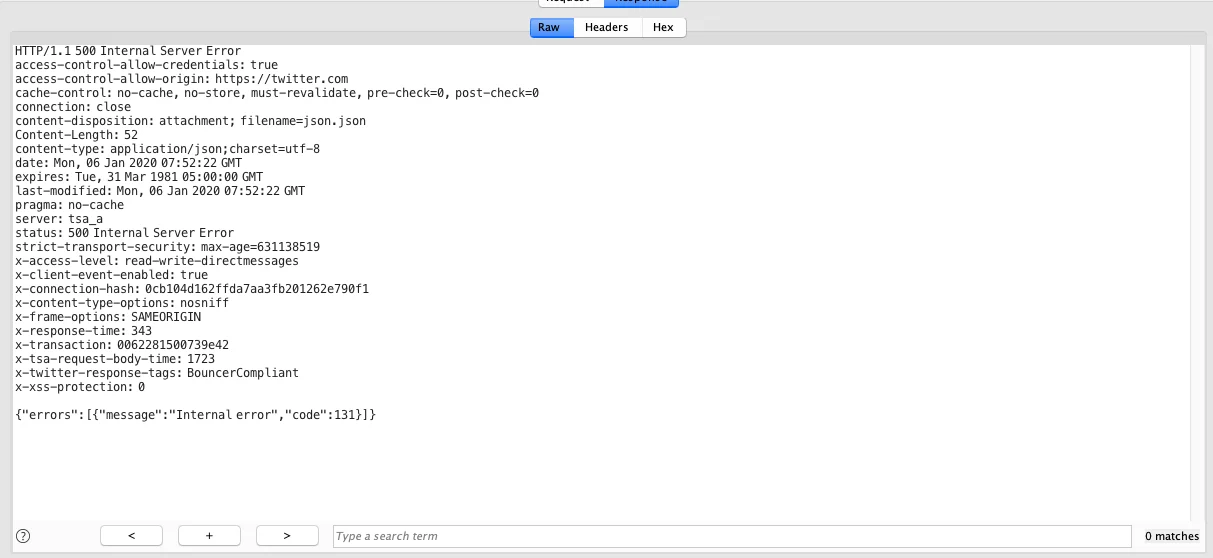
and the response code on the server side is 500 Internal Server Error
Kindly check 2 uploaded photo for my additional Proof of Concept
Remediation:
Implementing input validation
Validating free-form Unicode text
Define the allowed set of characters to be accepted.
Minimum and maximum value range
Supporting Material/References:
payload.txt
Thank you! Regards
Impact
Attacker can perform a DOS because of lack of input validation
Attachments
Context
The target was X (then Twitter), and the feature in question is the username change form at https://twitter.com/settings/screen_name. That page is where an authenticated user edits the screen name (the @handle) attached to their account. The report describes the form as accepting an unbounded number of characters, with no input validation. and argues that this can be driven into a denial of service condition against the server.
The weakness is classified as Uncontrolled Resource Consumption, and the report was rated medium severity with a 560.00 USD bounty. It was disclosed on 2020-03-12.
Setup
The preconditions are minimal. The researcher needed a logged-in Twitter account, a browser, and access to the account settings. No special tooling, proxy configuration or elevated role is described. The only artefact referenced besides the browser is a file named payload.txt, listed under supporting material, whose contents are not reproduced in the report text.
Finding it
The researcher noticed that the username input form on https://twitter.com/settings/screen_name performs no input validation, and that there is no limit to the number of characters accepted in the field. The reasoning is that because the value is not bounded, a large payload can be submitted, and the server-side handling of that value can be pushed into an error state or into excessive resource consumption.
Exploitation
Step 1: Log in
Log in to a Twitter account. The researcher logged in to a Twitter account first.
Step 2: Open account settings
Go to the settings of the account.
Step 3: Select the username section
Click Username.
Step 4: Submit an oversized username
Change the username, place the payload in the field and submit. The payload itself is not included in the report text; it is referenced only as the attached payload.txt.
After submission, the client showed the following message:
Something went wrong, but don't fret --- it's not your fault.
On the server side, the response status was:
500 Internal Server Error
The report states that the lack of input validation allows a DoS attack affecting the server side. The report does not include the raw HTTP request or response, only the browser outcome and the status code.
Root cause
The report attributes the behaviour to missing input validation on the username field: no maximum length and no defined set of accepted characters. The report attributes the 500 response to missing input validation on the username field. The report does not describe the server-side code path, so the precise resource that is exhausted is not identified; the classification as Uncontrolled Resource Consumption is the program's, and
Impact
An attacker can perform a denial of service because of the lack of input validation, according to the report. The stated effect is server-side. The report does not quantify how many requests are needed, how long the effect lasts, or which users or services are affected beyond the server handling the request. The observed evidence is a 500 Internal Server Error after submitting the payload.
Fix
The remediation section lists four measures:
- Implementing input validation.
- Validating free-form Unicode text.
- Defining the allowed set of characters to be accepted.
- Enforcing a minimum and maximum value range.
The report does not state which of these was actually applied by the vendor.
Variants to test
- Other profile fields that accept free-form text (display name, bio, location, website) with oversized values, checking for 500 responses or timeouts.
- The same username field with multi-byte Unicode and combining characters, to see whether length is counted in bytes or code points and whether the limit can be bypassed.
- The same field with a large payload sent directly to the underlying API endpoint rather than through the web form, to check whether validation exists only in the client.
- Repeated submissions of the oversized value to see whether the error is per-request or accumulates into a sustained outage.
A positive result in each case is a server error, a timeout, or a measurable degradation that does not occur with a normal-length value.
Hunting notes
This kind of bug tends to sit in profile and settings forms where a value is stored and later rendered or processed, and where the client-side field length is the only limit. During recon, forms that accept free-form text and return generic error pages on unusual input are worth probing.
Attachments
What happened, in plain words
A security researcher found that the username change form on X (then Twitter) accepted an unlimited number of characters. By submitting a payload in the username field, the researcher made the server return a 500 Internal Server Error. The researcher argued that this missing limit could be used to perform a denial of service (DoS) attack against the server. The report was rated medium severity, paid a 560.00 USD bounty, and was disclosed on 2020-03-12.
Context
The target was X (then Twitter). The feature in question is the username change form at https://twitter.com/settings/screen_name. That page is where a logged-in user edits the screen name (the @handle) attached to their account. The report says the form accepts an unbounded number of characters, with no input validation, and argues that this can be driven into a denial of service condition against the server.
The weakness is classified as Uncontrolled Resource Consumption. The report was rated medium severity with a 560.00 USD bounty. It was disclosed on 2020-03-12.
Setup
The preconditions are minimal. The researcher needed a logged-in Twitter account, a browser, and access to the account settings. No special tooling, proxy configuration or elevated role is described. The only artefact referenced besides the browser is a file named payload.txt, listed under supporting material, whose contents are not reproduced in the report text.
Finding it
The researcher noticed that the username input form on https://twitter.com/settings/screen_name performs no input validation, and that there is no limit to the number of characters accepted in the field. The reasoning is that because the value is not bounded, a large payload can be submitted, and the server-side handling of that value can be pushed into an error state or into excessive resource consumption.
Exploitation
Step 1: Log in
Log in to a Twitter account. The researcher logged in to a Twitter account first.
Step 2: Open account settings
Go to the settings of the account.
Step 3: Select the username section
Click Username.
Step 4: Submit an oversized username
Change the username, place the payload in the field and submit. The payload itself is not included in the report text; it is referenced only as the attached payload.txt.
After submission, the client showed the following message:
Something went wrong, but don't fret --- it's not your fault.
On the server side, the response status was:
500 Internal Server Error
The report states that the lack of input validation allows a DoS attack affecting the server side. The report does not include the raw HTTP request or response, only the browser outcome and the status code.
Root cause
The report attributes the behaviour to missing input validation on the username field: no maximum length and no defined set of accepted characters. The report attributes the 500 response to missing input validation on the username field. The report does not describe the server-side code path, so the precise resource that is exhausted is not identified; the classification as Uncontrolled Resource Consumption is the program's, and
Impact
An attacker can perform a denial of service because of the lack of input validation, according to the report. The stated effect is server-side. The report does not quantify how many requests are needed, how long the effect lasts, or which users or services are affected beyond the server handling the request. The observed evidence is a 500 Internal Server Error after submitting the payload.
Fix
The remediation section lists four measures:
- Implementing input validation.
- Validating free-form Unicode text.
- Defining the allowed set of characters to be accepted.
- Enforcing a minimum and maximum value range.
The report does not state which of these was actually applied by the vendor.
Variants to test
- Other profile fields that accept free-form text (display name, bio, location, website) with oversized values, checking for 500 responses or timeouts.
- The same username field with multi-byte Unicode and combining characters, to see whether length is counted in bytes or code points and whether the limit can be bypassed.
- The same field with a large payload sent directly to the underlying API endpoint rather than through the web form, to check whether validation exists only in the client.
- Repeated submissions of the oversized value to see whether the error is per-request or accumulates into a sustained outage.
A positive result in each case is a server error, a timeout, or a measurable degradation that does not occur with a normal-length value.
Hunting notes
This kind of bug tends to sit in profile and settings forms where a value is stored and later rendered or processed, and where the client-side field length is the only limit. During recon, forms that accept free-form text and return generic error pages on unusual input are worth probing.
Attachments
Glossary
- API: A set of rules that lets one piece of software talk to another. Think of it as a waiter taking your order to the kitchen.
- Bounty: A reward paid by a company to someone who reports a security problem.
- Client: The program you use, such as your browser, that sends requests to a server.
- Code point: A number that represents a single character in Unicode, the standard for text characters.
- Cookie: A small piece of data a website stores in your browser to remember who you are.
- Denial of service (DoS): An attack that makes a service unavailable to its normal users, often by overwhelming it.
- Endpoint: A specific URL where a service can be reached.
- Free-form text: Text that can contain any characters, not just a fixed set.
- HTTP: The language browsers and servers use to exchange requests and responses.
- Input validation: Checking that data entered by a user is allowed before using it.
- Payload: The data you send in a request, often crafted to test a vulnerability.
- Recon: Short for reconnaissance, the phase of gathering information about a target.
- Server: A computer that provides services to other computers over a network.
- Session: A period during which a user is logged in and the server remembers them.
- Status code: A three-digit number in an HTTP response that tells the client what happened, such as 200 for success or 500 for a server error.
- Uncontrolled Resource Consumption: A weakness where an application uses more resources (memory, CPU, disk) than it should because it does not limit input or usage.
- Unicode: A standard for representing text characters from many writing systems.
- Username: The name that identifies a user on a service, often shown with an @ symbol.