Sensitive Information Disclosure https://cards-dev.twitter.com
A directory on a Twitter host served a JSON file containing customer keys, a customer secret and a Jira password. An attacker who found the directory could read those credentials and potentially use them to escalate access.

- Triaged in 2 days
- Fixed in 10 days
- Paid in 6 days
- Disclosed after 13 days
Dear Twitter Team,
While researching through one of your domain cards-dev.twitter.com i discovered that the host is disclosing sensitive information when a user browses to a specific directory
https://cards-dev.twitter.com:443/keys/.
The application downloads a file json.json which discloses the following information
"customer_key":"████"
"customer_secret":"█████████"
"jira_password":"██████"
I am checking that can this information be used to further escalate any vulnerability.
Regards,
Attachments
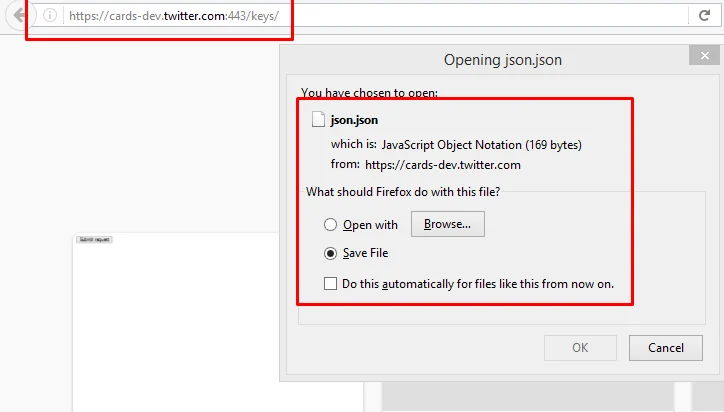
What the report shows
The target is the Twitter domain cards-dev.twitter.com. While researching the host, the researcher found that browsing to a specific directory returned a file containing credentials.
The path was:
https://cards-dev.twitter.com:443/keys/
Requesting that directory caused the application to download a file named json.json. The file disclosed three values, which the report shows with the secret parts masked:
"customer_key":"████"
"customer_secret":"█████████"
"jira_password":"██████"
The names suggest a customer key and secret, and a password for Jira. The report does not say what the customer key and secret belong to, nor which Jira instance the password was for.
The researcher states that they were checking whether the information could be used to escalate to a further vulnerability. The report ends there, so it does not record what that follow-up found.
The report does not describe a fix.
The report includes one attachment:
Root cause
The likely mistake is that a directory under the web root contains a file holding application secrets, and the server serves that directory's contents rather than blocking access to it. What the report does show is that a request to /keys/ resulted in the download of json.json, which means the file was reachable over HTTP..
Impact
The disclosed values are credentials: a customer key and secret, and a Jira password. In the report's own framing, the concern is whether they could be used to escalate to another vulnerability. That question is left open. The impact as documented is the exposure of secrets to anyone who requests the path.
How this kind of bug works
Sensitive files end up inside a web-served directory for mundane reasons: a deployment script writes configuration next to the application, a backup or export is placed under the document root, a framework serves static files from a folder that also holds generated data, or a developer tests a feature on a public host. If the web server is configured to serve that directory, the file becomes a URL.
Directory listing makes this worse. When a server has no index file and directory listing is enabled, a request to a folder returns an HTML index of its contents, which turns guessing into enumeration. Even without listing, predictable names such as keys, config, backup or json.json are easy to try.
The defences are straightforward: keep secrets outside the document root, deny access to sensitive paths and file extensions at the server or proxy, disable directory listing, and rotate any credential that has been exposed. Secrets should also be scoped narrowly so that a leak has limited reach.
How to test for it
- Map the host. Collect paths from crawling, JavaScript files, source maps, robots.txt, sitemaps and archived URLs. Look for names that suggest configuration, keys, backups, exports or admin tooling.
- Request candidate directories and note the response. A directory listing shows as an HTML page enumerating files; a direct file hit shows as a download or as JSON, XML or text content.
- Try common file names inside interesting directories, including
json.json,config.json,.env, backup archives and editor or deployment leftovers. Vary case and extensions where the server is case-sensitive. - Confirm the content is genuinely sensitive: API keys, passwords, tokens, connection strings, private keys. A positive result is a response body containing a credential that is not a placeholder and that belongs to a real system.
- Stop at proof. Do not use a discovered credential against other systems without explicit permission; note in the report what the value appears to be and let the program verify it.
Common false positives: public keys and client-side identifiers that are meant to be visible, example or placeholder values in sample configuration, documentation that describes a key format, and values that are already revoked. A file that merely exists but contains no secret is not this bug.
How it is fixed
Remove the file from the web root and store secrets in a secrets manager or environment configuration outside the served tree. Add server or proxy rules that deny requests to sensitive directories and extensions, and turn off directory listing. Rotate every credential that was exposed, since disclosure must be assumed to have been seen. Add deployment checks that fail when secret-bearing files land under the document root.
Hunting notes
This bug class hides in development and staging hosts, in paths that look like tooling (keys, config, admin, internal), and in files generated by build or export processes. Recon signals worth following are directory listings, unusual file extensions in crawl results, JavaScript that references configuration endpoints, and hosts whose naming suggests they were not meant for public traffic.
What happened, in plain words
This report is about a website that accidentally handed out secret passwords to anyone who asked for them. The site in question is cards-dev.twitter.com, a Twitter domain. The researcher was exploring this host and found that visiting one particular folder made the browser download a file full of credentials.
A quick word on terms before we go further. A domain is a name like twitter.com; a subdomain is a name in front of it, like cards-dev.twitter.com. A host is simply the machine (or service) that answers at that name. A directory (or folder) is a path on a website, the part after the slash, like /keys/. A credential is anything that proves who you are: a username and password, an API key, a token. If someone else gets your credential, they can pretend to be you.
The path the researcher browsed to was:
https://cards-dev.twitter.com:443/keys/
Line by line: https is the encrypted version of the web protocol; cards-dev.twitter.com is the host; :443 is the port, the numbered door on the server that HTTPS normally uses (browsers hide it, but it is always there); /keys/ is the folder being requested. Typing this into a browser is the same as sending a request, which is just the message your browser sends to a server asking for a page or file. The server replies with a response, which is the content it sends back.
Instead of a normal web page, the server responded by downloading a file called json.json. JSON is a plain-text format for structured data, a bit like a very simple spreadsheet written as text, with names and values in quotes. The file contained three values, shown in the report with the secret parts blacked out:
"customer_key":"████"
"customer_secret":"█████████"
"jira_password":"██████"
Each line is a name followed by a value. customer_key and customer_secret look like a pair used by an application to identify itself to another service (a key is often the public half, a secret the private half). jira_password looks like a password for Jira, a popular issue-tracking tool used by software teams. The report does not say which systems these belong to.
The researcher wrote that they were checking whether the information could be used to escalate to a further vulnerability, meaning whether these secrets could be used to break into something else. The report ends there, so we do not know what that check found.
A bounty is a reward a company pays someone who reports a security problem responsibly. Severity is a rough rating of how bad the issue is. Information Disclosure is the name for this whole class of bug: information that should have stayed private was shown to someone who should not have seen it.
In general, how this kind of bug works
This is a common and often simple mistake. A file holding secrets ends up inside a folder that the web server is willing to hand out. The reasons are ordinary: a deployment script writes a configuration file next to the application, someone leaves a backup or export in the public folder, or a developer tests something on a public host and forgets to remove it. If the server is set up to serve that folder, the file becomes a URL that anyone can visit.
A related problem is directory listing. When a server has no default page (like index.html) in a folder and listing is switched on, asking for the folder returns a page that lists every file inside it. That turns guessing into browsing. Even without listing, obvious names like keys, config, backup or json.json are easy to try.
The fixes are straightforward: keep secrets outside the public folder, block sensitive paths and file types at the server, turn off directory listing, and change (rotate) any credential that was exposed, because you must assume someone saw it.
In general, how to test for it
- Map the host. Gather paths from links, JavaScript files,
robots.txt, sitemaps and archived copies of the site. Look for names suggesting configuration, keys, backups or admin tools. - Request likely folders and watch the response. A listing appears as a page of file names; a direct file hit appears as a download or as JSON, XML or text.
- Try common file names inside interesting folders, such as
json.json,config.json,.envand backup archives. - Confirm the content is really sensitive: a live key, password or token, not a placeholder.
- Stop at proof. Do not use a found credential against other systems without permission; describe what it appears to be and let the program verify it.
Common false positives are public keys and identifiers meant to be visible, example values in sample configuration, and credentials that have already been revoked. A file that exists but holds no secret is not this bug.
Glossary
- Domain: a name like
twitter.comthat identifies a site on the internet. - Subdomain: a name in front of a domain, like
cards-dev.twitter.com. - Host: the machine or service that answers at a given name.
- Directory: a folder path on a website, such as
/keys/. - Port: the numbered door on a server that a service listens on; HTTPS normally uses 443.
- Request: the message a browser sends to a server asking for a page or file.
- Response: what the server sends back.
- JSON: a plain-text format for structured data, with names and values in quotes.
- Credential: anything that proves identity, such as a password, key or token.
- API key / secret: a pair of values an application uses to identify itself to another service.
- Token: a value that grants access, similar to a temporary password.
- Information Disclosure: a bug where private information is shown to someone who should not see it.
- Directory listing: a server feature that shows every file in a folder when no default page exists.
- Severity: a rating of how serious a security issue is.
- Bounty: a reward paid for a responsibly reported security problem.
- Rotate: to replace a credential with a new one, so the old one stops working.
- False positive: a finding that looks like a problem but is not one.