Script breaking tag (Forces website to render blank) (Informative)
A search query containing an unclosed HTML comment and script tag caused the page to render blank and hang.

- Fixed in 23 hours
- Paid in 23 hours
- Disclosed after 23 days
Summary:
This is a bug affecting core HTML and JS elements on the site via Search
Steps To Reproduce:
- Open https://www.xvideos.com
- Click to search enter payload= "<!--<script>" (without quotes)
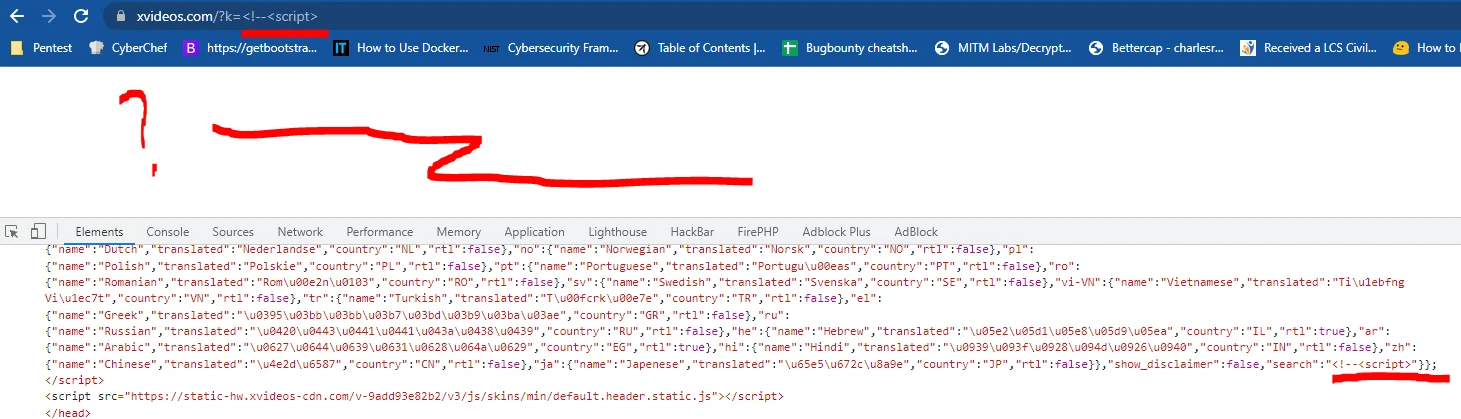
- Hit enter or search, watch the page break and not load any content (content is loaded in console, renders page blank)
To note this can possibly be expanded to XSS or another injection type.
xvideobroken2.png shows the HTML content cut off in the source of the page.
Supporting Material/References:
F1466873: xvideobroken.PN F1466876: xvideobroken2.PNG
Impact
Breaks page rendering due to broken JS (Script and HTML close tags) Seems to render the website inoperable. Also seems to hang and causes memory leak due to trying to constantly load content it can't.
Attachments

What the report shows
The target is the search feature of www.xvideos.com. The researcher found that submitting a particular string as a search term stops the page from rendering: the content still arrives in the console, but the visible page goes blank.
The reproduction steps are short and direct:
- Open https://www.xvideos.com
- Click to search and enter the payload
<!--<script>(without quotes) - Press enter or click search, and watch the page break: no content loads, although the content is loaded in the console and the page renders blank.
The payload, exactly as given:
<!--<script>
The researcher notes that the issue may possibly be expanded to XSS or another injection type, but the report does not demonstrate that. The second screenshot shows the HTML content cut off in the page source.
The report was filed against www.xvideos.com under the weakness "Unchecked Error Condition", rated low severity with a CVSS score of 3.3, and paid a bounty of 150.00 USD. It was disclosed on 2021-10-23. The title marks it as informative.
Root cause
The report says the bug affects core HTML and JS elements on the site via Search, and frames it as broken script and HTML close tags. The payload opens an HTML comment (<!--) and then opens a script tag (<script>). The report does not describe how the search term reaches the page or why the markup breaks. The content is loaded in the console, but the page renders blank.
The report frames this as broken script and HTML close tags. It does not identify the exact sink, the parameter name, or the server-side code involved.
Impact
The effect shown is that the page breaks and the site seems to render inoperable for the person who submits the payload. The researcher also reports that the page seems to hang and to cause a memory leak, because it keeps trying to load content it cannot render.
The report explicitly hedges that this could possibly be expanded to XSS or another injection type, but no such exploitation is shown.
How this kind of bug works
Reflected input bugs of this shape arise when user-controlled data is written into a response without context-appropriate encoding. HTML has several parsing contexts, and each has its own escape rules: text between tags, attribute values, script blocks, comments, and style blocks all treat the same characters differently. A string that is harmless in one context can terminate a construct in another.
The <!-- sequence is a good example. In HTML it starts a comment that runs until -->, so anything after it, including closing tags and script blocks, is consumed as comment text. An unclosed <script> tag is similar: the parser switches into script data state and treats the remainder of the document as script source until it finds a matching close tag. Either effect can leave the page's own JavaScript unparsed or its DOM incomplete, and the visible result is a blank or partially rendered page.
Defences are the standard ones for injection: HTML-encode reflected values for the context they land in, avoid placing user input inside script or comment contexts at all, and apply a restrictive Content Security Policy so that injected script cannot execute even if it reaches the page. Output encoding on the server, rather than client-side filtering, is what actually prevents the parser from being confused.
How to test for it
Look for features that reflect a value back into the response: search boxes, error messages, filters, redirect notices, and anything that echoes a query parameter into the page. The goal is to find a reflection and then determine which parsing context it lands in.
- Submit a unique marker string and locate it in the response body, both in the raw HTML and in the rendered DOM.
- Note the surrounding context: is the marker between tags, inside an attribute, inside a script block, or inside a comment?
- Send characters that are meaningful in that context. For HTML text, angle brackets and ampersands. For attributes, quote characters. For script blocks, quotes, backslashes and comment sequences. For comment contexts, the comment delimiters.
- Observe whether the page still renders and whether the browser console reports parse or script errors. A positive result is a reflection that changes the document structure, breaks rendering, or executes code.
- Confirm the effect is caused by your input and not by an unrelated error, by repeating with a benign value and comparing.
Common false positives: the marker appears only in a JSON response that the client encodes safely before insertion; the page breaks because of a pre-existing bug unrelated to your input; the reflection is HTML-encoded and the apparent breakage comes from browser extensions or cached state; or the input is reflected only after client-side sanitisation that a real attacker could not bypass.
How it is fixed
Apply context-aware output encoding to every reflected value. HTML-encode text and attribute contexts, JavaScript-encode values placed in script blocks, and never interpolate user input into comments or inline event handlers. Where possible, pass data to the client through structured channels such as JSON and insert it with DOM APIs that treat it as text. Add a Content Security Policy that disallows inline script, and validate input length and character set at the boundary as defence in depth.
Hunting notes
Reflections that break parsing tend to hide in search results, "no results for X" messages, pagination and sort parameters, language and locale switches, and error pages that echo the request. Single-page applications are worth attention because the reflection may happen client-side, where server-side encoding does not help.
Recon signals include parameters whose values appear verbatim in the HTML source, pages that include user input inside inline scripts or template blocks, and responses where the reflected value sits near comment markers or script tags. Comparing the raw response with the rendered DOM quickly shows whether encoding is applied.
What happened, in plain words
This report is about the search box on www.xvideos.com. A search box is the field where you type words and the site shows you matching results. Normally you type something ordinary, press enter, and a results page appears.
The researcher found that typing one particular string into that search box makes the page go blank. The page's content is still being fetched, and you can see it in the browser's console (a hidden panel where browsers print technical messages), but nothing visible is drawn on screen. The site effectively becomes unusable for the person who searched.
The string that causes this, exactly as given in the report, is:
<!--<script>
To understand why that matters, you need two small pieces of background. A web page is written in HTML, a language made of tags such as <script> that tell the browser what each part is. Some tags open a region that runs until a closing marker: <!-- starts a comment (text the browser ignores) and --> ends it, while <script> starts a block of JavaScript code and </script> ends it. If a page puts your search term into its own HTML without cleaning it first, your text stops being text and starts being treated as instructions to the browser.
The report does not explain the exact mechanism, only that the payload breaks script and HTML close tags. The content is loaded in the console, but the page renders blank.
The reproduction steps are short:
- Open https://www.xvideos.com
- Click to search and enter the payload
<!--<script>(without quotes) - Press enter or click search, and watch the page break: no content loads, although the content is loaded in the console and the page renders blank.
Step 2 is where the input enters the site. Step 3 is where you see the result: the page renders blank, and the report says it seems to hang and to cause a memory leak (memory being used up by work that never finishes).
The two screenshots show the effect. The first is the broken page itself.
The second shows the page's HTML source with the content cut off, which is the visible sign that the markup was interrupted.
The researcher adds that the issue might possibly be expanded to XSS or another injection type. XSS, cross-site scripting, is when an attacker's text is treated as code and runs in someone else's browser, which is far more serious than a blank page. The report does not demonstrate that, and the platform treated the finding as low severity, with a CVSS score of 3.3 (CVSS is a standard 0 to 10 scale for rating how serious a flaw is), a weakness label of "Unchecked Error Condition", a bounty of 150.00 USD, and a title marked informative. It was disclosed on 2021-10-23.
In general, how this kind of bug works
This is a reflected input bug. "Reflected" means your input is sent to the server and then written straight back into the page you receive. Think of a receptionist who repeats your name back to you: harmless if they say it, a problem if they read it out as an instruction to the building's fire system.
HTML has several contexts, and each treats the same characters differently: ordinary text between tags, attribute values inside a tag, script blocks, comments, and style blocks. A string that is harmless in one context can end a construct in another. <!-- is harmless as visible text but starts a comment when the browser is parsing markup. An unclosed <script> switches the parser into script mode and treats the rest of the document as code until it finds </script>.
The fix is context-aware output encoding: converting characters such as <, > and & into safe representations before they are placed in the page, using the rules for the exact spot they land in. Never place user input inside comments or inline scripts at all. A Content Security Policy, a header that tells the browser which scripts are allowed to run, adds a second layer so that injected script cannot execute even if it reaches the page. Encoding on the server is what actually prevents the browser's parser from being confused.
If you want to test for this yourself, the approach is:
- Submit a unique marker string and find it in the response, both in the raw HTML and in what the browser displays.
- Note the context: between tags, inside an attribute, inside a script block, or inside a comment.
- Send characters that matter in that context: angle brackets and ampersands for text, quotes for attributes, quotes and comment sequences for scripts and comments.
- Watch whether the page still renders and whether the console reports errors. A real finding changes the document structure, breaks rendering, or runs code.
- Repeat with a harmless value to confirm your input caused it, not an unrelated fault.
Watch for false positives: a value that only appears in a JSON response the client encodes safely, a page that was already broken, encoding that is applied but masked by a browser extension or cache, or sanitisation on the client that a real attacker could not get past.
Glossary
- HTML: the language of tags that describes the structure of a web page.
- JavaScript: the programming language browsers run to make pages interactive.
- Tag: a markup instruction such as
<script>that tells the browser what a region of the page is. - Comment (HTML): text between
<!--and-->that the browser ignores. - Script block: a region between
<script>and</script>containing code the browser executes. - Payload: the specific string an attacker or tester submits to trigger a behaviour.
- Console: a browser panel that shows technical messages and errors.
- DOM: the browser's in-memory model of the page, built from the HTML.
- Reflected input: user input that is sent to the server and written back into the response.
- Output encoding: converting characters so they are treated as data, not markup, in a given context.
- Parsing context: the part of a document (text, attribute, script, comment) that decides how characters are interpreted.
- XSS (cross-site scripting): a flaw where an attacker's input is treated as code and runs in another user's browser.
- Injection: inserting data that the receiving system mistakes for instructions.
- Denial of service: making a service unusable for its users.
- Memory leak: memory being consumed by work that never completes or is never released.
- CVSS: a standard 0 to 10 scale for rating the severity of a security flaw.
- Content Security Policy: a response header that restricts which scripts a browser may run.
- False positive: an apparent finding that turns out not to be caused by the input you tested.




