How I got started
The application accepted a plain username in place of an encrypted user identifier in a GET request, allowing the author to view notes belonging to other Yahoo accounts. An attacker could change the username to any other user's and read their notes.
 Published on medium.com
I’m going to keep a log of most of my bugs I find on this journey of Bug Hunting. No matter how trivial it may be, as it was in my case, it may come of use to someone, somewhere, sometime!
The full write-up lives on its author's site
It belongs to its author, so we link to it rather than copy it. The other two tabs are our own rewrites, checked against it.
Context
This is the story of a researcher's first two submissions on HackerOne, made in 2016 against Twitter and Yahoo. The first was a reflected XSS on Twitter.com, found through the Twitter Cards feature, which allowed rich media to be attached to tweets. The input on a parameter called scribe_context was echoed unmodified in the application's response. That report turned out to be a duplicate.
The second, and the technical subject here, was an IDOR in Yahoo Notepad, reachable at https://notepad.yahoo.com. Notepad is the feature where a signed-in Yahoo user keeps personal notes. The web front end loads those notes through a JSON API on calendar.yahoo.com, and the API addresses each user's collection of notes by a user identifier in the URL path.
Setup
The researcher used Burp Suite (Community edition) as an intercepting proxy and watched the Proxy HTTP History tab while using the application normally. Two Yahoo accounts were involved: the primary account used to browse Notepad, and a secondary test account, referred to in the report as test_account_2222, used to confirm that another user's data could be read. No special role or privilege was needed on either account; both were ordinary users. The attack required a valid session and the victim's Yahoo username.
Finding it
Late in the working day, with about an hour left before leaving, the researcher opened https://notepad.yahoo.com to pull up some notes and kept an eye on Burp's Proxy HTTP History. Opening a specific note produced a GET request to calendar.yahoo.com.

The request looked like this:
GET /ws/v3/users/**[redacted]**/items?format=json&count=200&type=Journal&wssid=55mJmcMk3tg&rand=1478541308397&prog=aeon HTTP/1.1
Host: calendar.yahoo.com
The segment after /ws/v3/users/ was an encrypted string, which the researcher knew was his own username in encrypted form. That is the interesting part: the client sends an opaque identifier, so the obvious assumption is that the server decrypts it and uses the result to decide whose notes to return. The question worth asking is what happens if the identifier is not the encrypted form at all.
Exploitation
Step 1: replace the encrypted identifier with a plain username
The researcher changed the encrypted string to his own plain Yahoo username and sent the request:
GET /ws/v3/users/**yahoo-username**/items?format=json&kw=test&count=200&type=Journal&wssid=55mJmcMk3tg&rand=1478541308397&prog=aeon HTTP/1.1
Host: calendar.yahoo.com
The response returned the same notes as before, this time as a JSON response. So the endpoint accepted a plain username in the position where it normally received an encrypted one, and resolved it to the same collection.
Step 2: substitute a second account
Next, the researcher passed the username of his secondary test account, test_account_2222, in the same position. The response contained that account's notes.
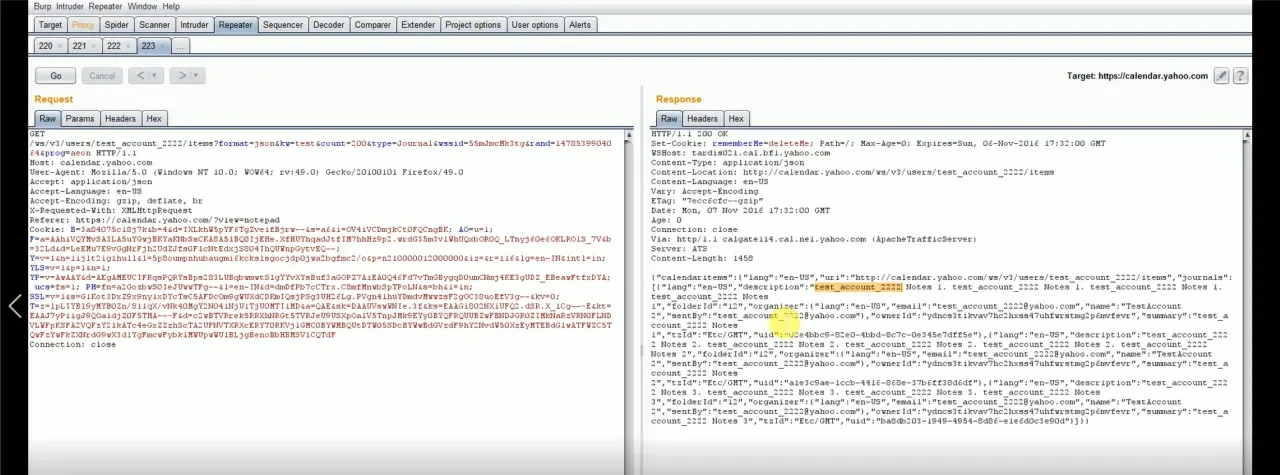
This confirmed that the value in the path, not the session, determined whose notes were returned. The application was passing the username as an encrypted string, but a direct username in the request passed through without any checks. In the researcher's shorthand, the two forms were interchangeable:
/ws/v3/users/**[redacted]**/items?

/ws/v3/users/**user-name**/items?
Step 3: confirm across more accounts
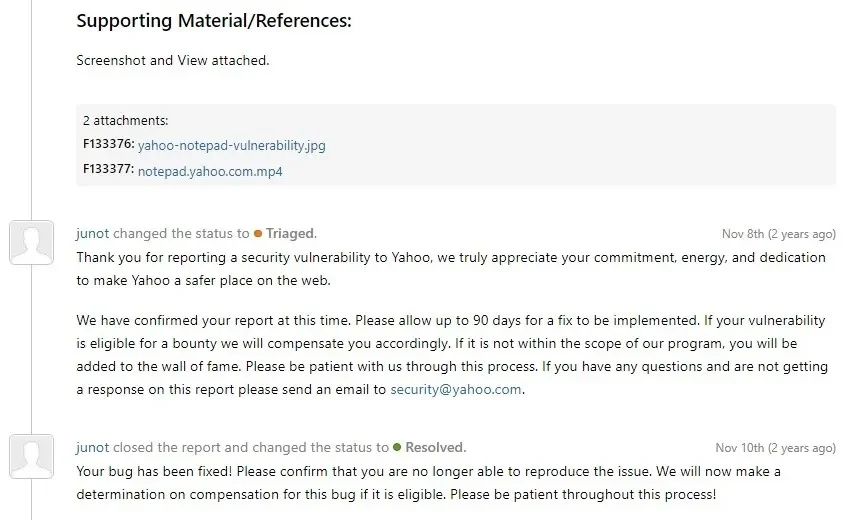
The researcher tried a few more test accounts to confirm the same behaviour, then submitted the report. It was triaged in a day and fixed the next.
Step 4: check whether the fix held everywhere
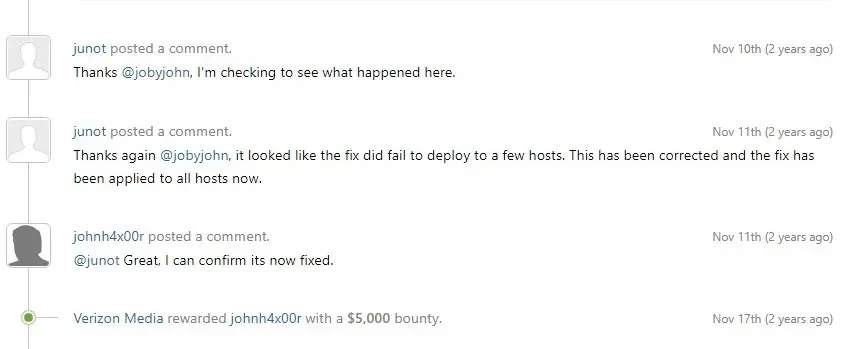
After the fix, the researcher kept replaying the same request and found that on some hosts the fix had not been deployed: with those hosts the request still worked. He reported this, the team fixed the bug on all hosts, and the bounty was issued.
Root cause
The endpoint takes the user identifier from the URL path and uses it to select the notes to return. The researcher's view was that the developers encrypted the username for appearance only: "encrypted for the eyes, but not for the application". The server also accepted a plain username in the same position. Changing the username in the path returned another user's notes, which is what makes this an IDOR. The encryption provided no protection, because the server also accepted a plain username in the same position.
Impact
An authenticated attacker could change the username in the GET request to any other Yahoo user's username and view that user's notes. The report does not describe any limit on which accounts could be targeted beyond knowing the username, and it does not state whether notes of users who had never used the feature, or deleted notes, were reachable. The researcher describes it as a major bug and notes that IDOR bugs are high paying. The bounty was $5,000.
Fix
The report says the bug was fixed on 2016-11-11, and that the fix initially failed to deploy on some hosts, after which the team fixed it on all hosts. It does not describe the code change.
Variants to test
- Plain value where an opaque identifier is expected. Take any endpoint whose path or query carries an encrypted, hashed or otherwise opaque user identifier, and substitute the plain username, email or numeric ID. A positive result is a response containing the same data as the original request.
- Second account substitution. With two accounts you control, put account B's identifier into a request made with account A's session. A positive result is account B's data in the response.
- Identifier in the path versus identifier in the session. Look for endpoints where the session already identifies the user but the path repeats it. If changing the path value changes the data returned, the session is not being used for authorisation.
- Per-host consistency after a fix. Once a fix is announced, replay the original request against every host that serves the same API. A positive result is any host where the old behaviour persists, which is what happened here.
- Collection endpoints with filters. The request here carried
format=json,count=200,type=Journaland similar parameters. Try varying the identifier while keeping the filters, and try the identifier on sibling collection paths, to see whether the same missing check appears elsewhere.
What happened, in plain words
A researcher joined HackerOne, a website where companies pay people for finding security problems in their products, in 2016. His very first report was a bug on Twitter.com. It was real, but someone else had already reported it, so it was marked as a duplicate (a "dupe") and he got nothing for it. After a two-day break he found a second bug, this time in Yahoo Notepad, a feature where a signed-in Yahoo user keeps personal notes. By changing one piece of text in a web request, he could read the notes of any other Yahoo user whose username he knew. That report was accepted, fixed, and paid a $5,000 bounty.
This article walks through both stories in the order they happened, explains every technical idea from scratch, and shows the exact requests that were sent.
How he got started
The researcher did not set out to become a security tester. A client's website was hacked: an SQL injection attack (a way of sneaking database commands into a website's input) turned the whole database into a store of malicious files in a single day. He restored the data from a backup disk taken a few days earlier, and that experience made him think about building applications on top of security rather than bolting security on afterwards. He started reading security write-ups from the community, and in 2016 he joined HackerOne.
The first bug: a duplicate on Twitter
One afternoon after lunch he opened Burp Suite (the Community edition) and looked at its Proxy HTTP History tab. Burp Suite is a tool that sits between your browser and the websites you visit, like a notebook that records every message the two exchange. The Proxy HTTP History tab is simply the list of those recorded messages.
He had Twitter open and was testing what little he had learned. Twitter had just introduced Twitter Cards, a feature that lets a tweet carry rich media such as images or video. On a parameter called scribe_context, the input he supplied was echoed back unmodified in the application's response. A parameter is a named value attached to a request, like a field on a form. "Echoed back unmodified" means the site repeated his text exactly as he typed it, without cleaning it. That is the classic setup for a reflected cross-site scripting (XSS) bug: if a site repeats whatever you type, an attacker may be able to type something that a browser will treat as code rather than as text.
He prepared a proof-of-concept (POC) link, a URL that demonstrates the bug, opened HackerOne and submitted his first report. He was thrilled and could not sleep that night.
The next day, this happened:
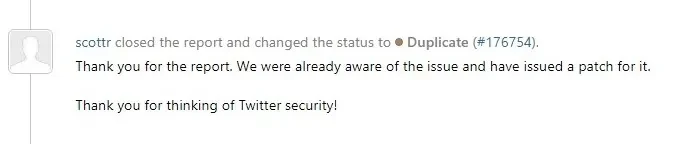
The image is captioned "The Dreaded Dupe! Depression Level 1". His report had been closed as a duplicate: someone else had reported the same issue first.
His inner voice told him the report should be different, so he took courage and asked. Then he was invited to the original report, and this happened:
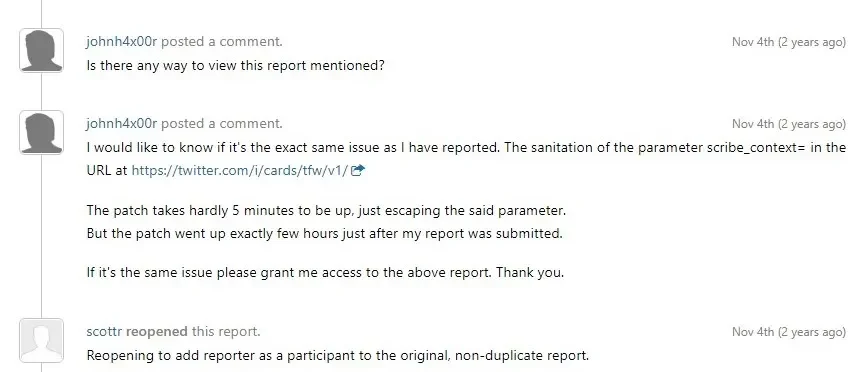

The second image is captioned "This is the initial phase when more depression sets in :-) Depression Level 2". Being added to the original report confirmed the dupe. He describes feeling sick and betrayed, and says his first taste of a dupe was sour.
He took a two-day break, then decided: "Somehow, I have to find a damn bug today, to make up for the damn dupe."
The second bug: reading other people's notes
What Notepad and an API are
Yahoo Notepad is a simple feature: you sign in with your Yahoo account and keep personal notes. Behind the web page, the notes are not baked into the page. Instead the page asks a separate server for them, and that server answers with data rather than with a web page. A server that answers requests with data in this way is called an API (application programming interface). The data format here was JSON, a plain-text way of writing structured data, something like a shopping list written with labels and brackets.
The API lived on calendar.yahoo.com, a different hostname from notepad.yahoo.com. A hostname is the part of a web address that names the machine, like the street address of a building. The API identified each user's collection of notes by a user identifier placed in the URL path. The path is the part of a URL after the hostname, the way a corridor and room number lead to a specific office inside a building.
Setup
He used Burp Suite (Community edition) as an intercepting proxy: a proxy is a middleman that every request passes through, and "intercepting" means it can record and later modify those requests. He watched the Proxy HTTP History tab while using Notepad normally.
Two Yahoo accounts were involved: his primary account, used to browse Notepad, and a secondary test account, called test_account_2222 in the report, used to check whether another user's data could be read. Both were ordinary accounts with no special role. The attack required the attacker to be signed in and to know the victim's Yahoo username.
Finding it
Late in the working day, with about an hour before leaving, he opened https://notepad.yahoo.com to pull up some notes and kept an eye on Burp's history. Opening a specific note produced a GET request to calendar.yahoo.com.
A GET request is the simplest kind of web request: it asks a server to send something back, as opposed to sending data to it. The request looked like this:
GET /ws/v3/users/**[redacted]**/items?format=json&count=200&type=Journal&wssid=55mJmcMk3tg&rand=1478541308397&prog=aeon HTTP/1.1
Host: calendar.yahoo.com
Line by line:
GETis the method, the verb of the request: please give me something./ws/v3/users/.../itemsis the path. It reads like a filing system: underws, then versionv3, thenusers, then one particular user, then that user'sitems(the notes).[redacted]is the user identifier. It is an encrypted string, meaning it has been scrambled so it cannot be read directly.- Everything after the
?is the query string, a set of named values sent along with the request.format=jsonasks for JSON data.count=200asks for up to 200 items.type=Journalselects the kind of item.wssid=55mJmcMk3tgis a session identifier, a short code that tells the server which signed-in session this request belongs to, like a wristband at an event.rand=1478541308397looks like a random or timestamp value used to avoid caching.prog=aeonnames the program making the request. HTTP/1.1is the version of the web protocol being used.Host: calendar.yahoo.comtells the server which site the request is for, since one machine can serve many sites.
The segment after /ws/v3/users/ was an encrypted string, which he knew was his own username in encrypted form. That is the interesting part: the browser sends an opaque identifier, meaning a value you cannot read, so the obvious assumption is that the server decrypts it and uses the result to decide whose notes to return. The question worth asking is what happens if the identifier is not the encrypted form at all.
Step 1: replace the encrypted identifier with a plain username
He changed the encrypted string to his own plain Yahoo username and sent the request:
GET /ws/v3/users/**yahoo-username**/items?format=json&kw=test&count=200&type=Journal&wssid=55mJmcMk3tg&rand=1478541308397&prog=aeon HTTP/1.1
Host: calendar.yahoo.com
Line by line:
- The method, path shape, host and most query values are the same as before.
- The encrypted identifier has been replaced with
yahoo-username, a readable name. - A new query value,
kw=test, appears.kwis short for keyword, a search term. - The session identifier
wssidis unchanged, so the server still knows which signed-in session is asking.
The response returned the same notes as before, this time as a JSON response. So the endpoint accepted a plain username in the position where it normally received an encrypted one, and resolved it to the same collection. In other words, the scrambling was decoration: the server was happy to take the readable name too.
Step 2: substitute a second account
Next, he passed the username of his secondary test account, test_account_2222, in the same position. The response contained that account's notes.
This confirmed that the value in the path, not the session, determined whose notes were returned. The application was passing the username as an encrypted string, but a direct username in the request passed through without any checks. In his shorthand, the two forms were interchangeable:
/ws/v3/users/**[redacted]**/items?

/ws/v3/users/**user-name**/items?
Line by line:
- The first line is the normal path: the user slot holds the encrypted string.
- The second line is the same path with a plain name in the user slot.
- The
?at the end marks where the query string would begin; it is shown alone to focus on the path.
This is the bug class called IDOR, short for Insecure Direct Object Reference. The idea is simple: a website hands you a reference to something that belongs to you (here, your notes), and you try swapping that reference for someone else's. If the server returns the other person's data without checking that the reference belongs to you, the reference is "insecure". A useful comparison is a hotel key card: if the card opens your room and also every other room because the door only checks that the card is valid, not which room it is for, that is an IDOR.
He knew he had found a major bug, because he could change the username in the GET request to any other Yahoo user's username and view the notes. He tried a few more test accounts to confirm the same behaviour. He had found it in about 15 minutes of checking the application.
Step 3: submit and get it fixed
He opened HackerOne and submitted his second bug. This time it was not a dupe. It was triaged in a day, meaning the security team reviewed it and confirmed it was valid, and fixed the next day.
Step 4: check whether the fix held everywhere
After the fix, he kept replaying the same request and found that on some hosts the fix had not been deployed: with those hosts the request still worked. A host is one machine serving the site; large services run on many machines, and a fix has to be rolled out to each of them. He reported this, the team fixed the bug on all hosts, and the bounty was issued.
Why it worked
The endpoint takes the user identifier from the URL path and uses it to select the notes to return. The researcher's view was that the developers encrypted the username for appearance only: "encrypted for the eyes, but not for the application". The server also accepted a plain username in the same position. Changing the username in the path returned another user's notes, which is what makes this an IDOR. Authorisation means deciding whether the person asking is allowed to do what they are asking to do; authentication, by contrast, is only proving who they are. The encryption provided no protection, because the server also accepted a plain username in the same position.
What the impact was
A signed-in attacker could change the username in the GET request to any other Yahoo user's username and view that user's notes. The report does not describe any limit on which accounts could be targeted beyond knowing the username, and it does not state whether notes of users who had never used the feature, or deleted notes, were reachable. The researcher describes it as a major bug and notes that IDOR bugs are high paying. The bounty was $5,000.
How it was fixed
The report says the bug was fixed on 2016-11-11, and that the fix initially failed to deploy on some hosts, after which the team fixed it on all hosts. It does not describe the code change.
Things to try yourself
- Plain value where an opaque identifier is expected. Take any endpoint whose path or query carries an encrypted, hashed or otherwise opaque user identifier, and substitute the plain username, email or numeric ID. A positive result is a response containing the same data as the original request.
- Second account substitution. With two accounts you control, put account B's identifier into a request made with account A's session. A positive result is account B's data in the response.
- Identifier in the path versus identifier in the session. Look for endpoints where the session already identifies the user but the path repeats it. If changing the path value changes the data returned, the session is not being used for authorisation.
- Per-host consistency after a fix. Once a fix is announced, replay the original request against every host that serves the same API. A positive result is any host where the old behaviour persists, which is what happened here.
- Collection endpoints with filters. The request here carried
format=json,count=200,type=Journaland similar parameters. Try varying the identifier while keeping the filters, and try the identifier on sibling collection paths, to see whether the same missing check appears elsewhere.
Timeline
- 2016-11-07: report submitted to HackerOne.
- 2016-11-08: team acknowledged and triaged the report.
- 2016-11-11: bug fixed.
- 2016-11-17: $5,000 bounty awarded.
Glossary
- API: a server that answers requests with data rather than with a web page, so that a website or app can fetch and display it.
- Authentication: proving who you are, for example by signing in with a password.
- Authorisation: deciding whether the person asking is allowed to do what they are asking to do.
- Bounty: money a company pays a researcher for reporting a valid security bug.
- Burp Suite: a tool that sits between your browser and websites, recording and letting you modify the requests and responses.
- Bypass: getting past a check or protection that was meant to stop you.
- Cross-site scripting (XSS): a bug where a site repeats user input in a way that a browser may treat as code instead of text.
- Duplicate (dupe): a report for a bug that someone else already reported first.
- Encryption: scrambling data so it cannot be read directly, and can be unscrambled with the right key.
- Endpoint: one specific address on a server that accepts requests, such as a particular path on a particular host.
- GET request: the simplest kind of web request, asking a server to send something back.
- Host / hostname: the part of a web address that names the machine serving the site.
- HTTP: the protocol browsers and servers use to exchange requests and responses.
- IDOR (Insecure Direct Object Reference): a bug where a site lets you swap a reference to your own data for a reference to someone else's, and returns their data without checking that it belongs to you.
- JSON: a plain-text format for structured data, written with labels, brackets and commas.
- Opaque identifier: a value you cannot read or interpret directly, such as an encrypted or hashed string.
- Parameter: a named value attached to a request, like a field on a form.
- Path: the part of a URL after the hostname that points to a particular resource.
- Proof of concept (POC): a small demonstration, such as a link, that shows a bug is real.
- Proxy: a middleman that requests pass through, which can record and modify them.
- Query string: the part of a URL after the
?, made of named values sent with the request. - Reflected XSS: an XSS bug where the malicious input is echoed straight back in the response to the same request.
- Session: the state of being signed in, usually represented by a session identifier sent with each request.
- Session identifier: a short code that tells the server which signed-in session a request belongs to.
- SQL injection: a bug where an attacker sneaks database commands into a website's input.
- Triaged: reviewed by a security team and confirmed to be a valid bug.
- Twitter Cards: a Twitter feature that lets a tweet carry rich media such as images or video.
- Username: the readable name that identifies a user account.



