How i hacked all Zendesk sites 265,000 site by one line
A cache poisoning vulnerability in Zendesk products allowed an attacker to send a header that caused a redirect loop when cached by a CDN. This could affect users of the 265,000 sites using Zendesk.
Ahmed Salah Abdalhfaz -110) Follow
 Published on mazoka777.medium.com
I will talk about the bug I discovered in several recent sites (from 1 year) As you can see in my bugcrowd profile, several people asked me about these reports
The full write-up lives on its author's site
It belongs to its author, so we link to it rather than copy it. The other two tabs are our own rewrites, checked against it.
Context
Zendesk is a customer service platform used by a very large number of sites: the report puts the figure at more than 265,000 sites. The products are built on Ruby on Rails, and the bug described here affected all Zendesk products. The weakness is web cache poisoning, and the mechanism is a redirect loop caused by a header that Rails applications commonly trust.
The report links a public write-up on cache poisoning at scale (youst.in/posts/cache-poisoning-at-scale/) for the Rack code, and the researcher, Ahmed Salah Abdalhfaz (Elsfa7-110), reported the bug to Zendesk and a list of other companies.
Setup
No accounts, roles or special tooling are described. The precondition is the deployment pattern: Ruby on Rails applications are often deployed behind the Rack middleware, and the Rack code takes the value of the x-forwarded-scheme header and uses it as the scheme of the request. A CDN in front of the application, which caches responses, is the second precondition.
Finding it
The researcher knew that Rails applications frequently sit behind Rack middleware that reads x-forwarded-scheme and treats it as the request scheme. If a client can set that header and the response is cached by a CDN, the cached response can be made to carry the wrong scheme. That is the observation that made the header worth testing against Zendesk products.
Exploitation
Step 1: send the scheme header
The request is a single header:
x-forwarded-scheme: http
Sending x-forwarded-scheme: http results in a 301 redirect to the same location.
Step 2: let the CDN cache the redirect
If the response is cached by a CDN, the redirect is stored and served to later visitors. Those visitors are redirected to the same location, which again answers with the same cached redirect, producing a redirect loop. The report illustrates the redirect behaviour with a screenshot taken from the referenced write-up.
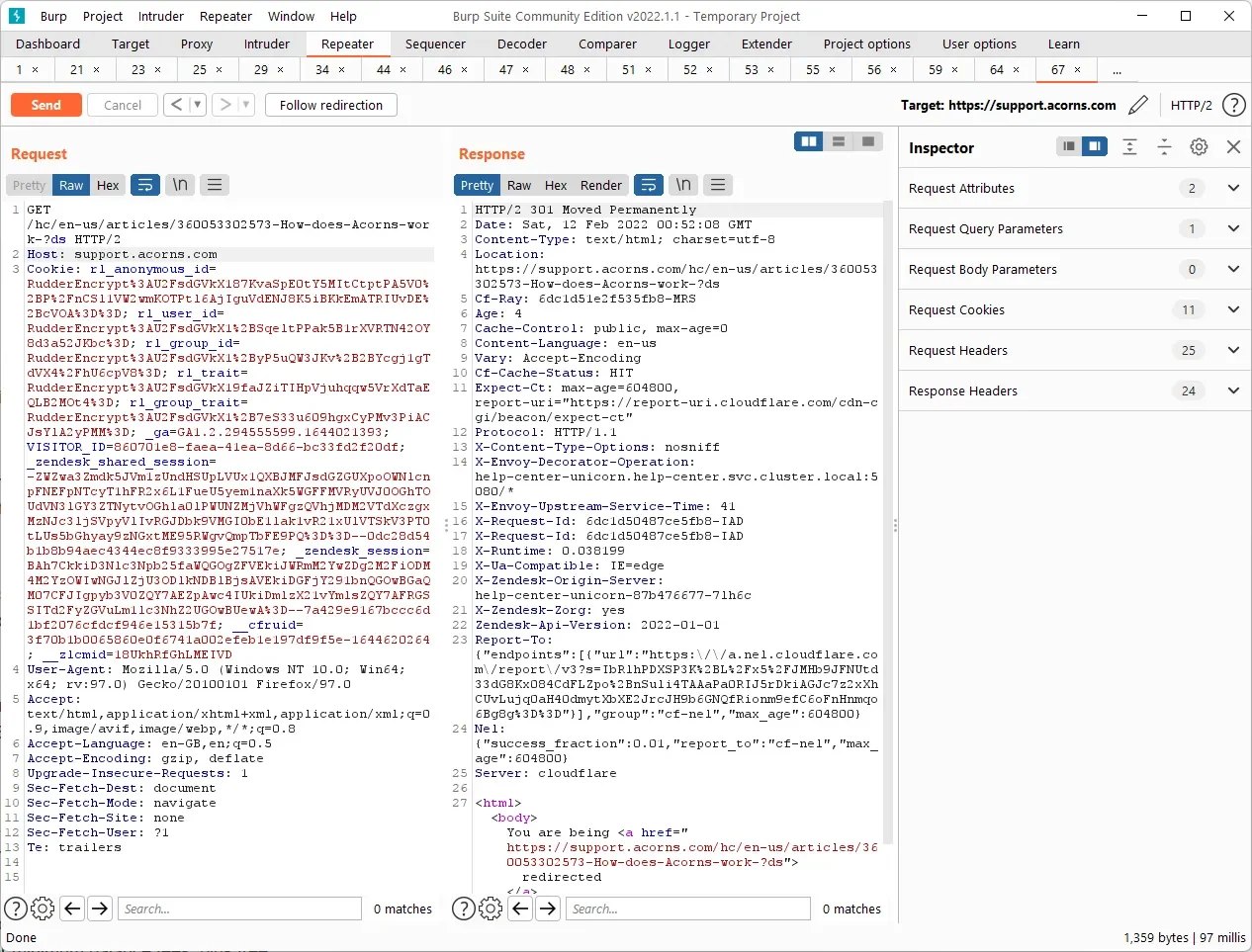
This is what happened with Zendesk products. The researcher sent reports to most of the affected companies first, including Etsy, Indeed, Moneytree KK, Quizlet, Skyscanner, Backblaze, SEEK, Acorns Grow, Inc. and a number of private programs. Zendesk was contacted as well, and closed the vulnerability completely.
Step 3: reach every cache
Poisoning one cache is not enough, because not all users worldwide connect to the same cache. When poisoning Cloudflare caches you have to look at the CF-RAY header: it indicates which cache gave you the response. The report gives this example value, which indicates the response was passed by the France server:
6d7d6150da02d781-MRS
The suffix MRS is Marseille, per the Cloudflare status page (cloudflarestatus.com). If you and your colleagues do not live in a similar area, you may be talking to different caches. A request made from the USA, for example, would not have hit the poisoned cache.
Cloudflare and other CDNs publish their IPs online, so iterating through them and poisoning a multitude of caches is a one line job.
Root cause
The mistake is trusting a client-supplied header. The Rack middleware takes the value of x-forwarded-scheme and uses it as the scheme of the request, so a client can tell the application that it arrived over HTTP. The application then answers with a 301 redirect to the same location. When a CDN caches that response, the redirect is replayed to every subsequent visitor of that cache, and the loop persists for every visitor served by that cache.
Caching, which is meant to reduce load, is what spreads the single poisoned response to other users.
Impact
The effect for users served by a poisoned cache is a redirect loop: they cannot reach the site. The scope depends on which caches are poisoned. Because caches are regional, users in a different area, talking to a different cache, are unaffected; the report notes that a request from the USA would not have been poisoned by a cache poisoned in France. An attacker who iterates over the CDN's published IPs can poison many caches, which widens the affected population. The report does not quantify how many users or caches were affected in the Zendesk case.
Fix
Zendesk closed the vulnerability completely. The report does not describe the change that was made.
Variants to test
- Send
x-forwarded-scheme: httpto any Rails application behind a CDN and check for a 301 to the same location. A positive result is a redirect whose target equals the requested URL. - Repeat the request and inspect the response headers for cache hits, then request the same URL without the header from a different network position. A positive result is the redirect being served without the header being sent.
- Read the
CF-RAYvalue on each response to identify which cache answered, then repeat the request against other published CDN IPs. A positive result is the same poisoned redirect from multiple cache locations. - Try the same idea with other scheme-related forwarding headers on other stacks, watching for the same self-redirect. A positive result is a cached 301 to the same location that persists for other clients.
What happened, in plain words
A security researcher found a cache poisoning bug that affected all Zendesk products, a service used by more than 265,000 sites. Zendesk is a customer service platform: companies use it to run their help desks, support tickets and contact forms. The report says Zendesk products are used by more than 265,000 sites, and the bug affected all of those products.
The trick was a single line added to a web request. A web request is what your browser sends to a website when you visit it: a short message asking for a page. That message is made of a first line (which page you want) and then a set of extra lines called headers, which carry details such as what kind of browser you use. One of those headers, x-forwarded-scheme, tells the application which scheme the request used. The researcher found that Zendesk's software believed whatever value a visitor put in that header.
When the software was told the request came over plain HTTP, it answered with a redirect: a response that says "this page lives somewhere else, go there instead". The redirect pointed back to the very same address, so if the response was cached by a CDN, following it led to the same redirect again, and again. On its own that would only annoy the person sending the request. The real damage came from a second ingredient: a CDN. A CDN (content delivery network) is a network of servers spread around the world that keep copies of web pages so they can be served faster to people nearby. If the CDN stored the redirect, every later visitor to that page received the stored redirect, and their browsers got stuck in a loop, never reaching the site.
This is called web cache poisoning. A cache is a store of saved responses; poisoning it means putting a harmful response into that store so that other people receive it. The researcher reported the issue to many companies, and finally to Zendesk itself, which closed the vulnerability completely.
Who found it and where it was published
The researcher is Ahmed Salah Abdalhfaz, known online as Elsfa7-110. He says he found this bug in several sites over the past year, and that several people had asked him about those reports after seeing his Bugcrowd profile. Bugcrowd is a bug bounty platform: a website where companies list their systems and pay researchers for reporting security problems in them.

The image is a screenshot of that profile, shown at the point where he mentions it.
He links a public write-up about cache poisoning at scale, at youst.in/posts/cache-poisoning-at-scale/, and lists a HackerOne report (hackerone.com/reports/1181946) as a reference. HackerOne is another bug bounty platform.
The setup: why this bug was possible
No accounts, special roles or tools are needed to understand this. Two things had to be true at the same time.
First, the software had to trust a header it should not trust. Zendesk products are built with a programming framework called Ruby on Rails. Rails is a toolkit that developers use to build web applications in the Ruby programming language. Rails applications are often deployed alongside a piece of software called Rack middleware. Middleware is code that sits between the incoming request and the application, doing small jobs on the way through, such as cleaning up or interpreting the request. The Rack code in question takes the value of the x-forwarded-scheme header and uses it as the scheme of the request. The scheme is the first part of a web address: http or https. So if a visitor sends x-forwarded-scheme: http, the application concludes the request arrived over plain HTTP, even if it actually arrived over HTTPS.
Second, a CDN had to sit in front of the application and cache its responses. Without caching, the wrong answer would only reach the person who asked for it. With caching, one wrong answer is copied and handed to everyone else.
A useful comparison: imagine a receptionist who writes down whatever a visitor says about themselves and files it in the company directory. One visitor says "I am the manager", the note is filed, and from then on every employee treats that visitor's instructions as coming from the manager. The receptionist trusted a claim that anyone could make. Here the application trusted a header that anyone can set.
Finding it
The researcher knew that Rails applications frequently sit behind Rack middleware that reads x-forwarded-scheme and treats it as the request scheme. He also knew that many of these applications are served through a CDN that caches responses. Put together, that means a visitor might be able to choose the scheme the application believes it received, and have the resulting response stored for everyone else. That observation is what made the header worth testing against Zendesk products.
Exploitation
Step 1: send the scheme header
The whole request is a single header:
x-forwarded-scheme: http
Line by line: x-forwarded-scheme is the name of the header. The x- prefix is a convention for headers that are not part of the official web standard, often added by proxies and load balancers. http is the value being sent, meaning the plain, unencrypted version of the web protocol. The colon separates the name from the value.
Why send it? Because the application uses this value as the scheme of the request. By sending http, the researcher tells the application that the request arrived unencrypted, whatever the truth is.
Sending x-forwarded-scheme: http results in a 301 redirect to the same location. A 301 is an HTTP status code, a number in the response that tells the browser what happened; 301 specifically means "this resource has moved permanently, go to this other address". Here the "other address" is the same address the visitor asked for.
Step 2: let the CDN cache the redirect
If the response is cached by a CDN, the redirect is stored and served to later visitors. Those visitors are redirected to the same location, which again answers with the same cached redirect, producing a redirect loop. A redirect loop is what it sounds like: the browser keeps being sent from a page to the same page, over and over, and never loads anything. The report illustrates the redirect behaviour with a screenshot taken from the referenced write-up.
The text around that image explains the mechanism: sending the header results in a 301 redirect to the same location, and if the response was cached by a CDN, it causes a redirect loop.
This is what happened with Zendesk products. The researcher sent reports to most of the affected companies first, including Etsy, Indeed, Moneytree KK, Quizlet, Skyscanner, Backblaze, SEEK, Acorns Grow, Inc. and a number of private programs. A private program is a bug bounty program whose details are not public. Zendesk was contacted as well, and closed the vulnerability completely.
Step 3: reach every cache
Poisoning one cache is not enough, because not all users worldwide connect to the same cache. CDNs keep many separate caches in different places, and your request goes to whichever one is nearest or best suited to you. When poisoning Cloudflare caches you have to look at the CF-RAY header: it indicates which cache gave you the response. Cloudflare is one of the large CDN providers. The report gives this example value, which indicates the response was passed by the France server:
6d7d6150da02d781-MRS
Line by line: the long string before the hyphen is an identifier for that particular request as Cloudflare saw it. The part after the hyphen, MRS, is a short code for the data centre that handled it. The report says MRS is Marseille, per the Cloudflare status page at cloudflarestatus.com. The status page lists the codes for each Cloudflare location, so you can read the suffix and know which city answered you.
Why does this matter? If you and your colleagues do not live in a similar area, you may be talking to different caches. A request made from the USA, for example, would not have hit the poisoned cache. So a researcher who poisons the French cache and then tests from America sees a working site and might wrongly conclude the attack failed. Checking CF-RAY tells you which cache you actually reached.
Cloudflare and other CDNs publish their IPs online, so iterating through them and poisoning a multitude of caches is a one line job. An IP address is the numeric address of a machine on the internet, the equivalent of a street address for a server. Because the list of CDN addresses is public, a script can send the same poisoned request to each address in turn, filling many regional caches with the bad redirect.
Root cause
The mistake is trusting a client-supplied header. The Rack middleware takes the value of x-forwarded-scheme and uses it as the scheme of the request, so a client can tell the application that it arrived over HTTP. The application then answers with a 301 redirect to the same location. When a CDN caches that response, the redirect is replayed to every subsequent visitor of that cache, and the loop persists for every visitor served by that cache.
Caching, which is meant to reduce load, is what spreads the single poisoned response to other users. In other words, two features that are each good on their own combine badly: the redirect to HTTPS and the shared cache.
Impact
The effect for users served by a poisoned cache is a redirect loop: they cannot reach the site. The scope depends on which caches are poisoned. Because caches are regional, users in a different area, talking to a different cache, are unaffected; the report notes that a request from the USA would not have been poisoned by a cache poisoned in France. An attacker who iterates over the CDN's published IPs can poison many caches, which widens the affected population. The report does not quantify how many users or caches were affected in the Zendesk case.
Fix
Zendesk closed the vulnerability completely. The report does not describe the change that was made. In plain terms: do not let a visitor decide facts about their own connection that the application relies on, and do not store answers that were built from those facts.
Variants to test
These are the same ideas applied more widely, for anyone learning how to look for this class of bug.
- Send
x-forwarded-scheme: httpto any Rails application behind a CDN and check for a 301 to the same location. A positive result is a redirect whose target equals the requested URL. - Repeat the request and inspect the response headers for cache hits, then request the same URL without the header from a different network position. A positive result is the redirect being served without the header being sent.
- Read the
CF-RAYvalue on each response to identify which cache answered, then repeat the request against other published CDN IPs. A positive result is the same poisoned redirect from multiple cache locations. - Try the same idea with other scheme-related forwarding headers on other stacks, watching for the same self-redirect. A positive result is a cached 301 to the same location that persists for other clients.
Glossary
- Header: an extra line in a web request or response carrying details, such as the browser type or the connection scheme.
- HTTP: the plain, unencrypted protocol browsers and servers use to exchange web pages.
- HTTPS: the encrypted version of HTTP, so that others cannot read or alter the traffic.
- Scheme: the first part of a web address,
httporhttps, saying which protocol to use. - 301 redirect: a response telling the browser the page has moved permanently to another address.
- Redirect loop: a situation where each redirect points to a page that redirects again, so the browser never loads anything.
- Ruby on Rails: a framework for building web applications in the Ruby programming language.
- Rack middleware: software that sits between an incoming request and a Rails application and processes the request on the way through.
x-forwarded-scheme: a non-standard header used by proxies to tell an application which scheme the original request used.- CDN (content delivery network): a worldwide network of servers that keep copies of responses so pages load faster for nearby users.
- Cache: a store of saved responses that are reused instead of being generated again.
- Cache poisoning: putting a harmful response into a cache so that other visitors receive it.
- Cloudflare: a large CDN provider whose caches are spread across many locations.
CF-RAY: a Cloudflare response header identifying the request and the data centre that handled it.- IP address: the numeric address of a machine on the internet.
- Denial of service: making a service unavailable to the people who need it.
- Bug bounty program: a scheme where companies pay researchers for reporting security problems.
- Private program: a bug bounty program whose details are not public.
- Bugcrowd / HackerOne: platforms that host bug bounty programs.
- Expire / purge (a cache entry): the saved copy reaching the end of its lifetime, or being deliberately deleted.


