Friend Request Flow Exposes User Data
The friend request API returned the target user's phone number in its response even though the request had not been accepted. An attacker who knew a username could therefore obtain that user's phone number, and could also read a user's friend list from a public friends endpoint.
 Originally disclosed on HackerOne
- Triaged in 19 hours
- Fixed in 3 months
- Paid in 16 days
- Disclosed after 7 months
Summary by the program
When submitting a friend request to a user, their phone number appeared in the API response regardless of whether the friend request was accepted or not. An attacker could have leveraged that to obtain the phone number of a user if he knew his username.
The report
Summary:
When submitting a friend request to a user, Zenly will allow access to their phone number regardless of whether the friend request is accepted or not. To obtain this information, a malicious actor only needs to know their username.
Steps To Reproduce:
To reproduce this issue, an environment that enables intercepting and decoding network requests is required. Once this environment is set up, we are able to gain visibility over network activity.
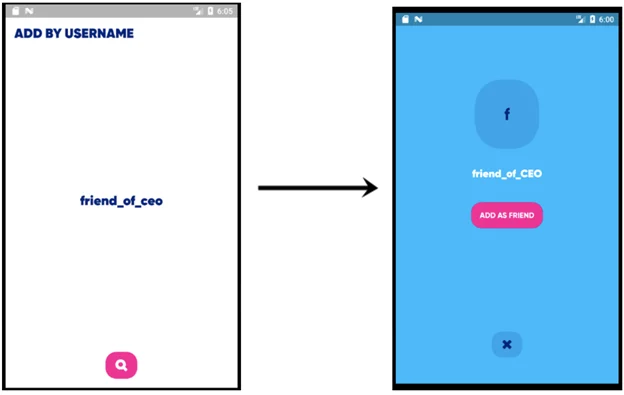
The vulnerability makes use of the “Add by Username” flow, which starts by searching a known username.
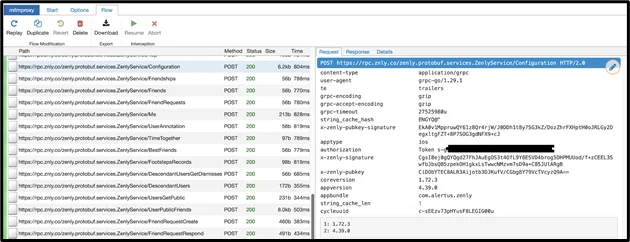
The interceptor that was previously set up can be used to view the requests that occurred during this search. Note that the “Add as Friend” button was never pressed, meaning a friend request was never sent.
███████
By observing the response of the request that was executed on the /UserPublicFriends endpoint, a list of friends can be seen, although it is not displayed on the UI of the application. This list contains every friend of the user, one of them is Bogus_CEO (bogus CEO of Zenly, for demonstration purposes). Note that the response also contains their username, which could in turn be used to repeat this process and obtain their friends' list instead.
Once we obtain the username of the target user, we can obtain their phone number through a flow that is almost identical. On the “Add by Username” view, we search for their username and complete the flow by tapping the ADD AS FRIEND button.
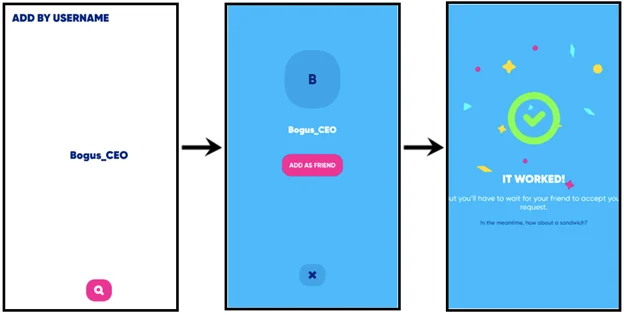
This friend invitation will trigger a request to the /FriendRequestCreate endpoint, whose response contains specific information regarding both our user (items 3, 5, and 6 in the image below) and the target user (items 4, 7, and 8 in the image below).
████████
Note that the response contains both our phone number and the phone number of the target user, even though our friend request was never accepted by the target user.
Impact
Exposure of user data can be used by attackers for malicious purposes. Obtaining this data can put at risk not only the users of the application but also Zenly’s brand image. Consider a scenario where a malicious actor wants to attack a company by targeting its CEO. An attacker can make use of this vulnerability and employ the following attack vector:
- Search the web for an employee of the company and try to obtain their social media handle e.g., Twitter. (Best targets are employees who work in communications or marketing fields since they are typically more exposed and represent easier targets)
- Validate their handle is valid on Zenly.
- Access their list of friends through Zenly, obtain the handle of the CEO.
- Retrieve the phone number of the CEO through their username. <- This is already a privacy violation, but the scenario can go on...
- Carry out a spear-phishing attack, using the phone number of the CEO.
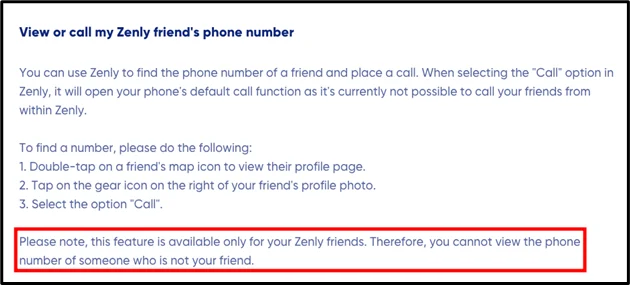
An attacker can also repeat these steps to obtain the phone number of other employees and thus prepare a more credible attack. Note that, according to the documentation provided by Zenly, present at this link, it should not be possible to retrieve the phone number of a user unless we are already friends with them. The following screenshot was obtained from this documentation:
Not written yet. The AI write-up for this report has not been written yet. The Original tab links to the source.
How it worked
Root cause
Likely the friend request endpoint returned the full user object, including the phone number, without checking whether the two users were actually friends.
Impact
An attacker could obtain the phone numbers of users, including a company's CEO, and use them for spear-phishing; the friend list endpoint also exposed relationships that were not shown in the app.
What the attacker needed
Knowledge of the target's username; ability to intercept network traffic
How it was found
- Set up a tool that intercepts and decodes network requests.
- Use the Add by Username flow to search for a known username.
- Observe the response from the public friends endpoint, which lists the user's friends.
- Take a username from that list and complete the Add as Friend flow.
- Read the friend request response, which contains the target user's phone number.
Explained by bugbounty.wiki with AI from the original and checked against quotes from it; it can still be wrong. Read the original before relying on a detail.
Not written yet. The AI write-up for this report has not been written yet. The Original tab links to the source.
When you add someone as a friend, the app's server sends back a bundle of data. Here that bundle included the other person's private phone number, even though you were not friends yet. Anyone who knew a username could trigger this and read the number, which should only be visible to accepted friends.
What is Info disclosure?
Data the application should keep private (personal data, internal details, other users' records) reaches someone it should not.