attacker can book unlimited tickets in free at https://aaf.com/checkout/order-received/21237/?key=wc_order_5bbef48fa35b2
 Originally disclosed on HackerOne
- Triaged in 39 days
- Fixed in 4 months
- Paid in 48 days
- Disclosed after 6 months
Summary by the researcher
Hi Team,
After looking into ticket booking at https://aaf.com/checkout/XXXXXX request , i tried to change value of ticket in burp request , but there is proper validation , so it was not possible to buy ticket by changing amount of ticket. after looking request carefully , i saw that user can buy 3-seats-3 only from UI level , what if i changed from 3-seats-3 to 10-seats-10 , and change money amount from 23$ to 0$ and i was able to forward that request , success. same way attacker can buy unlimited ticker in 0$ my suggestion is to think out of box and dig each and every request completely without just doing normal known test cases.
Team is very cool and reply very quick and fixed this issue by changing complete architecture of this product.
The report
Dear Team,
Summary: [add summary of the vulnerability] After looking into https://aaf.com/ i get to know that there is way where i can book a ticket and can play around , but it asked for valid credit card and all stuff so , i tried to bypass and bought a ticket 23 with 0$
Live PoC: https://aaf.com/checkout/order-received/21237/?key=wc_order_5bbef48fa35b2 (check this one)
Description: [add more details about this vulnerability] attacker can book unlimited tickets in free at https://aaf.com/checkout/order-received/21237/?key=wc_order_5bbef48fa35b2
Steps To Reproduce:
- go to aaf.com and login with your account
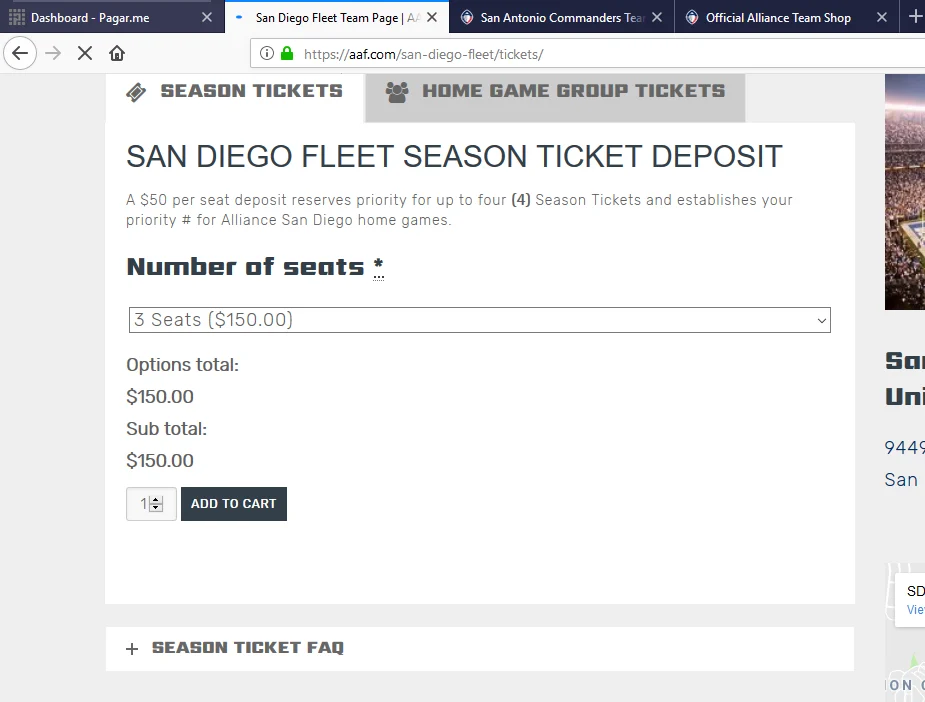
- click on ticket option and select San Antonio Commanders Season and click on that and select 3 or any ticket and intercept that request ,
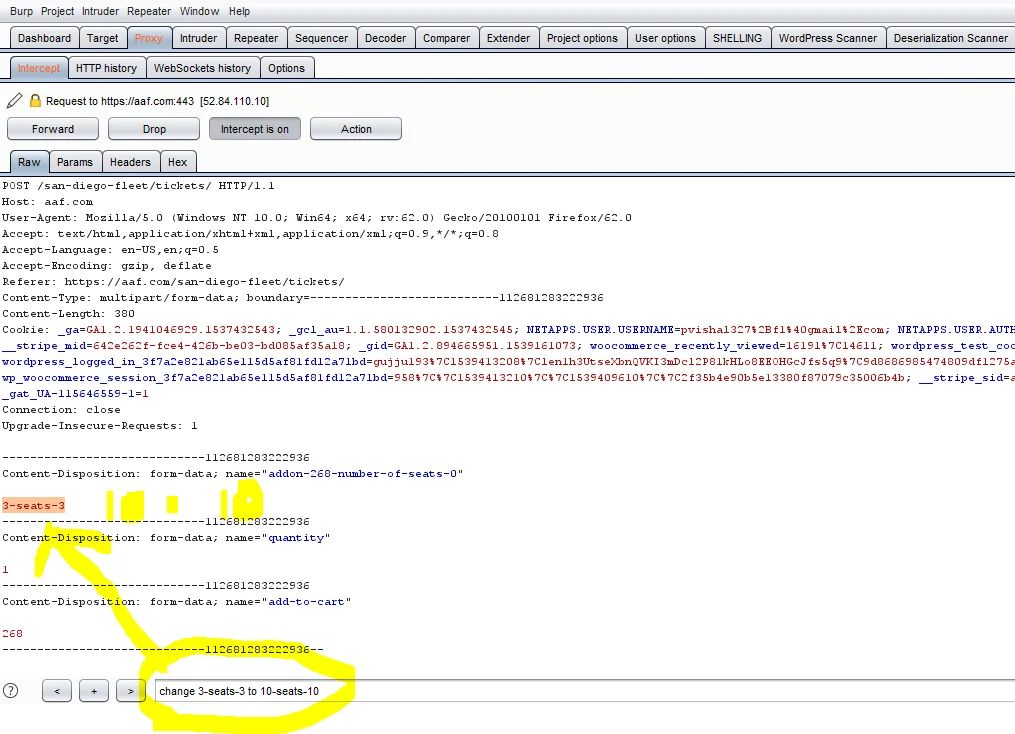
and change from 3-seats-3 to 10-seats-10
snip:
Content-Disposition: form-data; name="addon-268-number-of-seats-0"

10-seats-10
- click on add tickets and you can see your order is 0$
and book any number of ticket at 0$
Supporting Material/References:
Please find attachment
Thanks, Vishal
Impact
attacker can book unlimited tickets in free at https://aaf.com/checkout/order-received/21237/?key=wc_order_5bbef48fa35b2
Context
The target is aaf.com, the site of the Alliance of American Football. The feature involved is ticket booking: a logged-in user selects a ticket type (the researcher uses the San Antonio Commanders Season option), adds seats to the order, and pays through a checkout flow. The order confirmation lives at a URL of the form https://aaf.com/checkout/order-received/21237/?key=wc_order_5bbef48fa35b2, which the researcher uses as the live proof of concept.
Normally the site limits how many seats a buyer can add from the interface (the researcher notes that only 3-seats-3 could be chosen from the UI) and charges the corresponding amount, which in the researcher's example was 23 dollars.
Setup
No special accounts, roles or tool versions are described. The preconditions are simply a normal account on aaf.com and an intercepting proxy (the researcher uses Burp) to capture and modify the add-to-cart request. The researcher first tried the obvious manipulation, changing the ticket amount in the request, and found that validation blocked it.
Finding it
The researcher's first attempt was to change the value of the ticket in the intercepted request, but proper validation meant it was not possible to buy a ticket by changing the amount. Looking at the request more carefully, the researcher noticed that the UI only allowed 3-seats-3. The question was what would happen if that value were changed to 10-seats-10 and the money amount changed from 23 dollars to 0 dollars. The request was accepted.
Exploitation
Step 1: Log in and select a ticket
Go to aaf.com, log in with an account, click the ticket option, select San Antonio Commanders Season, and choose 3 (or any) ticket. Intercept the resulting request.
Step 2: Modify the seat count and the price
In the intercepted request, change 3-seats-3 to 10-seats-10. The researcher shows the relevant multipart form field:
Content-Disposition: form-data; name="addon-268-number-of-seats-0"

10-seats-10
The researcher shows the relevant multipart form field: The same request is where the money amount was changed from 23 dollars to 0 dollars, and the modified request was forwarded successfully.
Step 3: Add the tickets and confirm the zero total
Click add tickets, and the order shows a total of 0 dollars. From there any number of tickets can be booked at 0 dollars.
Root cause
The report does not analyse the root cause. The researcher notes that changing the ticket amount alone was blocked by validation, while changing the seat count and the amount together was accepted. This is a business logic flaw rather than an injection or memory issue.
Impact
An attacker can book unlimited tickets for free. In the researcher's demonstration a 23 dollar ticket was bought for 0 dollars, and the same technique allows any number of tickets at 0 dollars. The report does not describe any further effect on inventory, other customers or the organiser beyond the free bookings.
Fix
The team fixed the issue by changing the complete architecture of the product. The researcher also suggests digging into each request completely rather than only running normal known test cases.
Variants to test
- Change the seat quantity in an add-to-cart or booking request while leaving the price untouched. A positive result is an order line with more seats than the UI allows at the original unit price.
- Change the price or total field in the same request. A positive result is a confirmation page showing a lower total than the product price.
- Change both together, as here, when changing the price alone is rejected. A positive result is an accepted request and a zero or reduced total.
- Look for parameters whose value encodes both a number and a label (like
10-seats-10) and change both parts consistently. A positive result is the server accepting the new quantity without recalculating the price.
Hunting notes
This kind of bug hides in checkout and cart flows where the client sends quantity and price, and where the UI enforces limits that the backend does not. During recon, watch for add-to-cart requests with multipart fields named after add-ons and seat counts, and for confirmation URLs that expose an order ID and key. The researcher linked a confirmation page as the live proof of concept.
What happened, in plain words
A security researcher found that the ticket shop on aaf.com, the website of the Alliance of American Football, let a logged-in buyer change two things in the request their browser sends when adding tickets to an order: the number of seats and the price. The website accepted the changed request, so the researcher was able to order a ticket that normally cost 23 dollars for 0 dollars, and the same trick allowed booking any number of tickets for free. The site's interface only offered a choice of 3-seats-3, and the researcher changed that value in the request. The team fixed the problem by changing the complete architecture of the product.
This article explains the finding from scratch, for someone who has never done security testing. You only need to know how to use a browser and a computer.
Background: the product and the feature
aaf.com sold tickets for American football games. A visitor creates an account, logs in, picks a ticket type (the researcher chose "San Antonio Commanders Season"), chooses how many seats to add, and pays at checkout. After a successful order the site shows a confirmation page whose address looks like this:
https://aaf.com/checkout/order-received/21237/?key=wc_order_5bbef48fa35b2
That address contains an order number (21237) and a key (wc_order_5bbef48fa35b2). The researcher used this confirmation page as the live proof that a real order had been placed.
When you click buttons on a website, your browser sends requests to the server behind it. A request is simply a message: "please add this ticket to my order". The server reads the message and acts on it. Some of the values in that message come from what you chose on the page, but the browser can be made to send different values. A tool called an intercepting proxy sits between your browser and the server, lets you pause each request, edit it, and then send it on. The researcher used Burp, a well-known proxy of this kind.
The first attempt: changing the price alone
The researcher first tried the obvious manipulation: change the ticket amount in the request. The server validated that field properly, so the attempt failed. This is an important detail: the site did check something. The problem was what it did not check.
The second attempt: changing the seat count and the price together
Looking at the request more carefully, the researcher noticed that the page only allowed 3-seats-3. The question was: what happens if that value is changed to 10-seats-10 and the money amount is changed from 23 dollars to 0 dollars at the same time? The server accepted the request.
Step 1: Log in and select a ticket
- Go to aaf.com and log in with your account.
- Click the ticket option, select San Antonio Commanders Season, and choose 3 (or any) ticket.
- Intercept the request that your browser sends when you add the ticket.
Intercepting means telling the proxy to hold the request so you can look at it and change it before it reaches the server.
Step 2: Modify the seat count and the price
In the intercepted request, change 3-seats-3 to 10-seats-10. The researcher shows the relevant part of the request, a form field:
Content-Disposition: form-data; name="addon-268-number-of-seats-0"

10-seats-10
This snippet is one field of a larger request. The line starting with Content-Disposition describes the field: form-data means the request is built from several named parts (like a form with several boxes), and name="addon-268-number-of-seats-0" is the name of this particular box. The name says it is about an add-on (number 268) and the number of seats. After a blank line comes the value of the field: 10-seats-10. The value carries both a number and a label, and both were changed consistently.
The same request is where the money amount was changed from 23 dollars to 0 dollars. The modified request was then forwarded to the server, and the server accepted it.
Step 3: Add the tickets and confirm the zero total
Click add tickets, and the order shows a total of 0 dollars. From there any number of tickets can be booked at 0 dollars.
Why it worked
The report does not analyse the root cause. The researcher notes that changing the ticket amount alone was blocked by validation, while changing the seat count and the amount together was accepted.
This kind of problem is called a business logic flaw. It is not an injection or a memory bug; the software does what it is told, but the rules of the business (pay the right price for the right number of seats) are not enforced where they should be, on the server.
Impact
An attacker can book unlimited tickets for free. In the researcher's demonstration a 23 dollar ticket was bought for 0 dollars, and the same technique allows any number of tickets at 0 dollars. The report does not describe any further effect on inventory, other customers or the organiser beyond the free bookings.
Fix
The team fixed the issue by changing the complete architecture of the product. The researcher also suggests digging into each request completely rather than only running normal known test cases.
Variants to test
- Change the seat quantity in an add-to-cart or booking request while leaving the price untouched. A positive result is an order line with more seats than the interface allows at the original unit price.
- Change the price or total field in the same request. A positive result is a confirmation page showing a lower total than the product price.
- Change both together, as here, when changing the price alone is rejected. A positive result is an accepted request and a zero or reduced total.
- Look for parameters whose value encodes both a number and a label (like
10-seats-10) and change both parts consistently. A positive result is the server accepting the new quantity without recalculating the price.
Hunting notes
This kind of bug hides in checkout and cart flows where the client sends quantity and price, and where the interface enforces limits that the backend does not. During recon, watch for add-to-cart requests with multipart fields named after add-ons and seat counts, and for confirmation URLs that expose an order ID and key. The researcher linked a confirmation page as the live proof of concept.
Glossary
- API: a way for one piece of software to talk to another; here, the set of requests the website's pages send to its server.
- Backend: the server-side part of a website that receives requests and decides what to do with them.
- Burp: a tool that sits between your browser and a website, letting you pause, inspect and change requests.
- Business logic flaw: a weakness where the software follows the rules it is given but the rules of the business (such as paying the right price) are not enforced properly.
- Checkout flow: the sequence of pages and requests from choosing a product to paying and receiving a confirmation.
- Client: the browser or app on your computer that sends requests to the server.
- Confirmation page: the page shown after an order is placed, usually with an order number and a key.
- Content-Disposition: a line in a request that describes a form field, including its name.
- Cookie: a small piece of data a website stores in your browser, often used to remember that you are logged in.
- Form field: one named box in a form; in a request, a name and a value.
- Intercepting proxy: a tool that sits between browser and server and lets you pause and edit traffic.
- Multipart form data: a way of sending a form with several parts, each with its own name and value.
- Parameter: a named value in a request, such as a seat count or a price.
- Payload: the part of a request that carries the data you are sending.
- PoC (proof of concept): a concrete demonstration that a vulnerability is real, often a link or a screenshot.
- Recon: the information-gathering phase before testing, where you look at how a site works.
- Request: a message your browser sends to a server asking it to do something.
- Server: the computer that hosts a website and answers requests.
- Token: a value, often a long string, used to identify a session or authorise an action; here the
keyin the confirmation URL. - UI (user interface): the part of a website you see and click on.
- Validation: checks a program performs on incoming data to make sure it is acceptable.
- Vulnerability: a weakness in software that can be used to make it behave in a way its owners did not intend.