Potential XSS in redirect_url Parameter
The redirect_url parameter on the Acronis learning portal accepted a javascript: URI, which executed script in the page context. An attacker could run arbitrary JavaScript in a victim's authenticated session.

- Triaged in 13 hours
- Fixed in 20 days
- Paid in 33 hours
- Disclosed after 3 months
Summary
An XSS vulnerability has been identified on https://learn.acronis.com/ in the redirect_url parameter. By manipulating the redirectUrl parameter, it is possible to inject arbitrary JavaScript code
Steps To Reproduce
-
Log in to your https://learn.acronis.com/ account
-
Navigate to the following URL:
https://learn.acronis.com/portal/licensing-check?redirect_url=javascript:alert(document.domain)
- Observe that an alert box displaying the current domain (document.domain) appears, indicating that the JavaScript code was executed.
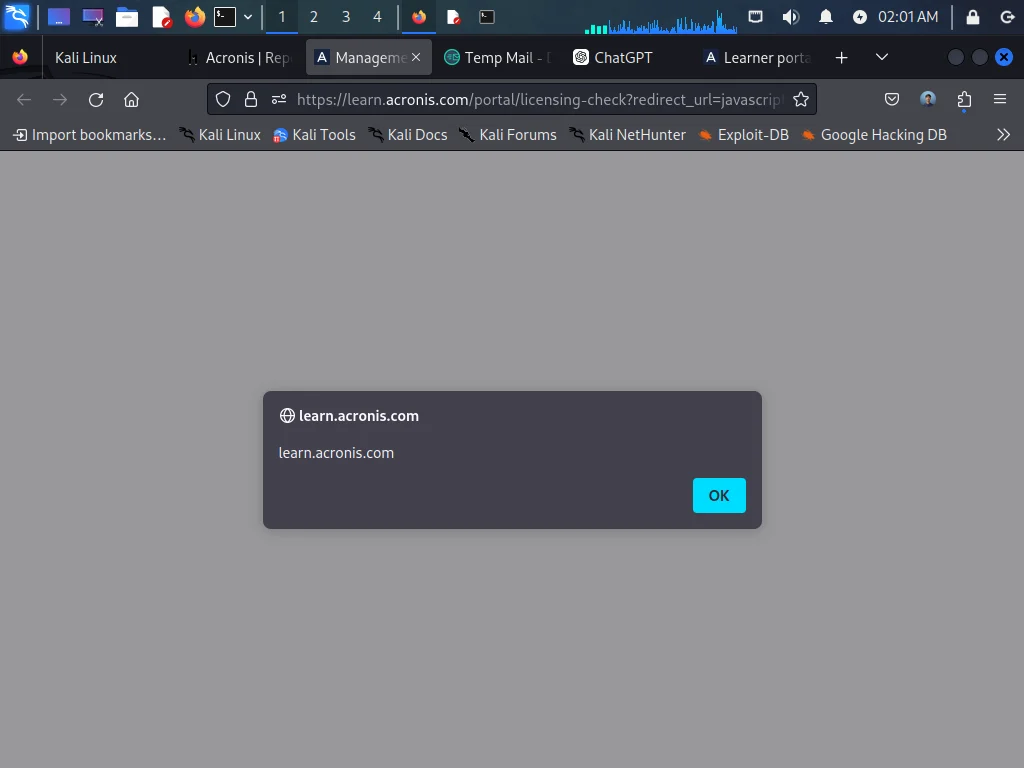
Suggested Fix:
Validate and sanitize the redirectUrl parameter to ensure that it does not contain any malicious content. This can be done by:
- Restricting the parameter to only allow URLs that belong to the same origin.
- Encoding or escaping any user input before including it in the URL.
Impact
An attacker can perform the following actions using this vulnerability:
- Steal sensitive information, such as cookies, session tokens, or other sensitive data.
- Perform actions on behalf of the victim by exploiting their authenticated session.
Context
Acronis runs a learning portal at https://learn.acronis.com/, and the report concerns a parameter called redirect_url on that host. The name suggests the usual job: a page takes a destination from the query string and sends the user there after some action, such as finishing a licensing check. The report does not describe the feature beyond the URL path /portal/licensing-check, so the exact flow that consumes the parameter is not documented.
The finding is a reflected cross-site scripting issue in that parameter. The weakness is classified as reflected XSS and the severity as medium. The asset in scope is *.acronis.com.
Setup
The only precondition stated is an account on the portal. Step one of the reproduction is to log in to https://learn.acronis.com/. No tools, browser versions or special roles are mentioned, and the report does not say whether the issue also reproduces without a session.
Finding it
The researcher identified that manipulating the redirect_url parameter allows arbitrary JavaScript to be injected. The parameter is meant to carry a URL, and the report's suggested fix implies it is not currently restricted to the same origin. Supplying a javascript: URI instead of a normal link therefore causes the browser to execute the value as script in the origin of the portal.
Exploitation
Step 1: authenticate
Log in to the portal with a normal account:
https://learn.acronis.com/
The report's first step is to log in to the portal before navigating to the crafted URL.
Step 2: request the licensing-check page with a script payload
Navigate to the following URL:
https://learn.acronis.com/portal/licensing-check?redirect_url=javascript:alert(document.domain)
The redirect_url value is a javascript: URI rather than a link. Its body, alert(document.domain), is the proof-of-concept payload: it does nothing harmful, it only displays the origin in which the code ran, which is what makes the execution unambiguous.
Step 3: observe execution
An alert box appears showing the current domain (document.domain). That confirms the JavaScript was executed in the page's origin rather than being treated as an inert string or a blocked navigation.
The screenshot shows the alert box produced by the payload, with the domain of the portal displayed in it.
Root cause
Because javascript: is accepted, the browser evaluates the value as code in the origin of learn.acronis.com. The report does not include the server-side or client-side code responsible, so the precise location of the mistake is not shown; the behaviour is consistent with a redirect handler that passes the parameter straight to a navigation sink.
Impact
According to the report, an attacker can steal sensitive information such as cookies, session tokens or other sensitive data, and can perform actions on behalf of the victim by exploiting their authenticated session. The report lists these impacts without further detail on how the victim is reached. The report gives no further detail on cookie flags, token storage or which actions could be taken.
Fix
The report recommends validating and sanitising the redirect_url parameter so that it cannot contain malicious content, by:
- Restricting the parameter to only allow URLs that belong to the same origin.
- Encoding or escaping any user input before including it in the URL.
Variants to test
- Other schemes: try
data:,vbscript:and mixed-case or whitespace-obfuscatedjavascript:values in the same parameter, and see whether the browser still executes or navigates. A positive result is script execution or a navigation to attacker-controlled content. - Other redirect-style parameters on the same host and sibling hosts under
*.acronis.com, such asnext,return,continueorurl. A positive result is the same alert firing withdocument.domainset to the target origin. - Same-origin bypasses: if a scheme allowlist is added, test values that begin with an allowed origin but redirect elsewhere, and values with userinfo or backslashes. A positive result is a redirect off-origin or execution despite the filter.
- Unauthenticated access: repeat the request without a session to see whether the parameter is processed before authentication. A positive result is the alert appearing on a logged-out visit, which widens the set of reachable victims.
Hunting notes
Parameters whose name says they carry a destination are worth watching during recon, especially on login, licensing, checkout and onboarding paths where a redirect after an action is natural. The signal is a query parameter reflected into a navigation, a Location header or a client-side router call. The proof here is minimal and effective: a javascript: URI that calls alert(document.domain) demonstrates execution in the target origin, which is exactly the evidence needed to show the issue is real rather than a harmless open redirect. Testing while authenticated, as the report does, also shows the session context the payload would run in.
What happened, in plain words
Acronis runs a learning website at https://learn.acronis.com/. One of those pages, /portal/licensing-check, accepts a value called redirect_url.
A security researcher found that a javascript: value in the parameter is executed. If you give it a normal web link, fine. But if you give it a special kind of link that starts with javascript:, the browser does not treat it as a destination to travel to. It treats the text after it as a small program and runs it inside the Acronis page. That is the bug: a reflected cross-site scripting (XSS) flaw. The report rates it medium severity and lists the affected asset as *.acronis.com.
The researcher proved it with a harmless program that only pops up a box showing the site's domain name. The report says an attacker could steal sensitive information such as cookies or session tokens, and perform actions on behalf of the victim.
Background you need first
A few ideas come up again and again, so here they are from zero.
A URL and its query string. A web address like https://learn.acronis.com/portal/licensing-check?redirect_url=... has two parts worth knowing. Everything before the ? is the page you are visiting. Everything after the ? is extra information handed to that page, called the query string. It is written as name=value pairs. Here the name is redirect_url and the value is whatever follows the =.
A parameter. A parameter is simply one of those name=value pairs. Think of a restaurant order form: the form has fields (name, dish, drink), and the kitchen reads each field. A web page reads its parameters the same way. redirect_url is a field whose name suggests it should contain a web address to send you to afterwards.
A scheme. The first word of a URL before the colon is its scheme. https: means a normal encrypted web page. javascript: is a different scheme: it tells the browser that what follows is code to run, not a place to go. This distinction is the heart of the bug.
JavaScript. The programming language that web pages run inside your browser. It is what makes pages interactive. It can also read things the page can see, such as the address bar and, depending on settings, cookies.
Cross-site scripting (XSS). A class of bug where a website lets an attacker's JavaScript run as if the site itself had written it. The word reflected means the malicious value is not stored on the server; it travels in the link, bounces off the page, and runs in the victim's browser when they open that link. The everyday comparison: a noticeboard where you can pin a note, and the board copies whatever you write onto an official-looking letter. If you write something nasty, it appears on the company's letterhead.
Origin and document.domain. An origin is the combination of scheme, host and port, roughly "which site this is". Browsers use it as a security boundary: code from one origin should not be able to read another origin's data. document.domain is a JavaScript expression that returns the current page's host name. Showing it in an alert proves where the code ran, which is why it is the standard harmless proof.
Cookies and session tokens. When you log in, the server gives your browser a small piece of data, usually stored as a cookie or a token, that it checks on every later request to know it is still you. If someone else's code can read that value, they can pretend to be you. That is why XSS matters so much on a logged-in site.
The product and feature. learn.acronis.com is Acronis's learning portal. The report does not describe the feature beyond that URL path, so the exact flow that uses the parameter is not documented.
Setup
The only precondition the report states is that you need an account on the portal. Step one is to log in at https://learn.acronis.com/. No special tools, browser versions or user roles are mentioned, and the report does not say whether the bug also works when you are logged out.
The report's first step is to log in to the portal before navigating to the crafted URL.
Finding it
The researcher found that a javascript: value in the parameter is executed by the browser. The field is supposed to carry a web address, and the report's suggested fix is to restrict it to the same origin. So if you supply a javascript: value instead of a normal link, the browser runs the value as a script in the portal's own origin.
Exploitation
Step 1: log in
Open the portal and sign in with a normal account:
https://learn.acronis.com/
This is the portal's address, where the report's first step is to log in. The report's first step is to log in before navigating to the crafted URL.
Step 2: open the licensing-check page with a script payload
With your session active, navigate to this address:
https://learn.acronis.com/portal/licensing-check?redirect_url=javascript:alert(document.domain)
Reading it piece by piece:
https://learn.acronis.comis the portal./portal/licensing-checkis the page that handles the licensing step.?starts the query string.redirect_url=is the parameter name, the field meant to hold a destination.javascript:alert(document.domain)is the value. It is not a web address at all.javascript:says "run what follows as code", andalert(document.domain)is a tiny program that opens a pop-up box containing the current page's domain name.
The payload does nothing harmful. It only displays the origin in which the code ran, which is what makes the execution unambiguous: if the box appears, the browser really ran our code as part of the Acronis page.
Step 3: watch for the pop-up
An alert box appears showing the current domain (document.domain). That confirms the JavaScript ran in the page's origin, rather than being treated as a harmless piece of text or being blocked.
The screenshot shows the alert box produced by the payload, with the portal's domain displayed inside it.
Why it works
Because javascript: is accepted, the browser evaluates the value as code in the origin of learn.acronis.com. The report does not include the server-side or client-side code responsible, so the exact line of the mistake is not shown. The behaviour fits a redirect handler that passes the parameter straight to the browser's navigation.
What an attacker could do
According to the report, an attacker can steal sensitive information such as cookies, session tokens or other sensitive data, and can perform actions on behalf of the victim by exploiting their authenticated session. The report lists these impacts without further detail on how the victim is reached. The report gives no further detail on cookie flags, how tokens are stored, or which actions could be taken.
The suggested fix
The report recommends validating and sanitising the redirect_url parameter so it cannot contain malicious content, by:
- Restricting the parameter to only allow URLs that belong to the same origin.
- Encoding or escaping any user input before including it in the URL.
In plain terms, the first rule means the page should only accept destinations on its own site, so javascript: and other odd schemes are refused. The second means any text taken from the visitor should be made safe before it is placed into the page, so it is shown as text rather than run as code.
Other things worth testing
These are follow-up ideas in the same spirit, not results from the report:
- Other schemes. Try
data:,vbscript:and mixed-case or whitespace-obfuscatedjavascript:values in the same parameter, and see whether the browser still runs or navigates. A positive result is script execution or a navigation to attacker-controlled content. - Other redirect-style parameters. Look on the same host and sibling hosts under
*.acronis.comfor names such asnext,return,continueorurl. A positive result is the same alert firing withdocument.domainset to the target origin. - Same-origin bypasses. If a scheme allowlist is added, test values that begin with an allowed origin but redirect elsewhere, and values with userinfo or backslashes. A positive result is a redirect off-origin or execution despite the filter.
- Logged-out access. Repeat the request without a session to see whether the parameter is processed before authentication. A positive result is the alert appearing on a logged-out visit, which widens the set of reachable victims.
Notes for hunting
Parameters whose name says they carry a destination are worth watching during recon, especially on login, licensing, checkout and onboarding paths where a redirect after an action is natural. The signal is a query parameter reflected into a navigation, a Location header or a client-side router call. The proof here is minimal and effective: a javascript: URI that calls alert(document.domain) demonstrates execution in the target origin, which is exactly the evidence needed to show the issue is real rather than a harmless open redirect. Testing while authenticated, as the report does, also shows the session context the payload would run in.
Glossary
- Alert: a browser pop-up box that displays a short message; often used as a harmless proof that code ran.
- Cookie: a small piece of data a website stores in your browser, often used to remember that you are logged in.
- Cross-site scripting (XSS): a bug where a site lets an attacker's JavaScript run as if the site had written it.
document.domain: a JavaScript expression that returns the current page's host name, used here to show where code ran.- JavaScript: the programming language that runs inside web pages in your browser.
javascript:scheme: a URL prefix that tells the browser to run the text after it as code instead of navigating to a page.- Open redirect: a flaw where a site will send visitors to any address supplied in a link, including attacker-controlled ones.
- Origin: the combination of scheme, host and port that identifies a site; browsers use it as a security boundary.
- Parameter: a
name=valuepair in a URL's query string that a page reads as input. - Payload: the piece of input an attacker supplies to trigger a bug; here, the
javascript:value. - Query string: the part of a URL after the
?, carrying parameters. - Reflected XSS: XSS where the malicious value travels in the link and bounces off the page rather than being stored on the server.
- Sanitise: to clean input so that dangerous parts cannot cause harm.
- Scheme: the first word of a URL before the colon, such as
httpsorjavascript, which says how to interpret the rest. - Session: the state of being logged in, maintained by the server across requests.
- Session token: a value that identifies your logged-in session; if stolen, it can be used to act as you.
- Severity: a rating of how serious a bug is; this one is rated medium.
- URL: a web address.





