Finding Multiple Security Issues on Agorapulse
A guest user in an organisation could access restricted information and modify settings such as ROI, report branding, and inbox assistant rules due to broken access control on several API endpoints. An attacker with a guest role could escalate privileges and change settings without authorisation.
Agorapulse provides everything an organization could possibly need for social media marketing, monitoring, and management. Agorapulse is a full-featured social media management platform.
The full write-up lives on its author's site
It belongs to its author, so we link to it rather than copy it. The other two tabs are our own rewrites, checked against it.
Agorapulse is a full-featured social media management platform: it lets an organisation publish and schedule content, monitor social accounts, engage audiences, listen for key terms and analyse performance. Its feature set is broad, and it integrates with third-party accounts, which makes it a large and interesting attack surface. This write-up walks through a set of issues found on the platform, from a Log4shell remote code execution down to a series of broken access control bugs that let the lowest-privileged role, the guest, read and change things it should never have touched.
Context
The application is built around organisations, workspaces and social profiles. Reports can be emailed automatically through the Power Reports add-on, so users do not have to export them by hand. Pages have settings such as ROI (return on investment), which tracks the monthly value generated by a page, and general report settings such as timezone, report author name and logo. There is also an inbox assistant that automates replies to received messages using custom rules whose order matters.
Permissions are role-based and split into two categories:
- Organisation role: Owner (one per organisation), Manager or Member. These define permissions over subscription and team settings.
- Role on a given social profile: Admin, Editor, Moderator or Guest. Editors have full access to Inbox, Publishing and Reports. Moderators have full access to Inbox, Listening, Publishing and retweet features. Guests are in view-only mode and cannot publish, reply or moderate.
The guest role is the lowest level available, with only some basic read permissions on limited features such as posts to review and likes. That made it the natural starting point for privilege escalation testing.
Setup
The work began with ordinary reconnaissance: interacting with the application's features, reading its YouTube channels, blogs and support documentation, and running general search queries to understand the application logic well enough to use it properly. The researchers then studied the structure of API paths and the HTTP requests behind various actions, and recorded the IDs used in those requests so that IDOR opportunities would not be missed. The requests were sent with the authorisation token of a guest user.
Finding it
The guest role has no direct access to organisation-level features, but it does have a handful of read-only surfaces. That combination is a good place to look for privilege escalation: endpoints that the UI hides from guests may still accept a guest token. The researchers tried a number of instinctively vulnerable API paths with guest credentials and were unable to access them, until they came across an organisation API endpoint. Separately, during investigation of the infrastructure, they found that Log4j was used somewhere in the application or infrastructure and were able to get DNS pingbacks from a vulnerable server.
Exploitation
1. RCE via Log4shell
Log4j had recently been found vulnerable to a critical flaw allowing unauthenticated remote code execution, which can be used to expose sensitive information from vulnerable servers. After some investigation the researchers confirmed that Log4j was used somewhere in Agorapulse's application or infrastructure, and they were able to send payloads and receive DNS pingbacks from the vulnerable server.
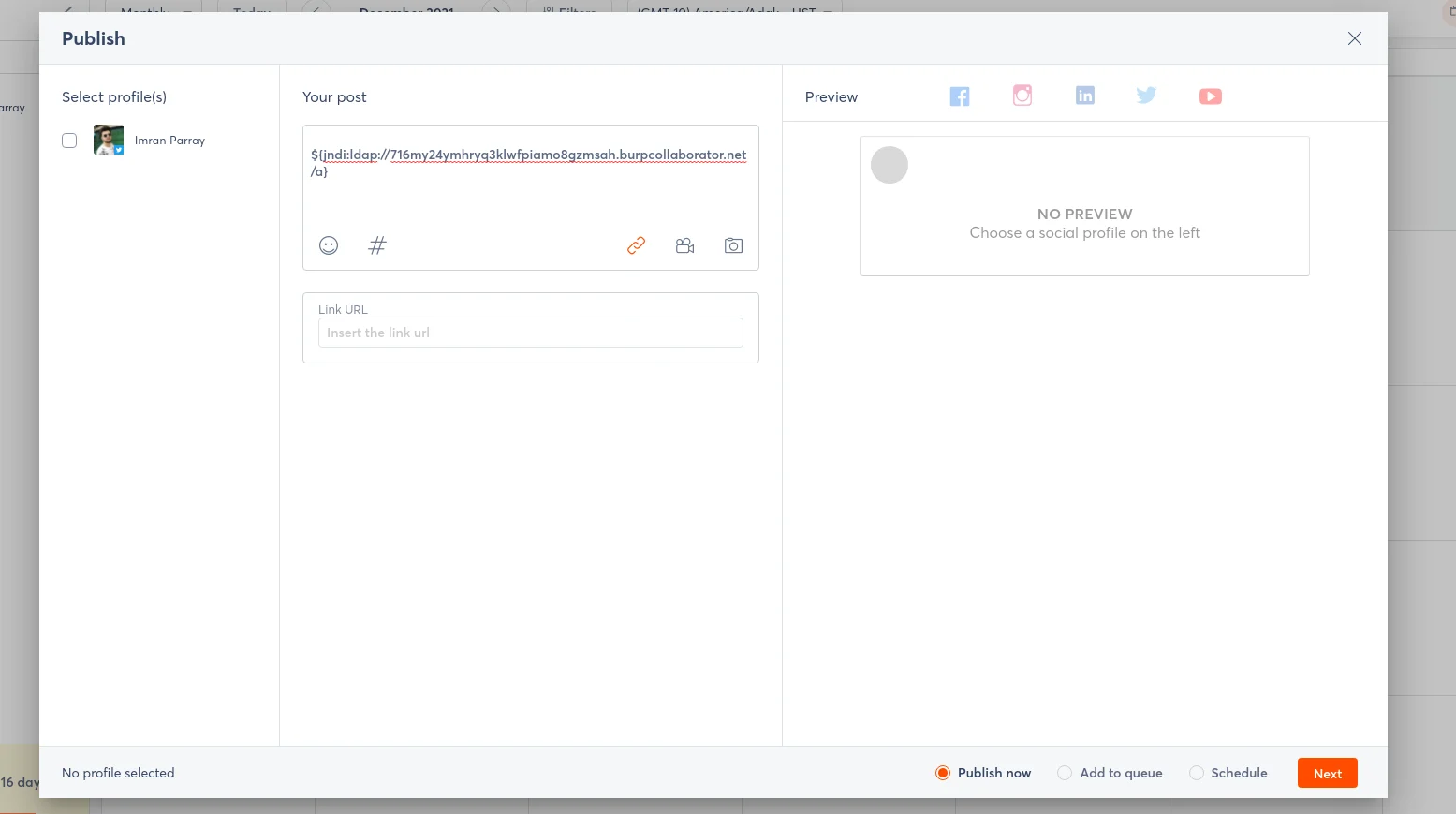
The pingback confirmed out-of-band interaction from the Agora servers. After confirmation, the researchers exploited the vulnerability by reading various environment variables of the Agorapulse servers, without performing any sensitive actions.
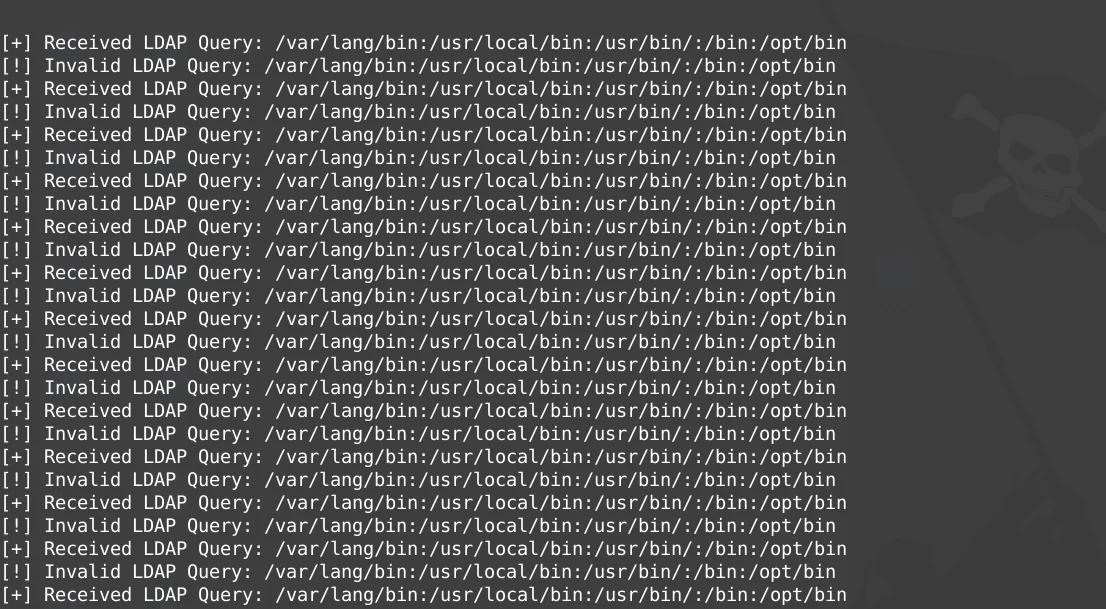
A detailed write-up of this vulnerability is published separately at https://snapsec.co/blog/Log4shell-on-agorapulse/.
2. Accessing automatic scheduling reports
Automatic scheduled reports are part of the Power Reports add-on, and a guest is explicitly restricted from viewing the information they contain. The researchers found an endpoint with broken access control that let the guest role reach that restricted information: labels, automatic scheduled reports and organisation groups.
GET /api/bootstrap?accountId=[Account-id] HTTP/1.1
Host: manager.agorapulse.com
Connection: close
Accept: application/json, text/plain, */*
Authorization: Bearer [Value]
Agorapulse-Agent: manager-2021.08.03.0929
Content-Type: application/json
Origin: https://app.agorapulse.com
Sec-Fetch-Site: same-site
Sec-Fetch-Mode: cors
Sec-Fetch-Dest: empty
Referer: https://app.agorapulse.com/
Accept-Language: en-US,en;q=0.9
Sent with a guest user's authorisation token, it returned 200 OK and included data about automatic scheduling reports, with assignee emails, labels and group names for that organisation.
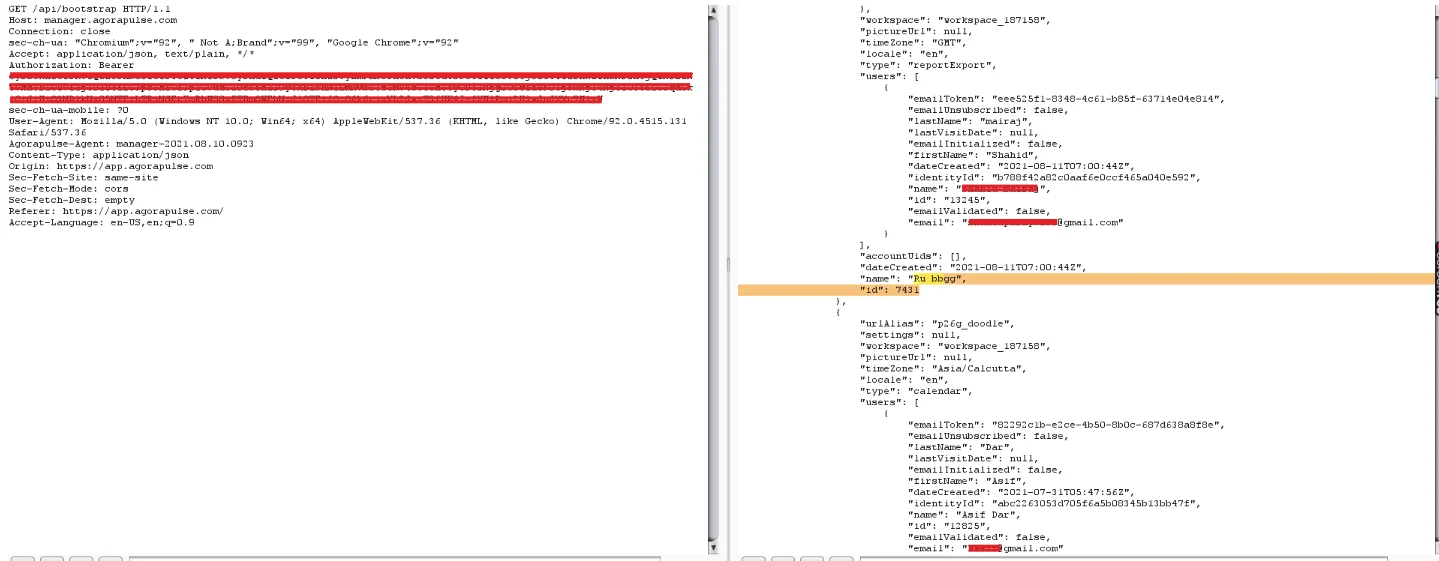
So a guest could escalate its privileges and read restricted information inside the organisation.
3. Accessing sensitive organisation information
Because the guest role has no direct access to the organisation, the organisation endpoints were a promising target. Most of the obviously sensitive API paths rejected guest credentials, but one endpoint did not:
GET /api/organizations/[org-id]?organizationId=[org-id] HTTP/1.1
Host: manager.agorapulse.com
Connection: close
Accept: application/json, text/plain, */*
Authorization: Bearer [Value]
Agorapulse-Agent: manager-2021.08.03.0929
Content-Type: application/json
Origin: https://app.agorapulse.com
Sec-Fetch-Site: same-site
Sec-Fetch-Mode: cors
Sec-Fetch-Dest: empty
Referer: https://app.agorapulse.com/
Accept-Language: en-US,en;q=0.9
The researchers examined the IDs used in the request and identified that this ID could return a set of information about the organisation that was meant to be restricted from the guest role.
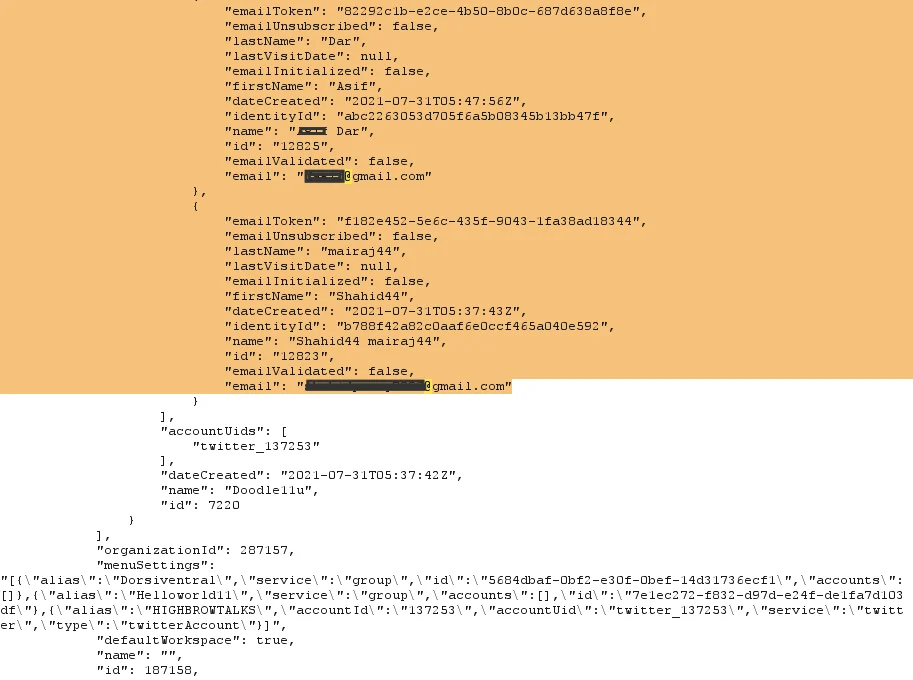
With guest credentials the request returned 200 OK and organisation information including scheduled calendars, email addresses of shared members, identification IDs, meeting dates and more. That is a clear privilege escalation: the guest role leaked information about the organisation it was not authorised to see.
4. Changing ROI settings from an unauthorised role
ROI settings let an organisation track the monthly value generated by a page, and only users with admin rights are supposed to enable or disable them for a page. A guest has limited access to social profile settings. The researchers found an API endpoint through which a guest could change the ROI settings of a page by supplying that page's ID, without having any access to the page.
PUT /api/organizations/287159/workspaces/187160/settings/roi/accounts/facebook_574024 HTTP/1.1
Host: api.report.agorapulse.com
User-Agent: Mozilla/5.0 (Windows NT 10.0; Win64; x64; rv:90.0) Gecko/20100101 Firefox/90.0
Accept: application/json, text/plain, */*
Accept-Language: en-US,en;q=0.5
Referer: https://app.agorapulse.com/
Agorapulse-Agent: manager-2021.08.04.1214
Authorization: Bearer VALUE
Content-Type: application/json
Content-Length: 118
Origin: https://app.agorapulse.com

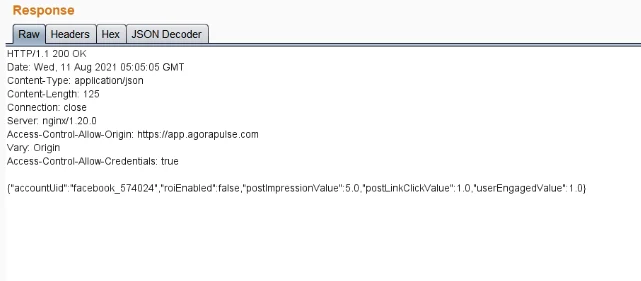
{"roiEnabled":true,"postImpressionValue":5,"postLinkClickValue":1,"userEngagedValue":1,"accountUid":"facebook_574024"}
The request returned 200 OK, indicating the change was made. Returning to the ROI setting of the page through an admin account confirmed that a guest had indeed been able to change it.
5. Changing general report settings such as logo and timezone
A guest has no access to the general settings of social media profiles and should not be able to change report settings. The researchers found a broken API path that let a guest change the timezone, author name and logo used for reports.
PUT /api/organizations/287157/workspaces/187158/settings/accounts/facebook_574363 HTTP/1.1
Host: api.report.agorapulse.com
Connection: close
Content-Length: 124
Authorization: Bearer
Agorapulse-Agent: manager-2021.08.10.0923
Content-Type: application/json
Origin: https://app.agorapulse.com
Referer: https://app.agorapulse.com/
Accept-Language: en-US,en;q=0.9

{"accountUid":"facebook_574363","authorName":"Waris","browserTimezoneEnabled":true,"locale":"en","timezone":"Asia/Calcutta"}
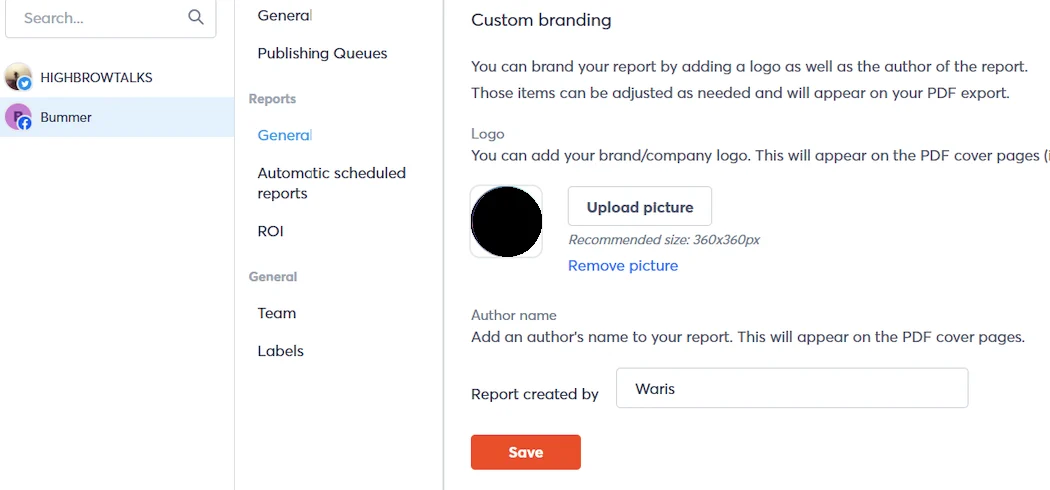
With this request a guest can set any author name for the organisation and change the timezone settings, which can disrupt automatic postings on the accounts. The researchers also found that the author's profile picture could be changed simply by adding a new key, authorPictureUrl, to the JSON body:
PUT /api/organizations/287157/workspaces/187158/settings/accounts/facebook_574363 HTTP/1.1
Host: api.report.agorapulse.com
Connection: close
Content-Length: 124
Authorization: Bearer
Agorapulse-Agent: manager-2021.08.10.0923
Content-Type: application/json
Origin: https://app.agorapulse.com
Referer: https://app.agorapulse.com/
Accept-Language: en-US,en;q=0.9

{"accountUid":"facebook_574363","authorName":"Waris","authorPictureUrl":"PICTURE-URL","browserTimezoneEnabled":true,"locale":"en","timezone":"Asia/Calcutta"}
Sent with the guest's authorisation token, the response was 200 OK, meaning a guest could change the author name, timezone and profile picture without having any permissions. Returning to the Reports section of the target page through an admin account confirmed that the guest had been able to change the Custom Branding and details such as the Report Author of the page.
6. Changing the rules of the inbox assistant from an unauthorised role
The inbox assistant automates replies to received messages: authorised users write custom rules and the order of those rules determines how replies are given. The feature is entirely inaccessible to the guest role. In the UI, an administrator reaches it through organisational settings, then social profile, then inbox assistant, where rules can be written and reordered.
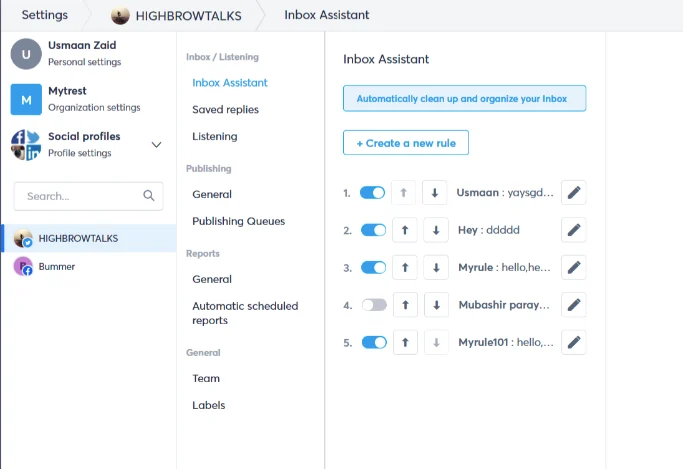
When the administrator changes the chronology of the rules using the arrows, the application sends this request:
PUT /api/accounts/twitter_137253/rules HTTP/1.1
Host: inbox.agorapulse.com
Connection: close
Content-Length: 17
Authorization: Bearer REDACTED
sec-ch-ua-mobile: ?0
Agorapulse-Agent: manager-2021.08.03.0929
Content-Type: application/json
Origin: https://app.agorapulse.com
Accept-Language: en-US,en;q=0.9

{"from":2,"to":1}
The researchers observed that this request had no authorisation checks in place and that it could be sent from a guest role to change the inbox rule chronology. Sent with guest credentials it returned 200 OK, and the rule was moved to a different assistant. The only extra ingredient was the assistant name, which was leaked to the guest through another GET request; using that name in the request, the researchers moved rules from one inbox assistant to another.
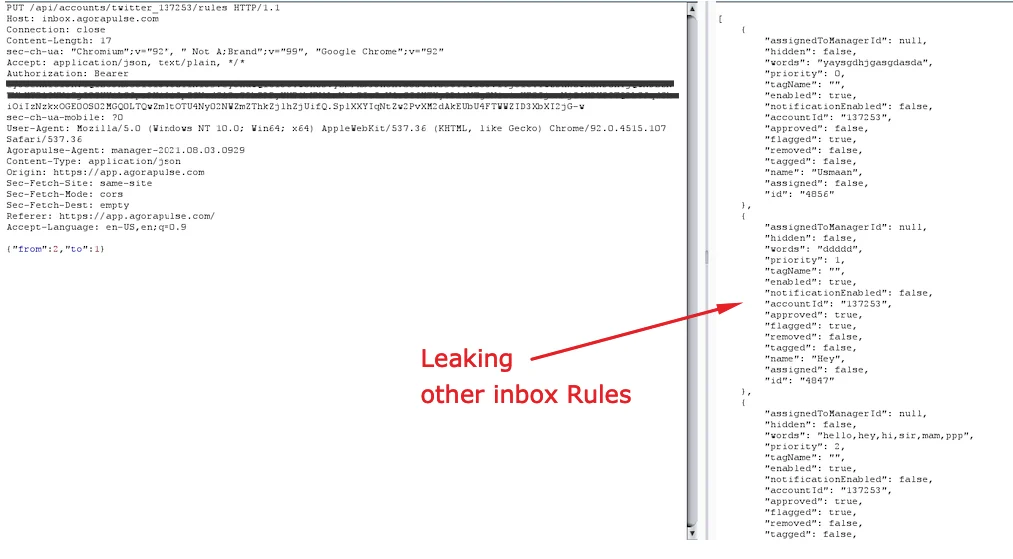
They also found that sending the same HTTP PUT request caused the application to change the chronological order of the assistant rules while leaking all of the inbox rules in the response. As a result, the guest role could both read the rules in the inbox assistant and change their chronology.
Root cause
The bootstrap endpoint, the organisation endpoint, the ROI settings endpoint, the report settings endpoint and the inbox rules endpoint all accepted a guest token and acted on IDs supplied by the client. In the report settings case the server also accepted an extra JSON key, authorPictureUrl, added to the request body. The Log4shell issue is separate: Log4j was used somewhere in the application or infrastructure, and payloads produced DNS pingbacks from the vulnerable server.
Impact
A guest, the lowest role in an organisation, could read automatic scheduling report data including assignee emails, labels and group names; read organisation information including scheduled calendars, member email addresses, identification IDs and meeting dates; change ROI settings on any page whose ID it knew; change report author name, timezone and profile picture, with the timezone change able to disrupt automatic postings; and read and reorder inbox assistant rules, including moving them between assistants. The Log4shell finding allowed reading environment variables from Agorapulse servers. The researchers state that they did not perform sensitive actions during that exploitation.
Fix
Following the implementation of their fixes, the Agorapulse team requested a re-check. The researchers then attempted to find bypasses of the fixes, using several documented 401 and 403 bypass techniques, to make sure the privilege escalation fixes could not be easily circumvented. The report does not describe the individual code changes.
Variants to test
- Low-privilege token against every endpoint the UI hides. Capture requests as an admin, then replay them with a guest token. A positive result is a
200with data or a state change that the guest cannot reach through the UI. - Bootstrap and organisation endpoints. Try
GET /api/bootstrap?accountId=...andGET /api/organizations/<id>?organizationId=<id>with the lowest role. A positive result is report metadata, member emails, calendars or meeting dates in the response. - Settings writes with guessed IDs. Send
PUTrequests to settings paths such as ROI or report settings with a low-privilege token and IDs belonging to another page. A positive result is200 OKplus a visible change when checked as an admin. - Extra JSON keys. Add fields the UI never sends, such as an image URL, to a settings update. A positive result is the field being persisted and reflected in the report.
- Order-changing endpoints. Look for small bodies like
{"from":2,"to":1}on rule or list reordering endpoints. A positive result is200 OKwith the order changed, or a response that leaks the full list. - Cross-object moves. Where an object name is leaked by one GET request, try using it in a write request to move or reassign objects between parents. A positive result is a successful move visible to an admin.
- Out-of-band logging checks. Where user input reaches a logging library, send a payload that triggers a DNS lookup to a collaborator domain. A positive result is a pingback from the target's infrastructure.
What happened, in plain words
Agorapulse is a website that companies use to run their social media. You can write posts, schedule them for later, watch what people say about your brand, reply to messages and look at reports about how well everything is doing. Because it does so much, and because it connects to other services such as Facebook and Twitter, it is a big piece of software with a lot of doors into it. Researchers spent time on it and found several problems.
The biggest one was a flaw in a piece of software called Log4j, which many servers use to write log messages. That flaw let an outsider make the server run code of their choosing. The rest were access control problems: places where the website let the lowest-ranking user in a company, called a guest, see or change things that only an administrator should touch. A guest is meant to be able to look at a few things and nothing more, a bit like a visitor badge in an office that opens the lobby and nothing else. In several places the badge opened the manager's office.
This article walks through each finding, explains the ideas from scratch, and shows the exact requests they used.
The product and its pieces
Before the bugs make sense, you need a picture of how Agorapulse is organised. Think of it as a building with floors and rooms.
- An organisation is the company's account. It is the whole building.
- Inside those are social profiles, which are the individual Facebook pages, Twitter accounts and so on. These are the rooms.
Reports can be emailed to people automatically through an add-on called Power Reports, so nobody has to export them by hand. Each page has settings such as ROI, short for return on investment, which tracks the monthly value a page generates. There are also general report settings: the timezone, the name shown as the report author, and the logo. And there is an inbox assistant, a feature that replies to incoming messages automatically using rules that people write. The order of those rules matters.
Who is allowed to do what
Agorapulse uses role-based access control. A role is a label attached to a user account, and the website decides what you may do by looking at that label. It is like a keycard whose colour determines which doors open for you.
There are two separate sets of roles.
Organisation role, which covers subscription and team settings:
- Owner (one per organisation)
- Manager
- Member
Role on a given social profile, which covers what you can do on that particular page:
- Admin
- Editor: full access to Inbox, Publishing and Reports.
- Moderator: full access to Inbox, Listening, Publishing and retweet features.
- Guest: view-only. A guest cannot publish, reply or moderate.
The guest is the lowest level available. It has only some basic read permissions on a few features, such as posts to review and likes. That makes it the natural place to start when you are testing whether the website enforces its own rules, because if a guest can do something, the check is missing.
Getting to know the target
The first step was ordinary exploration, the same thing any new user would do: click around, try the features, and read the company's YouTube channels, blogs and support documentation, plus general search results. The goal was to understand the logic of the application well enough to use it properly, so that anything unusual would stand out.
Next the researchers looked at the API. An API is the set of addresses a website's own pages use behind the scenes to fetch and send data. When you click a button, your browser quietly sends a request to one of these addresses and draws the answer on the screen. Watching those requests is like watching the waiters rather than the diners: you see exactly what is ordered and what comes back.
They studied the structure of the API paths and the HTTP requests behind various actions, and they wrote down the IDs used in those requests. An ID is a unique number or string that identifies a thing, such as a particular page or organisation. Recording them matters because a common bug is IDOR, short for Insecure Direct Object Reference: the website takes an ID from the request and hands back whatever that ID points to, without checking whether you are allowed to see it. It is like a hotel reception that gives out a room key to anyone who says a room number.
The requests were sent with the authorisation token of a guest user. A bearer token is a long string that the website gives you when you log in. Your browser attaches it to every request so the server knows who you are. The name says it plainly: whoever bears the token is treated as you, which is why it must be kept secret.
Finding the problems
The guest role has no direct access to organisation-level features, but it does have a handful of read-only surfaces. That combination is a good place to hunt: pages the interface hides from guests may still be answered by the API if you ask directly. The researchers tried a number of API paths that looked instinctively vulnerable with guest credentials and were unable to access them, until they came across an organisation API endpoint.
Separately, while investigating the infrastructure, they found that Log4j was used somewhere in the application or infrastructure, and they were able to get DNS pingbacks from a vulnerable server. A DNS pingback is a signal that comes back to a server you control when the target machine looks up a name on the internet. It proves the target processed your input, even if you never see a reply on the normal channel.
1. Remote code execution through Log4shell
Log4j is a very widely used piece of software that programs write to when they want to record log messages: notes about what happened, kept for debugging and auditing. Log4shell is the name given to a critical flaw found in it. The flaw allows unauthenticated remote code execution: unauthenticated means the attacker does not need an account, remote means from somewhere else on the internet, and code execution means the attacker can make the server run commands of their choosing. From there, sensitive information on the server can be exposed.
After some investigation, the researchers confirmed that Log4j was used somewhere in Agorapulse's application or infrastructure. They sent payloads, which here means specially crafted text designed to trigger the flaw, and received DNS pingbacks from the vulnerable server.
The pingback confirmed an out-of-band interaction from the Agora servers. Out-of-band means the evidence arrives through a different channel than the normal response: the server did not answer on the web page, it reached out to a name the researchers controlled. After confirmation, they exploited the vulnerability by reading various environment variables of the Agorapulse servers, without performing any sensitive actions. Environment variables are named settings that a running program can read, often holding configuration details; reading them is a way to show the flaw is real without changing anything.
A detailed write-up of this vulnerability is published separately at https://snapsec.co/blog/Log4shell-on-agorapulse/.
2. Reading automatic scheduling reports as a guest
Automatic scheduled reports are part of the Power Reports add-on. They are reports the system emails out on a schedule, so nobody has to export them by hand. A guest is explicitly restricted from viewing the information they contain.
The researchers found an endpoint with broken access control. Access control is the part of a website that decides who may do what; when it is broken, a request that should be refused is carried out. This endpoint let the guest role reach restricted information: labels, automatic scheduled reports and organisation groups.
GET /api/bootstrap?accountId=[Account-id] HTTP/1.1
Host: manager.agorapulse.com
Connection: close
Accept: application/json, text/plain, */*
Authorization: Bearer [Value]
Agorapulse-Agent: manager-2021.08.03.0929
Content-Type: application/json
Origin: https://app.agorapulse.com
Sec-Fetch-Site: same-site
Sec-Fetch-Mode: cors
Sec-Fetch-Dest: empty
Referer: https://app.agorapulse.com/
Accept-Language: en-US,en;q=0.9
Line by line:
GET /api/bootstrap?accountId=[Account-id] HTTP/1.1is the request line.GETmeans "give me something". The path/api/bootstrapis the address being asked.?accountId=[Account-id]is a query parameter, a value attached to the address, here naming which account the request is about.HTTP/1.1is the version of the language browsers and servers speak.Host: manager.agorapulse.comsays which server the request is for. One server can host many sites, so it needs to be told.Connection: closeasks the server to close the connection after answering.Accept: application/json, text/plain, */*tells the server which formats the client can read, preferring JSON, a common text format for structured data.Authorization: Bearer [Value]is where the token goes. The wordBearerannounces that a token follows, and[Value]stands in for the real string.Agorapulse-Agent: manager-2021.08.03.0929is a custom header identifying the client software and its version. A header is a labelled line of extra information sent with a request.Content-Type: application/jsondescribes the format of any body sent. AGETnormally has no body, but the header is harmless.Origin: https://app.agorapulse.comsays which site the request came from, used by the browser's cross-origin rules.Sec-Fetch-Site: same-site,Sec-Fetch-Mode: corsandSec-Fetch-Dest: emptyare hints modern browsers add about the context of the request.Referer: https://app.agorapulse.com/says which page the request was made from.Accept-Language: en-US,en;q=0.9says which languages the client prefers.
Sent with a guest user's authorisation token, the request returned 200 OK, the standard code for success, and included data about automatic scheduling reports, with assignee emails, labels and group names for that organisation.
So a guest could escalate its privileges, meaning raise its own level of access, and read restricted information inside the organisation.
3. Reading sensitive organisation information as a guest
Because the guest role has no direct access to the organisation, the organisation endpoints were a promising target. Most of the obviously sensitive API paths rejected guest credentials, but one endpoint did not:
GET /api/organizations/[org-id]?organizationId=[org-id] HTTP/1.1
Host: manager.agorapulse.com
Connection: close
Accept: application/json, text/plain, */*
Authorization: Bearer [Value]
Agorapulse-Agent: manager-2021.08.03.0929
Content-Type: application/json
Origin: https://app.agorapulse.com
Sec-Fetch-Site: same-site
Sec-Fetch-Mode: cors
Sec-Fetch-Dest: empty
Referer: https://app.agorapulse.com/
Accept-Language: en-US,en;q=0.9
Line by line:
GET /api/organizations/[org-id]?organizationId=[org-id]asks for one organisation. The organisation ID appears twice: once in the path, as the part after/organizations/, and once as theorganizationIdquery parameter.Host,Connection,Accept,Authorization,Agorapulse-Agent,Content-Type,Origin, the threeSec-Fetch-*headers,RefererandAccept-Languagemean the same as in the previous request. The token inAuthorization: Bearer [Value]is again the guest's.
The researchers examined the IDs used in the request and identified that this ID could return a set of information about the organisation that was meant to be restricted from the guest role.
With guest credentials the request returned 200 OK and organisation information including scheduled calendars, email addresses of shared members, identification IDs, meeting dates and more. That is a clear case of privilege escalation: the guest role leaked information about the organisation it was not authorised to see.
4. Changing ROI settings as a guest
ROI settings let an organisation track the monthly value generated by a page. Only users with admin rights are supposed to enable or disable them for a page, and a guest has limited access to social profile settings. The researchers found an API endpoint through which a guest could change the ROI settings of a page by supplying that page's ID, without having any access to the page.
PUT /api/organizations/287159/workspaces/187160/settings/roi/accounts/facebook_574024 HTTP/1.1
Host: api.report.agorapulse.com
User-Agent: Mozilla/5.0 (Windows NT 10.0; Win64; x64; rv:90.0) Gecko/20100101 Firefox/90.0
Accept: application/json, text/plain, */*
Accept-Language: en-US,en;q=0.5
Referer: https://app.agorapulse.com/
Agorapulse-Agent: manager-2021.08.04.1214
Authorization: Bearer VALUE
Content-Type: application/json
Content-Length: 118
Origin: https://app.agorapulse.com

{"roiEnabled":true,"postImpressionValue":5,"postLinkClickValue":1,"userEngagedValue":1,"accountUid":"facebook_574024"}
Line by line:
PUT /api/organizations/287159/workspaces/187160/settings/roi/accounts/facebook_574024 HTTP/1.1is aPUT, which means "replace or update this thing".Host: api.report.agorapulse.comis the reporting API server, a different host from the one used earlier.User-Agent: Mozilla/5.0 (Windows NT 10.0; Win64; x64; rv:90.0) Gecko/20100101 Firefox/90.0identifies the browser making the request.Accept,Accept-Language,Referer,Agorapulse-Agent,Authorization: Bearer VALUE,Content-Type: application/jsonandOrigincarry the same meanings as before; the token here is the guest's.Content-Length: 118states the size of the body in bytes, so the server knows how much to read.- The blank line separates headers from body.
{"roiEnabled":true,"postImpressionValue":5,"postLinkClickValue":1,"userEngagedValue":1,"accountUid":"facebook_574024"}is the body, written in JSON.
The request returned 200 OK, indicating the change was made. Returning to the ROI setting of the page through an admin account confirmed that a guest had indeed been able to change it.
5. Changing report settings such as logo and timezone as a guest
A guest has no access to the general settings of social media profiles and should not be able to change report settings. The researchers found a broken API path that let a guest change the timezone, author name and logo used for reports.
PUT /api/organizations/287157/workspaces/187158/settings/accounts/facebook_574363 HTTP/1.1
Host: api.report.agorapulse.com
Connection: close
Content-Length: 124
Authorization: Bearer
Agorapulse-Agent: manager-2021.08.10.0923
Content-Type: application/json
Origin: https://app.agorapulse.com
Referer: https://app.agorapulse.com/
Accept-Language: en-US,en;q=0.9

{"accountUid":"facebook_574363","authorName":"Waris","browserTimezoneEnabled":true,"locale":"en","timezone":"Asia/Calcutta"}
Line by line:
PUT /api/organizations/287157/workspaces/187158/settings/accounts/facebook_574363 HTTP/1.1updates the settings of accountfacebook_574363inside organisation287157and workspace187158.Host: api.report.agorapulse.comis the reporting API server.Connection: closecloses the connection after the answer.Content-Length: 124is the size of the body.Authorization: Beareris the header that should carry the token. Here the value is left blank in the write-up; in the actual test the guest's token was used.Agorapulse-Agent,Content-Type,Origin,RefererandAccept-Languagemean the same as before.- The body sets
accountUid, anauthorNameofWaris,browserTimezoneEnabledto true, alocaleofenand atimezoneofAsia/Calcutta.
With this request a guest can set any author name for the organisation and change the timezone settings, which can disrupt automatic postings on the accounts. The researchers also found that the author's profile picture could be changed simply by adding a new key, authorPictureUrl, to the JSON body:
PUT /api/organizations/287157/workspaces/187158/settings/accounts/facebook_574363 HTTP/1.1
Host: api.report.agorapulse.com
Connection: close
Content-Length: 124
Authorization: Bearer
Agorapulse-Agent: manager-2021.08.10.0923
Content-Type: application/json
Origin: https://app.agorapulse.com
Referer: https://app.agorapulse.com/
Accept-Language: en-US,en;q=0.9

{"accountUid":"facebook_574363","authorName":"Waris","authorPictureUrl":"PICTURE-URL","browserTimezoneEnabled":true,"locale":"en","timezone":"Asia/Calcutta"}
Line by line:
- The request line, host and headers are identical to the previous request.
- The body is the same except for one addition:
"authorPictureUrl":"PICTURE-URL". A JSON object is a set of key and value pairs, and adding a key the normal interface never sends is a way to test whether the server accepts more than the feature intends.PICTURE-URLstands in for the address of an image.
Sent with the guest's authorisation token, the response was 200 OK, meaning a guest could change the author name, timezone and profile picture without having any permissions. Returning to the Reports section of the target page through an admin account confirmed that the guest had been able to change the Custom Branding and details such as the Report Author of the page.
6. Changing the rules of the inbox assistant as a guest
The inbox assistant automates replies to received messages. Authorised users write custom rules, and the order of those rules determines how replies are given. The feature is entirely inaccessible to the guest role. In the interface, an administrator reaches it through organisational settings, then social profile, then inbox assistant, where rules can be written and reordered.
When the administrator changes the chronology of the rules using the arrows, the application sends this request:
PUT /api/accounts/twitter_137253/rules HTTP/1.1
Host: inbox.agorapulse.com
Connection: close
Content-Length: 17
Authorization: Bearer REDACTED
sec-ch-ua-mobile: ?0
Agorapulse-Agent: manager-2021.08.03.0929
Content-Type: application/json
Origin: https://app.agorapulse.com
Accept-Language: en-US,en;q=0.9

{"from":2,"to":1}
Line by line:
PUT /api/accounts/twitter_137253/rules HTTP/1.1updates the rules of the accounttwitter_137253.Host: inbox.agorapulse.comis the inbox server, a third host.Content-Length: 17is the size of the body.Authorization: Bearer REDACTEDcarries the token; the value is hidden here.sec-ch-ua-mobile: ?0is a browser hint saying the device is not a mobile phone.Agorapulse-Agent,Content-Type,OriginandAccept-Languagemean the same as before.
The researchers observed that this request had no authorisation checks in place and that it could be sent from a guest role to change the inbox rule chronology. Sent with guest credentials it returned 200 OK, and the rule was moved to a different assistant. The only extra ingredient was the assistant name, which was leaked to the guest through another GET request; using that name in the request, the researchers moved rules from one inbox assistant to another.
They also found that sending the same HTTP PUT request caused the application to change the chronological order of the assistant rules while leaking all of the inbox rules in the response. As a result, the guest role could both read the rules in the inbox assistant and change their chronology.
Why these bugs happened
The bootstrap endpoint, the organisation endpoint, the ROI settings endpoint, the report settings endpoint and the inbox rules endpoint all accepted a guest token and acted on IDs supplied by the client. In the report settings case the server also accepted an extra JSON key, authorPictureUrl, added to the request body. The Log4shell issue is separate: Log4j was used somewhere in the application or infrastructure, and payloads produced DNS pingbacks from the vulnerable server.
What it meant in practice
A guest, the lowest role in an organisation, could read automatic scheduling report data including assignee emails, labels and group names; read organisation information including scheduled calendars, member email addresses, identification IDs and meeting dates; change ROI settings on any page whose ID it knew; change report author name, timezone and profile picture, with the timezone change able to disrupt automatic postings; and read and reorder inbox assistant rules, including moving them between assistants. The Log4shell finding allowed reading environment variables from Agorapulse servers. The researchers state that they did not perform sensitive actions during that exploitation.
The fix and the re-check
Following the implementation of their fixes, the Agorapulse team requested a re-check. The researchers then attempted to find bypasses of the fixes, using several documented 401 and 403 bypass techniques, to make sure the privilege escalation fixes could not be easily circumvented. A 401 response means "you are not identified", and a 403 means "you are identified but not allowed"; bypass techniques are tricks that try to slip past those refusals. The report does not describe the individual code changes.
How you would look for the same things
These are the patterns to try if you ever test a similar site, each with the sign that something is wrong.
- Use a low-privilege token against every endpoint the interface hides. Capture requests while logged in as an admin, then replay them with a guest token. A positive result is a
200with data, or a change of state, that the guest cannot reach through the interface. - Try the bootstrap and organisation endpoints. Send
GET /api/bootstrap?accountId=...andGET /api/organizations/<id>?organizationId=<id>with the lowest role. A positive result is report metadata, member emails, calendars or meeting dates in the response. - Try settings writes with guessed IDs. Send
PUTrequests to settings paths such as ROI or report settings with a low-privilege token and IDs belonging to another page. A positive result is200 OKplus a visible change when you check as an admin. - Add extra JSON keys. Add fields the interface never sends, such as an image URL, to a settings update. A positive result is the field being saved and shown in the report.
- Look for order-changing endpoints. Watch for small bodies like
{"from":2,"to":1}on rule or list reordering endpoints. A positive result is200 OKwith the order changed, or a response that leaks the full list. - Try cross-object moves. Where an object name is leaked by one GET request, try using it in a write request to move or reassign objects between parents. A positive result is a successful move visible to an admin.
- Check for out-of-band logging. Where user input reaches a logging library, send a payload that triggers a DNS lookup to a domain you control. A positive result is a pingback from the target's infrastructure.
Glossary
- Access control: the part of a website that decides who is allowed to see or change what.
- API: the set of addresses a website's own pages use behind the scenes to fetch and send data.
- Bearer token: a long secret string issued at login and attached to requests so the server knows who you are; whoever holds it is treated as you.
- Body: the part of a request or response that carries the actual data, after the headers.
- Broken access control: a flaw where a request that should be refused is carried out anyway.
- Content-Length: a header stating the size of the body in bytes.
- DNS pingback: a signal that arrives at a server you control when the target machine looks up a name on the internet, proving it processed your input.
- Environment variables: named settings a running program can read, often holding configuration details.
- GET: an HTTP method meaning "give me something".
- Header: a labelled line of extra information sent with a request or response.
- HTTP: the language browsers and servers use to exchange requests and responses.
- ID: a unique number or string identifying a thing, such as a page or organisation.
- IDOR (Insecure Direct Object Reference): a flaw where the site takes an ID from the request and returns whatever it points to without checking permission.
- Inbox assistant: an Agorapulse feature that replies to incoming messages automatically using ordered rules.
- JSON: a common text format for structured data, made of keys and values.
- Log4j: a widely used software library that programs use to record log messages.
- Log4shell: the name of a critical flaw in Log4j allowing unauthenticated remote code execution.
- Organisation: the top-level company account in Agorapulse.
- Out-of-band: evidence that arrives through a different channel than the normal response.
- Payload: specially crafted input designed to trigger a flaw.
- Power Reports: an Agorapulse add-on that emails reports automatically.
- Privilege escalation: raising your own level of access beyond what you were given.
- PUT: an HTTP method meaning "replace or update this thing".
- Query parameter: a value attached to the end of an address after a question mark.
- Remote code execution (RCE): making a server run commands of the attacker's choosing.
- Role: a label on a user account that determines what it may do.
- Role-based access control: deciding permissions by looking at a user's role.
- ROI (return on investment): a metric tracking the monthly value a page generates.
- Social profile: an individual connected account such as a Facebook page or Twitter account.
- Status code: a number in the response saying what happened, such as
200 OKfor success,401for not identified and403for not allowed. - Unauthenticated: without needing an account or login.
- User-Agent: a header identifying the browser or client software making the request.
- Workspace: a grouping inside an organisation, like a floor in a building.