Account takeover on Airbnb acquisition | An Unusual Bug Part-2 🐛
The application allowed an attacker to take over an account created via Facebook signup by registering a new account with the same email address using email signup, without any verification. The attacker could then log in to the victim's account using the password set during the email signup.
 Published on medium.com
Hello, Everyone this is my second blogpost about one of my finding on Airbnb acquisition during HackTheWorld and I was awarded with special swagpack from Airbnb for submitting high impact and well written report https://www.hackerone.com/blog/Hacking-Planet-Hack-World-2017-Recap.
The full write-up lives on its author's site
It belongs to its author, so we link to it rather than copy it. The other two tabs are our own rewrites, checked against it.
Context
During the HackTheWorld event, Airbnb was offering rewards, and while looking through their scope the author picked the domain luxuryretreats.com, an Airbnb acquisition. The site offered two ways to create an account: signup via email and signup via Facebook. The feature at the centre of this write-up is the interaction between those two registration paths and the login that follows them.
The author had already found a misconfigured OAuth issue on the same application that led to account takeover, but that is described as a separate story.
Setup
No special tools, roles or versions are mentioned.
Finding it
The author signed up via Facebook, then went looking for IDORs and created another account, this time using signup by email. The same email address as the Facebook account was used. Instead of being rejected as a duplicate, the email signup logged the author straight into the Luxury Retreats account that had previously been created through Facebook signup, with no verification step in between.
That alone looked wrong, so the author repeated the sequence to confirm it: a new account via Facebook signup, then an email signup using the same email address associated with the Facebook account. The result was the same, the author was again logged into the previously created account. From that point the email address and the password chosen during the email signup were enough to log into the account.
Exploitation
Step 1: create the victim-style account via Facebook
Sign up on luxuryretreats.com using the Facebook option. The account is created and associated with the email address on the Facebook profile.
Step 2: sign up again with the same email via the email form
Use the signup by email option and enter the same email address that the Facebook account uses, together with a password of the attacker's choosing. The application does not reject the duplicate email and does not require verification of ownership of the address. The session that comes back is the existing Facebook-created account, now reachable with the password just set.
Step 3: log in normally
With the email address and the password entered during the email signup, log into the account through the ordinary login form. The author states that the email and the password entered during email signup can be used to log into the account.
Root cause
It neither rejects the duplicate nor verifies that the person submitting the email signup controls the mailbox, so the password supplied in the email signup is attached to the pre-existing account. The report does not describe the server-side code or the exact mechanism.
Impact
If a user signed up via Facebook, an attacker only needs that user's email address to log into the account and set a password on it.
Fix
The report does not say what Airbnb changed.
Variants to test
- Duplicate email across signup providers. Register with a social provider, then register with the email form using the same address. A positive result is being logged into the first account and being able to log in later with the password from the second signup.
- Password guessing on OAuth-created accounts. After signing up via Facebook, try logging in with the email address and common placeholder passwords, in case the OAuth path stored a hardcoded or default value. The author suggests trying values such as
[blank],123456,0,1,000000andundefined.
[blank]
123456
0
1
000000
undefined
A positive result is a successful login to the Facebook-created account with one of these values.
- Case 1: no password stored at signup. If the application creates the entry without any password when signing up via Facebook, the account may be reachable through the login form in the state shown below.
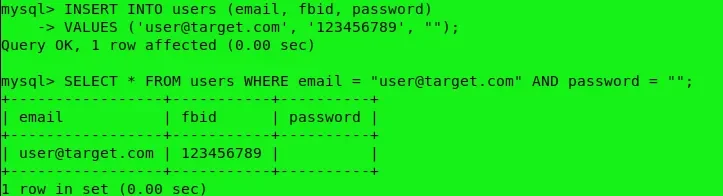
- Case 2: a false value stored as the password. If the application stores a false value for users who signed up via Facebook, entering
0as the password can let you log into the account.
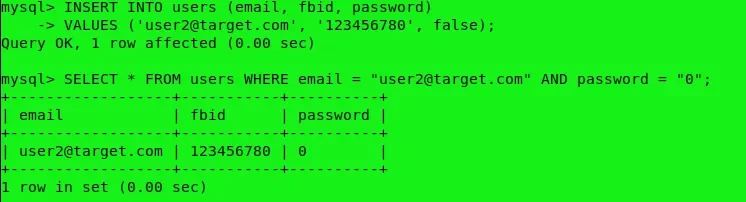
A positive result for either case is a login to an account that was only ever created through the social provider.
What happened, in plain words
A security researcher found a way to take over accounts on a travel booking site called Luxury Retreats, which Airbnb had acquired. The site let people create an account in two ways: by filling in an email address and a password, or by using their Facebook account. The researcher found that signing up again with the same email address through the email form logged them into the existing Facebook-created account. Instead, the site would log the attacker straight into the existing Facebook-created account and let them set a new password. After that, the attacker could log in normally with that email and the new password. The author states that an attacker would only need the user's email ID.
The researcher repeated the sequence using the same email address for both signup methods and saw the same result. They also suggested trying placeholder passwords such as [blank], 123456, 0, 1, 000000 and undefined on accounts created via Facebook.
This write-up explains the whole thing for someone who has never done security testing before. It covers what the site did, why it was wrong, and how you could check for similar problems yourself.
Background: the event and the target
The researcher was taking part in HackTheWorld, an event where companies offer rewards for finding security bugs in their systems. Airbnb was one of the companies offering rewards, so the researcher looked at the list of systems that were allowed to be tested (called the "scope"). In that list they found a domain called luxuryretreats.com, which Airbnb had acquired. A domain is just a website address, like example.com.
On luxuryretreats.com, there were two ways to create an account:
- Signup via Email: you type an email address and choose a password.
- Signup via Facebook: you click a button, log in to Facebook, and Facebook tells the site who you are.
The researcher had already found a different problem on the same site involving OAuth (a way for one website to ask another, like Facebook, to confirm your identity). That problem also led to account takeover, but it is a separate story. This post is about a second way to take over an account.
What you need to know before we start
To follow this, you only need to understand a few basic ideas. No special tools are required.
- Account takeover: when someone else gains control of your account without your permission. Imagine someone copying your house key and letting themselves in whenever they want.
- Signup and login: signing up creates a new account; logging in proves you are the owner of an existing account, usually with an email and password.
- Email address as identity: many websites treat your email address as your unique identifier. If two accounts end up with the same email, the site has to decide what to do.
- Password: a secret word or phrase that only you should know. When you log in, the site checks that the password you type matches the one stored for your account.
- Facebook signup (social login): instead of creating a password on the site, you let Facebook vouch for you. The site receives your email address from Facebook and creates an account for you. There is no password on the site because Facebook handles the proof of identity.
- IDOR: short for Insecure Direct Object Reference. It is a bug where a website lets you access something you should not be able to, simply by changing an identifier in a request. For example, if your profile page is at
example.com/profile?user=123, changing123to124might show you someone else's profile. The researcher was originally looking for this kind of bug when they found the issue described here. - OAuth: a protocol that lets a website ask another service (like Facebook) to confirm your identity without sharing your password. The site redirects you to Facebook, you log in there, and Facebook sends back a token that proves who you are.
- Token: a piece of data that acts like a temporary key. In OAuth, the token tells the site that Facebook has verified you.
- Session: a temporary state where the site remembers that you are logged in. It is usually kept in a cookie, which is a small piece of data your browser stores and sends back to the site with each request.
- API: the part of a website that your browser talks to behind the scenes. When you fill in a form and click submit, your browser sends a request to the site's API, which processes it and sends back a response.
How the researcher found it
The researcher first signed up on luxuryretreats.com using the Facebook option. That created an account tied to their Facebook email address. They then started looking for IDOR bugs, which is a common thing to test. To do that, they needed a second account, so they used the signup-by-email form. They entered the same email address that their Facebook account used, and chose a password.
Normally, a site should reject this: the email address is already in use. But instead of an error, the site logged the researcher directly into the existing Luxury Retreats account that had been created via Facebook. There was no verification step, like sending a confirmation email, to prove that the person submitting the form actually controlled that email address.
The researcher thought this was suspicious, so they repeated the whole sequence to be sure. They created a new account via Facebook signup, then again used the email signup with the same email address. The result was the same: they were logged into the previously created account. From that point on, they could log in with the email address and the password they had chosen during the email signup.
Step-by-step exploitation
Step 1: create the victim-style account via Facebook
Sign up on luxuryretreats.com using the Facebook option. The site creates an account and associates it with the email address from your Facebook profile.
Step 2: sign up again with the same email via the email form
Use the signup-by-email option and enter the same email address that the Facebook account uses, along with a password of your choosing. The site does not reject the duplicate email and does not ask for any proof that you own the email address. Instead, it logs you into the existing Facebook-created account and attaches the password you just set to it.
Step 3: log in normally
Now you can log out and log back in using the ordinary login form with that email address and the password you set in step 2. The researcher states that the email and the password entered during email signup can be used to log into the account.
Why this happens (root cause)
It does not reject the duplicate email, and it does not verify that the person submitting the form controls the mailbox. So the password supplied in the email signup gets attached to the pre-existing account. The report does not describe the server-side code or the exact mechanism.
Impact
If a user signed up via Facebook, an attacker only needs that user's email address to log into the account and set a password on it.
Fix
The report does not say what Airbnb changed.
Variants to test
These are related things you can try on other sites. They are not part of the original finding but are natural extensions.
- Duplicate email across signup providers. Register with a social provider, then register with the email form using the same address. A positive result is being logged into the first account and being able to log in later with the password from the second signup.
- Password guessing on OAuth-created accounts. After signing up via Facebook, try logging in with the email address and common placeholder passwords, in case the OAuth path stored a hardcoded or default value. The author suggests trying values such as
[blank],123456,0,1,000000andundefined.
[blank]
123456
0
1
000000
undefined
This code block is just a list of passwords to try, one per line. [blank] means leaving the password field empty. The others are simple strings that developers sometimes use as placeholders. A positive result is a successful login to the Facebook-created account with one of these values.
- Case 1: no password stored at signup. If the application creates the entry without any password when signing up via Facebook, the account may be reachable through the login form in the state shown below.
- Case 2: a false value stored as the password. If the application stores a false value for users who signed up via Facebook, entering
0as the password can let you log into the account.
A positive result for either case is a login to an account that was only ever created through the social provider.
Glossary
- Account takeover: when an attacker gains control of someone else's account without permission.
- API: the part of a website that your browser communicates with to perform actions like signing up or logging in.
- Cookie: a small piece of data stored by your browser that helps a site remember who you are between requests.
- Domain: a website address, such as example.com.
- Facebook signup (social login): creating an account on a site by using your Facebook identity instead of setting a password on that site.
- IDOR (Insecure Direct Object Reference): a bug where changing an identifier in a request lets you access data or actions you should not be allowed to.
- OAuth: a protocol that lets a site ask another service (like Facebook) to confirm your identity without sharing your password.
- Password: a secret value used to prove your identity when logging in.
- Scope: the list of systems and domains that a bug bounty program allows you to test.
- Session: a temporary logged-in state that a site maintains for you, usually tracked with a cookie.
- Signup: the process of creating a new account.
- Token: a piece of data that acts like a temporary key, often used in OAuth to prove that another service has verified you.
- Verification: a step that confirms you control something, like an email address, typically by sending a link or code to that address.




