Exploiting Redash instances with CVE-2021-41192
Redash instances that did not explicitly configure a secret key fell back to a static default key, allowing an attacker who knew that key to forge session cookies and password reset tokens. The attacker could then reset the administrator's password and log in to query internal data sources.
 Published on ian.sh
A while ago, I stumbled upon Airflow instances being vulnerable to stateless session issues, which allowed me to log into any Airflow instance which had a misconfigured secret key. Since then, I’ve been hunting for similar issues, hoping to find more applications that would have made a similar error.
The full write-up lives on its author's site
It belongs to its author, so we link to it rather than copy it. The other two tabs are our own rewrites, checked against it.
Context
Redash is a self-hosted product, acquired by Databricks, that connects itself to internal data sources such as SQL databases. The researcher had never heard of it before this engagement, but the fact that it connects to internal data sources made it a good target to look into.
The issue described here is a stateless session problem, similar in spirit to an earlier finding on Airflow instances, where a misconfigured secret key allowed logging into any instance. The researcher had been hunting for similar issues since then, hoping to find more applications that made the same error.
Setup
The researcher ran the Flask-Unsign tool on cookies found with bug bounty scanning. It found a good number of issues at first, but was disabled because it took up too many resources. It was re-enabled in October, and while the researcher was on a plane, a Slack alert reported that Flask-Unsign had found a vulnerable cookie.
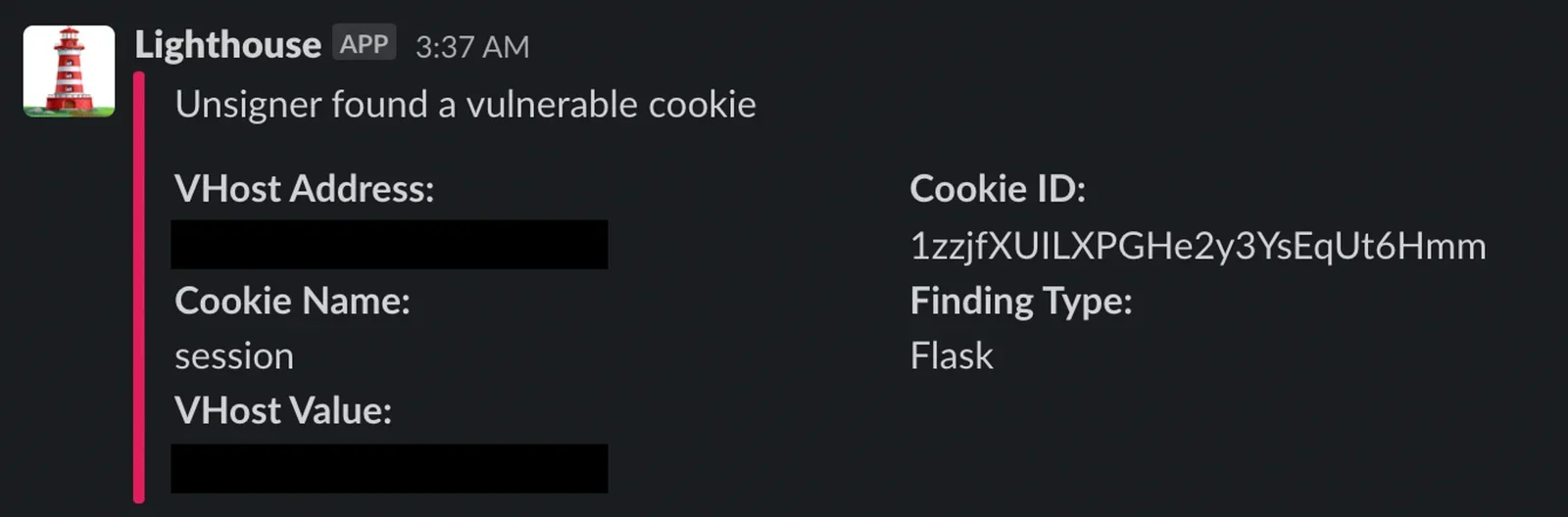
The alert shows Lighthouse, the researcher's automation, sending its findings into Slack.
Visiting the site returned a login page for Redash. The default Flask-Unsign wordlist had picked up the static secret key, and the bug bounty program was running a vulnerable instance.
Finding it
Looking at the Redash source code, the researcher saw that it silently fell back to a static secret key if one was not explicitly configured. Because the session signing key is known, session data can be tampered with and the server will be none the wiser.
In Airflow, the server stores a numeric user_id which is auto-incrementing, so on most Airflow instances sending {user_id: 1} as the session data logs you in as the first user, typically the administrator.
Redash is a bit clever and stores a random user UUID in the session instead. With no access to the instance at all, and no easy way to leak any user UUIDs, this is likely insurmountable. Privilege escalation might be possible from a lowly-privileged user who can see other UUIDs, but that is not good enough for bug bounties.
Exploitation
The breakthrough came from a piece of the Redash source code that generates the password reset links for users:
from itsdangerous import URLSafeTimedSerializer
serializer = URLSafeTimedSerializer(settings.SECRET_KEY)

def invite_token(user):
    return serializer.dumps(str(user.id))
The password reset links are also stateless and are based on the same secret key that is known. Best of all, they use an auto-incrementing user ID instead of a UUID.
Step 1: Generate an invite token for user #1
Because the serializer is keyed on the known secret, the invite token can be generated locally:
>>> from itsdangerous import URLSafeTimedSerializer, SignatureExpired, BadSignature
>>> serializer = URLSafeTimedSerializer("[redacted]")
>>> serializer.dumps(str("1"))
'IjEi.YdEknw.htZVzELmilJCgsSYu1oMXXEVhWY'
The call to serializer.dumps(str("1")) signs the string "1" (the user ID) with the secret key and returns a token.
Step 2: Visit the reset link
Visiting /reset/IjEi.YdEknw.htZVzELmilJCgsSYu1oMXXEVhWY prompted the researcher to set a new password. After doing so, the researcher was able to log in to this instance as an administrator and query quite a bit of data from the company.
The issue was reported via HackerOne while still on the plane and was fixed in minutes, although the program has not yet approved disclosure. The researcher was awarded the program's highest bounty of $1,500.
Redash and Databricks were also contacted about the issue and were great to work with on resolving and preventing the misconfiguration. Redash now has comprehensive documentation on configuring its secret keys, and will refuse to start if a secret key is not explicitly configured.
Scanning for CVE-2021-41192
One bounty is great, but many bounties are even better. Querying a database of page titles for bug bounty programs showed plenty of Redash instances but no other findings. The reason only one instance was found with Flask-Unsign appears to be that it was a very old version of Redash: later versions do not send session cookies until the user is successfully logged in, so there is no way to detect this with cookies for most instances. Finding this one in the first place was lucky.
Detection request
The reset link generated in the previous step can be sent as a simple HTTP request to see if an instance is vulnerable. Vulnerable instances return a new password field; those that are not just say the invite is invalid. A quick rule was written for the automation framework, which flags the server if it returns Enter your new password:
{Path: `/reset/IjEi.YdSlKg.79E2f3PIKsGC0UzV_X5oP8Gs3fk`}: {
		{
			Handler:  processors.SimpleString(`Enter your new password`),
			Name:     "redash_confirmed_vulnerable",
			Severity: types.SeverityTypeCritical,
		},
},
This detection method has an unfortunate side effect: URLSafeTimedSerializer enforces an expiry date on the token, and the token cannot be forged to get around this. As a result, the payload must be regenerated every week.
Scan results
Default installations of Redash via their official installation methods were not impacted, but many companies chose to deploy Redash on their own and fell into this misconfiguration. The researcher worked with two other researchers, haxor1337 and nagli, to scan for even more of these instances.
Ultimately, over $90,000 in bounties was earned from this issue. Two notable instances stood out:
- A large American corporation had numerous vulnerable instances on the internet, for nearly every one of their business units. They paid $75,000 in bounties for these reports.
- A small company had a vulnerable instance on the internet, who paid $5,000 in bounties and said they "need to [disclose] it to some legal institutions".
Several good-faith notifications were also sent to various organisations which were plainly vulnerable and on the internet, including domain registrars and universities. Strangely, or perhaps concerningly, there seems to still be a population of ad-tech companies who are still vulnerable to this issue but have no viable security contact.
Escalating to SSRF with CVE-2021-43780
While reporting this issue to some companies, some instances were encountered which did not have a ton of data inside of them. If data cannot be queried from databases, what else can be done with administrator access? Redash implements a URL data source, which loads data from arbitrary URLs. It attempts to prevent local network requests, in order to prevent server-side request forgery (SSRF).
Unfortunately, this security check was flawed, as seen in the source code:
def is_private_address(url):
    hostname = urlparse(url).hostname
    ip_address = socket.gethostbyname(hostname)
    return ipaddress.ip_address(text_type(ip_address)).is_private
A URL such as http://[redacted]\\@[redacted] returns a hostname of [redacted] when parsed by urllib, but libraries like requests will parse it as a request to the AWS metadata service. This allows it to pass as a public IP and allows full SSRF on the Redash instance.
This was reported to Redash, who promptly fixed it as CVE-2021-43780, moving to the Advocate library to safely perform external HTTP requests.
Root cause
Two separate mistakes are involved.
The first is the silent fallback to a static secret key when none is explicitly configured. Because the key is static and well known (the default Flask-Unsign wordlist had picked it up, presumably from GitHub), anyone can sign reset tokens for any instance that never set its own key. The session design in Redash, which stores a random user UUID rather than an auto-incrementing ID, would normally make session forgery impractical, but the reset token path sidesteps that by signing the auto-incrementing user ID instead.
The second is the SSRF check in is_private_address. It resolves the hostname with urllib and checks the resulting IP, but the URL is later fetched by requests, which parses the same URL differently. The two parsers disagree on which host is being contacted, so a URL that looks public to the check reaches the metadata service.
Impact
On a vulnerable instance, an unauthenticated attacker can generate a valid reset token for user #1, typically the administrator, and take over that account, then query data from the connected data sources. This applies to instances that never configured a secret key; default installations via the official installation methods were not impacted, and later versions do not send session cookies until login, which removes the cookie-based detection path.
With administrator access, the URL data source can be abused for full SSRF against internal services such as the AWS metadata service.
Fix
Redash now documents how to configure its secret keys and refuses to start if a secret key is not explicitly configured. The SSRF issue was fixed as CVE-2021-43780 by moving to the Advocate library to safely perform external HTTP requests.
Variants to test
- Other Flask applications with a default secret key. Run Flask-Unsign against cookies you collect and check whether the default wordlist hits. A positive result is a cookie that validates against a known key.
- Stateless reset or invite tokens keyed on the same secret. Look for serializers built on
URLSafeTimedSerializer(settings.SECRET_KEY)that sign predictable values such as user IDs. A positive result is a token you can generate locally that the server accepts. - Applications that do not set cookies until login. Since later Redash versions do not send session cookies before authentication, look for other endpoints that accept signed tokens, such as password reset links, and test those instead.
- URL parsers that disagree. Try URLs where the hostname seen by the validation library differs from the one seen by the HTTP client, for example
http://[redacted]\\@[redacted]. A positive result is a request that reaches an internal address despite passing the private-address check. - Scope gaps. The researcher notes that nearly every program had to ignore its scope restrictions because the vulnerable instances sat on other parts of their infrastructure. When testing, check adjacent infrastructure that shares the same product deployment.
What happened, in plain words
A security researcher found a way to log into a piece of software called Redash as its administrator, without ever being given a username or password. Redash is a tool that companies install on their own computers (this is what "self-hosted" means) and then connect to their internal databases, so that staff can make charts and reports from company data. If you can get into Redash as an administrator, you can often read the data it is connected to.
The way in was a mistake in how Redash handled a kind of digital signature. Redash signs certain things, such as the links it emails people to reset their password, using a secret key. If a company did not set its own secret key, Redash quietly used a fixed, publicly known one instead. Because that key is public, anyone can produce a signature that Redash will accept. The researcher used this to create a valid password reset link for the first user account, which is normally the administrator, and then set a new password for it.
The researcher then built a way to check many other Redash installations for the same mistake, worked with two other researchers to scan at scale, and together they earned over $90,000 in bug bounties. Along the way they found a second, related flaw that let an administrator make the Redash server fetch web addresses on the internal network, which is called server-side request forgery (SSRF). Both problems were reported to Redash and fixed.
This article walks through the whole story from the beginning, explaining each idea as it comes up. You only need to be comfortable using a browser.
Background: what Redash is and why it was interesting
Redash is software a company runs on its own servers. You point it at data sources, which are places data lives, such as SQL databases. A database is an organised store of information, and SQL is the language used to ask it questions. Redash then lets people build dashboards and reports from that data.
Redash was acquired by Databricks, a data company. The researcher had never heard of Redash before this story, but the fact that it connects to internal data sources made it worth a look: software that sits next to company databases is valuable to an attacker, because getting into it can mean getting at the data behind it.
The problem here belongs to a family called stateless session issues. To understand that, you first need to know what a session is.
When you log into a website, the server needs a way to remember that you are logged in as you click from page to page. The web itself does not remember anything between requests; each request arrives as if for the first time. So the server gives your browser a small piece of data, usually stored in a cookie, and your browser sends it back with every request. The server looks at the cookie and says, in effect, "this is the person who logged in earlier". That ongoing logged-in conversation is the session.
There are two broad ways to do this:
- Stateful: the server keeps a record of each session in its own memory or database, and the cookie is just a random ticket number that points at that record. The cookie means nothing on its own.
- Stateless: the server does not keep a record. Instead, the cookie itself contains the information (such as which user you are), plus a signature made with a secret key. When the cookie comes back, the server checks the signature. If it matches, the server trusts the contents.
A signature here works like a wax seal on an envelope. Anyone can see the letter inside, but only someone holding the seal (the secret key) can produce a valid seal. If an attacker does not have the key, they can read the cookie but cannot change it without breaking the seal.
The catch is obvious: if the secret key becomes known, the seal can be forged, and the attacker can write whatever they like in the cookie. That is exactly what happened here.
The researcher had seen this pattern before, on Airflow, another piece of software. On Airflow instances with a badly configured secret key, they had been able to log in. Since then they had been looking for other applications that made the same mistake.
Setting up the search
To find these problems at scale, the researcher used a tool called Flask-Unsign. Flask is a popular toolkit for building websites in the Python programming language, and many applications built with it sign their cookies in the way described above. Flask-Unsign takes a cookie and tries to check its signature against a long list of known or common secret keys, called a wordlist. If one of the keys in the list produces a matching signature, the tool reports the cookie as vulnerable, because it means the application is using a key that is publicly guessable.
The researcher ran Flask-Unsign on cookies collected during bug bounty scanning. A bug bounty is a programme where companies pay researchers for reporting security problems in their systems. The scanning is automated: software visits many websites and records what it finds.
Flask-Unsign found a good number of issues at first, but the researcher turned it off because it used too many resources, meaning it was too heavy for the machines running the scans. In October they switched it back on. While sitting on a plane, they received a Slack alert. Slack is a chat tool, and the researcher's automation sends its findings into a Slack channel so they can be seen on a phone.
The screenshot shows that alert: the researcher's automation, called Lighthouse, reporting that it had found a vulnerable cookie.
So the sequence was: a tool checked cookies against a list of known keys, one cookie matched, and an alert arrived. The researcher then visited the site the cookie came from and found a login page for Redash. The default wordlist shipped with Flask-Unsign had contained the fixed key that Redash falls back to, and this particular bug bounty programme was running a Redash instance that had never set its own key.
Finding the flaw in the code
The researcher read the Redash source code, which is the human-written instructions that make up the program. There they saw that if no secret key was explicitly configured, Redash silently fell back to a static secret key. "Static" means fixed and unchanging; the same key for every installation that does not set its own. "Silently" means it did not warn anyone or refuse to start; it simply carried on.
Because the session signing key is now known, the session data can be tampered with and the server will be none the wiser. It will check the signature, the signature will be valid, and it will believe whatever the cookie says.
But there was a complication. On Airflow, the session stored a numeric user_id, a number identifying the user, and that number counted up automatically: the first account created is 1, the next is 2, and so on. On most Airflow instances, sending {user_id: 1} as the session data logged you in as the first user, which is typically the administrator. An administrator is an account with full control.
Redash was a bit cleverer. It stored a random user UUID in the session. A UUID is a long random identifier, something like a serial number with no pattern. You cannot guess the next one or count through them. Since the researcher had no access to the instance at all, and could not find an easy way to leak any user UUIDs, this looked likely to be insurmountable. In theory, if you were already a low-privileged user and could see other users' UUIDs, you might escalate your privileges, meaning raise your own level of access. But that is not good enough for bug bounties, where the interesting finding is getting in from the outside with nothing.
The breakthrough: password reset links
Stuck at this point, and suffering with the quality of in-flight WiFi, the researcher came across a very intriguing piece of the Redash source code. This piece generates the password reset links for users. A password reset link is what a website emails you when you click "forgot my password": a special web address that lets you set a new password without knowing the old one.
from itsdangerous import URLSafeTimedSerializer
serializer = URLSafeTimedSerializer(settings.SECRET_KEY)

def invite_token(user):
    return serializer.dumps(str(user.id))
Line by line:
from itsdangerous import URLSafeTimedSerializerbrings in a helper from a Python library calleditsdangerous. The name is a pun on "it's dangerous", a hint that whatever you sign with it had better be handled carefully.URLSafeTimedSerializeris a tool that takes some data, signs it with a secret key, and produces a string that is safe to put in a web address. "Timed" means the result carries a timestamp and can be set to expire.serializer = URLSafeTimedSerializer(settings.SECRET_KEY)creates one of these tools, configured with the application's secret key.settings.SECRET_KEYis the key from the application's configuration, the same key used to sign sessions.def invite_token(user):defines a small function, a reusable block of code, that takes a user and returns their invite token.return serializer.dumps(str(user.id))is the important line. It takes the user's ID number, converts it to text withstr(...), signs it with the secret key, and returns the resulting string. That string is the token that goes into the reset link.
This is exactly what was needed. The password reset links are also stateless, and they are based on the same secret key that is now known. Best of all, they use an auto-incrementing user ID instead of a UUID. The reset link path sidesteps the clever UUID design entirely: it signs a small predictable number instead.
Step 1: generate an invite token for user #1
Because the serializer is keyed on the known secret, the invite token can be generated locally, on the researcher's own machine, without touching the target at all:
>>> from itsdangerous import URLSafeTimedSerializer, SignatureExpired, BadSignature
>>> serializer = URLSafeTimedSerializer("[redacted]")
>>> serializer.dumps(str("1"))
'IjEi.YdEknw.htZVzELmilJCgsSYu1oMXXEVhWY'
Line by line:
- The first line imports the serializer, plus two error types,
SignatureExpiredandBadSignature, which are raised when a token is too old or its signature does not match. The>>>prompt is how Python's interactive mode shows that you are typing commands directly and seeing results immediately. - The second line creates a serializer using the secret key
[redacted]. This is the fixed key that Redash falls back to, the one the Flask-Unsign wordlist had picked up. - The third line asks the serializer to sign the text
"1", the user ID of the first account. The result is'IjEi.YdEknw.htZVzELmilJCgsSYu1oMXXEVhWY'.
Change any part and the signature no longer matches.
Step 2: visit the reset link
The researcher visited /reset/IjEi.YdEknw.htZVzELmilJCgsSYu1oMXXEVhWY on the target site and was prompted to set a new password. After doing so, they were able to log in to this instance as an administrator and query quite a bit of data from the company. In other words, the forged reset link handed over the most powerful account on the system, and from there the connected data was reachable.
The issue was reported through HackerOne, a platform where researchers submit bug bounty reports, while the researcher was still on the plane. It was fixed in minutes, which is impressively fast, although the programme has not yet approved public disclosure of the report. The researcher was awarded the programme's highest bounty of $1,500.
Redash and Databricks were also contacted about the issue and were great to work with on resolving it and preventing the misconfiguration. Redash now has comprehensive documentation on configuring its secret keys, and will refuse to start if a secret key is not explicitly configured. Refusing to start is a strong fix: instead of quietly using a public key, the software stops and makes the operator choose one.
Scanning for CVE-2021-41192
One bounty is great, but many bounties are even better. A CVE is a public catalogue number for a known security flaw, so that everyone can refer to the same issue unambiguously. CVE-2021-41192 is the number assigned to this Redash problem.
The researcher queried a database of page titles collected from bug bounty programmes and could see plenty of Redash instances, but no other findings. Why had Flask-Unsign only found this one instance? The answer appears to be that this was a very old version of Redash. Later versions do not send session cookies until the user is successfully logged in. If no cookie is handed out before login, there is no way to detect this with cookies for most instances. Finding this one in the first place was genuinely lucky.
The detection request
Luckily, there is another way. The reset link generated in the previous step can be sent as a simple HTTP request to see if an instance is vulnerable. An HTTP request is the ordinary message a browser sends to a web server when you visit a page; here the automation sends the same kind of request directly. Vulnerable instances return a page with a new password field, meaning the reset link was accepted. Instances that are not vulnerable just say the invite is invalid.
The researcher wrote a quick rule for their automation framework, which flags the server if the response contains Enter your new password:
{Path: `/reset/IjEi.YdSlKg.79E2f3PIKsGC0UzV_X5oP8Gs3fk`}: {
		{
			Handler:  processors.SimpleString(`Enter your new password`),
			Name:     "redash_confirmed_vulnerable",
			Severity: types.SeverityTypeCritical,
		},
},
Line by line:
{Path:/reset/IjEi.YdSlKg.79E2f3PIKsGC0UzV_X5oP8Gs3fk}: {says: for this web address, apply the checks that follow. The address is a reset link built the same way as before, with a different token. The language is Go, and the backticks mark the address as literal text.Handler: processors.SimpleString(Enter your new password)is the check itself. It looks in the server's response for the exact textEnter your new password. If that text is present, the reset link was accepted.Name: "redash_confirmed_vulnerable"gives the finding a label, so the results are easy to recognise.Severity: types.SeverityTypeCriticalmarks a hit as critical, the highest urgency level, because an accepted reset link means an administrator account can be taken over.
This detection method has an unfortunate side effect. URLSafeTimedSerializer enforces an expiry date on the token, and the token cannot be forged to get around this: the timestamp is part of what is signed, so changing it breaks the seal. As a result, the payload must be regenerated every week. The scan is therefore not a one-off; it needs fresh tokens to keep working.
Scan results
Default installations of Redash via their official installation methods were not impacted. But many companies chose to deploy Redash on their own, and fell into this misconfiguration. The researcher worked with two other researchers, haxor1337 and nagli, to scan for even more of these instances.
Ultimately, over $90,000 in bounties was earned from this issue. Two notable instances stood out:
- A large American corporation had numerous vulnerable instances on the internet, for nearly every one of their business units. They paid $75,000 in bounties for these reports.
- A small company had a vulnerable instance on the internet, who paid $5,000 in bounties and said they "need to [disclose] it to some legal institutions".
Several good-faith notifications were also sent to various organisations which were plainly vulnerable and on the internet, including domain registrars and universities. A domain registrar is a company that sells and manages web addresses. Strangely, or perhaps concerningly, there seems to still be a population of ad-tech companies who are still vulnerable to this issue but have no viable security contact, meaning there is no reliable way to tell them.
Escalating to SSRF with CVE-2021-43780
While reporting this issue to some companies, the researchers encountered some instances which did not have a ton of data inside them. If data cannot be queried from databases, what else can be done with administrator access?
Redash implements a URL data source, which loads data from arbitrary web addresses. You give it a URL and it fetches whatever is there, treating the result as data. That is useful, but it also means the Redash server can be told to make requests on the attacker's behalf. This is called server-side request forgery (SSRF): the attacker cannot reach some address directly, but the server can, so the attacker makes the server do it. The classic target is the cloud provider's internal metadata service, a special address that cloud machines use to learn about themselves and which can hand out credentials.
Redash attempts to prevent local network requests, in order to prevent SSRF. The idea is to check whether the address is private, meaning inside the internal network, and refuse those. Unfortunately, this security check was flawed, as seen in the source code:
def is_private_address(url):
    hostname = urlparse(url).hostname
    ip_address = socket.gethostbyname(hostname)
    return ipaddress.ip_address(text_type(ip_address)).is_private
Line by line:
def is_private_address(url):defines a function that takes a web address and answers whether it points somewhere private.hostname = urlparse(url).hostnameusesurlparse, a standard Python tool for splitting a URL into its parts, and takes thehostname, the name of the machine being contacted.ip_address = socket.gethostbyname(hostname)looks up that name and turns it into a numeric IP address, the number that identifies a machine on a network. This is like looking up a name in a phone book.return ipaddress.ip_address(text_type(ip_address)).is_privatechecks whether that numeric address is in a private range and returns true or false.
The flaw is that two different pieces of software read the same URL differently. A URL such as http://[redacted]\\@[redacted] returns a hostname of [redacted] when parsed by urllib, the library used in the check. But libraries like requests, which actually fetch the page, will parse it as a request to the AWS metadata service. The check sees a public address and lets it through; the fetcher then contacts the internal one. This allows it to pass as a public IP and allows full SSRF on the Redash instance.
This was reported to Redash, who promptly fixed it as CVE-2021-43780, moving to the Advocate library to safely perform external HTTP requests.
Root cause
Two separate mistakes are involved.
The first is the silent fallback to a static secret key when none is explicitly configured. Because the key is static and well known (the default Flask-Unsign wordlist had picked it up, presumably from GitHub), anyone can sign reset tokens for any instance that never set its own key. The session design in Redash, which stores a random user UUID rather than an auto-incrementing ID, would normally make session forgery impractical, but the reset token path sidesteps that by signing the auto-incrementing user ID instead.
The second is the SSRF check in is_private_address. It resolves the hostname with urllib and checks the resulting IP, but the URL is later fetched by requests, which parses the same URL differently. The two parsers disagree on which host is being contacted, so a URL that looks public to the check reaches the metadata service.
Impact
On a vulnerable instance, an unauthenticated attacker, meaning someone with no account at all, can generate a valid reset token for user #1, typically the administrator, and take over that account, then query data from the connected data sources. This applies to instances that never configured a secret key. Default installations via the official installation methods were not impacted, and later versions do not send session cookies until login, which removes the cookie-based detection path.
With administrator access, the URL data source can be abused for full SSRF against internal services such as the AWS metadata service.
Fix
Redash now documents how to configure its secret keys and refuses to start if a secret key is not explicitly configured. The SSRF issue was fixed as CVE-2021-43780 by moving to the Advocate library to safely perform external HTTP requests.
Variants to test
If you want to look for similar problems, these are the patterns worth trying:
- Other Flask applications with a default secret key. Run Flask-Unsign against cookies you collect and check whether the default wordlist hits. A positive result is a cookie that validates against a known key.
- Stateless reset or invite tokens keyed on the same secret. Look for serializers built on
URLSafeTimedSerializer(settings.SECRET_KEY)that sign predictable values such as user IDs. A positive result is a token you can generate locally that the server accepts. - Applications that do not set cookies until login. Since later Redash versions do not send session cookies before authentication, look for other endpoints that accept signed tokens, such as password reset links, and test those instead.
- URL parsers that disagree. Try URLs where the hostname seen by the validation library differs from the one seen by the HTTP client, for example
http://[redacted]\\@[redacted]. A positive result is a request that reaches an internal address despite passing the private-address check. - Scope gaps. The researcher notes that nearly every programme had to ignore its scope restrictions because the vulnerable instances sat on other parts of their infrastructure. Scope is the list of systems a programme says are in bounds for testing. When testing, check adjacent infrastructure that shares the same product deployment.
Glossary
- Administrator: an account with full control over a system, including its settings and data.
- Advocate: a Python library used to make external HTTP requests safely, adopted by Redash to fix the SSRF issue.
- Airflow: another piece of software the researcher had previously found vulnerable to a similar stateless session problem.
- API: a defined way for one piece of software to talk to another; here, the interfaces Redash exposes for data and configuration.
- AWS metadata service: an internal address on Amazon cloud machines that provides information about the machine and can hand out credentials.
- Bug bounty: a programme that pays researchers for reporting security problems.
- Cookie: a small piece of data a website stores in your browser and receives back with each request, often used to remember that you are logged in.
- CVE: a public catalogue number for a known security flaw.
- Databricks: the company that acquired Redash.
- Disclosure: making the details of a security report public.
- Domain registrar: a company that sells and manages web addresses.
- Endpoint: a specific web address on a server that accepts requests.
- Escalate privileges: raise your level of access, for example from a normal user to an administrator.
- Flask: a toolkit for building websites in Python.
- Flask-Unsign: a tool that checks whether a cookie's signature matches any key in a list of known keys.
- Go: a programming language, used here for the scanning rule.
- HackerOne: a platform where researchers submit bug bounty reports.
- Handler: in the scanning rule, the part that inspects the server's response.
- Hostname: the name of a machine in a web address, such as a domain name.
- HTTP request: the message a browser or tool sends to a web server to ask for a page.
- IP address: the number that identifies a machine on a network.
- itsdangerous: a Python library for signing data and producing tokens.
- Lighthouse: the researcher's automation that sends findings into Slack.
- Metadata service: see AWS metadata service.
- OAuth / SAML: standard ways for websites to handle login and identity.
- oauth2-proxy: a tool that puts a login check in front of an application.
- Payload: the data part of a token, before the signature.
- Privilege escalation: gaining a higher level of access than you should have.
- Python: a programming language, used to build Redash and its tools.
- Redash: self-hosted software that connects to data sources and builds dashboards and reports.
- requests: a Python library for fetching web pages.
- Scope: the list of systems a bug bounty programme says are in bounds for testing.
- Secret key: a private value used to sign data so that it cannot be forged.
- Self-hosted: software a company runs on its own machines rather than as a service from a vendor.
- Serializer: a tool that turns data into a signed string and back again.
- Session: the ongoing logged-in conversation between a browser and a server.
- Signature: a value produced from data and a secret key, used to prove the data has not been changed.
- Slack: a chat tool, used here to receive alerts.
- SQL: the language used to ask questions of a database.
- SSRF (server-side request forgery): making a server fetch an address on the attacker's behalf, often to reach internal systems.
- Stateless session: a session where the cookie itself holds the information and a signature, with no record kept on the server.
- Timestamp: the time a token was made, used to enforce expiry.
- Token: a string that represents something, such as a login or a reset permission, usually signed so it cannot be forged.
- URL: a web address.
- URLSafeTimedSerializer: the itsdangerous tool that signs data into a URL-safe string with a timestamp.
- User ID: the number identifying a user account.
- UUID: a long random identifier with no predictable pattern.
- Wordlist: a list of known or common values, here secret keys, that a tool tries against a target.



