Breaking the Barrier: Admin Panel Takeover Worth $3500
The password reset endpoint for the admin panel leaked the reset token in its response, and the API documentation revealed a parameter that allowed the token to be used to set a new admin password. An attacker could reset the admin password and log in to the admin panel.
 Published on medium.com
I’m back with another writeup where we successfully bypassed the Admin Panel while working on a Bugcrowd private program. This issue was discovered in collaboration with my friend Rajesh Ranjan (Also thanks to him for inviting me to collaborate on the program).
The full write-up lives on its author's site
It belongs to its author, so we link to it rather than copy it. The other two tabs are our own rewrites, checked against it.
Context
This write-up covers an admin panel takeover found on a Bugcrowd private program, discovered together with Rajesh Ranjan, who also invited me to collaborate on the program. The target was a web application whose administrative interface lives on a subdomain, admin.example.com (the name is a placeholder used throughout the write-up). Visiting that subdomain normally redirects to the login page at https://admin.example.com/manage/login, and everything administrative sits under the /manage/ path.
Admin panel bypass, as the term is used here, means gaining unauthorised access to an administrative interface by exploiting weak authentication mechanisms, exposed endpoints or flawed password reset functionality, rather than by breaking the login itself. Once inside, an attacker can manipulate the system, steal data or cause significant damage, which is why this class of bug is treated as critical.
Setup
The work was done against a private Bugcrowd program, so the real hostnames are not published. The only tooling named in the write-up is FFUF for directory enumeration. The write-up submits the username admin to the Forgot Password page.
Finding it
Subdomain enumeration surfaced admin.example.com. A normal visit redirects to https://admin.example.com/manage/login, so the next step was content discovery against the /manage/ directory:
That enumeration turned up a second endpoint, the Forgot Password page at https://admin.example.com/manage/forgotpassword. A password reset form is a normal feature, but it is also a place where token handling frequently goes wrong, so it was worth testing.
Exploitation
Step 1: Request a reset and watch the response
Submitting the username admin to the Forgot Password page and intercepting the request showed that the password reset token was leaked directly in the response body. The token is meant to be delivered out of band, to the address or device that owns the account; returning it to whoever asked for the reset means the requester can complete the reset themselves.
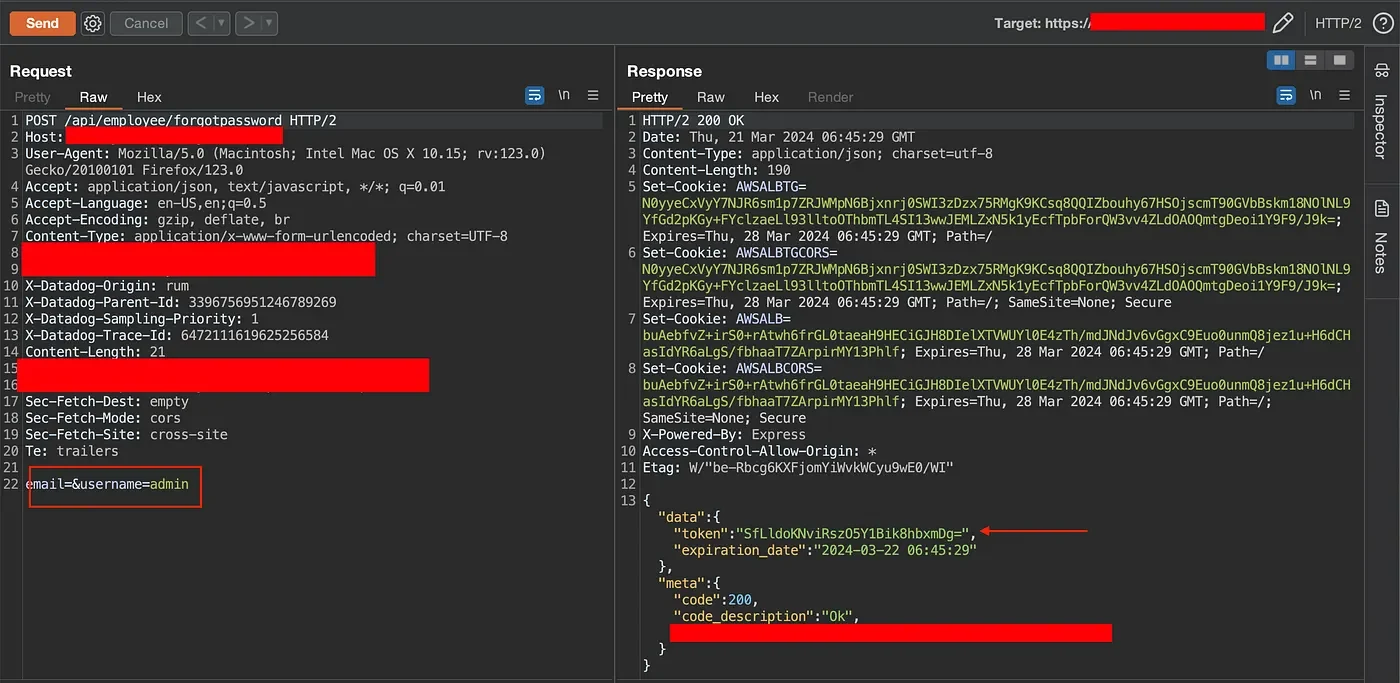
Picture 1 shows the intercepted Forgot Password request and the response containing the leaked reset token.
Step 2: Work out how to spend the token
Having a token is not the same as having a working reset. The main hurdle was figuring out which request actually consumes it. Reading the full API documentation of the web application resolved this: the relevant parameter is passwordConfirm. The documentation identified the relevant parameter, passwordConfirm.
Step 3: Reset the administrator password
With the parameter identified, the next step was to craft a request to the /api/employee/resetpassword endpoint carrying the leaked token and the new password. Sending it successfully reset the admin user's password.
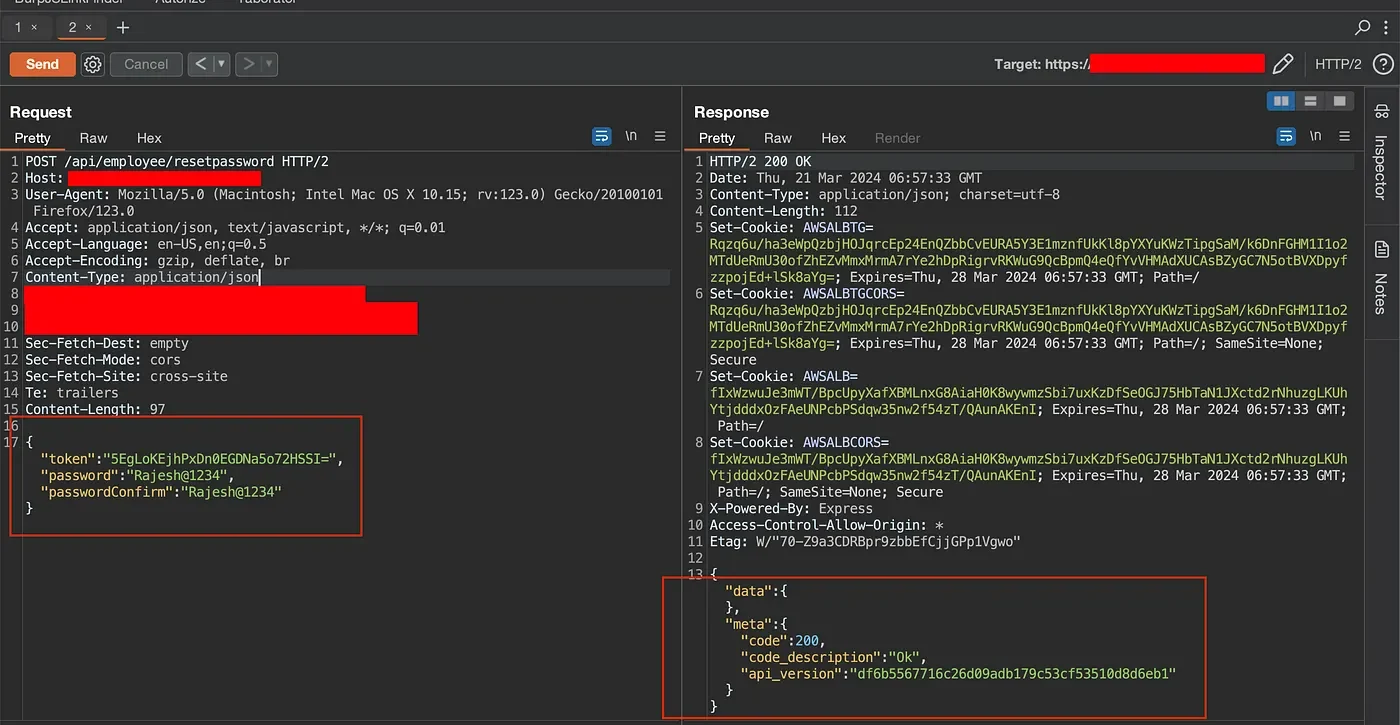
Picture 2 shows the reset request against /api/employee/resetpassword with the passwordConfirm parameter and the token, and the successful reset of the admin account.
Step 4: Log in to the admin panel
Finally, we logged in at https://admin.example.com/manage/login with the password we had just set. The login succeeded and gave access to the admin panel.
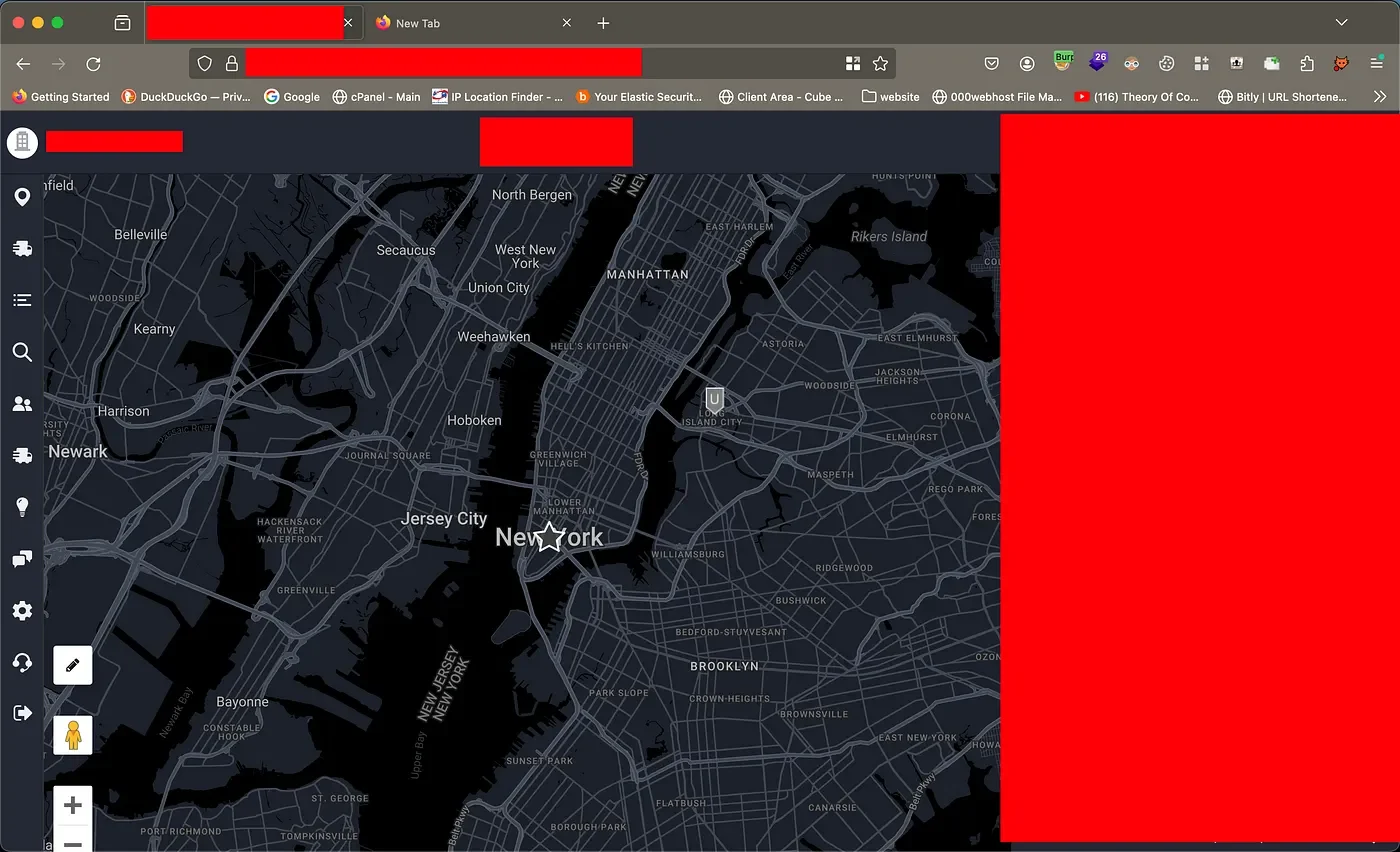
Picture 3 shows the admin panel after a successful login with the reset password.
Root cause
The flaw is a combination of two mistakes. First, the Forgot Password endpoint returns the reset token in the HTTP response to the caller instead of delivering it only to the account owner, so possession of a username is enough to obtain a valid token. Second, the reset API at /api/employee/resetpassword accepts that token together with a caller-supplied passwordConfirm value and applies it to the account, so the token can be redeemed by anyone who holds it. Because the token is handed out on request, the attacker never has to guess a password.
The write-up does not describe the server-side validation around the token beyond this, so the exact checks that were missing (single use, binding to the requesting session, expiry) are not stated.
Impact
An attacker who submits an administrator username can obtain a reset token for that account, set a new password and log in to the admin panel. From there the attacker has access to the administrative interface. In this case the program treated it as serious enough to patch within an hour of submission and to reward $3,500.
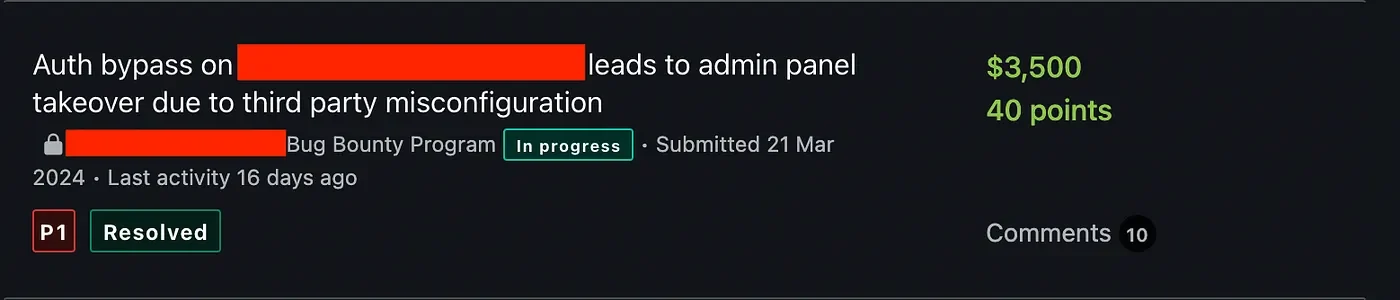
Picture 4 shows the bounty credited for the finding.
The same access also enabled a follow-on finding: a full internal SSRF leading to an AWS metadata leak. That was marked as a duplicate, because it could only be exploited once the admin panel, the original vulnerability, had been reached.
Fix
The write-up states that the vulnerability was patched within an hour of submission but does not describe the change that was made.
Variants to test
- Request a password reset for a known username and inspect the full response, including JSON bodies, headers and any debug fields. A positive result is a token, a reset link or a temporary password appearing in the response.
- Enumerate the directory that holds the login page with FFUF and look for sibling endpoints such as forgot-password, reset and API paths. A positive result is a reset or account endpoint that is reachable without authentication.
- Read the application's API documentation and look for reset endpoints and parameter names such as
passwordConfirm. A positive result is a documented reset call whose parameters you can reproduce with a token obtained in step 1. - Replay a token obtained in one session from a different client or session. A positive result is the reset succeeding, which shows the token is not bound to the requester.
- Try the same token a second time. A positive result is a second successful reset, which shows the token is not single use.
- After gaining admin access, look for server-side request functionality inside the panel and test it against internal addresses and the cloud metadata service. A positive result is a response from an internal host or metadata credentials, as happened here with the AWS metadata leak.
What happened, in plain words
A website had a separate area for its staff, called the admin panel. That is the back office of a site: the place where administrators manage users, data and settings, and where ordinary visitors are not supposed to go. The only thing standing between a stranger and that back office was a login page asking for a username and a password.
We found a way to skip the password entirely. The site had a normal "Forgot Password" feature. When we asked it to reset the password for the administrator account, the site handed the secret reset code straight back to us in its reply. With that code in hand, we used the site's own password reset function to set a new password for the administrator, then logged in with it. The admin panel was ours.
The company fixed the problem within an hour of us reporting it and paid a $3,500 bounty. A bounty is a reward a company pays to someone who reports a security flaw responsibly instead of abusing it.
This write-up was done together with my friend Rajesh Ranjan, who also invited me to collaborate on the program. The program was a private one on Bugcrowd, a platform where companies list their systems for security testing. Because it is private, the real website address is not published; throughout the write-up the target is called example.com, a placeholder name.
The idea behind the attack
An admin panel bypass means getting into the administrative area of a website without being allowed in. The usual way in is to guess or steal the password. Here we did something different: we abused weak spots around the login, in this case a password reset feature that was built badly. The write-up lists the kinds of weakness that make this possible: weak authentication mechanisms (ways of proving who you are), exposed endpoints (web addresses that should not be reachable by outsiders), and flawed password reset functionality.
Once someone is inside an admin panel, they can change the system, take data or cause serious damage. That is why this kind of bug is treated as critical.
Step by step
Step 1: Find the admin area
We started by looking for parts of the target that are not linked from the main site. A website can have many subdomains, which are prefixes added to the main name, like shop.example.com or mail.example.com. Finding them is called subdomain enumeration. During that search we found admin.example.com.
When you visit that address in a browser, it does not show you anything useful. It redirects you, meaning it automatically sends your browser to another address, the login page at https://admin.example.com/manage/login. Everything administrative lives under the /manage/ path, the part of the address after the domain name.
Step 2: Look for other pages in the same folder
A login page rarely sits alone. Next to it there are usually related pages: a registration form, a password reset form, and so on. To find them we used a tool called FFUF, which takes a list of common names and tries each one in place of the FUZZ marker in a web address, reporting which ones exist. Think of it as trying every key on a big keyring in a door to see which one turns.
Line by line:
ffufis the name of the program being run.-utells it which address to test. TheFUZZword is the placeholder that gets replaced by each candidate name from a wordlist.https://admin.example.com/manage/FUZZis the address being probed. With a candidate likelogin, FFUF would requesthttps://admin.example.com/manage/login; withforgotpassword, it would requesthttps://admin.example.com/manage/forgotpassword, and so on.
This turned up a second page: the Forgot Password form at https://admin.example.com/manage/forgotpassword. A password reset form is a completely normal feature, but it is also a place where developers often make mistakes with the secret codes involved, so it was worth a closer look.
Step 3: Ask for a reset and watch what comes back
A password reset works like this. You tell the site which account you want to reset. The site creates a one-time secret code, called a token, and is supposed to send it to the email address or phone that belongs to that account. You then use the code to prove the account is yours and set a new password. The whole security of the feature rests on the code reaching only the real owner.
We submitted the username admin to the Forgot Password page. We intercepted the request to see what the site sent and received. When we looked at the reply to the reset request, the reset token was right there in it.
Picture 1 shows the intercepted Forgot Password request and the response containing the leaked reset token. In other words, the site answered the stranger who asked for the reset with the secret that was meant for the administrator's inbox.
Step 4: Work out how to use the token
Having the token is not the same as having a working reset. The site's reset form is only one way to use it; behind the scenes the page talks to an API. An API is the set of addresses a website's own pages use to send and receive data, separate from the pages you see in a browser. Think of the visible page as the counter of a shop and the API as the back door the staff use to fetch stock: same building, different entrance, and it accepts requests in a specific format.
The main difficulty was finding out which request actually consumes the token. We read the full API documentation of the web application, which is the reference guide describing every API address and the parameters it expects. A parameter is a named value you attach to a request, like a field on a form. Reading the documentation, we identified the relevant parameter, passwordConfirm.
Step 5: Reset the administrator's password
With the parameter identified, we built a request to the reset API at /api/employee/resetpassword, carrying the leaked token and the new password we wanted. Sending it reset the administrator's password.
Picture 2 shows the reset request against /api/employee/resetpassword with the passwordConfirm parameter and the token, and the successful reset of the admin account.
Step 6: Log in
Finally we went to https://admin.example.com/manage/login and entered the password we had just set. The login succeeded and we were inside the admin panel.
Picture 3 shows the admin panel after a successful login with the reset password.
Why it worked
Two mistakes combined to make this possible.
- The Forgot Password page returned the reset token in its reply to whoever asked, instead of delivering it only to the account owner. Knowing a username was therefore enough to obtain a valid token.
- The reset API at
/api/employee/resetpasswordaccepted that token together with a password value supplied by the caller, and applied it to the account. Anyone holding the token could redeem it.
Because the token is handed out on request, the login page offered no protection at all. We never had to guess a password.
The write-up does not describe the server-side checks around the token beyond this, so the exact validations that were missing (single use, binding to the requesting session, expiry) are not stated.
What it means for the site
Someone who submits an administrator's username can obtain a reset token for that account, set a new password and log in to the admin panel. From there they have access to the administrative interface. The program treated it as serious enough to patch within an hour of submission and to pay $3,500.
Picture 4 shows the bounty credited for the finding.
The same access also led to a follow-on finding: a full internal SSRF leading to an AWS metadata leak. SSRF, or server-side request forgery, is when a website can be tricked into making requests on the attacker's behalf, for example to internal machines that outsiders cannot reach. AWS metadata is a small internal service in Amazon's cloud that hands out information about the server, including credentials. That follow-on finding was marked as a duplicate, because it could only be exploited after reaching the admin panel, which was the original vulnerability.
How to fix it
The write-up says the vulnerability was patched within an hour of submission but does not describe the change that was made.
Things to try yourself
- Request a password reset for a known username and inspect the full response, including JSON bodies, headers and any debug fields. JSON is a common text format for data exchanged between a site and its API. A positive result is a token, a reset link or a temporary password appearing in the response.
- Enumerate the folder that holds the login page with FFUF and look for sibling pages such as forgot-password, reset and API paths. A positive result is a reset or account endpoint reachable without logging in.
- Read the application's API documentation and look for reset endpoints and parameter names such as
passwordConfirm. A positive result is a documented reset call whose parameters you can reproduce with a token obtained in step 1. - Replay a token obtained in one session from a different client or session. A positive result is the reset succeeding, which shows the token is not bound to the requester.
- Try the same token a second time. A positive result is a second successful reset, which shows the token is not single use.
- After gaining admin access, look for server-side request functionality inside the panel and test it against internal addresses and the cloud metadata service. A positive result is a response from an internal host or metadata credentials, as happened here with the AWS metadata leak.
Glossary
- Admin panel: the back-office area of a website where administrators manage users, data and settings.
- Admin panel bypass: gaining access to that back office without being authorised, by abusing weaknesses around the login rather than breaking the password.
- API: the set of addresses a website's own pages use to send and receive data, separate from the pages a visitor sees.
- API documentation: the reference guide describing an API's addresses and the parameters each one expects.
- Authentication: the process of proving who you are, usually with a username and password.
- AWS metadata: an internal service in Amazon's cloud that provides information about a server, including credentials.
- Bounty: a reward a company pays to someone who reports a security flaw responsibly.
- Bugcrowd: a platform where companies list their systems for security testing by researchers.
- Endpoint: a specific web address that accepts requests, such as a login page or an API path.
- FFUF: a tool that tries a list of candidate names in a web address to discover pages that exist.
- Forgot Password: a feature that lets a user reset a forgotten password, normally by sending a secret code to the account owner.
- HTTP response: the reply a website sends back after a request, containing the page or data plus headers.
- Intercepting proxy: a tool that sits between your browser and a website so you can pause, read and change requests and responses.
- JSON: a common text format for data exchanged between a site and its API.
- Parameter: a named value attached to a request, like a field on a form.
- Path: the part of a web address after the domain name, such as
/manage/. - Private program: a security testing programme on a platform that is not open to the public and whose targets are not published.
- Redirect: an automatic instruction from a website that sends your browser to a different address.
- Reset token: a one-time secret code created during a password reset, meant to reach only the account owner.
- SSRF (server-side request forgery): tricking a website into making requests on the attacker's behalf, for example to internal machines outsiders cannot reach.
- Subdomain: a prefix added to a main domain name, such as
admininadmin.example.com. - Subdomain enumeration: the search for a site's subdomains.
- Token: a secret string used to prove permission or identity, here the code that authorises a password reset.
- Username: the name that identifies an account, here
admin. - Vulnerability: a weakness in a system that can be abused to do something the owner did not intend.



