Unusual Cache Poisoning between Akamai and S3 buckets
Akamai was observed to load pages from a different origin than specified in its configuration when a malicious Host header containing a Unicode separator character was sent. An attacker could force a host to serve a response from a malicious S3 bucket, and if caching was enabled, the malicious response could be cached and served to victims.

Hey, I am SpyD3r(@TarunkantG) and in this blog, I will be presenting an unusual way of Cache Poisoning which happens between Akamai and Amazon S3 Buckets.
The full write-up lives on its author's site
It belongs to its author, so we link to it rather than copy it. The other two tabs are our own rewrites, checked against it.
Context
This write-up describes an unusual web cache poisoning issue that occurs between Akamai and Amazon S3 buckets. Akamai is a CDN and reverse proxy: a customer maps a hostname such as redacted.example.com to an origin, and Akamai Edge servers fetch content from that origin on the customer's behalf. In the normal case the origin is an S3 bucket endpoint such as redacted.s3.ap-south-1.amazonaws.com.
The issue is that Akamai was observed loading pages from a different origin than the one specified in its configuration. If redacted.example.com is mapped to redacted.s3.ap-south-1.amazonaws.com, an attacker can force redacted.example.com to serve a response from a malicious host such as tarunkant.s3.ap-south-1.amazonaws.com. When caching is enabled for such hosts, the malicious response is cached and served to victim users.
Web cache poisoning itself is the technique of exploiting the behaviour of a web server and cache so that a harmful HTTP response is stored and later served to other users. A poisoned cache can lead to XSS, JavaScript injection, open redirection, DoS and similar attacks.
Setup
The attack requires the following preconditions:
- The target host is an S3 bucket website.
- The host is onboarded in Akamai.
- Caching is enabled for the host.
- The attacker controls a public S3 bucket in the same region as the S3 bucket mapped to the vulnerable host.
The attacker's bucket must be public. In some edge cases static website hosting must also be enabled on the bucket, which is why the researcher recommends enabling it to cover those cases as well. The malicious bucket in the payload is ap-south-1.tarunkant.com.
Finding it
During research it was noticed that Akamai would fetch content from an origin other than the one in its configuration when the incoming request carried a Host header containing certain separator Unicode characters. The character used in this technique is \x1d.
A second observation concerns the origin side: Amazon S3 fetches the first occurrence of the host header without caring whether it contains a Unicode character or not, and performs the action on that host header. That behaviour is what turns the Akamai parsing problem into content being served from an attacker-controlled bucket.
Exploitation
Step 1: Send the malicious request
A sample cURL request for exploiting the issue:
Command:
Response:
Result:
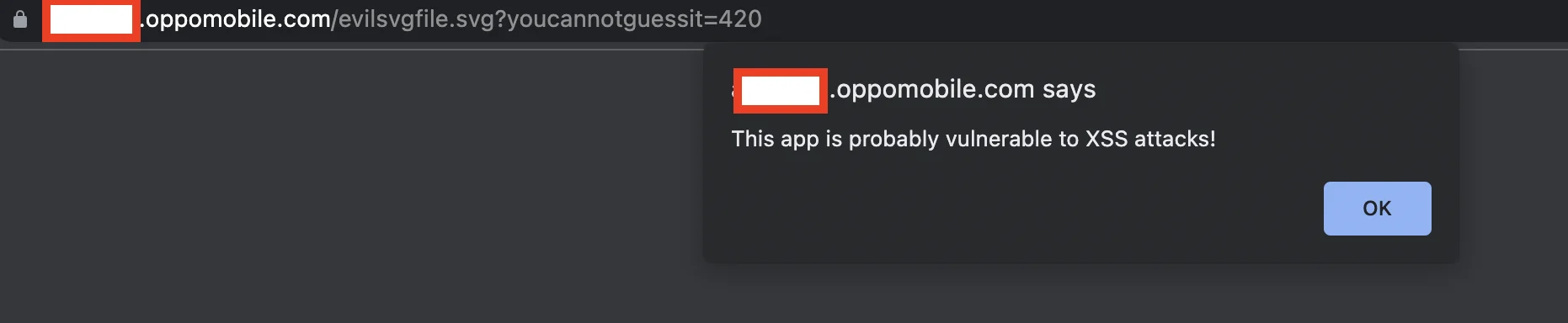
The command sometimes needs to be run multiple times to hit the cache. The important part of the request is the \x1dhost header, which contains a malicious bucket ap-south-1.tarunkant.com created by the attacker. That bucket hosts an evilsvgfile.svg file containing a malicious XSS payload. In the response, the content has been fetched from the malicious bucket rather than from the S3 bucket to which the host was mapped.
Step 2: Match the region
There is a catch: the malicious bucket passed via the \x1dhost header must be in the same region as the S3 bucket mapped to the vulnerable host. To handle this, create an S3 bucket in all regions, upload the malicious evilsvgfile.svg file to all of them, and then brute force the value of the \x1dhost header with the created bucket names against the vulnerable target, checking whether any part of the malicious payload appears in the response.
Step 3: Choose the file extension
.svg was chosen because during the research it was noticed that the .svg extension is very common and almost always present in the caching configuration of Akamai, which makes it easy to exploit the issue through that extension.
Step 4: Automate discovery
The issue only affects targets that are S3 buckets and are onboarded in Akamai, so three things need to be established at scale:
- Are those S3 websites?
- Are they onboarded in Akamai?
- If both are satisfied, perform the attack.
Nuclei can identify S3 buckets among all targets using the s3-detect template. From the resulting list of S3 targets, the researcher wrote an automation script that finds hosts onboarded in Akamai and then checks for vulnerable hosts. A second Python script identifies whether a host is vulnerable to cache poisoning by this technique. The input file akamaiurl.txt contains domains that are onboarded in Akamai.
That detection script uses a .html file rather than .svg. Any file extension can be used for detection, because the root cause is Akamai fetching content from a different origin; other extensions simply will not get cached. .svg is used for exploitation because it is very common in caching configuration.
Root cause
Akamai prioritises the host header with a Unicode value over the original host header when making outbound requests, that is, requests sent from Akamai Edge servers towards the customer origin. The researcher believes this is likely due to incorrect parsing when Unicode characters are included in the header.
As an example, say redacted.oppomobile.com is mapped to redacted.s3.ap-south-1.amazonaws.com in the Akamai configuration. This is how a normal flow of requests looks when a host is onboarded in Akamai:
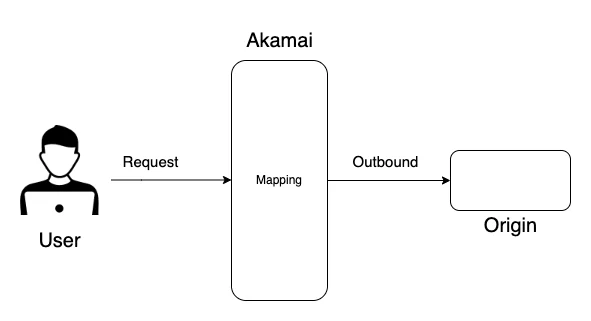
With the request flow established, compare a request without the malicious header and its outbound request from Akamai, then a request with the malicious header and its outbound request from Akamai.
Request without the malicious header
Outbound request from Akamai
Request with the malicious header
Outbound request from Akamai
When a request carries a malicious host header, that header is prioritised in Akamai's outbound request. A service such as Amazon S3 that treats the first host header in the request as valid then returns the object from the malicious host rather than the real host. S3 takes the first occurrence of the host header regardless of Unicode characters and acts on it.
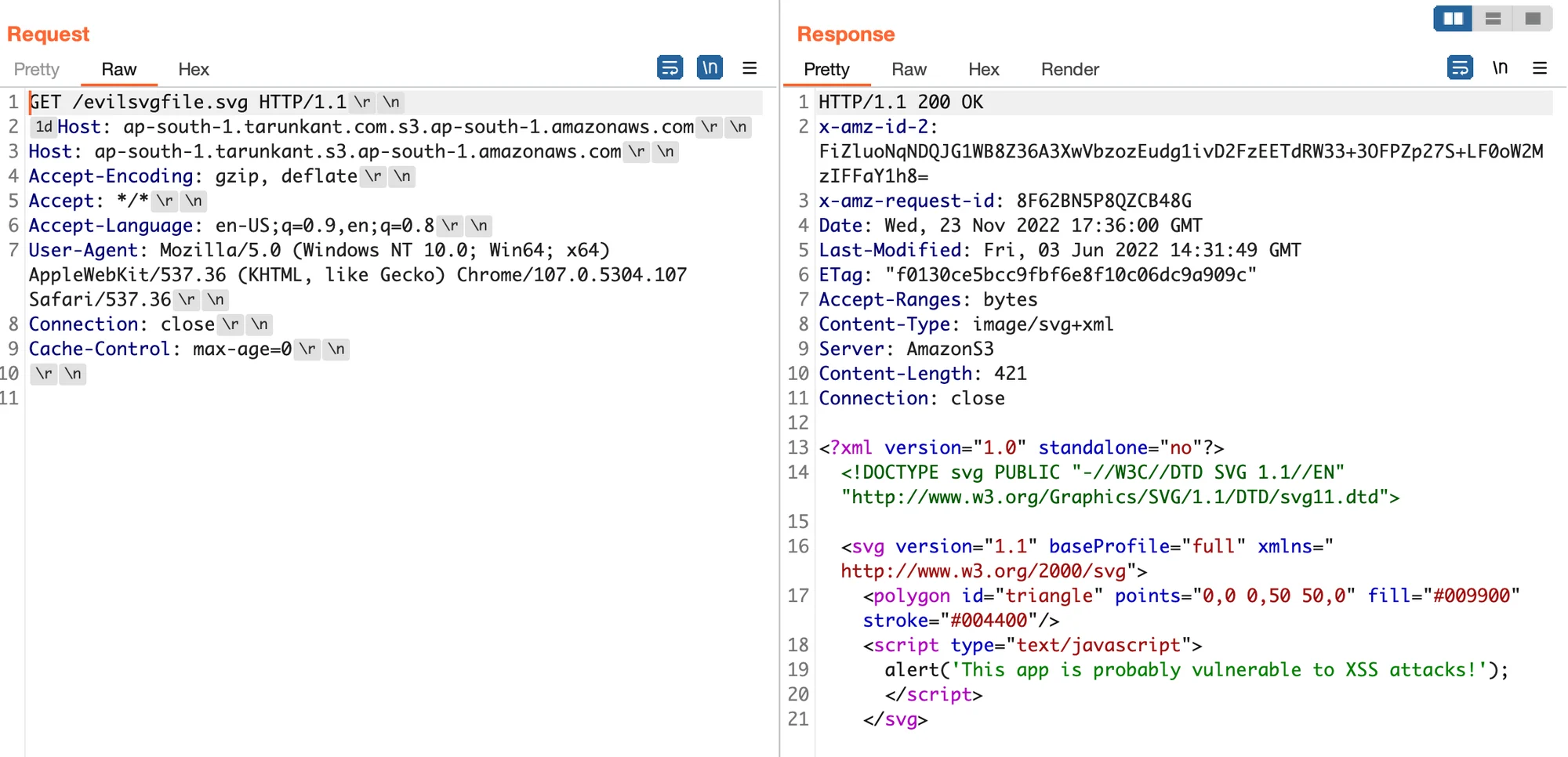
If caching is enabled for the host, the cache can be tricked into storing malicious responses instead of the actual ones.
Impact
All S3 bucket domains that are onboarded in Akamai and have caching enabled might be affected. Where the conditions hold, an attacker can make a victim hostname serve content from an attacker-controlled bucket, and because the response is cached, it is served to other users. The example payload is an SVG file containing an XSS payload; the report notes that cache poisoning in general can lead to XSS, JavaScript injection, open redirection and DoS.
Fix
Do not accept malicious headers, meaning headers containing Unicode characters, at the Akamai level itself. Akamai has custom tags to stop accepting requests with malicious headers, but they are not set by default.
Akamai's reply to the disclosure states that the undesired interaction between Akamai proxies and AWS S3 origins is a configuration issue that is a joint responsibility of customers, AWS and Akamai. It results from certain customers' needs to process non-RFC compliant requests for their applications to function correctly, and therefore from cloud vendors offering features to support such traffic unless explicitly instructed not to do so. Akamai said it was working with the owners of the application to identify the best mitigation, and that a blanket patch to correct all such instances is not trivial because it may have a big negative impact on legitimate Internet traffic.
Variants to test
- Other separator characters. The researcher brute forced all values in the range
(0,256)and found 6 Unicode characters that can be used. Try each of them in the injected host header against a target; a positive result is a response whose content comes from the attacker's bucket rather than the configured origin. - Other file extensions. Detection works with any extension, since the root cause is the origin switch. Test extensions that are present in the target's caching configuration; a positive result is the malicious content appearing in the response, and for exploitation you need an extension that is actually cached.
- Region matching. Create buckets in all regions with the same payload and brute force the injected header value with the bucket names; a positive result is any part of the malicious payload appearing in the response.
- Static website hosting edge cases. Enable
static website hostingon the attacker bucket to cover the edge cases the researcher observed.
PoC Video
What happened, in plain words
Imagine you run a small shop. You hire a delivery company to bring goods from your warehouse to your customers. Normally, the delivery company goes to your warehouse, picks up your goods, and brings them to your shop. Now imagine someone slips a fake address label onto the delivery company's clipboard. The delivery company, instead of going to your warehouse, goes to a different warehouse owned by the attacker, picks up a box from there, and delivers it to your shop. Your customers think the box came from you, but it actually came from the attacker. That is essentially what happened here, but on the internet.
In this report, the researcher (SpyD3r, also known as @TarunkantG) found a way to make a website that uses Akamai (a content delivery network) fetch content from a malicious server (an Amazon S3 bucket controlled by the attacker) instead of the legitimate server. Because the content is then cached (stored temporarily) by Akamai, other visitors to the website receive the malicious content. This is called web cache poisoning.
Let's break down the key terms:
- Akamai: A content delivery network (CDN). Think of it as a global network of delivery trucks that stores copies of website content close to users so pages load faster. When you visit a website that uses Akamai, your request goes to an Akamai server (called an edge server) near you, which then fetches the content from the website's actual server (the origin) if it doesn't already have a copy.
- Amazon S3 bucket: A storage service provided by Amazon Web Services (AWS). Think of it as a online folder where you can store files (like images, videos, HTML pages) and make them accessible over the internet. Each bucket has a unique name and is located in a specific region (a geographic area like "ap-south-1" which is Mumbai, India).
- Web cache poisoning: A technique where an attacker tricks a cache (a temporary storage) into storing a harmful response, which is then served to other users. Imagine a restaurant that keeps a pot of soup warm for all customers. If someone poisons the pot, everyone who eats from it gets sick. Similarly, if an attacker poisons the cache, every user who requests that page gets the malicious content.
- Host header: When your browser sends a request to a web server, it includes a
Hostheader that tells the server which website you want to visit (e.g.Host: www.example.com). It's like writing the address on an envelope. - Unicode character: A character from the Unicode standard, which includes letters, symbols, and control characters from many writing systems. Some Unicode characters are invisible or have special meanings. Here, the attacker uses a specific control character (
\x1d) to manipulate how the server interprets theHostheader. - XSS (Cross-Site Scripting): A type of attack where malicious JavaScript code is injected into a website and executed in the browsers of other users. This can steal cookies, redirect users, or perform actions on behalf of the user.
The issue in detail
Akamai was observed loading pages from a different origin (i.e. a malicious host) than what is specified in the Akamai configuration. For example, let's say redacted.example.com is mapped to redacted.s3.ap-south-1.amazonaws.com in Akamai; now using this issue an attacker can force redacted.example.com to serve a response of a malicious host such as tarunkant.s3.ap-south-1.amazonaws.com. And if caching is enabled for such hosts then the malicious response will be cached and it can be served to victim users for exploitation purposes.
In simpler terms: Akamai is supposed to fetch content from the S3 bucket that the website owner configured. But by sending a specially crafted request, an attacker can make Akamai fetch content from a different S3 bucket that the attacker controls. If Akamai caches that response, then all users who visit the website will receive the attacker's content.
Exploitation
This issue can be exploited by injecting malicious Host headers that contain some specific separators' Unicode characters. One character that I used in this technique is \x1d.
A sample cURL request for exploiting this issue:
Command:
Command:
Response:
Response:
Result:
Result:
Let's explain what each part means:
- The Command is a cURL request. cURL is a command-line tool used to send HTTP requests. In this case, it's used to send a request to the vulnerable website with a malicious
Hostheader. The header is\x1dhost(the\x1dis a Unicode control character) and its value is a malicious bucketap-south-1.tarunkant.comthat the attacker created. That bucket hosts anevilsvgfile.svgfile containing a malicious XSS payload. - The Response is what the server sends back. In the response, you can see that the content has been fetched from the malicious bucket rather than from the S3 bucket where the host was mapped to. This means the attack worked: Akamai fetched the file from the attacker's bucket.
- The Result shows the outcome: the malicious content is served.
Please note that sometimes the command needs to run multiple times to hit the cache. Caches only store responses after the first request, so the attacker may need to send the request several times until the malicious response is cached.
There is a catch: the malicious bucket that the attacker is passing via the \x1dhost header should be in the same region as the S3 bucket which is mapped to the vulnerable host. So, how can it be done? We can create an S3 bucket in all regions and upload a malicious evilsvgfile.svg file in all the buckets. And after that bruteforce the value of the \x1dhost header with the created bucket names on the vulnerable target to check if any part of the malicious payload came in the response.
Why same region? S3 buckets are region-specific. If the legitimate bucket is in ap-south-1 (Mumbai), then the malicious bucket must also be in ap-south-1 for Akamai to fetch from it. Because the malicious bucket must be in the same region as the legitimate one, the attacker creates buckets in all regions and tries each one. This is called bruteforcing: trying many possibilities until one works.
Why SVG file?
While conducting the research it was noticed that .svg extension is very common and almost every time to be present in Caching configuration of Akamai. Thus it makes it easy to exploit this issue via .svg extension.
SVG files are images, but they can contain JavaScript, and the malicious file in the example contains an XSS payload. Also, because .svg files are commonly cached by Akamai, the malicious response gets stored and served to many users.
Any requirements for the attacker's S3 bucket?
Yes, the attacker has to create a public bucket. It was also observed during the research that there are some edge cases where we need to enable static website hosting on the S3 bucket and hence the .com in the name of the S3 bucket. So it is also recommended to have static website hosting enabled in the S3 bucket to include testing edge cases as well.
A public bucket means anyone can read the files. Static website hosting is an S3 feature that allows the bucket to serve web pages. The report notes the .com in the bucket name in connection with static website hosting, without explaining it further.
What other Unicode can be used?
I have brute-forced all the values from the range(0,256) to see which all hex values could work to exploit this issue and found 6 Unicode characters that can be used:
(No specific characters are listed in the report, but the researcher found 6.)
Automation
As this issue only affects the target which are S3 bucket and onboarded in Akamai, we need to figure out three main things on the hosts that are pointed below in order to exploit this issue at scale:
- Are those S3 Websites?
- Are they Onboarded in Akamai?
- If satisfy above both points then perform the attack
The Nuclei tool can be used to identify S3 bucket out of all the targets by using s3-detect template. After that we have a list of targets that are S3 bucket, we can check which ones are onboarded in Akamai and to do that I have written an automation script that find hosts onboarded in Akamai and then check for the vulnerable hosts.
The following script can be used to check for hosts that are onboarded in Akamai:
(No script is provided in the report.)
I have created another python script to identify if the host is vulnerable to cache poisoning by this technique:
(No script is provided in the report.)
Here, akamaiurl.txt contain domains that are onboarded in Akamai. You would notice that I used a .html file for detecting this attack instead of .svg. Actually, we can detect this attack by using any file extension because the root cause of the vulnerability is the Akamai fetching the content from a different origin, just that other file extensions won't get cached, and hence I used .svg extension for exploitation, which is very common in caching configuration.
Nuclei is a vulnerability scanner that can automate the detection of various issues. The s3-detect template is a predefined check that identifies S3 buckets. The automation scripts help scale the attack: first find all S3 buckets, then check which are behind Akamai, then test each for the vulnerability. The detection uses .html because any file can trigger the origin switch, but only certain extensions (like .svg) are cached, so those are used for actual exploitation.
Root Cause Analysis
I did some analysis on why Akamai is fetching the data from another origin than what is specified in its configuration and found out that Akamai prioritizes the host header with unicode value over the original host header while making the outbound requests (i.e. Request sent from Akamai Edge servers towards customer Origin). I strongly believe that this might be happening due to incorrect parsing when inclusion of unicode characters in the header.
Let's explain the above sentence through an example. Let's say redacted.oppomobile.com is mapped to redacted.s3.ap-south-1.amazonaws.com in the Akamai configuration.
This is how a normal flow of requests looks when any host is onboarded in Akamai:
Now, that you know the request flow, let's look sample request and corresponding outbound request from Akamai.
Request without the malicious header
(No specific request shown in the report.)
Outbound request from Akamai
(No specific request shown in the report.)
Request with the malicious header
(No specific request shown in the report.)
Outbound request from Akamai
(No specific request shown in the report.)
As you could notice when someone makes a request with a malicious host header then that host header gets prioritized in the outbound request of Akamai. And if any services like Amazon S3 which consider the first host header from the request as valid then it will return the object from the malicious host rather than the real host.
Also to note that Amazon S3 just fetches the first occurrence of the host header without caring if it contains any unicode character or not and performs the action on that host header.
And if caching is enabled for the host then it can be tricked to cache malicious responses instead of the actual responses.
In other words, Akamai appears to mishandle a Host header with a Unicode character and uses that header instead of the correct one when fetching content from the origin. Amazon S3, on the other hand, simply takes the first Host header it sees, regardless of Unicode, and serves content from that host. So the two behaviours combine to allow the attack.
Responsible Disclosure
I have responsibly reported this security bug to the Akamai Security team, and they have acknowledged that this is a valid security issue.
Reply from Akamai
This undesired interaction between Akamai proxies and AWS S3 origins is a configuration issue that's joint responsibility between our customers, AWS, and Akamai. It results from certain customers' needs to process non-RFC compliant requests for their applications to function correctly, and therefore cloud vendors offering features to support such traffic unless explicitly instructed not to do so.
We thank you again for your notification, we are working with the owners of the application to identify the best mitigation for the circumstances. But a blanket "patch" to correct all such instances is not trivial, as that may have a big negative impact on legitimate Internet traffic.
Akamai's response means they see this as a configuration issue shared among customers, AWS, and Akamai. Some customers need to accept non-standard requests (non-RFC compliant) for their applications to work, so cloud providers support such traffic unless told otherwise. A universal fix is hard because it could break legitimate traffic.
PoC Video
Who all are affected?
All those S3 bucket domains that are onboarded in Akamai and have caching enabled might be affected from this.
How to prevent?
Do not accept any malicious header (i.e. header containing unicode characters) at the Akamai level itself. Additionally, Akamai has custom tags to stop accepting requests with malicious headers but they are not set by default.
In plain terms: website owners should configure Akamai to reject requests with unusual Unicode characters in headers. Akamai provides settings (custom tags) to do this, but they are not enabled by default, so owners must turn them on.
Glossary
- Akamai: A content delivery network (CDN) that speeds up websites by caching content on servers close to users.
- Amazon S3 bucket: A cloud storage container for files, accessible over the internet.
- Web cache poisoning: An attack where a cache is tricked into storing malicious content that is then served to other users.
- Host header: An HTTP header that specifies the domain name of the server being requested.
- Unicode character: A character from the Unicode standard, which includes many symbols and control characters; some are invisible.
- XSS (Cross-Site Scripting): An attack that injects malicious scripts into web pages viewed by other users.
- cURL: A command-line tool for sending HTTP requests.
- SVG: Scalable Vector Graphics, an image format that can contain JavaScript.
- Static website hosting: An S3 feature that allows a bucket to serve web pages.
- Nuclei: A vulnerability scanner that uses templates to detect issues.
- s3-detect: A Nuclei template for identifying S3 buckets.
- Bruteforce: Trying many possibilities until one works.
- RFC: Request for Comments, documents that define internet standards; non-RFC compliant means not following those standards.
- Cache: Temporary storage of data to speed up future requests.
- Origin: The original server where content is hosted.
- Edge server: A server in a CDN network that is close to users and caches content.
- PoC: Proof of Concept, a demonstration that a vulnerability exists.
- DoS: Denial of Service, an attack that makes a service unavailable.