XSS in azure devOps
The markdown renderer in Azure DevOps pull request comments failed to properly escape certain HTML tags when they appeared between two dollar signs and a percent sign, allowing an attacker to inject HTML. The attacker could then use an iframe to bypass the Content Security Policy and execute JavaScript, leading to XSS.

Microsoft have launched a new bounty program targeting to the Azure DevOps. A new program is always easier for bug hunting.
The full write-up lives on its author's site
It belongs to its author, so we link to it rather than copy it. The other two tabs are our own rewrites, checked against it.
Context
Microsoft opened a new bug bounty programme covering Azure DevOps, and a fresh programme is always a good place to start hunting. The target here is https://dev.azure.com, described in the report as a git web server implemented by Microsoft.
The feature that turned out to be vulnerable is the markdown editor used when creating a pull request: people can add comments written in markdown, and the markdown renderer failed to escape some syntax properly, which led to cross-site scripting.
Setup
The report does not describe any special account, role or tooling beyond a browser. The researcher worked against https://dev.azure.com and used the browser console to read the Content Security Policy violations that Chrome reported. The starting point for payloads was a large collection of XSS payloads published by @ZephrFish:
https://github.com/ZephrFish/XSSPayloads/blob/master/raw_payloads
Finding it
While creating a pull request, the researcher pasted that whole collection of payloads into a markdown comment. The browser was redirected to a strange URL, which suggested something in the input was being interpreted rather than escaped.
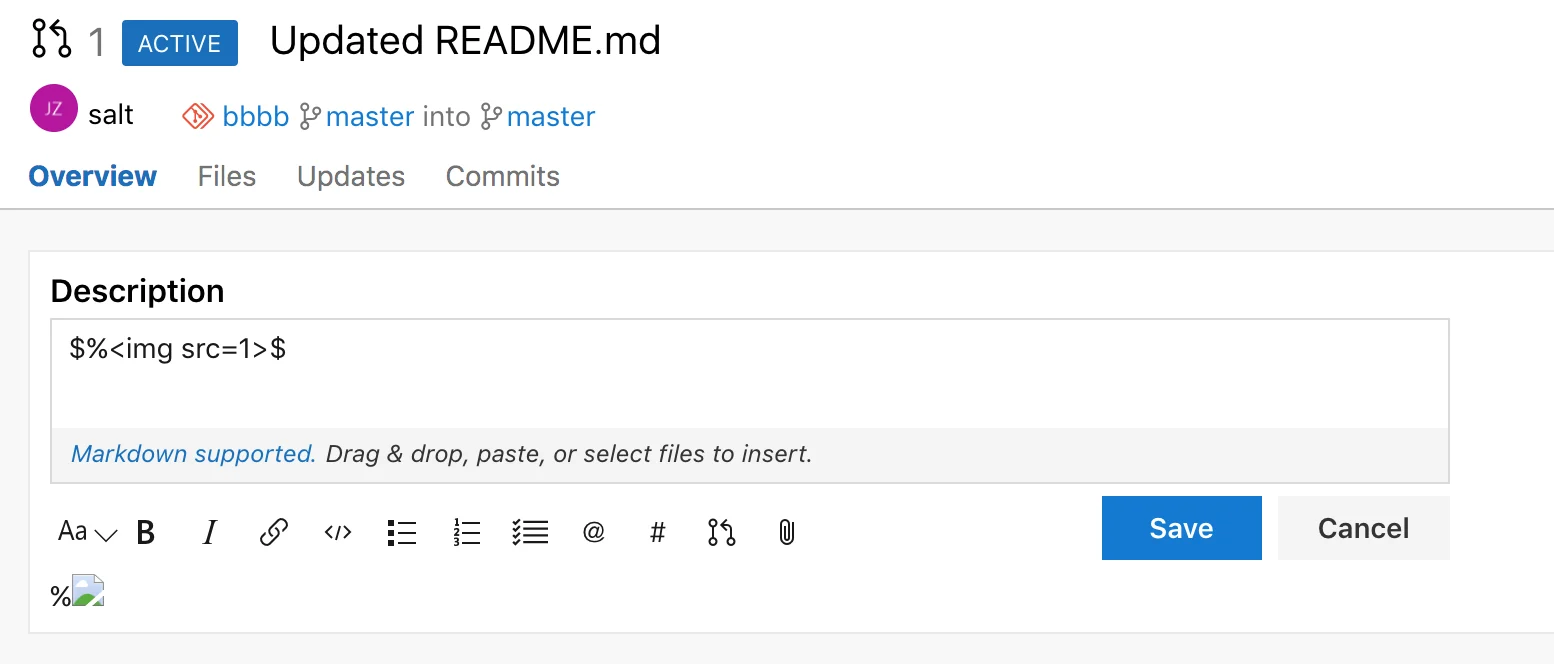
From there the goal was to reduce the collection to a minimum payload. After many attempts, the pattern that worked was: put HTML tags between two $ characters, and a % must also appear there. When those conditions are met, the HTML tags are rendered in the output as-is. A sample payload is shown below.
Exploitation
Step 1: inline event handler blocked by CSP
The first attempt was an img tag with an onerror action to trigger the XSS. Nothing happened. Chrome's console showed the following error:
1?_a=overview:1 Refused to execute inline event handler because it violates the following Content Security Policy directive: “script-src ‘unsafe-inline’ .visualstudio.com.dev.azure.com dev.azure.com https://cdn.vsassets.io https://vsassetscdn.azure.cn https://ms.gallery.vsassets.io https://ms.gallerycdn.vsassets.io https://ms.gallerycdn.azure.cn .ensighten.com.microsoft.com *.google-analytics.com ‘nonce-JNv3ZUluxXSBwNijHMtlKg==’”. Note that ‘unsafe-inline’ is ignored if either a hash or nonce value is present in the source list.
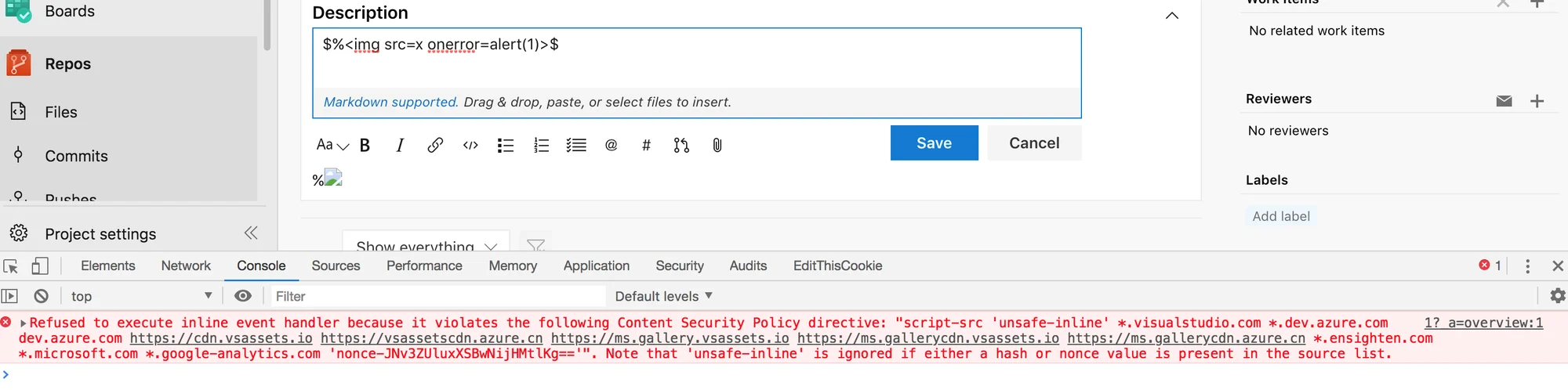
The key point is that 'unsafe-inline' is ignored when a hash or nonce is present in the source list, and this policy carries a nonce. So inline event handlers cannot run.
Step 2: inline script blocked by unsafe-eval
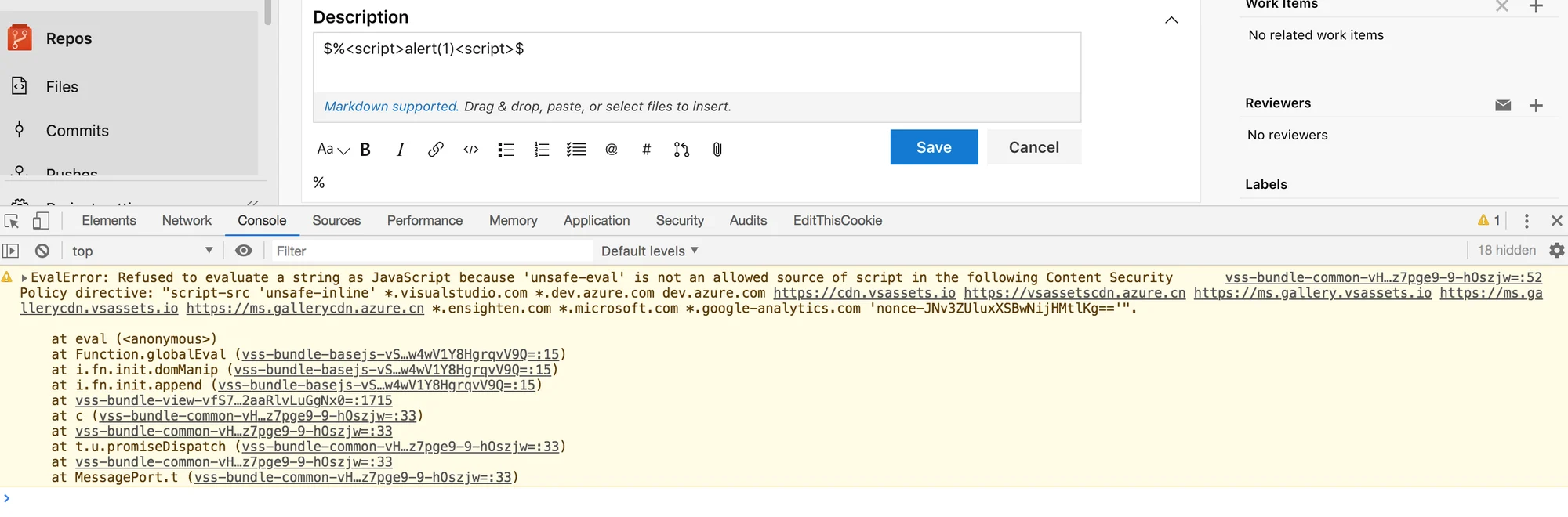
The next attempt was a plain script tag:
<script>alert(1)</script>
This was blocked because of unsafe-eval.
Step 3: external script from a whitelisted origin
Since dev.azure.com itself is whitelisted in script-src, the researcher pointed the script tag's src at a repository file containing the payload.
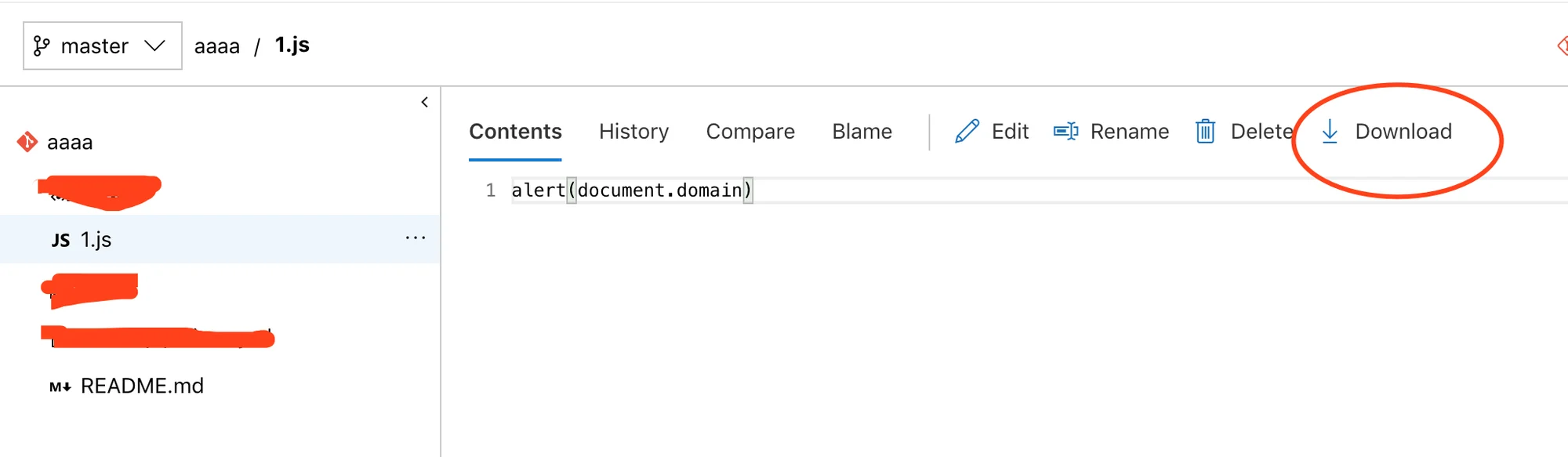
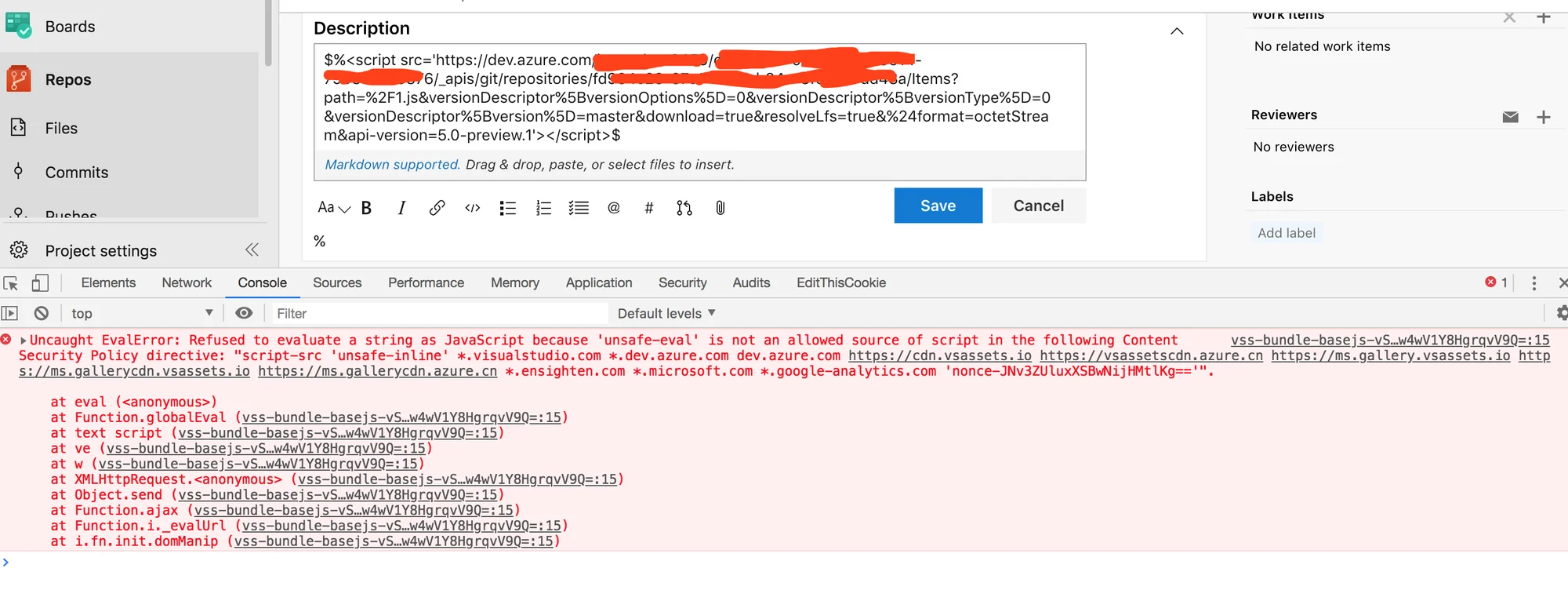
That did not work either: the script tag appeared to be hooked by a frontend framework. The remaining options were to bypass the CSP or to bypass the hook.
Step 4: reading the full CSP
The full policy was retrieved:
content-security-policy: default-src 'none'; font-src *.visualstudio.com *.dev.azure.com dev.azure.com *.vsassets.io vsassetscdn.azure.cn ms.gallery.vsassets.io ms.gallerycdn.vsassets.io ms.gallerycdn.azure.cn *.microsoft.com *.sharepointonline.com; style-src 'unsafe-inline' *.visualstudio.com *.dev.azure.com dev.azure.com cdn.vsassets.io vsassetscdn.azure.cn ms.gallery.vsassets.io ms.gallerycdn.vsassets.io ms.gallerycdn.azure.cn; connect-src *.visualstudio.com wss://*.visualstudio.com *.dev.azure.com dev.azure.com wss://*.dev.azure.com wss://dev.azure.com *.vsassets.io vsassetscdn.azure.cn ms.gallery.vsassets.io ms.gallerycdn.vsassets.io ms.gallerycdn.azure.cn *.blob.core.windows.net; img-src http: https: blob: data:; script-src 'unsafe-inline' *.visualstudio.com *.dev.azure.com dev.azure.com https://cdn.vsassets.io https://vsassetscdn.azure.cn https://ms.gallery.vsassets.io https://ms.gallerycdn.vsassets.io https://ms.gallerycdn.azure.cn *.ensighten.com *.microsoft.com *.google-analytics.com 'nonce-BByveBAMp0eRn6Ll29C7Lw=='; child-src * blob: tfs:; frame-src * blob: tfs:; media-src http: https:;
One directive stood out: frame-src * blob: tfs:;. Because frames can be loaded from anywhere, an iframe can be used to isolate the script tag from the hook.
Step 5: final payload
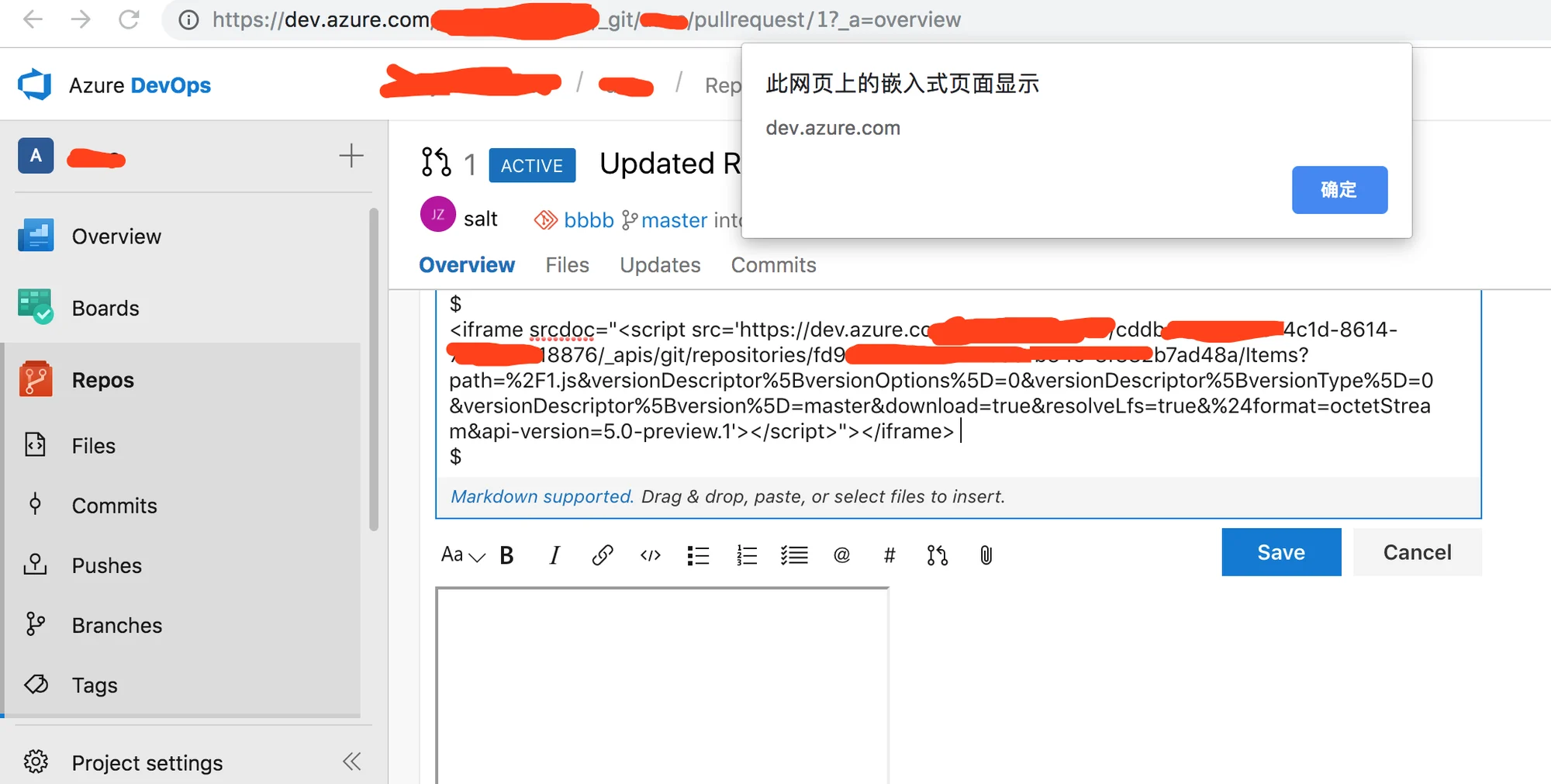
The final payload combines the markdown trick with an iframe that carries the script, and the alert box popped up.
Root cause
The markdown renderer did not escape HTML tags when they appeared between two $ characters with a % also present, so attacker-controlled markup reached the page as HTML. The page's CSP then limited what that markup could do: inline event handlers were refused because a nonce was present, and inline script was refused because of unsafe-eval. Loading a script from a whitelisted origin was defeated by a frontend framework hooking script tags. The frame-src * blob: tfs: directive allowed an iframe from an arbitrary origin, which isolated the script from the hook and let it execute.
Impact
An attacker who can post a markdown comment on a pull request can run script in the context of dev.azure.com when another user views it. The report does not go further into which users or data are exposed.
Fix
The report states that CVE-2019-0742 was assigned and acknowledged, with the issue already fixed at that point. It does not describe the code change.
Variants to test
- Try other markdown delimiters and characters in place of
$and%to see whether HTML is rendered unescaped; a positive result is HTML appearing in the rendered output. - Test other CSP-protected markdown surfaces for
frame-src *or similar permissive directives; a positive result is an iframe loading from an arbitrary origin. - Look for frontend framework hooks on script tags and check whether isolating the script in an iframe bypasses them; a positive result is the script executing.
- Check whether whitelisted origins in
script-srchost user-controlled files; a positive result is a script loading from such an origin.
What happened, in plain words
Microsoft runs a programme that pays people for finding security bugs in its products. This is called a bug bounty programme. When a new programme opens, fewer people have looked at the software yet, so it can be a good moment to start hunting. The product in this story is Azure DevOps, and the address the researcher looked at was https://dev.azure.com. The report describes it as a git web server implemented by Microsoft. A git web server is a website that hosts code repositories: folders of files with their history, which teams share and work on together.
One feature of Azure DevOps lets people discuss a proposed change to the code. A proposed change is called a pull request, and people can leave comments on it. Those comments are written in markdown, a simple way of formatting text with plain characters: for example, you can make a word bold or turn a line into a link without using a word processor. The website takes the markdown you typed and turns it into formatted HTML, the language web pages are made of. That conversion step is called rendering, and the piece of software doing it is the markdown renderer.
The bug was in that renderer. For certain input it failed to escape some syntax properly. Escaping means turning characters that have a special meaning in HTML into harmless text, so that they are displayed as characters instead of being treated as instructions. When escaping fails, text that a user typed can be treated by the browser as real HTML, including HTML that runs code. That class of bug is called cross-site scripting, usually shortened to XSS: an attacker gets their own code to run inside someone else's page, in that page's context, when a victim views the content.
So the chain is: a comment on a pull request, written in markdown, containing a specially crafted string, ends up in the page as live HTML, and from there the researcher worked towards running JavaScript, the programming language browsers execute. The goal of the proof was modest: make the browser show an alert box with the number 1 in it, written alert(1). An alert box is a small pop-up. It proves code ran, without doing anything harmful.
Setting up
The report does not describe any special account, role or tooling beyond a browser. The researcher worked against https://dev.azure.com and used the browser console to read the security errors that Chrome reported. The console is a panel built into the browser, usually opened with the developer tools, where the browser prints warnings and errors about the page.
The starting point for payloads was a large collection of XSS payloads published by @ZephrFish. A payload here just means the piece of input you feed to the site hoping it gets treated as code. The collection lives at this address:
https://github.com/ZephrFish/XSSPayloads/blob/master/raw_payloads
This is a link to a file on GitHub, a website where people publish code. The file contains many ready-made XSS payloads gathered in one place. Copying a big list of known payloads into an input is a common first move: if any one of them behaves unexpectedly, you have found something worth investigating.
Finding it
While creating a pull request, the researcher pasted that whole collection of payloads into a markdown comment. The browser was redirected to a strange URL. A redirect is when a page sends your browser somewhere else automatically. That was the signal: something in the pasted text was not being shown as plain text but was being interpreted, and interpreted input is exactly where XSS lives.
From there the goal was to shrink the huge collection down to a minimum payload: the shortest input that still triggers the behaviour. This matters for two reasons. A short payload is easier to understand, and it shows precisely which characters cause the problem, which helps when reporting the bug and when the developers fix it.
After many attempts, the pattern that worked was: put HTML tags between two $ characters, and a % must also appear there. When those conditions are met, the HTML tags are rendered in the output as-is. In other words, the renderer normally neutralises HTML you type, but this particular combination of characters around it slips past that protection. A sample payload is shown below.
The image shows the sample payload as it was used. The point to take away is the shape of the input: HTML tags, wrapped in the two $ signs, with a % somewhere in the same piece of text.
Exploitation
Exploitation means turning a confirmed weakness into a working demonstration. Here it was done in small steps, because the site has defences that stop the obvious attempts, and each step was about learning which defence was in the way.
Step 1: an inline event handler, blocked by CSP
The first attempt was an img tag with an onerror action to trigger the XSS. An img tag tells the browser to load an image. The onerror attribute is a piece of JavaScript attached to the tag that the browser runs if the image fails to load. Attackers like it because you can point the tag at an address that will never load, so the error fires immediately and the code runs. Code written directly inside an HTML attribute like this is called an inline event handler.
Nothing happened. Chrome's console showed the following error:
1?_a=overview:1 Refused to execute inline event handler because it violates the following Content Security Policy directive: “script-src ‘unsafe-inline’ .visualstudio.com.dev.azure.com dev.azure.com https://cdn.vsassets.io https://vsassetscdn.azure.cn https://ms.gallery.vsassets.io https://ms.gallerycdn.vsassets.io https://ms.gallerycdn.azure.cn .ensighten.com.microsoft.com *.google-analytics.com ‘nonce-JNv3ZUluxXSBwNijHMtlKg==’”. Note that ‘unsafe-inline’ is ignored if either a hash or nonce value is present in the source list.
Let us unpack this message. Content Security Policy, or CSP, is a rulebook that a website sends to the browser along with the page. It lists what the page is allowed to load and run: which places scripts may come from, which places images may come from, and so on. When the page tries something the rulebook forbids, the browser refuses and prints a message like the one above in the console. The script-src part of the rulebook covers scripts.
The message says the browser refused to execute an inline event handler because it violates the script-src directive. The directive then lists the sources that are allowed. Among them is 'unsafe-inline', which sounds like it should permit code written directly in the page. But the message ends with the crucial explanation: 'unsafe-inline' is ignored when a hash or nonce is present in the source list, and this policy carries a nonce. A nonce is a random value generated fresh for each page load and added to the rulebook and to the legitimate scripts on the page. If a script carries the matching nonce, it is trusted; anything else written inline is not. Because a nonce is present, the 'unsafe-inline' permission is switched off. That is why the onerror handler never ran.
Step 2: an inline script, blocked by unsafe-eval
The next attempt was a plain script tag:
<script>alert(1)</script>
Line by line: <script> opens a script element, the place where JavaScript goes. alert(1) is the JavaScript instruction that shows a pop-up containing the number 1. </script> closes the element. If this ran, the pop-up would appear.
This was blocked because of unsafe-eval.
unsafe-eval is another CSP keyword. It controls whether the page may turn text into running code at the moment it runs, a technique called evaluation. Without that permission, certain ways of executing script are refused. The console message in the image shows the browser refusing this attempt for that reason. So the plain script tag was out too.
Step 3: an external script from a whitelisted origin
Since dev.azure.com itself is whitelisted in script-src, the researcher pointed the script tag's src at a repository file containing the payload. The src attribute tells the browser where to fetch the script from, instead of writing the code inline. The idea was clever: the rulebook trusts scripts loaded from dev.azure.com, and a file stored in a repository on dev.azure.com is served from dev.azure.com. If the researcher could get a file with the payload into a repository, the browser might load and run it as a trusted script.
The images show this attempt. It did not work either: the script tag appeared to be hooked by a frontend framework. A frontend framework is a library of JavaScript that a website uses to build its pages and manage what happens on them. Hooking here means the framework intercepts script tags and controls what happens to them, so simply inserting one does not get it executed the way you would expect. The remaining options were to bypass the CSP or to bypass the hook.
Step 4: reading the full CSP
To find a way around the rulebook, you need to read the whole rulebook, not just the part quoted in one error message. The full policy was retrieved:
content-security-policy: default-src 'none'; font-src *.visualstudio.com *.dev.azure.com dev.azure.com *.vsassets.io vsassetscdn.azure.cn ms.gallery.vsassets.io ms.gallerycdn.vsassets.io ms.gallerycdn.azure.cn *.microsoft.com *.sharepointonline.com; style-src 'unsafe-inline' *.visualstudio.com *.dev.azure.com dev.azure.com cdn.vsassets.io vsassetscdn.azure.cn ms.gallery.vsassets.io ms.gallerycdn.vsassets.io ms.gallerycdn.azure.cn; connect-src *.visualstudio.com wss://*.visualstudio.com *.dev.azure.com dev.azure.com wss://*.dev.azure.com wss://dev.azure.com *.vsassets.io vsassetscdn.azure.cn ms.gallery.vsassets.io ms.gallerycdn.vsassets.io ms.gallerycdn.azure.cn *.blob.core.windows.net; img-src http: https: blob: data:; script-src 'unsafe-inline' *.visualstudio.com *.dev.azure.com dev.azure.com https://cdn.vsassets.io https://vsassetscdn.azure.cn https://ms.gallery.vsassets.io https://ms.gallerycdn.vsassets.io https://ms.gallerycdn.azure.cn *.ensighten.com *.microsoft.com *.google-analytics.com 'nonce-BByveBAMp0eRn6Ll29C7Lw=='; child-src * blob: tfs:; frame-src * blob: tfs:; media-src http: https:;
This is one long line made of directives separated by semicolons. Each directive starts with a name and is followed by the sources it allows. default-src 'none' sets the fallback to nothing, so anything not explicitly permitted is forbidden. font-src covers fonts, style-src covers stylesheets, connect-src covers background network connections, img-src covers images, script-src covers scripts, child-src and frame-src cover embedded frames, and media-src covers audio and video. The * character is a wildcard meaning any subdomain, and blob: and data: are special schemes for content generated in the browser rather than fetched from a server.
One directive stood out: frame-src * blob: tfs:;. A frame, or iframe, is a page embedded inside another page, like a small window showing different content. This directive says frames may be loaded from anywhere, because * on its own matches any origin. That is far more permissive than the rest of the policy. Because frames can be loaded from anywhere, an iframe can be used to isolate the script tag from the hook: the script goes inside the frame, where the framework's interception does not reach it.
Step 5: the final payload
The final payload combines the markdown trick with an iframe that carries the script, and the alert box popped up.
The image shows the result: the alert box appearing on the page. The report does not print the final payload as text. What matters is the combination: the markdown trick gets HTML into the page, and the iframe, allowed by the permissive frame-src rule, gives the script a place to run free of the framework hook.
Why it worked
The markdown renderer did not escape HTML tags when they appeared between two $ characters with a % also present, so attacker-controlled markup reached the page as HTML. The page's CSP then limited what that markup could do: inline event handlers were refused because a nonce was present, and inline script was refused because of unsafe-eval. Loading a script from a whitelisted origin was defeated by a frontend framework hooking script tags. The frame-src * blob: tfs: directive allowed an iframe from an arbitrary origin, which isolated the script from the hook and let it execute.
What an attacker could do
An attacker who can post a markdown comment on a pull request can run script in the context of dev.azure.com when another user views it. Running script in the context of a site means the code acts as if it came from that site: it can read what the page shows and act with the viewer's session. The report does not go further into which users or data are exposed.
The fix
The report states that CVE-2019-0742 was assigned and acknowledged, with the issue already fixed at that point. It does not describe the code change. A CVE is a public identifier given to a known security vulnerability so that people can refer to it unambiguously.
Timeline
- 01/19/2019 reported to Microsoft
- 01/25/2019 Microsoft confirmed the issue
- 02/06/2019 CVE-2019-0742 is assigned and acknowledged; ask for disclosing the details (already fixed)
- 02/07/2019 Microsoft agreed for disclosing after fix
- 02/26/2019 publicly disclosed
Things worth trying elsewhere
- Try other markdown delimiters and characters in place of
$and%to see whether HTML is rendered unescaped; a positive result is HTML appearing in the rendered output. - Test other CSP-protected markdown surfaces for
frame-src *or similar permissive directives; a positive result is an iframe loading from an arbitrary origin. - Look for frontend framework hooks on script tags and check whether isolating the script in an iframe bypasses them; a positive result is the script executing.
- Check whether whitelisted origins in
script-srchost user-controlled files; a positive result is a script loading from such an origin.
Glossary
- Bug bounty programme: a scheme where a company pays people for reporting security bugs in its products.
- Azure DevOps: Microsoft's online service for hosting code repositories and managing software projects.
- Git web server: a website that hosts git repositories, which are folders of files with their full change history.
- Repository: a project's collection of files together with its history of changes.
- Pull request: a proposed change to a repository that others can review and comment on.
- Markdown: a simple way of formatting text using plain characters, which is later converted into HTML.
- HTML: the language web pages are written in, made of tags that describe elements such as images and scripts.
- Renderer: the software that converts markdown into HTML for display.
- Escaping: turning characters with a special meaning into harmless text so they are shown, not interpreted.
- Cross-site scripting (XSS): a bug where an attacker's code runs inside someone else's web page, in that page's context.
- JavaScript: the programming language that browsers execute to make pages interactive.
- Payload: the piece of input crafted to be treated as code by the target.
- Redirect: an automatic instruction from a page that sends the browser to another address.
- Browser console: a panel in the browser's developer tools where warnings and errors about the page are printed.
imgtag: an HTML element that tells the browser to load an image.onerror: an HTML attribute holding code that runs if an image fails to load.- Inline event handler: code written directly inside an HTML attribute, such as
onerror. - Content Security Policy (CSP): a rulebook sent with a page that tells the browser which sources it may load and run things from.
- Directive: one rule inside a CSP, such as
script-srcorframe-src. script-src: the CSP directive that lists where scripts may come from.- Nonce: a random value generated per page load and attached to trusted scripts, so that only those scripts are allowed to run inline.
'unsafe-inline': a CSP keyword that would permit code written directly in the page, ignored when a nonce or hash is present.unsafe-eval: a CSP keyword controlling whether the page may turn text into running code at runtime.srcattribute: the part of a tag that says where to fetch an external file from.- Whitelisted origin: a source that the CSP explicitly trusts.
- Origin: the combination of scheme, host and port that identifies where content comes from.
- Frontend framework: a JavaScript library a website uses to build and manage its pages.
- Hook: an interception point where a framework takes control of something, such as a script tag, before it runs.
- Iframe (frame): a page embedded inside another page.
frame-src: the CSP directive that lists where embedded frames may be loaded from.- Wildcard (
*): a character in a CSP source list that matches anything, or any subdomain depending on position. blob:anddata:: schemes for content generated in the browser rather than fetched from a server.- CVE: a public identifier assigned to a known security vulnerability.
- Disclosure: making the details of a vulnerability public.