No rate-limit in Two factor Authentication leads to bypass using bruteforce attack
The two-factor authentication endpoint accepted verification codes without any rate limiting, so an attacker could repeatedly guess codes. The report claims this allows bypassing two-factor authentication and accessing the application without the correct code.

- Triaged in 12 hours
- Fixed in 8 days
- Paid in 8 days
- Disclosed after 56 days
Summary by the researcher
Two Factor Authentication bypass allows user to access application without entering verification code and no rate limit is set to protect from Code bruteforce attack.
The report
Hi,
There is no rate limit set for Two factor authentication, which demand for code sent to mobile. This code can be bruteforced easily to bypass this.
POST /users/testqr HTTP/1.1
Host: www.algolia.com
User-Agent: Mozilla/5.0 (Windows NT 6.3; WOW64; rv:44.0) Gecko/20100101 Firefox/44.0
Accept: text/html,application/xhtml+xml,application/xml;q=0.9,*/*;q=0.8
Accept-Language: en-US,en;q=0.5
Accept-Encoding: gzip, deflate, br
Referer: https://www.algolia.com/users/displayqr
Cookie: __cfduid=dbe6010b3183f275b85d61f6dbce0417a1459962341; _ga=GA1.2.1293083525.1459962367; PRUM_EPISODES=s=1459971091672&r=https%3A//www.algolia.com/users/displayqr; _session_id=c8f877144126b9e3142d158ce5fbadfb; kvcd=1459971056919; km_ai=20868; km_uq=; km_lv=x; visitor_id139121=7630498; __cid=2af41b1f-9f59-4c7e-a3ef-e0c43327b92f; km_ni=20868; _hjIncludedInSample=1; _gat=1; _dc_gtm_UA-32446386-9=1; km_vs=1; km_identity=f7975d47418f3d188a1ed45468bc2c7e; _gat_UA-32446386-9=1; km_aliased=true
Connection: close
Content-Type: application/x-www-form-urlencoded
Content-Length: 168

utf8=%E2%9C%93&authenticity_token=twHnV25SUnlKr2rqoBCjEcZ5M749eY1aLiX8gL9f7NiR4PJreIlBlBtn3X6F6qi7Z1JBQOKNgFxFVKapX4lCdg%3D%3D&users%5Bgauth_token%5D=6700&commit=Verify
F83580
Attachments
What the report shows
The target is Algolia's web application, and the feature under test is the two factor authentication step that asks the user for a code sent to their mobile phone.
The report opens with a short summary: two factor authentication can be bypassed, letting a user reach the application without entering the verification code, and nothing protects the code from a brute force attack.
The only technical evidence is a single captured request to the verification endpoint:
POST /users/testqr HTTP/1.1
Host: www.algolia.com
User-Agent: Mozilla/5.0 (Windows NT 6.3; WOW64; rv:44.0) Gecko/20100101 Firefox/44.0
Accept: text/html,application/xhtml+xml,application/xml;q=0.9,*/*;q=0.8
Accept-Language: en-US,en;q=0.5
Accept-Encoding: gzip, deflate, br
Referer: https://www.algolia.com/users/displayqr
Cookie: [redacted]
Connection: close
Content-Type: application/x-www-form-urlencoded
Content-Length: 168

utf8=%E2%9C%93&authenticity_token=[redacted]&users%5Bgauth_token%5D=6700&commit=Verify
The request is a form post to /users/testqr on www.algolia.com, with the Referer pointing at /users/displayqr. The body carries a Rails style authenticity_token, a users[gauth_token] field holding the submitted code (6700 in this capture), a utf8 marker and a commit=Verify button value. The code is submitted as a plain form field, and the researcher's point is that with no rate limit the code can be brute forced.
Below the request the report shows the string F83580, which is not explained in the text.
The report gives no response, no timing data, no number of attempts and no statement of how many digits the code has. It also gives no severity rating and no CVSS score. The platform records a bounty of 100.00 USD, a weakness of improper authentication (generic), and disclosure on 1 June 2016. The report does not describe a fix.
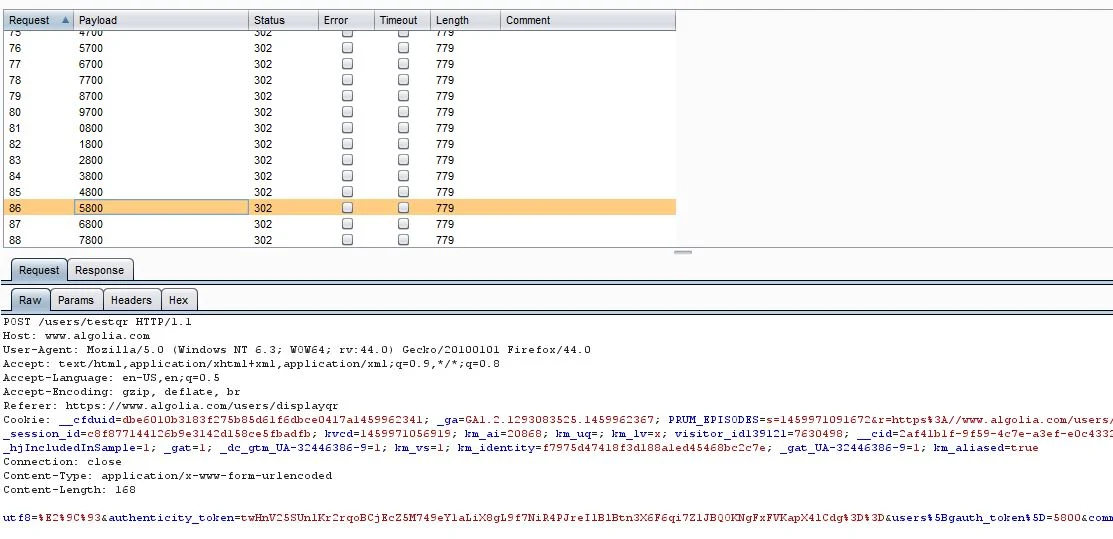
The only attachment is a screenshot named Brutforce.JPG:
Root cause
The report points to the absence of a rate limit on the endpoint that verifies the code. If the server accepts an unlimited number of submissions for the same pending second factor challenge, the search space of the code becomes the only barrier, and a short numeric code is small enough to enumerate.
A related weakness that often accompanies this one is that the pending challenge is not invalidated after a failed attempt, so the same session can keep guessing. The report does not state which of these applies; it only says no rate limit is set.
Impact
The report frames this as a bypass of two factor authentication and does not go further into which accounts or data would be reachable.
How this kind of bug works
Two factor authentication relies on a secret the attacker is assumed not to have. A one time code is typically six digits, so there are only one million possible values, and often far fewer in practice because codes are time based and only a narrow window is valid. If the verifier accepts guesses at network speed, the expected number of requests to hit the right value is small enough to be practical.
The defence is not secrecy of the code but control of the attempt rate. Servers normally implement this with a per challenge attempt counter that locks the challenge after a handful of failures, a per account or per IP throttle, exponential backoff, or a requirement to re authenticate before retrying. Without one of these, the second factor degrades to a second password with a tiny keyspace.
How to test for it
- Enable two factor authentication on a test account and reach the code entry step, keeping the session that is waiting for verification.
- Capture the verification request in a proxy. Note every field: the code, any CSRF token, any challenge identifier, and any cookie that ties the request to the pending login.
- Send the request repeatedly with wrong codes, for example twenty or fifty times, and record the status code, body length and any message for each response.
- Look for a change: a lockout message, a redirect back to login, a new challenge identifier, or a growing delay. If every wrong attempt returns the same generic failure and the request keeps being accepted, the endpoint is a candidate.
- Confirm the challenge is still usable by submitting the correct code afterwards. If it still succeeds, the challenge was never invalidated.
- Only then estimate feasibility: the code length, the validity window and the observed request rate together tell you whether enumeration is realistic.
A positive result is a verifier that keeps accepting guesses with no lockout, no delay and no challenge reset, while the pending session stays valid. Common false positives are client side throttling that a proxy bypasses but the server still enforces, a lockout that only triggers after a much larger number of attempts than you tried, and a captcha or device fingerprint check that appears later in the flow. Also check whether the CSRF token rotates per attempt; if it does, a naive replay will fail for reasons unrelated to rate limiting.
How it is fixed
Standard fixes are a server side attempt counter bound to the pending challenge, invalidating the challenge after a small number of failures and forcing a fresh login, throttling by account and by source address, and adding a delay that grows with each failure. Codes should also expire quickly, be single use, and be compared in constant time. Logging repeated failures and alerting on them helps detect attempts that slip past the counters.
Hunting notes
This class of bug hides wherever a short secret is verified: login codes, recovery codes, email verification links, PIN entry, and API endpoints that confirm a token. Look for endpoints whose names suggest verification (verify, confirm, check, validate) and for mobile or QR based flows, which are often newer and less hardened than the main login form.
Recon signals include a second step that posts a short numeric field, a challenge identifier in the body or cookie, and error messages that distinguish wrong code from expired code. Those distinctions make enumeration easier and are worth noting in the report.
To get a report accepted, show the mechanism rather than just the missing header: demonstrate that the pending challenge survives many failures, that the correct code still works afterwards, and give a realistic estimate of the time needed at the observed rate. Keep the number of attempts modest and stop once the pattern is clear.
What happened, in plain words
Algolia is a service that helps websites add search to their pages. Like most online services, it lets people create accounts, and it offers a security feature called two factor authentication (often shortened to 2FA). With 2FA turned on, logging in takes two steps: first your username and password, then a short code that the service sends to your mobile phone. The idea is that even if someone steals your password, they still cannot get in without your phone.
The report says the second step, where you enter the phone code, had no rate limit. A rate limit is a cap on how many times you may try something in a given period, like a shop that only lets you try on three pairs of shoes before asking you to come back later. Without such a cap, a computer can submit guess after guess very quickly. Since the code is short, guessing until you hit the right one becomes practical. This is a brute force attack: trying every possibility until one works.
The report's summary says it plainly: two factor authentication can be bypassed, so a user can reach the application without entering the verification code, and nothing protects the code from a brute force attack.
The report
The only technical evidence in the report is one captured request, the message a browser sends to the server when the code form is submitted. Here it is exactly as the researcher recorded it:
POST /users/testqr HTTP/1.1
Host: www.algolia.com
User-Agent: Mozilla/5.0 (Windows NT 6.3; WOW64; rv:44.0) Gecko/20100101 Firefox/44.0
Accept: text/html,application/xhtml+xml,application/xml;q=0.9,*/*;q=0.8
Accept-Language: en-US,en;q=0.5
Accept-Encoding: gzip, deflate, br
Referer: https://www.algolia.com/users/displayqr
Cookie: [redacted]
Connection: close
Content-Type: application/x-www-form-urlencoded
Content-Length: 168

utf8=%E2%9C%93&authenticity_token=[redacted]&users%5Bgauth_token%5D=6700&commit=Verify
Line by line, this is what it means:
POST /users/testqr HTTP/1.1is the request line.POSTmeans the browser is sending data to the server rather than just asking for a page./users/testqris the address on the server that handles the code check.Host: www.algolia.comnames the website the request is for.User-Agenttells the server which browser and operating system sent the request. Here it is Firefox 44 on 64 bit Windows.Accept,Accept-LanguageandAccept-Encodingdescribe what kinds of content the browser can handle and in which language. They are routine and not central to the bug.Referer: https://www.algolia.com/users/displayqrsays which page the user came from, in this case the page that displays the QR code for setting up the phone app.Cookie: [redacted]carries the browser's cookies. A cookie is a small piece of data the site stored in your browser earlier, and it is how the server recognises that this request belongs to your logged in session. The values here identify the session and some analytics tools; they are redacted because they act like a temporary key to the account.Connection: closeasks the server to close the network connection after replying.Content-Type: application/x-www-form-urlencodedsays the body is a standard web form, encoded as name equals value pairs.Content-Length: 168is the size of the body in bytes.- The blank line separates the headers from the body.
- The body is the form itself:
utf8=%E2%9C%93is a marker meaning the form uses UTF-8 text encoding,authenticity_token=[redacted]is a security token the site embeds in forms to prove the submission came from its own page (a defence against cross site request forgery),users%5Bgauth_token%5D=6700is the field holding the code the user typed, where%5Band%5Dare the encoded square brackets so the name really readsusers[gauth_token], andcommit=Verifyis the value of the button that was pressed.
The key point is the users[gauth_token] field. The code is sent as an ordinary form value, and the researcher's claim is that with no rate limit the code can be brute forced. That is what makes guessing possible: each attempt is just another copy of this request with a new number.
Below the request the report shows the string F83580, which the text does not explain.
The report does not include any server response, any timing measurements, any count of attempts, or any statement of how many digits the code has. It gives no severity rating and no CVSS score. The platform records a bounty of 100.00 USD, a weakness category of improper authentication (generic), and disclosure on 1 June 2016. The report does not describe a fix.
The only attachment is a screenshot named Brutforce.JPG:
In general, how this kind of bug works
Two factor authentication rests on a secret the attacker is assumed not to have: your phone. The code it produces is short, typically six digits, which means only one million possible values, and in practice fewer are usable because codes are time based and only valid for a narrow window. If the server that checks the code accepts guesses as fast as the network allows, the number of requests needed to hit the right value is small enough to be practical.
The defence is therefore not secrecy of the code but control of the attempt rate. Servers normally keep a counter of failed attempts for each pending login and lock it after a handful of failures, or throttle by account or by source address, or add a delay that grows with each failure, or require you to log in again before retrying. Without one of these, the second factor becomes a second password with a very small number of possibilities.
A related weakness that often comes with this one is that the pending challenge is not cancelled after a failed attempt, so the same session can keep guessing. The report does not say which of these applies; it only says no rate limit is set.
In general, how to test for it
- Turn on two factor authentication on a test account and reach the code entry step, keeping the session that is waiting for verification.
- Capture the verification request in a proxy, a tool that sits between your browser and the server and lets you read and resend traffic. Note every field: the code, any CSRF token, any challenge identifier, and any cookie that ties the request to the pending login.
- Send the request repeatedly with wrong codes, for example twenty or fifty times, and record the status code, body length and any message for each response.
- Look for a change: a lockout message, a redirect back to login, a new challenge identifier, or a growing delay. If every wrong attempt returns the same generic failure and the request keeps being accepted, the endpoint is a candidate.
- Confirm the challenge is still usable by submitting the correct code afterwards. If it still succeeds, the challenge was never invalidated.
- Only then estimate feasibility: the code length, the validity window and the observed request rate together tell you whether enumeration is realistic.
A positive result is a verifier that keeps accepting guesses with no lockout, no delay and no challenge reset, while the pending session stays valid. Common false positives are client side throttling that a proxy bypasses but the server still enforces, a lockout that only triggers after far more attempts than you tried, and a captcha or device fingerprint check that appears later in the flow. Also check whether the CSRF token rotates per attempt; if it does, a naive replay will fail for reasons unrelated to rate limiting.
In general, how it is fixed
Standard fixes are a server side attempt counter bound to the pending challenge, invalidating the challenge after a small number of failures and forcing a fresh login, throttling by account and by source address, and adding a delay that grows with each failure. Codes should also expire quickly, be single use, and be compared in constant time. Logging repeated failures and alerting on them helps detect attempts that slip past the counters.
In general, where to look
This class of bug hides wherever a short secret is verified: login codes, recovery codes, email verification links, PIN entry, and API endpoints that confirm a token. Look for endpoints whose names suggest verification (verify, confirm, check, validate) and for mobile or QR based flows, which are often newer and less hardened than the main login form.
Recon signals include a second step that posts a short numeric field, a challenge identifier in the body or cookie, and error messages that distinguish wrong code from expired code. Those distinctions make enumeration easier and are worth noting in the report.
To get a report accepted, show the mechanism rather than just the missing header: demonstrate that the pending challenge survives many failures, that the correct code still works afterwards, and give a realistic estimate of the time needed at the observed rate. Keep the number of attempts modest and stop once the pattern is clear.
Glossary
- Two factor authentication (2FA): a login that needs two separate proofs, usually a password plus a code sent to your phone.
- Rate limit: a cap on how many requests or attempts are allowed in a period of time.
- Brute force attack: trying every possible value of a secret until the right one is found.
- Bypass: getting past a security check without satisfying it.
- Request: the message a browser sends to a server asking for something or submitting data.
- Response: the message a server sends back.
- Endpoint: a specific address on a server that handles a particular action.
- POST: an HTTP method used to send data to the server.
- Header: a labelled line in a request or response carrying metadata, such as the browser type or content type.
- Body: the part of a request that carries the submitted data.
- Cookie: a small piece of data stored by the site in your browser, used to recognise your session.
- Session: the server's record of your logged in state, tied to a cookie.
- Token: a value used to prove identity or authenticity, such as a CSRF token or a verification code.
- CSRF token: a value embedded in forms to prove the submission came from the site's own page.
- Referer: a header saying which page the request came from.
- User-Agent: a header describing the browser and operating system.
- URL encoding: writing special characters as percent codes, such as
%5Bfor[. - Challenge: the pending second step the server is waiting for you to complete.
- Throttling: deliberately slowing or limiting requests to reduce abuse.
- Lockout: blocking further attempts after too many failures.
- Keyspace: the total number of possible values a secret can take.
- Enumeration: systematically trying every possibility in a set.
- Proxy: a tool that sits between browser and server so you can inspect and resend traffic.
- False positive: a finding that looks like a bug but is not exploitable in practice.
- Captcha: a test meant to distinguish humans from automated tools.
- Constant time comparison: comparing values in a way that takes the same time regardless of where they differ, so timing does not leak information.
- CVSS: a standard scoring system for the severity of a vulnerability.