Do you like to read? I can take over your Kindle with an e-book
A heap overflow in the JBIG2 image decoder of the Kindle PDF reader allowed a malicious e-book to execute code as the framework user, and a separate privilege-management flaw let that user run code as root. Opening a crafted book could therefore give an attacker full control of the device.
 Published on research.checkpoint.com
Since 2007, Amazon has sold tens of millions of Kindles, which is impressive. But this also means that tens of millions of people could have potentially been hacked through a software bug in those same Kindles.
The full write-up lives on its author's site
It belongs to its author, so we link to it rather than copy it. The other two tabs are our own rewrites, checked against it.
Context
Amazon has sold tens of millions of Kindles since 2007. The easiest way to reach a Kindle remotely is through an e-book: a malicious book can be published and made available for free in any virtual library, including the Kindle Store via the self-publishing service, or sent directly to the device through the Amazon "send to kindle" service. Antiviruses have no signatures for e-books, and no such scenarios had been publicised before this research.
The Kindle OS is a Linux kernel with a set of native programs mainly provided by busybox, the LIPC subsystem for inter-process communication, and the Java and Webkit subsystems for user interface and services.
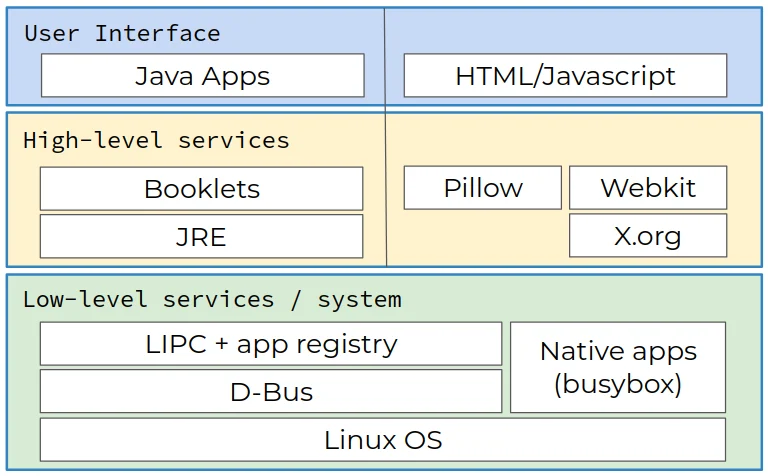
LIPC is a D-Bus-based IPC library that links all Kindle components together. A process can use it to start apps, expose application properties and settings, and listen for or emit events. For example, a Webkit application written in HTML and JavaScript can use LIPC to interact with a Java service or a native application. Most of the UI is written in Java: the framework provides LIPC handlers for services and for the UI (so-called Booklets), such as the com.lab126.booklet.home booklet that manages the home window. The Webkit subsystem is another way to build UI; the built-in experimental browser is part of it, and the pillow library exposes LIPC to JavaScript.
The research targeted the components that parse and render e-books. The latest firmware at the time, 5.13.4, is publicly downloadable from Amazon, and its source is partially available, but the source consists mainly of third-party open-source projects with small Amazon tweaks. There is no source for the components responsible for parsing and rendering e-books, so the work was done on firmware files without needing a real device for the first stage.
Setup
When a book is downloaded, it lands in /mnt/us/documents. The /usr/bin/scanner service periodically scans that directory and, depending on the file extension, uses one of the extractor libraries to pull metadata. The extractors are listed in the /var/local/appreg.db sqlite database:
| File format | Extractor |
|---|---|
| kfx | /usr/lib/ccat/libyjextractorE.so |
| azw1, tpz | /usr/lib/ccat/libtopazE.so |
/usr/lib/ccat/libpdfE.so |
|
| azw3 | /usr/lib/ccat/libmobi8extractorE.so |
| azw, mbp, mobi, prc | /usr/lib/ccat/libEBridge.so |
If the scanner does not match the extension or a parsing error occurs, the book is not shown to the user. The researchers did not go deep into scanning because metadata extraction is too simple an operation to suggest parsing errors.
After scanning, a thumbnail appears on the home screen, and from then on the Java framework opens the book when it is clicked. The JAR files implementing opening and rendering live in /opt/amazon/ebook/lib, primarily MobiReader-impl.jar, YJReader-impl.jar, PDFReader-impl.jar, HTMLReader-impl.jar and TopazReader-impl.jar.
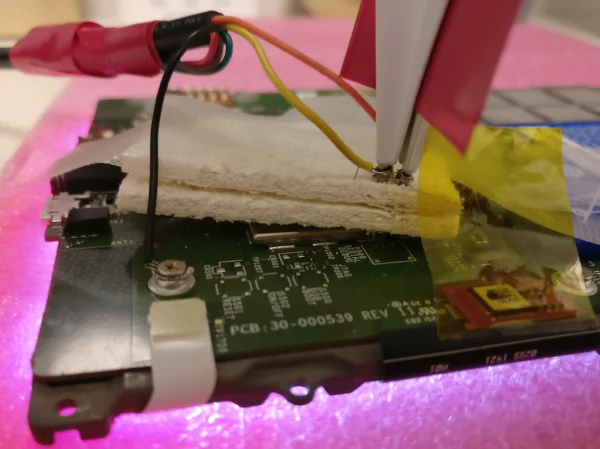
The team focused on PDF, one of the most common and at the same time most complex formats. For the second stage they needed a jailbroken Kindle, because firmware files alone are not enough to search for a logical LPE: running processes, open ports and service debugging are required. A software jailbreak exists for some firmware versions, but the most general route is through the serial port, which requires disassembling the device. That is what they did.
Finding it
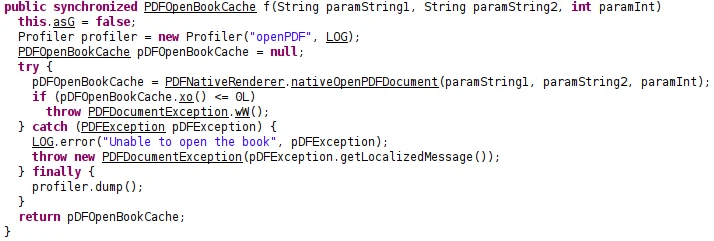
The PDF opening function in PDFReader-impl.jar (com.amazon.ebook.booklet.pdfreader.impl.PDFModel) is only a wrapper over the native nativeOpenPDFDocument function, whose body lives in /usr/java/lib/libPDFClientJNI.so.
nativeOpenPDFDocument forks the PDF server /usr/bin/pdfreader and synchronously sends it an "openBook" message through the open source HTTP client/server library /usr/lib/libsoup-2.4.so. In practice it sends a GET request to http://[redacted]:7667/command/openBook.
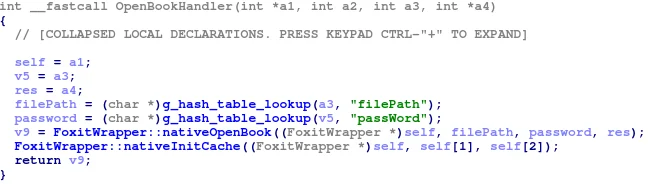
The pdfreader server became the main target, since the payload would eventually run in its context. At startup it lowers itself to the permissions of the "framework" user (uid 9000) with a setuid call, then launches a soup server on port 7667 with dozens of handlers for high-level PDF operations, including "openBook" and "startRendering". The /usr/lib/libFoxitWrapper.so library, written by Amazon, provides the PDF API used by those handlers. The "openBook" handler looks like this:
The significant functions of libFoxitWrapper.so are:
openPDFDocumentFromLibrary(char *file, char* password, uint32_t* handle)opens the PDF document.getCurrentPage(uint32_t handle, uint32_t page, uint32_t flag)parses a PDF page into internal structures.renderPageFromLibrary(uint32_t handle, uint32_t page, uint32_t width, uint32_t height, float scale, uint8_t landscape, uint8_t* out)renders a page to an image; when it is called, the stream filters begin to be parsed.
These are good entry points for fuzzing a PDF tree structure. libFoxitWrapper.so is a wrapper for the Foxit PDF SDK, present on the device as /usr/lib/libfpdfemb.so, a closed-source library proprietary to Foxit Software Inc. Its manual can be found on the Internet.
Fuzzing the libFoxitWrapper.so functions produced nothing but a set of null pointer exceptions. A more promising approach is to pick one specific object or stream filter as the target, so the team decided to fuzz libfpdfemb.so directly.
The classic model: write an executable that loads the closed-source library into memory and calls the target function, taking a file of permuted data as a command line argument, reading it and passing it to the function under test. The loader is instrumented or run on an emulator to collect a code coverage matrix per test case, and a third-party fuzzer/permutor generates new cases from that matrix. They chose American Fuzzy Lop (AFL) combined with Quick emulator (Qemu), on an Ubuntu host.
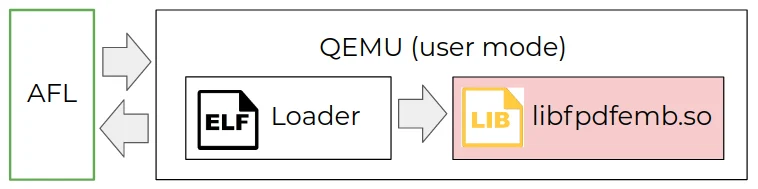
Because a Kindle is based on an ARM processor, the loader was compiled with arm-linux-gnueabi-g++; Qemu emulates ARM on x86 easily.
Searching libfpdfemb.so for the words "CPDF" and "Codec" revealed all the stream filters/codecs: Predictor, Decrypt, Flate, Fax, Lzw, AsciiHex, RunLen, Ascii85, Jpeg, Jbig2 and Jpx. The jbig2 filter is a good example.
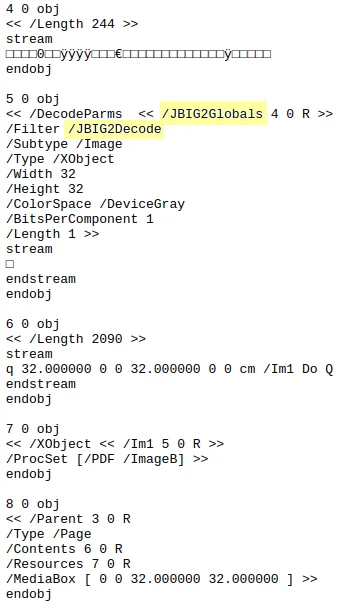
An image Im1 with the jbig2 filter is declared. Jbig2 is an image compression standard for bi-level images: the encoder segments the input page into regions (text, halftone images, refinement and others), and these regions are held in the JBIG2Globals stream. When rendering a PDF page, libfpdfemb.so parses the JBIG2Globals stream and reconstructs the image. The Jbig2Module object in libfpdfemb.so is responsible for decoding jbig2 compressed images.
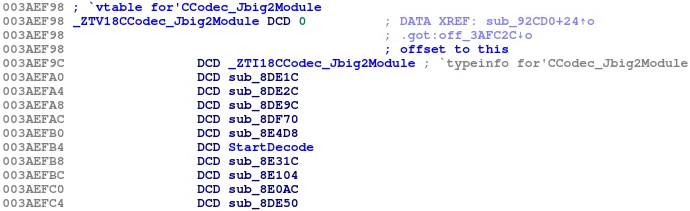
Its StartDecode method is declared as follows:
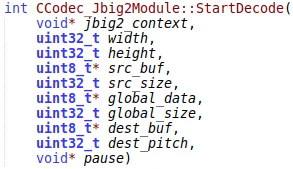
Among the other filters, they fuzzed the jbig2 decoding algorithm with StartDecode as the entry point, permuting the image size (width and height arguments), the image stream (src_buf, src_size) and the JBIG2Globals stream (global_data, global_size). The harness below invokes StartDecode; the base variable is the address of libfpdfemb.so in memory.
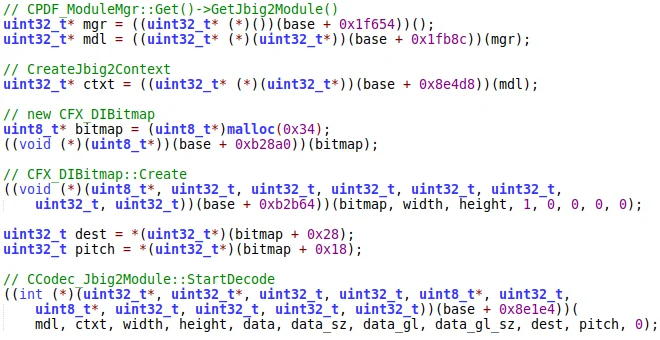
This produced a heap overflow in the JBIG2Globals decoding algorithm.
Exploitation
Step 1: a malformed JBIG2Globals stream (CVE-2021-30354)
Consider the following JBIG2Globals stream:
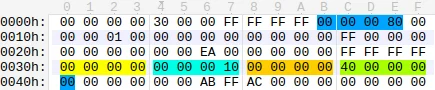
Two page regions are defined:
- The image information region, the first 0x23 bytes. The image width is 0x80, the height is 1 and the stride is 0x10. The stride is calculated as
((width + 31) >> 5) << 2. - The "refinement" region, from 0x23 to 0x4D bytes. It contains jbig2 encoded information to refine the image. Since only part of an image can be refined, it also carries the coordinates of the refining rectangle: width 0, height 0x10, x 0, y 0x40000000.
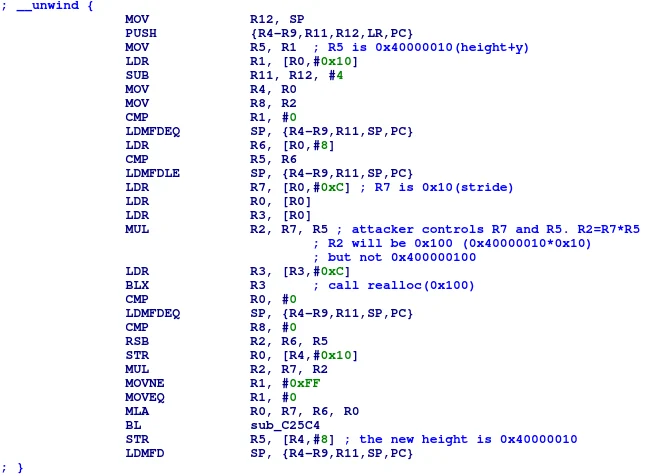
This is malformed: an oversized rectangle is defined in the refinement region. The algorithm tries to expand the base image to the new dimensions. The height of the new image is recalculated as height + y, and (height + y) * stride heap memory is allocated for the resized image. But the expanding function misses a check for INT_MAX when calculating the size in memory of the new image. The 32-bit register overflows, and 0x100 bytes is allocated for the image instead of 0x400000100.
Step 2: turn the overflow into an arbitrary write
Using refinement regions, data outside the image can be "refined", which gives an arbitrary write primitive. In the following example, the second refinement region overwrites 0x10 (stride) bytes at an offset of 0x1234 * 0x10 bytes from the beginning of the image in the heap. The data blob (0x71 to 0x79 bytes) is decompressed by the jbig2 algorithm and then XORed with the heap content.
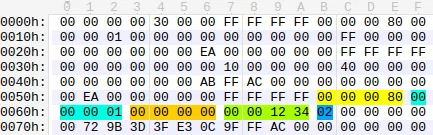
Any number of refinement regions can be created, overwriting parts of memory that are at a distance from each other. Because the write is a XOR operation, only specific bits of memory can be fixed rather than whole words, which also allows bypassing ASLR if required.
Step 3: why the write is easy to exploit
libfpdfemb.so is part of the pdfreader process, whose data and heap segments are read/write/execute. ASLR is built into the Linux kernel and controlled by /proc/sys/kernel/randomize_va_space; its default value on Kindle devices is 1, which means the base address of the data segment sits immediately after the end of the executable code segment. There is no randomisation for the data segment and the heap. Together with the read/write/execute data and heap segments, this makes exploiting the jbig2 vulnerability trivial.
Step 4: from framework to root (CVE-2021-30355)
At this point there is RCE in the context of pdfreader: a user downloads the PDF book, opens it, and a malicious payload is launched. The process has framework user rights:
uid=9000(framework) gid=150(javausers) groups=150(javausers)
It can send LIPC messages and access special internal files, but it is still limited. The second stage is an LPE that lets the framework user run code as root.
On the jailbroken device they analysed services with root rights and the resources they access, and found a logical error, more precisely an improper privilege management, in one of the Kindle services. No need to fuzz device drivers.
The framework user has full access to the /var/tmp/framework directory, where any executable file can be created; it is the user's working directory. For example, a bash script payload.sh that logs user privileges:
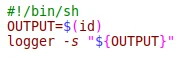
The framework user also has read/write access to the /var/local/appreg.db sqlite database, essentially an application registry. A database entry can be fixed using the /usr/lib/libsqlite3.so library or by simply editing the file. The target is one of the "command" entries in the properties table.
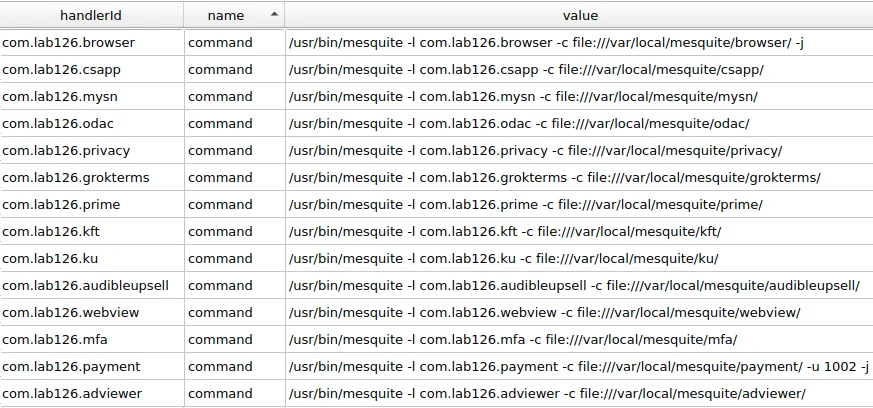
For example, the entry com.lab126.browser can be patched: set the value field to /var/tmp/framework/payload.sh instead of /usr/bin/mesquite. The following SQL request does the work:
The framework can ask the application manager, the appmgrd service, to start an arbitrary application by sending an LIPC message to open the browser app using the /usr/lib/liblipc.so library. This shell command does the same:
The application manager launches built-in apps by listening for the appropriate LIPC events. To start the browser app it reads the com.lab126.browser entry from appreg.db and executes the command in the value field. Since that entry was patched, payload.sh is launched. appmgrd has root rights, and the payload.sh logs the string root: uid=0(root) gid=0(root).
This LPE is easily exploited from the owned pdfreader process: libsqlite3.so and liblipc.so are already loaded into its memory. Combining the two vulnerabilities runs any malicious payload as root.
Root cause
The heap overflow is a missed check for INT_MAX in the function that expands a jbig2 image to the dimensions of a refinement rectangle. The new height is computed as height + y and the allocation as (height + y) * stride; with y = 0x40000000 the 32-bit arithmetic overflows and 0x100 bytes are allocated instead of 0x400000100, so the refinement data is written past the buffer. The write is XOR-based, which limits it to flipping bits but also lets it bypass ASLR if needed. The process's data and heap segments are read/write/execute and, with randomize_va_space at 1, the data segment and heap are not randomised, so the primitive is directly usable.
The privilege escalation is an improper privilege management: the framework user can write to /var/tmp/framework and to the appreg.db registry, and the root appmgrd service executes the command named in the value field of an application entry.
Impact
Opening a malicious e-book on a Kindle could execute hidden code with root rights, at which point the owner has lost control of the e-reader. The attacker could delete e-books, potentially gain full access to the Amazon account, convert the Kindle into a bot, and attack other devices on the local network. The book can be distributed through any virtual library, including the Kindle Store via self-publishing, or sent directly to the device with "send to kindle". Antiviruses do not detect e-books.
The issues were reported to Amazon in February 2021 and fixed in firmware 5.13.5 in April 2021; patched firmware installs automatically on devices connected to the Internet.
Fix
Amazon fixed the vulnerabilities in Kindle firmware 5.13.5, released in April 2021, and the update is installed automatically on Internet-connected devices.
Variants to test
- Fuzz the other stream filters found in
libfpdfemb.so(Predictor,Decrypt,Flate,Fax,Lzw,AsciiHex,RunLen,Ascii85,Jpeg,Jpx) with the same AFL+Qemu loader. A positive result is a crash or coverage-guided input that reaches a size calculation with attacker-controlled dimensions. - Target the
libFoxitWrapper.soentry points (openPDFDocumentFromLibrary,getCurrentPage,renderPageFromLibrary) with structured PDFs rather than raw bytes. A positive result is a memory error beyond the null pointer exceptions seen here. - Look for other integer overflows of the form
(height + y) * stridein image decoders that support refinement or region-based formats. A positive result is an allocation much smaller than the write that follows it. - On any device where a low-privileged user can write an application registry that a root service reads to build a command line, patch an entry and trigger the service. A positive result is the payload running with
uid=0. - Check
randomize_va_spaceand segment permissions on the target process. A value of 1 with an executable heap makes a heap overflow far easier to turn into code execution.
What happened, in plain words
Amazon has sold tens of millions of Kindles since 2007. A Kindle is a small computer dedicated to reading, and like any computer it runs software that can contain mistakes. This research shows that a specially crafted e-book, opened on a Kindle, could run hidden code with the highest level of permission on the device. At that point the owner has effectively lost control of the e-reader.
The easiest way to reach a Kindle from a distance is through a book. A malicious book can be published and made available for free in any virtual library, including the Kindle Store through the self-publishing service, or sent straight to the device with Amazon's "send to kindle" service. Antivirus programs have no signatures for e-books, and no such scenario had been publicised before this work.
Two separate weaknesses were chained together. The first is a memory corruption bug in the code that decodes images inside PDF files, which lets an attacker run code as the "framework" user, a low-privileged account. The second is a design mistake in how the device decides which program to start, which lets that same low-privileged user get code run as root, the all-powerful account. Neither alone gives full control; together they do.
The device and its parts
The Kindle operating system is a Linux kernel with a set of native programs mainly provided by busybox, the LIPC subsystem for inter-process communication, and the Java and Webkit subsystems for the user interface and services.
Figure 1 shows this architecture: the kernel at the bottom, the native programs, LIPC in the middle connecting everything, and the Java and Webkit layers on top.
A few of those words need unpacking for anyone new to this.
- The kernel is the core of the operating system. It manages memory, decides which program may use the processor, and enforces who is allowed to do what.
- busybox is a collection of small standard command-line tools bundled into one program. It is common on small Linux devices.
- LIPC is a D-Bus-based IPC library and its environment that links all Kindle components together. IPC means inter-process communication: a way for one running program to send a message to another. D-Bus is a well-known message bus on Linux, a kind of internal postal service. A Kindle process can use LIPC to start apps, expose application properties and settings, and listen for or emit events. For example, a Webkit application written in HTML and JavaScript can use LIPC to talk to a Java service or a native application.
- Java is a programming language; here it is used for most of the interface. The Java subsystem, called the framework, provides LIPC handlers for services and for the interface. Those interface pieces are called Booklets. The Kindle home window, for instance, is the
com.lab126.booklet.homebooklet managed by the framework. - Webkit is the engine that renders web pages (HTML and JavaScript). The built-in experimental browser is part of the Webkit subsystem. The pillow library lets JavaScript reach LIPC.
A process is simply a running program. Each process has an identity, called a user, and the kernel uses that identity to decide what the process may read, write or execute. The most powerful identity is root, which can do anything. A normal program runs under a limited user so that a bug in it cannot damage the whole system. Keep that idea in mind: the whole story is about moving from a limited user to root.
Where books are handled
The latest firmware at the time, version 5.13.4, is publicly downloadable from Amazon, and its source is partially available. But the source consists mainly of third-party open-source projects with small Amazon tweaks. There is no source for the components that parse and render e-books, so the work was done on firmware files, without needing a real device for the first stage.
When a book is downloaded it lands in /mnt/us/documents. A path like that is just an address in the device's file system, the same way a folder on a computer has a location. The /usr/bin/scanner service periodically scans that directory and, depending on the file extension, uses one of the extractor libraries to pull metadata. Metadata is information about the book, such as its title and author, rather than its contents. The extractors are listed in the /var/local/appreg.db sqlite database:
| File format | Extractor |
|---|---|
| kfx | /usr/lib/ccat/libyjextractorE.so |
| azw1, tpz | /usr/lib/ccat/libtopazE.so |
/usr/lib/ccat/libpdfE.so |
|
| azw3 | /usr/lib/ccat/libmobi8extractorE.so |
| azw, mbp, mobi, prc | /usr/lib/ccat/libEBridge.so |
A library here means a file of reusable code that other programs load and call, usually ending in .so on Linux. sqlite is a small database engine that stores data in a single file; appreg.db is such a file, and it acts as a registry of applications.
If the scanner does not match the extension, or a parsing error occurs, the book is not shown to the user. The researchers did not go deep into scanning, because extracting metadata is too simple an operation to suggest parsing errors.
After scanning, a thumbnail of the new book appears on the home screen. From then on the Java framework opens the book when it is clicked. The Java archive (JAR) files that implement opening and rendering live in /opt/amazon/ebook/lib, primarily MobiReader-impl.jar, YJReader-impl.jar, PDFReader-impl.jar, HTMLReader-impl.jar and TopazReader-impl.jar. A JAR is a packaged bundle of Java code.
The team focused on PDF, one of the most common and at the same time most complex formats. A format is complex when it can describe many things: text, fonts, images, compression, and instructions for putting them together. Complexity is where bugs hide.
For the second stage they needed a jailbroken Kindle. Jailbreaking means removing the manufacturer's restrictions so you can run your own code and inspect the system. Firmware files alone are not enough to search for a logical privilege escalation, because you need to see running processes, open ports and be able to debug Kindle services. A software jailbreak exists for some firmware versions, but the most general route is through the serial port, which requires disassembling the device. That is what they did.
Figure 8 shows the Kindle opened up for the serial-port jailbreak.
Following the PDF path
The PDF opening function in PDFReader-impl.jar, in the class com.amazon.ebook.booklet.pdfreader.impl.PDFModel, is only a wrapper over the native nativeOpenPDFDocument function, whose body lives in /usr/java/lib/libPDFClientJNI.so.
A wrapper is a thin layer that does little itself and hands the real work to something else. Native means compiled machine code rather than Java. The figure shows the Java function, and you can see it simply calls down into the native library.
nativeOpenPDFDocument forks the PDF server /usr/bin/pdfreader and synchronously sends it an "openBook" message through the open source HTTP client/server library /usr/lib/libsoup-2.4.so. To fork is to start a second process from the current one. Synchronously means it waits for the answer before continuing. In practice it sends a GET request to http://[redacted]:7667/command/openBook.
That deserves a pause, because it is the key to the whole first stage. HTTP is the protocol your browser uses to talk to websites. A GET request is the simplest kind: "please give me this". [redacted] is the special address that always means "this same machine", so the request never leaves the device. 7667 is a port, a numbered door on a machine that a particular program listens behind. /command/openBook is the path being requested. In short, the Java side asks a local server, over the same kind of protocol as the web, to open a book.
The pdfreader server became the main target, since the payload would eventually run in its context. At startup it lowers itself to the permissions of the "framework" user (uid 9000) with a setuid call, then launches a soup server on port 7667 with dozens of handlers for high-level PDF operations, including "openBook" and "startRendering".
A uid is a user identifier, a number the kernel uses for an account. setuid is the system call a program uses to change its own identity, here deliberately dropping from a powerful account to a weaker one. That is good practice: if the PDF code has a bug, the bug is contained. A handler is the piece of code that runs when a particular request arrives, like the person at a counter who deals with one specific form.
The /usr/lib/libFoxitWrapper.so library, written by Amazon, provides the PDF API used by those handlers. An API is the set of functions a library offers to other programs, like a menu of services. The "openBook" handler looks like this:
The significant functions of libFoxitWrapper.so are:
openPDFDocumentFromLibrary(char *file, char* password, uint32_t* handle)opens the PDF document.getCurrentPage(uint32_t handle, uint32_t page, uint32_t flag)parses a PDF page into internal structures.renderPageFromLibrary(uint32_t handle, uint32_t page, uint32_t width, uint32_t height, float scale, uint8_t landscape, uint8_t* out)renders a page to an image; when it is called, the stream filters begin to be parsed.
In plain terms: the first function opens the file, the second reads a page into memory, and the third draws the page as a picture. Rendering means turning the description of a page into pixels. A stream filter is a decoding step inside a PDF: the file stores data compressed or encoded, and a filter turns it back into usable data. The third function is where those filters start running, which makes it interesting.
These are good entry points for fuzzing a PDF tree structure. Fuzzing means feeding a program huge numbers of slightly varied inputs to see which ones make it misbehave. A PDF tree structure is how a PDF organises its objects: pages, images, fonts and so on, linked together like branches.
libFoxitWrapper.so is a wrapper for the Foxit PDF SDK, present on the device as /usr/lib/libfpdfemb.so, a closed-source library proprietary to Foxit Software Inc. Closed source means the code is not published, so you cannot read it; you can only observe how it behaves. Its manual can be found on the Internet.
Fuzzing the libFoxitWrapper.so functions produced nothing but a set of null pointer exceptions. A null pointer exception is a crash caused by the program trying to use an empty reference, a fairly harmless kind of mistake. A more promising approach is to pick one specific object or stream filter as the target, so the team decided to fuzz libfpdfemb.so directly.
The classic model works like this. Write an executable that loads the closed-source library into memory and calls the target function. It takes a file of permuted data as a command line argument, reads it, and passes it to the function under test. The loader is instrumented or run on an emulator to collect a code coverage matrix for each test case, and a third-party fuzzer generates new cases from that matrix. They chose American Fuzzy Lop (AFL) combined with Quick emulator (Qemu), on an Ubuntu host.
A loader here is a small program built only to call the library. Instrumented means extra measurements are added so you can see which parts of the code ran. Code coverage is the record of which lines or blocks were executed by a given input; the matrix is that record for every test case. A fuzzer uses coverage to decide which inputs to mutate next, so it drifts towards unexplored code. Qemu is an emulator: it pretends to be a different kind of processor so code for that processor can run on your machine. Ubuntu is a common Linux distribution, the host machine here.
Figure 2 shows the fuzzing scheme: the loader, the library, the coverage collection and the fuzzer feeding new cases back in.
Because a Kindle is based on an ARM processor, the loader was compiled with arm-linux-gnueabi-g++; Qemu emulates ARM on x86 easily. ARM and x86 are two families of processor instruction sets; code built for one does not run natively on the other. A compiler is the program that turns source code into an executable, and arm-linux-gnueabi-g++ is the compiler used here, targeting ARM.
Searching libfpdfemb.so for the words "CPDF" and "Codec" revealed all the stream filters and codecs: Predictor, Decrypt, Flate, Fax, Lzw, AsciiHex, RunLen, Ascii85, Jpeg, Jbig2 and Jpx. A codec is a piece of code that encodes or decodes a particular format. The jbig2 filter is a good example.
Figure 3 shows a fragment of a PDF page that uses the jbig2 filter. An image Im1 with the jbig2 filter is declared. Jbig2 is an image compression standard for bi-level images, meaning images with only two tones, such as black and white. The encoder segments the input page into regions: text, halftone images, refinement and others. These regions are held in the JBIG2Globals stream. When rendering a PDF page, libfpdfemb.so parses the JBIG2Globals stream and reconstructs the image. The Jbig2Module object in libfpdfemb.so is responsible for decoding jbig2 compressed images.
A stream in a PDF is a sequence of bytes, often compressed, that holds data such as an image. Refinement is a jbig2 feature: instead of storing a whole image again, you store a small correction that improves part of it. That is efficient, and it is also where the bug lives.
Figure 4 shows the Jbig2Module object. Its StartDecode method is declared as follows:
A method is a function that belongs to an object. StartDecode is the function that begins decoding an image.
Among the other filters, they fuzzed the jbig2 decoding algorithm with StartDecode as the entry point, permuting the image size (width and height arguments), the image stream (src_buf, src_size) and the JBIG2Globals stream (global_data, global_size). The harness below invokes StartDecode; the base variable is the address of libfpdfemb.so in memory.
A harness is the small program that feeds inputs to the function under test. Permuting means varying the values systematically. An address in memory is the numbered location where a piece of code or data sits while the program runs.
Figure 5 shows the harness. This produced a heap overflow in the JBIG2Globals decoding algorithm.
A heap is the region of memory a program uses for data it creates while running, as opposed to its fixed code. A heap overflow means writing more data than a buffer in that region can hold, so the extra bytes spill into neighbouring memory. That is dangerous because the spilled bytes can overwrite things the program relies on.
Turning the bug into control
Step 1: a malformed JBIG2Globals stream (CVE-2021-30354)
A CVE is a public catalogue number for a known vulnerability, so people can refer to the same bug unambiguously. Consider the following JBIG2Globals stream:
Figure 6 shows the malformed stream. Two page regions are defined:
- The image information region, the first 0x23 bytes. The image width is 0x80, the height is 1 and the stride is 0x10. The stride is calculated as
((width + 31) >> 5) << 2. - The "refinement" region, from 0x23 to 0x4D bytes. It contains jbig2 encoded information to refine the image. Since only part of an image can be refined, it also carries the coordinates of the refining rectangle: width 0, height 0x10, x 0, y 0x40000000.
Numbers starting with 0x are written in hexadecimal, base 16, a compact way to write byte values. Stride is the number of bytes used for one row of an image in memory, which is often a little more than the row's visible width because rows are padded. The expression ((width + 31) >> 5) << 2 is a formula that rounds the width up and multiplies by four; >> and << are bit shifts, fast ways to divide or multiply by powers of two.
This is malformed: an oversized rectangle is defined in the refinement region. The algorithm tries to expand the base image to the new dimensions. The height of the new image is recalculated as height + y, and (height + y) * stride heap memory is allocated for the resized image. But the expanding function misses a check for INT_MAX when calculating the size in memory of the new image. The 32-bit register overflows, and 0x100 bytes is allocated for the image instead of 0x400000100.
This is the heart of the bug, so it is worth going slowly. Allocating memory means asking the system for a block of a given size. INT_MAX is the largest value a standard integer can hold. A 32-bit register is a small slot inside the processor that holds a number of limited size; when a calculation goes past that limit, the value wraps around, like a car odometer rolling over. That wrap is called an integer overflow. Here the intended size was 0x400000100, but after wrapping only 0x100 bytes were reserved. The program then writes the refinement data as if the larger space existed, and the bytes land outside the small buffer. That is the heap overflow.
Figure 7 shows the expand function where the missing check sits.
Step 2: turn the overflow into an arbitrary write
Using refinement regions, data outside the image can be "refined", which gives an arbitrary write primitive. An arbitrary write primitive means the attacker can choose both what value is written and where in memory it goes, which is the building block of most serious exploits. In the following example, the second refinement region overwrites 0x10 (stride) bytes at an offset of 0x1234 * 0x10 bytes from the beginning of the image in the heap. The data blob (0x71 to 0x79 bytes) is decompressed by the jbig2 algorithm and then XORed with the heap content.
An offset is a distance from a starting point, so this says "write at a chosen distance from the image". XOR is a simple bit operation: each bit of the written data is combined with the existing bit, flipping it if the incoming bit is 1 and leaving it if 0. A data blob is just a chunk of bytes.
Figure 8 shows the controlled heap overflow. Any number of refinement regions can be created, overwriting parts of memory that are at a distance from each other. Because the write is a XOR operation, only specific bits of memory can be fixed rather than whole words, which also allows bypassing ASLR if required.
ASLR stands for Address Space Layout Randomisation. It is a defence that shuffles where things sit in memory each time a program starts, so an attacker cannot hard-code an address. If you can only flip chosen bits, you can still adjust an existing address to point where you want, which is why XOR writes matter against ASLR.
Step 3: why the write is easy to exploit
libfpdfemb.so is part of the pdfreader process, whose data and heap segments are read/write/execute. A segment is a block of a process's memory with a set of permissions. Read/write/execute means the processor may read it, change it and run it as code. Normally data memory is not executable, precisely to make this kind of attack harder.
ASLR is built into the Linux kernel and controlled by /proc/sys/kernel/randomize_va_space; its default value on Kindle devices is 1, which means the base address of the data segment sits immediately after the end of the executable code segment. There is no randomisation for the data segment and the heap. Together with the executable heap, this makes exploiting the jbig2 vulnerability trivial.
In other words, two protections that usually make exploitation hard were absent: the data and heap segments could also be run as code, and their location was predictable.
Step 4: from framework to root (CVE-2021-30355)
At this point there is remote code execution in the context of pdfreader: a user downloads the PDF book, opens it, and a malicious payload is launched. Remote code execution, often shortened to RCE, means an attacker gets their own code running on someone else's machine. The process has framework user rights:
uid=9000(framework) gid=150(javausers) groups=150(javausers)
This line is the identity of the process as the system reports it. uid is the user number, gid is the group number, and groups lists the groups the process belongs to. Groups are a way to share permissions among several accounts. The framework user can send LIPC messages and access special internal files, but it is still limited. The second stage is a local privilege escalation that lets the framework user run code as root.
Local privilege escalation, or LPE, means going from a weaker account to a stronger one on the same machine. It is "local" because the attacker is already running code there; the question is only how much power that code has.
On the jailbroken device they analysed services with root rights and the resources they access, and found a logical error, more precisely an improper privilege management, in one of the Kindle services. No need to fuzz device drivers. A logical error is a mistake in the rules the program follows, not in its memory handling. Improper privilege management means the system gives someone more power than they should have, or trusts something they should not be able to change.
The framework user has full access to the /var/tmp/framework directory, where any executable file can be created; it is the user's working directory. For example, a bash script payload.sh that logs user privileges:
A directory is a folder. A bash script is a text file of commands the shell runs in order. Logging means writing information out so it can be read later. The script here logs which user it is running as.
The framework user also has read/write access to the /var/local/appreg.db sqlite database, essentially an application registry. A database entry can be fixed using the /usr/lib/libsqlite3.so library or by simply editing the file. The target is one of the "command" entries in the properties table.
A table is how a database organises rows of data, like a spreadsheet. A field is one column of a row. The properties table holds settings, and some of its entries name a command to run.
Figure 9 shows the properties table in appreg.db. For example, the entry com.lab126.browser can be patched: set the value field to /var/tmp/framework/payload.sh instead of /usr/bin/mesquite. The following SQL request does the work:
SQL is the language used to query and change databases. Patching means changing a value in place. The idea is simple: the registry says which program to start for the browser, and the researchers change that answer to point at their own script.
The framework can ask the application manager, the appmgrd service, to start an arbitrary application by sending an LIPC message to open the browser app using the /usr/lib/liblipc.so library. This shell command does the same:
A service is a program that runs in the background and does jobs for others. A shell command is a line typed into a terminal. The point of this step is to trigger the normal "open the browser" path, so the device itself does the rest.
The application manager launches built-in apps by listening for the appropriate LIPC events. To start the browser app it reads the com.lab126.browser entry from appreg.db and executes the command in the value field. Since that entry was patched, payload.sh is launched. appmgrd has root rights, and the payload.sh logs the string root: uid=0(root) gid=0(root).
That logged line is the proof: the script ran as root, the all-powerful account. The chain is now complete. A low-privileged process changed a setting that a root service trusts, and the root service ran the attacker's file.
This LPE is easily exploited from the owned pdfreader process: libsqlite3.so and liblipc.so are already loaded into its memory. Combining the two vulnerabilities runs any malicious payload as root.
Why it worked
The heap overflow is a missed check for INT_MAX in the function that expands a jbig2 image to the dimensions of a refinement rectangle. The new height is computed as height + y and the allocation as (height + y) * stride; with y = 0x40000000 the 32-bit arithmetic overflows and 0x100 bytes are allocated instead of 0x400000100, so the refinement data is written past the buffer. The write is XOR-based, which limits it to flipping bits but also lets it bypass ASLR if needed. The process's data and heap segments are read/write/execute and, with randomize_va_space at 1, the data segment and heap are not randomised, so the primitive is directly usable.
The privilege escalation is an improper privilege management: the framework user can write to /var/tmp/framework and to the appreg.db registry, and the root appmgrd service executes the command named in the value field of an application entry.
What an attacker could do
Opening a malicious e-book on a Kindle could execute hidden code with root rights, at which point the owner has lost control of the e-reader. The attacker could delete e-books, potentially gain full access to the Amazon account, convert the Kindle into a bot, and attack other devices on the local network. A bot is a compromised machine controlled remotely, often without the owner noticing, and used to attack others. The book can be distributed through any virtual library, including the Kindle Store via self-publishing, or sent directly to the device with "send to kindle". Antiviruses do not detect e-books.
The issues were reported to Amazon in February 2021 and fixed in firmware 5.13.5 in April 2021; patched firmware installs automatically on devices connected to the Internet.
The fix
Amazon fixed the vulnerabilities in Kindle firmware 5.13.5, released in April 2021, and the update is installed automatically on Internet-connected devices.
What to test next
- Fuzz the other stream filters found in
libfpdfemb.so(Predictor,Decrypt,Flate,Fax,Lzw,AsciiHex,RunLen,Ascii85,Jpeg,Jpx) with the same AFL and Qemu loader. A positive result is a crash, or a coverage-guided input that reaches a size calculation with attacker-controlled dimensions. - Target the
libFoxitWrapper.soentry points (openPDFDocumentFromLibrary,getCurrentPage,renderPageFromLibrary) with structured PDFs rather than raw bytes. A positive result is a memory error beyond the null pointer exceptions seen here. - Look for other integer overflows of the form
(height + y) * stridein image decoders that support refinement or region-based formats. A positive result is an allocation much smaller than the write that follows it. - On any device where a low-privileged user can write an application registry that a root service reads to build a command line, patch an entry and trigger the service. A positive result is the payload running with
uid=0. - Check
randomize_va_spaceand segment permissions on the target process. A value of 1 with an executable heap makes a heap overflow far easier to turn into code execution.
Glossary
- API: the set of functions a library or service offers to other programs, like a menu of services.
- Arbitrary write primitive: the ability to choose both a value and a memory location to write it to; a building block of serious exploits.
- ARM: a family of processor instruction sets common in small devices such as the Kindle.
- ASLR: Address Space Layout Randomisation, a defence that shuffles where code and data sit in memory each run.
- bash script: a text file of shell commands run in order.
- Bit shift: an operation that moves the bits of a number left or right, a fast way to multiply or divide by powers of two.
- Booklet: a Java interface component on the Kindle, managed by the framework.
- Bot: a compromised machine controlled remotely and often used to attack others.
- Buffer: a reserved block of memory for holding data; writing past its end is an overflow.
- busybox: a bundle of small standard Linux command-line tools in one program.
- Closed source: software whose code is not published, so it can only be observed, not read.
- Code coverage: the record of which parts of a program were executed by a given input.
- Codec: code that encodes or decodes a particular data format.
- Compiler: a program that turns source code into an executable.
- CVE: a public catalogue number for a known vulnerability.
- D-Bus: a standard message bus on Linux that lets programs talk to each other.
- Directory: a folder in a file system.
- Emulator: software that pretends to be different hardware so code for it can run elsewhere.
- Executable: a file the system can run as a program.
- Field: one column of a row in a database table.
- Fork: to start a second process from the current one.
- Framework: here, the Java subsystem that provides services and interface components on the Kindle.
- Fuzzer: a tool that feeds many varied inputs to a program to find crashes and bugs.
- Fuzzing: the practice of feeding a program huge numbers of varied inputs to see which make it misbehave.
- GET request: the simplest HTTP request, asking for a resource.
- gid: group identifier, the number of a group account.
- Handler: the code that runs when a particular request arrives.
- Harness: a small program that feeds inputs to the function under test.
- Heap: the region of memory a program uses for data it creates while running.
- Heap overflow: writing more data than a heap buffer can hold, so bytes spill into neighbouring memory.
- Hexadecimal: base 16 notation, written with a
0xprefix, a compact way to write byte values. - HTTP: the protocol browsers use to talk to web servers.
- Improper privilege management: a design mistake that gives someone more power than they should have, or trusts something they should not change.
- Instrumented: with extra measurements added so you can see which code ran.
- Integer overflow: a calculation that exceeds the largest value a number type can hold and wraps around.
- INT_MAX: the largest value a standard integer can hold.
- IPC: inter-process communication, a way for running programs to exchange messages.
- JAR: a packaged bundle of Java code.
- Java: a programming language, used here for most of the Kindle interface.
- Jailbreaking: removing the manufacturer's restrictions so you can run your own code and inspect the system.
- Kernel: the core of the operating system, which manages memory, the processor and permissions.
- Library: a file of reusable code that other programs load and call.
- LIPC: the Kindle's D-Bus-based IPC library and environment that links its components.
- Loader: here, a small program built only to call a library function.
- Local privilege escalation (LPE): going from a weaker account to a stronger one on the same machine.
- Logging: writing information out so it can be read later.
- Metadata: information about data, such as a book's title and author.
- Method: a function that belongs to an object.
- Native: compiled machine code rather than Java.
- Null pointer exception: a crash caused by using an empty reference.
- Offset: a distance from a starting point.
- Patch: to change a value or file in place.
- PDF tree structure: how a PDF links its objects, such as pages, images and fonts.
- Permuting: varying values systematically.
- pillow: a library that lets JavaScript reach LIPC on the Kindle.
- Port: a numbered door on a machine that a particular program listens behind.
- Process: a running program.
- Qemu: an emulator that can run code for one processor family on another.
- Read/write/execute: memory permissions allowing the processor to read, change and run the contents.
- Refinement: a jbig2 feature that stores a small correction to part of an image instead of the whole image.
- Remote code execution (RCE): getting your own code to run on someone else's machine.
- Rendering: turning a page description into pixels.
- Root: the all-powerful account on a Linux system.
- Segment: a block of a process's memory with a set of permissions.
- Service: a program that runs in the background and does jobs for others.
- setuid: the system call a program uses to change its own user identity.
- Shell command: a line typed into a terminal.
- sqlite: a small database engine that stores data in a single file.
- SQL: the language used to query and change databases.
- Stride: the number of bytes used for one row of an image in memory, including padding.
- Stream: a sequence of bytes in a PDF, often compressed, holding data such as an image.
- Stream filter: a decoding step inside a PDF that turns stored data back into usable data.
- Synchronously: waiting for an answer before continuing.
- Table: how a database organises rows of data, like a spreadsheet.
- uid: user identifier, the number of a user account.
- Ubuntu: a common Linux distribution.
- Webkit: the engine that renders web pages, used for the Kindle's experimental browser.
- Wrapper: a thin layer that does little itself and hands the real work to something else.
- x86: a family of processor instruction sets common in desktop and laptop computers.
- XOR: a bit operation that flips a bit when the incoming bit is 1 and leaves it when 0.