What is App Sandbox?
A sandboxed macOS application could escape its App Sandbox by using the open utility to launch the unsandboxed Terminal app with a controlled HOME environment variable pointing to the sandboxed app's container, causing Terminal to execute a malicious profile file. This allowed the attacker to run arbitrary commands outside the sandbox and, if Terminal had Full Disk Access, bypass TCC restrictions to access sensitive user data.
 Published on perception-point.io
Perception Point researchers have discovered a vulnerability in macOS which allows an attacker to bypass App Sandbox restrictions. The vulnerability was disclosed to Apple, and the fix was announced on the latest macOS Monterey 12.0.1security update on October 25th, identified asCVE-2021-30864.
The full write-up lives on its author's site
It belongs to its author, so we link to it rather than copy it. The other two tabs are our own rewrites, checked against it.
Context
macOS App Sandbox is a mechanism that restricts an application's access to system resources and user data. Applications put themselves inside the sandbox voluntarily, declaring through entitlements which resources they are allowed to reach, so that damage is contained if the app is compromised by an attacker. A user can also read an application's entitlements to assess its behaviour and security risk. Despite the voluntary approach, Apple allows only sandboxed applications into the Mac App Store.
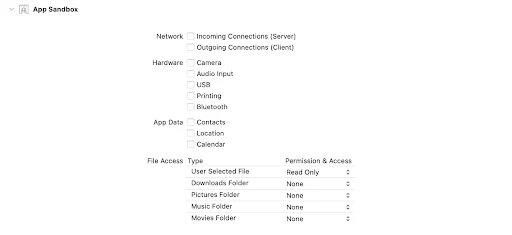
App Sandbox restrictions include access to network, the hardware (camera, microphone, etc.) and the file system.
Every sandboxed application gets a container, a directory that serves as the application's home directory. Even the most restricted applications have access to their container directory, and that detail matters for the vulnerability described here.
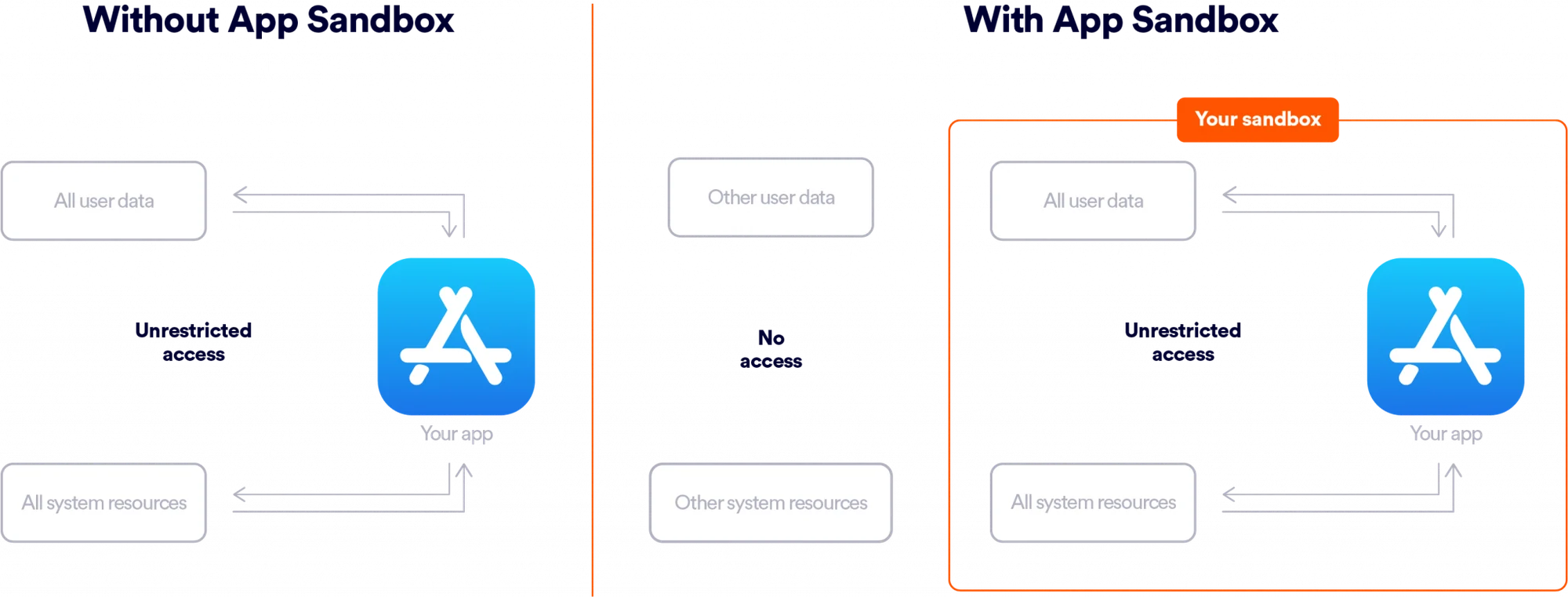
The vulnerability was disclosed to Apple and fixed in the macOS Monterey 12.0.1 security update on 25 October 2021, identified as CVE-2021-30864. It is closely related to CVE-2021-30783, which was fixed in earlier macOS versions.
Setup
Finding it
macOS users may be familiar with the open utility, which opens files, directories and applications just as if you had double-clicked them. A sandboxed application can use this utility, or its underlying API calls, to execute another application. Independently of the calling application's sandbox configuration, the newly opened application runs in its own sandbox configuration, or even outside of a sandbox if it is not a sandboxed application.
The researchers found a way to exploit this behaviour by opening the built-in Terminal application, which is not sandboxed. To execute an arbitrary command in the context of Terminal, they leveraged another feature of the open utility: controlling the environment variables of the target application. That makes it possible to control the HOME environment variable of Terminal and point it at the container of the sandboxed application. After further research they also found that an additional variable, __OSINSTALL_ENVIROMENT, is needed for the HOME variable to take effect inside the Terminal app.
Exploitation
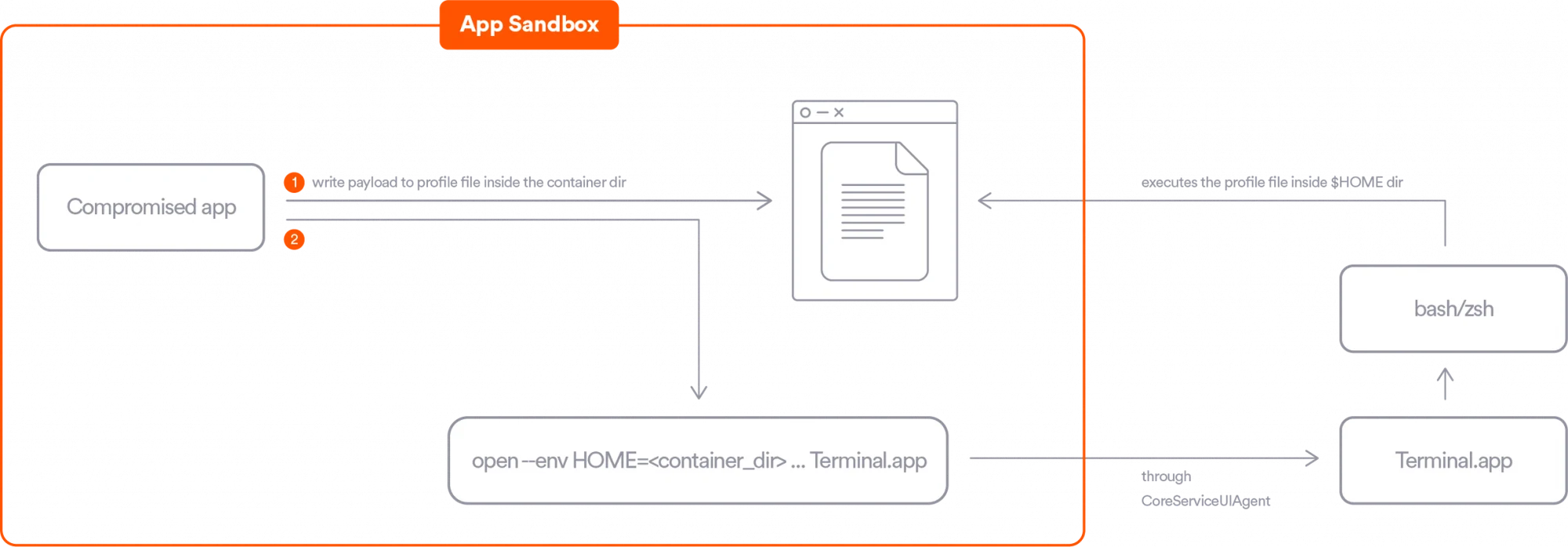
Step 1: Write the payload into the container
Write the desired payload to a profile file in the application's container directory. The file depends on the default shell, for example .zshenv or .bash_profile. Even the most restricted applications have access to their container directory.
Step 2: Open Terminal with a controlled environment
Open the Terminal application with these environment variables:
__OSINSTALL_ENVIROMENTHOME = <path_to_container_dir>
Because Terminal is not sandboxed, it starts outside the caller's sandbox. The HOME variable it inherits is redirected to the attacker-controlled container, and __OSINSTALL_ENVIROMENT is what makes that HOME value take effect inside Terminal.
Step 3: The shell executes the profile file
The newly opened Terminal runs bash or zsh, which in turn look for their profile files in their inherited HOME directory. That directory is the container, so the payload written in step 1 is executed.
Root cause
First, open lets a sandboxed caller launch an application that is not itself sandboxed, and the launched application runs under its own configuration rather than the caller's. Second, open lets the caller control the environment variables of the target application, including HOME. A shell started by Terminal trusts HOME to locate its profile files, so a writable directory that the sandboxed app controls becomes a code execution path outside the sandbox.
Impact
A sandboxed application can escape its App Sandbox restrictions and execute arbitrary commands in the context of the unsandboxed Terminal application. An extraordinary bonus of Terminal not being sandboxed is that it is often granted Full Disk Access by the user. In those cases the vulnerability also bypasses TCC restrictions, allowing access to sensitive user data such as contacts, mails and messages.
Fix
Apple released macOS 11.5 on 21 July 2021, which addresses the reported vulnerability, and macOS 12.0.1 on 25 October 2021, which addresses the reported vulnerability. The report does not describe the code change itself.
The disclosure timeline was:
| Date | Event |
|---|---|
| 2021-06-20 | First report to Apple Product Security |
| 2021-06-21 | Apple advises they are investigating |
| 2021-07-21 | Apple releases macOS 11.5, which addresses the reported vulnerability |
| 2021-07-22 | Second report to Apple Product Security with a slightly different Proof-Of-Concept |
| 2021-07-22 | Apple advises they are investigating |
| 2021-09-17 | Apple advises they will address the issue in the upcoming release of macOS Monterey |
| 2021-10-25 | macOS 12.0.1 released, which addresses the reported vulnerability |
- Launch other unsandboxed built-in applications through open from a sandboxed process and check whether environment variables such as
HOMEare honoured. A positive result is the target application reading configuration or profile files from a path the sandboxed app controls. - Try the same environment-variable redirection without
__OSINSTALL_ENVIROMENTand with it, to confirm which variable is required forHOMEto take effect. A positive result is the payload executing only when the extra variable is present. - Check whether the launched application inherits other environment variables that influence code loading, such as shell startup or library search paths. A positive result is code from the container being loaded by the unsandboxed process.
- Test whether the technique still works when Terminal has been granted Full Disk Access, and observe which TCC-protected resources become reachable. A positive result is access to data such as contacts, mails or messages from the escaped context.
What happened, in plain words
Security researchers at Perception Point found a way for a program running inside a macOS security cage, called the App Sandbox, to break out of that cage. The trick was to make the built-in Terminal app, which is not caged, run a small piece of the attacker's choosing. Apple fixed the problem in the macOS Monterey 12.0.1 security update on 25 October 2021, and the issue is tracked as CVE-2021-30864. It is closely related to CVE-2021-30783, which was fixed in earlier macOS versions.
This article explains what the App Sandbox is, then walks through the vulnerability as it was disclosed to Apple.
What is App Sandbox?
Think of the App Sandbox as a playpen for a program. macOS uses it to restrict what an application can reach: system resources and your personal data. An application chooses to go into the playpen, and it declares in advance, through a list called entitlements, which resources it is allowed to touch. The idea is that if an attacker manages to take over the app, the damage stays inside the playpen.
A user can also read an application's entitlements to judge what the app does and how risky it is. Even though joining the sandbox is voluntary, Apple only lets sandboxed applications into the Mac App Store.
App Sandbox restrictions include access to network, the hardware (camera, microphone, etc.) and the file system.
Every sandboxed application gets a container: a directory that acts as the application's home directory. Even the most tightly restricted applications have access to their own container. This detail will become important when we overview the vulnerability.
The vulnerability
If you use a Mac, you may know the open utility. It opens files, directories and applications exactly as if you had double-clicked them. A sandboxed application can call this utility, or the lower-level API calls behind it, to launch another application.
Independently of the calling application's sandbox configuration, the newly opened application runs under its own sandbox configuration. If the launched application is not sandboxed at all, it simply runs outside any sandbox.
The researchers found a way to abuse this by opening the built-in Terminal application, which is not sandboxed. To get an arbitrary command to run in the context of Terminal, they used another feature of the open utility: the ability to control the environment variables of the target application. That let them control the HOME environment variable of Terminal and point it at the container of the sandboxed application. After more research they also found that a second variable, __OSINSTALL_ENVIROMENT, is needed for the HOME variable to take effect inside Terminal.
In short, these are the steps a sandboxed application could take to bypass its App Sandbox restrictions:
-
Write a desired payload to a profile file (for example
.zshenvor.bash_profile, depending on the default shell) in its container directory. -
Open the Terminal application with these environment variables:
__OSINSTALL_ENVIROMENTHOME = <path_to_container_dir>
The newly opened Terminal runs bash or zsh, which in turn look for their profile files in their inherited HOME directory, and so execute the payload written in the container directory.
An extraordinary bonus of Terminal not being sandboxed is that it is often granted Full Disk Access by the user. In those cases the vulnerability also gets around TCC restrictions, giving access to sensitive user data such as contacts, mails and messages.
Vendor communication
The timeline of the disclosure was:
| Date | Event |
|---|---|
| 2021-06-20 | First report to Apple Product Security |
| 2021-06-21 | Apple advises they are investigating |
| 2021-07-21 | Apple releases macOS 11.5, which addresses the reported vulnerability |
| 2021-07-22 | Second report to Apple Product Security with a slightly different Proof-Of-Concept |
| 2021-07-22 | Apple advises they are investigating |
| 2021-09-17 | Apple advises they will address the issue in the upcoming release of macOS Monterey |
| 2021-10-25 | macOS 12.0.1 released, which addresses the reported vulnerability |
Glossary
- App Sandbox: a macOS feature that limits what an application can access, so that a compromised app does less damage.
- Entitlement: a permission an application declares to the operating system, saying which resources it may use.
- Container: a directory that serves as a sandboxed application's home directory; the app can always write there.
- API: a defined way for one program to ask another program or the operating system to do something, like a service counter with fixed forms.
- Environment variable: a named value that a program passes to the programs it starts, which those programs can read;
HOMEis the usual one for the user's home directory. HOME: the environment variable that tells programs where the current user's home directory is.- Shell: the program that reads your typed commands and runs them; bash and zsh are common shells on macOS.
- Profile file: a file a shell reads automatically when it starts, used to set up the environment; examples are
.zshenvand.bash_profile. - Payload: the code or command an attacker wants to run.
openutility: a macOS command that opens files, folders and applications as if you double-clicked them.- Terminal: the built-in macOS app that gives you a shell window; it is not sandboxed.
- CVE: a public identifier for a known vulnerability, so people can refer to the same issue unambiguously.
- TCC: macOS's privacy system that asks your permission before apps reach things like contacts, mail or messages.
- Full Disk Access: a powerful macOS permission that lets an app read much of the disk, including data normally protected by TCC.
- Proof-Of-Concept (PoC): a small demonstration that shows a vulnerability is real, without being a full attack tool.
- Local attack: an attack that starts from a program already running on the same machine, rather than from the network.



