Bad things come in large packages: .pkg signature verification bypass on macOS
A vulnerability in the xar library used by macOS installer packages allowed an attacker to modify a signed .pkg file without invalidating its signature. This could bypass Gatekeeper and SIP protections, and under certain conditions elevate privileges to root.

Code signing of applications is an essential element of macOS security. Besides signing applications, it is also possible to sign installer packages (.pkg files).
The full write-up lives on its author's site
It belongs to its author, so we link to it rather than copy it. The other two tabs are our own rewrites, checked against it.
Code signing is a core part of macOS security. Applications are signed, but so are installer packages: .pkg files. During a short review of the xar source code, we found a vulnerability (CVE-2022-42841) that allowed a signed installer package to be modified without invalidating its signature. The bug could be abused to bypass Gatekeeper and SIP, and, under certain conditions, to elevate privileges to root.
Context
Installer packages are xar archives with a number of predefined file names. Signing an installer package uses the same mechanism as generating a signed xar file, so it is worth explaining how that format works first.
A xar file consists of three parts: a fixed length header, a table of contents (TOC) and the heap.
The header contains a number of fields, including the hashing algorithm used throughout the file (typically still SHA1) and the size of the TOC.
The TOC is a zlib-compressed XML document. For each file in the archive it lists the start address and length where the contents can be found on the heap, starting with 0 for the first byte directly after the TOC. Each file can be compressed independently by specifying an encoding, so an archive can store each file in the most suitable way.
For every file, the TOC includes a hash of both the uncompressed and the compressed data, using the algorithm named in the header. For example:
<file id="4">
  <data>
    <length>430</length>
    <offset>2533</offset>
    <size>654</size>
    <encoding style="application/x-bzip2"/>
    <extracted-checksum style="sha1">[redacted]</extracted-checksum>
    <archived-checksum style="sha1">[redacted]</archived-checksum>
  </data>
  <FinderCreateTime>
    <nanoseconds>0</nanoseconds>
    <time>1970-01-01T00:00:00</time>
  </FinderCreateTime>
  <ctime>2022-10-03T17:54:54Z</ctime>
  <mtime>2022-10-03T17:54:54Z</mtime>
  <atime>2022-10-03T17:54:54Z</atime>
  <group>wheel</group>
  <gid>0</gid>
  <user>root</user>
  <uid>0</uid>
  <mode>0644</mode>
  <deviceno>16777241</deviceno>
  <inode>33</inode>
  <type>file</type>
  <name>PackageInfo</name>
</file>
Even unsigned xar files carry these hashes, so integrity can be verified when a file is extracted.
To verify the integrity of the whole archive, the TOC also lists the heap location where a value known as the TOC hash is stored. In practice this is usually offset 0:
<checksum style="sha1">
  <offset>0</offset>
  <size>20</size>
</checksum>
The value stored there must equal the hash of the compressed TOC data, and this is checked when the archive is opened. The reason it lives on the heap rather than in the TOC is a cyclic dependency: putting the value into the TOC would change the TOC and therefore the TOC hash again.
This hash indirectly protects every file in the archive. For each file, the extracted-checksum in the TOC covers that file, and the TOC hash covers the TOC. The construction has the useful property that a single file can be extracted and validated without validating the whole archive, so files can be extracted without reading the entire archive, or even without downloading all of it.
Signed xar files additionally contain a signature element with a certificate chain in the TOC:
The signature itself is also stored on the heap, again because of the cyclic dependency. The data that is signed is the TOC hash, so the signature guarantees the authenticity of every file in the archive.
One consequence of the design is that heap data which is not covered by any range can be modified without invalidating the signature. Appending data to a xar file, for instance, always leaves the TOC hash and the signature valid.
Setup
The work was a short review of the xar source code. The relevant code paths are the archive open routine in xar/lib/archive.c and the signature verification routine in xar/lib/signature.c.
Finding it
For signed packages, the TOC hash is used for two different checks:
- The computed TOC hash must equal the TOC hash stored on the heap.
- The signature and certificates must correspond to the TOC hash.
Both are implemented in the xar source. The first check compares the computed TOC against the value stored on the heap:
/* if TOC specifies a location for the checksum, make sure that
 * we read the checksum from there: this is required for an archive
 * with a signature, because the signature will be checked against
 * the checksum at the specified location <rdar://problem/7041949>
 */
const char *value;
uint64_t offset = 0;
uint64_t length = 0;
if( xar_prop_get( XAR_FILE(ret) , "checksum/offset", &value) == 0 ) {

    if (value) {
        errno = 0;
        offset = strtoull( value, (char **)NULL, 10);
        if( errno != 0 ) {
            fprintf(stderr, "checksum/offset missing or invalid!\n");
            xar_close(ret);
            return NULL;
        }
    } else {
        fprintf(stderr, "checksum/offset missing or invalid!\n");
        xar_close(ret);
        return NULL;
    }
}

[...]

XAR(ret)->heap_offset = xar_get_heap_offset(ret) + offset;
if( lseek(XAR(ret)->fd, XAR(ret)->heap_offset, SEEK_SET) == -1 ) {
    xar_close(ret);
    return NULL;
}
[...]

size_t tlen = 0;
void *toccksum = xar_hash_finish(XAR(ret)->toc_hash_ctx, &tlen);
XAR(ret)->toc_hash_ctx = NULL;

if( length != tlen ) {
    free(toccksum);
    xar_close(ret);
    return NULL;
}

// Store our toc hash upon archive open, so callers can determine if it
// has changed or been tampered with after archive open
XAR(ret)->toc_hash = malloc(tlen);
memcpy(XAR(ret)->toc_hash, toccksum, tlen);
XAR(ret)->toc_hash_size = tlen;

void *cval = calloc(1, tlen);
if( ! cval ) {
    free(toccksum);
    xar_close(ret);
    return NULL;
}

ssize_t r = xar_read_fd(XAR(ret)->fd, cval, tlen);

[...]

if( memcmp(cval, toccksum, tlen) != 0 ) {
    fprintf(stderr, "Checksums do not match!\n");
    free(toccksum);
    free(cval);
    xar_close(ret);
    return NULL;
}
This reads the checksum/offset attribute from the XML document as a const char *value, converts it with strtoull to an unsigned 64-bit integer and stores it in offset.
For obtaining the TOC hash used to validate the signature, a similar piece of code is used:
uint32_t offset = 0;
xar_t x = NULL;
const char  *value;

// xar 1.6 fails this method if any of data, length, signed_data, signed_length are NULL
// within OS X we use this method to get combinations of signature, signed data, or signed_offset,
// so this method checks and sets these out values independently

if( !sig )
  return -1;

x = XAR_SIGNATURE(sig)->x;

/* Get the checksum, to be used for signing.  If we support multiple checksums
  in the future, all checksums should be retrieved            */
if(length) {
  if(0 == xar_prop_get_expect_notnull( XAR_FILE(x) , "checksum/size", &value)){
    *length  = strtoull( value, (char **)NULL, 10);
  }

  if(0 == xar_prop_get_expect_notnull( XAR_FILE(x) , "checksum/offset", &value)){
    offset  = strtoull( value, (char **)NULL, 10);
  }

  if(data) {
    *data = malloc(sizeof(char)*(*length));

    // This function will either read all of length or return -1. Check and bubble up.
    if (_xar_signature_read_from_heap(x, offset, *length, *data) != 0)
      return -1;
  }
}
The difference is small but very important. The first comparison stores the offset in uint64_t offset, a 64-bit unsigned integer. The second uses uint32_t offset, a 32-bit unsigned integer. As a result, if the offset is outside the range that fits in 32 bits, the two checks can use a different heap offset. With an offset of 0x1 0000 0000, for example, the integrity hash is read from 0x1 0000 0000, while the signature hash is read from offset 0x0 on the heap.
Exploitation
A xar file could therefore be modified without invalidating its signature as follows:
Step 1: Parse the signed package
Take a correctly signed xar file and parse its TOC.
Step 2: Change the checksum offset and the payload
Change the checksum offset value to 4294967296, and make any other changes to the included files, such as adding a malicious preinstall script or replacing the installation check script.
Step 3: Rewrite the TOC
Write the modified TOC back to the file and compute the new TOC hash.
Step 4: Pad the heap to 4 GiB
Add padding until the heap is exactly 4294967296 bytes (4 GiB) in size. If the original package is already larger than 4 GiB, there are alternatives: pad to 8, 12, 16 GiB and so on, or move files around on the heap to make offset 4294967296 available.
Step 5: Place the new TOC hash
Place the new TOC hash at heap offset 4294967296, leaving the original TOC hash at heap offset 0.
When the package is verified, the integrity check uses the hash at offset 4294967296, while the signature verification reads it from offset 0. The integrity check passes because the new TOC hash is placed there, and the signature also passes because the signatures still correspond to the old TOC hash.
Bypassing SIP's filesystem restrictions
When a package signed by Apple is installed, installation works differently from a package signed by anyone else. These installations are performed by system_installd instead of installd, and that process holds an entitlement granting access to all files normally protected by SIP:
[Key] com.apple.rootless.install.heritable
[Value]
  [Bool] true
This makes sense, because Apple's own updates often need to write to protected locations, such as replacing OS components.
Abusing the vulnerability to modify a package signed by Apple would make it possible to read and write all those SIP-protected files. That could be used, for example, to:
- Grant an application TCC permissions, such as access to the webcam or microphone.
- Read data from a data vault, such as the user's Mail and Safari data.
- Load a kernel extension without user approval on Intel macs, although the kernel extension would still need to be properly signed.
This could be applied to a package a user installs manually, although that requires convincing the user. Another option is a process that has already obtained root privileges using this technique to gain access to SIP-protected locations, since the root user is allowed to use the install command to install new packages.
Files on the Signed System Volume (SSV) could not be modified this way, because that disk is mounted read-only.
Bypassing Gatekeeper
After a .pkg file is downloaded, Gatekeeper performs a notarization check similar to the one for applications. It takes the hash of the package and submits it to Apple to check that it has been scanned for malware. When a user opens a package that was not notarized, they receive a scary warning, which makes it quite difficult to trick a user into installing a package containing malware.
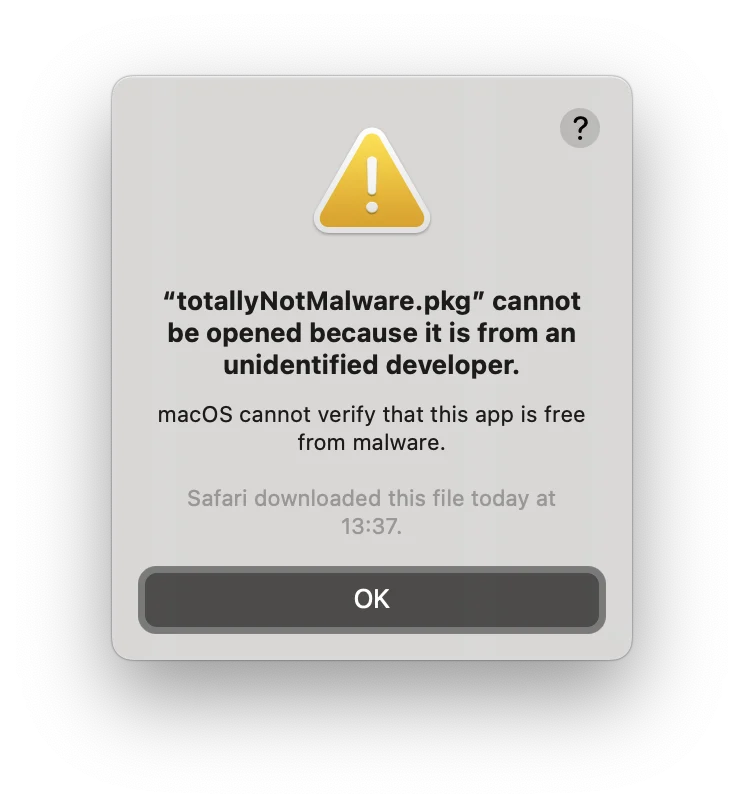
The method used to query Apple's server for the notarization status of a package uses the same function to obtain the TOC hash as the signature verification. A modified package is therefore still considered notarized if the original was, and a user who downloads such a modified package is not warned in any way.
Asking users to download a 4 GiB .pkg sounds like a challenge. Even if users do not notice the unusual size, waiting a few minutes for the download could let them spot that something is off about the webpage offering it. Fortunately the padding can be anything, so when the same byte is used for all of it the resulting file compresses very well. Placing the package on a compressed disk image brings the resulting .dmg down to only a few hundred kilobytes, and distributing an application this way is not unusual on macOS. The size increase does not increase verification time either, because only the integrity of heap data that is actually in use is checked.
Combined with the SIP bypass, this allows for powerful malware: a manipulated installer package that appears completely legitimate and triggers no warnings when installed, after which the malware immediately gains complete access to all SIP-protected data on the system.
Elevating privileges
We did not find a way to abuse the vulnerability for privilege escalation on an out-of-the-box installation of macOS. Combined with certain third-party software, however, we did find a method.
Some applications want to update themselves automatically even when the current user is not an admin. Normally non-admin users cannot make changes in /Applications, so they cannot update existing applications, and if the admin never logs in, users could run known vulnerable software indefinitely.
To solve that, some applications include a privileged helper tool that performs the upgrade. It runs as root and has the single purpose of installing updates for the existing application. Often the application itself checks for updates and downloads a new update file, and the tool only performs the actual installation.
Two checks are important for this to be secure:
- A request to install an update must originate from the associated application.
- The update file must be authentic, and not a downgrade.
The update file format varies between applications, but .pkg files are common. Where that format is used, it may be possible to swap an update package for a modified version, for example by using a race condition to change the package between the download by the application and the installation by the privileged helper tool. The package would then be installed automatically, allowing privilege escalation to root.
This vulnerability was originally discovered while investigating the privileged helper tool used by Zoom. In the DEF CON 30 talk "You're Muted Rooted" by Patrick Wardle, a method for bypassing the signature verification performed by Zoom was described. That issue was addressed by switching to the libxar functions for verifying a package signature.
Non-impact
While investigating the full impact, we also attempted to modify macOS system updates. These also use .pkg files and verify the TOC hash, but they compare it to the computed TOC hash, so replacing a system update with a malicious file is not possible.
The issue does not affect iOS either, as xar files are not used there as far as we could tell. Signed xar files were used for Safari extensions in the past, but those now use app extensions, so no impact could be identified there.
Demo
The following video demonstrates the vulnerability being used to bypass Gatekeeper and SIP. It creates a new file in /private/var/db/SystemPolicyConfiguration/, a directory normally protected by SIP.
The installer states that the installation has failed, but the exploit has already run through a pre-install script. This is only the case for the demo and could be avoided in a real attack.
Root cause
The two checks that consume the TOC hash disagree on the width of the offset. The integrity check parses checksum/offset into a uint64_t, while the signature verification parses the same value into a uint32_t. A value such as 4294967296 truncates to 0 in the 32-bit variable, so the signature is validated against the TOC hash at heap offset 0 while the integrity check reads the hash from offset 4294967296. The attacker keeps the original TOC hash at offset 0, so the signature still matches, and puts the hash of the modified TOC at the 4 GiB offset, so the integrity check also passes.
The design contributes to the problem: the TOC hash is read from the heap twice, once per check, instead of being read once and reused. The code even stores the value on archive open, as the comment notes, so callers can determine whether it changed after open, but the signature path reads it from the file again.
There was a similar issue in 2010, CVE-2010-0055. In that version one check assumed the TOC hash offset was always 0 and the other used the value read from the TOC. Variants of fixed issues and regressions that reintroduce a vulnerability are sadly common, but a vulnerability similar to a 12 year old one is still surprising, especially since a small change to the library could prevent all similar vulnerabilities with the same result.
Impact
An attacker who can deliver a modified package can bypass Gatekeeper's notarization warning, because the notarization check uses the same TOC hash lookup as the signature verification. If the original package was signed by Apple, the modified package is installed by system_installd with the com.apple.rootless.install.heritable entitlement, giving read and write access to SIP-protected files. That enables granting TCC permissions, reading data vault contents such as Mail and Safari data, and loading a properly signed kernel extension without user approval on Intel macs. Files on the read-only SSV cannot be modified this way.
Privilege escalation to root was not demonstrated on an out-of-the-box macOS installation. It was demonstrated in combination with third-party software whose privileged helper tool installs .pkg updates, where a race condition can substitute the package between download and installation. macOS system updates are not affected because they compare the TOC hash against the computed value, and iOS is not affected because xar files are not used there.
Fix
Apple fixed the issue with a two character change: uint32_t was changed to uint64_t in macOS 13.1. The commit is linked from the apple-oss-distributions xar repository.
Using the TOC hash value stored at archive open instead of reading it from the file again would have made this vulnerability and any similar variants impossible to exploit. That would make this vulnerability and any similar variants impossible to exploit, because the value would not be read from the heap twice.
Variants to test
- Look for other consumers of the same on-disk field that parse it into different integer widths. A positive result is one code path reading a 64-bit offset and another truncating it to 32 bits, so a crafted value selects different data for each check.
- Check whether integrity and authenticity checks read the same value from the file independently rather than sharing a single in-memory copy. A positive result is a signed archive whose signature still validates after the TOC is rewritten and the hash relocated.
- Test whether notarization or reputation lookups reuse the signature verification path. A positive result is a modified package that is still reported as notarized.
- Examine privileged helper tools that install
.pkgupdates for a window between download and installation. A positive result is a package replaced in that window being installed as root. - Try the same offset truncation against other archive formats that store a checksum location in a header or table of contents. A positive result is a modified archive that passes both its integrity check and its signature check.
- Check whether padding to a multiple of 4 GiB, or rearranging heap contents, can reach the truncated offset when the original file is already larger than 4 GiB. A positive result is a valid signature with a modified payload at a different heap location.
What happened, in plain words
Apple's macOS has a security feature called code signing. When a developer builds an app or an installer, they attach a cryptographic signature to it. The signature is like a wax seal on an envelope: it proves who made the file and that nobody has changed it since. macOS checks that seal before it lets the file run or install.
Installer packages on macOS are files ending in .pkg. They are built on an older archive format called xar. While reading the source code of the xar library (the code Apple publishes openly), the researchers found a bug tracked as CVE-2022-42841. The bug let someone change the contents of a signed .pkg file while the signature still looked valid. That is like swapping the letter inside a sealed envelope without breaking the wax.
With that trick, an attacker could get past two of macOS's main defences, Gatekeeper and SIP, and in some situations gain the highest level of access on the machine, the root account.
Background: how a xar file is built
Before the bug makes sense, you need to know how a xar file is put together. Think of a xar file as a cardboard box with three compartments:
- A header: a short fixed block of bytes at the very start.
- A table of contents (TOC): a list describing what is inside.
- The heap: the actual file contents, stored one after another.
The header holds a few fields, including which hashing algorithm is used across the file (typically still SHA1) and how big the TOC is.
A hash is a short fingerprint computed from data. Change one byte of the data and the fingerprint changes completely. It is one-way: you cannot rebuild the data from the fingerprint. That is what makes it useful for spotting tampering.
The TOC is an XML document (text with tags, like a structured list) that has been compressed with zlib, a common compression method. For every file in the archive, the TOC records where that file's bytes start on the heap (the offset) and how long they are. Offsets are counted from 0, meaning the first byte right after the TOC. Each file can be compressed on its own, so the archive can store each file in whatever way saves the most space.
For every file, the TOC stores two fingerprints: one of the file as it was before compression, and one of the compressed bytes. Both use the algorithm named in the header. Here is one entry from a real TOC:
<file id="4">
  <data>
    <length>430</length>
    <offset>2533</offset>
    <size>654</size>
    <encoding style="application/x-bzip2"/>
    <extracted-checksum style="sha1">[redacted]</extracted-checksum>
    <archived-checksum style="sha1">[redacted]</archived-checksum>
  </data>
  <FinderCreateTime>
    <nanoseconds>0</nanoseconds>
    <time>1970-01-01T00:00:00</time>
  </FinderCreateTime>
  <ctime>2022-10-03T17:54:54Z</ctime>
  <mtime>2022-10-03T17:54:54Z</mtime>
  <atime>2022-10-03T17:54:54Z</atime>
  <group>wheel</group>
  <gid>0</gid>
  <user>root</user>
  <uid>0</uid>
  <mode>0644</mode>
  <deviceno>16777241</deviceno>
  <inode>33</inode>
  <type>file</type>
  <name>PackageInfo</name>
</file>
Line by line, in plain words:
<file id="4">opens the description of one file, number 4 in the archive.<data>starts the block that says where the bytes live.<length>430</length>is the length of the compressed data on the heap.<offset>2533</offset>is where that data starts, counted from the beginning of the heap.<size>654</size>is the size of the file once it is decompressed.<encoding style="application/x-bzip2"/>says this file was compressed with bzip2.<extracted-checksum ...>is the fingerprint of the decompressed file. The long hex string is the SHA1 hash.<archived-checksum ...>is the fingerprint of the compressed bytes as stored on the heap.- The
FinderCreateTime,ctime,mtimeandatimelines record timestamps: when the file was created and when it was last modified, accessed and so on. <group>wheel</group>,<gid>0</gid>,<user>root</user>,<uid>0</uid>record which user and group own the file.rootwith id 0 is the all-powerful account.<mode>0644</mode>records the file permissions.<deviceno>,<inode>and<type>are internal bookkeeping numbers.<name>PackageInfo</name>is the file's name.</file>closes the entry.
Even xar files that are not signed carry these fingerprints, so the archive can check that a file was not corrupted when it is extracted.
To protect the whole archive, the TOC also records where on the heap a special value called the TOC hash is stored. In practice it is usually at offset 0:
<checksum style="sha1">
  <offset>0</offset>
  <size>20</size>
</checksum>
<checksum style="sha1">says a SHA1 fingerprint is involved.<offset>0</offset>says the fingerprint is stored at the very start of the heap.<size>20</size>says it is 20 bytes long, which is the size of a SHA1 hash.
The value at that spot must equal the fingerprint of the compressed TOC, and the archive checks this when it is opened. Why store it on the heap and not inside the TOC? Because putting it in the TOC would change the TOC, which would change the fingerprint, which would change the TOC again: a chicken-and-egg problem. Keeping it outside breaks the loop.
This one fingerprint indirectly protects every file. Each file's own fingerprint in the TOC covers that file, and the TOC hash covers the TOC. A handy side effect is that a single file can be checked without checking the whole archive, so files can be pulled out without reading everything, or even without downloading everything.
Signed xar files add one more element to the TOC: a signature with a chain of certificates.
<signature style="RSA">says an RSA signature is used. RSA is a widely used public-key cryptography scheme.<offset>20</offset>and<size>256</size>say where the signature bytes sit on the heap and how long they are.<KeyInfo ...>starts the block describing the keys.<X509Data>holds the certificate chain: a list of certificates. A certificate is a digitally signed statement that a particular key belongs to a particular identity. A chain links the signer's certificate up to a trusted authority.- Each
<X509Certificate>line is one certificate, shown here truncated with[...]. - The closing tags end the blocks.
The signature bytes themselves also live on the heap, again to avoid the chicken-and-egg problem. What gets signed is the TOC hash. So the signature vouches for the TOC hash, the TOC hash vouches for the TOC, and the TOC vouches for every file. A chain of trust.
One consequence of this design: heap bytes that no range points to are not covered by anything. You can append extra data to a xar file and the TOC hash and signature stay valid. Keep that in mind, because the attack uses exactly this freedom.
The vulnerability
For a signed package, the TOC hash is used in two separate checks:
- The fingerprint computed from the TOC must equal the TOC hash stored on the heap.
- The signature and certificates must match the TOC hash.
Both checks live in the xar source code. The first one compares the computed TOC fingerprint with the value stored on the heap:
/* if TOC specifies a location for the checksum, make sure that
 * we read the checksum from there: this is required for an archive
 * with a signature, because the signature will be checked against
 * the checksum at the specified location <rdar://problem/7041949>
 */
const char *value;
uint64_t offset = 0;
uint64_t length = 0;
if( xar_prop_get( XAR_FILE(ret) , "checksum/offset", &value) == 0 ) {

    if (value) {
        errno = 0;
        offset = strtoull( value, (char **)NULL, 10);
        if( errno != 0 ) {
            fprintf(stderr, "checksum/offset missing or invalid!\n");
            xar_close(ret);
            return NULL;
        }
    } else {
        fprintf(stderr, "checksum/offset missing or invalid!\n");
        xar_close(ret);
        return NULL;
    }
}

[...]

XAR(ret)->heap_offset = xar_get_heap_offset(ret) + offset;
if( lseek(XAR(ret)->fd, XAR(ret)->heap_offset, SEEK_SET) == -1 ) {
    xar_close(ret);
    return NULL;
}
[...]

size_t tlen = 0;
void *toccksum = xar_hash_finish(XAR(ret)->toc_hash_ctx, &tlen);
XAR(ret)->toc_hash_ctx = NULL;

if( length != tlen ) {
    free(toccksum);
    xar_close(ret);
    return NULL;
}

// Store our toc hash upon archive open, so callers can determine if it
// has changed or been tampered with after archive open
XAR(ret)->toc_hash = malloc(tlen);
memcpy(XAR(ret)->toc_hash, toccksum, tlen);
XAR(ret)->toc_hash_size = tlen;

void *cval = calloc(1, tlen);
if( ! cval ) {
    free(toccksum);
    xar_close(ret);
    return NULL;
}

ssize_t r = xar_read_fd(XAR(ret)->fd, cval, tlen);

[...]

if( memcmp(cval, toccksum, tlen) != 0 ) {
    fprintf(stderr, "Checksums do not match!\n");
    free(toccksum);
    free(cval);
    xar_close(ret);
    return NULL;
}
What each part does:
- The comment explains that when the TOC names a location for the checksum, the code must read it from there, because the signature is checked against the checksum at that location.
const char *value;declares a variable to hold text read from the XML.uint64_t offset = 0;declares the offset as a 64-bit unsigned integer, meaning a whole number from 0 up to about 18 quintillion.uint64_tis the type name.uint64_t length = 0;declares the length the same way.xar_prop_get(... "checksum/offset" ...)fetches thechecksum/offsetvalue from the XML. If it succeeds, the code enters the block.strtoull(value, ..., 10)converts that text into an unsigned long long number, base 10. The result goes intooffset.- The
errnochecks andfprintflines handle the case where the value is missing or not a number, printing an error and closing the archive. XAR(ret)->heap_offset = xar_get_heap_offset(ret) + offset;works out the real position in the file: where the heap starts plus the offset.lseek(...)moves the file read position to that spot. If it fails, the archive is closed.xar_hash_finish(...)finishes computing the fingerprint of the TOC and returns it intoccksum.- The
length != tlencheck makes sure the stored length matches the fingerprint length. - The comment and the
malloc/memcpylines save a copy of the TOC hash in memory when the archive is opened, so later code can tell whether it changed. callocallocates a buffercvalto read the stored fingerprint into.xar_read_fd(...)reads the stored fingerprint from the file intocval.memcmp(cval, toccksum, tlen)compares the stored fingerprint with the computed one. If they differ, it printsChecksums do not match!and closes the archive.
So this path reads the checksum/offset text, converts it with strtoull into a 64-bit number, and stores it in offset.
For getting the TOC hash that validates the signature, a similar piece of code is used:
uint32_t offset = 0;
xar_t x = NULL;
const char  *value;

// xar 1.6 fails this method if any of data, length, signed_data, signed_length are NULL
// within OS X we use this method to get combinations of signature, signed data, or signed_offset,
// so this method checks and sets these out values independently

if( !sig )
  return -1;

x = XAR_SIGNATURE(sig)->x;

/* Get the checksum, to be used for signing.  If we support multiple checksums
  in the future, all checksums should be retrieved            */
if(length) {
  if(0 == xar_prop_get_expect_notnull( XAR_FILE(x) , "checksum/size", &value)){
    *length  = strtoull( value, (char **)NULL, 10);
  }

  if(0 == xar_prop_get_expect_notnull( XAR_FILE(x) , "checksum/offset", &value)){
    offset  = strtoull( value, (char **)NULL, 10);
  }

  if(data) {
    *data = malloc(sizeof(char)*(*length));

    // This function will either read all of length or return -1. Check and bubble up.
    if (_xar_signature_read_from_heap(x, offset, *length, *data) != 0)
      return -1;
  }
}
Line by line:
uint32_t offset = 0;declares the offset as a 32-bit unsigned integer, which can only hold numbers from 0 up to 4,294,967,295. This is the crucial difference from the first snippet.xar_t x = NULL;declares a handle to the archive, initially empty.const char *value;declares a text variable.- The comments explain that the function can be asked for the signature, the signed data or the signed offset independently, and that it fails if required arguments are missing.
if( !sig ) return -1;bails out if there is no signature object.x = XAR_SIGNATURE(sig)->x;gets the archive from the signature object.- The next comment says the checksum used for signing is being fetched.
if(length) {runs the block only if the caller asked for the length.xar_prop_get_expect_notnull(... "checksum/size" ...)reads thechecksum/sizevalue and converts it withstrtoullinto*length.xar_prop_get_expect_notnull(... "checksum/offset" ...)reads thechecksum/offsetvalue and converts it withstrtoullintooffset. Becauseoffsetis 32-bit, any value above 4,294,967,295 gets cut down to fit.if(data) {runs only if the caller asked for the data.malloc(sizeof(char)*(*length))allocates a buffer of the right size._xar_signature_read_from_heap(x, offset, *length, *data)reads the fingerprint from the heap atoffset. If it fails, the function returns -1.
The difference is tiny but very important. The first check stores the offset in a uint64_t, a 64-bit number. The second uses a uint32_t, a 32-bit number. If the offset is larger than a 32-bit number can hold, the two checks end up using different heap positions. For example, with an offset of 0x1 0000 0000, the integrity check reads the fingerprint from 0x1 0000 0000, while the signature check reads it from offset 0x0.
Think of it like a building with a room number written on a form. One clerk reads the full number, say 4,294,967,296. Another clerk's form only has room for the last few digits, so they read 0. Both think they are following instructions, but they walk into different rooms.
Exploitation
A xar file could therefore be modified without breaking its signature, in five steps.
Step 1: Parse the signed package
Take a correctly signed xar file and read its TOC. You need to understand the structure before you can change it. This is like opening the envelope carefully so you can put it back together.
Step 2: Change the checksum offset and the payload
Change the checksum offset value to 4294967296, and make any other changes to the included files, such as adding a malicious preinstall script or replacing the installation check script.
A preinstall script is a small program that runs before the installer copies files. If you can slip your own script in, it runs with the installer's privileges. The offset 4294967296 is exactly 2 to the power of 32, one more than a 32-bit number can hold, so it wraps to 0 in the 32-bit variable.
Step 3: Rewrite the TOC
Write the modified TOC back to the file and compute the new TOC hash. Because the TOC changed, its fingerprint changed too, so you need the new value.
Step 4: Pad the heap to 4 GiB
Add padding until the heap is exactly 4294967296 bytes (4 GiB) in size. If the original package is already larger than 4 GiB, there are alternatives: pad to 8, 12, 16 GiB and so on, or move files around on the heap to make offset 4294967296 available.
Padding means filling space with bytes that mean nothing. The point is to push the heap out to exactly the size where the 64-bit offset points, so the new fingerprint can sit there.
Step 5: Place the new TOC hash
Place the new TOC hash at heap offset 4294967296, leaving the original TOC hash at heap offset 0.
Now, when the package is verified, the integrity check reads the hash at offset 4294967296, while the signature check reads it from offset 0. The integrity check passes because the new TOC hash is there, and the signature also passes because the signature still matches the old TOC hash at offset 0. Two checks, two different rooms, both happy.
Bypassing SIP's filesystem restrictions
SIP, the System Integrity Protection, is a macOS feature that stops even the root user from changing certain important files and folders. It is a locked cabinet around the operating system's most sensitive parts.
When a package signed by Apple is installed, the installation works differently from a package signed by anyone else. These installations are performed by system_installd instead of installd, and that process holds an entitlement granting access to all files normally protected by SIP:
[Key] com.apple.rootless.install.heritable
[Value]
  [Bool] true
An entitlement is a permission slip baked into a program, telling macOS what the program is allowed to do. This one, com.apple.rootless.install.heritable, says the process may install into locations that SIP normally guards. The [Bool] true means the permission is switched on. It makes sense for Apple's own updates, which often need to replace parts of the operating system.
Abusing the vulnerability to modify a package signed by Apple would make it possible to read and write all those SIP-protected files. That could be used, for example, to:
- Grant an application TCC permissions, such as access to the webcam or microphone. TCC is macOS's privacy control system, the thing that asks whether an app may use your camera, microphone, contacts and so on.
- Read data from a data vault, such as the user's Mail and Safari data. A data vault is a protected store of personal data.
- Load a kernel extension without user approval on Intel macs, although the kernel extension would still need to be properly signed. A kernel extension is code that runs inside the operating system's core, the kernel, with very high trust.
This could be applied to a package a user installs manually, although that requires convincing the user. Another option is a process that has already obtained root privileges using this technique to gain access to SIP-protected locations, since the root user is allowed to use the install command to install new packages.
Files on the Signed System Volume (SSV) could not be modified this way, because that disk is mounted read-only. The SSV is the part of the disk holding the operating system itself, and it is deliberately locked so nothing can write to it.
Bypassing Gatekeeper
Gatekeeper is the macOS gatekeeper (the name says it) that checks files downloaded from the internet before they are opened. After a .pkg file is downloaded, Gatekeeper performs a notarization check similar to the one for applications. Notarization means the developer sent the file to Apple, Apple scanned it for malware, and Apple recorded that it is clean. Gatekeeper takes the hash of the package and submits it to Apple to check that it has been scanned for malware. When a user opens a package that was not notarized, they receive a scary warning, which makes it quite difficult to trick a user into installing a package containing malware.
The image shows the warning a user receives when opening a package that was not notarized.
The method used to query Apple's server for the notarization status of a package uses the same function to obtain the TOC hash as the signature verification. A modified package is therefore still considered notarized if the original was, and a user who downloads such a modified package is not warned in any way. The same 32-bit truncation that fooled the signature check also fools the notarization lookup.
Asking users to download a 4 GiB .pkg sounds like a challenge. Even if users do not notice the unusual size, waiting a few minutes for the download could let them spot that something is off about the webpage offering it. Fortunately the padding can be anything, so when the same byte is used for all of it the resulting file compresses very well. Placing the package on a compressed disk image brings the resulting .dmg down to only a few hundred kilobytes, and distributing an application this way is not unusual on macOS. A .dmg is a disk image, a single file that macOS can mount as if it were a disk. The size increase does not increase verification time either, because only the integrity of heap data that is actually in use is checked.
Combined with the SIP bypass, this allows for powerful malware: a manipulated installer package that appears completely legitimate and triggers no warnings when installed, after which the malware immediately gains complete access to all SIP-protected data on the system.
Elevating privileges
Privilege escalation means going from a low level of access, such as a normal user, to a higher one, such as root. The researchers did not find a way to abuse the vulnerability for privilege escalation on an out-of-the-box installation of macOS. Combined with certain third-party software, however, they did find a method.
Some applications want to update themselves automatically even when the current user is not an admin. Normally non-admin users cannot make changes in /Applications, so they cannot update existing applications, and if the admin never logs in, users could run known vulnerable software indefinitely.
To solve that, some applications include a privileged helper tool that performs the upgrade. It runs as root and has the single purpose of installing updates for the existing application. Often the application itself checks for updates and downloads a new update file, and the tool only performs the actual installation. Think of it as a building's caretaker who holds the master key and only opens the door when the tenant's app asks.
Two checks are important for this to be secure:
- A request to install an update must originate from the associated application.
- The update file must be authentic, and not a downgrade. A downgrade is installing an older, possibly vulnerable version on purpose.
The update file format varies between applications, but .pkg files are common. Where that format is used, it may be possible to swap an update package for a modified version, for example by using a race condition to change the package between the download by the application and the installation by the privileged helper tool. A race condition is a timing problem: two things happen in sequence, and an attacker slips a change into the gap between them. The package would then be installed automatically, allowing privilege escalation to root.
This vulnerability was originally discovered while investigating the privileged helper tool used by Zoom. In the DEF CON 30 talk "You're Muted Rooted" by Patrick Wardle, a method for bypassing the signature verification performed by Zoom was described. That issue was addressed by switching to the libxar functions for verifying a package signature.
The embed is the DEF CON 30 talk by Patrick Wardle, which described a method for bypassing the signature verification performed by Zoom.
Non-impact
While investigating the full impact, the researchers also attempted to modify macOS system updates. These also use .pkg files and verify the TOC hash, but they compare it to the computed TOC hash, so replacing a system update with a malicious file is not possible. In other words, the system update path does not fall for the two-different-offsets trick.
The issue does not affect iOS either, as xar files are not used there as far as the researchers could tell. Signed xar files were used for Safari extensions in the past, but those now use app extensions, so no impact could be identified there.
Demo
The following video demonstrates the vulnerability being used to bypass Gatekeeper and SIP. It creates a new file in /private/var/db/SystemPolicyConfiguration/, a directory normally protected by SIP.
The video demonstrates the vulnerability being used to bypass Gatekeeper and SIP.
The installer states that the installation has failed, but the exploit has already run through a pre-install script. This is only the case for the demo and could be avoided in a real attack.
Root cause
The two checks that consume the TOC hash disagree on the width of the offset. The integrity check parses checksum/offset into a uint64_t, while the signature verification parses the same value into a uint32_t. A value such as 4294967296 truncates to 0 in the 32-bit variable, so the signature is validated against the TOC hash at heap offset 0 while the integrity check reads the hash from offset 4294967296. The attacker keeps the original TOC hash at offset 0, so the signature still matches, and puts the hash of the modified TOC at the 4 GiB offset, so the integrity check also passes.
The design contributes to the problem: the TOC hash is read from the heap twice, once per check, instead of being read once and reused. The code even stores the value on archive open, as the comment notes, so callers can determine whether it changed after open, but the signature path reads it from the file again.
There was a similar issue in 2010, CVE-2010-0055. In that version one check assumed the TOC hash offset was always 0 and the other used the value read from the TOC. Variants of fixed issues and regressions that reintroduce a vulnerability are sadly common, but a vulnerability similar to a 12 year old one is still surprising, especially since a small change to the library could prevent all similar vulnerabilities with the same result.
Impact
An attacker who can deliver a modified package can bypass Gatekeeper's notarization warning, because the notarization check uses the same TOC hash lookup as the signature verification. If the original package was signed by Apple, the modified package is installed by system_installd with the com.apple.rootless.install.heritable entitlement, giving read and write access to SIP-protected files. That enables granting TCC permissions, reading data vault contents such as Mail and Safari data, and loading a properly signed kernel extension without user approval on Intel macs. Files on the read-only SSV cannot be modified this way.
Privilege escalation to root was not demonstrated on an out-of-the-box macOS installation. It was demonstrated in combination with third-party software whose privileged helper tool installs .pkg updates, where a race condition can substitute the package between download and installation. macOS system updates are not affected because they compare the TOC hash against the computed value, and iOS is not affected because xar files are not used there.
Fix
Apple fixed the issue with a two character change: uint32_t was changed to uint64_t in macOS 13.1. The commit is linked from the apple-oss-distributions xar repository. Two characters, one type name, and the two checks finally agree on how wide the offset is.
Using the TOC hash value stored at archive open instead of reading it from the file again would have made this vulnerability and any similar variants impossible to exploit. That would make this vulnerability and any similar variants impossible to exploit, because the value would not be read from the heap twice. Read it once, remember it, and compare against the remembered copy: no second room to walk into.
Variants to test
- Look for other consumers of the same on-disk field that parse it into different integer widths. A positive result is one code path reading a 64-bit offset and another truncating it to 32 bits, so a crafted value selects different data for each check.
- Check whether integrity and authenticity checks read the same value from the file independently rather than sharing a single in-memory copy. A positive result is a signed archive whose signature still validates after the TOC is rewritten and the hash relocated.
- Test whether notarization or reputation lookups reuse the signature verification path. A positive result is a modified package that is still reported as notarized.
- Examine privileged helper tools that install
.pkgupdates for a window between download and installation. A positive result is a package replaced in that window being installed as root. - Try the same offset truncation against other archive formats that store a checksum location in a header or table of contents. A positive result is a modified archive that passes both its integrity check and its signature check.
- Check whether padding to a multiple of 4 GiB, or rearranging heap contents, can reach the truncated offset when the original file is already larger than 4 GiB. A positive result is a valid signature with a modified payload at a different heap location.
Glossary
- Code signing: attaching a cryptographic signature to a file so others can verify who made it and that it was not changed.
- Signature: a cryptographic value that proves authenticity and integrity, like a wax seal.
.pkg: a macOS installer package file.- xar: an archive file format used by macOS for installer packages, made of a header, a table of contents and a heap.
- CVE: a public identifier for a known security vulnerability, here CVE-2022-42841.
- Gatekeeper: a macOS feature that checks downloaded files before they are opened.
- SIP (System Integrity Protection): a macOS feature that prevents even root from modifying protected system files and folders.
- Root: the most powerful account on a Unix-like system, allowed to do anything.
- Header: a fixed block of bytes at the start of a file describing its structure.
- Table of contents (TOC): a list inside an archive describing its files and where they are stored.
- Heap: the part of a xar file that holds the actual file contents and other stored values.
- Hashing algorithm: a method that turns data into a short fixed-length fingerprint.
- SHA1: a hashing algorithm producing a 20-byte fingerprint.
- Hash / fingerprint: the short value produced by a hashing algorithm; changes if the data changes.
- XML: a text format for structured data using tags.
- zlib: a common compression library and format.
- Offset: a position counted in bytes from a starting point, here from the start of the heap.
- TOC hash: the fingerprint of the compressed table of contents, stored on the heap.
- Certificate: a digitally signed statement linking a key to an identity.
- Certificate chain: a list of certificates linking a signer up to a trusted authority.
- RSA: a widely used public-key cryptography scheme.
uint64_t: a 64-bit unsigned integer type, holding whole numbers from 0 to about 18 quintillion.uint32_t: a 32-bit unsigned integer type, holding whole numbers from 0 to 4,294,967,295.- Truncation: cutting a number down to fit a smaller type, dropping the higher digits.
strtoull: a C function that converts text into an unsigned long long number.memcmp: a C function that compares two blocks of bytes.malloc/calloc: C functions that reserve memory.lseek: a C function that moves the read position in a file.- Preinstall script: a small program that runs before an installer copies files.
- Entitlement: a permission baked into a macOS program saying what it may do.
system_installd/installd: macOS background processes that perform installations;system_installdhandles Apple-signed packages and holds extra permissions.- TCC: macOS's privacy control system for camera, microphone, contacts and similar data.
- Data vault: a protected store of personal data on macOS.
- Kernel extension: code that runs inside the operating system's core with high trust.
- Signed System Volume (SSV): the read-only part of the disk holding the operating system.
- Notarization: Apple's process of scanning a file for malware and recording that it is clean.
.dmg: a macOS disk image file that can be mounted like a disk.- Privilege escalation: gaining a higher level of access than you started with.
- Privileged helper tool: a small program running as root that performs a specific task, such as installing updates.
- Downgrade: installing an older, possibly vulnerable version on purpose.
- Race condition: a timing flaw where a change can be slipped in between two steps.
- Padding: meaningless filler bytes added to reach a particular size.
- 4 GiB: 4 gibibytes, equal to 4,294,967,296 bytes, one more than a 32-bit number can hold.
- Regression: a bug that comes back after it was fixed.
- Variant: a new bug that is a variation of an earlier one.