How I got 9000 USD by hacking into iCloud
A folder name in iCloud Drive was rendered into the page without proper sanitisation, so an attacker could embed HTML in a shared folder's name and run JavaScript when the victim opened the folder's details pop-up. The script could then move all of the victim's files into the attacker's shared folder, and the attacker could later stop sharing to lock the victim out.
 Published on fernale.blogspot.com
{{media:0}}
The full write-up lives on its author's site
It belongs to its author, so we link to it rather than copy it. The other two tabs are our own rewrites, checked against it.
Context
In December 2020 I read a tweet about a group of researchers who had spent three months hacking Apple, and the blog post it linked to described 55 vulnerabilities in the Apple domain. After reading their findings I decided to try bug bounty hunting against Apple myself, and I narrowed my scope to a single target: iCloud. The reasoning was simple: with limited time, focusing on one product would maximise my chances.
The feature I ended up attacking is iCloud Drive. Users upload files and organise them into folders, and both files and folders can be shared with other iCloud users by email, or made public so that a link can be sent to anyone.
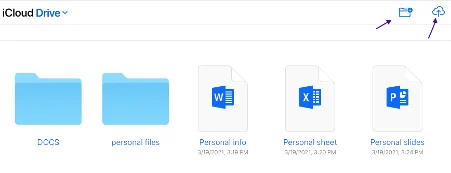
That sharing functionality is central to the attack: it is the delivery mechanism that carries the payload from the attacker's account to the victim's.
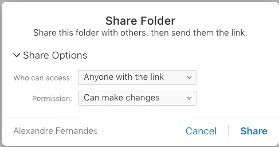
The vulnerability itself is a Cross-site Scripting (XSS) in the process of creating a file or folder in iCloud Drive. XSS lets an attacker execute code in the victim's browser; the general background is well covered in BugCrowd's guide to finding and escalating XSS bugs, which I linked from the post.
Setup
The report does not describe any special tooling. The preconditions are all product features:
- An attacker account with iCloud Drive, able to create a folder and share it with another iCloud user by email.
- A victim account that accepts the shared folder.
- The victim opening the pop-up window that shows the folder's details.
No versions, browser details or specific endpoints are given in the write-up.
Finding it
Every folder or file in iCloud Drive has an icon that opens a pop-up where the user can view its details or edit its name.
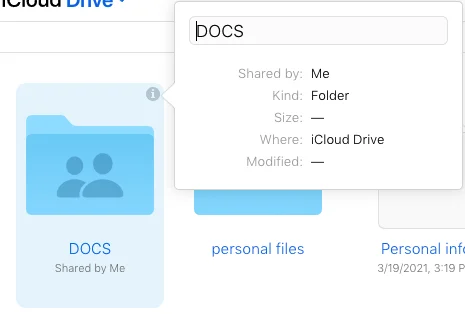
When that pop-up opens, an HTML <span> tag is injected into the DOM alongside the other information about the item.

Because of a server misconfiguration, an attacker could embed HTML tags into the directory name, and those tags were then loaded into the DOM. Once you can insert new elements into the DOM, you can execute JavaScript on the page.

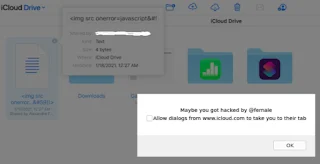
Exploitation
Step 1: work around the CSP
At the time, iCloud Drive had a strict Content Security Policy in place. It prevented <script> tags and requests to domains outside *.icloud.com and *.apple.com. I could not use script tags, but I could use event handlers to run JavaScript through the XSS.
Step 2: decide on impact and report early
I spent some time thinking about what the XSS could actually achieve. Once I had the vulnerability and a way to share it, I reported it to Apple immediately rather than waiting, to avoid someone else exploiting it first. A few days later I sent additional information to append to the original ticket.
Step 3: deliver the payload through a shared folder
In the final proof of concept the attacker shares a folder with the victim, and the folder name contains this payload:
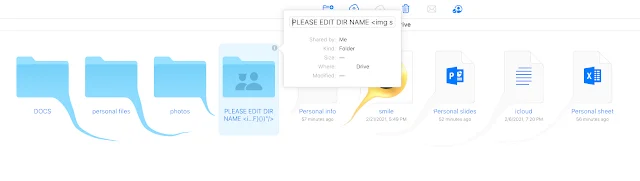
PLEASE EDIT DIR NAME <img src onerror="(function hacking(){//BAD JS STUFF}())"/>
The handler invokes a function named hacking, which is where the real JavaScript goes.
Step 4: act on the victim's account from the handler
Inside the JavaScript function I included code that made requests to iCloud APIs. Those requests retrieved all file and folder IDs from the victim's account and moved them into the folder shared by the attacker. That gave the attacker access to all of the victim's files.
In the end the XSS automatically moved all of the victim's files into the attacker's shared folder. That is what the image at the top of the post illustrates.
Step 5: revoke the victim's access
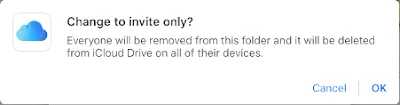
Once the attacker has the victim's files inside the shared folder, they can stop sharing the folder. That revokes the victim's access, so the attacker keeps the files and the victim loses them.
Conditions and limits
The attack has two conditions that the report states explicitly:
- Victim interaction. The XSS is only fully exploited if the victim accepts the shared folder and opens the pop-up window. If the pop-up is never opened, the XSS does not execute.
- Editable name. The victim can edit the folder name and remove the payload. However, that change only happens on the victim's side, so the attacker can keep sharing the same malicious folder with multiple victims and collect files from everyone who opens the pop-up.
Root cause
The report attributes the flaw to a server misconfiguration: an attacker could embed HTML tags into the directory name, and those tags were then loaded into the DOM. The existing defence, a strict CSP, was effective against <script> tags and against requests to external domains, The CSP blocked <script> tags and external requests, but the researcher was able to leverage event handlers to execute JavaScript through the XSS. The report does not describe the server-side code or the exact misconfiguration.
Impact
The report frames the impact in terms of the CIA triad:
| Principle | Effect |
|---|---|
| Confidentiality | The attacker accesses and exfiltrates all of the victim's files and folders by moving them into a shared folder. |
| Integrity | The victim's file structure is manipulated: files are moved and their original organisation is altered, which can disrupt workflows or cause confusion. |
| Availability | Once the attacker stops sharing the folder, the victim can no longer access their own files, a full denial of access. |
Taken together, the attacker can steal the victim's data, manipulate its organisation and deny access to it, which is why the report calls it a critical issue. All of this depends on the victim accepting the shared folder and opening the pop-up.
Fix
The report gives the triage timeline rather than the patch details:
- 25/01/2021: opened
- 01/02/2021: re-tested (fixed)
- 02/02/2021: Hall of Fame credit
- 16/02/2021: bounty awarded
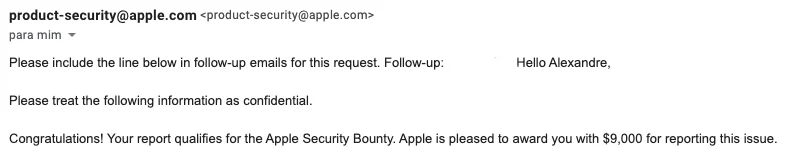
Apple paid 9,000 USD through its bug bounty program.
Variants to test
- Item names in other sharing surfaces. Put an event-handler payload in a folder or file name and open every UI that renders that name: details pop-ups, share sheets, notification emails, activity lists. A positive result is the handler firing when the view renders, without any script tag.
- CSP bypass via event handlers. Where a strict CSP blocks
<script>and external requests, try<img src onerror=...>,<svg onload=...>and similar handlers. A positive result is JavaScript executing under the same CSP. - Same-origin API abuse from the XSS. Once you have execution, enumerate the APIs the page can call with the victim's session and look for state-changing operations such as moving or sharing items. A positive result is a request that changes the victim's data using only allowed origins.
- Persistent payloads that survive victim edits. Check whether a rename by the victim propagates back to the attacker's copy. If it does not, the same shared item can be reused against many victims; a positive result is the payload still firing for a second victim after the first renamed it.
- Revocation as an impact primitive. After gaining access through a shared item, stop sharing it and confirm the victim loses access. A positive result is the victim being unable to reach files that were moved into the shared folder.
What happened, in plain words
A security researcher found a way to run his own code inside another person's iCloud account. The trick was a shared folder with a booby-trapped name. When the victim opened the folder's details window, the name was treated as part of the web page rather than as plain text, so hidden code inside the name ran in the victim's browser. That code then made requests to iCloud APIs that retrieved all file and folder IDs from the victim's account and moved them into the folder shared by the attacker. The attacker could then stop sharing the folder, which cut the victim off from their own files. Apple paid 9,000 USD for the report.
The bug class is called Cross-site Scripting, usually shortened to XSS. The rest of this article explains, from zero, what that means, how iCloud Drive's sharing feature made it possible, and why each step of the attack was needed.
Some background first
What a browser actually does
When you open a website, your browser downloads a document written in HTML. HTML is a language for describing a page: it says "here is a heading", "here is an image", "here is a button". The browser reads that description and builds an internal model of the page, called the DOM (Document Object Model). You can think of the DOM as the browser's live, working copy of the page: every heading, image and button is an object in it, and JavaScript code can read and change those objects while the page is open.
JavaScript is the programming language that runs inside web pages. It is what makes a page interactive: it can react to a click, fetch new data, or change what is on screen. Crucially, JavaScript running on a page can do anything the page itself is allowed to do, including talking to the website's servers on your behalf.
What a session is, and why it matters
When you log in to a website, the server needs a way to remember that the next request comes from you. It does this by giving your browser a small piece of data, usually stored as a cookie or a token, which the browser sends back with every subsequent request. Think of it as a cloakroom ticket: the server hands you a ticket when you arrive, and shows you the coat when you present it. Anyone holding your ticket can collect your coat.
This is why XSS is serious. If an attacker can run JavaScript inside a page you are logged in to, that code runs with your ticket. It can ask the server to do things as if you had asked. It does not need your password; it just borrows your logged-in session.
What an API is
An API (Application Programming Interface) is the set of addresses and rules a website's own pages use to talk to its servers. When you click a button in a web app, the page usually sends a request to an API address behind the scenes, and the server replies with data or performs an action. You can picture it as a restaurant menu: the menu lists what you can order and how to order it, and the kitchen does the rest. If an attacker's JavaScript is running on the page, it can order from the same menu, using the victim's session.
What XSS is
Cross-site Scripting is a vulnerability where an attacker manages to get their own code treated as part of a trusted page. The usual cause is that some piece of text supplied by a user (a name, a comment, a filename) is placed into the page without being neutralised. If that text contains HTML or JavaScript, the browser does not know it was supposed to be harmless text; it just follows the instructions it finds.
A useful comparison: imagine a noticeboard where people write their names. If someone writes "Jane" it is fine. If someone writes a note that says "whoever reads this must hand me their keys", and the reader treats every note on the board as an official instruction, the noticeboard has an XSS problem.
What iCloud Drive is
iCloud Drive is Apple's file storage service. You upload files, organise them into folders, and both files and folders can be shared. You can share with another iCloud user by email, or make an item public and send its link to anyone. That sharing feature is the delivery mechanism in this story: it is how the attacker's booby-trapped folder reaches the victim's account.
How the researcher got there
In December 2020 the researcher read a tweet about a group of researchers who had spent three months hacking Apple, and the linked blog post described 55 vulnerabilities in the Apple domain. After reading their findings he decided to try bug bounty hunting against Apple himself.
A bug bounty programme is a scheme where a company pays people to report security flaws instead of punishing them. The company gets a warning before criminals find the same flaw, and the researcher gets money and recognition. It is a bit like a shop paying a locksmith to test its locks and tell it which ones are weak.
He narrowed his scope to a single target: iCloud. The reasoning was practical. With limited time, focusing on one product would maximise his chances of finding something real, rather than spreading thin effort across everything Apple makes.
The vulnerability
The flaw is a Cross-site Scripting vulnerability in the process of creating a file or folder in iCloud Drive. The general background on XSS is covered in BugCrowd's guide to finding and escalating XSS bugs, which the researcher linked from his post.
Setup
The report does not describe any special tooling. The preconditions are all ordinary product features:
- An attacker account with iCloud Drive, able to create a folder and share it with another iCloud user by email.
- A victim account that accepts the shared folder.
- The victim opening the pop-up window that shows the folder's details.
No versions, browser details or specific endpoints are given in the write-up.
Finding it
Every folder or file in iCloud Drive has an icon that opens a pop-up where the user can view its details or edit its name.
When that pop-up opens, an HTML <span> tag is injected into the DOM alongside the other information about the item. A <span> is one of the simplest HTML elements: it is an inline container used to group a piece of text, usually so it can be styled or positioned. On its own it does nothing visible; it is just a wrapper.
Because of a server misconfiguration, an attacker could embed HTML tags into the directory name, and those tags were then loaded into the DOM. A server misconfiguration means the server was set up in a way that skipped a safety step it should have performed. Here, the safety step that was missing was making the folder name safe before putting it into the page.
Once you can insert new elements into the DOM, you can execute JavaScript on the page. This is the heart of XSS: the browser cannot tell the difference between HTML the site wrote and HTML that arrived inside a user-supplied name. If the name contains an element with an instruction attached, the browser will follow that instruction.
Exploitation
Step 1: work around the CSP
At the time, iCloud Drive had a strict Content Security Policy in place. A Content Security Policy, or CSP, is a rule set the website sends to the browser saying which sources of code and data are allowed. It is like a building's security policy: "only staff badges open this door, and only deliveries from these two suppliers are accepted".
The policy prevented <script> tags and requests to domains outside *.icloud.com and *.apple.com. A <script> tag is the most direct way to put JavaScript on a page, so blocking it removes the obvious route. Blocking requests to outside domains stops the attacker from sending stolen data to a server they control.
The researcher could not use script tags, but he could use event handlers to run JavaScript through the XSS. An event handler is an instruction attached to an element that runs when something happens to that element, such as a click, a load or a failure. The researcher was able to leverage event handlers to execute JavaScript through the XSS.
Step 2: decide on impact and report early
He spent some time thinking about what the XSS could actually achieve. This matters in bug bounty work: a report that says "I can run code" is weaker than a report that says "I can run code, and here is exactly what damage it does". Understanding the impact helps the company prioritise the fix and helps the researcher argue for a reward.
Once he had the vulnerability and a way to share it, he reported it to Apple immediately rather than waiting, to avoid someone else exploiting it first. A few days later he sent additional information to append to the original ticket. A ticket is the tracking record a company uses to manage a reported issue; appending to it keeps all the details in one place.
Step 3: deliver the payload through a shared folder
In the final proof of concept the attacker shares a folder with the victim, and the folder name contains this payload:
PLEASE EDIT DIR NAME <img src onerror="(function hacking(){//BAD JS STUFF}())"/>
Line by line, in plain words:
PLEASE EDIT DIR NAMEis ordinary visible text. It is social engineering: it invites the victim to rename the folder, which is exactly the action that opens the details pop-up and triggers the injection. The attacker is not relying on the victim being technical; he is relying on the victim following a simple instruction.<img ... />is an HTML image element. Normally it displays a picture.srcis the attribute that tells the image element where the picture lives. Here it is empty, so there is no valid address to load.onerror="..."is an event handler. It tells the browser: if loading the image fails, run the code inside the quotes. Because thesrcis empty, the load always fails, so the handler always fires.(function hacking(){//BAD JS STUFF}())is the code that runs. It defines a function namedhackingand immediately calls it. The//BAD JS STUFFis a placeholder comment where the real JavaScript goes; in the actual attack, that is where the code that talks to iCloud's APIs sat.
So the whole payload is a small trap: a broken image whose failure triggers a function. The visible text is the bait that gets the victim to open the window where the trap fires.
Step 4: act on the victim's account from the handler
Inside the JavaScript function the researcher included code that made requests to iCloud APIs. Those requests retrieved all file and folder IDs from the victim's account and moved them into the folder shared by the attacker. That gave the attacker access to all of the victim's files.
Why this works: the requests came from a page the victim was logged in to, so the browser attached the victim's session automatically.
In the end the XSS automatically moved all of the victim's files into the attacker's shared folder. That is what the image at the top of the post illustrates.
The image is the summary of the attack vector referenced at the start of the post.
Step 5: revoke the victim's access
Once the attacker has the victim's files inside the shared folder, they can stop sharing the folder. That revokes the victim's access, so the attacker keeps the files and the victim loses them. Think of it as inviting someone to put their belongings in your storage unit, then changing the lock: the belongings are inside, but the original owner can no longer get in.
Conditions and limits
The attack has two conditions that the report states explicitly:
- Victim interaction. The XSS is only fully exploited if the victim accepts the shared folder and opens the pop-up window. If the pop-up is never opened, the XSS does not execute. This is why the payload includes the instruction to edit the name: it nudges the victim towards the exact action needed.
- Editable name. The victim can edit the folder name and remove the payload. However, that change only happens on the victim's side, so the attacker can keep sharing the same malicious folder with multiple victims and collect files from everyone who opens the pop-up. The attacker's copy of the name is unchanged, which means one booby-trapped folder can be reused again and again.
Root cause
The report attributes the flaw to a server misconfiguration: an attacker could embed HTML tags into the directory name, and those tags were then loaded into the DOM.
The existing defence, a strict CSP, was effective against <script> tags and against requests to external domains, The researcher was able to leverage event handlers to execute JavaScript through the XSS. The report does not describe the server-side code or the exact misconfiguration.
Impact
The report frames the impact in terms of the CIA triad, a classic way of describing what security protects. Confidentiality means only the right people can read data. Integrity means data is not altered without permission. Availability means the right people can reach their data when they need it.
| Principle | Effect |
|---|---|
| Confidentiality | The attacker accesses and exfiltrates all of the victim's files and folders by moving them into a shared folder. |
| Integrity | The victim's file structure is manipulated: files are moved and their original organisation is altered, which can disrupt workflows or cause confusion. |
| Availability | Once the attacker stops sharing the folder, the victim can no longer access their own files, a full denial of access. |
Taken together, the attacker can steal the victim's data, manipulate its organisation and deny access to it, which is why the report calls it a critical issue. All of this depends on the victim accepting the shared folder and opening the pop-up.
Fix
The report gives the triage timeline rather than the patch details. Triage is the process a company goes through to confirm a report, reproduce it, fix it and reward the reporter.
- 25/01/2021: opened
- 01/02/2021: re-tested (fixed)
- 02/02/2021: Hall of Fame credit
- 16/02/2021: bounty awarded
A Hall of Fame credit is public recognition on the company's security page, separate from the money. Apple paid 9,000 USD through its bug bounty programme.
Variants to test
These are the kinds of follow-up checks a researcher would try after finding a bug like this. They are written for someone learning, so each one says what to do and what a positive result looks like.
- Item names in other sharing surfaces. Put an event-handler payload in a folder or file name and open every screen that displays that name: details pop-ups, share sheets, notification emails, activity lists. A positive result is the handler firing when the view renders, without any script tag. The lesson is that a name can be displayed in many places, and each place is a separate chance for the same mistake.
- CSP bypass via event handlers. Where a strict CSP blocks
<script>and external requests, try<img src onerror=...>,<svg onload=...>and similar handlers. A positive result is JavaScript executing under the same CSP. The lesson is that a CSP is only as strong as the list of things it actually blocks; event handlers are easy to forget. - Same-origin API abuse from the XSS. Once you have execution, enumerate the APIs the page can call with the victim's session and look for state-changing operations such as moving or sharing items. A positive result is a request that changes the victim's data using only allowed origins. The lesson is that the damage from XSS depends on what the page itself is allowed to do.
- Persistent payloads that survive victim edits. Check whether a rename by the victim propagates back to the attacker's copy. If it does not, the same shared item can be reused against many victims; a positive result is the payload still firing for a second victim after the first renamed it. The lesson is that "the victim can fix it" is not a mitigation if the fix only applies on one side.
- Revocation as an impact primitive. After gaining access through a shared item, stop sharing it and confirm the victim loses access. A positive result is the victim being unable to reach files that were moved into the shared folder. The lesson is that losing access to your own data is a real harm, not just an inconvenience.
Glossary
- API: the set of addresses and rules a website's own pages use to talk to its servers; like a menu of what can be ordered and how.
- Availability: the principle that the right people can reach their data when they need it.
- Bug bounty programme: a scheme where a company pays people to report security flaws instead of punishing them.
- CIA triad: the three principles of information security: confidentiality, integrity and availability.
- Confidentiality: the principle that only the right people can read data.
- Content Security Policy (CSP): a rule set a website sends to the browser saying which sources of code and data are allowed.
- Cookie: a small piece of data a website stores in your browser, often used to remember that you are logged in.
- Cross-site Scripting (XSS): a vulnerability where an attacker gets their own code treated as part of a trusted page.
- DOM (Document Object Model): the browser's live, working model of a page, which JavaScript can read and change.
- Event handler: an instruction attached to an element that runs when something happens to it, such as a click, a load or a failure.
- Exfiltrate: to move data out of a system without permission.
- Hall of Fame credit: public recognition on a company's security page, separate from any money paid.
- HTML: the language used to describe the structure of a web page.
- Integrity: the principle that data is not altered without permission.
- JavaScript: the programming language that runs inside web pages and makes them interactive.
- Proof of concept (POC): a working demonstration that a vulnerability can actually be exploited.
- Server misconfiguration: a server set up in a way that skips a safety step it should have performed.
- Session: the state of being logged in, usually maintained by a cookie or token the browser sends with each request.
- Social engineering: manipulating a person into taking an action, rather than attacking the technology directly.
<span>: a simple inline HTML container used to group a piece of text, usually for styling or positioning.- Ticket: the tracking record a company uses to manage a reported issue.
- Token: a piece of data, similar to a cookie, that proves to a server who you are.
- Triage: the process a company goes through to confirm a report, reproduce it, fix it and reward the reporter.




