How to Hack Apple ID
Apple's iCloud sign-in page, hosted on idmsa.apple.com, could be embedded in an attacker's page because the redirect_uri parameter was parsed inconsistently by the server, the Content-Security-Policy frame-ancestors directive and the client-side postMessage target origin. An attacker could frame a convincing Apple ID login and communicate with it, potentially capturing credentials entered by a victim.

Everyone knows what’s inside a computer isn’t really real. It pretends to be, sure, hiding just under the pixels — but I promise you it isn’t.
The full write-up lives on its author's site
It belongs to its author, so we link to it rather than copy it. The other two tabs are our own rewrites, checked against it.
Context
Apple ID is the authentication service behind iCloud. iCloud lives on its own domain, icloud.com, separate from Apple's usual apple.com, yet its core feature is logging into your Apple iCloud account. Rather than redirecting through a common login domain the way Google does with accounts.google.com, iCloud embeds a login page served from the AppleID server, idmsa.apple.com.
The page is served at an address like this:
https://idmsa.apple.com/appleauth/auth/authorize/signin?frame_id=auth-ebog4xzs-os6r-58ua-4k2f-xlys83hd&language=en_US&iframeId=auth-ebog4xzs-os6r-58ua-4k2f-xlys83hd&client_id=[redacted]&redirect_uri=https://www.icloud.com&response_type=code&response_mode=web_message&state=auth-ebog4xzs-os6r-58ua-4k2f-xlys83hd&authVersion=latest
Apple is using OAuth 2 here, a capability-based authentication framework. Capability-based means a login from apple.com does not necessarily equate to one from icloud.com, and not all iCloud logins are the same either: that is how Find My manages to skip a second-factor check to find your phone. This lets Apple reduce the blast radius of security issues that might otherwise touch iCloud.
The flow is modified to allow the login to work embedded in another page. response_mode=web_message appears to be the switch that turns this on. If you visit the address directly, the page is blank: Apple's code detects that it is not being put in the right place and blanks out the page, which prevents a redress attack where someone shows the real login page and plays with its presentation to steal data.
In typical OAuth, redirect_uri specifies where access is sent, and is checked against what is registered for the client_id so that it is safe to send the keys that grant access there. Here there is no such redirect. Instead, redirect_uri is used for a different purpose: to specify the domain that is allowed to embed the login page.
Setup
The work was done in Chrome, using DevTools: the Network panel to watch requests, the Sources panel with XHR/fetch breakpoints to pause execution when a particular address is requested, and the code search feature to search all the code the Apple ID client uses. The researcher also injected code into the AppleID and iCloud JavaScript to view the postMessage conversation between them.
No accounts or special roles are described. The report does not describe preconditions beyond the victim interacting with the embedded login; the proof of concept requires one click from the user.
Finding it
The researcher noticed that the redirect_uri check fell prey to the same class of bug as a previous finding: web addresses are extraordinarily hard to compare safely. The parameter must pass through several software systems, each of which probably interprets it subtly differently. To bypass the control, the goal is for the redirect_uri checker on the AppleID server to think icloud.com, while other systems think something else.
Messing with the embed in situ in the iCloud page with Chrome DevTools, the researcher found that a redirect_uri of https://[redacted] passed just fine, despite being a really weird way of saying the same thing.
The next question was how to get the iCloud login page into an attacker's own page. The relevant embed controls are:
X-Frame-Options: DENYprevents any kind of embedding. It is ancient and universally supported, but if you want only some embedding you need complicated and unreliable logic.X-Frame-Options: ALLOW-FROM http://example.comonly allows embedding from a specific place. It is a good idea from a security perspective, but was only supported by Firefox and Internet Explorer for a short time, so using it will probably make you less secure.Content-Security-Policy: frame-ancestorsonly allows embedding from specific places. It is new and prevents embeds-in-embeds bypassing your controls, but very old browsers will ignore it.
Checking the Network panel shows the AppleID signon page uses both X-Frame-Options: ALLOW-FROM (which essentially does nothing) and Content-Security-Policy: frame-ancestors.
With redirect_uri set to the default https://www.icloud.com/, the cut-down CSP header looks like this:
Content-Security-Policy: frame-ancestors 'self' https://www.icloud.com
With the weirder redirect_uri https://[redacted], it looks like this:
Content-Security-Policy: frame-ancestors 'self' https://[redacted]
That is interesting because the URI language used to express web addresses is contextually different from the language used to express Content Security Policies. Setting redirect_uri to https://mywebsite.com;@icloud.com/ keeps the AppleID server happy, but it sends:
Content-Security-Policy: frame-ancestors 'self' https://mywebsite.com;@www.icloud.com
https://mywebsite.com;@www.icloud.com is a totally valid URL meaning the same as https://www.icloud.com, but to Content-Security-Policy the same statement means https://mywebsite.com and then some extra garbage which gets ignored after the ;. That allows the Apple ID login page to be embedded in the attacker's own page.
Exploitation
Step 1: Embed the login page
Using the redirect_uri above, the Apple ID login page can be embedded in an attacker page. If embedding fails in Chrome you get the browser's sad-page icon:
Instead, the result is a big box of absolutely nothing:
Step 2: Listen to the blank box
The box is blank but not silent. When the page loads, the browser console gives this message:
{"type":"ERROR","title":"PMRPErrorMessageSequence","message":"APPLE ID : PMRPC Message Sequence log fail at AuthWidget.","iframeId":"601683d3-4d35-4edf-a33e-6d3266709de3","details":"{\"m\":\"a:28632989 b:DEA2CA08 c:req h:rPR e:wSR:SR|a:28633252 b:196F05FD c:req h:rPR e:wSR:SR|a:28633500 b:DEA2CA08 c:rRE f:Application error. Destination unavailable. 500 h:rPR e:f2:rRE|a:28633598 b:B74DD348 c:req h:rPR e:wSR:SR|a:28633765 b:196F05FD c:rRE f:Application error. Destination unavailable. 500 h:rPR e:f2:rRE|a:28634110 b:BE7671A8 c:req h:rPR e:wSR:SR|a:28634110 b:B74DD348 c:rRE f:Application error. Destination unavailable. 500 h:rPR e:f2:rRE|a:28634621 b:BE7671A8 c:rRE f:Application error. Destination unavailable. 500 h:rPR e:f2:rRE|a:28635123 b:E6F267A9 c:req h:rPR e:wSR:SR|a:28635130 b:25A38CEC c:req h:r e:wSR:SR|a:28635635 b:E6F267A9 c:rRE f:Application error. Destination unavailable. 500 h:rPR e:f2:rRE|a:28636142 b:25A38CEC c:rRE f:Application error. Destination unavailable. 1000 h:r e:f2:rRE\",\"pageVisibilityState\":\"visible\"}"}
The message is mostly useless for discerning what is going wrong. Checking the Network panel shows that when an error occurs, a request is sent to https://idmsa.apple.com/appleauth/jslog, assumedly to report to Apple that an error occurred.
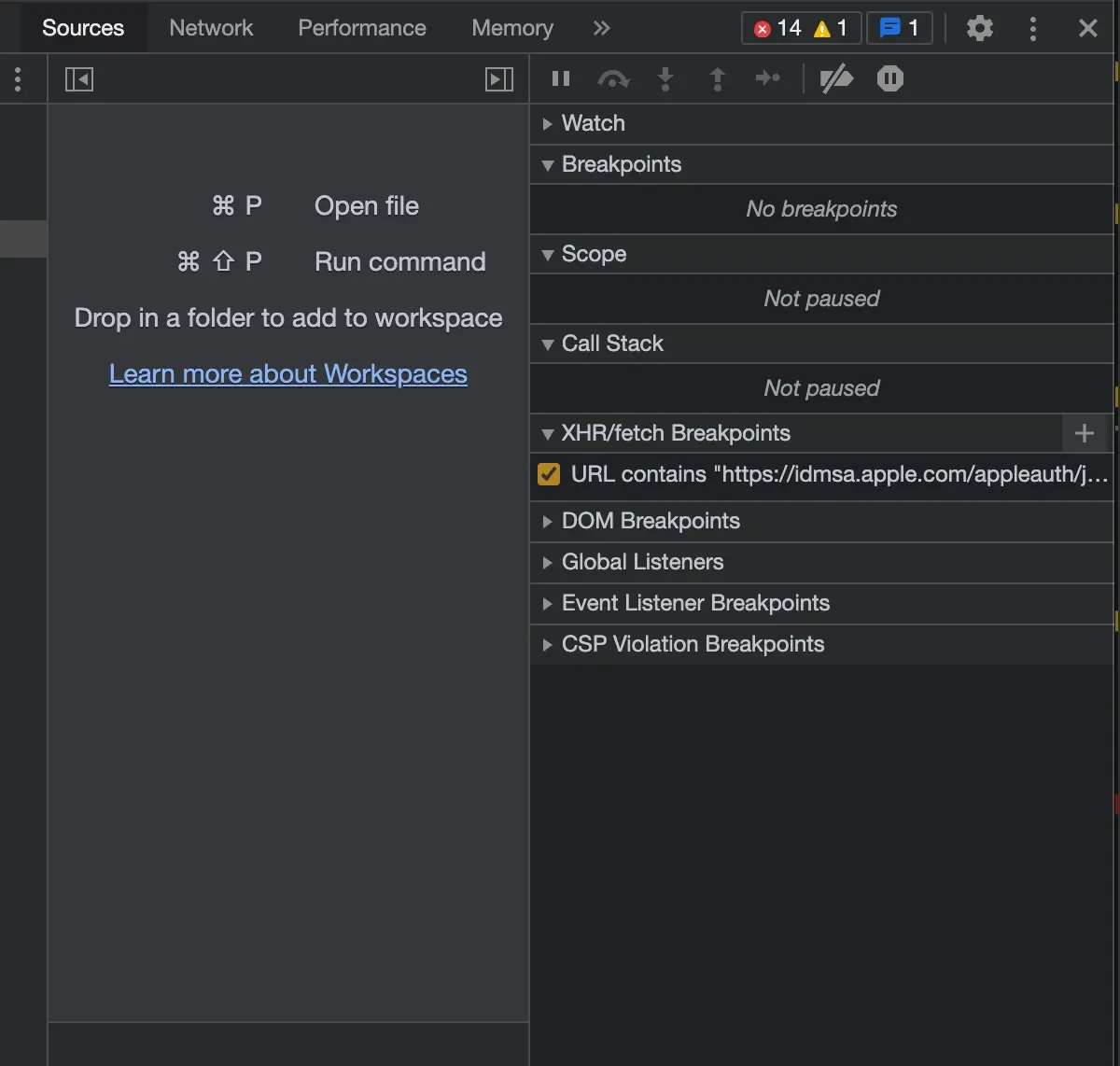
Chrome DevTools' Sources panel has an "XHR/fetch Breakpoints" component that stops execution when a particular web address is requested. Using it, the application can be paused at the point the error occurs, and the debugger asked to go backwards to the condition that caused the failure. Eventually, stepping backward, there is this:
new Promise(function(e, n) { it.call({ destination: window.parent, publicProcedureName: "ready", params: [{ iframeTitle: d.a.getString("iframeTitle") }], onSuccess: function(t) { e(t) }, onError: function(t) { n(t) }, retries: p.a.meta.FEConfiguration.pmrpcRetryCount, timeout: p.a.meta.FEConfiguration.pmrpcTimeout, destinationDomain: p.a.destinationDomain }) }
The important part is window.parent, the fake version of iCloud. The software inside AppleID is trying to contact the iCloud parent when the page is ready and failing over and over (see retries). The communication happens over postMessage (the pm of pmrpc). The code targets a destinationDomain, likely set to something like https://www.icloud.com; since the embedding page is not that domain, there is a failure.
Injecting code into the AppleID and iCloud JavaScript reveals the conversation:
- AppleID to iCloud:
pmrpc.{"jsonrpc":"2.0","method":"receivePingRequest","params":["ready"],"id":"9BA799AA-6777-4DCC-A615-A8758C9E9CE2"}AppleID tells iCloud it is ready to receive messages. - iCloud to AppleID:
pmrpc.{"jsonrpc":"2.0","id":"9BA799AA-6777-4DCC-A615-A8758C9E9CE2","result":true}iCloud responds to the ping request with a pong. - AppleID to iCloud:
pmrpc.{"jsonrpc":"2.0","method":"ready","params":[{"iframeTitle":" Sign In with Your Apple ID"}],"id":"E0236187-9F33-42BC-AD1C-4F3866803C55"}AppleID tells iCloud the frame is named "Sign in with Your Apple ID", guessed to make the page title correct. - iCloud to AppleID:
pmrpc.{"jsonrpc":"2.0","id":"E0236187-9F33-42BC-AD1C-4F3866803C55","result":true}iCloud acknowledges receipt of the title. - AppleID to iCloud:
pmrpc.{"jsonrpc":"2.0","method":"receivePingRequest","params":["config"],"id":"87A8E469-8A6B-4124-8BB0-1A1AB40416CD"}AppleID asks iCloud if it wants the login configured. - iCloud to AppleID:
pmrpc.{"jsonrpc":"2.0","id":"87A8E469-8A6B-4124-8BB0-1A1AB40416CD","result":true}iCloud says yes. - AppleID to iCloud:
pmrpc.{"jsonrpc":"2.0","method":"config","params":[],"id":"252F2BC4-98E8-4254-9B19-FB8042A78E0B"}AppleID asks iCloud for a login dialog configuration. - iCloud to AppleID:
pmrpc.{"jsonrpc":"2.0","id":"252F2BC4-98E8-4254-9B19-FB8042A78E0B","result":{"data":{"features":{"rememberMe":true,"createLink":false,"iForgotLink":true,"pause2FA":false},"signInLabel":"Sign in to iCloud","serviceKey":"[redacted]","defaultAccountNameAutoFillDomain":"icloud.com","trustTokens":["HSARMTnl/S90E=SRVX"],"rememberMeLabel":"keep-me-signed-in","theme":"dark","waitAnimationOnAuthComplete":false,"logo":{"src":"data:image/png;base64,[ ... ]ErkJggg==","width":"100px"}}}}iCloud configures the dialog: the logo, the caption "Sign in to iCloud", and whether a forgot-password link is shown. - AppleID to iCloud:
pmrpc.{"jsonrpc":"2.0","id":"252F2BC4-98E8-4254-9B19-FB8042A78E0B","result":true}iCloud confirms receipt of the configuration.
A bootleg iCloud needs code that completes the conversation the same way.
Step 3: Defeat the postMessage targetOrigin check
The next problem is destinationDomain. postMessage ensures that kids trying to impersonate iCloud cannot just impersonate iCloud, by giving every postMessage a targetOrigin: the message goes to window.parent, but that parent must also be securely specified to prevent information going the wrong place.
Placing a breakpoint at the destinationDomain line shows that, unlike both the AppleID server and Content-Security-Policy, the whole redirect_uri parameter, https://mywebsite.com;@wwwicloud.com, is passed to postMessage, as though it were this code:
window.parent.postMessage(data_to_send, "https://mywebsite.com;@www.icloud.com");
At first this seems an impasse: the page will never be at that address. But the HTML standard's algorithm for comparing postMessage origins, section 9.4.3, step 5, does this:
- Let parsedURL be the result of running the URL parser on targetOrigin.
- If parsedURL is failure, then throw a
SyntaxErrorDOMException. - Set targetOrigin to parsedURL's origin.
Crucially, despite https://mywebsite.com;@www.icloud.com not being a valid place to send a postMessage, the algorithm extracts a valid origin from it (it becomes https://www.icloud.com). That allows extra content to be sneaked in to potentially confuse other parts of AppleID's machinery.
The source for the AppleID login page starts with a preamble that tells the framework what the destination domain is:
bootData.destinationDomain = decodeURIComponent("https://mywebsite.com;@www.icloud.com");
This bubbles down to the destinationDomain being messed with. Toying with redirect_uri revealed a bug in how this is programmed on Apple's server. For an input https://mywebsite.com;"@www.icloud.com (note the double quote), this code is produced:
bootData.destinationDomain = decodeURIComponent("https://mywebsite.com;\"@www.icloud.com");
The double quote is escaped with a \ so it cannot break out of the quoted section and execute code. But inputting https://mywebsite.com;%[redacted] instead, where %22 is what encodeURIComponent produces for a double quote, gives exactly the same response:
bootData.destinationDomain = decodeURIComponent("https://mywebsite.com;\"@www.icloud.com");
Apple is already doing a decodeURIComponent on the server before the generated JavaScript, and then the generated JavaScript performs the same decoding again. Someone made the mistake of doing the same decoding on the client and server, but it did not become a functionality-breaking bug because the intended usage has no doubly encoded components. Doubly encoded components can be introduced, though.
Because the server uses the decodeURIComponent-ed form and the client uses the twice decodeURIComponent-ed form, special modifier characters can be doubly encoded so that only the client sees them, while all server-side checks still pass. After some trial and error, this redirect_uri works:
https%3A%2F%2Fmywebsite.com%253F%20mywebsite.com%3B%40www.icloud.com
The order of operations is:
- AppleID's server decodeURIComponent-s it, producing:
https://mywebsite.com%3F mywebsite.com;@www.icloud.com - AppleID's server parses the origin from
https://mywebsite.com%3F mywebsite.com;@www.icloud.com, and getshttps://www.icloud.com, which passes the first security check. - AppleID's server takes the once-decodeURIComponent-ed form and sends
Content-Security-Policy: allow-origin https://mywebsite.com%3F mywebsite.com;@www.icloud.com. - The browser parses the Content-Security-Policy directive and parses out origins again, allowing embedding of the iCloud login from both
https://mywebsite.com%3f(which is nonsense) andmywebsite.com(which is us). This passes the second security check and allows the page to continue loading. - AppleID's server generates the sign-in page with the JavaScript
bootData.destinationDomain = decodeURIComponent("https://mywebsite.com%3F mywebsite.com;@www.icloud.com");. - The second
decodeURIComponentsetsbootData.destinationDomaintohttps://mywebsite.com? mywebsite.com;@www.icloud.com. - When the AppleID client tries to send data to www.icloud.com, it sends it to
https://mywebsite.com? mywebsite.com;@www.icloud.com. - The browser, when performing postMessage, parses an origin again again from
https://mywebsite.com? mywebsite.com;@www.icloud.com. The?causes everything after it to be ignored, resulting in the target originhttps://mywebsite.com. This passes the third security check.
That is only half the problem, and the page stays blank:
Step 4: Bypass the sender check with a null source
Messages can now be received from iCloud, but the login dialog cannot be fully initialised without also sending them. AppleID checks the senders of all messages it gets, and that mechanism is totally different from the one used for a postMessage send.
The lowest-level browser mechanism AppleID must be calling does not perform an abusable parse step beforehand. A typical message origin check looks like this:
if (message.origin != "https://safesite.com") throw new Error("hey!! thats illegal!");
That is a strict string comparison, which would in theory require the origin https://mywebsite.com? mywebsite.com;@www.icloud.com, which has no chance of ever happening.
However, the PMRPC protocol is open source, and its own version of the check can be viewed online. Receipt of a message is handled by processJSONRpcRequest, defined in pmrpc.js. Line 254 decides if the request needs to be checked for security via an ACL (Access Control List):
254: !serviceCallEvent.shouldCheckACL || checkACL(service.acl, serviceCallEvent.origin)
This checks a value called shouldCheckACL to determine if security is disabled. That value comes from line 221:
221: shouldCheckACL : !isWorkerComm
And isWorkerComm comes via lines 205-206:
205: var eventSource = eventParams.source;206: var isWorkerComm = typeof eventSource !== "undefined" && eventSource !== null;
eventParams is the event representing the postMessage, and event.source is a reference to the window that sent the message. The check can be summarised as:
if (message.source !== null && !(message.origin === "https://mywebsite.com? mywebsite.com;@www.icloud.com"))
So the origin check is completely skipped if message.source is null. The intention is likely to allow rapid testing of pmrpc-based applications: a made-up test message can have its source set to null, and security no longer gets in the way. Section 9.4.3, step 8.3 of the HTML standard says a postMessage event's source is always a WindowProxy object, so it can never be null.
But section 8.6 of the HTML standard defines an iframe sandboxing flag allow-same-origin which, if not present in a sandboxed iframe, sets the Sandboxed origin browsing context flag (section 7.5.3), which forces the content into a unique origin (section 7.5.5), which makes the window an opaque origin (section 7.5), which when given to JavaScript is turned into null. So an embedded, sandboxed frame without the allow-same-origin flag creates a special window considered to be null, bypassing the pmrpc security check on received messages.
A null page is heavily restricted, and if the attack page identifies as null via this trick, all the other checks that were bypassed will fail.
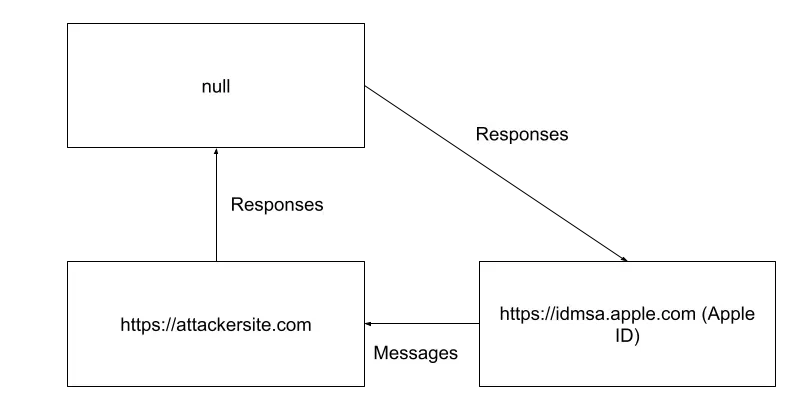
Instead, both Apple ID (with all the earlier work) and a null page are embedded. Messages can still be posted to the null page, so it is used to forward messages on to Apple ID, which thinks that since it is a null window, it must have generated them itself.
Step 5: From phishing to code injection
Now that AppleID thinks the page is iCloud, all the settings iCloud gets can be messed with. For example, a free Apple gift card can be offered to coerce the user into entering credentials:
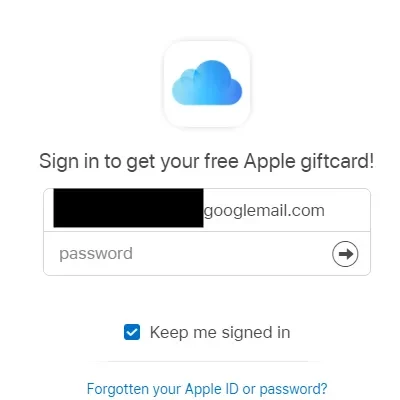
In this state, having tricked Apple ID into thinking the page is iCloud, there is a little box that fills in the Apple email nicely. Logging in to the embed yields an authentication for the Apple account over postMessage, even without 2FA, because an authentication token is granted without passing 2FA for iCloud Find My, used for finding a potentially lost phone.
That is basically phishing, albeit extremely high-tech phishing, and the powers that be will likely argue that a fake AppleID page could do the same. More is needed.
Apple ID thinks the page is iCloud, so interactions with the Apple ID system will be a lot more trusting. A lot of configuration settings affect how the login page is displayed:
pmrpc.{"jsonrpc":"2.0","id":"252F2BC4-98E8-4254-9B19-FB8042A78E0B","result":{"data":{"features":{"rememberMe":true,"createLink":false,"iForgotLink":true,"pause2FA":false},"signInLabel":"Sign in to iCloud","serviceKey":"[redacted]","defaultAccountNameAutoFillDomain":"icloud.com","trustTokens":["HSARMTnl/S90E=SRVX"],"rememberMeLabel":"keep-me-signed-in","theme":"dark","waitAnimationOnAuthComplete":false,"logo":{"src":"data:image/png;base64,[ ... ]ErkJggg==","width":"100px"}}}}
What about options iCloud can use but chooses not to? They will not be in the config, but Chrome DevTools' code search can search all the code the Apple ID client uses. signInLabel makes a good search term as it probably does not turn up anywhere else:
d()(w.a, "envConfigFromConsumer.signInLabel", "").trim() && n.attr("signInLabel", w.a.envConfigFromConsumer.signInLabel),
All these settings like signInLabel are part of envConfigFromConsumer, so searching for that gives:
this.attr("testIdpButtonText", d()(w.a, "envConfigFromConsumer.testIdpButtonText", "Test")) d()(w.a, "envConfigFromConsumer.accountName", "").trim() ? (n.attr("accountName", w.a.envConfigFromConsumer.accountName.trim()), n.attr("showCreateLink", d()(w.a, "envConfigFromConsumer.features.createLink", !0)), n.attr("showiForgotLink", d()(w.a, "envConfigFromConsumer.features.iForgotLink", !0)), n.attr("learnMoreLink", d()(w.a, "envConfigFromConsumer.learnMoreLink", void 0)), n.attr("privacyText", d()(w.a, "envConfigFromConsumer.privacy", void 0)), n.attr("showFooter", d()(w.a, "envConfigFromConsumer.features.footer", !1)), n.attr("showRememberMe") && ("remember-me" === d()(w.a, "envConfigFromConsumer.rememberMeLabel", "").trim() ? n.attr("rememberMeText", l.a.getString("rememberMe")) : "keep-me-signed-in" === d()(w.a, "envConfigFromConsumer.rememberMeLabel", "").trim() && n.attr("rememberMeText", l.a.getString("keepMeSignedIn")), n.attr("isRememberMeChecked", !!d()(w.a, "envConfigFromConsumer.features.selectRememberMe", !1) || !!d()(w.a, "accountName", "").trim())), i = d()(w.a, "envConfigFromConsumer.verificationToken", ""),
These values get different names in a template. For example, envConfigFromConsumer.features.footer becomes showFooter. Searching all resources the page uses for where these inputs end up gives:
{{#if showRememberMe}}<div class="si-remember-password"> <input type="checkbox" id="remember-me" class="form-choice form-choice-checkbox" {($checked)}="isRememberMeChecked"> <label id="remember-me-label" class="form-label" for="remember-me"> <span class="form-choice-indicator"></span> {{rememberMeText}} </label></div>
These are handlebars templates. Handlebars has a dirty secret: {{value}} statements safely put content into the page, but {{{value}}} extremely unsafely injects potentially untrusted HTML code, and for most inputs looks just the same. Searching the templates for }}} gives:
{{#if showLearnMoreLink}}<div> {{{learnMoreLink}}}</div>{{/if}}{{#if showPrivacy}}<div class="label-small text-centered centered tk-caption privacy-wrapper"> <div class="privacy-icon"></div> {{{privacyText}}} </div>{{/if}}
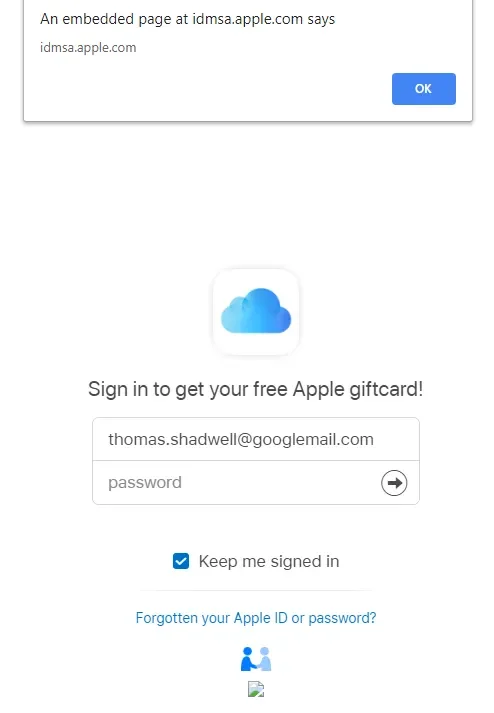
privacyText comes from the configuration option envConfigFromConsumer.privacy, or just privacy. Re-configuring the client to send the configuration option { "privacy": "<img src=fake onerror='alert(document.domain)'" } makes Apple ID execute the code and show a popup indicating which domain has been taken over:
Step 6: Full account takeover proof of concept
With control over idmsa.apple.com, the Apple ID server browser client, all the credentials saved there can be accessed: the Apple login and cookie. In theory it is also possible to jump to other Apple login windows. Those credentials are stored in a form that can be used to take over an Apple account, but they are not a username and password.
The proof of concept:
- Execute the full exploit chain to take over Apple ID. This requires only one click from the user.
- Present the user with a "login with AppleID" button by deleting all the content of the Apple ID login page and replacing it with the standard button.
- Open a new window to the real, full Apple ID login page, same as Apple would when the button is clicked.
- With control of idmsa.apple.com, take control over the real Apple ID login dialog and inject code which harvests the logins as they are typed.
- Manipulate browser history to set the exploit page location to
https://apple.com, and then delete the history record of being on the exploit page. If the user checks whether they came from a legitimate Apple site, they will just see apple.com and be unable to go back.

Root cause
The chain rests on three separate parsing mismatches between systems that each interpret the same redirect_uri string differently:
- The AppleID server's origin check and the browser's Content-Security-Policy parser disagree about
https://mywebsite.com;@www.icloud.com, because the;terminates the CSP source while the URL parser treats everything before the@as userinfo. - The server decodes
redirect_urionce and the generated client JavaScript decodes it again, so a doubly encoded value passes server checks while the client sees different characters. - The postMessage targetOrigin algorithm extracts a valid origin from a string that is not a valid destination, and the
?in the twice-decoded value causes the browser to ignore everything after it.
On top of that, the PMRPC library skips its ACL check entirely when message.source is null, and a sandboxed iframe without allow-same-origin produces exactly such a null source. The existing defences (X-Frame-Options ALLOW-FROM, CSP frame-ancestors, the server-side redirect_uri check, and the postMessage targetOrigin) each failed because they were applied to a string that other layers parsed differently, or because the library's own check had a bypass.
Impact
An attacker can embed the real Apple ID login page in their own page, complete the postMessage handshake so Apple ID believes it is talking to iCloud, and then inject code into the Apple ID client through the handlebars {{{privacyText}}} template. With control of idmsa.apple.com, the attacker can access the credentials saved there (the Apple login and cookie) and, in the proof of concept, harvest logins typed into a real Apple ID login window opened in a new window, and manipulate browser history so the user sees apple.com. The chain requires one click from the user. The researcher notes that the intermediate state is essentially high-tech phishing, and that the credentials obtained are not a username and password.
Apple paid $10,000 for the bug and proof of concept. The researcher notes this is 2.5 times lower than the lowest bounty on Apple's Example Payouts page, for creating an app that can access "a small amount of sensitive data".
Fix
Apple mitigated the issue partially on 24 November 2019, three days after the first proof of concept, and confirmed it fixed on 4 February 2020. The report does not describe the specific code changes. The underlying problems to address are the double decodeURIComponent (server and client), the use of redirect_uri as an embed-domain allowlist without a single canonical parse, and the PMRPC ACL bypass when message.source is null.
Variants to test
- Userinfo tricks in allowlists. Submit
redirect_urivalues likehttps://[redacted]andhttps://mywebsite.com;@www.icloud.comto any endpoint that reflects the value into a CSPframe-ancestorsorallow-origindirective. A positive result is a CSP header whose parsed source is the attacker domain while the server-side check still sees the legitimate one. - Double decoding. Send a value encoded once, then twice (
%253F,%253B,%2540), and compare the server's echoed form with the client-sidedecodeURIComponentoutput. A positive result is a client value containing characters (?,;,@) that the server never saw. - postMessage targetOrigin parsing. Pass a full URL where an origin is expected and check whether the browser extracts an origin from it. A positive result is a message delivered to an attacker window whose origin differs from the string the server validated.
- Null-source ACL bypass. Embed a sandboxed iframe without
allow-same-originand forward messages through it to a PMRPC-based target. A positive result is the target processing messages whose origin would otherwise fail the ACL check. - Handlebars triple-stash injection. Search templates for
{{{and trace each value back to a configuration field the client controls. A positive result is HTML execution from a config value such asprivacyorlearnMoreLink. - History manipulation. After a successful injection, use
history.replaceStateand history deletion to make the exploit page appear as a legitimate origin. A positive result is the address bar showing the legitimate domain with no back entry to the exploit page.
What happened, in plain words
A security researcher found a way to make Apple's own login page, the one served from Apple's servers, appear inside a page the attacker controls. Once the real login page was embedded, the attacker could talk to it in a way that made it believe it was talking to iCloud, and then slip code into it. That code could read the login details saved for the Apple ID session and, in the proof of concept, harvest what a user typed into a real Apple login window. Apple paid $10,000 for the report.
The whole thing is a chain of small misunderstandings between pieces of software. Each piece reads the same web address slightly differently, and the attacker lines those differences up so that every check sees something harmless while the browser ends up doing something dangerous. If that sounds abstract, think of a form where one clerk reads the line "pay to Alice; ignore the rest" as "pay to Alice" and another clerk reads the same line as "pay to Alice and also ignore the rest". Nobody lied, but the two clerks disagree about what the paper says, and that disagreement is the bug.
This article walks through the chain in the order the researcher built it. Every address, header and snippet below is copied from the report.
The pieces you need to know first
Before the attack makes sense, a handful of everyday web ideas need to be clear. None of them are exotic; they are the plumbing behind every login button you have ever pressed.
- A web page is a document plus code. When your browser loads a page, it downloads HTML (the structure), CSS (the look) and JavaScript (the behaviour). JavaScript running in a page can read and change that page, and can ask the browser to do things like open windows or send messages.
- An origin is the combination of protocol, host and port, for example
https://www.icloud.com. Browsers use origins as a security boundary: code from one origin is not supposed to read data from another. This is the same-origin policy, and it is the reason a random website cannot read your webmail. - An iframe is a window inside a window. A page can embed another page inside a rectangle on itself. That is how a YouTube video sits inside a blog post.
- An embed allowlist is a rule that says which pages are allowed to put a given page inside an iframe. Without it, any site could frame a login page and dress it up to look like something else, which is called a redress attack. Two mechanisms do this job: the older
X-Frame-Optionsheader and the newerContent-Security-Policy: frame-ancestorsheader. A header is a small line of metadata a server sends along with a page. - OAuth 2 is a standard way for one service to let another service log a user in without sharing the password. It works with capabilities: a token is a short string that grants a specific permission, like a cloakroom ticket that only gets you one coat.
client_ididentifies which application is asking, andredirect_urisays where the result should be sent. - A cookie is a small piece of data a site stores in your browser so it can recognise you on the next request. A session cookie is effectively a logged-in badge. If someone else gets it, they can act as you.
- postMessage is the browser feature that lets two windows or frames from different origins send each other messages. Because the two sides do not trust each other, every message carries a
targetOrigin: the sender states which origin is allowed to receive it, and the browser refuses to deliver it anywhere else. The receiving side can also checkmessage.origin, the origin the message came from. - A sandboxed iframe is an iframe with extra restrictions applied by an attribute called
sandbox. One of the switches inside that attribute,allow-same-origin, decides whether the framed page keeps its normal origin. Without it, the framed page is treated as having a special, anonymous origin. - Handlebars is a templating library: it takes a template with placeholders and fills in values.
{{value}}inserts a value with HTML escaping, so angle brackets become harmless text.{{{value}}}inserts the value raw, so any HTML in it becomes live markup. - XSS (cross-site scripting) is the vulnerability class where an attacker gets their own code to run inside someone else's page. It matters because that code runs with the page's privileges, so it can read what the page can read.
- Account takeover means using a flaw to get into someone else's account, here by obtaining the credentials or session that the Apple ID client holds.
- DevTools is the set of developer tools built into Chrome. The Network panel lists requests the page makes, the Sources panel lets you read and pause JavaScript, and breakpoints stop execution at a chosen line so you can inspect the state.
Context: how iCloud logs you in
iCloud lives on its own domain, icloud.com, separate from Apple's usual apple.com. Most login systems, Google's for example, send you through a shared login domain such as accounts.google.com. iCloud does not. Instead, iCloud embeds a login page that is served from Apple's AppleID server, idmsa.apple.com.
The page is served at an address like this:
https://idmsa.apple.com/appleauth/auth/authorize/signin?frame_id=auth-ebog4xzs-os6r-58ua-4k2f-xlys83hd&language=en_US&iframeId=auth-ebog4xzs-os6r-58ua-4k2f-xlys83hd&client_id=[redacted]&redirect_uri=https://www.icloud.com&response_type=code&response_mode=web_message&state=auth-ebog4xzs-os6r-58ua-4k2f-xlys83hd&authVersion=latest
Read it piece by piece. Everything before the ? is the address of the login page on Apple's server. After the ? come parameters, which are named values separated by &. frame_id and iframeId identify this particular embedded frame. language sets the language. client_id is the long hex string that identifies which application is asking for a login. redirect_uri is set to https://www.icloud.com. response_type=code asks for an authorisation code. response_mode=web_message asks for the result to be delivered as a browser message rather than a redirect. state is a value the caller can use to match the response to its request. authVersion=latest selects the current version of the login flow.
Apple is using OAuth 2, which is capability-based. Capability-based means a login from apple.com does not automatically mean a login from icloud.com, and not all iCloud logins are the same either. That is how Find My, the feature that locates your phone, can skip a second-factor check: it holds a narrower capability. This design limits how much damage a single flaw can do.
The flow is modified so the login can work embedded in another page, and response_mode=web_message appears to be the switch that turns that on. If you open the address directly in a browser tab, the page is blank. Apple's code notices it is not being placed where it should be and blanks itself out. That is the defence against a redress attack: if anyone could frame the real login page, they could rearrange its presentation and trick you into typing your details into a page that looks official.
In a typical OAuth setup, redirect_uri says where the access should be sent, and the server checks it against the value registered for the client_id, so the keys that grant access only go to a safe place. Here there is no such redirect. redirect_uri is being used for a different job: it names the domain that is allowed to embed the login page.
Setup: the tools used
The work was done in Chrome with DevTools. The Network panel was used to watch requests. The Sources panel was used with XHR/fetch breakpoints, which pause the page when it requests a particular address, so execution can be stopped at the moment something interesting happens. The code search feature was used to search all the code the Apple ID client uses. The researcher also injected code into the AppleID and iCloud JavaScript to watch the messages the two sides exchange.
No accounts or special roles are involved. The only precondition is a victim who loads a page the attacker controls and interacts with the embedded login.
Finding it: the embed check can be fooled
The researcher noticed the redirect_uri check had the same class of bug as an earlier finding: web addresses are extraordinarily hard to compare safely. The parameter has to pass through several software systems, and each one probably interprets it in a subtly different way. To get past the control, the goal is for the checker on the AppleID server to see icloud.com, while the other systems see something else.
By editing the embed live in the iCloud page with DevTools, the researcher found that a redirect_uri of https://[redacted] passed just fine, even though it is a really odd way of writing the same address. The researcher found that a redirect_uri of https://[redacted] passed just fine, even though it is a really odd way of writing the same address.
The next question was how to get the iCloud login page into an attacker's own page. The relevant embed controls are:
X-Frame-Options: DENYprevents any kind of embedding. It is ancient and universally supported, but if you want to allow only some embedding you need complicated and unreliable logic.X-Frame-Options: ALLOW-FROM http://example.comallows embedding only from a specific place. It is a good idea from a security perspective, but it was supported only by Firefox and Internet Explorer for a short time, so relying on it will probably make you less secure.Content-Security-Policy: frame-ancestorsallows embedding only from specific places. It is newer and prevents embeds inside embeds from bypassing your controls, but very old browsers will ignore it.
Looking at the Network panel shows the AppleID sign-in page uses both X-Frame-Options: ALLOW-FROM, which essentially does nothing, and Content-Security-Policy: frame-ancestors.
With redirect_uri set to the default https://www.icloud.com/, the cut-down CSP header looks like this:
Content-Security-Policy: frame-ancestors 'self' https://www.icloud.com
This header is the server telling the browser: only pages from this same site and from https://www.icloud.com may put this page in a frame. 'self' means the page's own origin.
With the weirder redirect_uri https://[redacted], it looks like this:
Content-Security-Policy: frame-ancestors 'self' https://[redacted]
The server has copied the odd address into the header. That is interesting because the language used to write web addresses is contextually different from the language used to write Content Security Policies. The same characters mean different things to the two parsers.
Setting redirect_uri to https://mywebsite.com;@icloud.com/ keeps the AppleID server happy, but it sends:
Content-Security-Policy: frame-ancestors 'self' https://mywebsite.com;@www.icloud.com
Here is the mismatch. https://mywebsite.com;@www.icloud.com is a valid URL that means the same as https://www.icloud.com, because everything before the @ is user information. But to a Content Security Policy, the same statement means https://mywebsite.com, and then some extra text after the ; which is ignored. The ; separates entries in the policy, so the browser reads the attacker's domain as an allowed embedder. That is what lets the Apple ID login page be embedded in the attacker's own page.
Exploitation
Step 1: Embed the login page
Using the redirect_uri above, the Apple ID login page can be embedded in an attacker page. If embedding fails in Chrome, you get the browser's sad-page icon:
Instead, the result is a big box of absolutely nothing:
A blank box is progress. The page loaded, but it has not finished setting itself up, so it is not showing the form yet.
Step 2: Listen to the blank box
The box is blank but not silent. When the page loads, the browser console gives this message:
{"type":"ERROR","title":"PMRPErrorMessageSequence","message":"APPLE ID : PMRPC Message Sequence log fail at AuthWidget.","iframeId":"601683d3-4d35-4edf-a33e-6d3266709de3","details":"{\"m\":\"a:28632989 b:DEA2CA08 c:req h:rPR e:wSR:SR|a:28633252 b:196F05FD c:req h:rPR e:wSR:SR|a:28633500 b:DEA2CA08 c:rRE f:Application error. Destination unavailable. 500 h:rPR e:f2:rRE|a:28633598 b:B74DD348 c:req h:rPR e:wSR:SR|a:28633765 b:196F05FD c:rRE f:Application error. Destination unavailable. 500 h:rPR e:f2:rRE|a:28634110 b:BE7671A8 c:req h:rPR e:wSR:SR|a:28634110 b:B74DD348 c:rRE f:Application error. Destination unavailable. 500 h:rPR e:f2:rRE|a:28634621 b:BE7671A8 c:rRE f:Application error. Destination unavailable. 500 h:rPR e:f2:rRE|a:28635123 b:E6F267A9 c:req h:rPR e:wSR:SR|a:28635130 b:25A38CEC c:req h:r e:wSR:SR|a:28635635 b:E6F267A9 c:rRE f:Application error. Destination unavailable. 500 h:rPR e:f2:rRE|a:28636142 b:25A38CEC c:rRE f:Application error. Destination unavailable. 1000 h:r e:f2:rRE\",\"pageVisibilityState\":\"visible\"}"}
This is a JSON object, a format for structured data. type is ERROR. title names the error sequence. message says the Apple ID message sequence log failed at the authentication widget. iframeId identifies the frame. details is a long string of entries separated by |, each with a timestamp-like a: value, an identifier b:, a request or response marker c:req or c:rRE, and repeated Application error. Destination unavailable. 500 messages. pageVisibilityState says the page is visible. The message is mostly useless for working out what is actually wrong.
Checking the Network panel shows that when an error occurs, a request is sent to https://idmsa.apple.com/appleauth/jslog, assumedly to report to Apple that an error occurred.
Chrome DevTools' Sources panel has an XHR/fetch Breakpoints component that stops execution when a particular web address is requested. Using it, the application can be paused at the point the error occurs, and the debugger asked to go backwards to the condition that caused the failure. Eventually, stepping backward, there is this:
new Promise(function(e, n) { it.call({ destination: window.parent, publicProcedureName: "ready", params: [{ iframeTitle: d.a.getString("iframeTitle") }], onSuccess: function(t) { e(t) }, onError: function(t) { n(t) }, retries: p.a.meta.FEConfiguration.pmrpcRetryCount, timeout: p.a.meta.FEConfiguration.pmrpcTimeout, destinationDomain: p.a.destinationDomain }) }
Line by line: new Promise(function(e, n) { creates a promise, an object that represents work that will finish later, with e to call on success and n to call on failure. it.call({ invokes a function with a set of options. destination: window.parent says the message goes to the parent window, the page that embedded this one, which in the attack is the fake iCloud. publicProcedureName: "ready" names the procedure being called. params carries the arguments, here an object with iframeTitle read from a string table. onSuccess and onError pass the result or the failure back to the promise. retries and timeout come from configuration and control how many times the call is retried and how long it waits. destinationDomain: p.a.destinationDomain is the origin the message is addressed to.
The important part is window.parent, the fake version of iCloud. The software inside AppleID is trying to contact the iCloud parent when the page is ready, and failing over and over, which is what retries is doing. The communication happens over postMessage, the pm of pmrpc. The code targets a destinationDomain, likely set to something like https://www.icloud.com. Since the embedding page is not that domain, the message is refused and the call fails.
Injecting code into the AppleID and iCloud JavaScript reveals the conversation the two sides are trying to have:
- AppleID to iCloud:
pmrpc.{"jsonrpc":"2.0","method":"receivePingRequest","params":["ready"],"id":"9BA799AA-6777-4DCC-A615-A8758C9E9CE2"}AppleID tells iCloud it is ready to receive messages. - iCloud to AppleID:
pmrpc.{"jsonrpc":"2.0","id":"9BA799AA-6777-4DCC-A615-A8758C9E9CE2","result":true}iCloud responds to the ping request with a pong. - AppleID to iCloud:
pmrpc.{"jsonrpc":"2.0","method":"ready","params":[{"iframeTitle":" Sign In with Your Apple ID"}],"id":"E0236187-9F33-42BC-AD1C-4F3866803C55"}AppleID tells iCloud the frame is named "Sign in with Your Apple ID", guessed to make the page title correct. - iCloud to AppleID:
pmrpc.{"jsonrpc":"2.0","id":"E0236187-9F33-42BC-AD1C-4F3866803C55","result":true}iCloud acknowledges receipt of the title. - AppleID to iCloud:
pmrpc.{"jsonrpc":"2.0","method":"receivePingRequest","params":["config"],"id":"87A8E469-8A6B-4124-8BB0-1A1AB40416CD"}AppleID asks iCloud if it wants the login configured. - iCloud to AppleID:
pmrpc.{"jsonrpc":"2.0","id":"87A8E469-8A6B-4124-8BB0-1A1AB40416CD","result":true}iCloud says yes. - AppleID to iCloud:
pmrpc.{"jsonrpc":"2.0","method":"config","params":[],"id":"252F2BC4-98E8-4254-9B19-FB8042A78E0B"}AppleID asks iCloud for a login dialog configuration. - iCloud to AppleID:
pmrpc.{"jsonrpc":"2.0","id":"252F2BC4-98E8-4254-9B19-FB8042A78E0B","result":{"data":{"features":{"rememberMe":true,"createLink":false,"iForgotLink":true,"pause2FA":false},"signInLabel":"Sign in to iCloud","serviceKey":"[redacted]","defaultAccountNameAutoFillDomain":"icloud.com","trustTokens":["HSARMTnl/S90E=SRVX"],"rememberMeLabel":"keep-me-signed-in","theme":"dark","waitAnimationOnAuthComplete":false,"logo":{"src":"data:image/png;base64,[ ... ]ErkJggg==","width":"100px"}}}}iCloud configures the dialog: the logo, the caption "Sign in to iCloud", and whether a forgot-password link is shown. - AppleID to iCloud:
pmrpc.{"jsonrpc":"2.0","id":"252F2BC4-98E8-4254-9B19-FB8042A78E0B","result":true}iCloud confirms receipt of the configuration.
Each message is JSON-RPC, a simple convention where a request has a method, params and an id, and a response carries the same id with a result. The id is how each side matches a reply to its question. The config reply is the interesting one: it carries the settings that shape the login dialog, including signInLabel, rememberMeLabel, theme, trustTokens, and a base64-encoded logo image. A bootleg iCloud needs code that completes the conversation the same way.
Step 3: Defeat the postMessage targetOrigin check
The next problem is destinationDomain. postMessage ensures that a page trying to impersonate iCloud cannot simply do so, by giving every postMessage a targetOrigin: the message goes to window.parent, but that parent must also be securely specified so information does not go to the wrong place.
Placing a breakpoint at the destinationDomain line shows that, unlike both the AppleID server and Content-Security-Policy, the whole redirect_uri parameter, https://mywebsite.com;@wwwicloud.com, is passed to postMessage, as though it were this code:
window.parent.postMessage(data_to_send, "https://mywebsite.com;@www.icloud.com");
window.parent is the embedding page. postMessage sends data_to_send to it. The second argument is the target origin, the address the browser is told the receiver must have. At first this seems an impasse: the attacker's page will never be at that address. But the HTML standard's algorithm for comparing postMessage origins, section 9.4.3, step 5, does this:
- Let parsedURL be the result of running the URL parser on targetOrigin.
- If parsedURL is failure, then throw a
SyntaxErrorDOMException. - Set targetOrigin to parsedURL's origin.
In plain words: the browser runs the target origin through its URL parser. If the string cannot be parsed at all, it throws an error. Otherwise it takes the origin out of the parsed result and uses that. Crucially, even though https://mywebsite.com;@www.icloud.com is not a valid place to send a postMessage, the algorithm extracts a valid origin from it, which becomes https://www.icloud.com. That lets extra content be sneaked in to potentially confuse other parts of AppleID's machinery.
The source for the AppleID login page starts with a preamble that tells the framework what the destination domain is:
bootData.destinationDomain = decodeURIComponent("https://mywebsite.com;@www.icloud.com");
bootData is a configuration object the page sets up before the main code runs. destinationDomain is the field the earlier code reads. decodeURIComponent turns percent-encoded sequences such as %3F back into characters such as ?. This value bubbles down to the destinationDomain being messed with.
Toying with redirect_uri revealed a bug in how this is programmed on Apple's server. For an input https://mywebsite.com;"@www.icloud.com, note the double quote, this code is produced:
bootData.destinationDomain = decodeURIComponent("https://mywebsite.com;\"@www.icloud.com");
The double quote is escaped with a \, so it cannot break out of the quoted string and start executing code. That is the correct defensive behaviour. But inputting https://mywebsite.com;%[redacted] instead, where %22 is what encodeURIComponent produces for a double quote, gives exactly the same response:
bootData.destinationDomain = decodeURIComponent("https://mywebsite.com;\"@www.icloud.com");
So Apple is already doing a decodeURIComponent on the server before the generated JavaScript, and then the generated JavaScript performs the same decoding again. Someone made the mistake of doing the same decoding on the client and on the server. It did not become a functionality-breaking bug because the intended usage has no doubly encoded components. Doubly encoded components can be introduced, though.
Because the server uses the once-decoded form and the client uses the twice-decoded form, special modifier characters can be doubly encoded so that only the client sees them, while all the server-side checks still pass. After some trial and error, this redirect_uri works:
https%3A%2F%2Fmywebsite.com%253F%20mywebsite.com%3B%40www.icloud.com
%3A is :, %2F is /, %253F is a double-encoded ? (the %25 is %, so %253F decodes once to %3F and twice to ?), %20 is a space, %3B is ; and %40 is @. The order of operations is:
- AppleID's server
decodeURIComponent-s it, producing:https://mywebsite.com%3F mywebsite.com;@www.icloud.com - AppleID's server parses the origin from
https://mywebsite.com%3F mywebsite.com;@www.icloud.com, and getshttps://www.icloud.com, which passes the first security check. - AppleID's server takes the once-decoded form and sends
Content-Security-Policy: allow-origin https://mywebsite.com%3F mywebsite.com;@www.icloud.com. - The browser parses the Content-Security-Policy directive and parses out origins again, allowing embedding of the iCloud login from both
https://mywebsite.com%3f, which is nonsense, andmywebsite.com, which is us. This passes the second security check and allows the page to continue loading. - AppleID's server generates the sign-in page with the JavaScript
bootData.destinationDomain = decodeURIComponent("https://mywebsite.com%3F mywebsite.com;@www.icloud.com");. - The second
decodeURIComponentsetsbootData.destinationDomaintohttps://mywebsite.com? mywebsite.com;@www.icloud.com. - When the AppleID client tries to send data to www.icloud.com, it sends it to
https://mywebsite.com? mywebsite.com;@www.icloud.com. - The browser, when performing postMessage, parses an origin again again from
https://mywebsite.com? mywebsite.com;@www.icloud.com. The?causes everything after it to be ignored, resulting in the target originhttps://mywebsite.com. This passes the third security check.
That is only half the problem, and the page stays blank:
Step 4: Bypass the sender check with a null source
Messages can now be received from iCloud, but the login dialog cannot be fully initialised without also sending them. AppleID checks the senders of all the messages it gets, and that mechanism is totally different from the one used for a postMessage send.
The lowest-level browser mechanism AppleID must be calling does not perform an abusable parse step beforehand. A typical message origin check looks like this:
if (message.origin != "https://safesite.com") throw new Error("hey!! thats illegal!");
message.origin is the origin the message came from. The code compares it to a fixed string and throws an error if they differ. That is a strict string comparison, which would in theory require the attacker's page to have the origin https://mywebsite.com? mywebsite.com;@www.icloud.com, which has no chance of ever happening.
However, the PMRPC protocol is open source, and its own version of the check can be viewed online. Receipt of a message is handled by processJSONRpcRequest, defined in pmrpc.js. Line 254 decides if the request needs to be checked for security via an ACL, an Access Control List, which is a list of who is allowed to do what:
254: !serviceCallEvent.shouldCheckACL || checkACL(service.acl, serviceCallEvent.origin)
This checks a value called shouldCheckACL to decide whether security is disabled. If shouldCheckACL is false, the left side of the || is true and the ACL check is skipped entirely. That value comes from line 221:
221: shouldCheckACL : !isWorkerComm
shouldCheckACL is the opposite of isWorkerComm. And isWorkerComm comes via lines 205-206:
205: var eventSource = eventParams.source;206: var isWorkerComm = typeof eventSource !== "undefined" && eventSource !== null;
eventParams is the event representing the postMessage, and event.source is a reference to the window that sent the message. Line 205 stores it. Line 206 sets isWorkerComm to true only if the source exists and is not null. The check can be summarised as:
if (message.source !== null && !(message.origin === "https://mywebsite.com? mywebsite.com;@www.icloud.com"))
So the origin check is completely skipped if message.source is null. The intention is likely to allow rapid testing of pmrpc-based applications: a made-up test message can have its source set to null, and security no longer gets in the way. Section 9.4.3, step 8.3 of the HTML standard says a postMessage event's source is always a WindowProxy object, so it can never be null.
But section 8.6 of the HTML standard defines an iframe sandboxing flag allow-same-origin which, if not present in a sandboxed iframe, sets the Sandboxed origin browsing context flag in section 7.5.3, which forces the content into a unique origin in section 7.5.5, which makes the window an opaque origin in section 7.5, which when given to JavaScript is turned into null. So an embedded, sandboxed frame without the allow-same-origin flag creates a special window considered to be null, bypassing the pmrpc security check on received messages.
A null page is heavily restricted, and if the attack page identifies as null via this trick, all the other checks that were bypassed will fail.
Instead, both Apple ID, with all the earlier work, and a null page are embedded. Messages can still be posted to the null page, so it is used to forward messages on to Apple ID, which thinks that since it is a null window, it must have generated them itself.
Step 5: From phishing to code injection
Now that AppleID thinks the page is iCloud, all the settings iCloud gets can be messed with. For example, a free Apple gift card can be offered to coerce the user into entering credentials:
In this state, having tricked Apple ID into thinking the page is iCloud, there is a little box that fills in the Apple email nicely. Logging in to the embed yields an authentication for the Apple account over postMessage, even without 2FA, because an authentication token is granted without passing 2FA for iCloud Find My, used for finding a potentially lost phone.
That is basically phishing, albeit extremely high-tech phishing, and the powers that be will likely argue that a fake AppleID page could do the same. More is needed.
Apple ID thinks the page is iCloud, so interactions with the Apple ID system will be a lot more trusting. A lot of configuration settings affect how the login page is displayed:
pmrpc.{"jsonrpc":"2.0","id":"252F2BC4-98E8-4254-9B19-FB8042A78E0B","result":{"data":{"features":{"rememberMe":true,"createLink":false,"iForgotLink":true,"pause2FA":false},"signInLabel":"Sign in to iCloud","serviceKey":"[redacted]","defaultAccountNameAutoFillDomain":"icloud.com","trustTokens":["HSARMTnl/S90E=SRVX"],"rememberMeLabel":"keep-me-signed-in","theme":"dark","waitAnimationOnAuthComplete":false,"logo":{"src":"data:image/png;base64,[ ... ]ErkJggg==","width":"100px"}}}}
This is the same configuration reply as before, now being used as a lever. features toggles parts of the dialog: rememberMe, createLink, iForgotLink, pause2FA. signInLabel is the caption. serviceKey identifies the service. defaultAccountNameAutoFillDomain tells the form which domain to autofill from. trustTokens carries tokens. rememberMeLabel chooses the wording of the remember-me option. theme sets the colour scheme. waitAnimationOnAuthComplete controls an animation. logo holds the image and its width.
What about options iCloud can use but chooses not to? They will not be in the config, but Chrome DevTools' code search can search all the code the Apple ID client uses. signInLabel makes a good search term as it probably does not turn up anywhere else:
d()(w.a, "envConfigFromConsumer.signInLabel", "").trim() && n.attr("signInLabel", w.a.envConfigFromConsumer.signInLabel),
d() is a helper that reads a value from an object with a default. Here it reads envConfigFromConsumer.signInLabel, defaulting to an empty string, trims it, and if the result is non-empty, sets an attribute called signInLabel on n from the same value. All these settings like signInLabel are part of envConfigFromConsumer, so searching for that gives:
this.attr("testIdpButtonText", d()(w.a, "envConfigFromConsumer.testIdpButtonText", "Test")) d()(w.a, "envConfigFromConsumer.accountName", "").trim() ? (n.attr("accountName", w.a.envConfigFromConsumer.accountName.trim()), n.attr("showCreateLink", d()(w.a, "envConfigFromConsumer.features.createLink", !0)), n.attr("showiForgotLink", d()(w.a, "envConfigFromConsumer.features.iForgotLink", !0)), n.attr("learnMoreLink", d()(w.a, "envConfigFromConsumer.learnMoreLink", void 0)), n.attr("privacyText", d()(w.a, "envConfigFromConsumer.privacy", void 0)), n.attr("showFooter", d()(w.a, "envConfigFromConsumer.features.footer", !1)), n.attr("showRememberMe") && ("remember-me" === d()(w.a, "envConfigFromConsumer.rememberMeLabel", "").trim() ? n.attr("rememberMeText", l.a.getString("rememberMe")) : "keep-me-signed-in" === d()(w.a, "envConfigFromConsumer.rememberMeLabel", "").trim() && n.attr("rememberMeText", l.a.getString("keepMeSignedIn")), n.attr("isRememberMeChecked", !!d()(w.a, "envConfigFromConsumer.features.selectRememberMe", !1) || !!d()(w.a, "accountName", "").trim())), i = d()(w.a, "envConfigFromConsumer.verificationToken", ""),
This block reads a series of configuration values and copies them onto attributes of a template object. testIdpButtonText becomes the text of a test identity-provider button. If accountName is set, it copies accountName, showCreateLink, showiForgotLink, learnMoreLink, privacyText, showFooter, the remember-me text and the remember-me checked state. verificationToken is read into i. These values get different names in a template. For example, envConfigFromConsumer.features.footer becomes showFooter. Searching all the resources the page uses for where these inputs end up gives:
{{#if showRememberMe}}<div class="si-remember-password"> <input type="checkbox" id="remember-me" class="form-choice form-choice-checkbox" {($checked)}="isRememberMeChecked"> <label id="remember-me-label" class="form-label" for="remember-me"> <span class="form-choice-indicator"></span> {{rememberMeText}} </label></div>
This is a Handlebars template. {{#if showRememberMe}} renders the block only when showRememberMe is true. The input is a checkbox whose checked state comes from isRememberMeChecked. The label is tied to the checkbox by for="remember-me". {{rememberMeText}} inserts the label text with escaping, so any HTML in it becomes visible text rather than live markup.
Handlebars has a dirty secret: {{value}} statements safely put content into the page, but {{{value}}} extremely unsafely injects potentially untrusted HTML code, and for most inputs looks just the same. Searching the templates for }}} gives:
{{#if showLearnMoreLink}}<div> {{{learnMoreLink}}}</div>{{/if}}{{#if showPrivacy}}<div class="label-small text-centered centered tk-caption privacy-wrapper"> <div class="privacy-icon"></div> {{{privacyText}}} </div>{{/if}}
Two triple-stash insertions appear here: {{{learnMoreLink}}} and {{{privacyText}}}. Both insert their value raw. privacyText comes from the configuration option envConfigFromConsumer.privacy, or just privacy. Re-configuring the client to send the configuration option { "privacy": "<img src=fake onerror='alert(document.domain)'" } makes Apple ID execute the code and show a popup indicating which domain has been taken over:
The payload is an img tag whose src points at a file that does not exist, with an onerror handler that runs alert(document.domain). The image fails to load, the error handler fires, and the alert shows the origin of the page the code is running in. That is the proof that attacker-controlled HTML is executing inside the Apple ID page.
Step 6: Full account takeover proof of concept
With control over idmsa.apple.com, the Apple ID server browser client, all the credentials saved there can be accessed: the Apple login and cookie. In theory it is also possible to jump to other Apple login windows. Those credentials are stored in a form that can be used to take over an Apple account, but they are not a username and password.
The proof of concept:
- Execute the full exploit chain to take over Apple ID. This requires only one click from the user.
- Present the user with a login with AppleID button by deleting all the content of the Apple ID login page and replacing it with the standard button.
- Open a new window to the real, full Apple ID login page, same as Apple would when the button is clicked.
- With control of
idmsa.apple.com, take control over the real Apple ID login dialog and inject code which harvests the logins as they are typed. - Manipulate browser history to set the exploit page location to
https://apple.com, and then delete the history record of being on the exploit page. If the user checks whether they came from a legitimate Apple site, they will just seeapple.comand be unable to go back.
Root cause
The chain rests on three separate parsing mismatches between systems that each interpret the same redirect_uri string differently:
- The AppleID server's origin check and the browser's Content-Security-Policy parser disagree about
https://mywebsite.com;@www.icloud.com, because the;terminates the CSP source while the URL parser treats everything before the@as user information. - The server decodes
redirect_urionce and the generated client JavaScript decodes it again, so a doubly encoded value passes server checks while the client sees different characters. - The postMessage targetOrigin algorithm extracts a valid origin from a string that is not a valid destination, and the
?in the twice-decoded value causes the browser to ignore everything after it.
On top of that, the PMRPC library skips its ACL check entirely when message.source is null, and a sandboxed iframe without allow-same-origin produces exactly such a null source. The existing defences, X-Frame-Options: ALLOW-FROM, CSP frame-ancestors, the server-side redirect_uri check and the postMessage targetOrigin, each failed because they were applied to a string that other layers parsed differently, or because the library's own check had a bypass.
Impact
An attacker can embed the real Apple ID login page in their own page, complete the postMessage handshake so Apple ID believes it is talking to iCloud, and then inject code into the Apple ID client through the Handlebars {{{privacyText}}} template. With control of idmsa.apple.com, the attacker can access the credentials saved there, the Apple login and cookie, and in the proof of concept harvest logins typed into a real Apple ID login window opened in a new window, and manipulate browser history so the user sees apple.com. The chain requires one click from the user. The researcher notes that the intermediate state is essentially high-tech phishing, and that the credentials obtained are not a username and password.
Apple paid $10,000 for the bug and proof of concept. The researcher notes this is 2.5 times lower than the lowest bounty on Apple's Example Payouts page, for creating an app that can access a small amount of sensitive data.
Fix
Apple mitigated the issue partially on 24 November 2019, three days after the first proof of concept, and confirmed it fixed on 4 February 2020. The report does not describe the specific code changes. The underlying problems to address are the double decodeURIComponent on server and client, the use of redirect_uri as an embed-domain allowlist without a single canonical parse, and the PMRPC ACL bypass when message.source is null.
Variants to test
These are the same ideas applied to other targets, written as things to try rather than things that were found.
- User information tricks in allowlists. Submit
redirect_urivalues likehttps://[redacted]andhttps://mywebsite.com;@www.icloud.comto any endpoint that reflects the value into a CSPframe-ancestorsorallow-origindirective. A positive result is a CSP header whose parsed source is the attacker domain while the server-side check still sees the legitimate one. - Double decoding. Send a value encoded once, then twice (
%253F,%253B,%2540), and compare the server's echoed form with the client-sidedecodeURIComponentoutput. A positive result is a client value containing characters (?,;,@) that the server never saw. - postMessage targetOrigin parsing. Pass a full URL where an origin is expected and check whether the browser extracts an origin from it. A positive result is a message delivered to an attacker window whose origin differs from the string the server validated.
- Null-source ACL bypass. Embed a sandboxed iframe without
allow-same-originand forward messages through it to a PMRPC-based target. A positive result is the target processing messages whose origin would otherwise fail the ACL check. - Handlebars triple-stash injection. Search templates for
{{{and trace each value back to a configuration field the client controls. A positive result is HTML execution from a config value such asprivacyorlearnMoreLink. - History manipulation. After a successful injection, use
history.replaceStateand history deletion to make the exploit page appear as a legitimate origin. A positive result is the address bar showing the legitimate domain with no back entry to the exploit page.
Glossary
- ACL (Access Control List): a list of which callers are allowed to do which actions.
- Account takeover: using a flaw to gain access to someone else's account.
- allow-same-origin: a switch inside an iframe's
sandboxattribute that lets the framed page keep its normal origin; without it the page gets an anonymous origin. - Base64: a way of writing binary data, such as an image, as plain text characters.
- Breakpoint: a marker in DevTools that pauses the page's code at a chosen line or request so you can inspect it.
- Capability-based: a design where holding a specific token grants a specific permission, rather than a general identity granting everything.
- client_id: the parameter that identifies which application is asking for a login.
- Content-Security-Policy (CSP): a header in which a server tells the browser which sources of content and which embedders are allowed.
- Cookie: a small piece of data a site stores in your browser to recognise you later; a session cookie acts as a logged-in badge.
- Cross-site scripting (XSS): a vulnerability where an attacker's code runs inside someone else's page.
- decodeURIComponent / encodeURIComponent: JavaScript functions that turn percent-encoded text back into characters and the reverse.
- DevTools: the developer tools built into Chrome, including Network, Sources and code search.
- DOMException: the type of error JavaScript throws for certain browser-level failures.
- frame-ancestors: the CSP directive that lists which pages may embed this page in a frame.
- Handlebars: a templating library that fills placeholders in a template;
{{x}}escapes,{{{x}}}does not. - Header: a line of metadata a server sends with a page or response.
- HTML standard: the specification that defines how browsers parse and behave, including postMessage and sandboxing.
- iframe: a window embedded inside another page.
- JSON: a text format for structured data made of objects, arrays, strings, numbers and booleans.
- JSON-RPC: a convention for remote calls where requests carry
method,paramsandid, and replies carry the sameidwith aresult. - OAuth 2: a standard for letting one service log a user in through another without sharing the password.
- Opaque origin: an anonymous origin that a browser assigns to content it does not want to identify with any real site; JavaScript sees it as
null. - Origin: the combination of protocol, host and port that browsers use as a security boundary.
- postMessage: the browser feature that lets windows and frames from different origins exchange messages, with a
targetOriginon send and amessage.originon receive. - PMRPC: an open-source library that implements remote procedure calls over postMessage.
- redirect_uri: the OAuth parameter that normally says where the result is sent; here it names the domain allowed to embed the login page.
- Redress attack: showing a real login page in a misleading way to trick a user into entering data.
- Same-origin policy: the browser rule that code from one origin cannot read data from another.
- Sandbox: an iframe attribute that applies extra restrictions to the framed page.
- Session cookie: a cookie that represents a logged-in session.
- targetOrigin: the origin a postMessage sender states the receiver must have for the message to be delivered.
- Token: a short string that grants a specific permission or identifies a session.
- URL parser: the browser component that breaks a web address into scheme, host, path and other parts.
- User information (userinfo): the optional username and password part of a URL, before the
@. - WindowProxy: the browser object that represents another window or frame to JavaScript.
- X-Frame-Options: the older header that controls whether a page may be embedded in a frame.
- XHR/fetch breakpoint: a DevTools breakpoint that pauses the page when it requests a chosen address.

