The $12,000 Intersection between Clickjacking, XSS, and Denial of Service
The report describes a bitcoin gambling site where a rising multiplier can be cashed out, and the author claims a chain involving clickjacking, cross-site scripting and denial of service. The text does not state the actual vulnerability, the attack mechanics, or what an attacker could concretely achieve.
One of the more challenging tasks in web app pentesting is approaching an application that has limited interaction. It's very easy to give up after trying every common method to exploit something, but putting in the time to understand an application is often rewarding and beneficial to ones personal growth as a hacker.
The full write-up lives on its author's site
It belongs to its author, so we link to it rather than copy it. The other two tabs are our own rewrites, checked against it.
Context
The target was a bitcoin gambling website. In the game, a stock rises progressively over time; the gambler chooses how much money to put in and a multiplier at which to pay out. As the multiplier goes up, the player can click a button and take whatever return they have reached, but each time the multiplier rises there is a chance the stock will "bust" and the whole investment is lost.
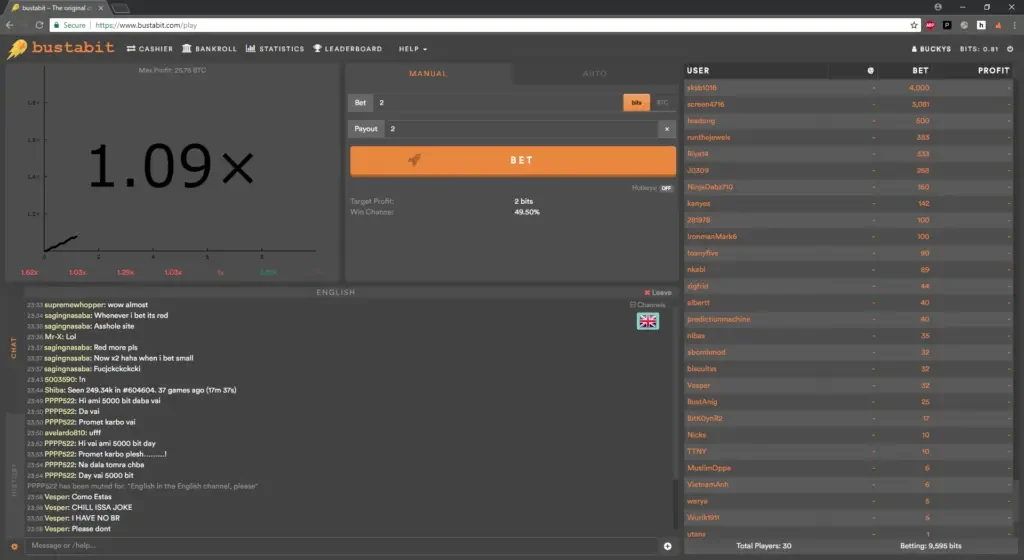
The application had several interesting features, but the one I wanted to spend time on was the chat with other users. Chat auto-created hyperlinks when a link was pasted, and the site built a special HTML element for those links, which is often implemented dangerously.
Setup
The report does not describe any accounts, roles, tools or versions. The work was done against the live application over a period of a few weeks, and the only precondition that matters is that the chat feature accepts pasted URLs and renders them as links.
Finding it
Scrolling through chat messages showed that pasted links became clickable. That raised the obvious question of how the anchor is constructed. The dangerous shape is:
<a href=":1">:2</a>
with three candidate injections:
" onmouseover=alert(1) a="- this would fire at:1if not sanitised properlyjavascript:alert(1)- this would fire at:1if not sanitised properly<script>alert(1)</script>- this would fire at:2if not sanitised properly
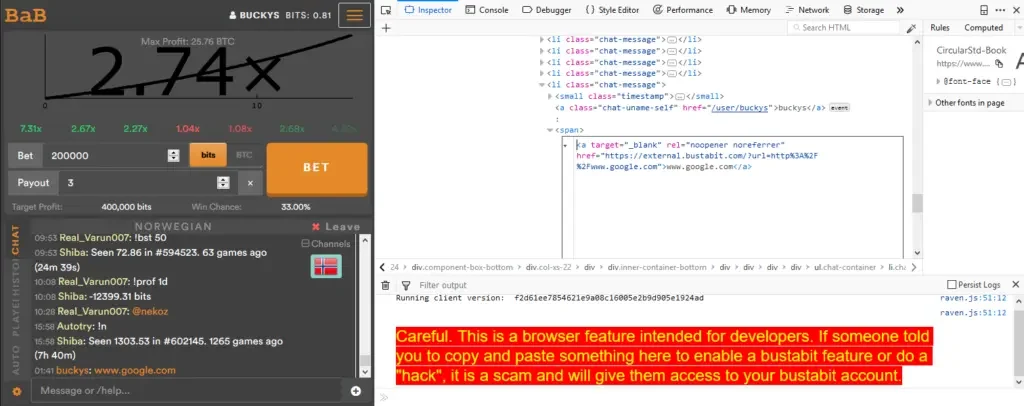
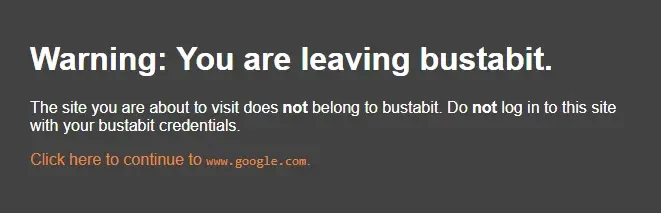
None of these worked. The service did not hyperlink external endpoints directly. Instead it rewrote them to a forwarding endpoint, where www.google.com is an example posted URL:
https://www.bustabit.com/external?url=https://www.google.com
Exploitation
Step 1: same-domain links are not rewritten
The external forwarding service did not forward URLs for the same domain. There was some detection mechanism for deciding whether a URL was from the same site: www.bustabit.com/a was not rewritten to www.bustabit.com/external?url=www.bustabit.com/a because it was on the same domain.
The generated HTML for www.bustabit.com/a:
<a href="/a">www.bustabit.com/a</a>
compared with the generated HTML for www.google.com/a:
<a href="https://www.bustabit.com/external?url=https://www.google.com/a">https://www.google.com/a</a>
Step 2: abusing double slashes
The interesting part of the rewritten URL is that it does not hyperlink the full domain, only the endpoint. That allows abuse of the double-slash convention for external resources with a payload like:
https://www.bustabit.com//attacker.com/hacked
to create:
<a href="//attacker.com/hacked">www.bustabit.com//attacker.com/hacked</a>
This worked.
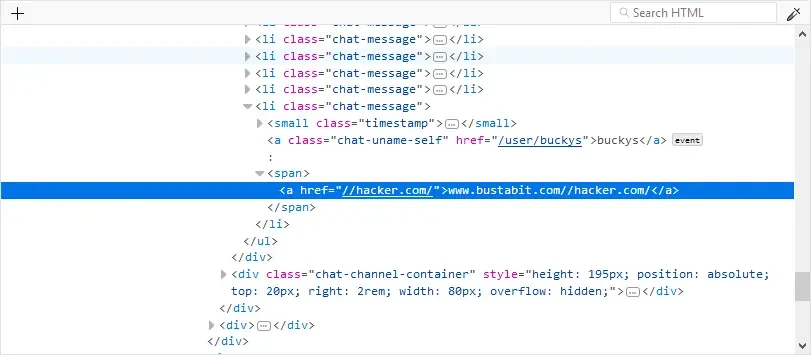
The following HTML is the exact same hyperlink as above: //hacker.com/. It takes you to an external resource and not to an endpoint on samcurry.net. More information on this is in http://www.ietf.org/rfc/rfc2396.txt.
This WOULD'VE WORKED as a bypass to the link filter, but the application was all JavaScript and used an onclick event to load the endpoint in the same tab, since the domain was the exact same and it did not have to refresh. Damn.
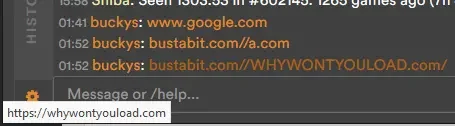
It is frustrating to see your PoC HTML written in the client, hover over a hyperlink pointing at whywontyouload.com, click it, and have nothing happen. After investigating for a bit I worked out what was happening when the URL was clicked.
Step 3: a malformed URL breaks the client
After a long time spamming random payloads looking for something that would take a user to an external domain, the website went gray.
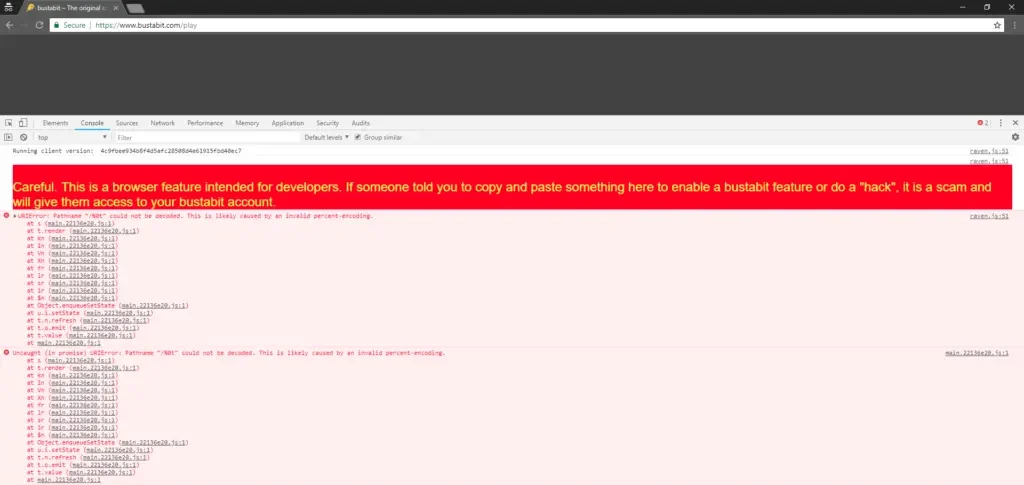
I had broken my own client by sending https://www.bustabit.com/%0t. The JavaScript did not know how to handle it, because the URL encoding for %0t does not decode to anything and simply failed the entire application. (Correct URL encoding is described here.)
After refreshing the page, the client was still broken. The application pushed all hyperlinks to a JavaScript function automatically, and if there was a failed URL such as one containing %0t, the application would crash.
Step 4: weaponising the crash
An attacker could direct message anyone placing a bet (all live bets and wagers are public, shown in the upper right box) and crash the victim's client, making them unable to cash out their bet. An attacker could also post a bad link to the main chat channel and disconnect everyone, making the game unplayable for a long period of time or cancelling the ability to interact for all users.
Step 5: XSS through the external endpoint
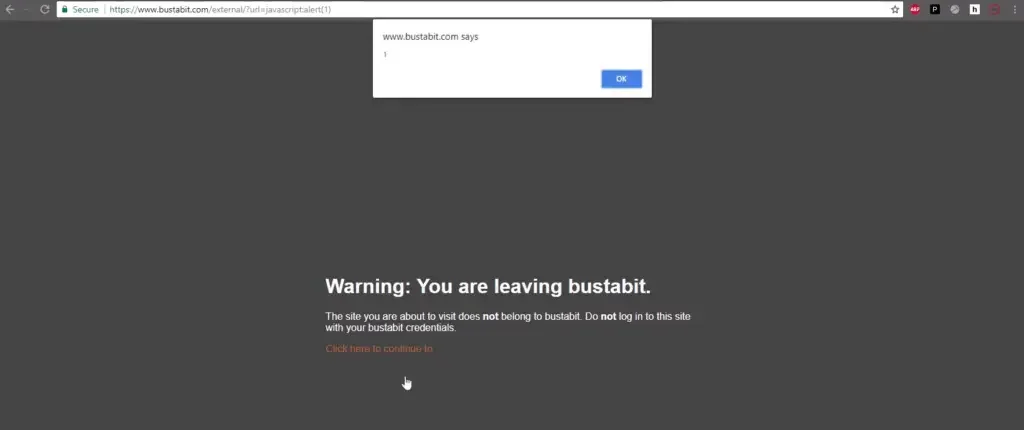
The external endpoint from earlier could simply be passed a JavaScript URI, and an attacker could execute JavaScript within the context of the application.
These bugs always require convincing someone to click something.
Step 6: adding clickjacking
One way to make such PoCs better is to check whether the website can be placed inside an <iframe>. If it can, a clickjacking PoC can be built with something like Samy Kamkar's quick jacking PoC generation tool.
The service could be placed inside an <iframe>. With that, I generated an example PoC using the Click here to continue snippet.
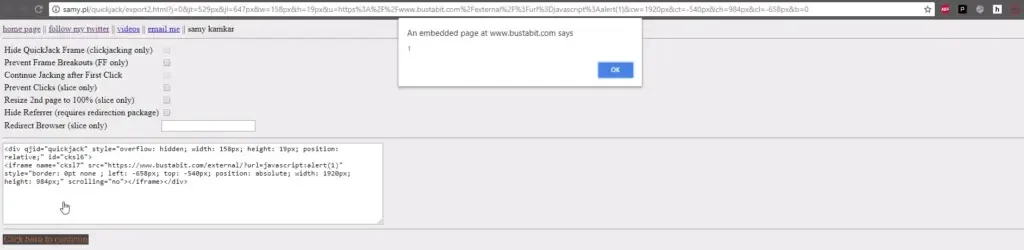
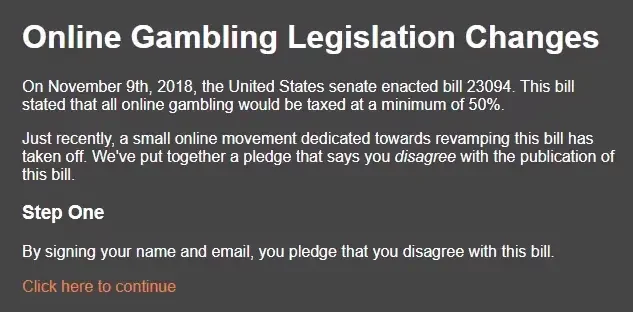
In a real world scenario it could look a little something like this:
Step 7: from XSS to session takeover
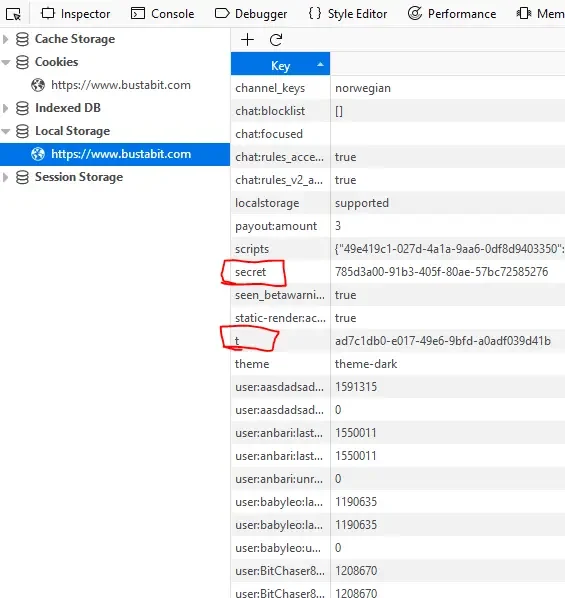
The web sockets session is stored in the browser's local storage. An attacker could abuse the XSS to force the victim to make a call to an external service carrying their session information, then authenticate to the application by changing their own secrets to the victim's and authenticating to the service.
Root cause
The link filter only rewrote URLs it judged to be external, and the rewritten form kept the attacker-controlled URL as a query parameter on the trusted domain. The double-slash form was emitted as a protocol-relative link, so the filter's domain check was bypassed. The onclick handler then loaded the endpoint in the same tab, which defeated the practical value of that bypass.
The crash came from the client pushing every hyperlink through a JavaScript function that did not handle a URL whose percent-encoding did not decode, such as %0t. The failure was not contained to the single link: the client stayed broken after a refresh.
The XSS came from the external endpoint accepting a javascript: URI, which was then executed in the application's context. The clickjacking came from the application being framable, so a victim could be made to click the link that triggered the XSS. The report does not describe the server-side code, so the exact sanitisation that was missing is not stated.
Impact
- Denial of service: a direct message with a malformed link crashes the recipient's client, so a player cannot cash out a live bet. A bad link posted to the main chat channel disconnects everyone and makes the game unplayable for a long period or cancels interaction for all users. This was worth a $2,000 bounty.
- XSS plus clickjacking: passing a JavaScript URI to the external endpoint executes JavaScript in the application's context, but it requires convincing someone to click. Framing the site makes the clickjacking PoC better. Combined with the session stored in local storage, this leads to session takeover. This was worth a $10,000 bounty.
The two findings together were paid $12,000.
Fix
Based on the behaviour described, the fixes would be: reject or neutralise protocol-relative URLs such as //attacker.com/... in the link filter, refuse javascript: and other non-HTTP schemes at the external endpoint, wrap the URL handling in error handling so a single malformed link cannot crash the client, and send X-Frame-Options or a frame-ancestors CSP so the application cannot be framed.
Variants to test
- Protocol-relative bypass of a link filter. Post
https://target.tld//attacker.tld/xin any feature that rewrites external links. A positive result is generated HTML containinghref="//attacker.tld/x". - Scheme injection in a redirect or forward endpoint. Pass
javascript:alert(1)and other schemes to any?url=style parameter. A positive result is the scheme surviving into the rendered link or the redirect. - Malformed percent-encoding in client-side URL handling. Send values such as
%0tthrough chat, comments or profile fields that are rendered as links. A positive result is a client that throws and stays broken after a refresh. - Framing check. Load the application inside an
<iframe>. A positive result is the page rendering, which makes a clickjacking PoC possible. - Session storage exposure. After achieving XSS, read
localStoragefor session material. A positive result is a token that can be replayed against the service.
What happened, in plain words
A security researcher spent a few weeks looking at a bitcoin gambling website. In this game a number rises over time, like a share price climbing. You decide how much money to put in and at what number to take your winnings out. The higher the number goes, the more you win, but at any moment the number can "bust" and you lose everything you put in.
The site had a chat where players could talk to each other. When someone pasted a web address into the chat, the site turned it into a clickable link automatically. That little feature, turning text into a link, is where all three problems in this article came from: a way to crash other players' browsers (denial of service), a way to run your own code inside the site (cross-site scripting, or XSS), and a trick to make a victim click something without realising (clickjacking). The two paid findings together earned $12,000.
Before going further, a few words that come up constantly:
- HTML is the language web pages are written in. A link on a page is written as an
<a>tag, short for anchor, with anhrefattribute that holds the address the link points to. - JavaScript is the programming language that runs inside your browser and makes pages interactive. If an attacker can get their own JavaScript to run on a site, that code runs with the same powers as the site's own code.
- A URL is a web address, like
https://www.google.com. - A query parameter is the part of a URL after a question mark, used to pass values to the server, like
?url=.... - URL encoding is a way of writing characters that are not allowed in a URL by replacing them with a percent sign and codes, for example
%20for a space.
The setup
The researcher did not describe any special accounts, tools or software versions. The work was done against the live website over a few weeks. The only thing that mattered was that the chat accepted pasted web addresses and displayed them as links.
Finding the link feature
Scrolling through the chat, the researcher noticed that pasted links became clickable. The natural next question: how exactly does the site build that link? A link is normally written in HTML like this, with the address in one place and the visible text in another:
<a href=":1">:2</a>
Here :1 is a placeholder for the address the link points to, and :2 is a placeholder for the text the user sees. If the site pastes whatever the user typed straight into those two slots without cleaning it, an attacker can type something that breaks out of the link and becomes code. The researcher tried three classic tricks:
" onmouseover=alert(1) a="- this would fire at:1if not sanitised properlyjavascript:alert(1)- this would fire at:1if not sanitised properly<script>alert(1)</script>- this would fire at:2if not sanitised properly
What each one is trying to do:
- The first one starts with a double quote. In HTML, a double quote ends the address value inside
href="...". If the site does not escape quotes, the attacker's quote closes the address early and the rest,onmouseover=alert(1), becomes a new attribute on the link.onmouseovermeans "when the mouse moves over this element", andalert(1)is JavaScript that pops up a box saying 1. So hovering over the link would run the attacker's code. - The second one uses
javascript:as the address. Browsers treat a link starting withjavascript:as code to run when clicked, not as a place to go. If the site accepts it, clicking the link runsalert(1). - The third one is a script tag. If the site inserts the pasted text as raw HTML rather than as plain text, the browser sees
<script>and runs whatever is inside it.
None of these worked. The site was not putting the pasted address directly into the link. Instead it rewrote external addresses to go through its own forwarding page, where www.google.com is an example posted URL:
https://www.bustabit.com/external?url=https://www.google.com
Reading this URL piece by piece: https://www.bustabit.com is the gambling site itself, /external is a page on that site, and ?url=https://www.google.com is a query parameter telling that page which address the user actually wanted to visit. So the site's own page acts as a middleman: you click the link, you land on the site's /external page, and that page sends you on to Google. This is a common pattern, and it is also a common place for bugs, because the middleman has to decide which addresses are safe to forward to.
The first image shows the result of posting a URL, and the second shows the page you land on after clicking it.
Step 1: links to the same site are not rewritten
The forwarding page had a rule: it did not forward addresses that pointed at the same site. There was some detection mechanism for deciding whether a URL was from the same site. For example, www.bustabit.com/a was not rewritten to www.bustabit.com/external?url=www.bustabit.com/a, because it was already on the same domain.
A domain is the part of a web address that identifies the site, like bustabit.com or google.com. The site was checking the domain of the pasted address and only wrapping it in the forwarding page if the domain was different.
The HTML the site generated for www.bustabit.com/a was:
<a href="/a">www.bustabit.com/a</a>
Line by line: <a starts a link, href="/a" says the link points to the path /a on the same site (a path starting with a single slash means "on this same site"), and >www.bustabit.com/a</a> is the visible text, closed by </a>.
Compare that with the HTML generated for www.google.com/a:
<a href="https://www.bustabit.com/external?url=https://www.google.com/a">https://www.google.com/a</a>
Here the address in href is the site's own forwarding page, with the real destination tucked into the url= parameter. The visible text is still the original address the user typed.
Step 2: abusing double slashes
The interesting part of the rewritten URL is that it does not hyperlink the full domain, only the endpoint. In other words, the site's check looked at the domain, but the link it produced pointed at a path on its own site. That opens a trick based on how browsers read addresses that begin with two slashes.
A protocol-relative URL is an address that starts with // and no https:. Browsers read it as "use the same protocol as the current page, but go to this other domain". So //attacker.com/hacked means "go to attacker.com, path /hacked, using whatever protocol this page uses". This is a standard part of how web addresses work, described in the document the researcher links to, http://www.ietf.org/rfc/rfc2396.txt.
The researcher posted this address:
https://www.bustabit.com//attacker.com/hacked
Read it carefully: it starts with the gambling site's own domain, so the site's same-domain check says "this is ours, no need to forward it". But right after the domain there are two slashes, then attacker.com/hacked. The site took the part after its own domain and put it into the link, producing:
<a href="//attacker.com/hacked">www.bustabit.com//attacker.com/hacked</a>
Line by line: the visible text is the harmless-looking address the user typed, which starts with the trusted site's name. But the href, the actual destination, is //attacker.com/hacked, which the browser reads as a protocol-relative address pointing at attacker.com. So the link looks like it goes to the gambling site and actually goes to the attacker's site.
This worked.
The following HTML is the exact same hyperlink as above: //hacker.com/. It takes you to an external resource and not to an endpoint on samcurry.net. In other words, the same // trick works in any page: a link written as //hacker.com/ sends the visitor to hacker.com, not to the site the page belongs to.
This WOULD'VE WORKED as a bypass to the link filter, but the application was all JavaScript and used an onclick event to load the endpoint in the same tab, since the domain was the exact same and it did not have to refresh. Damn.
What that means: an onclick event is JavaScript that runs when a user clicks an element. The site had attached its own click handler to chat links. Because the link's address began with the site's own domain, the handler decided it was an internal link and loaded it inside the same tab without a full page reload. That internal handling meant the browser never followed the //attacker.com destination the way a normal link would, so the trick did not actually take the victim anywhere. The filter was bypassed on paper, but the click did not do what the researcher wanted.
It is frustrating to see your proof of concept HTML written in the client, hover over a hyperlink pointing at whywontyouload.com, click it, and have nothing happen. A proof of concept, or PoC, is a small demonstration that proves a bug is real. After investigating for a bit the researcher worked out what was happening when the URL was clicked.
Step 3: a malformed URL breaks the client
After a long time spamming random payloads looking for something that would take a user to an external domain, the website went gray.
The researcher had broken their own browser tab by sending this address into the chat:
https://www.bustabit.com/%0t
Here %0t is meant to be URL encoding, the percent-sign notation for special characters. But %0t is not valid: after a percent sign a URL expects two hexadecimal digits (0 to 9 and A to F), and t is not one of them. So %0t does not decode to any character. The site's JavaScript did not know how to handle that, and the whole application failed. The researcher links to https://www.w3schools.com/tags/ref_urlencode.asp for how URL encoding is supposed to work.
After refreshing the page, the client was still broken. The application pushed all hyperlinks to a JavaScript function automatically, and if there was a failed URL such as one containing %0t, the application would crash. The client stayed broken after a refresh. A client here means the part of the application running in the victim's browser, as opposed to the server.
Step 4: weaponising the crash
This is a denial of service, often shortened to DoS: making a service unusable for its intended users without needing to break into it.
An attacker could direct message anyone placing a bet (all live bets and wagers are public, shown in the upper right box) and crash the victim's client, making them unable to cash out their bet. Think about what that means in this game: the number keeps rising, and the player has to click at the right moment to take their winnings. If their browser is frozen, they cannot click, and the bet can bust while they sit there unable to act.
An attacker could also post a bad link to the main chat channel and disconnect everyone, making the game unplayable for a long period of time or cancelling the ability to interact for all users. One message in a public channel, and every player's browser breaks.
Step 5: XSS through the external endpoint
Remember the external endpoint from earlier, the /external?url= forwarding page?
It turns out that you could simply pass it a JavaScript URI and an attacker could execute JavaScript within the context of the application. A JavaScript URI is an address that starts with javascript: instead of https:. When a browser follows one, it runs the code after the colon instead of loading a page. "Within the context of the application" means the code runs as if it were the site's own code: it can read what the site can read and do what the site can do for the logged-in user. That is cross-site scripting, or XSS.
These bugs always require convincing someone to click something. That is the weak point of this kind of XSS: the attacker cannot simply make it happen, they have to get a victim to click a link.
Step 6: adding clickjacking
One way to make such PoCs better is to check whether the website can be placed inside an <iframe>. An iframe is an HTML element that lets one web page display another page inside a rectangular frame, like a picture within a picture. Sites that do not want to be embedded this way can refuse, using response headers such as X-Frame-Options or a Content Security Policy rule. If a site can be framed, an attacker can put the real site inside their own page and overlay or disguise it.
That leads to clickjacking: tricking a user into clicking something on a page they did not intend to interact with. The user thinks they are clicking one thing, but the click lands on the hidden framed site underneath.
If the site can be framed, a clickjacking PoC can be built with something like Samy Kamkar's quick jacking PoC generation tool.
The service could be placed inside an <iframe>. With that, the researcher generated an example PoC using the Click here to continue snippet.
In a real world scenario it could look a little something like this:
The two images show the generated proof of concept and how it could look in a real world scenario.
Step 7: from XSS to session takeover
So, what can you do with XSS? The answer here is session takeover.
A session is how a website remembers that you are logged in. After you log in, the site gives your browser a piece of secret data, often called a token or cookie, and your browser sends it back with every request so the site knows who you are. Anyone who steals that secret can act as you. Local storage is a storage area inside the browser where a website can keep data, and it is readable by any JavaScript running on that site.
It turns out that the web sockets session is stored within the local storage of your browser. A web socket is a connection that stays open between the browser and the server, so data can flow both ways in real time, which is how live chat and live game updates work. An attacker could abuse the XSS to force the victim to make a call to an external service with their session information. In plain terms: the attacker's JavaScript, running inside the victim's browser, reads the session secret from local storage and sends it to a server the attacker controls. An attacker could then authenticate to the application by modifying their own secrets to the victim's and authenticating to the service, which means logging in as the victim.
Why it worked
The link filter only rewrote URLs it judged to be external, and the rewritten form kept the attacker-controlled URL as a query parameter on the trusted domain. The double-slash form was emitted as a protocol-relative link, so the filter's domain check was bypassed. The onclick handler then loaded the endpoint in the same tab, which defeated the practical value of that bypass.
The crash came from the client pushing every hyperlink through a JavaScript function that did not handle a URL whose percent-encoding did not decode, such as %0t. The failure was not contained to the single link: the client stayed broken after a refresh.
The XSS came from the external endpoint accepting a javascript: URI, which was then executed in the application's context. The clickjacking came from the application being framable, so a victim could be made to click the link that triggered the XSS. The report does not describe the server-side code, so the exact sanitisation that was missing is not stated.
What it was worth
- Denial of service: a direct message with a malformed link crashes the recipient's client, so a player cannot cash out a live bet. A bad link posted to the main chat channel disconnects everyone and makes the game unplayable for a long period or cancels interaction for all users. This was worth a $2,000 bounty.
- XSS plus clickjacking: passing a JavaScript URI to the external endpoint executes JavaScript in the application's context, but it requires convincing someone to click. Framing the site makes the clickjacking PoC better. Combined with the session stored in local storage, this leads to session takeover. This was worth a $10,000 bounty.
The two findings together were paid $12,000.
How it could be fixed
Based on the behaviour described, the fixes would be: reject or neutralise protocol-relative URLs such as //attacker.com/... in the link filter, refuse javascript: and other non-HTTP schemes at the external endpoint, wrap the URL handling in error handling so a single malformed link cannot crash the client, and send X-Frame-Options or a frame-ancestors CSP so the application cannot be framed.
Similar things to test elsewhere
- Protocol-relative bypass of a link filter. Post
https://target.tld//attacker.tld/xin any feature that rewrites external links. A positive result is generated HTML containinghref="//attacker.tld/x". - Scheme injection in a redirect or forward endpoint. Pass
javascript:alert(1)and other schemes to any?url=style parameter. A positive result is the scheme surviving into the rendered link or the redirect. - Malformed percent-encoding in client-side URL handling. Send values such as
%0tthrough chat, comments or profile fields that are rendered as links. A positive result is a client that throws and stays broken after a refresh. - Framing check. Load the application inside an
<iframe>. A positive result is the page rendering, which makes a clickjacking PoC possible. - Session storage exposure. After achieving XSS, read
localStoragefor session material. A positive result is a token that can be replayed against the service.
Glossary
- HTML: the language web pages are written in, made of tags such as
<a>for links. - Anchor (
<a>): the HTML tag that creates a clickable link; itshrefattribute holds the destination. - Attribute: a setting on an HTML tag, written as
name="value", such ashreforonmouseover. - JavaScript: the programming language that runs in the browser and makes pages interactive.
- URL: a web address, such as
https://www.google.com. - Domain: the part of a web address that names the site, such as
bustabit.com. - Path: the part of a URL after the domain, such as
/aor/external. - Query parameter: the part of a URL after a question mark, used to pass values, such as
?url=.... - URL encoding: writing characters that are not allowed in a URL as a percent sign plus codes, such as
%20for a space. - Protocol-relative URL: an address starting with
//and nohttps:, which the browser reads as "same protocol, different domain". javascript:URI: an address starting withjavascript:that makes the browser run the code after the colon instead of loading a page.onclickevent: JavaScript that runs when a user clicks an element.onmouseoverevent: JavaScript that runs when the mouse pointer moves over an element.alert(1): a JavaScript command that shows a pop-up box containing 1, often used to prove code ran.- Sanitisation: cleaning user-supplied input so it cannot be interpreted as code or markup.
- Cross-site scripting (XSS): getting an attacker's JavaScript to run inside another site, with that site's powers.
- Proof of concept (PoC): a small demonstration that proves a bug is real.
- Client: the part of an application running in the user's browser, as opposed to the server.
- Server: the computer that stores the site and answers requests from browsers.
- Denial of service (DoS): making a service unusable for its intended users.
- Iframe: an HTML element that displays one web page inside another.
- Clickjacking: tricking a user into clicking something they did not intend to click, often by hiding the real page under a decoy.
- Session: how a site remembers that you are logged in, usually via a secret token sent with each request.
- Token / cookie: the secret data a site gives your browser after login so it can recognise you.
- Local storage: a storage area inside the browser that a website can read and write with JavaScript.
- Web socket: a connection that stays open between browser and server so data can flow both ways in real time.
- Session takeover: stealing a user's session secret and using it to act as that user.
- Bounty: a reward a company pays a researcher for reporting a security bug.
X-Frame-Options: a response header a site can send to refuse being displayed inside an iframe.- Content Security Policy (CSP): a set of rules a site sends to the browser about what it is allowed to load and run, including a
frame-ancestorsrule about who may frame it.