Analysis of CVE-2019-14994 - Jira Service Desk Path Traversal leads to Massive Information Disclosure
Jira Service Desk allowed a user with customer portal access to traverse paths and reach the administrative portal, exposing issues from all Jira projects on the instance. An attacker could view issues across Jira Service Desk, Core, and Software projects.

Jira Service Desk is a help desk application that is built on top of core Jira. It allows customers to submit tickets that can be reviewed and managed by administrators.
The full write-up lives on its author's site
It belongs to its author, so we link to it rather than copy it. The other two tabs are our own rewrites, checked against it.
Context
Jira Service Desk is a help desk application built on top of core Jira. Customers submit tickets that administrators review and manage. The product exposes two portals:
- Customer portal, primarily accessible under the /servicedesk/ directory.
- Administrative portal, primarily accessible under the /secure/ directory.
CVE-2019-14994 is a path traversal that lets an attacker who can reach the customer portal traverse into the administrative portal and view issues in every Jira project on the instance: Jira Service Desk projects, Jira Core projects and Jira Software projects alike.
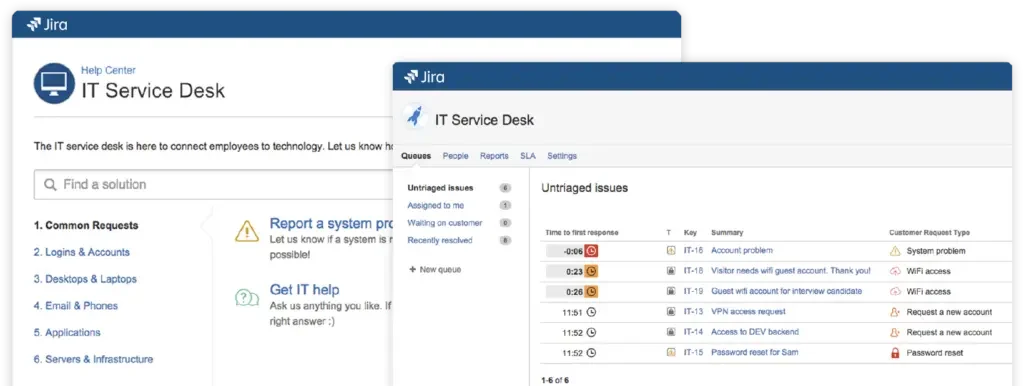
The screenshot shows both portals side by side, the customer-facing one and the administrative one.
Setup
The only precondition is the ability to authenticate to the customer portal, which is possible when the *anyone can email the service desk or raise a request in the portal* setting is enabled. The affected versions are:
- All versions before 3.9.16
- 3.10.x
- 3.11.x
- 3.12.x
- 3.13.x
- 3.14.x
- 3.15.x
- 3.16.x before 3.16.8 (the fixed version for 3.16.x)
- 4.0.x
- 4.1.x before 4.1.3 (the fixed version for 4.1.x)
- 4.2.x before 4.2.5 (the fixed version for 4.2.x)
- 4.3.x before 4.3.4 (the fixed version for 4.3.x)
- 4.4.0 before 4.4.1 (the fixed version for 4.4.x)
The requests in this write-up were sent through a proxy such as Burp Suite. Sending them from a browser does not work because the browser normalises the URL before it leaves the address bar.
Finding it
If the routing that decides which portal a request belongs to can be confused with traversal sequences, a customer session might be able to reach administrative pages. The test is simple: request an administrative page through a path that starts inside the customer portal directory.
Exploitation
Step 1: check whether Service Desk is present
Browse to:
https://target.com/servicedesk/
If the directory exists, you are redirected to a login portal.
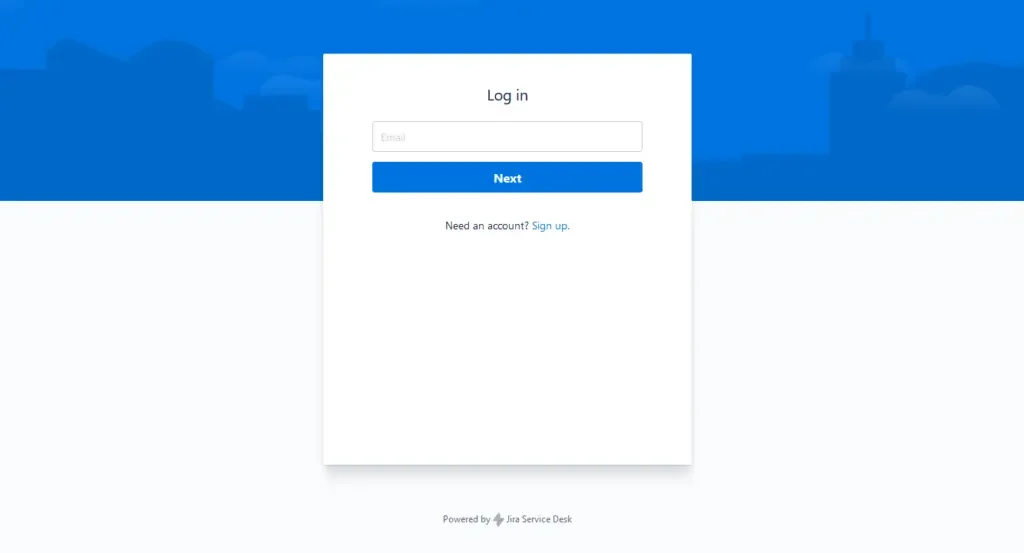
The screenshot shows the URL you land on after browsing to /servicedesk/.
Step 2: get a customer account
On that login portal, check for a "Sign up" button below the next button. If it exists you can register and proceed. If it does not, the instance is unexploitable unless you already have access to an account with access to the customer portal.
Register with the "Sign up" button and log in to the application.
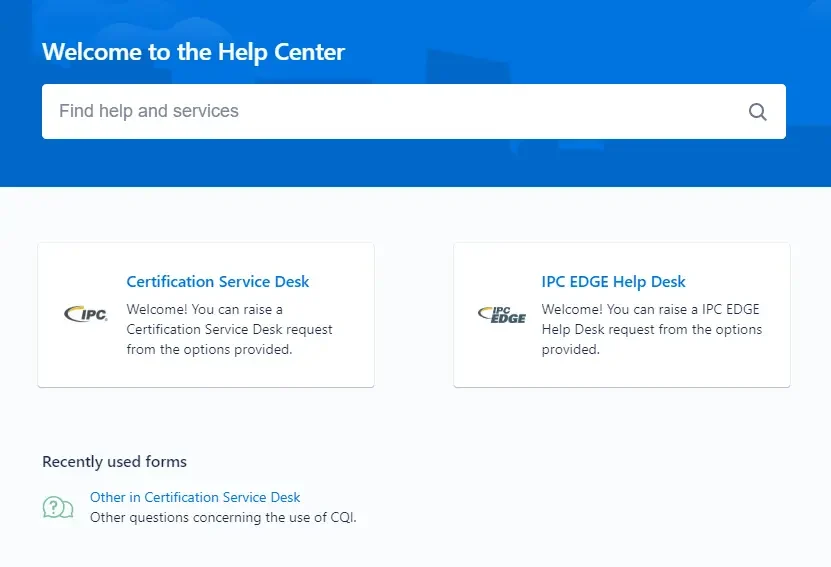
The screenshot shows the customer portal after authenticating.
Step 3: confirm traversal into the administrative portal
With an authenticated customer session, send the following request through a proxy:
GET /servicedesk/customer/../../secure/BrowseProjects.jspa HTTP/1.1
Host: target.com
Cookie: [authenticated as a customer]
The path starts under /servicedesk/customer/ and then climbs out with ../../ to reach /secure/BrowseProjects.jspa, an administrative page. Depending on the Service Desk version, you may have to use the following notation to traverse instead:
GET /servicedesk/customer/..;/..;/secure/BrowseProjects.jspa HTTP/1.1
If the application is vulnerable, a broken "Browse Projects" page is displayed.
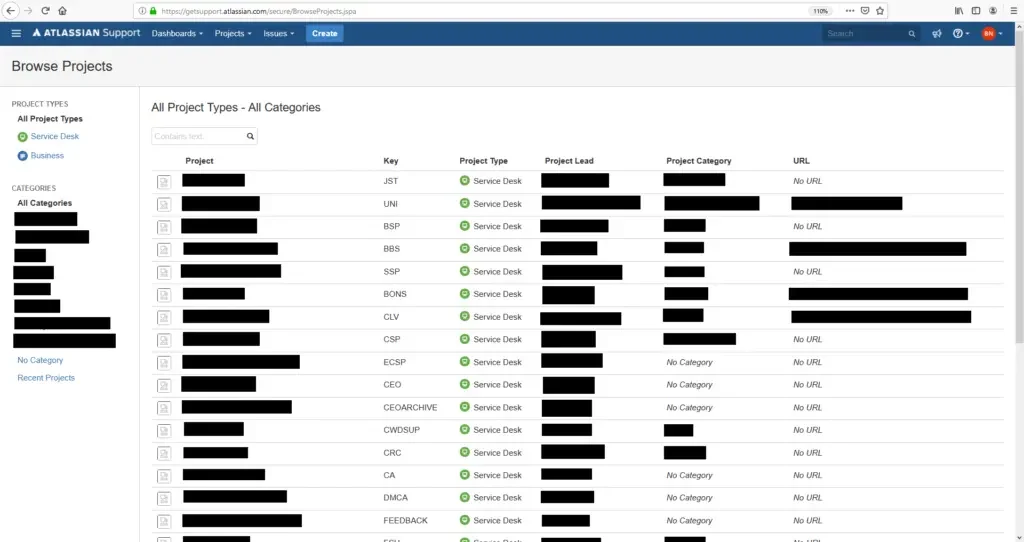
The screenshot shows the administrative Jira portal being reached through directory traversal from the customer portal.
This proves that, as a customer, you can access partial data from the administrative portal. Most functionality on that portal is however performed through APIs, which handle the directory traversal characters strangely and make it hard to browse around the application normally.
Step 4: export the organisation's data
The easiest way to exploit the vulnerability is to send the following request, which exports all of the organisation's data:
GET /servicedesk/customer/../../sr/jira.issueviews:searchrequest-html-all-fields/temp/SearchRequest.html?jqlQuery=text+%7E+%22%22 HTTP/1.1
Host: target.com
Cookie: [authenticated as a customer]
The traversal again leaves the customer portal and lands on /sr/, the issue search and export area.
If this endpoint returns "not found" but you were able to access the /secure/BrowseProjects.jspa endpoint, try the following URL instead:
GET /servicedesk/customer/../../sr/jira.issueviews:searchrequest-xml/temp/SearchRequest.xml?jqlQuery=text+%7E+%22%22 HTTP/1.1
This is the same export in XML form. The request returns all of the data pertaining to the search term. You can use standard JQL to query whatever you like, or simply replace the jqlQuery text parameter with the text you want to search for.
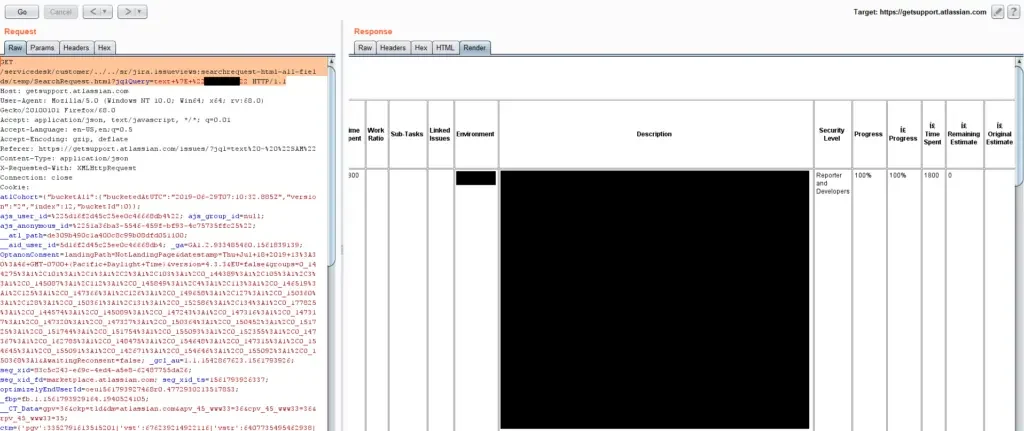
The screenshot shows the HTTP request and the response for exporting an organisation's data as HTML.
Root cause
Under normal circumstances, logging in as an employee and browsing to the administrative URLs (for example /secure/ and /sr/) redirects you back to the customer dashboard. That redirect appears to be the primary prevention against customers reaching the administrative portal, and it is likely implemented by matching the URL that was browsed to and deciding whether the user should have access.
The redirect is likely implemented by matching the URL that was browsed to and deciding whether the user should have access. A path that begins with the customer portal prefix but contains traversal sequences resolves to an administrative resource, so the access decision and the resource actually served disagree. Because the check is tied to the URL rather than to the resolved resource, it does not stop the request.
Impact
An attacker who can authenticate to the customer portal can traverse to the administrative portal and view issues within all Jira projects contained in the vulnerable instance, including Jira Service Desk, Jira Core and Jira Software projects. In practice the export endpoints turn this into a bulk disclosure of the organisation's issue data, filtered only by the JQL the attacker chooses. The precondition is the ability to authenticate, which in the common configuration is open registration through the customer portal.
Fix
Atlassian published a security advisory and suggested that customers apply the following rule:
 <rule>
        <from>^/[^?]*\.\..*$</from>
        <to type="temporary-redirect">/</to>
 </rule>
This rule matches any path containing .. and redirects it to /. The researcher notes that the patch only seems to address the "browsing to X gives you access" behaviour. If an attacker found a way, after the fix, to browse directly to the administrative endpoints, for example through encoding or fuzzing, they would probably be able to access the same functionality.
Variants to test
- Plain traversal through the customer prefix. Request
/servicedesk/customer/../../secure/BrowseProjects.jspawith a customer session. A positive result is the administrative "Browse Projects" page rendering instead of a redirect to the customer dashboard. - Semicolon traversal. If plain
../is normalised away, try/servicedesk/customer/..;/..;/secure/BrowseProjects.jspa. A positive result is the same administrative page being served. - HTML export of all issues. Request
/servicedesk/customer/../../sr/jira.issueviews:searchrequest-html-all-fields/temp/SearchRequest.html?jqlQuery=text+%7E+%22%22. A positive result is an HTML export of all data pertaining to the search term. - XML export fallback. If the HTML view returns "not found", request
/servicedesk/customer/../../sr/jira.issueviews:searchrequest-xml/temp/SearchRequest.xml?jqlQuery=text+%7E+%22%22. A positive result is an XML export of all data pertaining to the search term. - Targeted JQL. Replace the
jqlQueryvalue with a narrower query to confirm the scope of what is reachable, for example a project or keyword you know exists only in an internal project. - Post-fix bypass attempts. Against a patched instance, try encoded or otherwise obfuscated traversal sequences aimed directly at the administrative endpoints.
I found this vulnerability while attending the Atlassian Bug Bash hosted by Bugcrowd and was able to compromise Atlassian's core service desk meant for Atlassian customers. They awarded the issue $10,000 with an $1,000 "stop testing" bonus.
What happened, in plain words
Jira Service Desk is a piece of software made by Atlassian. Think of it as a shared inbox with a front door for customers and a back office for staff. Customers use it to open support tickets ("my printer is broken"), and the company's staff read, sort and answer those tickets. It is built on top of another Atlassian product called Jira, which is a general tool for tracking work items, and Jira Service Desk reuses much of Jira underneath.
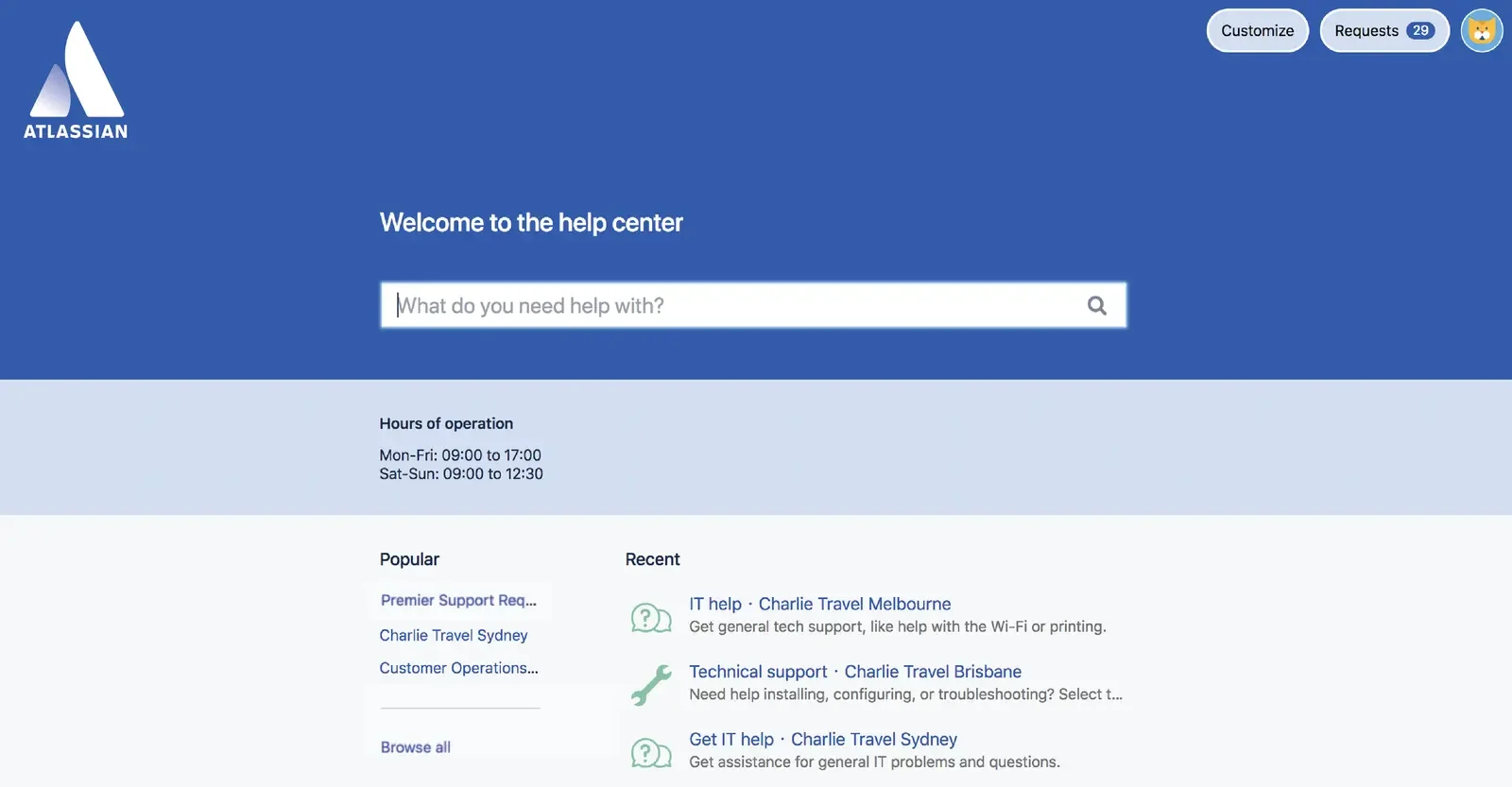
The product gives people two separate areas, called portals:
- The customer portal, normally reached under the /servicedesk/ directory. This is the front door: the place where a customer signs up, logs in and submits a ticket.
- The administrative portal, normally reached under the /secure/ directory. This is the back office: the place where staff browse projects and manage everything.
A directory here simply means a section of the website's address, the part of the URL after the domain name. So https://target.com/servicedesk/ and https://target.com/secure/ are two different sections of the same website.
The bug, tracked publicly as CVE-2019-14994, is a path traversal. A path is the part of a web address that says which page you want, and traversal means using special notation to walk out of the folder you are supposed to be in and into another one. A simple everyday comparison: imagine a building where visitors are only allowed in the lobby, and the doors are labelled "lobby/room1", "lobby/room2" and so on. If the sign on a door says "lobby/../../staff-office", and the person checking badges only reads the start of the sign ("lobby, fine") while the door itself opens into the staff office, then a visitor can walk into the back office. That mismatch between what is checked and what is actually opened is the whole vulnerability.
In this case, a person who can log in as an ordinary customer can use traversal to reach the administrative portal and view issues in every Jira project on the affected installation. That includes Jira Service Desk projects, Jira Core projects and Jira Software projects, which are the different kinds of project the same Jira installation can hold.
The screenshot shows both portals side by side, the customer-facing one and the administrative one.
Who is affected
The only precondition is that the attacker can log in to the customer portal. That is possible when the setting *anyone can email the service desk or raise a request in the portal* is enabled, because then anyone can create a customer account.
The affected versions are:
- All versions before 3.9.16
- 3.10.x
- 3.11.x
- 3.12.x
- 3.13.x
- 3.14.x
- 3.15.x
- 3.16.x before 3.16.8 (the fixed version for 3.16.x)
- 4.0.x
- 4.1.x before 4.1.3 (the fixed version for 4.1.x)
- 4.2.x before 4.2.5 (the fixed version for 4.2.x)
- 4.3.x before 4.3.4 (the fixed version for 4.3.x)
- 4.4.0 before 4.4.1 (the fixed version for 4.4.x)
Version numbers like 4.2.5 are read as major.minor.patch: the first number is a big release, the second a smaller one, the third a bug-fix. "4.2.x before 4.2.5" means every 4.2 release older than 4.2.5.
All the requests in this write-up were sent through a proxy such as Burp Suite. A proxy is a program that sits between your browser and the website: you point your browser at it, and it lets you write a request by hand, character by character, and read the raw reply. Sending these requests from a normal browser address bar does not work, because the browser normalises the URL before it leaves the address bar. Normalising means tidying the address up: a browser sees ../../ and quietly resolves it to the shorter, final path, so the traversal never reaches the server. The proxy sends exactly what you typed.
Finding it
A prefix is just the beginning of the address, the /servicedesk/ or /secure/ part. The question was: if the routing that decides which portal a request belongs to can be confused with traversal sequences, could a customer session reach administrative pages? The test is simple: ask for an administrative page through a path that starts inside the customer portal directory.
Exploitation
Step 1: check whether Service Desk is present
First, find out whether the target is running Service Desk at all. Browse to:
https://target.com/servicedesk/
This is just the customer portal address. If the directory exists, you are redirected to a login portal. A redirect is the server answering "not here, go there instead", and your browser follows it automatically. If you land on a login page, Service Desk is present.
The screenshot shows the URL you land on after browsing to /servicedesk/.
Step 2: get a customer account
On that login portal, look for a "Sign up" button below the next button. If it exists, you can register and proceed. If it does not, the instance is unexploitable unless you already have access to an account with access to the customer portal. In other words, the bug needs a logged-in customer, and open registration is the easy way to become one.
Register with the "Sign up" button and log in to the application.
The screenshot shows the customer portal after authenticating.
Step 3: confirm traversal into the administrative portal
Now, with an authenticated customer session, send the following request through a proxy:
GET /servicedesk/customer/../../secure/BrowseProjects.jspa HTTP/1.1
Host: target.com
Cookie: [authenticated as a customer]
Line by line:
GET /servicedesk/customer/../../secure/BrowseProjects.jspa HTTP/1.1is the request line.GETmeans "give me this page". The path starts under/servicedesk/customer/, the customer area, and then climbs out with../../to reach/secure/BrowseProjects.jspa, an administrative page. Each../means "go up one folder", exactly as it does in a file manager on your computer.HTTP/1.1is the version of the web protocol being spoken.Host: target.comtells the server which website you are asking for. One server can host many sites, so it needs to know which one you mean.Cookie: [authenticated as a customer]is where your login is carried. A cookie is a small piece of text the website stores in your browser after you log in, and your browser sends it back with every request so the site knows who you are. Think of it as the wristband you get at an event: it proves you already checked in. Here the placeholder stands for the cookie of a logged-in customer account.
Depending on the Service Desk version, you may have to use the following notation to traverse instead:
GET /servicedesk/customer/..;/..;/secure/BrowseProjects.jspa HTTP/1.1
A servlet container is the part of the server software that receives web requests and hands them to the application; some of them treat ;something after a path segment as extra information and remove it before deciding what the path means. So ..; can end up being read as .., while a filter that looks for the literal text ../ does not recognise it.
If the application is vulnerable, a broken "Browse Projects" page is displayed.
The screenshot shows the administrative Jira portal being reached through directory traversal from the customer portal.
This proves that, as a customer, you can access partial data from the administrative portal. Most functionality on that portal is however performed through APIs, which handle the directory traversal characters strangely and make it hard to browse around the application normally. An API is the same website answering a program rather than drawing a page for a human: instead of a finished screen, it sends raw data. Those APIs handle the directory traversal characters strangely, which makes it hard to browse around the application normally.
Step 4: export the organisation's data
The easiest way to exploit the vulnerability is to send the following request, which exports all of the organisation's data:
GET /servicedesk/customer/../../sr/jira.issueviews:searchrequest-html-all-fields/temp/SearchRequest.html?jqlQuery=text+%7E+%22%22 HTTP/1.1
Host: target.com
Cookie: [authenticated as a customer]
Line by line:
- The request line again starts with
GETand theHostandCookielines work as before. The path begins in the customer area and traverses out with../../to land on/sr/, the issue search and export area of Jira. - "All fields" is the important part: it means the export is not a tidy summary but everything stored about each issue.
?jqlQuery=...starts the query string, the part of a URL after the question mark that passes settings to the page.jqlQueryis the name of the setting and the rest is its value.text+%7E+%22%22is the JQLtext ~ ""written in URL-encoded form. JQL (Jira Query Language) is Jira's search language, like a search box with grammar. URL encoding is how special characters travel safely in an address:+stands for a space,%7Estands for~, and%22stands for a double quote.
If this endpoint returns "not found" but you were able to access the /secure/BrowseProjects.jspa endpoint, try the following URL instead:
GET /servicedesk/customer/../../sr/jira.issueviews:searchrequest-xml/temp/SearchRequest.xml?jqlQuery=text+%7E+%22%22 HTTP/1.1
This is the same export in XML form, XML being another text format for structured data. The request returns all of the data pertaining to the search term. You can use standard JQL to query whatever you like, or simply replace the jqlQuery text parameter with the text you want to search for.
The screenshot shows the HTTP request and the response for exporting an organisation's data as HTML.
Root cause
Under normal circumstances, logging in as an employee and browsing to the administrative URLs (for example /secure/ and /sr/) redirects you back to the customer dashboard. That redirect appears to be the primary prevention against customers reaching the administrative portal, and it is likely implemented by matching the URL that was browsed to and deciding whether the user should have access.
The redirect is likely implemented by matching the URL that was browsed to and deciding whether the user should have access. A path that begins with the customer portal prefix but contains traversal sequences resolves to an administrative resource, so the access decision and the resource actually served disagree. Because the check is tied to the URL rather than to the resolved resource, it does not stop the request. Going back to the building comparison: the guard reads the first word on the sign and waves you through, but the door itself follows the whole sign and opens into the staff office.
Impact
An attacker who can authenticate to the customer portal can traverse to the administrative portal and view issues within all Jira projects contained in the vulnerable instance, including Jira Service Desk, Jira Core and Jira Software projects. In practice the export endpoints turn this into a bulk disclosure of the organisation's issue data, filtered only by the JQL the attacker chooses. The precondition is the ability to authenticate, which in the common configuration is open registration through the customer portal.
Fix
Atlassian published a security advisory and suggested that customers apply the following rule:
 <rule>
        <from>^/[^?]*\.\..*$</from>
        <to type="temporary-redirect">/</to>
</rule>
This is a rule written in XML, a text format that uses tags in angle brackets to describe settings. Line by line:
<rule>opens one rule and</rule>closes it. Everything between them describes what the rule does.<from>^/[^?]*\.\..*$</from>is the pattern the rule looks for in the requested path. It is a regular expression, a compact way of describing text patterns.^means the start of the path,/is a literal slash,[^?]*means any run of characters that are not a question mark,\.\.means two literal dots,.*means anything else, and$means the end. In plain words: any path that contains..before the question mark.<to type="temporary-redirect">/</to>says what to do when the pattern matches: send the visitor to/, the site's home page, with a temporary redirect.
So the rule matches any path containing .. and redirects it to /. The researcher notes that the patch only seems to address the "browsing to X gives you access" behaviour. If an attacker found a way, after the fix, to browse directly to the administrative endpoints, for example through encoding or fuzzing, they would probably be able to access the same functionality. Encoding means writing characters in an alternative form (as with %7E above), and fuzzing means trying many variations automatically to see which one gets through.
Variants to test
- Plain traversal through the customer prefix. Request
/servicedesk/customer/../../secure/BrowseProjects.jspawith a customer session. A positive result is the administrative "Browse Projects" page rendering instead of a redirect to the customer dashboard. - Semicolon traversal. If plain
../is normalised away, try/servicedesk/customer/..;/..;/secure/BrowseProjects.jspa. A positive result is the same administrative page being served. - HTML export of all issues. Request
/servicedesk/customer/../../sr/jira.issueviews:searchrequest-html-all-fields/temp/SearchRequest.html?jqlQuery=text+%7E+%22%22. A positive result is an HTML export of all data pertaining to the search term. - XML export fallback. If the HTML view returns "not found", request
/servicedesk/customer/../../sr/jira.issueviews:searchrequest-xml/temp/SearchRequest.xml?jqlQuery=text+%7E+%22%22. A positive result is an XML export of all data pertaining to the search term. - Targeted JQL. Replace the
jqlQueryvalue with a narrower query to confirm the scope of what is reachable, for example a project or keyword you know exists only in an internal project. - Post-fix bypass attempts. Against a patched instance, try encoded or otherwise obfuscated traversal sequences aimed directly at the administrative endpoints.
How it was found and rewarded
The researcher found this vulnerability while attending the Atlassian Bug Bash hosted by Bugcrowd, a bug bounty event where companies invite researchers to test their systems and pay for valid findings. The researcher was able to compromise Atlassian's core service desk meant for Atlassian customers. Atlassian awarded the issue $10,000 with an $1,000 "stop testing" bonus,
Glossary
- Jira: Atlassian's general tool for tracking work items such as tasks, bugs and tickets.
- Jira Service Desk: a help desk application built on top of core Jira, where customers submit tickets and staff manage them.
- Ticket: a single support request submitted by a customer.
- Portal: one of the two areas of the product, the customer-facing one or the administrative one.
- Directory: a section of a website's address, such as
/servicedesk/or/secure/. - Path: the part of a URL that says which page or resource is wanted.
- Path traversal: using notation such as
../to walk out of the intended folder and reach another part of the site. - CVE: a public identifier for a known security vulnerability, here CVE-2019-14994.
- Proxy: a program between your browser and a website that lets you write and inspect requests by hand, such as Burp Suite.
- Normalisation: tidying up a URL or path into its final, simplified form before it is used.
- Redirect: a server response telling the browser to go to a different address instead.
- Cookie: a small piece of text stored by the browser and sent with requests, used here to carry a logged-in session.
- Session: the state of being logged in, identified by a cookie.
- Authenticate: prove who you are, normally by logging in.
- API: an interface where the site returns raw data to a program rather than a finished page to a person.
- Servlet container: the server component that receives web requests and passes them to the application; some strip
;path parameters during normalisation. - Path parameter separator: the
;notation after a path segment that some servers treat as extra information and remove. - HTML: the language web pages are written in.
- XML: a text format for structured data using tags in angle brackets.
- JQL: Jira Query Language, Jira's search language for finding issues.
- Query string: the part of a URL after the question mark that passes settings to the page.
- URL encoding: writing special characters in a safe form, such as
%7Efor~and%22for a double quote. - Endpoint: a specific address on the server that performs a specific function.
- Regular expression: a compact pattern language for describing and matching text.
- Encoding: writing characters in an alternative form.
- Fuzzing: automatically trying many variations of a request to find one that gets through.
- Bug bounty: a programme where companies pay researchers for reporting valid security issues.
- Bug Bash: a bug bounty event hosted by Bugcrowd that the researcher was attending.
- Stop testing bonus: an extra payment asking a researcher to stop probing once a serious issue has been confirmed.