Cracking my windshield and earning $10,000 on the Tesla Bug Bounty Program

One of the more interesting things I've had the opportunity to hack on is the Tesla Model 3. It has a built in web browser, free premium LTE, and over-the-air software updates.
The full write-up lives on its author's site
It belongs to its author, so we link to it rather than copy it. The other two tabs are our own rewrites, checked against it.
Context
One of the more interesting things I've had the opportunity to hack on is the Tesla Model 3. It has a built in web browser, free premium LTE, and over-the-air software updates. It's a network connected computer on wheels that drives really fast.

Early in the year I decided to purchase one and have had an absolute blast both messing with it and driving it. I've spent way too long sitting in my garage trying to make it do things it's not supposed to, but luckily got something interesting out of it.
Setup
The first thing I spent time messing with was the car's "Name Your Vehicle" functionality. This allowed you to set a nickname for your car and would save the information to your account so you could see it on the mobile app whenever you received push notifications (e.g. charging complete).
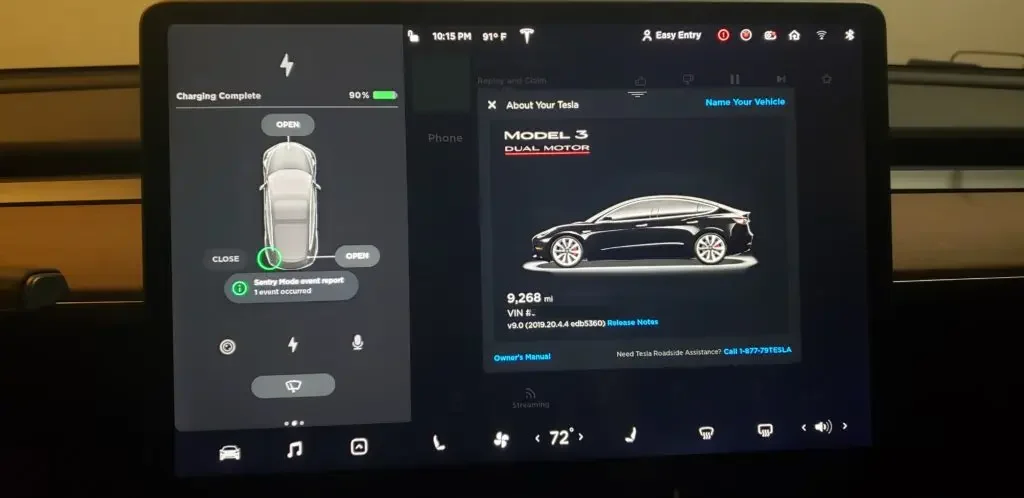
The "Name Your Vehicle" button in the upper right of the center square
Finding it
Initially, I named my car %x.%x.%x.%x to see if it was vulnerable to format string attacks like the 2011 BMW 330i was, but sadly it didn't really do anything.
"So basically set your smartphone's name to %x%x%x%x and test for format string vulns in connected devices", Eهاв Huسein (@Obzy)
After spending more time messing with the input I saw that the allowed content length for the input was very long. I decided to name the Tesla my XSS hunter payload and continued toying around with the other functionalities on the car.
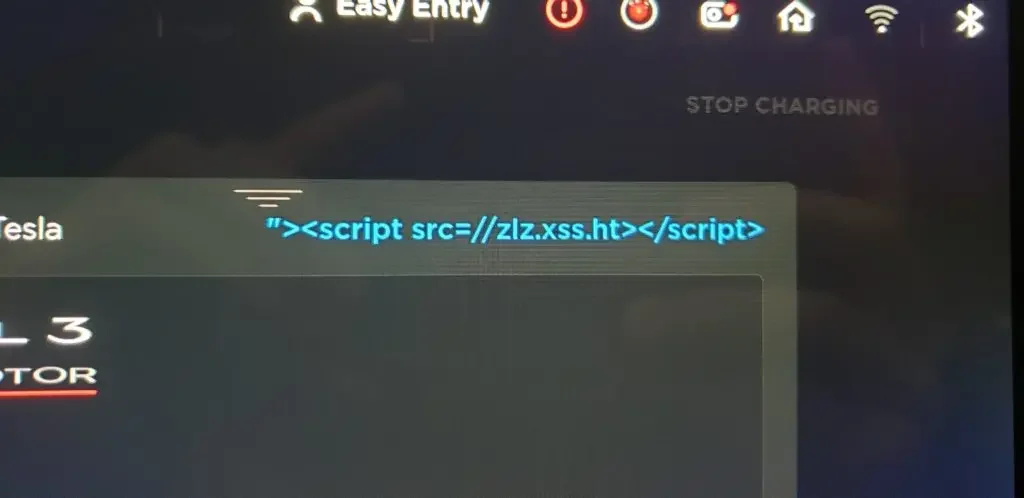
My idea for setting this name was that it may show up on some internal Tesla website for vehicle management or possibly from a functionality within my account.
The other thing I spent a lot of time messing with was the built in web browser. I wasn't able to get this to do anything even remotely interesting but had a fun time trying to get it to load in files or strange URIs.
I couldn't find anything that evening so I called it quits and forgot that I'd set my car name to a blind XSS payload.
Exploitation
Step 1: A cracked windshield
During a road trip a huge rock came from somewhere and cracked my windshield.

I used Tesla's in app support to setup an appointment and continued driving.
The day after, I received a text message about the issue saying that someone was looking into it. I checked my XSS hunter and saw something really interesting.
Vulnerable Page URL
https://redacted.teslamotors.com/redacted/5057517/redacted
Execution Origin
https://redacted.teslamotors.com
Referer
https://redacted.teslamotors.com/redacted/5YJ31337
One of the agents responding to my cracked windshield fired my XSS hunter payload from within the context of the "redacted.teslamotors.com" domain.
This was super exciting.
Step 2: What the payload revealed
The screenshot attached to the XSS hunter showed that the page was used to see the vital statistics of the vehicle and was accessed via an incremental vehicle ID in the URL. The referrer header had my vehicle's VIN number as an argument.
The XSS had fired on a dashboard used for pulling managing Tesla vehicles.
There was current information about my car shown in the attached XSS hunter screenshot like the speed, temperature, version number, tire pressure, whether it was locked, alerts, and many more little tidbits of information.
VIN: 5YJ3E13374KF2313373
Car Type: 3 P74D
Birthday: Mon Mar 11 16:31:37 2019
Car Version: develop-2019.20.1-203-991337d
Car Computer: ice
SOE / USOE: 48.9, 48.9 %
SOC: 54.2 %
Ideal energy remaining: 37.2 kWh
Range: 151.7 mi
Odometer: 4813.7 miles
Gear: D
Speed: 81 mph
Local Time: Wed Jun 19 15:09:06 2019
UTC Offset: -21600
Timezone: Mountain Daylight Time
BMS State: DRIVE
12V Battery Voltage: 13.881 V
12V Battery Current: 0.13 A
Locked?: true
UI Mode: comfort
Language: English
Service Alert: 0X0
Additionally, there were tabs about firmware, CAN viewers, geofence locations, configurations, and code named functionalities that sounded interesting.
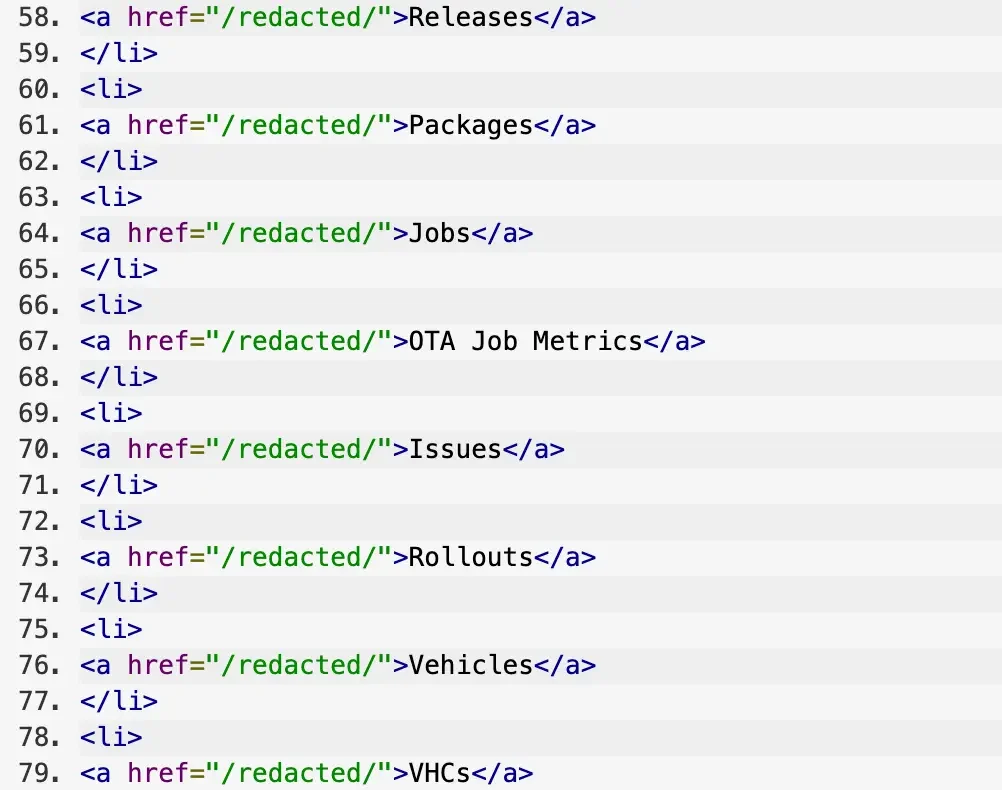
Some of the functionality of the application
I had attempted to browse to the "redacted.teslamotors.com" URL but it timed out. It was probably an internal application.
The thing that was very interesting was that live support agents have the capability to send updates out to cars and, most likely, modify configurations of vehicles. My guess was that this application had that functionality based off the different hyperlinks within the DOM.
I didn't attempt this, but it is likely that by incrementing the ID sent to the vitals endpoint, an attacker could pull and modify information about other cars.
If I were an attacker attempting to compromise this I'd probably have to submit a few support requests but I'd eventually be able to learn enough about their environment via viewing the DOM and JavaScript to forge a request to do exactly what I'd want to do.
Reporting
At nearly 2:00 AM in the morning (after driving for 11 hours) I manically wrote a report to the Tesla bug bounty program. They triaged it as a P1, commented, and pushed out a hot fix within 12 hours.
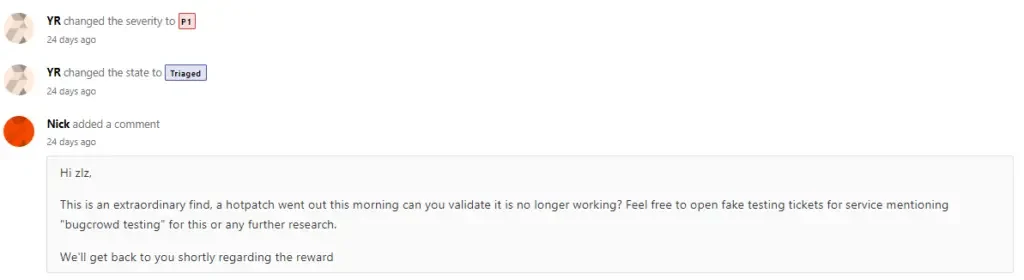
I was unable to reproduce it. In about two weeks, they paid out a $10,000 bounty and confirmed my suspicion this was a serious issue.
Looking back, this was a very simple issue but understandably something that could've been overlooked or regressed somehow. Although I'm unsure of the exact impact of the vulnerability, it seems to have been substantial and at the very least would've allowed an attacker to view live information about vehicles and likely customer information.
Timeline
| Time (UTC) | Event |
|---|---|
| 20 Jun 2019 06:27:30 | Reported |
| 20 Jun 2019 20:35:35 | Triaged, hot fix |
| 11 Jul 2019 16:07:59 | Bounty and resolution |
On a final note, Tesla's bug bounty program is fantastic. They provide a safe haven for researchers who are in good-faith trying to hack their cars. If you accidentally brick one, they'll even offer support in attempting to fix it.
Thanks to everyone who helped me review this before publishing.
Root cause
The blind XSS payload set through the car's nickname executed in the context of the internal redacted.teslamotors.com application when a support agent viewed the vehicle. The report does not describe the server-side code or the exact cause. The report does not describe the server-side code, so the exact encoding failure is not stated;
Impact
At the very least, the issue would have allowed an attacker to view live information about vehicles and likely customer information. The XSS hunter screenshot showed live telemetry (speed, temperature, version, tire pressure, lock state, alerts and more), and the page had tabs for firmware, CAN viewers, geofence locations and configurations. Live support agents can send updates out to cars and, most likely, modify vehicle configurations, and the researcher's guess was that incrementing the ID sent to the vitals endpoint could pull and modify information about other cars. That last part was not attempted, and the exact impact of the vulnerability is described as uncertain.
Fix
Tesla triaged the report as a P1 and pushed out a hot fix within 12 hours.
Variants to test
- Stored fields that surface in internal tooling: set a blind XSS payload in any user-controlled name or label (vehicle nickname, device name, account display name) and watch an XSS hunter for execution from an internal origin. A positive result is a callback whose execution origin is an internal management domain.
- Long input limits: check whether a field accepts far more content than the UI suggests, as the nickname input did here. A positive result is a stored value that survives intact and is rendered elsewhere.
- Incremental object IDs: where a dashboard URL carries a sequential vehicle or object ID, try neighbouring IDs. A positive result is another object's data returned without an authorisation error.
- Referrer leakage: inspect the Referer sent by internal pages for identifiers such as VINs. A positive result is a sensitive identifier passed as a URL argument to third-party or logging endpoints.
- Format string probes: submit
%x.%x.%x.%xstyle values into connected-device fields. A positive result is formatted output or a crash rather than the literal string.
What happened, in plain words
A security researcher bought a Tesla Model 3 and spent time trying to make it do things it was not designed to do. One of the things he tried was giving his car a nickname that contained a small piece of code. He then forgot about it. Weeks later, a rock cracked his windshield, he asked Tesla support for help through the car's app, and a support agent opened his car's details on an internal Tesla website. A support agent opened his car's details on an internal Tesla website, the payload ran inside the agent's browser, and it reported back to the researcher. The payload had been planted weeks earlier and did nothing until a Tesla employee viewed the record. Tesla fixed the problem within 12 hours and paid a $10,000 bounty.
This article walks through the whole story from the beginning, explaining every technical idea as it comes up. You only need to know how to use a browser and a computer.
Background: what the car is
One of the more interesting things the researcher had the opportunity to hack on is the Tesla Model 3. It has a built in web browser, free premium LTE, and over-the-air software updates. It's a network connected computer on wheels that drives really fast.
A few terms here. LTE is the mobile phone network technology that gives the car its own internet connection, so it does not need your phone to be online. Over-the-air software updates means the car receives new software from Tesla over that internet connection, the same way your phone installs an update without being plugged into a computer. A web browser inside the car means the car can load web pages, just like the browser on your laptop.
Early in the year the researcher decided to purchase one and had an absolute blast both messing with it and driving it. He spent way too long sitting in his garage trying to make it do things it's not supposed to, but luckily got something interesting out of it.
Why sit in a garage poking at a car? Because a car connected to the internet is, from a security point of view, a computer. Computers have inputs (things you can type or set) and outputs (places where those things are shown). If an input is not handled carefully, the thing you typed can end up being treated as instructions rather than as plain text. That is the seed of the whole story.
Setup: the "Name Your Vehicle" feature
The first thing the researcher spent time messing with was the car's "Name Your Vehicle" functionality. This allowed you to set a nickname for your car and would save the information to your account so you could see it on the mobile app whenever you received push notifications (e.g. charging complete).
The "Name Your Vehicle" button in the upper right of the center square
In plain words: the car has a settings screen where you type a name for your car, such as "Blue Thunder". Tesla stores that name in your account. Later, when the car sends you a notification on your phone, for example to say charging has finished, the notification shows the name you chose. So the nickname travels from the car, to Tesla's servers, to your phone. Anywhere a piece of text travels, it may also be displayed on some other screen you have never seen, such as an internal tool used by Tesla staff. That is exactly what happened here.
Finding it: the first experiment
Initially, the researcher named his car %x.%x.%x.%x to see if it was vulnerable to format string attacks like the 2011 BMW 330i was, but sadly it didn't really do anything.
%x.%x.%x.%x
What is a format string attack? Some programs build text using a template, where %x is a placeholder meaning "insert a number here in hexadecimal". If a program takes text you typed and treats it as a template instead of as plain text, your %x placeholders get filled in with whatever numbers happen to be lying around in the program's memory. That can leak information or crash the program. The researcher had read that a 2011 BMW 330i had been affected by something like this, so he tried the same trick on his Tesla. In this case nothing happened: the car treated the text as ordinary text, which is the correct behaviour.
He also quoted a tip from another researcher:
"So basically set your smartphone's name to %x%x%x%x and test for format string vulns in connected devices", Eهاв Huسein (@Obzy)
The idea behind the tip is the same: put a probe into a name that a connected device will display, and see whether the device mishandles it.
After spending more time messing with the input, the researcher saw that the allowed content length for the input was very long. In other words, the nickname field accepted far more characters than a name would ever need. He decided to name the Tesla his XSS hunter payload and continued toying around with the other functionalities on the car.
My idea for setting this name was that it may show up on some internal Tesla website for vehicle management or possibly from a functionality within my account.
Two new terms. XSS stands for Cross-Site Scripting. It is a vulnerability where text you control ends up being treated as code by a web page, so the code runs in the browser of whoever views that page. XSS hunter is a service that gives you a special payload (a small piece of code) and then tells you when and where that payload runs. You plant the payload somewhere, forget about it, and wait for a notification. This is called blind XSS, because you cannot see the page where your code will run; you only find out afterwards, when the payload calls home.
Why did the long input limit matter? Because a payload is longer than a normal nickname. If the field had only allowed, say, ten characters, there would have been no room to store anything interesting. A generous limit is not a vulnerability by itself, but it makes a stored XSS possible.
The other thing the researcher spent a lot of time messing with was the built in web browser. He wasn't able to get this to do anything even remotely interesting but had a fun time trying to get it to load in files or strange URIs.
A URI is an address for a resource, such as a web address or a file path. Trying odd URIs in a browser is a common way to look for bugs, because browsers sometimes handle unusual addresses in unexpected ways. Here it led nowhere.
He couldn't find anything that evening, so he called it quits and forgot that he'd set his car name to a blind XSS payload. That forgetting is part of the method: a blind payload is designed to wait.
Exploitation
Step 1: A cracked windshield
During a road trip a huge rock came from somewhere and cracked my windshield.
He used Tesla's in app support to setup an appointment and continued driving. In other words, he opened a support request through the car's own app, which is a normal customer action. Nothing about this step was a hack; it was an accident followed by a repair request.
The day after, he received a text message about the issue saying that someone was looking into it. He checked his XSS hunter and saw something really interesting.
Vulnerable Page URL
https://redacted.teslamotors.com/redacted/5057517/redacted
Execution Origin
https://redacted.teslamotors.com
Referer
https://redacted.teslamotors.com/redacted/5YJ31337
Let us unpack these three fields, because they are the heart of the finding.
- Vulnerable Page URL is the address of the web page where the payload ran. The host part,
redacted.teslamotors.com, is a Tesla-owned domain. Theredactedpieces are placeholders where the researcher hid identifying details before publishing. The number5057517is part of the page address; the report does not say what it identifies. - Execution Origin is the site that the browser considered the code to belong to. It is the same Tesla domain. This matters because browsers keep websites separate from each other: code running on one site cannot normally read data from another site. Here the code ran as part of Tesla's own internal site, so it could see what that site could see.
- Referer is a header that a browser sends automatically to tell the destination page which page you came from. Think of it as the "you came from here" note that a browser attaches to a link click. The report says the referrer header had the vehicle's VIN number as an argument. A VIN is the Vehicle Identification Number, the unique serial number stamped on a car.
One of the agents responding to the cracked windshield fired the XSS hunter payload from within the context of the "redacted.teslamotors.com" domain. In plain words: a Tesla support agent opened the researcher's car record on an internal Tesla website, and the payload ran in the agent's browser. The code ran in the agent's browser and reported back to the XSS hunter service.
This was super exciting, as the researcher puts it, because the payload had been planted weeks earlier and had done nothing until a real employee viewed the record.
Step 2: What the payload revealed
The screenshot attached to the XSS hunter showed that the page was used to see the vital statistics of the vehicle and was accessed via an incremental vehicle ID in the URL. The referrer header had the vehicle's VIN number as an argument.
An incremental ID is a number that goes up by one for each new record: 5057516, 5057517, 5057518, and so on. If a website uses such numbers in its addresses, then changing the number in the address bar asks the site for a different record. Whether you are allowed to see that other record is a separate question, and it is one of the classic things a security researcher checks.
The XSS had fired on a dashboard used for pulling managing Tesla vehicles. A dashboard here means an internal web application: a set of screens that Tesla staff use to look up and manage cars.
There was current information about the car shown in the attached XSS hunter screenshot like the speed, temperature, version number, tire pressure, whether it was locked, alerts, and many more little tidbits of information.
VIN: 5YJ3E13374KF2313373
Car Type: 3 P74D
Birthday: Mon Mar 11 16:31:37 2019
Car Version: develop-2019.20.1-203-991337d
Car Computer: ice
SOE / USOE: 48.9, 48.9 %
SOC: 54.2 %
Ideal energy remaining: 37.2 kWh
Range: 151.7 mi
Odometer: 4813.7 miles
Gear: D
Speed: 81 mph
Local Time: Wed Jun 19 15:09:06 2019
UTC Offset: -21600
Timezone: Mountain Daylight Time
BMS State: DRIVE
12V Battery Voltage: 13.881 V
12V Battery Current: 0.13 A
Locked?: true
UI Mode: comfort
Language: English
Service Alert: 0X0
Line by line, in plain words:
VIN: 5YJ3E13374KF2313373is the car's unique serial number.Car Type: 3 P74Didentifies the model and variant.Birthday: Mon Mar 11 16:31:37 2019is when the car was built or first registered.Car Version: develop-2019.20.1-203-991337dis the software version running on the car. The worddevelopsuggests a development build.Car Computer: icenames the computer unit in the car.SOE / USOE: 48.9, 48.9 %is state of energy, meaning how full the battery is, as a percentage.SOC: 54.2 %is state of charge, another battery fullness figure.Ideal energy remaining: 37.2 kWhis the energy left in the battery, in kilowatt hours.Range: 151.7 miis how far the car estimates it can still drive.Odometer: 4813.7 milesis the total distance the car has driven.Gear: Dmeans the car was in drive.Speed: 81 mphis how fast the car was going at that moment.Local Time: Wed Jun 19 15:09:06 2019andUTC Offset: -21600andTimezone: Mountain Daylight Timedescribe the car's clock and time zone.BMS State: DRIVEis the battery management system state.12V Battery Voltage: 13.881 Vand12V Battery Current: 0.13 Aare readings from the small battery that powers the car's electronics.Locked?: truesays whether the car was locked.UI Mode: comfortandLanguage: Englishdescribe the car's display settings.Service Alert: 0X0is a service alert code.
The important point is not any single number. It is that an internal page was showing live telemetry, meaning live measurements from the car, to whoever opened it, and that the page was reachable through a simple number in the address.
Additionally, there were tabs about firmware, CAN viewers, geofence locations, configurations, and code named functionalities that sounded interesting.
Some of the functionality of the application
A few of those words need explaining. Firmware is the low-level software built into a device. A CAN viewer relates to the CAN bus, the internal network over which a car's electronic parts talk to each other; a viewer would let someone watch those messages. A geofence is a virtual boundary around a place, so geofence locations would be places the car is tracked against. Configurations are settings. None of these tabs were explored in depth; the researcher is describing what he could see in the page.
The researcher had attempted to browse to the "redacted.teslamotors.com" URL but it timed out. It was probably an internal application. An internal application is a website that is only meant to be reachable from inside a company's own network, not from the public internet. The timeout is consistent with that: from the outside, the address simply does not answer.
The thing that was very interesting was that live support agents have the capability to send updates out to cars and, most likely, modify configurations of vehicles. The researcher's guess was that this application had that functionality based off the different hyperlinks within the DOM.
The DOM is the browser's in-memory model of a web page: every button, link, and text block as objects. When you view a page's source or inspect it, you are looking at the DOM. Seeing links in the DOM that point to actions is how you infer what an application can do, even without clicking them.
He did not attempt this, but it is likely that by incrementing the ID sent to the vitals endpoint, an attacker could pull and modify information about other cars. An endpoint is a specific address on a server that accepts a request and returns data, like a service window in a building: you go to the right window with the right form and you get a specific service. The vitals endpoint is the one that returns the live measurements shown above. If it accepts a vehicle ID and does not check that the requester is allowed to see that vehicle, then changing the ID would return another car's data. That is called an authorisation problem: the site knows who you are but does not check whether you may do this particular thing.
If the researcher were an attacker attempting to compromise this, he would probably have to submit a few support requests but would eventually be able to learn enough about their environment via viewing the DOM and JavaScript to forge a request to do exactly what he wanted. JavaScript is the programming language that web pages run in your browser. Forging a request means building a request by hand, outside the normal page, so you can ask the server for something the page would not normally let you ask for. This is a description of a possible path, not something that was carried out.
Reporting
At nearly 2:00 AM in the morning, after driving for 11 hours, the researcher manically wrote a report to the Tesla bug bounty program. A bug bounty program is a scheme where a company invites outside researchers to report security problems and pays them for valid findings, instead of punishing them. They triaged it as a P1, commented, and pushed out a hot fix within 12 hours.
Triaged means the company reviewed the report, confirmed it was real, and assigned it a priority. P1 is the highest priority level in many such schemes. A hot fix is an urgent, quick repair, as opposed to a fix that waits for the next scheduled release.
The researcher was unable to reproduce it. In about two weeks, they paid out a $10,000 bounty and confirmed his suspicion this was a serious issue. Reproduce means to make the bug happen again on purpose. He could not, because the bug depended on an internal page and an employee viewing the record, which he had no direct access to.
Looking back, this was a very simple issue but understandably something that could've been overlooked or regressed somehow. Regressed means a bug that was once fixed came back, usually because new code replaced the fix. Although the researcher is unsure of the exact impact of the vulnerability, it seems to have been substantial and at the very least would have allowed an attacker to view live information about vehicles and likely customer information.
Timeline
| Time (UTC) | Event |
|---|---|
| 20 Jun 2019 06:27:30 | Reported |
| 20 Jun 2019 20:35:35 | Triaged, hot fix |
| 11 Jul 2019 16:07:59 | Bounty and resolution |
UTC is Coordinated Universal Time, a common clock used so that times can be compared across the world. The table shows the report was filed in the early hours of 20 June, triaged and fixed the same day, and paid out about three weeks later.
On a final note, Tesla's bug bounty program is fantastic. They provide a safe haven for researchers who are in good-faith trying to hack their cars. If you accidentally brick one, they'll even offer support in attempting to fix it. To brick a device means to break it so badly that it no longer works at all, like a brick.
Thanks to everyone who helped review this before publishing.
Root cause
The blind XSS payload set through the car's nickname executed in the context of the internal redacted.teslamotors.com application when a support agent viewed the vehicle. The report does not describe the server-side code or the exact cause.
Encoding is the process of converting text so that it is treated as data and not as instructions. In a web page, characters like < and > have special meaning: they mark the start and end of HTML tags, the building blocks of a page. If text containing such characters is inserted into a page without encoding, the browser reads it as part of the page's structure and may run it as code. Encoding turns < into a harmless representation that displays as a literal character.
Impact
At the very least, the issue would have allowed an attacker to view live information about vehicles and likely customer information. The XSS hunter screenshot showed live telemetry (speed, temperature, version, tire pressure, lock state, alerts and more), and the page had tabs for firmware, CAN viewers, geofence locations and configurations. Live support agents can send updates out to cars and, most likely, modify vehicle configurations, and the researcher's guess was that incrementing the ID sent to the vitals endpoint could pull and modify information about other cars. That last part was not attempted, and the exact impact of the vulnerability is described as uncertain.
Fix
Tesla triaged the report as a P1 and pushed out a hot fix within 12 hours.
Variants to test
These are the general lessons a beginner can take from the story, each with what a positive result looks like.
- Stored fields that surface in internal tooling. Set a blind XSS payload in any user-controlled name or label, such as a vehicle nickname, a device name, or an account display name, and watch an XSS hunter for execution from an internal origin. A positive result is a callback whose execution origin is an internal management domain.
- Long input limits. Check whether a field accepts far more content than the UI suggests, as the nickname input did here. A positive result is a stored value that survives intact and is rendered elsewhere.
- Incremental object IDs. Where a dashboard URL carries a sequential vehicle or object ID, try neighbouring IDs. A positive result is another object's data returned without an authorisation error.
- Referrer leakage. Inspect the Referer sent by internal pages for identifiers such as VINs. A positive result is a sensitive identifier passed as a URL argument to third-party or logging endpoints.
- Format string probes. Submit
%x.%x.%x.%xstyle values into connected-device fields. A positive result is formatted output or a crash rather than the literal string.
Glossary
- API: a defined way for one piece of software to ask another for data or actions, like a service counter with set forms.
- Authorisation: the check that a logged-in user is allowed to perform a particular action or see a particular record.
- Blind XSS: cross-site scripting where you cannot see the page your code will run on, so you plant a payload and wait for it to report back.
- Brick: to break a device so badly that it no longer works at all.
- Bug bounty program: a scheme where a company pays outside researchers for reporting security problems.
- CAN bus / CAN viewer: the internal network over which a car's electronic parts communicate, and a tool for watching those messages.
- Dashboard: an internal web application with screens for looking up and managing records.
- DOM: the browser's in-memory model of a web page, made of objects such as links, buttons and text.
- Encoding: converting text so it is treated as data rather than as instructions by a browser or other program.
- Endpoint: a specific address on a server that accepts a request and returns a response.
- Execution origin: the site a browser considers running code to belong to, which decides what that code can access.
- Firmware: the low-level software built into a device.
- Forging a request: building a request by hand, outside the normal page, to ask a server for something the page would not normally allow.
- Format string attack: making a program treat your text as a template with placeholders such as
%x, so it fills them with values from its memory. - Geofence: a virtual boundary around a place, used to track whether a device is inside or outside it.
- Hot fix: an urgent, quick repair rather than one waiting for the next scheduled release.
- HTML: the language that describes the structure of a web page, using tags such as
<and>. - Incremental ID: a number that goes up by one for each new record, so neighbouring numbers refer to neighbouring records.
- Internal application: a website meant to be reachable only from inside a company's own network.
- JavaScript: the programming language that web pages run in the browser.
- LTE: a mobile network technology that gives a device its own internet connection.
- Over-the-air update: software delivered to a device over the internet, without a cable.
- P1: the highest priority level in many bug bounty schemes.
- Payload: the small piece of code or input you plant to test for a vulnerability.
- Referer: a header a browser sends to say which page you came from.
- Regression: a bug that was once fixed coming back, usually because new code replaced the fix.
- Reproduce: to make a bug happen again on purpose.
- Telemetry: live measurements sent back from a device, such as speed or battery level.
- Triaged: reviewed and confirmed by the company, with a priority assigned.
- URI: an address for a resource, such as a web address or a file path.
- UTC: Coordinated Universal Time, a common clock for comparing times worldwide.
- VIN: Vehicle Identification Number, the unique serial number of a car.
- XSS (Cross-Site Scripting): a vulnerability where text you control is treated as code by a web page and runs in the browser of whoever views it.
- XSS hunter: a service that supplies a payload and reports when and where it runs.





