Yet another Google Clickjacking
Several Google pages could be embedded in an iframe on a Google Sites page because their frame-ancestors policies allowed any *.google.com origin, or because a referer from google.com removed X-Frame-Options. An attacker could trick a logged-in user into clicking hidden buttons to make payments, change account settings, or alter video privacy.
 Published on medium.com
Instead of going for Cross Site Scripting, Remote Code Execution, SQL Injection, etc. I decided to find clickjacking in google and facebook.
The full write-up lives on its author's site
It belongs to its author, so we link to it rather than copy it. The other two tabs are our own rewrites, checked against it.
Context
This is a collection of clickjacking findings in Google properties, reported by Raushan Raj (@raushan_rajj) and disclosed on 6 March 2018. The researcher deliberately chose clickjacking over Cross Site Scripting, Remote Code Execution and SQL Injection, describing clickjacking as one of the lowest paid, mostly out of scope and underestimated vulnerabilities by organisations. The report defines the issue as unknowingly performing some sensitive actions on a webpage embedded (mostly in iframes) in any webpage with a different or same domain or subdomain.
The findings span several products: the Google Play store payment page, payments.google.com, the Google Docs picker used by YouTube's video importer, the Google Sites (New) settings page, a Google Sites error page, and YouTube video embedding.
Setup
The report does not describe any special accounts, tooling or versions beyond a browser. The browsers used are stated per finding: Chrome and Firefox for the Play payment page and the picker, Firefox and Chrome for the Sites settings page, Chrome and Firefox for the Sites error page, and Chrome on Linux for the YouTube embedding finding. Several steps rely on being logged in to a Google account: for the Sites error page finding the researcher logs in to Gmail and sites.google.com, and for the Play payment page the researcher adds funds to the Google Play wallet using a recharge code. The researcher uses Google Sites pages for the proofs of concept, at https://sites.google.com/site/conceptofmathematicsnow/ and https://beta.sites.google.com/site/conceptofmathematicsnow/.
Finding it
The researcher went looking for clickjacking specifically rather than for injection classes. Several findings involve framing protection that can be satisfied by a Google Sites origin.
Exploitation
A. Google Play store payment page (5000 USD)
- The attack URL is the Play store e-purchase endpoint for a 100 GB Drive subscription:
https://play.google.com/store/epurchase?dp=null&hl=en&docId=subs:com.google.android.apps.docs:r1.100gb&usegapi=1&id=I2_1505755312332&parent=https://www.google.com
-
Adding this URL to an
<iframe src>produces a CSP error: -
The key observation is that
*.google.comis allowed by theframe-ancestorsdirective. The report notes that*.google.comis allowed by the directive. -
Go to play.google.com and add some amount greater than 200 INR using a Google Play recharge code.
-
Go to sites.google.com, create a new site, and use the iframe option to insert the URL from step 1 as the iframe
src. -
For the proof of concept the researcher embedded it at
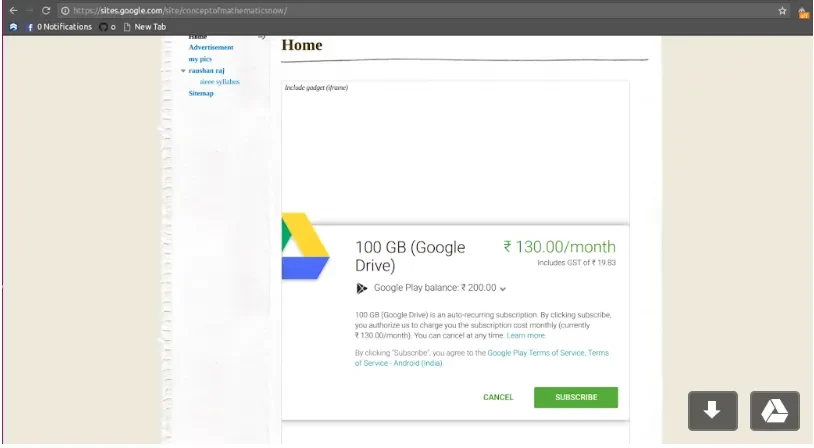
https://sites.google.com/site/conceptofmathematicsnow/. The page gets embedded. A single click on subscribe deducts 130 rs and subscribes the victim to 100 GB of Drive without them knowing.
Attack scenario: clickjacking on the page leads to deducting an amount from the Google Play wallet and subscribing the user to a Google Drive upgrade.
- The attacker embeds the e-purchase URL in any sites.google.com site, such as
https://sites.google.com/site/conceptofmathematicsnow/(where, the researcher notes, JavaScript plugins can be added). - When a user visits that site and unknowingly clicks just one button (subscribe), money is deducted and they are subscribed.
B. payments.google.com via Google's open redirection (3133.7 USD)
-
The iframe is:
-
The URL in the iframe
srcmakeshttps://www.google.com/urlthe referer to the payments.google.com page. -
Once there is a valid referer, the X-Frame-Options header vanishes.
Browsers used: Chrome and Firefox.
Attack scenario: the whole of payments.google.com pages and tabs become clickjackable. With a few user interactions:
- The attacker can close the victim's payment account.
- The attacker can add their own account to manage the victim's account.
- The attacker can change payment profile details.
C. docs.google.com/picker (1337 USD)
- On YouTube there is an upload button and an option to import videos from Google Photos. Clicking it opens a video picker, whose URL is:
https://docs.google.com/picker?protocol=gadgets&origin=https%3A%2F%2Fwww.youtube.com&hostId=yt-upload-importer&hl=en_GB&title&actions=picked%2Ccancel%2Cloaded%2Creceived%2CviewContentRendered&mineOnly=true&multiselectEnabled=true&shadeDialog=true&horizNav=true&maxItems=300&relayUrl=https%3A%2F%2Fwww.youtube.com%2F%2Fs.ytimg.com%2Fyts%2Ffavicon-vflz7uhzw.ico&pp=%5B%5B%22album%22%2C%7B%7D%5D%5D&nav=((%22photos%22%2C%22All%20Videos%22%2C%7B%22type%22%3A%22videos-uploaded%22%2C%22svm%22%3Atrue%2C%22rdv%22%3Atrue%7D)%2C(%22photos%22%2C%22Auto%20Backup%22%2C%7B%22type%22%3A%22videos-camerasync%22%2C%22svm%22%3Atrue%7D)%2C(%22photos%22%2C%22Albums%22%2C%7B%22selectAlbum%22%3Atrue%7D))&rpctoken=tppfn9l0d0ug&rpcService=40cmfpboj50i
- The behaviour depends on the
originrequest parameter:
- A. With
origin=https://www.youtube.com, the response header isx-frame-options: ALLOW-FROM https://www.youtube.com. - B. With
origin=https://anything.com, there is an error page andx-frame-options: https://anything.com. - C. With
origin=https://sites.google.com, there is an error page andx-frame-options: https://sites.google.com. - D. With
origin=https://beta.sites.google.com, the picker appears, there is no error page, and the response header isx-frame-options: https://beta.sites.google.com. The same is the case forhttps://googledrive.com.
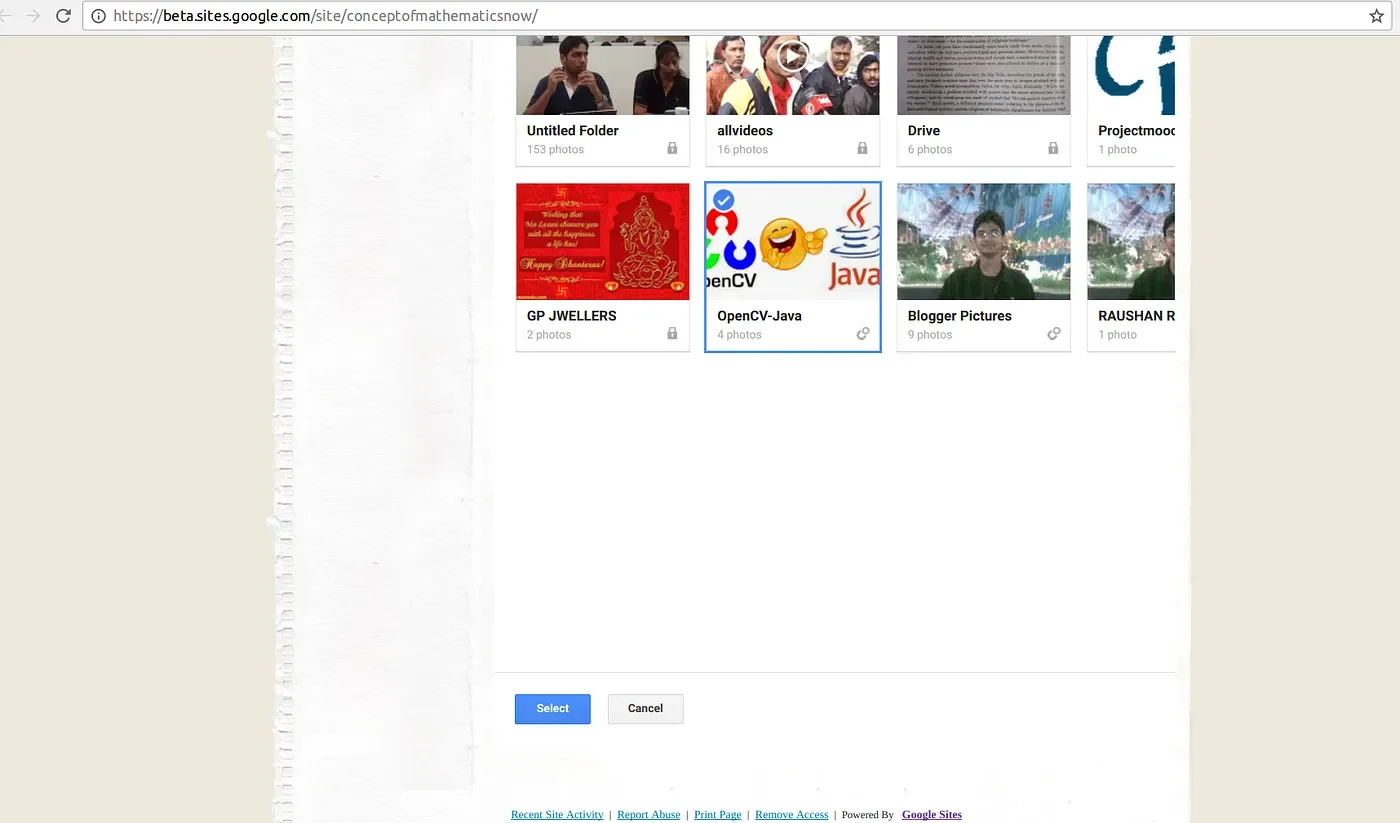
This means the video picker can be embedded on https://beta.sites.google.com.
- E. The researcher uploaded the same in an iframe at
https://beta.sites.google.com/site/conceptofmathematicsnow/.
Browsers used: Firefox and Chrome.
Attack scenario: clickjacking the button can convert the user's private or public videos to public on YouTube.
D. Google Sites (New) settings page (1337 USD)
Clickjacking here leads to deleting the Google site (moving it to trash).
- The X-Frame-Options for
https://sites.google.com/new?usp=jotspot_siis Same-Origin, so the page can be embedded in the researcher'shttps://sites.google.com/site/conceptofmathematicsnow/. - The page is embedded at
https://sites.google.com/site/conceptofmathematicsnow/.
Browsers used: Firefox and Chrome.
Attack scenario: the page contains sensitive actions such as deleting the page and renaming the page.
E. Google Sites error page (1337 USD)
-
Create a Google site (new) and embed an iframe with the following source:
-
Open a new browser and log in to Gmail and sites.google.com.
-
In another tab, open the site created in step 1 (
https://sites.google.com/view/raushannewtest). Because the user is logged in, there is an option inside the iframe to change the public profile picture, choosing from albums or private photos inside Google Drive; the user can also upload from the system and set it as the profile picture.
Browsers used: Chrome and Firefox.
Attack scenario: the attacker can embed the payload in a Google site. With a few clicks, a victim logged in to sites.google.com or Gmail can unknowingly:
- make their private pictures public;
- upload unwanted files to Google Drive;
- subscribe to site change subscriptions without knowing.
Embedding this page is like embedding the Google Drive picker.
F. Embedding unlisted YouTube videos (500 USD)
- Go to your video, then advanced settings, then Distribution Options, then embedding, and uncheck it. This is meant to prevent the video from being embedded in any iframe.
- Despite that, it can be embedded into any webpage:
Browser and OS: Chrome on Linux.
Attack scenario: instead of disallowing the video, it can still be embedded.
The researcher notes that the same technique was able to embed whole YouTube and Google Books. Those were reported but both went duplicate.
Root cause
Each finding comes down to framing protection that does not actually restrict framing to trusted origins:
- On the Play payment page, the CSP
frame-ancestorsdirective allowshttps://*.google.com. Any user can host content on agoogle.comsubdomain such assites.google.com, so the allowlist is satisfied by an attacker-controlled page. - On payments.google.com, the X-Frame-Options header is dropped when a valid referer is present, and the open redirect at
https://www.google.com/urlsupplies that referer. The protection is conditional on a value the attacker can arrange. - On the picker, the
originrequest parameter is reflected into thex-frame-optionsvalue. Forbeta.sites.google.comandgoogledrive.comthe picker renders and the header names that origin, so the picker can be framed from a page the attacker controls on those domains. - On the Sites (New) settings page, the X-Frame-Options is Same-Origin, so the page can be embedded in the researcher's Sites page.
- On the Sites error page, the crafted path renders a page that, for a logged-in user, exposes profile picture and Drive actions inside the iframe.
- On YouTube, a video with embedding unchecked could still be embedded via the embed URL.
Impact
Under the conditions described, an attacker who can get a victim to visit an attacker-controlled page and click can:
- deduct money from the victim's Google Play wallet and subscribe them to a 100 GB Drive plan (130 rs in the proof of concept);
- close the victim's payment account, add the attacker's account to manage it, or change payment profile details on payments.google.com;
- convert the victim's private or public videos to public on YouTube through the picker;
- delete or rename the victim's Google site through the Sites settings page;
- make the victim's private pictures public, upload unwanted files to their Drive, or subscribe them to site changes through the Sites error page;
- embed an unlisted YouTube video that the owner intended to prevent from being embedded.
The report frames each as a few clicks or a single click.
Fix
The report does not describe any fixes that were applied. Based on the findings, the changes needed are: restrict frame-ancestors on the Play payment page to origins that cannot host user content; do not drop X-Frame-Options on payments.google.com based on a referer that an open redirect can set; do not reflect the origin parameter into x-frame-options for origins that host user content, and reject framing from beta.sites.google.com and googledrive.com; apply framing protection to the Sites settings page that excludes user-content origins; fix the Sites error page so it does not render sensitive account actions; and enforce the embedding restriction on unlisted videos for the /embed/ URL.
Variants to test
- Look for
frame-ancestorsdirectives that allow a wildcard subdomain of a domain where users can publish content (for example*.google.com). A positive result is the target page rendering inside an iframe on a user-content subdomain. - Look for pages whose X-Frame-Options or CSP changes when a referer is present, and pair them with an open redirect on the same organisation's domain. A positive result is the header disappearing or weakening when the iframe
srcgoes through the redirect. - Look for request parameters such as
originthat are reflected intox-frame-optionsor CSP. A positive result is the picker or page rendering with the header naming an origin you control. - Look for Same-Origin X-Frame-Options on pages that share an origin with user-generated content. A positive result is the page embedding in a user site on the same origin.
- Look for error pages reachable through crafted paths that render account actions for logged-in users. A positive result is sensitive actions such as profile picture changes appearing inside the iframe.
- Test embedding restrictions on media: uncheck embedding on a video and request the
/embed/URL in an iframe. A positive result is the video playing despite the restriction.
What happened, in plain words
A security researcher spent time looking for one specific kind of bug in Google's websites: clickjacking. Instead of chasing the famous, high-paying bug types (Cross Site Scripting, Remote Code Execution, SQL Injection), he went after clickjacking, which he describes as one of the lowest paid, mostly out of scope and underestimated vulnerabilities by organisations. The reports were disclosed on 6 March 2018.
Clickjacking is easy to understand with an everyday comparison. Imagine someone places a transparent sheet of glass over a cash machine keypad, with a fake "Press here for a free coffee" sticker on it. You think you are pressing the coffee button, but your finger lands on the "withdraw 100" key underneath. On the web, the "sheet of glass" is an invisible or disguised frame that loads a real, logged-in page from another site, and the "sticker" is whatever the attacker draws on top to make you click. The report's own definition is: unknowingly performing some sensitive actions on a webpage embedded (mostly in iframes) in any webpage with a different or same domain or subdomain.
Two words come up constantly, so let us define them now.
- An iframe is an HTML tag that lets one web page display another web page inside a rectangular window. It is like a picture frame on a wall: the frame belongs to your page, but the picture inside is loaded from somewhere else. Attackers love iframes because they can position the framed page anywhere, make it transparent, and put their own buttons on top.
- Clickjacking is the attack that abuses this: the victim sees and clicks the attacker's page, but the click actually lands on the framed page underneath.
Websites defend against clickjacking with response headers, which are small pieces of information the server sends back alongside the page. Two matter here:
- X-Frame-Options tells the browser whether the page is allowed to appear inside an iframe, and from which sites. Values like
DENY,SAMEORIGINorALLOW-FROM <url>control this. - Content Security Policy (CSP), specifically its
frame-ancestorsdirective, is the newer, more flexible version of the same idea: it lists which origins are allowed to frame the page.
An origin is the combination of protocol, host and port, for example https://sites.google.com. Two pages share an origin only if all three parts match.
The findings cover six different Google products, several involving framing protection that a Google Sites origin could satisfy.
Setup
The report does not describe any special accounts, tooling or versions beyond a browser. The browsers used are stated per finding: Chrome and Firefox for the Play payment page and the picker, Firefox and Chrome for the Sites settings page, Chrome and Firefox for the Sites error page, and Chrome on Linux for the YouTube embedding finding.
Several steps rely on being logged in to a Google account. For the Sites error page finding the researcher logs in to Gmail and sites.google.com. For the Play payment page the researcher adds funds to the Google Play wallet using a recharge code. The researcher also uses a Google Sites site as the attacker-controlled embedding page, at https://sites.google.com/site/conceptofmathematicsnow/, and a beta Sites site at https://beta.sites.google.com/site/conceptofmathematicsnow/.
Google Sites appears in several findings; the researcher used a Sites page to host the proof of concept.
Finding it
The researcher went looking for clickjacking specifically rather than for injection classes. The common thread across the findings is a page that either lacks framing protection or whose framing protection can be satisfied by an origin the attacker can control, in particular sites.google.com and beta.sites.google.com, which any user can create content on.
Exploitation
A. Google Play store payment page (5000 USD)
This finding is about the Google Play store payment page, the screen that confirms a purchase of a subscription. The goal was to make that payment screen appear inside an attacker's page so that a victim's click on a decoy button would actually confirm a purchase.
- The attack URL is the Play store e-purchase endpoint for a 100 GB Drive subscription:
https://play.google.com/store/epurchase?dp=null&hl=en&docId=subs:com.google.android.apps.docs:r1.100gb&usegapi=1&id=I2_1505755312332&parent=https://www.google.com
Line by line: https://play.google.com/store/epurchase is the address of the purchase confirmation page. Everything after the ? is a set of parameters, which are name=value pairs the server reads to know what to show. dp=null and hl=en set display and language options. docId=subs:com.google.android.apps.docs:r1.100gb identifies the product being bought: a 100 GB Google Drive subscription. usegapi=1 and id=I2_1505755312332 are internal identifiers for the purchase flow. parent=https://www.google.com tells the page which site is the parent, which matters for framing.
- Adding this URL to an
<iframe src>produces a CSP error:
This is the browser refusing to load the page inside the frame. The message names the rule that blocked it: the frame-ancestors directive. 'self' means the page may frame itself. https://*.google.com means any subdomain of google.com. https://*.googleusercontent.com means any subdomain of googleusercontent.com. The last two entries are specific Google sites. The message names the origins the directive allows to frame the page.
- The key observation is that
*.google.comis allowed by theframe-ancestorsdirective. Sincesites.google.comis a subdomain ofgoogle.com, a page hosted there satisfies the policy.
This is the heart of the bug. The directive allows *.google.com, and the researcher embedded the page on a sites.google.com site.
- Go to play.google.com and add some amount greater than 200 INR using a Google Play recharge code.
This step is about setting up a realistic victim: a Google Play wallet with money in it, so that a purchase can actually go through. The researcher used a Google Play recharge code.
- Go to sites.google.com, create a new site, and use the iframe option to insert the URL from step 1 as the iframe
src.
Google Sites has a built-in feature to embed an iframe on your page. The researcher used that legitimate feature to place the payment page inside his own site. No hacking tools were needed; the site builder did the work.
- For the proof of concept the researcher embedded it at
https://sites.google.com/site/conceptofmathematicsnow/. The page gets embedded. A single click on subscribe deducts 130 rs and subscribes the victim to 100 GB of Drive without them knowing.
This is the moment the bug becomes real: the payment page rendered inside the attacker's site, and one click on the subscribe button charged the wallet. The amount in the proof of concept was 130 rs.
Attack scenario: clickjacking on the page leads to deducting an amount from the Google Play wallet and subscribing the user to a Google Drive upgrade.
- The attacker embeds the e-purchase URL in any sites.google.com site, such as
https://sites.google.com/site/conceptofmathematicsnow/(where, the researcher notes, JavaScript plugins can be added). - When a user visits that site and unknowingly clicks just one button (subscribe), money is deducted and they are subscribed.
The researcher notes that JavaScript plugins can be added to the Sites page. The victim sees a normal-looking page; the click goes to the payment screen underneath.
B. payments.google.com via Google's open redirection (3133.7 USD)
This finding targets payments.google.com, the site where a Google user manages their payment account. The trick here is different: the page's framing protection disappears under a certain condition.
- The iframe is:
Line by line: <iframe> opens the frame. height="1200px" width="1200px" makes it large enough to show the whole page. src="..." is the address loaded inside the frame. That address is not payments.google.com directly; it is https://www.google.com/url, a Google redirect service. The parameters sa=D, q=https://payments.google.com/payments and usg=AFQjCNGnO25JhaC9l_zIK-Is46SusuQRsQ tell the redirect service where to send the browser. The q parameter is the destination. So the frame first loads the redirect, which then forwards to the payments page.
An open redirect is a feature where a site takes a URL in a parameter and forwards the user to it, without checking that the destination is trusted. It is like a receptionist who will walk you to any office you name, including one you should not be in. Here the redirect is used not to send the victim somewhere malicious, but to make the browser arrive at payments.google.com with a Google referer.
- The URL in the iframe
srcmakeshttps://www.google.com/urlthe referer to the payments.google.com page.
The referer (yes, spelled that way in the HTTP standard) is a header the browser sends with a request, saying which page the user came from. Because the frame went through google.com/url, the payments page sees a Google referer.
- Once there is a valid referer, the X-Frame-Options header vanishes.
This is the bug. The report says that once there is a valid referer, the X-Frame-Options header vanishes. But the referer is something the attacker can arrange, simply by routing the frame through the open redirect. The protection was conditional on a value the attacker controls.
Browsers used: Chrome and Firefox.
Attack scenario: the whole of payments.google.com pages and tabs become clickjackable. With a few user interactions:
- The attacker can close the victim's payment account.
- The attacker can add their own account to manage the victim's account.
- The attacker can change payment profile details.
These are serious account actions. Closing a payment account, adding another person as a manager, or changing profile details are exactly the kind of thing a victim would never knowingly click on a strange page.
C. docs.google.com/picker (1337 USD)
This finding is about the Google Docs picker, a dialog that lets you choose files from your Google account. YouTube uses it when you click "Import your videos from Google Photos" on the upload page. The picker is a separate page served from docs.google.com, and it takes an origin parameter telling it which site is using it.
- On YouTube there is an upload button and an option to import videos from Google Photos. Clicking it opens a video picker, whose URL is:
https://docs.google.com/picker?protocol=gadgets&origin=https%3A%2F%2Fwww.youtube.com&hostId=yt-upload-importer&hl=en_GB&title&actions=picked%2Ccancel%2Cloaded%2Creceived%2CviewContentRendered&mineOnly=true&multiselectEnabled=true&shadeDialog=true&horizNav=true&maxItems=300&relayUrl=https%3A%2F%2Fwww.youtube.com%2F%2Fs.ytimg.com%2Fyts%2Ffavicon-vflz7uhzw.ico&pp=%5B%5B%22album%22%2C%7B%7D%5D%5D&nav=((%22photos%22%2C%22All%20Videos%22%2C%7B%22type%22%3A%22videos-uploaded%22%2C%22svm%22%3Atrue%2C%22rdv%22%3Atrue%7D)%2C(%22photos%22%2C%22Auto%20Backup%22%2C%7B%22type%22%3A%22videos-camerasync%22%2C%22svm%22%3Atrue%7D)%2C(%22photos%22%2C%22Albums%22%2C%7B%22selectAlbum%22%3Atrue%7D))&rpctoken=tppfn9l0d0ug&rpcService=40cmfpboj50i
Line by line: https://docs.google.com/picker is the picker page. protocol=gadgets selects the communication protocol the picker uses to talk to the page that opened it. origin=https%3A%2F%2Fwww.youtube.com is the crucial parameter: it tells the picker which site is embedding it. The value is URL-encoded, so %3A is a colon and %2F is a slash, meaning the decoded value is https://www.youtube.com. hostId=yt-upload-importer names the YouTube feature using the picker. hl=en_GB sets the language. actions=picked%2Ccancel%2Cloaded%2Creceived%2CviewContentRendered lists the events the picker will send back. mineOnly=true restricts the picker to the user's own files. multiselectEnabled=true allows selecting several items. shadeDialog=true and horizNav=true control the look. maxItems=300 caps the number of items. relayUrl=... is a URL the picker uses to communicate back. pp=%5B%5B%22album%22%2C%7B%7D%5D%5D is an encoded configuration for the picker's panels. nav=... is a long encoded description of the navigation tabs (All Videos, Auto Backup, Albums). rpctoken=tppfn9l0d0ug and rpcService=40cmfpboj50i are identifiers for the communication channel between the picker and the embedding page.
- The behaviour depends on the
originrequest parameter:
- A. With
origin=https://www.youtube.com, the response header isx-frame-options: ALLOW-FROM https://www.youtube.com. - B. With
origin=https://anything.com, there is an error page andx-frame-options: https://anything.com. - C. With
origin=https://sites.google.com, there is an error page andx-frame-options: https://sites.google.com. - D. With
origin=https://beta.sites.google.com, the picker appears, there is no error page, and the response header isx-frame-options: https://beta.sites.google.com. The same is the case forhttps://googledrive.com.
This is a systematic test. The researcher changed one value, the origin parameter, and watched what came back. In case A, the picker works and the header names YouTube, which is the legitimate embedding site. In cases B and C, the picker refuses to render and shows an error page, and the header names the origin that was sent. In case D, the picker renders normally and the header names beta.sites.google.com. That last case is the bug: beta.sites.google.com is a site where any user can publish content, so the picker can be framed from an attacker's page there. The same applies to googledrive.com.
This means the video picker can be embedded on https://beta.sites.google.com.
- E. The researcher uploaded the same in an iframe at
https://beta.sites.google.com/site/conceptofmathematicsnow/.
Browsers used: Firefox and Chrome.
Attack scenario: clickjacking the button can convert the user's private or public videos to public on YouTube.
In other words, the picker's buttons, which are meant to select videos for import, can be overlaid with decoy buttons on the attacker's page. A victim who thinks they are clicking something harmless could instead be changing the visibility of their videos to public.
D. Google Sites (New) settings page (1337 USD)
This finding is about the settings page of the new Google Sites, the screen where you manage a site you have created. Clickjacking here leads to deleting the Google site (moving it to trash).
- The X-Frame-Options for
https://sites.google.com/new?usp=jotspot_siis Same-Origin, so the page can be embedded in the researcher'shttps://sites.google.com/site/conceptofmathematicsnow/.
Same-Origin (often written SAMEORIGIN) means the page may only be framed by a page on the same origin. That sounds safe, but it is not, because user-created Sites pages live on the same origin, sites.google.com. So the settings page can be framed by any user's site. The protection allows exactly the wrong neighbour.
- The page is embedded at
https://sites.google.com/site/conceptofmathematicsnow/.
Browsers used: Firefox and Chrome.
Attack scenario: the page contains sensitive actions such as deleting the page and renaming the page.
A victim who visits the attacker's site and clicks a decoy could instead delete or rename their own Google site.
E. Google Sites error page (1337 USD)
This finding is about an error page on Google Sites, reached through a crafted path. The path contains encoded traversal sequences and ends at /etc/passwd; the server renders an error page.
- Create a Google site (new) and embed an iframe with the following source:
Line by line: <iframe src="..."> loads the given URL in a frame. The URL is https://sites.google.com/site/sites/_/.%2F..%2f/..%2F/etc/passwd. The %2F and %2f are URL-encoded slashes, and .. means "parent directory". So the path contains encoded traversal sequences that climb up and end at /etc/passwd, a well-known file on Unix systems. The server does not serve that file; instead it renders an error page. That error page is the interesting part.
- Open a new browser and log in to Gmail and sites.google.com.
This sets up the victim: a logged-in Google user. The attack only works against someone who is signed in, because the sensitive actions belong to their account.
- In another tab, open the site created in step 1 (
https://sites.google.com/view/raushannewtest). Because the user is logged in, there is an option inside the iframe to change the public profile picture, choosing from albums or private photos inside Google Drive; the user can also upload from the system and set it as the profile picture.
This is the surprising part: the error page, when framed and viewed by a logged-in user, exposes profile picture controls that can pull from private Google Drive photos. The attacker's page can overlay decoy buttons on those controls.
Browsers used: Chrome and Firefox.
Attack scenario: the attacker can embed the payload in a Google site. With a few clicks, a victim logged in to sites.google.com or Gmail can unknowingly:
- make their private pictures public;
- upload unwanted files to Google Drive;
- subscribe to site change subscriptions without knowing.
Embedding this page is like embedding the Google Drive picker.
F. Embedding unlisted YouTube videos (500 USD)
This finding is about YouTube's embedding restriction: a video with embedding unchecked could still be embedded in an iframe.
- Go to your video, then advanced settings, then Distribution Options, then embedding, and uncheck it. This is meant to prevent the video from being embedded in any iframe.
This is the owner's side: a normal YouTube setting, intended as a privacy control.
- Despite that, it can be embedded into any webpage:
Line by line: <iframe src="..."> loads the URL in a frame. The URL is https://www.youtube.com/embed/pbsQVpEROw4, the standard YouTube embed address for a video, where pbsQVpEROw4 is the video's identifier. The video plays even though the owner unchecked embedding.
Browser and OS: Chrome on Linux.
Attack scenario: instead of disallowing the video, it can still be embedded.
The researcher notes that the same technique was able to embed whole YouTube and Google Books. Those were reported but both went duplicate.
Root cause
Each finding comes down to framing protection that does not actually restrict framing to trusted origins:
- On the Play payment page, the CSP
frame-ancestorsdirective allowshttps://*.google.com. Any user can host content on agoogle.comsubdomain such assites.google.com, so the allowlist is satisfied by an attacker-controlled page. - On payments.google.com, the X-Frame-Options header is dropped when a valid referer is present, and the open redirect at
https://www.google.com/urlsupplies that referer. The protection is conditional on a value the attacker can arrange. - On the picker, the
originrequest parameter is reflected into thex-frame-optionsvalue. Forbeta.sites.google.comandgoogledrive.comthe picker renders and the header names that origin, so the picker can be framed from a page the attacker controls on those domains. - On the Sites (New) settings page, the X-Frame-Options is Same-Origin, which still permits framing from another page on the same origin, and user content lives on that origin.
- On the Sites error page, the crafted path renders a page that, for a logged-in user, exposes profile picture and Drive actions inside the iframe.
- On YouTube, a video with embedding unchecked could still be embedded.
Impact
Under the conditions described, an attacker who can get a victim to visit an attacker-controlled page and click can:
- deduct money from the victim's Google Play wallet and subscribe them to a 100 GB Drive plan (130 rs in the proof of concept);
- close the victim's payment account, add the attacker's account to manage it, or change payment profile details on payments.google.com;
- convert the victim's private or public videos to public on YouTube through the picker;
- delete or rename the victim's Google site through the Sites settings page;
- make the victim's private pictures public, upload unwanted files to their Drive, or subscribe them to site changes through the Sites error page;
- embed an unlisted YouTube video that the owner intended to prevent from being embedded.
The report frames each as a few clicks or a single click.
Fix
The report does not describe any fixes that were applied. Based on the findings, the changes needed are: restrict frame-ancestors on the Play payment page to origins that cannot host user content; do not drop X-Frame-Options on payments.google.com based on a referer that an open redirect can set; do not reflect the origin parameter into x-frame-options for origins that host user content, and reject framing from beta.sites.google.com and googledrive.com; apply framing protection to the Sites settings page that excludes user-content origins; fix the Sites error page so it does not render sensitive account actions; and enforce the embedding restriction on unlisted videos for the /embed/ URL.
Variants to test
- Look for
frame-ancestorsdirectives that allow a wildcard subdomain of a domain where users can publish content (for example*.google.com). A positive result is the target page rendering inside an iframe on a user-content subdomain. - Look for pages whose X-Frame-Options or CSP changes when a referer is present, and pair them with an open redirect on the same organisation's domain. A positive result is the header disappearing or weakening when the iframe
srcgoes through the redirect. - Look for request parameters such as
originthat are reflected intox-frame-optionsor CSP. A positive result is the picker or page rendering with the header naming an origin you control. - Look for Same-Origin X-Frame-Options on pages that share an origin with user-generated content. A positive result is the page embedding in a user site on the same origin.
- Look for error pages reachable through crafted paths that render account actions for logged-in users. A positive result is sensitive actions such as profile picture changes appearing inside the iframe.
- Test embedding restrictions on media: uncheck embedding on a video and request the
/embed/URL in an iframe. A positive result is the video playing despite the restriction.
Glossary
- Clickjacking: tricking a user into clicking something on a page they did not intend to interact with, usually by framing a real page and overlaying decoy buttons.
- Iframe: an HTML element that displays another web page inside a rectangular area of the current page.
- X-Frame-Options: an HTTP response header that tells the browser whether and from where a page may be framed.
- Content Security Policy (CSP): a set of rules a server sends to the browser, restricting what the page may load and who may frame it.
- frame-ancestors: the CSP directive that lists which origins are allowed to frame the page.
- Origin: the combination of protocol, host and port that identifies a web page's source, for example
https://sites.google.com. - Subdomain: a name that sits under a main domain, such as
sites.google.comundergoogle.com. - Referer: an HTTP header the browser sends saying which page the request came from.
- Open redirect: a feature that forwards the user to a URL supplied in a parameter without checking that the destination is trusted.
- Parameter: a name=value pair in a URL after the
?, used to pass information to the server. - URL encoding: representing special characters in a URL with
%codes, such as%2Ffor a slash. - Response header: extra information a server sends alongside a page, such as security rules.
- Same-Origin: a policy meaning a page may only be framed by pages on the same origin.
- ALLOW-FROM: an X-Frame-Options value naming a specific origin that is allowed to frame the page.
- Proof of concept (PoC): a working demonstration that a vulnerability is real.
- Bounty: a reward paid by an organisation for a valid security report.
- Duplicate: a report describing a bug that has already been reported, which usually earns no reward.
- Directory traversal: using
../sequences in a path to try to climb out of the intended folder. - Google Sites: a Google tool that lets any user publish a simple website on a
sites.google.comaddress. - Google Play wallet: the balance of credit in a Google account used to pay for Play store purchases.
- Recharge code: a prepaid voucher that can be redeemed for Google Play credit.
- Google Docs picker: a dialog served from
docs.google.comthat lets a user choose files from their Google account. - Unlisted video: a YouTube video that is not publicly listed but can be viewed by anyone with the link.
- CORS: Cross-Origin Resource Sharing, a mechanism that lets a server permit web pages from other origins to read its responses.



