SiriSpy iOS bug allowed apps to eavesdrop on your conversations with Siri
A flaw in Apple's Bluetooth Low Energy implementation allowed apps with Bluetooth permission to access the DoAP service on AirPods and Beats headsets, which streams audio from Siri and dictation without microphone permission. On macOS, a missing entitlement check in a system daemon allowed any app to request this audio without any permission prompt.
 Published on rambo.codes
One of the biggest myths when it comes to security and privacy on mobile devices is the old saying that Facebook is using your device's microphone to listen to everything you say, in order to sell more targeted ads. There's never been any evidence of that, and iPhones have very strong security measures in place to…
The full write-up lives on its author's site
It belongs to its author, so we link to it rather than copy it. The other two tabs are our own rewrites, checked against it.
Context
Apple's platforms mediate access to sensitive resources through TCC (Transparency, Consent, and Control), the subsystem behind the permission prompts an app sees when it asks for the microphone, camera, location or calendar. Apps do not touch hardware directly: they ask background daemons, which run with higher privilege, and those daemons are supposed to gate the request with code signing, entitlements and, where appropriate, a TCC prompt.
AirPods and Beats headsets with the H1 chip support "Hey, Siri" and dictation. Unlike a video call, talking to Siri through the headset does not degrade output audio quality, even though the headset microphone is in use. The researcher, who develops AirBuddy, had long wondered how that was implemented. The answer turned out to live in a Bluetooth Low Energy GATT service, and that service was reachable by ordinary apps.
The write-up covers two issues: direct access to the AirPods DoAP service over BLE GATT, which affected iOS, iPadOS, watchOS, tvOS and macOS, and a missing entitlement check on a macOS system agent that removed even the Bluetooth permission requirement on that platform. The October 2022 updates fixed the issues; the report cites CVE-2022-32946.
Setup
The work was done with a small command-line tool the researcher wrote, called bleutil, which interacts with Bluetooth Low Energy devices on macOS. It can connect to a LE device, query its GATT database, and subscribe to notifications on a service's characteristics, streaming the values as hex to the Terminal. The researcher normally uses it to inspect the advertisement packets from AirPods.
GATT (Generic Attribute Profile) is the standard that lets BLE devices exchange data through services and characteristics. Services are like folders, characteristics like files inside them, and a characteristic that supports notifications lets a subscriber be pushed new values instead of polling.
For the cross-platform check, a small test app was built for iPhone, iPad, Apple Watch and Apple TV, and run on devices with the shipping iOS 15 and the iOS 16 beta current at the time. The discovery happened in late August 2022. Decoding required the Opus library compiled for all of Apple's platforms.
Finding it
While adding notification subscription to bleutil, the researcher ran it against his own AirPods and saw a service with the UUID 9bd708d7-64c7-4e9f-9ded-f6b6c4551967 whose characteristics supported notifications. A first run produced no events. Digging in, he learned that this UUID is the DoAP service, used for Siri and Dictation support.
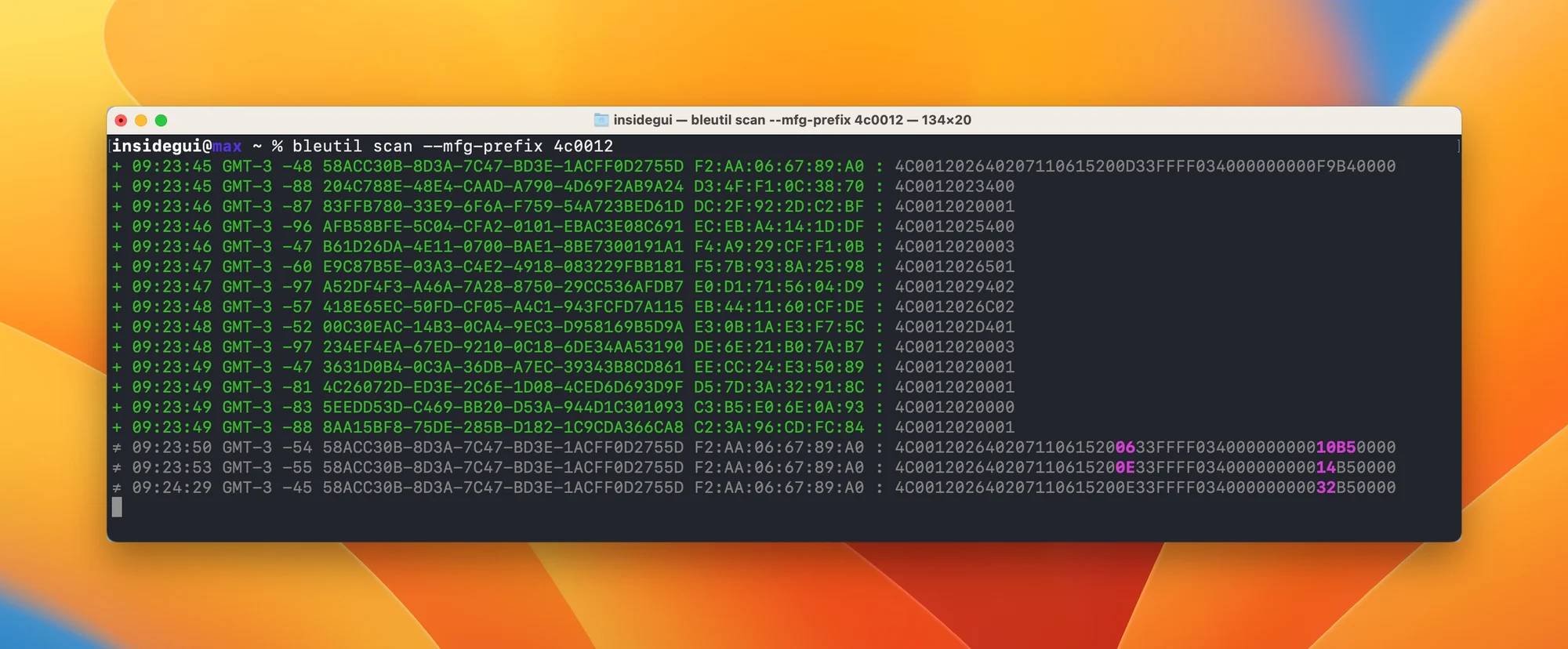
The screenshot shows bleutil scan --mfg-prefix 4c0012 running in a macOS Terminal, listing timestamps, UUIDs, RSSI values, MAC addresses and hex bytes.
He ran the tool again and invoked Siri while wearing the AirPods. A stream of hex bytes immediately started arriving, and the bytes changed rapidly while he spoke and settled when he went silent. That correlation suggested audio, and decoding later confirmed it was audio from the AirPods.
The video is a reproduction of the notification stream.
Getting audio off the AirPods on macOS without a microphone permission was only the first step. The second was checking Apple's other platforms, which the test app did on iOS 15 and the iOS 16 beta. The third was proving the bytes were not encrypted. Pasting the hex dump into HexFiend and opening the raw data in Audacity and Adobe Audition with various sample rates, bit rates and endianness produced garbled audio whose loudness vaguely matched what he had said, which pointed to unencrypted data. Given BLE bandwidth, uncompressed audio made no sense, so the remaining question was the codec. System components referenced Opus repeatedly, and Opus is designed for interactive speech, so he compiled the Opus library for Apple's platforms and wrote an app that connects to the AirPods, keeps the connection open in the background, and listens to notifications and audio data.
The video follows the almost full day of work needed to build the app.
The app's behaviour, as summarised in the write-up:
- Ask for Bluetooth permission.
- Find a connected BLE device that has the DoAP service.
- Subscribe to its characteristics to be notified when streaming starts and stops and when audio data arrives.
- On stream start, create a wav file and feed the Opus packets from the AirPods into a decoder, writing the uncompressed audio to the file.
- On stream stop, close the wav file and post a local push notification to show the app recorded the user in the background.
In a real attack, an app that already holds Bluetooth permission for some unrelated reason could do all of this with no indication to the user. No microphone permission is requested, and Control Center lists only "Siri & Dictation", not the app that is bypassing the microphone permission by talking to the AirPods directly over BLE. Bluetooth permission itself is not bypassed by this first issue, but users would not expect granting Bluetooth to hand over their Siri conversations and dictation audio.
Exploitation
Step 1: subscribe to the DoAP service over BLE
The app connects to the headset over BLE, finds the DoAP service 9bd708d7-64c7-4e9f-9ded-f6b6c4551967, and subscribes to its notifying characteristics. When Siri or dictation starts, the headset streams Opus packets as notification values. The app decodes them and writes a wav file, then notifies itself locally when streaming stops. This works on iOS, iPadOS, watchOS, tvOS and macOS, and requires only the Bluetooth permission.
Step 2: talk to the macOS agent directly
Investigating how the OS talks to AirPods led to the second issue. The process handling DoAP on Apple's platforms is BTLEServerAgent (or BTLEServer, depending on the platform). It exposes an interface over the mach service com.apple.BTLEAudioController.xpc, which other processes use to request audio from the AirPods DoAP service. Hundreds or thousands of mach services exist on Apple's systems, and sandboxing plus entitlements keep most apps away from them. For services exposed to third-party apps, daemons normally check a specific entitlement or raise a TCC prompt on the app's behalf before allowing communication.
BTLEServerAgent did neither for com.apple.BTLEAudioController.xpc. Any process on the system could connect, send requests and receive audio frames from the AirPods. This only works on macOS, because the tighter iOS sandbox prevents apps from reaching most global mach services directly. On macOS, an app could therefore record Siri conversations or dictation audio with no permission prompt at all, and could also request DoAP audio on demand rather than waiting for the user to talk to Siri or use dictation.
The video is a demo of the on-demand audio exploit in action.
Root cause
Two separate design failures combined.
First, the DoAP GATT service on AirPods and Beats headsets was reachable by any app holding Bluetooth permission. Apple maintains a system that limits which GATT services third-party apps may access, and DoAP was not on that deny list. The microphone permission model assumed audio capture goes through the OS audio stack, so audio arriving over BLE notifications from a paired headset never passed a TCC check.
Second, BTLEServerAgent exposed com.apple.BTLEAudioController.xpc without an entitlement check or a TCC prompt. The daemon trusted any local process that could reach the mach service. The macOS sandbox permits that reach for ordinary apps, so the missing check was the only barrier, and it was absent.
In both cases the protection existed in principle (entitlements, TCC, the GATT deny list) but was not applied to this particular path, which is why the microphone prompt and the Control Center indicator never reflected what was happening.
Impact
Any app with Bluetooth access could record conversations with Siri and audio from the iOS keyboard dictation feature when the user was on AirPods or Beats headsets, without requesting microphone access and without leaving a trace that it was listening. On macOS the second issue removed the Bluetooth requirement as well: any local process could obtain the audio, and could request DoAP audio on demand instead of waiting for Siri or dictation to be triggered. The iOS sandbox limited the second issue to macOS. The first issue required the user to be wearing a compatible headset and to invoke Siri or dictation for audio to flow, unless the macOS agent path was used.
Fix
Apple restricted access to the DoAP service by adding it to the system's deny list of GATT services that third-party apps may access. For the macOS agent, BTLEServerAgent now checks that the calling process holds the com.apple.bluetooth.system entitlement before allowing communication, the same entitlement that opens access to the forbidden GATT services. An app without it has its connection closed, and the agent logs a message to the console.

The image shows the message "Not an entitled process. Good bye."
The fixes shipped on October 24, 2022 in iOS 16.1 and the remaining Apple operating systems, as CVE-2022-32946. The issues were reported on August 26, 2022, and Apple confirmed investigation on August 29. The write-up initially stated a US$7000 bounty; a November 9 update corrected this: Apple split the findings into two CVEs, awarding US$7000 for one and US$22500 for the other, for a total of US$29500, and Apple's security team apologised for the confusion.
Variants to test
- Enumerate GATT services on other Apple and third-party BLE accessories (headsets, watches, speakers) and subscribe to every notifying characteristic. A positive result is a stream of values that changes in step with microphone input or other sensor data, with no corresponding permission prompt.
- On macOS, enumerate mach services exposed by system agents and attempt connections from an unentitled app. A positive result is a successful connection and a response where an entitlement check or TCC prompt would be expected.
- For any daemon that fronts a sensitive resource, compare the entitlement it checks against the entitlement the client actually needs. A positive result is a client without the documented entitlement receiving data or performing actions.
- Check whether the Control Center or status bar indicator names the app responsible for an active capture. A positive result is audio capture that the indicator attributes only to a system feature, not to the requesting app.
- Test whether a permission granted for one purpose (Bluetooth, in this case) implicitly unlocks data of a different sensitivity class. A positive result is access to microphone-derived content with only the weaker permission held.
What happened, in plain words
In 2022 a security researcher found that ordinary apps on Apple devices could listen in on what you say to Siri, and on what you dictate using the iPhone keyboard, whenever you were wearing AirPods or Beats headphones. The app did not need to ask for microphone permission, and it did not leave any sign that it was listening. On a Mac, a second, related flaw meant an app did not even need Bluetooth permission.
Apple fixed both problems in its October 2022 software updates. The researcher reported them in August 2022 and was paid a bug bounty for the work.
This article walks through how the researcher found the problem, how he proved it, and how Apple fixed it, explaining every technical idea from scratch along the way.
Background: how Apple protects your private data
The permission prompt you see
When an app wants your location, your camera, your microphone or your calendar, your iPhone shows a pop-up asking whether you allow it. That system is called TCC, short for Transparency, Consent, and Control. It is the part of the operating system that decides which apps may touch which sensitive resources, and it is the reason you see those prompts at all.
A common myth says that Facebook (or some other company) secretly records everything you say through your phone's microphone in order to target ads. There has never been evidence of that, and Apple's systems are built specifically to stop it. This story is not about a company doing that on purpose; it is about a gap in the protections that would have let any app do something similar, if its developer had wanted to.
Apps do not touch hardware directly
An app on your phone cannot reach the microphone chip itself. Instead it asks a daemon for help. A daemon is a small program that runs in the background, usually with more power than a normal app, and does the actual work of talking to hardware or to other parts of the system. Think of the app as a customer at a bank counter and the daemon as the clerk behind it: the customer cannot walk into the vault, but the clerk can fetch things, provided the customer has the right paperwork.
Those requests travel through what the report calls "doors" from the app's sandbox to the rest of the system. A sandbox is the cage the operating system puts around each app so it can only see its own files and a limited set of system services.
Code signing and entitlements
Two mechanisms control those doors:
- Code signing: every app carries a cryptographic signature that Apple has approved. Think of it as a government-issued ID: it proves the app is who it claims to be and that Apple has seen it.
- Entitlements: small pieces of information, also verified by Apple, that grant an app specific powers. Think of them as licences: a taxi driver's licence lets that person carry passengers, and nothing else.
When these are implemented correctly, they work well. The problem is that their effectiveness depends on Apple's engineers applying them everywhere. Sometimes the front door is locked and bolted, but a window has been left open. That is exactly what happened here.
AirPods, Siri and a strange detail
Since the second-generation AirPods introduced Apple's H1 chip, you can say "Hey, Siri" while wearing them and talk to the assistant. One detail stands out: the audio quality does not drop while you talk to Siri, even though the headset's microphone is in use. Compare that with a video call, where the sound you hear gets noticeably worse as soon as the microphone turns on. That drop is a physical limitation of the Bluetooth standards these headsets use.
The researcher, who develops an app called AirBuddy for managing AirPods, had long wondered how Apple pulled off talking to Siri without that quality drop. He never looked into it seriously until a side project led him there.
The tool that started it
To make his own work easier, the researcher had written a small command-line tool called bleutil. A command-line tool is a program you run by typing its name in a terminal window instead of clicking an icon. This one talks to Bluetooth Low Energy devices on a Mac.
Bluetooth Low Energy (BLE) is a low-power version of Bluetooth used by small devices such as fitness trackers, smart bulbs and, as it turns out, AirPods. The researcher used bleutil all the time to inspect the advertisement packets his AirPods were broadcasting. An advertisement packet is a short radio message a BLE device sends out periodically to announce that it exists and what it can do, a bit like a shop putting a sign in its window.
The screenshot shows bleutil scan --mfg-prefix 4c0012 running in a macOS Terminal. The output is a long list of timestamps, UUIDs, RSSI values, MAC addresses and hex bytes. In plain terms: the tool is scanning for Bluetooth devices and printing what each one is broadcasting.
While adding a new feature to bleutil, the researcher decided to let it connect to a BLE device and browse its GATT database. GATT stands for Generic Attribute Profile. It is the standard that lets BLE devices exchange data using services and characteristics. Think of services as folders on a computer and characteristics as the files inside them. Each service and characteristic has a UUID, a long identifier that looks like 9bd708d7-64c7-4e9f-9ded-f6b6c4551967 and works like a unique name so devices can agree on what they are talking about.
The new feature also let him subscribe to notifications on a characteristic. In GATT, a characteristic that supports notifications lets another device say "tell me whenever this value changes" instead of repeatedly asking "has it changed yet?". That is essential for real-time data. The tool would print each incoming value as a stream of hexadecimal bytes in the Terminal window. Hexadecimal is just a way of writing numbers using sixteen symbols (0 to 9 and A to F) instead of ten; it is a compact way to show raw data.
He had never looked at the services on AirPods before, because most of what AirBuddy needs comes from advertisements or from Bluetooth Classic, the older, higher-bandwidth version of Bluetooth. Neither of those requires connecting to the device and browsing its GATT database.
The discovery
While testing the new feature, the researcher was wearing his AirPods. He noticed they offered a service with the UUID 9bd708d7-64c7-4e9f-9ded-f6b6c4551967, and that its characteristics supported notifications. He ran the tool against his AirPods and left it running, but nothing came through.
Digging into it, he learned that this UUID is the DoAP service, a service used for Siri and Dictation support. Dictation is the feature where you speak and the device types out your words.
He tried again. This time, while the tool was waiting for events, he invoked Siri while wearing the AirPods. Immediately a flood of hex bytes started streaming into the Terminal. As he spoke to Siri, the bytes changed rapidly, and they settled down when he went quiet. Could this be audio data?
The video is a reproduction of the notification stream.
It was audio. His first thought was "oh, so that is how they do it, this is cool". His second thought was "oh, no".
Getting audio off the AirPods on a Mac without asking for microphone permission was only step one. Step two was checking whether Apple's other platforms were affected too. He wrote a small test app and ran it on an iPhone, an iPad, an Apple Watch and an Apple TV, on devices running the shipping version of iOS 15 and the latest iOS 16 beta at the time. This happened in late August 2022.
Step three was proving what the bytes actually were. Maybe they were encrypted, in which case they would be useless to an attacker. The way the bytes changed in step with his voice already suggested they were not, but he had to confirm it.
Decoding the audio
The researcher knew a little about digital audio but had little practical experience; he usually relied on high-level Apple frameworks such as AVFoundation whenever he had to deal with sound or video. A framework here means a ready-made library of code that handles a complicated job for you.
His first attempt was crude: copy the hex dump from the Terminal, paste it into a hex editor called HexFiend, then open the raw data in audio tools such as Audacity and Adobe Audition, trying different combinations of sample rate, bit rate and endianness.
- Sample rate is how many times per second the audio was measured; a higher rate captures higher-pitched sound.
- Bit rate is how much data is used per second of audio.
- Endianness is the order in which the bytes of a number are stored; getting it wrong turns the sound into noise.
With some combinations, the garbled mess he heard vaguely matched the loudness of what he had said. That again suggested the data was not encrypted.
In hindsight, he realised the audio could not possibly be uncompressed: Bluetooth Low Energy has very little bandwidth, so sending raw audio would not fit. The remaining question was which codec was used. A codec is the recipe for squeezing audio into fewer bytes and expanding it back again.
Looking through the system components responsible for the feature, he noticed that Opus was referenced repeatedly. Opus is a well-known audio codec, and its own website describes it as unmatched for interactive speech. That sounds exactly like the sort of thing you would use for talking to a digital assistant.
So he compiled the Opus library for all of Apple's platforms and wrote a small app that would connect to the AirPods, keep the connection open in the background, and listen to notifications and audio data. Compiling means turning human-written source code into a program the machine can run.
That sounds simple, but it took several hours, almost a full day, to get to this point.
The video follows the almost full day of work needed to build the app.
Here is what the app does, step by step:
- It asks for Bluetooth permission.
- It finds a connected BLE device that has the DoAP service.
- It subscribes to that service's characteristics so it is notified when streaming starts and stops, and when audio data arrives.
- When streaming starts, it creates a new wav file and feeds the Opus packets coming from the AirPods into a decoder, which writes the uncompressed audio into the file. A wav file is a standard, uncompressed audio file format.
- When streaming stops, it closes the wav file and sends a local push notification to show that the app has successfully recorded the user in the background. A local push notification is a banner the app shows on the device itself, not one sent from a server.
In a real attack, an app that already had Bluetooth permission for some unrelated reason could do all of this without any indication to the user. No microphone permission is requested, and the indicator in Control Center lists only "Siri & Dictation", not the app that is bypassing the microphone permission by talking to the AirPods directly over Bluetooth Low Energy.
One point deserves emphasis: this first issue does not bypass Bluetooth permission. The app still needs it. But most users would not expect that granting an app Bluetooth access could also hand it their conversations with Siri and their dictation audio. And, as the next section shows, the researcher also found a way around the Bluetooth permission on macOS.
A second issue: bypassing even Bluetooth permission on macOS
While investigating how Apple's operating systems talk to AirPods for the report above, the researcher found another problem.
The system process that handles the DoAP protocol on Apple's platforms is called BTLEServerAgent (or BTLEServer, depending on the platform). A process is a running program; a system process is one that belongs to the operating system rather than to you. This agent provides an interface over a mach service named com.apple.BTLEAudioController.xpc. A mach service is a named communication channel that one program on a Mac can use to send requests to another. Other processes on the system can use this channel to ask the agent for audio from the AirPods DoAP service.
There are hundreds, perhaps thousands, of mach services exposed by system agents and daemons on Apple's operating systems. Sandboxing restrictions and entitlement requirements keep most apps away from them. For services that are exposed to third-party apps, system daemons usually check for a specific entitlement before allowing an app to send requests, or they put up a TCC prompt on the app's behalf and only let the communication through once the user has approved it.
BTLEServerAgent did neither for its com.apple.BTLEAudioController.xpc service. Any process on the system could connect to it, send requests and receive audio frames from the AirPods. An audio frame is a small chunk of audio data.
This second issue only works on macOS, because the tighter sandbox on iOS prevents apps from reaching most global mach services directly. So on a Mac, an app could record your conversations with Siri or your dictation audio with no permission prompt at all. Worse, this exploit also let the app request DoAP audio on demand, so it did not have to wait for the user to talk to Siri or use dictation.
The video is a demo of the on-demand audio exploit in action.
As the researcher puts it, these issues show that no matter how private and secure Apple's products can be, there is always more work to be done.
Why it worked
Two separate design failures combined.
First, the DoAP GATT service on AirPods and Beats headsets could be reached by any app that held Bluetooth permission. Apple maintains a system that limits which GATT services third-party apps may access, and DoAP was not on that deny list. The microphone permission model assumed that audio capture goes through the operating system's audio stack, so audio arriving over BLE notifications from a paired headset never passed a TCC check.
Second, BTLEServerAgent exposed com.apple.BTLEAudioController.xpc without an entitlement check or a TCC prompt. The daemon trusted any local process that could reach the mach service. The macOS sandbox allows ordinary apps to reach it, so the missing check was the only barrier, and it was absent.
In both cases the protection existed in principle (entitlements, TCC, the GATT deny list) but was not applied to this particular path. That is why the microphone prompt and the Control Center indicator never reflected what was happening.
What an attacker could have done
Any app with Bluetooth access could record conversations with Siri and audio from the iOS keyboard dictation feature whenever the user was wearing AirPods or Beats headsets, without requesting microphone access and without leaving a trace that it was listening. On macOS the second issue removed the Bluetooth requirement as well: any local process could obtain the audio, and could request DoAP audio on demand instead of waiting for Siri or dictation to be triggered. The iOS sandbox limited the second issue to macOS. The first issue required the user to be wearing a compatible headset and to invoke Siri or dictation for audio to flow, unless the macOS agent path was used.
How Apple fixed it
Apple restricted access to the DoAP service by adding it to the system's deny list of GATT services that third-party apps may access. For the macOS agent, BTLEServerAgent now checks that the calling process holds the com.apple.bluetooth.system entitlement before allowing communication. That is the same entitlement that opens access to the forbidden GATT services. An app without it has its connection closed, and the agent logs a message to the console.
The image shows the message "Not an entitled process. Good bye."
The fixes shipped on 24 October 2022 in iOS 16.1 and the remaining Apple operating systems, as CVE-2022-32946. A CVE is a public catalogue number for a known security flaw, so people can refer to it unambiguously.
The issues were reported on 26 August 2022, and Apple confirmed it was investigating on 29 August. The write-up initially stated a US$7000 bounty. A 9 November update corrected this: Apple split the findings into two CVEs, awarding US$7000 for one and US$22500 for the other, for a total of US$29500, and Apple's security team apologised for the confusion. A bug bounty is a payment a company makes to a researcher who reports a security problem responsibly.
Things worth testing elsewhere
- List the GATT services on other Apple and third-party BLE accessories (headsets, watches, speakers) and subscribe to every characteristic that supports notifications. A positive result is a stream of values that changes in step with microphone input or other sensor data, with no corresponding permission prompt.
- On macOS, list the mach services exposed by system agents and try to connect from an app without the relevant entitlement. A positive result is a successful connection and a response where an entitlement check or TCC prompt would be expected.
- For any daemon that fronts a sensitive resource, compare the entitlement it checks against the entitlement the client actually needs. A positive result is a client without the documented entitlement receiving data or performing actions.
- Check whether the Control Center or status bar indicator names the app responsible for an active capture. A positive result is audio capture that the indicator attributes only to a system feature, not to the requesting app.
- Test whether a permission granted for one purpose (Bluetooth, in this case) implicitly unlocks data of a different sensitivity class. A positive result is access to microphone-derived content with only the weaker permission held.
Glossary
- TCC (Transparency, Consent, and Control): the part of Apple's operating systems that shows permission prompts and decides which apps may access sensitive resources such as the microphone, camera or location.
- Daemon: a background program that runs with more privilege than a normal app and performs system tasks, such as talking to hardware.
- Sandbox: the cage the operating system puts around an app so it can only see its own files and a limited set of system services.
- Code signing: a cryptographic signature on an app that proves Apple has approved it, like a government-issued ID.
- Entitlement: a small piece of information, verified by Apple, that grants an app a specific power, like a licence.
- Bluetooth Low Energy (BLE): a low-power version of Bluetooth used by small devices such as fitness trackers, smart bulbs and AirPods.
- Advertisement packet: a short radio message a BLE device sends out periodically to announce that it exists and what it can do.
- GATT (Generic Attribute Profile): the standard that lets BLE devices exchange data using services and characteristics.
- Service: in GATT, a group of related data, like a folder on a computer.
- Characteristic: in GATT, a single piece of data inside a service, like a file inside a folder.
- UUID: a long identifier such as
9bd708d7-64c7-4e9f-9ded-f6b6c4551967that uniquely names a service or characteristic. - Notification (in GATT): a setting that lets a device be told whenever a characteristic's value changes, instead of repeatedly asking.
- Hexadecimal: a way of writing numbers using sixteen symbols (0 to 9 and A to F), often used to show raw data compactly.
- DoAP service: the GATT service on AirPods and Beats headsets used for Siri and Dictation support.
- Dictation: the feature where you speak and the device types out your words.
- Codec: the recipe for squeezing audio into fewer bytes and expanding it back again.
- Opus: a well-known audio codec designed for interactive speech.
- Sample rate: how many times per second audio was measured.
- Bit rate: how much data is used per second of audio.
- Endianness: the order in which the bytes of a number are stored.
- Wav file: a standard, uncompressed audio file format.
- Compiling: turning human-written source code into a program the machine can run.
- Framework: a ready-made library of code that handles a complicated job for you.
- Process: a running program; a system process belongs to the operating system rather than to you.
- Mach service: a named communication channel on a Mac that one program can use to send requests to another.
- Audio frame: a small chunk of audio data.
- CVE: a public catalogue number for a known security flaw.
- Bug bounty: a payment a company makes to a researcher who reports a security problem responsibly.
- Local push notification: a banner an app shows on the device itself, not one sent from a server.
- Command-line tool: a program you run by typing its name in a terminal window instead of clicking an icon.




