How a macOS bug could have allowed for a serious phishing attack against users
The CoreFollowUp daemon on macOS failed to validate connections, allowing any app, including sandboxed ones, to send commands that triggered a fake Apple ID verification alert within System Preferences. An attacker could use this to phish for Apple ID credentials and two-factor codes.
 Published on rambo.codes
Phishing attacks are a very common threat in our digital lives. So much so that many companies try to trick their own employees into falling for fake phishing attacks in order to assess their skills when trying to identify a certain message as genuine or not.
The full write-up lives on its author's site
It belongs to its author, so we link to it rather than copy it. The other two tabs are our own rewrites, checked against it.
Phishing is a familiar threat, and many companies now run fake phishing campaigns against their own staff to see who takes the bait. The usual advice is to check the sender and the domain of any link before acting. This write-up is about a case where that advice does not help, because the deceptive message does not arrive by email at all: it appears as a system notification on macOS, and the login panel it leads to sits inside System Preferences.
Context
The target is macOS, and the same mechanism is also present on iOS. The feature at the centre of it is CoreFollowUp, the subsystem behind the recurring "Verify your Apple ID" and "Finish Setting Up Your Device" messages that macOS and iOS show to users. Several components of both operating systems use CoreFollowUp, and they talk to it through a daemon called followupd.
The normal behaviour is that system components post follow-up notifications through this daemon, and the user sees them as genuine system prompts. Because those prompts appear inside System Preferences and look like first-party Apple UI, users have good reason to trust them.
Setup
The report does not describe a lab setup, tooling or specific macOS builds beyond the versions named in the fix timeline. The precondition for the attack is simply the ability to run a process on the target Mac that can look up the followupd Mach service. That includes sandboxed apps, so a malicious app does not need to be privileged or to escape its sandbox. The partial fix shipped in macOS 11.3 and the complete one in macOS 12.3.
Finding it
The researcher noticed that followupd failed to validate connections made to it on macOS. Any process able to look up its Mach service could therefore send it commands, including commands that trigger the Apple ID verification dialog inside System Preferences.
What makes this interesting is the trust users place in that dialog. A notification telling the user to "Verify your Apple ID information" is followed, on launching System Preferences, by an alert like this one:
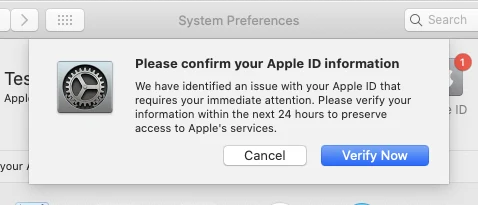
The alert offers a default "Verify Now" action. Most users would accept it, and it then launches a form asking for the Apple ID email and password. The researcher notes that the assets in the post are not Retina quality, and includes a video of the whole flow:
The key point is that this scary-looking alert, rendered right inside System Preferences, could be sent by any app running on the Mac. The notification could even be made to look like it came from the System Preferences app itself, which makes it far more believable.
Exploitation
Step 1: ship an ordinary-looking app
The attacker distributes an app that looks like a simple, regular application. It could even be a sandboxed app. No special privileges are needed, because the daemon accepts connections from any process that can look up its Mach service.
Step 2: post the follow-up notification
From inside that app, the attacker sends commands to followupd that trigger the Apple ID verification dialog. The report does not include the exact command or payload used, only that the daemon accepted commands from the app and that these could trigger the dialog within System Preferences.
Step 3: collect the credentials
When the user accepts the default "Verify Now" action and fills in the form, the email and password are sent to the attacker rather than to Apple. The report does not show the form's submission mechanism or the endpoint that received the data.
Step 4: defeat two-factor authentication
A sophisticated attacker could go further. They could try to authenticate the stolen credentials on a machine under their control, which causes a two-factor code to appear on the victim's device, and then convince the victim to type that code into the panel. The code is then sent to the attacker, who gains access to pretty much all the data in the Apple account.
Even without that step, the researcher notes that it is possible to extract some information from an Apple ID just by authenticating with the email and password, without two-factor authentication.
Root cause
The flaw is a missing authentication check on an XPC/Mach service. followupd did not validate the processes connecting to it, so any process that could look up its Mach service, sandboxed apps included, could send it commands. The daemon's power is the problem: it can post notifications that the system presents as first-party prompts.
Existing defences did not stop it because sandboxed apps could still look up this Mach service, and because the UI itself is genuine system UI. The user's usual checks, such as verifying the sender or the domain, have nothing to act on when the prompt comes from the operating system.
Impact
Before the fixes, an attacker who could get an app onto a Mac could use it to run a convincing phishing flow that harvests the Apple ID email and password; after the partial fix, unsolicited notifications without user permission remained possible. With social engineering of the two-factor code, the attacker could gain access to pretty much all the data in the victim's Apple account. The report hedges the two-factor step as something a sophisticated attacker could devise, and notes that some account information can be extracted with the email and password alone, without two-factor authentication.
Fix
Apple shipped a partial fix in macOS 11.3. It added an allow list for the URL launched when the user clicks "Verify Now". With only Apple-approved URLs permitted, the attack is no longer very useful, except for sending unsolicited notifications without user permission.
A complete fix came in macOS 12.3, tracked as CVE-2022-22660. It stops any random binary on the system from talking to the daemon and registering notifications, regardless of the destination URL. Apple did this by introducing a new entitlement, com.apple.private.followup. As of macOS 12.3, when a process attempts to connect to the CoreFollowUp daemon, the connection is validated by checking whether the connecting process has that entitlement in its code signature, and communication is denied if it does not.
The researcher's broader point is that this is not only an Apple problem. Many third-party apps on macOS ship privileged daemons that accept connections over XPC, and those services should authenticate the calling process to prevent malicious use and exfiltration of user data.
Timeline
| Date | Event |
|---|---|
| December 23, 2020 | Issue discovered and reported to Apple's security team |
| January 11, 2021 | Apple replies confirming it is investigating |
| February 15, 2021 | Apple replies that it will be fixed in a future update |
| April 26, 2021 | macOS 11.3 released with a partial fix |
| August 31, 2021 | US$5000 bug bounty payment received from Apple |
| March 14, 2022 | macOS 12.3 released with a complete fix (CVE-2022-22660) |
The researcher notes that it took Apple quite a long time to fully address the issue.
A note on Apple's bug bounty process
The researcher's account of payment applies to his own situation, and he notes it may vary by location. Payment is made through an Apple Developer account: to receive it you need a developer account with the paid applications agreement signed and banking set up. If you do not have one, you sign up and Apple refunds the $99 fee with the bounty payment. This requirement applies only at the payment stage, not to submitting the report or communicating with Apple's security team. Anyone can submit reports by emailing [redacted].
The email used to submit the original report must be associated with the developer account, otherwise Apple cannot pay. In this case the report was sent from an email that is part of the researcher's Apple ID and therefore part of his developer account, but it was not the primary Apple ID email, which led to some back and forth. His recommendation is to submit from the primary Apple ID email associated with the developer account, the account holder email. He received payment about a week after replying with the developer account information. His main criticism of the process is that Apple does not communicate very well throughout it and can take a long time to fully address an issue.
Variants to test
- Enumerate Mach services reachable from a sandboxed app and try connecting to each privileged daemon. A positive result is a connection accepted from a process that should not be authorised, ideally followed by an observable side effect such as a notification or a privileged action.
- Look for daemons that accept a URL or other destination from the caller and then open it in a trusted UI context. A positive result is a system prompt that leads to an attacker-chosen destination.
- Check whether a daemon validates the caller's code signature or entitlement, and whether that check can be bypassed by a process without the entitlement. A positive result is communication succeeding without the required entitlement.
- Test whether notifications can be made to appear as if they originate from a trusted system component. A positive result is a prompt attributed to a first-party app that the caller did not control.
- For third-party apps with XPC services, check whether the service authenticates the calling process at all. A positive result is a privileged operation performed on behalf of an unauthorised client.
What happened, in plain words
Most of us have been warned about phishing: an email that pretends to be from your bank or from Apple, telling you something is wrong with your account and that you must act quickly. Many companies even send fake phishing emails to their own staff to test whether people spot them. The usual advice is to check who sent the message and to look at the address of any link before you click it.
This story is about a phishing attempt where that advice does not help, because the message does not arrive by email at all. It appears as a notification on your Mac, and the login screen it leads you to sits inside System Preferences, the app where you normally change your Mac's settings. The researcher, Guilherme Rambo, found that any app running on a Mac could make the system show a convincing "Verify your Apple ID information" prompt, and that a malicious app could use it to lead users to a form that sends their Apple ID email and password to the attacker. Apple fixed the problem in two stages, and paid a US$5000 bug bounty for the report.
To follow the rest of this article you only need to know how to use a computer and a browser. Every technical term is explained where it first appears, and there is a glossary at the end.
The issue on macOS
A phishing attack is a con: someone sends you a message that looks like it comes from a company you trust, hoping you will hand over a password or install something harmful. The researcher quotes Wikipedia's definition:
Phishing is a type of social engineering where an attacker sends a fraudulent (e.g. spoofed, fake, or otherwise deceptive) message designed to trick a person into revealing sensitive information to the attacker or to deploy malicious software on the victim’s infrastructure like ransomware.
In plain words: social engineering means tricking a person rather than a machine, and ransomware is malicious software that locks your files until you pay.
A typical example is an email that claims to be from Apple, saying there is a problem with your Apple ID and that you must act quickly. Your Apple ID is the account you use for iCloud, the App Store and other Apple services. Most careful users would notice the trick: they would check whether the sender really is Apple, and whether the link goes to an official Apple website. A domain is the part of a web address after the "www", such as apple.com; checking it is a common way to spot a fake link.
But what if the message did not come by email? What if a notification appeared on your Mac saying "Verify your Apple ID information", and when you opened System Preferences you saw an alert like this one?
That alert looks exactly like something Apple would show. It sits inside System Preferences, the app that manages your Mac's settings, and it offers a default "Verify Now" button. The researcher apologises for the images not being Retina quality, meaning they are not as sharp as a modern high-resolution screen would show. He also includes a video of the whole flow:
Most users, the researcher says, would click the default "Verify Now" action. That opens a form asking for your Apple ID email and password. Filling in a password form that the system itself presents feels safe, because it is the operating system talking to you, not a stranger.
The problem is that this alarming alert, shown right inside System Preferences, could be sent by any app running on your Mac. The malicious app could look like a simple, ordinary program, and it could even be a sandboxed app. A sandbox is a security feature that limits what an app is allowed to do, a bit like keeping a new employee in one room with only the files they need; a sandboxed app is supposed to be harmless even if it is malicious. The malicious app could even be a sandboxed app. The app could send the notification, and the notification could even be made to look as if it came from the System Preferences app itself, which makes it far more believable.
You might ask: what about two-factor authentication? Two-factor authentication, often shortened to 2FA, means logging in with two things: your password plus a second proof, usually a short code that appears on one of your devices. A sophisticated attacker could try to get around it. They could take your stolen email and password and try to log in on a machine they control. That attempt causes a two-factor code to appear on your device. The attacker then convinces you to type that code into the fake panel, and the code is sent to them. With the password and the code, the attacker gains access to pretty much all the data in your Apple account.
Even without that extra trick, the researcher notes that it is possible to extract some information from an Apple ID just by logging in with the email and password, without two-factor authentication.
The technical details
The attack relies on a mechanism in macOS, also present on iOS (the operating system on iPhones), called CoreFollowUp. You have probably seen the messages it produces: "Verify your Apple ID", "Finish Setting Up Your Device", and similar reminders that appear again and again. Those are posted through CoreFollowUp.
Several parts of macOS and iOS use CoreFollowUp, and they talk to it through a daemon called followupd. A daemon is a background program that runs without a window of its own and does a job for the rest of the system, like a back-office clerk who handles requests. Programs talk to daemons through a mechanism called XPC, short for cross-process communication: a way for one program to send a message to another program on the same machine. On macOS, each such service has a name, called a Mach service, that a program can look up in order to find it, a bit like looking up a phone number in a directory before calling.
The flaw was that followupd did not check who was connecting to it on macOS. Any process that could look up its Mach service, including sandboxed apps, could send it commands. Among those commands were ones that trigger the Apple ID verification dialog inside System Preferences. A process is simply a running program.
A partial fix arrived in macOS 11.3. It added an allow list for the URL that is opened when the user clicks "Verify Now". A URL is a web address, and an allow list is a list of things that are permitted, with everything else refused, like a guest list at a door. By allowing only Apple-approved URLs, the fix stopped the attack from being very useful, though an app could still send unsolicited notifications without the user's permission.
A complete fix came in macOS 12.3. It stops any random binary on the system from talking to the daemon and registering notifications, whatever the destination URL. A binary is a program file that the computer can run. Apple did this by introducing a new entitlement, com.apple.private.followup. An entitlement is a permission written into a program's code signature, which is a cryptographic stamp that identifies who made the program and what it is allowed to do; think of it as a badge that says which doors you may open. From macOS 12.3, when a process tries to connect to the CoreFollowUp daemon, the daemon checks whether the connecting process has that entitlement in its code signature, and refuses the connection if it does not.
The researcher calls this an interesting attack vector, meaning a route an attacker can take, and says it shows how important it is for Apple to protect powerful daemons against any random process that might try to do harm.
It is not only an Apple problem. Many third-party apps on macOS, meaning apps made by other companies, ship with their own privileged daemons that accept connections over XPC. Privileged here means the daemon can do things an ordinary app cannot. Such services should use some form of authentication of the calling process, meaning they should check who is calling before doing what they ask, to prevent malicious use and the theft of user data. For developers who want to learn more, the researcher points to a series of posts on theevilbit about secure coding for XPC.
Timeline
The researcher lists the dates of the whole process:
| Date | Event |
|---|---|
| December 23, 2020 | Issue discovered and reported to Apple's security team |
| January 11, 2021 | Apple replies confirming it is investigating |
| February 15, 2021 | Apple replies that it will be fixed in a future update |
| April 26, 2021 | macOS 11.3 released with a partial fix |
| August 31, 2021 | US$5000 bug bounty payment received from Apple |
| March 14, 2022 | macOS 12.3 released with a complete fix (CVE-2022-22660) |
A CVE, short for Common Vulnerabilities and Exposures, is a public identifier given to a known security flaw so that people can refer to it unambiguously. As the timeline shows, it took Apple quite a long time to fully address the issue, which the researcher says is far from ideal.
A note on Apple's bug bounty process
A bug bounty is a programme in which a company pays researchers for reporting security flaws. This was the researcher's first time taking part in Apple's programme, and he notes that the details below applied to his own situation and may vary by location; he is in Brazil.
One thing specific to Apple is how you get paid: through an Apple Developer account. A developer account is the account Apple gives to people who build apps for its platforms. To receive the payment, you must have such an account with the paid applications agreement properly signed and banking set up. If you do not have a developer account yet, you sign up for one, and Apple refunds the $99 fee with your bounty payment.
This account requirement does not apply to submitting the initial bug report or to communicating with Apple's security team. It only becomes a requirement once it gets to the point of getting paid. Anyone can submit security vulnerability reports by emailing [redacted], a process detailed on Apple's support site.
The email you use to submit the original report must be associated with that developer account, otherwise Apple cannot pay you. In this case, the report was sent from an email that is part of the researcher's Apple ID, which is in turn part of his developer account. But that email was not his primary Apple ID email, meaning the main address on the account, so it took some back and forth until Apple understood that the address was already part of his developer account through his Apple ID.
His recommendation: if you are already a member of the Apple Developer programme, submit your security vulnerability reports through the primary Apple ID email associated with that account, the account holder email. That is what he will do from now on. Despite this minor bump in the process, he received his payment about a week after replying with the developer account information.
All in all, he describes it as a mostly positive experience. The main thing he does not like about how Apple does it is that the company does not communicate very well throughout the process, and it can take a really long time to completely address an issue.
Glossary
- Allow list: a list of things that are permitted, with everything not on the list refused.
- Apple Developer account: the account Apple gives to people who build apps for its platforms; needed to receive a bounty payment.
- Apple ID: the account used for iCloud, the App Store and other Apple services.
- Binary: a program file that the computer can run.
- Bug bounty: a programme in which a company pays researchers for reporting security flaws.
- Code signature: a cryptographic stamp that identifies who made a program and what it is allowed to do.
- CoreFollowUp: the macOS and iOS mechanism behind system reminders such as "Verify your Apple ID".
- CVE: Common Vulnerabilities and Exposures, a public identifier given to a known security flaw.
- Daemon: a background program that runs without a window and does a job for the rest of the system.
- Domain: the part of a web address after the "www", such as apple.com.
- Entitlement: a permission written into a program's code signature, like a badge saying which doors it may open.
followupd: the daemon through which system components talk to CoreFollowUp.- iOS: the operating system on iPhones.
- Mach service: the name a program looks up to find and contact a system service on macOS.
- macOS: Apple's operating system for Mac computers.
- Phishing: a con in which a fraudulent message tricks a person into revealing sensitive information or installing malicious software.
- Process: a running program.
- Ransomware: malicious software that locks your files until you pay.
- Retina: Apple's name for high-resolution screens; non-Retina images look less sharp.
- Sandbox: a security feature that limits what an app is allowed to do.
- Social engineering: tricking a person rather than a machine.
- System Preferences: the macOS app where you change your Mac's settings.
- Two-factor authentication (2FA): logging in with two things, usually a password plus a short code that appears on one of your devices.
- URL: a web address.
- XPC: cross-process communication, a way for one program to send a message to another program on the same machine.

