CSRF Protection Bypass in Atlassian Confluence Server
A CORS misconfiguration in the applinks-cors plugin reflected the Origin header in Access-Control-Allow-Origin with credentials allowed for certain URL patterns, including a 404 page that contained the user's CSRF token. An attacker could read that token cross-origin and use it to bypass CSRF protection, potentially creating an administrator account and achieving RCE if secure administrator sessions were disabled.

The Server version of Atlassian Confluence comes with a built-in plugin named applinks-cors, with the following declaration in file atlassian-plugin.xml:
The full write-up lives on its author's site
It belongs to its author, so we link to it rather than copy it. The other two tabs are our own rewrites, checked against it.
Context
Atlassian Confluence Server ships with a built-in plugin called applinks-cors. Its job is to add CORS headers to responses for a set of URL patterns, so that other applications can read those responses cross-origin. The plugin declares its filter in atlassian-plugin.xml, and the filter itself is the CorsFilter class.
The relevant behaviour is simple to state: for every request whose URL matches one of the configured patterns, the response gets Access-Control-Allow-Origin (ACAO) and Access-Control-Allow-Credentials (ACAC) headers. The value of ACAO is copied from the Origin header of the incoming request.

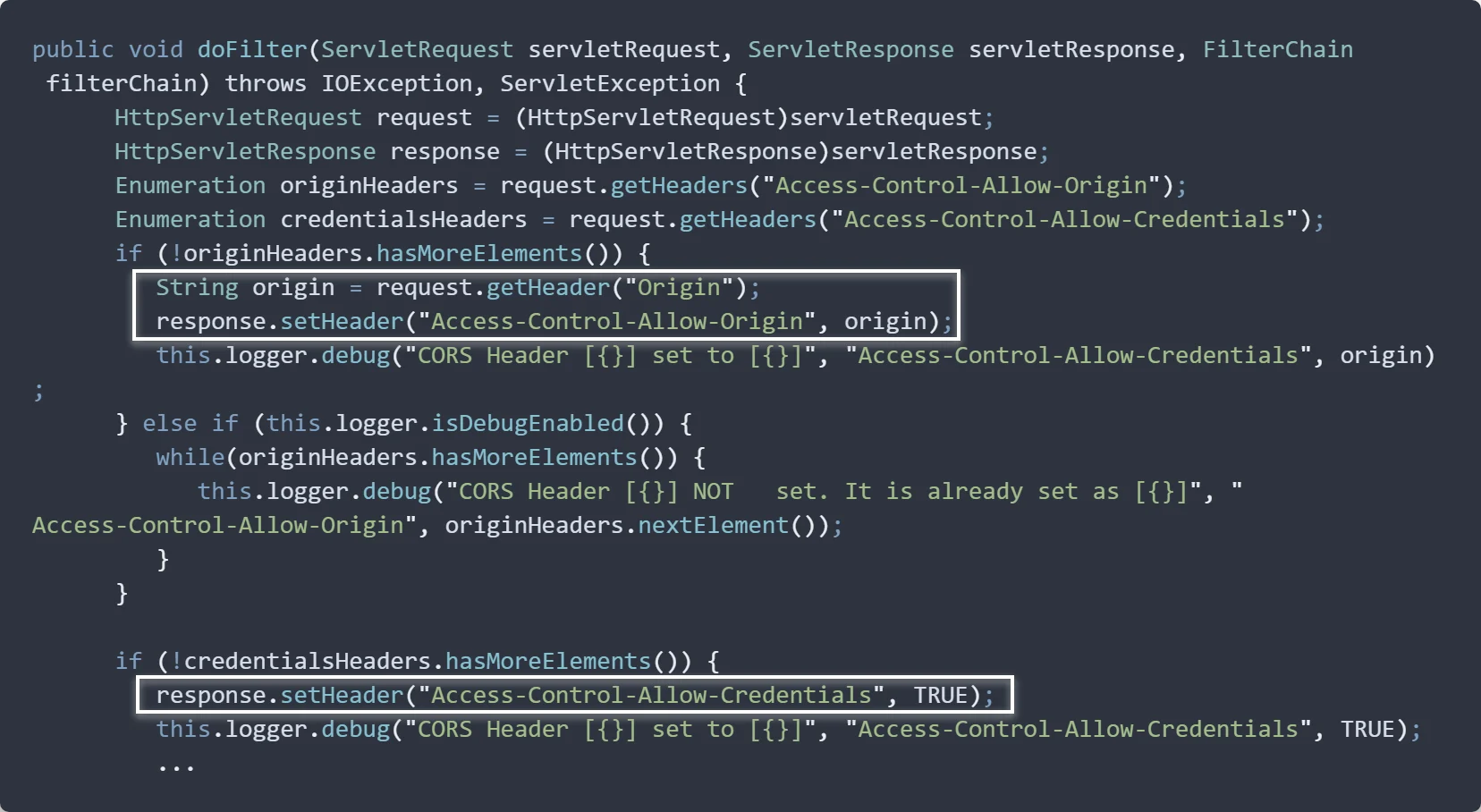
That combination, a reflected origin plus credentials allowed, is what makes the rest of this write-up possible. One of the patterns is /plugins/servlet/oauth/consumer-info*, and that pattern turns out to be the interesting one.
Setup
The report lists the versions that contain the fix (see below).
One environmental precondition matters a lot for reproduction: recent versions of Chrome implement the new SameSite behaviour, so the victim's cookies are not sent with cross-origin requests and most CSRF issues of this kind are no longer exploitable there. To reproduce the issue, the author recommends using Firefox.
On the target side, the impact depends on the Secure Administrator Session feature: the full chain applies when that feature is disabled, or when the victim is already inside a Secure Administrator Session.
Finding it
The starting point is the CorsFilter implementation. Because the filter reflects the request's Origin into ACAO and also sets ACAC, any page on any origin can make a credentialed request to a matching URL and read the response, provided the browser sends the session cookie.
The second ingredient is ordinary Confluence behaviour: requesting an invalid URL, for example /plugins/servlet/oauth/consumer-info/zzz, returns a 404 page.
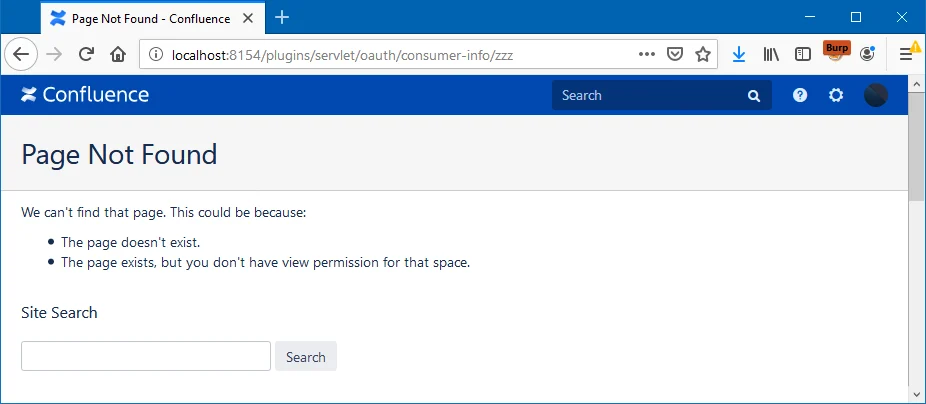
That 404 page still matches the /plugins/servlet/oauth/consumer-info* pattern, so the CORS headers are added to it as well. The response body of the 404 page contains the CSRF token of the current user, and because of the CORS headers the attacker's page can read it.
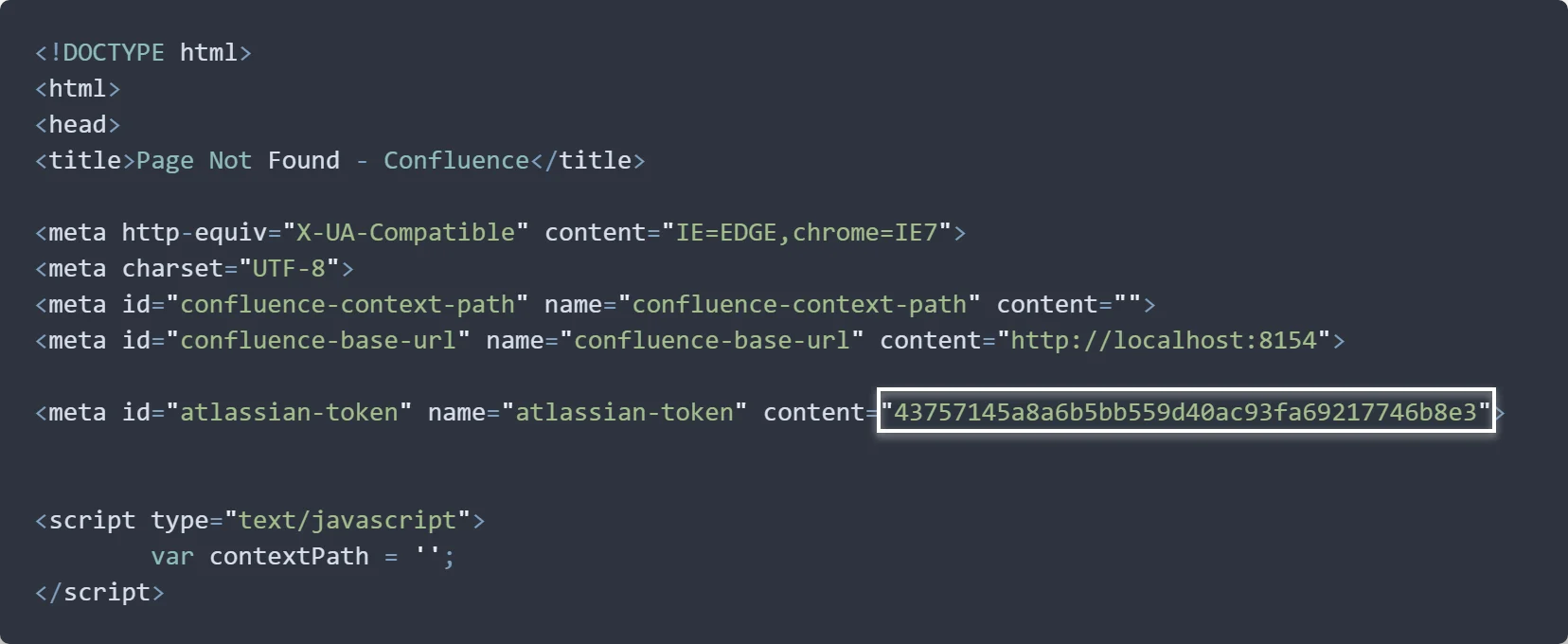
So a URL that looks like a dead end is in fact a readable, credentialed endpoint that hands out the victim's CSRF token.
Exploitation
The exploit strategy in the report is two steps.
Step 1: read the CSRF token cross-origin
Create a web page that, when visited by a victim, sends a request to the <victim-confluence-website>/plugins/servlet/oauth/consumer-info/ycs endpoint and reads the response to extract the CSRF token. The page reads the response to extract the CSRF token, provided the browser sends the victim's session cookie.
Step 2: use the token
Use the leaked token to bypass CSRF protection on Confluence. With a valid CSRF token for the victim's session, state-changing requests are no longer blocked by the anti-CSRF check.
What that buys the attacker
When the Secure Administrator Session feature is disabled, or the victim is already in a Secure Administrator Session, the leaked CSRF token can be used to create a new administrator user. That new administrator has the ability to gain RCE on the target application by uploading a malicious plugin.
Root cause
The mistake is in the CORS configuration of the applinks-cors plugin. The filter reflects the Origin header into Access-Control-Allow-Origin and sets Access-Control-Allow-Credentials, for every URL matching its patterns. Reflecting an arbitrary origin while allowing credentials means any site can read authenticated responses from those URLs; a correct implementation would only allow origins that are explicitly trusted.
The pattern /plugins/servlet/oauth/consumer-info* also matches an invalid path such as /plugins/servlet/oauth/consumer-info/zzz, and Confluence's 404 page for it includes the current user's CSRF token in its HTML. The CORS filter therefore makes a page that was never meant to be cross-origin readable into a token oracle.
The CSRF token is present in the 404 page and the CORS headers are applied to that page by the same filter, so the token can be read cross-origin. Recent Chrome versions implement the new SameSite behaviour, so most CSRF issues of this kind are no longer exploitable there.
Impact
An attacker who can get a victim to visit a malicious page can read that victim's CSRF token and then perform state-changing actions as the victim. In the conditions described above (Secure Administrator Session disabled, or victim already in such a session), this escalates to creating a new administrator account, and from there to remote code execution via a malicious plugin upload.
The report notes that with the new SameSite behaviour in recent Chrome versions, most CSRF vulnerabilities are no longer exploitable, as the victim's cookies will not be sent with cross-origin requests. Firefox was used for reproduction.
Fix
The issue was fixed in these versions:
- 6.13.9
- 6.6.17
- 7.0.3
- 7.1.0
The timeline in the report is:
- 26 Apr 2019: submission created on Bugcrowd.
- 12 Jul 2019: an incomplete fix was released.
- 17 Jul 2019: another submission created, as suggested by the Atlassian team.
- 15 Oct 2019: the issue was resolved, with a bounty of $1,800 x 2.
Variants to test
- Look for other built-in plugins that declare CORS filters reflecting the Origin header together with Access-Control-Allow-Credentials. A positive result is a response to a request from an arbitrary origin that carries ACAO equal to that origin and ACAC: true.
- Enumerate URL patterns used by such filters and probe invalid paths under each prefix (for example appending a random segment). A positive result is a 404 or error page that still carries the CORS headers and whose body contains a CSRF token or other per-user secret.
- Check whether other error pages (404, 500, access denied) under CORS-matched prefixes leak tokens or session-specific data. A positive result is readable secret material in the body of an error response.
- Test the same chain in browsers with and without strict SameSite enforcement to confirm whether the cookie is actually sent cross-origin. A positive result is the token being returned to the attacker's page in the browser under test.
- Where administrator sessions can be made "secure", check whether the token leak still works inside such a session. A positive result is a token that is accepted for privileged actions while the secure session is active.
What happened, in plain words
Atlassian Confluence Server is a piece of software that companies install on their own servers to let staff write and share documents together, a bit like a private wiki. It has a feature for administrators, and it has a built-in add-on (a "plugin") called applinks-cors that controls which other websites are allowed to read certain responses from Confluence.
That plugin made a mistake. For URLs matching its patterns, it copied whatever origin asked into the allow-origin header and allowed credentials. Because of that, a malicious website could quietly ask Confluence for a page, read the answer, and find a secret code inside it: the visitor's CSRF token. That token is the thing Confluence uses to check that a request really came from its own pages and not from somewhere else. With the token in hand, the attacker could bypass CSRF protection, and when the Secure Administrator Session feature is disabled or already satisfied, create a new administrator user and gain RCE by uploading a malicious plugin.
The researcher who found this reported it to Atlassian through the Bugcrowd bug bounty platform, and it was fixed. The bounty was $1,800 x 2; the timeline lists two submissions and an incomplete fix released in between.
This article walks through the whole thing slowly, explaining every term as it appears. You only need to know how to use a browser.
Background: the pieces you need to know
Before the technical part, here are the ideas involved, explained from zero.
- A server and a browser. When you visit a website, your browser (Chrome, Firefox) sends a request over the internet to a server, and the server sends back a response, usually a web page. That is the whole loop.
- A cookie. A small piece of data the server asks your browser to store and to send back with every later request to that same site. It is how a website remembers that you are logged in. Think of it as a wristband you get at a festival: you show it at every door and nobody asks for your ID again.
- A session. The period during which the server treats you as a known, logged-in user, identified by your cookie.
- A token. A secret string of characters that a server generates and expects to see again later. A CSRF token is a token whose only job is to prove that a form submission came from a page the server itself served, not from a page on another site.
- CSRF (Cross-Site Request Forgery). An attack where a malicious website makes your browser send a request to another site where you are logged in. Because your browser automatically attaches your cookie, the other site thinks the request is genuinely from you. The classic comparison: a forged letter with your signature already on it, because the postal service stamps every letter you post.
- CORS (Cross-Origin Resource Sharing). Browsers have a rule called the same-origin policy: a page from
site-a.comis not allowed to read responses fromsite-b.com. CORS is the official way forsite-b.comto say "actually,site-a.comis allowed to read my responses". It works through response headers (small labels attached to the response). - Origin. The combination of scheme, host and port of a page, for example
https://example.com. When your browser makes a cross-origin request, it puts the origin of the page into an Origin request header so the server can decide whether to allow it. - ACAO (Access-Control-Allow-Origin). The response header that names which origin is allowed to read the response.
- ACAC (Access-Control-Allow-Credentials). The response header that says whether cookies may be included in the cross-origin request and its response. Without it, the browser sends no cookie and hides the response.
- A plugin. An optional add-on that extends a product. Confluence ships with several built-in ones.
- A filter. A piece of code that runs on the server before or after the main page logic, and can add or change things in the request or response. The plugin here uses a filter to add CORS headers.
- A URL pattern. A rule like
/plugins/servlet/oauth/consumer-info*that matches a whole family of URLs, not just one exact address. - A 404 page. The page a server returns when the address you asked for does not exist.
- RCE (Remote Code Execution). The worst kind of compromise: the attacker can make the server run their own code, effectively owning the machine.
- SameSite. A cookie setting that tells the browser whether to send the cookie along with requests that come from a different site. Modern browsers increasingly refuse to send such cookies, which blocks many CSRF attacks.
Context: the plugin and its filter
Atlassian Confluence Server ships with a built-in plugin called applinks-cors. Its job is to add CORS headers to responses for a set of URL patterns, so that other applications can read those responses cross-origin. The plugin declares its filter in atlassian-plugin.xml, and the filter itself is the CorsFilter class.
The relevant behaviour is simple to state: for every request whose URL matches one of the configured patterns, the response gets Access-Control-Allow-Origin (ACAO) and Access-Control-Allow-Credentials (ACAC) headers. The value of ACAO is copied from the Origin header of the incoming request.
The image shows the declaration inside atlassian-plugin.xml.
The second image shows the CorsFilter class itself, the code that adds the headers to the response.
That combination, a reflected origin plus credentials allowed, is what makes the rest of this write-up possible. The report does not list the full set of patterns, but one of them is /plugins/servlet/oauth/consumer-info*, and that pattern turns out to be the interesting one.
Why is reflecting the origin dangerous? Imagine a nightclub bouncer who, instead of checking a guest list, simply repeats back whatever name you give him and lets you in. Here the server takes whatever Origin the browser sends and copies it into ACAO. So if a page on evil.example asks, the answer says Access-Control-Allow-Origin: https://evil.example, and because ACAC is also set, the browser hands over the response, cookie included. A correct implementation would only ever name origins that are explicitly trusted.
Setup: what you need to reproduce it
The report lists the versions that contain the fix (see below).
One environmental precondition matters a lot for reproduction: recent versions of Chrome implement the new SameSite behaviour, so the victim's cookies are not sent with cross-origin requests and most CSRF issues of this kind are no longer exploitable there. To reproduce the issue, the author recommends using Firefox.
In plain words: the attack depends on the victim's browser attaching the Confluence cookie to a request that was started by another website. Chrome now refuses to do that in many cases, so the attack simply does not work there. The author recommends using Firefox to reproduce the issue.
On the target side, the impact depends on the Secure Administrator Session feature: the full chain applies when that feature is disabled, or when the victim is already inside a Secure Administrator Session. The full chain applies when that feature is disabled, or when the victim is already inside a Secure Administrator Session.
Finding it: how the pieces fit together
The starting point is the CorsFilter implementation. Because the filter reflects the request's Origin into ACAO and also sets ACAC, any page on any origin can make a credentialed request to a matching URL and read the response, provided the browser sends the session cookie.
The second ingredient is ordinary Confluence behaviour: requesting an invalid URL, for example /plugins/servlet/oauth/consumer-info/zzz, returns a 404 page.
The image shows that 404 page: the server's way of saying "there is nothing at this address".
That 404 page still matches the /plugins/servlet/oauth/consumer-info* pattern, so the CORS headers are added to it as well. The response body of the 404 page contains the CSRF token of the current user, and because of the CORS headers the attacker's page can read it.
So a URL that looks like a dead end is in fact a readable, credentialed endpoint that hands out the victim's CSRF token. The pattern was written with a wildcard at the end, so it matches not only the intended address but anything appended to it, including nonsense like zzz. And Confluence's 404 page happens to include the visitor's CSRF token in its HTML. Put the two together and the error page becomes a machine for handing out tokens.
Exploitation: the two steps
The exploit strategy in the report is two steps.
Step 1: read the CSRF token cross-origin
Create a web page that, when visited by a victim, sends a request to the <victim-confluence-website>/plugins/servlet/oauth/consumer-info/ycs endpoint and reads the response to extract the CSRF token. The page reads the response to extract the CSRF token, provided the browser sends the victim's session cookie.
Why this works, step by step:
- The victim is logged in to Confluence, so their browser holds a Confluence cookie.
- The victim opens the attacker's page. That page runs a small script that asks the browser to fetch the Confluence URL above.
- Because the request goes to a different site, the browser adds an Origin header naming the attacker's page.
- The Confluence filter copies that origin into ACAO and sets ACAC, so the browser decides the attacker's page is allowed to read the answer.
- If the browser sends the victim's cookie along, Confluence answers with the 404 page, and the page's script reads the HTML and pulls out the CSRF token.
Step 2: use the token
Use the leaked token to bypass CSRF protection on Confluence. With a valid CSRF token for the victim's session, state-changing requests are no longer blocked by the anti-CSRF check.
In other words, the token is the stamp the server looks for on every form submission. Once the attacker's page knows the stamp, it can put it on its own forged requests, and Confluence accepts them as genuine.
What that buys the attacker
When the Secure Administrator Session feature is disabled, or the victim is already in a Secure Administrator Session, the leaked CSRF token can be used to create a new administrator user. That new administrator has the ability to gain RCE on the target application by uploading a malicious plugin.
So the chain is: read a token from an error page, and when the Secure Administrator Session feature is disabled or already satisfied, use it to create an admin account, then upload a malicious plugin to gain RCE.
Root cause: where the mistake actually is
The mistake is in the CORS configuration of the applinks-cors plugin. The filter reflects the Origin header into Access-Control-Allow-Origin and sets Access-Control-Allow-Credentials, for every URL matching its patterns. Reflecting an arbitrary origin while allowing credentials means any site can read authenticated responses from those URLs; a correct implementation would only allow origins that are explicitly trusted.
The second half of the problem is the choice of patterns. /plugins/servlet/oauth/consumer-info* matches not only the intended endpoint but also invalid paths under it, and Confluence's 404 page for those paths includes the current user's CSRF token in its HTML. The CORS filter therefore makes a page that was never meant to be cross-origin readable into a token oracle.
Existing defences did not stop it: the CSRF token is present in the 404 page and the CORS headers are applied to that page by the same filter, so the anti-CSRF mechanism is undermined by the CORS misconfiguration rather than by any weakness in the token itself. Recent Chrome versions implement the new SameSite behaviour, so most CSRF issues of this kind are no longer exploitable there.
Impact: what an attacker could do
An attacker who can get a victim to visit a malicious page can read that victim's CSRF token and then perform state-changing actions as the victim. In the conditions described above (Secure Administrator Session disabled, or victim already in such a session), this escalates to creating a new administrator account, and from there to remote code execution via a malicious plugin upload.
The report notes that with the new SameSite behaviour in recent Chrome versions, most CSRF vulnerabilities are no longer exploitable, as the victim's cookies will not be sent with cross-origin requests. Firefox was used for reproduction.
Fix: the versions that contain it
The issue was fixed in these versions:
- 6.13.9
- 6.6.17
- 7.0.3
- 7.1.0
The timeline in the report is:
- 26 Apr 2019: submission created on Bugcrowd.
- 12 Jul 2019: an incomplete fix was released.
- 17 Jul 2019: another submission created, as suggested by Atlassian team.
- 15 Oct 2019: the issue got resolved, with a bounty of $1,800 x 2.
Variants to test: where else to look
If you want to hunt for similar bugs, these are the directions the report suggests. Each one is written as "what to try" and "what a hit looks like".
- Look for other built-in plugins that declare CORS filters reflecting the Origin header together with Access-Control-Allow-Credentials. A positive result is a response to a request from an arbitrary origin that carries ACAO equal to that origin and ACAC: true.
- Enumerate URL patterns used by such filters and probe invalid paths under each prefix (for example appending a random segment). A positive result is a 404 or error page that still carries the CORS headers and whose body contains a CSRF token or other per-user secret.
- Check whether other error pages (404, 500, access denied) under CORS-matched prefixes leak tokens or session-specific data. A positive result is readable secret material in the body of an error response.
- Test the same chain in browsers with and without strict SameSite enforcement to confirm whether the cookie is actually sent cross-origin. A positive result is the token being returned to the attacker's page in the browser under test.
- Where administrator sessions can be made "secure", check whether the token leak still works inside such a session. A positive result is a token that is accepted for privileged actions while the secure session is active.
Glossary
- ACAO (Access-Control-Allow-Origin): a response header that names which website is allowed to read the response.
- ACAC (Access-Control-Allow-Credentials): a response header that says whether cookies may be sent with a cross-origin request and its response.
- applinks-cors: a built-in Confluence Server plugin that adds CORS headers to responses for certain URL patterns.
- Atlassian Confluence Server: software companies install on their own servers for staff to write and share documents together.
- atlassian-plugin.xml: the configuration file in which a Confluence plugin declares its components, including filters and the URL patterns they apply to.
- Bugcrowd: a bug bounty platform where researchers report vulnerabilities to companies and receive rewards.
- Cookie: a small piece of data a site asks your browser to store and send back with later requests, commonly used to keep you logged in.
- CORS (Cross-Origin Resource Sharing): the browser mechanism that lets one website read responses from another, when the other site explicitly allows it through headers.
- CorsFilter: the class in the applinks-cors plugin that adds the CORS headers to responses.
- CSRF (Cross-Site Request Forgery): an attack where a malicious site makes your browser send a request to another site where you are logged in, so the request looks like it came from you.
- CSRF token: a secret value the server puts into its pages and expects back on form submissions, proving the request came from its own pages.
- Endpoint: a specific URL on a server that performs a particular function.
- Filter: server code that runs around the main page logic and can add or change things in the request or response.
- 404 page: the page a server returns when the requested address does not exist.
- Origin: the scheme, host and port of a page, for example
https://example.com; browsers send it in the Origin header on cross-origin requests. - Plugin: an add-on that extends a product's features.
- RCE (Remote Code Execution): a compromise in which the attacker can make the server run their own code.
- SameSite: a cookie setting that controls whether the browser sends the cookie with requests coming from another site.
- Secure Administrator Session: a Confluence feature that adds an extra confirmation step for administrator actions.
- Session: the period during which a server treats you as a known, logged-in user, identified by your cookie.
- Token: a secret string a server generates and later expects to see again, used to prove identity or authenticity.
- URL pattern: a rule that matches a family of URLs, often using a wildcard at the end.
- Wildcard: a symbol in a pattern that stands for "anything here", so one rule can match many addresses.




