Jira defenses for Cross-Site Request Forgeries
The POP3 test-connection request in Jira's mail server settings did not check the CSRF token or the Referer header, so a logged-in administrator visiting a malicious page could be made to trigger connections to hosts and ports chosen by the attacker. By timing how long each request took, the attacker could map hosts reachable from the Jira server.

Last October I dived into the world of Jira Software (version 8.4.1) in the hope of discovering new vulnerabilities. Initially, I came across a few Cross-Site Request Forgery (CSRF) weaknesses, leading me to a vulnerability that allows a user to instruct the Jira server to initiate connections to other hosts of my…
The full write-up lives on its author's site
It belongs to its author, so we link to it rather than copy it. The other two tabs are our own rewrites, checked against it.
Context
Jira Software, at the version I tested (8.4.1), is the target here. The feature at the centre of this write-up is the outgoing POP3 mail server configuration: a system administrator fills in a form with the mail server details (server name, host address, port number, user credentials and so forth) and can either request to set up a new mail server or test the mail server connection. The test connection button makes the Jira server attempt to connect to the mail server specified on the form, and the connection consists of a credential exchange with the POP3 mail server.
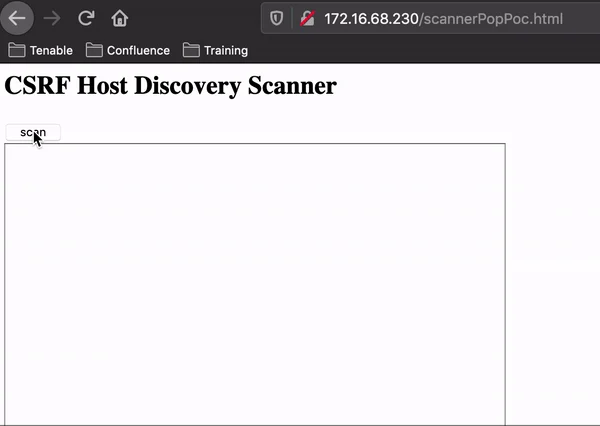
The vulnerability I found, CVE-2019-20099, affects Atlassian Jira Server and Data Center versions 8.2.4 prior to 8.7.0. It is a CSRF weakness in that test connection request, and it can be leveraged to perform a host discovery scan of networks visible to an affected Jira server.
Setup
I started by looking at how Jira defends state changing requests in general. The server sets CSRF tokens in an HttpOnly cookie on its clients, and for requests that perform state changing operations it checks that the token is present both in the CSRF cookie and in a CSRF parameter. The Referer header is also validated against the server domain and port number to prevent same origin policy violations.
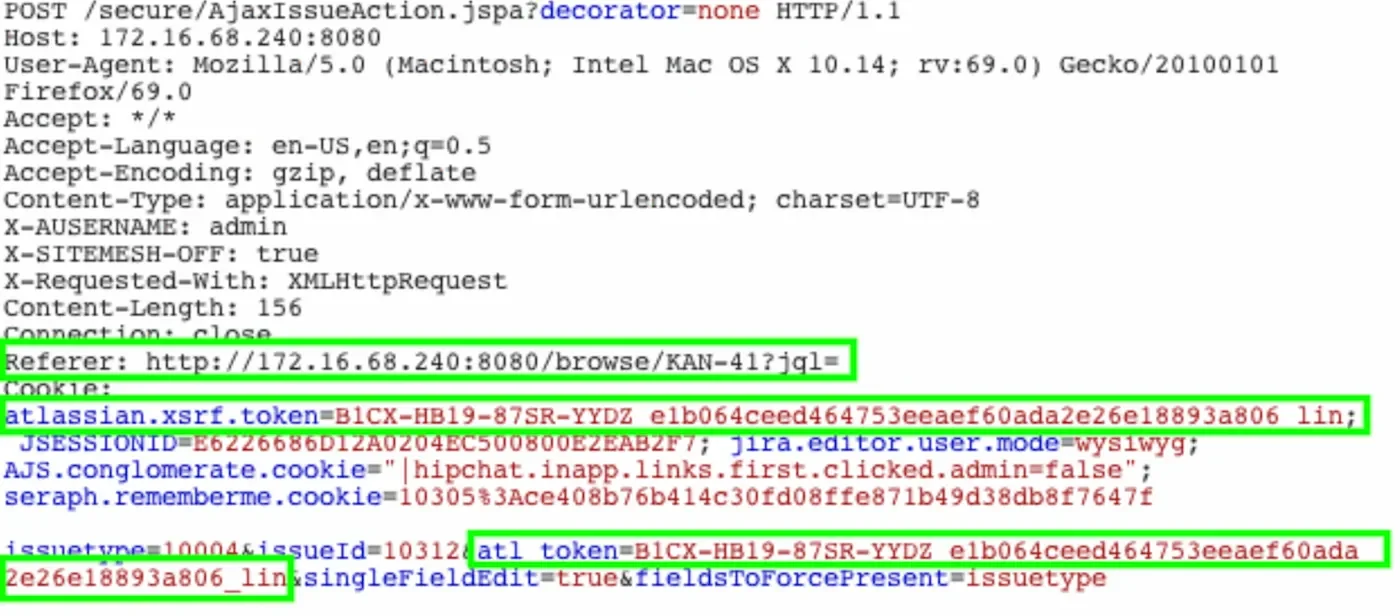
The example above is a POST request that sets an issue's type to bug. The CSRF cookie and the CSRF parameter are named Atlassian.xsrf.token and atl_token. The Referer header is validated by checking whether its value commences with the Jira Server's IP address and port number.
For the proof of concept I set up a host with a POP3 mail server to receive verification connections from the Jira server, and a web server to host a webpage with the CSRF script. The idea was to simulate a user clicking on a malicious link that would reuse the user's session ID cookies to make requests to the Jira server for verifying mail server connections on hosts and ports of my choice.
Finding it
While testing various requests, I discovered that Jira does not always validate these values. The test connection request for the POP3 mail server was the one that stood out: when looking into it, there was neither a Referer header nor a CSRF parameter validation check implemented. That meant the only requirement to perform a CSRF on this request was to reuse the cookies from a logged in system administrator.
Exploitation
Step 1: Host the CSRF page
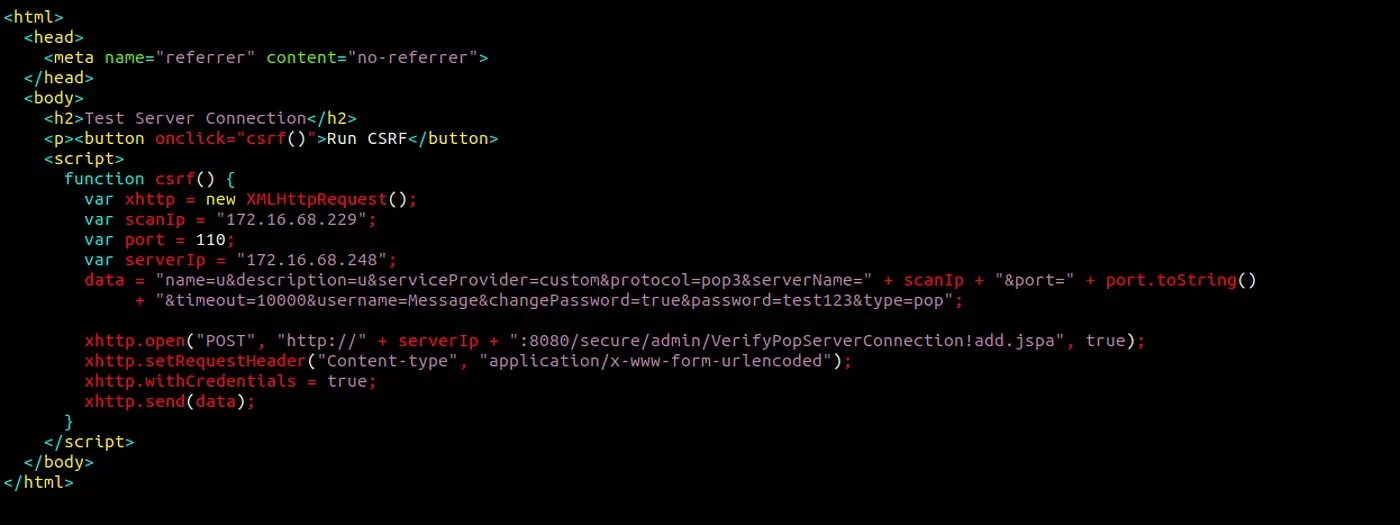
I hosted a webpage containing a script that would make the browser of a logged in administrator issue the test connection request to the Jira server. Here is the script I used for the CSRF webpage to exploit the POP3 server connection verification:
Step 2: Observe the traffic
Below is a snippet of a Wireshark capture taken while running the above script.
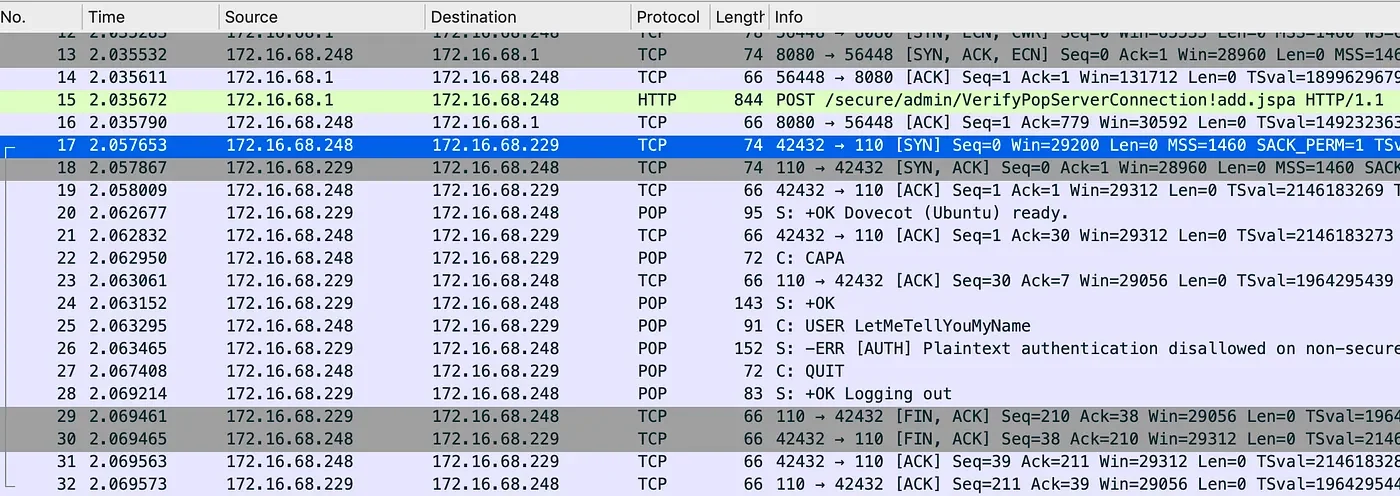
The victim user's browser ([redacted]) sends a POST request to the Jira server ([redacted]). Immediately after this, a POP3 connection is initiated from Jira to the specified host and port ([redacted]:110). There is an exchange of credentials which fail to authenticate and the connection terminates.
The script was able to send a request to the Jira server via a CSRF link to get the server to connect to a host and port of my choice.
Step 3: Note the message channel
The POP3 connection verification request requires a username and password to be set in the POST parameters. These parameters get sent to the specified host and port after a successful handshake, which provides a mechanism through which an attacker could send messages or commands to listening hosts.
Step 4: Measure request timing
XMLHttpRequest objects have a readyState property which can be used in conjunction with the onreadystatechange event handler. The readyState property holds a value between 0 and 4 representing the state of the request. The following table was taken from the w3schools.com website and describes the meaning of readyState values:
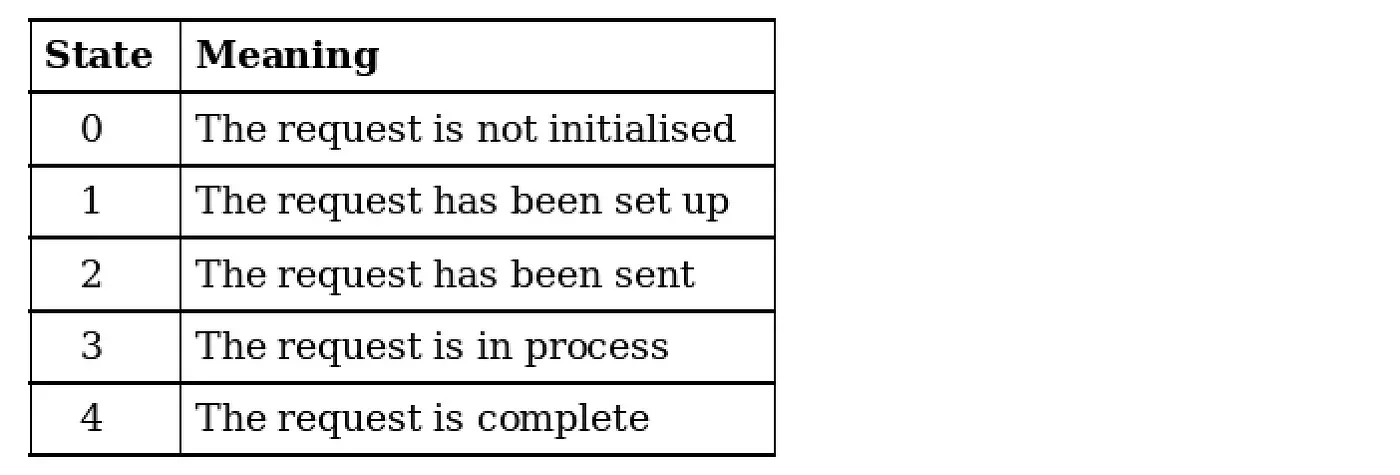
The onreadystatechange event handler gets called every time the readyState value changes, so I amended the web page script to alert me every time the XMLHttpRequest changed state. I wanted to see whether there were any differences in the state transitions as I made requests to connect to different host IPs and port numbers.
I added the following lines to the script to keep track of state transitions:

When the Jira server attempted to connect to an IP address for which there was no corresponding host assigned, the request state transition from state 1 to 4 took about 3 seconds to complete. The server was returning a response to the POST request only after it had terminated the connection with the specified host, so if the IP address did not correspond to a running host, it would take about 3 seconds for the connection to time out and terminate.
Step 5: Scan a range
I created a PoC script that exploits this vulnerability to perform a host discovery scan from the Jira server. The script makes several requests to the Jira server via CSRF for verifying mail servers across a range of IP addresses on an arbitrary port (the PoC uses port 110, but this can be changed to any other port). The time taken to complete each request is measured and posted on a text area of the web page.
After running the PoC against the Jira server, the text area in the web page was filled with scanned IP addresses together with the corresponding time taken to get a response.
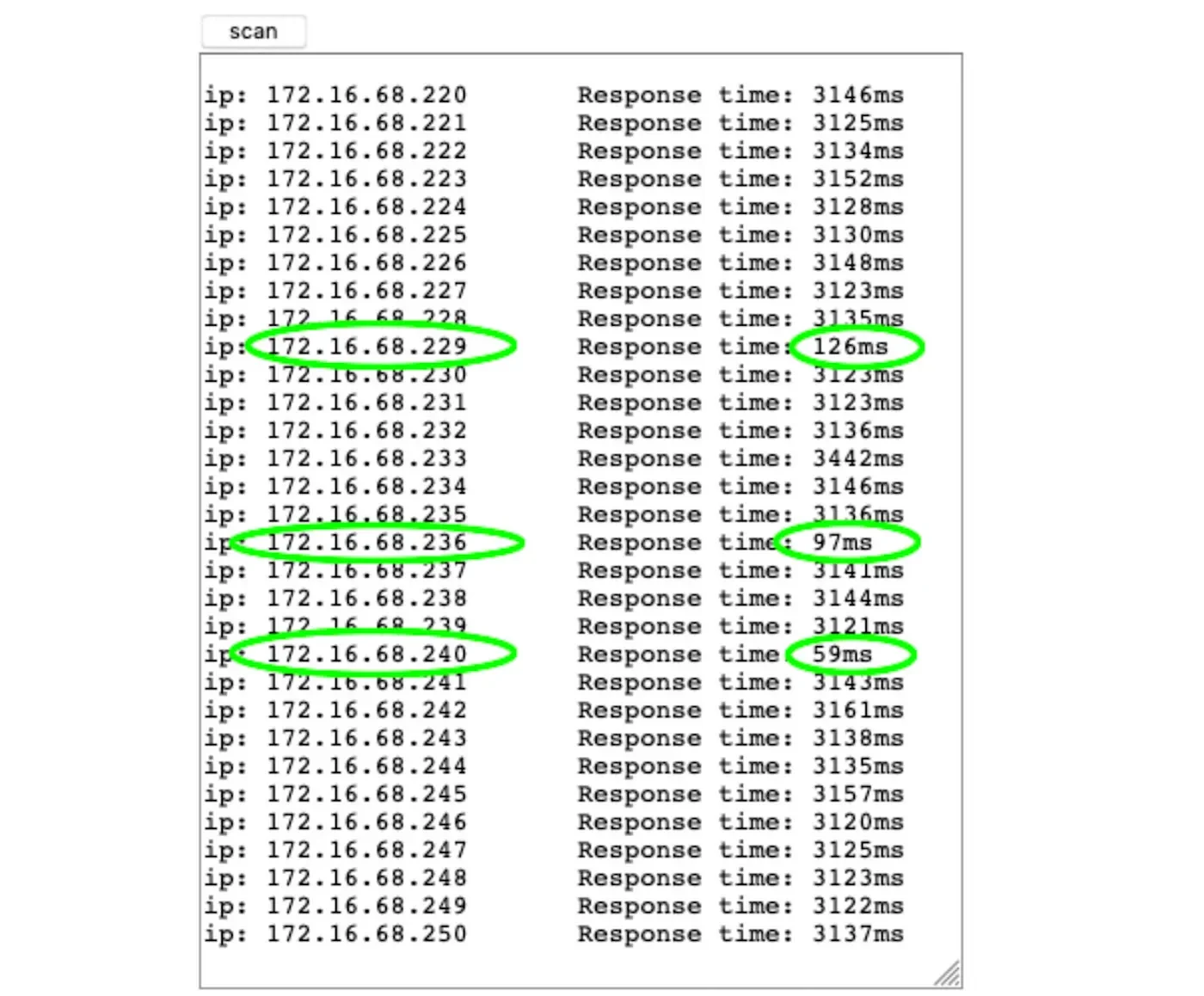
To validate the results I ran an Nmap host discovery scan from the Jira server.
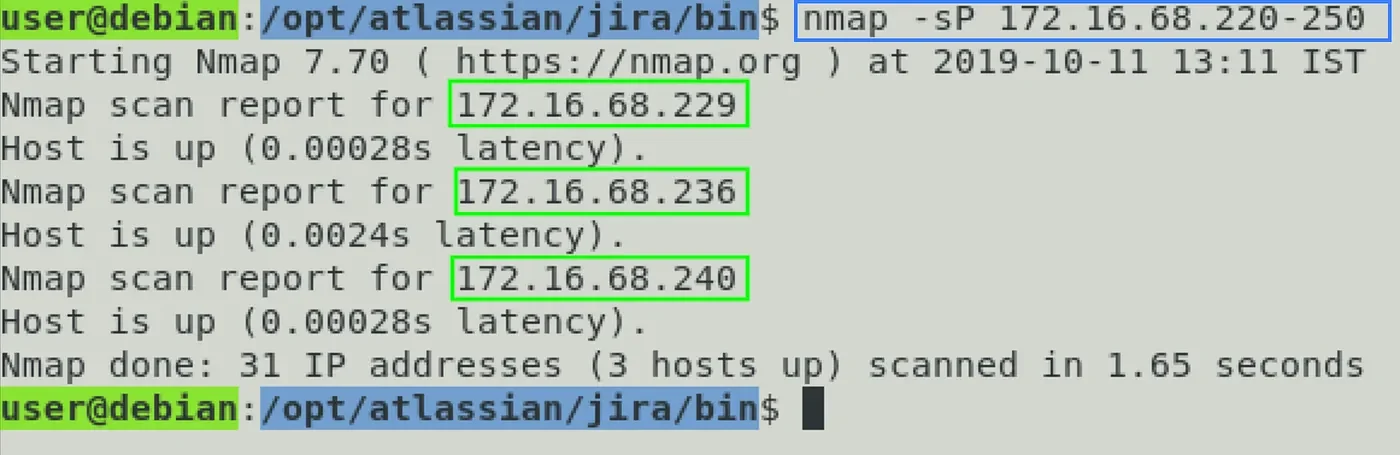
These results from the Nmap scans are consistent with the results from the PoC scan.
The following snippet of a Wireshark capture shows that the PoC caused Jira to initiate a POP connection to an arbitrary host and port, and demonstrates how the username field can be used for sending messages to hosts.

Root cause
The test connection request for the POP3 mail server was missing both the Referer header check and the CSRF parameter check that Jira applies to other state changing requests. When looking into the test connection request, there was neither a Referer header nor a CSRF parameter validation check implemented, so a cross-site request carrying only the administrator's cookies was accepted. The server then acted on the attacker supplied host and port, and because it only responded after the connection attempt had terminated, a missing host took about 3 seconds to time out.
Impact
An attacker who can get a logged in system administrator to load a malicious page can make the Jira server initiate POP3 connections to hosts and ports of the attacker's choice. Because the username and password POST parameters are sent to the specified host and port after a successful handshake, this also provides a mechanism through which an attacker could send messages or commands to listening hosts. By measuring how long each request takes, the attacker can perform a host discovery scan of networks visible to the affected Jira server, since addresses with no corresponding host took about 3 seconds to time out. The requirement is a logged in system administrator whose browser loads the attacker's page.
Fix
The issue has been fixed in Atlassian Jira Server and Data Center version 8.7.0. The vulnerability was disclosed to Atlassian through Tenable's coordinated disclosure process, and Tenable's research advisory outlines the disclosure timeline and links to Jira's release notes.
Variants to test
- Other administrative forms that trigger outbound connections (mail, LDAP, proxy or integration tests). A positive result is a request that is accepted without a valid atl_token parameter or with a Referer from another origin, and that causes the server to contact the supplied host.
- Timing side channels on connection tests. A positive result is a measurable difference between a host that accepts the connection and one that does not, visible from the browser through readyState transitions.
- Attacker controlled fields that are forwarded to the remote service. A positive result is seeing the username or password value arrive at a listener you control after the handshake.
- Port variation on the same request. A positive result is the server connecting to arbitrary ports, not just the default mail port, which widens the scan beyond a single service.
What happened, in plain words
A security researcher spent time poking at Jira Software, a tool that teams use to track tasks and bugs. He found a way to make a Jira server reach out to other computers on its network, by getting a logged in administrator to click a malicious link. By timing how long each of those reach-outs took, he could work out which computers were switched on. He then compared his results with a standard network scanning tool and they matched. The flaw was reported to Atlassian, the company that makes Jira, and fixed in a later version.
This article walks through the whole story slowly, explaining every term as it comes up, so you can follow it even if you have never done any security work before.
Some background first
What Jira is
Jira is a web application. That means it runs on a server (a computer somewhere that is always on and answers requests) and people use it through their browser. A team member opens a web address, logs in, and sees lists of tasks, called issues. Each issue has a type, such as bug or task, and an administrator can change those settings.
What a cookie is
When you log in to a website, the server needs a way to remember you on the next page you open. It does this by sending your browser a small piece of text called a cookie. Your browser stores it and sends it back with every later request to that same site. One of those cookies identifies your logged in session, which is why you do not have to type your password on every page. If someone else could get hold of your session cookie, they could act as you without knowing your password. That is the heart of the attack described here.
What CSRF means
CSRF stands for Cross-Site Request Forgery. The name sounds complicated, but the idea is simple. Your browser sends cookies to a site automatically, based on which site the request is going to, not on who wrote the page that triggered the request. So if you are logged in to Jira and then visit some other website, a page on that other website can contain code that makes your browser send a request to Jira. Your browser attaches your Jira cookies because the request is going to Jira. Jira sees a request with valid cookies and may treat it as something you deliberately did.
A useful comparison: imagine a bank that accepts written instructions, and recognises you by the stamp on your hand. CSRF is that trick, played with web requests.
What a token is, and how Jira defends itself
To stop this, many sites use a second check called a CSRF token. A token is a long random string that the server generates and gives to your browser. When your browser sends a request that changes something, it must include the token. A page on another website cannot read your token, so it cannot include it, and the server rejects the request.
Jira does this in a specific way. It sets CSRF tokens in an HttpOnly cookie on its clients. HttpOnly means the cookie is marked so that JavaScript running in the page cannot read it, which makes it harder for a malicious script to steal. Then, for requests that perform state changing operations (requests that alter something, rather than just viewing it), the server checks that the token is present in two places at once: in the CSRF cookie and in a CSRF parameter. A parameter here means a value sent along with the request, separate from the cookie.
Jira also checks a second thing: the Referer header. Every request your browser sends can carry a header (an extra piece of information attached to the request) called Referer, which says which page the request came from. Jira validates it against the server domain and port number, to prevent same origin policy violations. The same origin policy is a browser rule that stops a page from one site reading data from another site. By checking that the Referer starts with the Jira server's own address and port, Jira tries to ensure the request really came from its own pages.
The screenshot above shows an example of a POST request that sets an issue's type to bug. A POST request is simply one kind of request a browser can send, typically used when submitting a form or changing something. In this example, the CSRF cookie and the CSRF parameter are named Atlassian.xsrf.token and atl_token. The Referer header gets validated by checking whether its value commences with the Jira Server's IP address and port number. An IP address is the numeric label of a computer on a network, and a port number identifies which service on that computer the traffic is for.
So far, so sensible. The defences look solid.
The feature that turned out to be the problem
Jira can be set up to read email. An administrator configures an outgoing POP3 mail server. POP3 is an old and simple protocol for fetching email from a mail server. Setting it up requires a system administrator to complete and submit a form with the relevant mail server details, such as the server name, host address, port number, user credentials and so forth. At the bottom of the form there are two buttons, one for requesting to set up a new mail server and the other for testing the mail server connection.
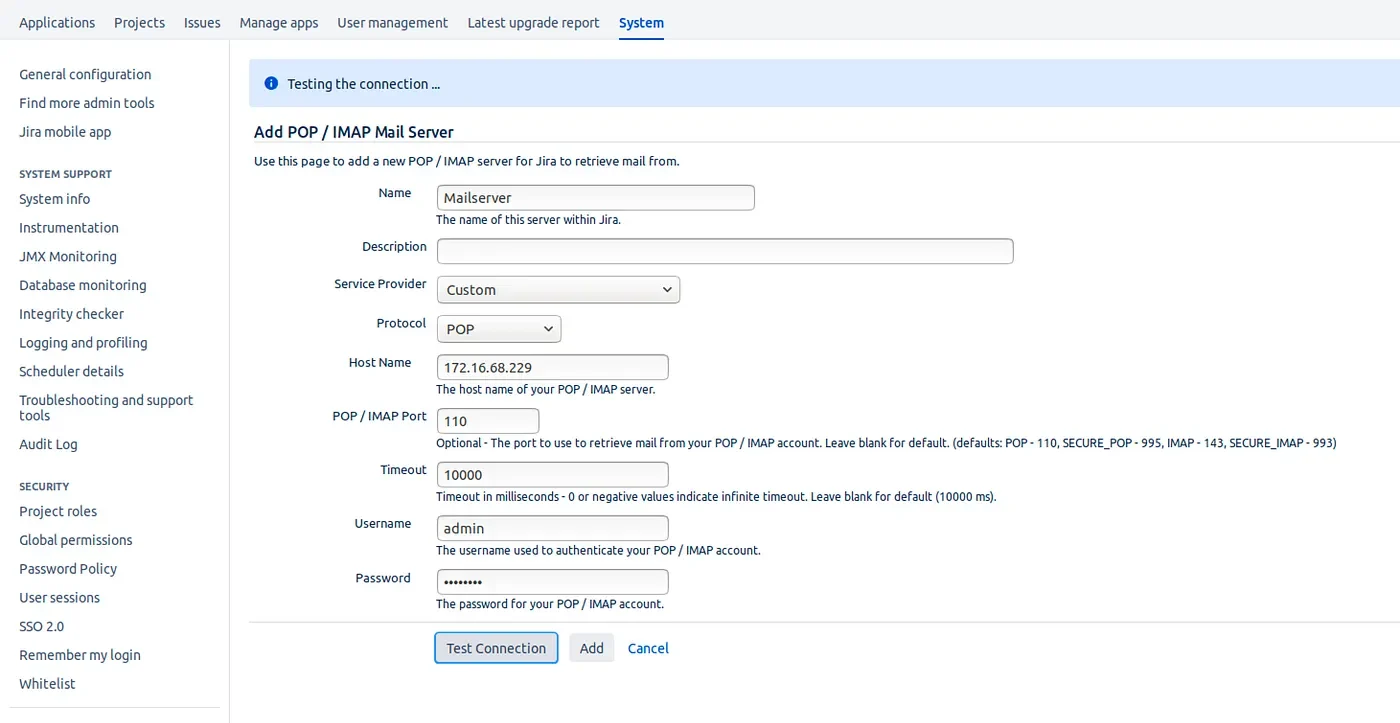
The test connection button causes the Jira Server to attempt to connect to the mail server specified on the form. The connection consists of a credential exchange with the POP3 mail server. In plain terms: you type in an address and a port, press the button, and Jira itself opens a network connection to whatever you typed, then tries to log in with the username and password you supplied.
That is a powerful thing for a server to do on request. It means the form tells the server where to connect.
The bug
While testing various requests, the researcher discovered that Jira does not always validate these values. When looking into the test connection request, there was neither a Referer header nor a CSRF parameter validation check implemented. In other words, the two defences described earlier were simply missing on this one request.
Therefore, the only requirement to perform a CSRF on this request would be to reuse the cookies from a logged in system administrator. No token needed, no Referer check to pass. If an administrator's browser could be made to send this request, Jira would accept it.
Setting up a test
To prove it, the researcher set up a host with a POP3 mail server to receive verification connections from the Jira server, and a web server to host a webpage with the CSRF script. A script here means a small program, in this case one that runs inside a web page in the browser.
The idea was to simulate a user clicking on a malicious link that would reuse the user's session ID cookies to make requests to the Jira server for verifying mail server connections on hosts and ports of my choice. The attacker does not need the administrator's password. They only need the administrator to visit a page while logged in to Jira.
Here is the script I used for the CSRF webpage to exploit the POP3 server connection verification:
The script is shown as an image in the report, so the exact lines are not reproduced as text here. The browser attaches the administrator's Jira cookies automatically, because the request goes to Jira. Jira, missing its usual checks, treats the request as legitimate and tries to connect to the address in the form.
Watching the traffic
Below is a snippet of a Wireshark capture taken while running the above script. Wireshark is a program that records network traffic so you can look at it afterwards, like a recording of a phone call.
Here, the victim user's browser ([redacted]) sends a POST request to the Jira server ([redacted]). Immediately after this, a POP3 connection is initiated from Jira to the specified host and port ([redacted]:110). There is an exchange of credentials which fail to authenticate and the connection terminates.
Read that sequence carefully, because it is the whole trick in miniature. The browser talked to Jira. Jira then talked to a third machine. The third machine was chosen by whoever wrote the web page, not by the administrator. The login attempt failed, but the connection itself happened, and that is what matters.
The script was able to send a request to the Jira server via a CSRF link to get the server to connect to a host and port of my choice.
A second use: sending data to other machines
The POP3 connection verification request requires a username and password to be set in the POST parameters. These parameters get sent to the specified host and port after a successful handshake, which provides a mechanism through which an attacker could send messages or commands to listening hosts.
A handshake here means the opening exchange between two computers when they connect, where they agree how to talk. Once that happens, Jira passes along the username and password values. If an attacker controls those values, they control some of the text that arrives at the other machine. That is a separate concern from scanning, and worth noting on its own.
Turning it into a scanner
What XMLHttpRequest and readyState are
When a web page wants to fetch something from a server without reloading the whole page, it uses a browser feature called XMLHttpRequest. You can think of it as a messenger the page sends out and then waits for.
XMLHttpRequest objects have a readyState property which can be used in conjunction with the onreadystatechange event handler. The readyState property holds a value between 0 and 4 representing the state of the request. An event handler is simply a piece of code that runs when something happens, in this case whenever the state changes. The following table was taken from the w3schools.com website, describes the meaning of readyState values:
In everyday terms: the messenger reports back at each stage, from "not started" through "on its way" to "finished". By watching those reports, a page can tell how long the whole trip took.
Why timing matters
The onreadystatechange event handler gets called every time the readyState values change. So, I amended the web page script to alert me every time the XMLHttpRequest changed state. I wanted to see if there were any differences in the state transitions as I made requests to connect to different host IPs and port numbers.
I added the following lines to the script to keep track of state transitions:
Again the code is shown as an image, so the exact lines are not given as text.
When the Jira server attempted to connect to an IP address for which there was no corresponding host assigned, the request state transition from state 1 to 4 took about 3 seconds to complete.
The server was returning a response to the POST request only after it had terminated the connection with the specified host. Therefore, if the IP address didn't correspond to a running host, it would take about 3 seconds for the connection to timeout and terminate.
This is the key insight. Jira does not answer straight away. It answers after it has finished trying to connect. If nothing is there, the attempt waits and then gives up after roughly 3 seconds, so a slow answer suggests an empty address. The page can measure that difference from inside the browser, without ever seeing the network directly.
The proof of concept
I created a PoC script that exploits this vulnerability to perform a host discovery scan from the Jira server. PoC stands for proof of concept: a small demonstration that shows a flaw is real. Host discovery means finding out which computers on a network are alive, without necessarily breaking into them.
The script makes several requests to the Jira server via CSRFs for verifying mail servers across a range of IP addresses on an arbitrary port (the PoC uses port 110 but this can be changed to any other port). The time taken to complete each request is measured and posted on a text area of the web page. A text area is just a box on the page where text appears.
After running the PoC against the Jira server, the text area in the web page was filled with scanned IP addresses together with the corresponding time taken to get a response.
To validate the results I ran an Nmap host discovery scan from the Jira server. Nmap is a well known tool for exactly this job: probing addresses to see which respond.
These results from the Nmap scans are consistent with the results from the PoC scan. Two independent methods agreed, which is what makes the finding convincing.
The following snippet of a Wireshark capture shows that the PoC caused JIRA to initiate a POP connection to an arbitrary host and port, and demonstrates how the username field can be used for sending messages to hosts.
What it all means
An attacker who can get a logged in system administrator to load a malicious page can make the Jira server initiate POP3 connections to hosts and ports of the attacker's choice. Because the username and password POST parameters are sent to the specified host and port after a successful handshake, this also provides a mechanism through which an attacker could send messages or commands to listening hosts. By measuring how long each request takes, the attacker can perform a host discovery scan of networks visible to the affected Jira server, distinguishing hosts that respond from those that time out after about 3 seconds. The requirement is a logged in system administrator whose browser loads the attacker's page.
In plain words: the attacker needs one administrator to click a link. From there, the Jira server becomes a probe, and its answers reveal what else is reachable from it.
The fix
The issue has been fixed in Atlassian Jira Server and Data Center version 8.7.0. The vulnerability was disclosed to Atlassian through Tenable's coordinated disclosure process, and Tenable's research advisory outlines the disclosure timeline and links to Jira's release notes. Coordinated disclosure means telling the vendor privately first and giving them time to fix it before the details become public.
Other places worth checking
If you are testing a similar product, these are the kinds of things to look at. Each one is a variation on the same theme: a form that makes the server reach out, and a check that is missing or weak.
- Other administrative forms that trigger outbound connections (mail, LDAP, proxy or integration tests). A positive result is a request that is accepted without a valid atl_token parameter or with a Referer from another origin, and that causes the server to contact the supplied host.
- Timing side channels on connection tests. A positive result is a measurable difference between a host that accepts the connection and one that does not, visible from the browser through readyState transitions.
- Attacker controlled fields that are forwarded to the remote service. A positive result is seeing the username or password value arrive at a listener you control after the handshake.
- Port variation on the same request. A positive result is the server connecting to arbitrary ports, not just the default mail port, which widens the scan beyond a single service.
Glossary
- API: a defined way for one piece of software to ask another to do something, like a menu of requests a program accepts.
- Cookie: a small piece of text a website stores in your browser so it can recognise you on later requests.
- Session cookie: a cookie that identifies your logged in session, so you do not have to log in on every page.
- HttpOnly: a setting on a cookie that stops JavaScript in the page from reading it.
- CSRF (Cross-Site Request Forgery): tricking a logged in user's browser into sending a request to a site the user did not intend to act on.
- CSRF token: a random value the server issues and requires on state changing requests, so that pages from other sites cannot forge them.
- Parameter: a value sent along with a request, separate from cookies and headers.
- Header: extra information attached to a web request or response, such as where the request came from.
- Referer header: a header that says which page a request originated from.
- Same origin policy: a browser rule that stops a page from one site reading data from another site.
- POST request: a type of web request typically used to submit a form or change something on the server.
- State changing operation: a request that alters data, as opposed to one that only reads it.
- IP address: the numeric label of a computer on a network.
- Port number: a number that identifies which service on a computer the traffic is meant for.
- Host: a computer on a network.
- POP3: an old, simple protocol for fetching email from a mail server.
- Mail server: a computer that stores and serves email.
- Handshake: the opening exchange when two computers connect and agree how to talk.
- XMLHttpRequest: a browser feature that lets a page send requests to a server without reloading the page.
- readyState: a property of an XMLHttpRequest holding a value from 0 to 4 that describes how far the request has got.
- Event handler: a piece of code that runs when something happens, such as a state change.
- onreadystatechange: the event that fires whenever an XMLHttpRequest changes state.
- Timing side channel: learning information from how long an operation takes, rather than from its content.
- Host discovery: finding out which computers on a network are alive.
- PoC (proof of concept): a small demonstration showing that a flaw is real and exploitable.
- Wireshark: a program that records and displays network traffic.
- Nmap: a well known tool for probing networks and discovering hosts and services.
- CVE: a public identifier for a known vulnerability, here CVE-2019-20099.
- Coordinated disclosure: telling a vendor about a flaw privately and giving them time to fix it before publishing details.
- Script: a small program, often one that runs inside a web page.
- Text area: a box on a web page where text is displayed or entered.

