Wait Time Bypass for fun and Profit
A GET endpoint accepted email and password in the URL and, when a password reset link on the resulting page was clicked, logged the user in without checking the 20-minute ban. An attacker could bypass the ban and continue brute-forcing the login.
 Published on vijetareigns.medium.com
Hello hackers, I am back with another bug bounty write-up. In today’s blog, I am going to show you how I was able to bypass a ban time of 20 Minutes.
The full write-up lives on its author's site
It belongs to its author, so we link to it rather than copy it. The other two tabs are our own rewrites, checked against it.
Context
IntenseDebate, at intensedebate.com, is one of the domains in the Automattic programme on HackerOne and was in scope for this work. The main application is a debate platform with features such as creating posts and sharing opinions. The login page sits at http://intensedebate.com/. Brute forcing passwords there got the researcher banned for 20 minutes.
The bug in this write-up is a rate limiting bypass. The lockout is enforced on the login flow, but a second, JavaScript-facing endpoint accepted the same credentials during the ban and returned a page whose link logged the researcher in.
Setup
- A normal account on
intensedebate.com, created by the researcher. - Burp Suite, used with the habit of capturing every request so the history can be reviewed later.
- No special role or privilege is needed. The precondition for the bypass is simply that the account (or client) has been banned by the login page's brute force protection.
Finding it
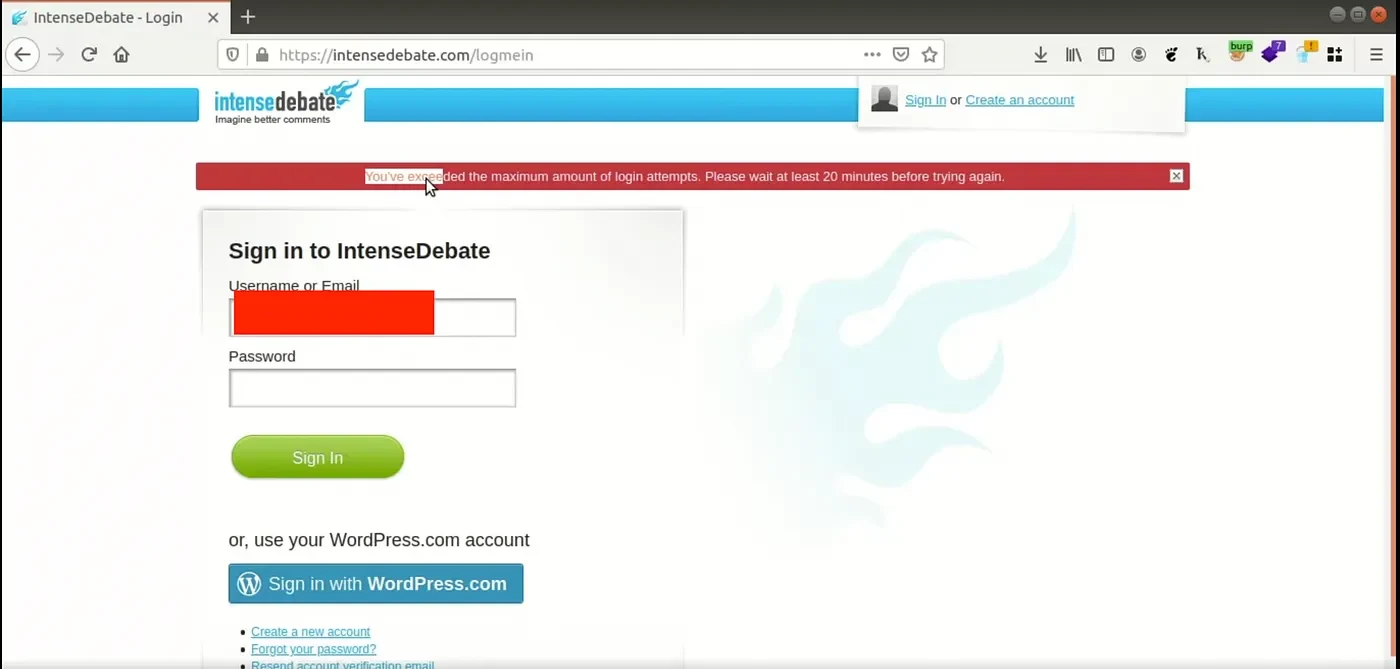
After creating an account, the researcher spent about two hours on the main application looking for IDOR, XSS, business logic bugs, access control issues, SQLi, account takeover and information disclosure, without finding anything usable. The first concrete result came from brute forcing passwords on the http://intensedebate.com/ login page, which triggered a 20 minute ban.
Because every request had been captured in Burp, the next step was to review the target tab for all HTTP requests made to http://intensedebate.com/. Among them was a GET endpoint that stood out.

Exploitation
Step 1: identify the JavaScript endpoint that takes credentials
The interesting request was a GET to the following URL, with the credentials carried inside a JSON object in the data parameter:
http://intensedebate.com/js/commentAction/?data={"request_type":"2", "params":{"blogpostid":1, "acctid":1, "email":"user_email_id", "pass":"user_password", "firstCall":true}}
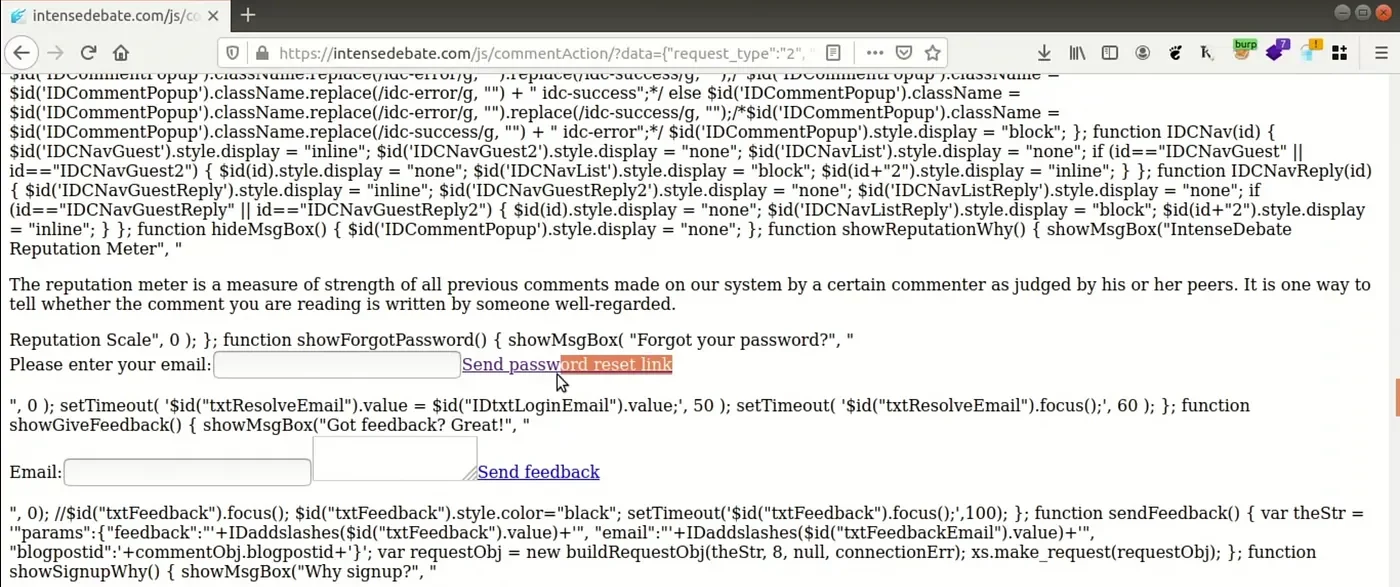
The path takes email and pass as parameters inside the GET request. request_type is 2, and params also carries blogpostid, acctid and firstCall. Opening the URL in the browser with the correct credentials returned a JavaScript page.
Step 2: use the link on the returned page to complete the login
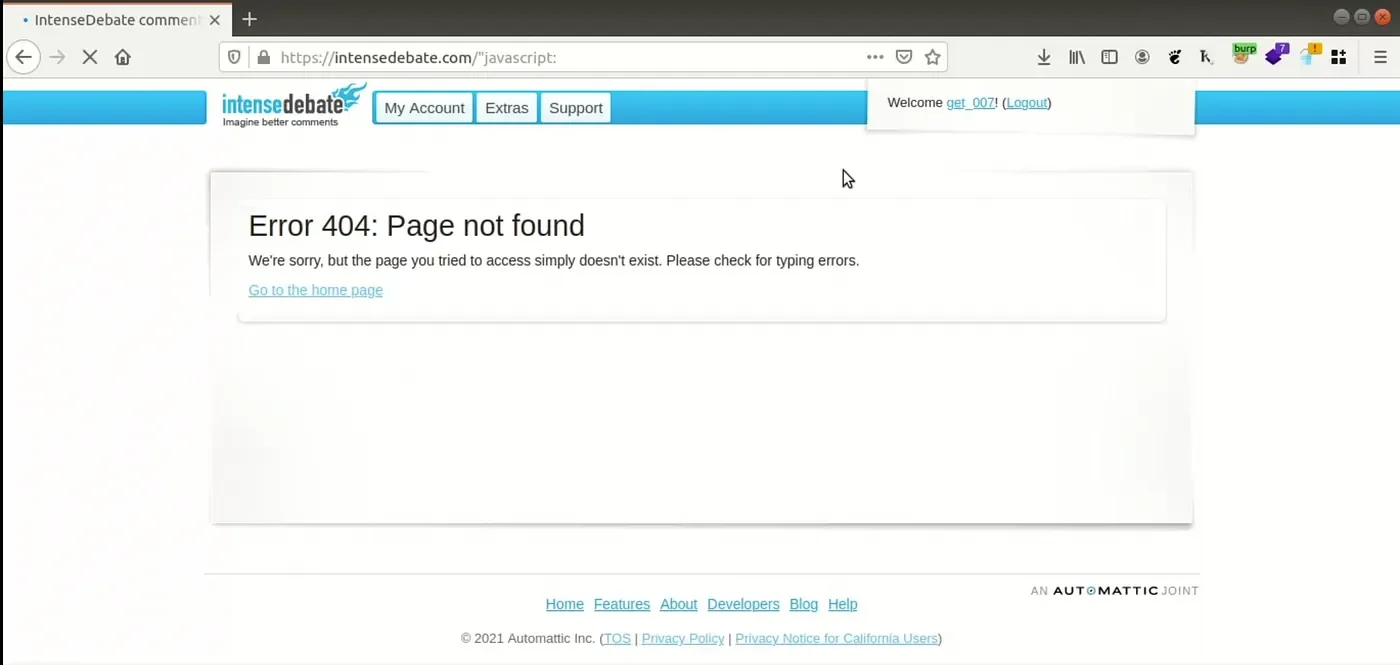
The JavaScript page contained several clickable links, including a 'Send password reset' link. Clicking that link without entering anything redirected to a 404 page, but at the same time the researcher was logged into the account.
Step 3: repeat while banned
The final step reproduced the whole sequence under the lockout: first get a 20 minute ban through brute forcing, then open the same GET endpoint with the username and password, and click the Send password reset link. The result was a logged-in session, which is how the 20 minute wait time was bypassed.

Root cause
The login page enforced the 20 minute ban, yet the js/commentAction/ endpoint accepted the same email and pass pair while the researcher was banned. The lockout is therefore tied to one entry point rather than to the credential check itself, and any other path that validates credentials remains usable during the ban. The returned JavaScript page then offers a link that finishes the login, so the attacker does not need to interact with the protected login form at all. The report does not describe the server-side implementation, so the exact mechanism is likely a separate authentication path that was never wired into the rate limiting logic.
Impact
An attacker who is locked out after failed logins can continue guessing passwords through the JavaScript endpoint during the ban period, defeating the purpose of the 20 minute wait. The report does not quantify how many attempts the endpoint allows or whether it has any throttling of its own. The report does not assess the practical impact beyond the bypass itself.
Fix
The report states that the issue was fixed on 4 February 2021, and a bounty was awarded. It does not describe the change that was made. A fix addressing the root cause would be to apply the ban and rate limiting to every path that validates credentials, including the js/commentAction/ endpoint.
Variants to test
Tip from the report: always capture every request in Burp Suite and review them later.
What happened, in plain words
A security researcher was testing a website called IntenseDebate, which is a debate platform where people create posts and share opinions. The site belongs to Automattic, a company that runs a bug bounty programme on HackerOne. A bug bounty programme is a deal where a company says: if you find a security problem in our systems and report it responsibly, we will pay you a reward (a bounty) instead of punishing you.
The researcher created a normal account and spent about two hours looking for common security mistakes. Nothing turned up. Then they tried something different: guessing passwords over and over on the login page. That is called password brute forcing, and it is exactly what a login page is supposed to defend against. The site noticed and banned the researcher for 20 minutes. That block is called a ban or a lockout.
Here is the interesting part. The researcher had a habit of recording every single request their browser made, using a tool called Burp Suite. A request is the message your browser sends to a website when you click something or load a page. Because every request had been recorded, the researcher could go back and look through the history. In that history they found a second way to log in, a web address that accepted an email and a password and still worked while the researcher was banned. Opening that address with the right credentials returned a small page with a link on it. Clicking the link logged them in, even though the normal login page was still refusing them.
So the protection existed on one door but not on another door that led to the same room. That is the whole bug: a rate limiting bypass. Rate limiting means restricting how many times someone can try something in a period of time. A bypass means getting around that restriction.
Background: the site, the login page and the ban
IntenseDebate lives at intensedebate.com. It is one of the domains in the Automattic programme on HackerOne, and it was in scope, meaning the company had explicitly authorised testing on it. Testing a site without permission is not allowed, which is why scope matters.
The main application is a debate platform with features such as creating posts and sharing opinions. The login page sits at http://intensedebate.com/. In this case, brute forcing passwords on the login page got the researcher banned for 20 minutes.
Why does a site do that? Imagine a door with a keypad. If someone can try a thousand codes a minute, they will eventually hit the right one. If the door locks for 20 minutes after a handful of wrong codes, guessing becomes impractical. That is the purpose of the lockout: it turns a fast guessing game into a hopelessly slow one.
The bug in this write-up is a rate limiting bypass. The lockout is enforced on the login flow, but a second endpoint, one meant for JavaScript in the browser, accepted the same credentials while the researcher was banned. An endpoint is simply a specific address on a server that does one job, like a service counter in a large building: you go to the counter for passports, another for driving licences. An attacker who is locked out can keep testing passwords through that second counter.
Setting up
- A normal account on
intensedebate.com, created by the researcher. No special role or privilege is needed. - Burp Suite, a tool that sits between your browser and the website and records every request and response. The researcher used it with the habit of capturing every request so the history could be reviewed later.
- The bypass was performed after the researcher had been banned by the login page's brute force protection.
Think of Burp Suite as a notebook that automatically writes down every conversation you have with a website. You do not need to know in advance which conversation will matter. You just need the notebook later.
Finding it
After creating an account, the researcher spent about two hours on the main application looking for a list of common bug types: IDOR, XSS, business logic bugs, access control issues, SQLi, account takeover and information disclosure. None of them produced anything usable. These terms are explained in the glossary, but the short version is that they are the usual suspects in web security.
The first concrete result came from brute forcing passwords on the http://intensedebate.com/ login page, which triggered a 20 minute ban.
The screenshot accompanies the description of the 20 minute ban. That is the defence working as designed. The question that follows is whether the defence covers everything it should.
Because every request had been captured in Burp, the next step was to review the target tab for all HTTP requests made to http://intensedebate.com/. HTTP is the language browsers and websites use to talk to each other; a request is one message in that language. Among the recorded requests was a GET endpoint that stood out.
A GET request is the ordinary kind of request a browser makes when you open a page or click a link: it asks the server to give you something. The other common kind, POST, is used when you submit a form. The researcher noticed a GET request that looked unusual, and that is where the story turns.
Exploitation
Step 1: identify the JavaScript endpoint that takes credentials
The interesting request was a GET to the following URL, with the credentials carried inside a JSON object in the data parameter:
http://intensedebate.com/js/commentAction/?data={"request_type":"2", "params":{"blogpostid":1, "acctid":1, "email":"user_email_id", "pass":"user_password", "firstCall":true}}
Line by line, in plain words:
http://intensedebate.com/js/commentAction/is the address of the endpoint. Thejspart suggests it is meant to be called by JavaScript running in the page, not by a person typing in a form.?data=starts the query string, the part of a URL after the question mark that carries extra information to the server.{"request_type":"2", ...}is a JSON object. JSON is a simple text format for structured data, like a labelled box with named slots. Here the slotrequest_typehas the value2, which presumably tells the server what kind of action is being requested."params":{...}is a nested object holding the actual details."blogpostid":1and"acctid":1are identifiers for a blog post and an account."email":"user_email_id"and"pass":"user_password"are the credentials: the email address and the password. In the real request these would be the actual values; here they are placeholders."firstCall":trueis a flag, a true or false value, that probably tells the server this is the first call in a sequence.
The path takes email and pass as parameters inside the GET request. request_type is 2, and params also carries blogpostid, acctid and firstCall. Opening the URL in the browser with the correct credentials returned a JavaScript page.
Why does this matter? Because credentials in a URL are unusual and risky. A URL is visible in the browser history, in server logs and in the address bar. More importantly for this bug, this endpoint is a second place where the server checks an email and a password. If the ban is only applied at the login form, this second place may not know about it.
Step 2: use the link on the returned page to complete the login
The JavaScript page contained several clickable links, including a 'Send password reset' link. Clicking that link without entering anything redirected to a 404 page, but at the same time the researcher was logged into the account.
A 404 page is the standard "not found" page a website shows when the address you asked for does not exist. It looks like a failure. But the important thing happened in the background: the researcher was logged into the account. From that moment on, the site treated the researcher as authenticated, even though the visible page was an error.
This is a useful lesson for beginners: what you see on screen is not the whole story. The browser and the server exchange data behind the page, and a redirect to an error page can still carry a successful login.
Step 3: repeat while banned
The final step reproduced the whole sequence under the lockout: first get a 20 minute ban through brute forcing, then open the same GET endpoint with the username and password, and click the Send password reset link. The result was a logged-in session, which is how the 20 minute wait time was bypassed.
In other words, the researcher did not need to wait. The normal login page was still refusing them, but the second endpoint accepted the same credentials and the link on its response finished the job. The ban was real, but it only covered one of the two doors.
Why it worked
The login page enforced the 20 minute ban, yet the js/commentAction/ endpoint accepted the same email and pass pair while the researcher was banned. The lockout is therefore tied to one entry point rather than to the credential check itself, and any other path that validates credentials remains usable during the ban. The returned JavaScript page then offers a link that finishes the login, so the attacker does not need to interact with the protected login form at all.
A useful comparison is a building with a main entrance that has a security guard and a side entrance that has none. The guard is doing their job perfectly. The problem is that the guard was never told about the side door. The report does not describe the server-side implementation, so the exact mechanism is likely a separate authentication path that was never wired into the rate limiting logic.
Impact
An attacker who is locked out after failed logins can continue guessing passwords through the JavaScript endpoint during the ban period, defeating the purpose of the 20 minute wait. The report does not quantify how many attempts the endpoint allows or whether it has any throttling of its own. The report does not assess the practical impact beyond the bypass itself.
In plain terms: the lockout is supposed to make password guessing too slow to be worth trying. If a second path lets you keep guessing at full speed, the lockout is decoration. The report does not say how many attempts were possible through the endpoint, so the practical speed of guessing is unknown.
The fix
The report states that the issue was fixed on 4 February 2021, and a bounty was awarded. A fix addressing the root cause would be to apply the ban and rate limiting to every path that validates credentials, including the js/commentAction/ endpoint.
A simple way to think about it: the rule should live with the lock, not with one particular door. Wherever a password is checked, the same counter and the same ban should apply.
Variants to test
Each one describes what to try and what a positive result looks like.
Tip from the report: always capture every request in Burp Suite and review them later. The bug in this write-up was found in the history, not by staring at the login form. Recording everything costs nothing and pays off later.
Timeline
- 19 January 2021: reported.
- 4 February 2021: fixed and a bounty awarded.
Glossary
- API: a set of addresses and rules a program uses to talk to another program, like a service counter with a defined menu of requests.
- Authentication: proving who you are, usually with an email and password.
- Ban / lockout: a temporary block applied after too many failed attempts, here 20 minutes.
- Bounty: a reward paid by a company for a responsibly reported security bug.
- Brute forcing: trying many passwords or codes in sequence until one works.
- Burp Suite: a tool that sits between browser and website and records every request and response.
- Business logic bug: a flaw in the rules of a feature rather than in its code, such as a discount applied twice.
- Cookie / session token: a small piece of data the site gives your browser after login so it can recognise you on later requests.
- Credentials: the pair of values used to log in, here an email and a password.
- Endpoint: a specific address on a server that performs one job.
- GET request: a request that asks the server to return something, used when you open a page or click a link.
- HackerOne: a platform where companies publish bug bounty programmes and researchers report bugs.
- HTTP: the language browsers and websites use to exchange requests and responses.
- IDOR: insecure direct object reference, where changing an identifier in a request lets you see someone else's data.
- Information disclosure: leaking data that should not be visible.
- JSON: a text format for structured data made of named fields and values.
- Parameter: a named value sent with a request, such as
emailorpasshere. - POST request: a request that sends data to the server, typically used when submitting a form.
- Query string: the part of a URL after the question mark that carries extra values.
- Rate limiting: restricting how many times an action can be performed in a period of time.
- Rate limiting bypass: getting around that restriction, as in this report.
- Redirect: the server telling the browser to go to a different address.
- Scope: the set of systems a programme explicitly authorises for testing.
- SQLi: SQL injection, where crafted input changes a database query.
- Throttling: slowing or limiting repeated actions, closely related to rate limiting.
- 404 page: the standard "not found" page shown when an address does not exist.
- XSS: cross-site scripting, where an attacker gets their own code to run in another user's browser.
- Account takeover: gaining control of someone else's account.
- Access control: the rules deciding who is allowed to do what.




