Accessing deleted comment for $$: A Bug Bounty Writeup
A comment deletion feature only removed comments from the user interface, leaving them accessible via a direct API request. An attacker who knew or had captured the comment and thread identifiers could retrieve deleted comments.
 Published on vijetareigns.medium.com
Hello hackers, I am back with a new bug bounty write-up. In this blog, I am going to show how I was able to access deleted comments on a community thread of a website.
The full write-up lives on its author's site
It belongs to its author, so we link to it rather than copy it. The other two tabs are our own rewrites, checked against it.
Context
The target was a community subdomain, community.redacted.com, sitting under the wildcard scope *.redacted.com. The community site lets an authenticated user create a thread, interact with other threads and interact with other users. Comments on a thread are fetched by a front-end AJAX endpoint that returns JSON.
The behaviour under test is the deletion of a comment. From the UI, deleting a comment removes it from the thread view. The question the researcher asked was whether the comment is actually gone from the backend, or only hidden in the interface.
Setup
- Scope:
*.redacted.com. - Tooling: subdomain enumeration, aquatone for screenshots of live subdomains, and Burp Suite as the proxy to capture every request while browsing the community site.
- Precondition: an authenticated account on the community site, able to create a thread and post comments.
- No special role or privilege is described beyond a normal authenticated user.
Finding it
The researcher started with subdomain enumeration and found 500+ live subdomains. Screenshots of all of them were taken with aquatone, and one screenshot showing the subdomain name community.redacted.com stood out. After exploring the site and capturing traffic in Burp, the requests and responses from community.redacted.com were reviewed.

Among them was a GET endpoint used to fetch comments from a thread:
https://community.redacted.com/ajax/ugc/frontend/comment/getComment?id=comment_id&tid=thread_id
The endpoint takes two parameters, id=comment_id and tid=thread_id, and both are long numeric strings. Opening the endpoint directly in the browser returned all the comments from the researcher's own thread in the JSON response. That is the normal read path: the client asks for a comment by id within a thread and the server answers with JSON.
Exploitation
Step 1: Confirm the read path
With a thread and comments created under the authenticated account, the endpoint was opened in the browser:
https://community.redacted.com/ajax/ugc/frontend/comment/getComment?id=comment_id&tid=thread_id
The response was JSON containing all the comments from the researcher's thread. This established the baseline: the endpoint returns comment content keyed by comment_id and thread_id.
Step 2: Delete the comment from the UI
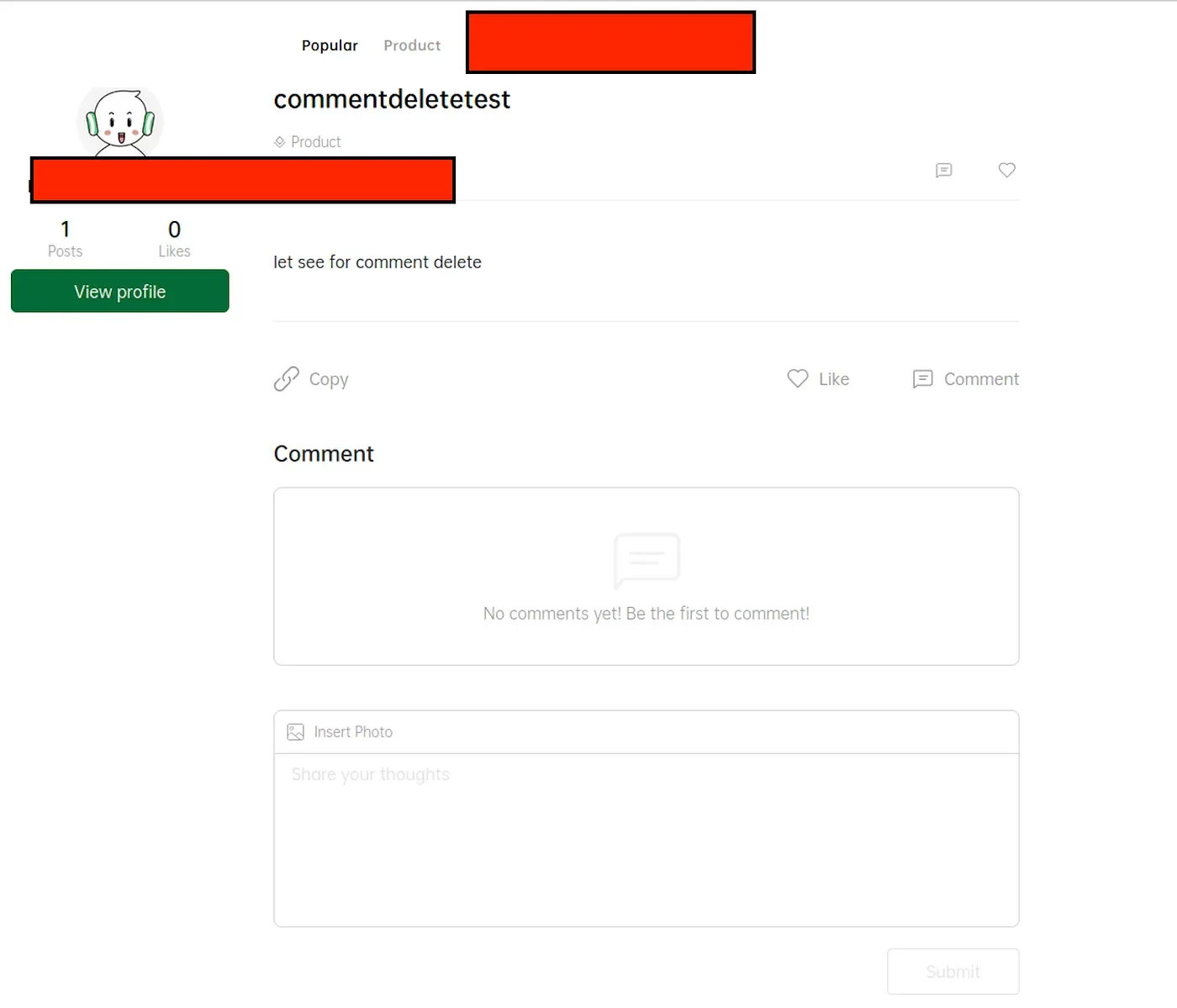
The comment was then deleted from the community thread through the normal interface. In the UI no comment was visible in the thread any more, consistent with a successful deletion.
Step 3: Re-request the deleted comment
The same GET endpoint was reopened in the browser:
https://community.redacted.com/ajax/ugc/frontend/comment/getComment?id=comment_id&tid=thread_id
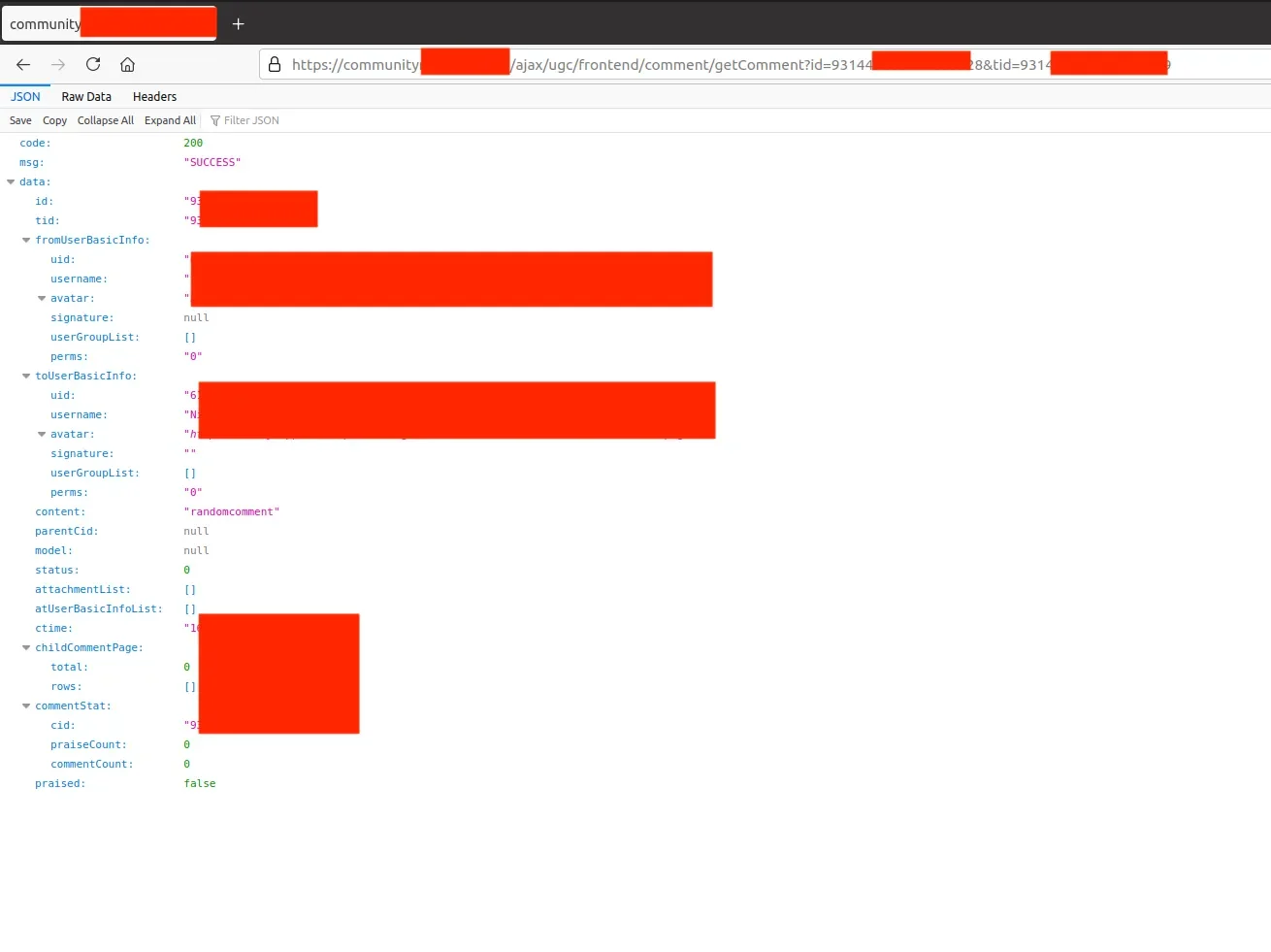
The deleted comment was still present in the JSON response. The comment had only been removed from the UI; it had not been deleted from the backend or database. Anyone who knows the comment_id, or who captured it before the deletion, can still retrieve the deleted comment of the thread.
Root cause
The deletion is a UI-level operation only. The record remains in the backend/database, and the read endpoint getComment continues to serve it without checking whether the comment has been marked as deleted. The report does not describe the server-side deletion code; it only states that the comment was not actually deleted from the backend or database.
Existing defences did not stop it because the only barrier is the unpredictability of the identifiers: both comment_id and thread_id are long numeric strings. The report does not describe any authorisation or state check on the read path.
Impact
The researcher describes this as a violation of the privacy of the user: content the user believed was removed remains retrievable. The impact is limited because both identifiers are long numeric strings. An attacker can access a deleted comment only if they already know the comment_id, or if they captured the comment_id of a thread before the comment was deleted.
The security team accepted the report as Low and fixed it.

Fix
Timeline
| Date | Event |
|---|---|
| Nov 09, 2021 | Reported |
| Nov 24, 2021 | Triaged |
| Dec 8, 2021 | $$ Rewarded |
| Dec 24, 2021 | Fixed |
Variants to test
- Other delete operations on the same product. Delete a thread, a reply, a direct message or a profile field through the UI, then re-request the object through its read endpoint. A positive result is the deleted content still appearing in the JSON response.
- Soft-delete flags in responses. Look for fields such as
deleted,is_deletedorstatusin JSON returned by read endpoints. A positive result is a record returned with a deleted flag set to true, or a record returned after the UI has hidden it. - Identifier capture before deletion. Record
comment_idandthread_idvalues while the content exists, delete it, then replay the read request. A positive result is the same content returned after deletion. - Authorisation on the read path. Request another user's comment by id and thread id with your own session. A positive result is content you should not be able to read, which also shows the endpoint does not check ownership or state.
- Cached or indexed copies. Check whether deleted content remains reachable through search endpoints, feeds, notifications or exports that reuse the same identifiers. A positive result is deleted content surfacing through a path other than the original thread view.
What happened, in plain words
A website had a community section where logged-in people could start discussion threads and post comments under them. When someone deleted their own comment, the comment disappeared from the page. But it had not actually been removed from the website's servers. If you knew the right web address, you could still ask the server for that comment and it would hand it back, even though the person thought it was gone. The researcher who found this reported it, the security team agreed it was a real problem (they rated it Low), and they fixed it.
This article walks through the whole thing slowly, assuming you have never done security testing before. You only need to know how to use a browser.
The pieces you need to understand first
Before the steps make sense, here are a few ideas explained from zero.
A subdomain. A website like example.com can have many smaller sites hanging off it, such as shop.example.com or community.example.com. Each of those is a subdomain. Companies often run dozens or hundreds of them, and some are forgotten or less carefully built than the main site.
A scope. When a company invites security researchers to test its systems (a bug bounty programme), it publishes a scope: the list of things you are allowed to test. Here the scope was *.redacted.com. The * is a wildcard meaning "anything", so every subdomain of redacted.com was fair game.
Subdomain enumeration. This is the process of finding out which subdomains exist. You cannot test what you cannot find, so researchers use tools and wordlists to discover them. The researcher here found more than 500 live subdomains.
A screenshot tool (aquatone). Once you have a list of hundreds of subdomains, opening each one by hand is slow. Aquatone visits them all and saves a picture of each page. You then flick through the pictures like a photo album, looking for something interesting. Think of it as a security guard walking past every door in a building and photographing what is behind each one, so you can review them all later from a desk.
A proxy tool (Burp Suite). A proxy sits between your browser and the website. Every request your browser sends and every response the website sends back passes through it, and it keeps a copy. This lets you see exactly what your browser is asking for, which is normally invisible. It is like putting a recording device on a phone line: you still make your calls, but now you can read the transcript afterwards.
A request and a response. When you click something on a website, your browser sends a request to a server (a computer somewhere that holds the site's data). The server sends back a response. A request has a method (such as GET, which means "please give me this"), an address (the URL), and sometimes parameters (extra details, like which item you want).
An endpoint. An endpoint is a specific address on a server that does a specific job. One endpoint might show a list of comments, another might delete one. Each has its own URL.
An API and AJAX. Modern websites often load parts of a page in the background without reloading the whole page. The browser quietly sends a request to the server, the server replies with raw data, and the page updates. This kind of background request is called AJAX, and the address it talks to is often called an API endpoint. Think of a restaurant: the menu (the page) is in front of you, but when you order, a waiter (the AJAX request) goes to the kitchen (the API) and brings back just your dish (the data), without bringing you a whole new menu.
JSON. When an API replies, it usually sends data in a format called JSON. It looks like a set of labels and values in curly brackets, for example {"name": "Alice", "age": 30}. It is designed to be easy for a program to read, but a person can read it too. If you open an API address directly in your browser, you will often see this raw JSON text instead of a pretty web page.
A parameter. In a web address, the part after a ? is made of parameters. In ?id=5&tid=9, there are two parameters: id with the value 5, and tid with the value 9. They are like the blanks on a form: the server fills them in to know what you are asking for.
An identifier (ID). An identifier is a unique label for a thing in a database. Every comment has its own comment ID, and every thread has its own thread ID. If you know the ID, you can ask for that exact item. The report says both IDs here are long numeric strings, meaning long sequences of digits. Long numbers are hard to guess, which matters later.
A database and the backend. The backend is the part of the system that runs on the server and holds the real data, usually in a database (an organised store of records). The frontend is what you see in your browser. A common mistake is to change only the frontend and forget the backend.
A logic flaw. This is a bug where nothing crashes and no technical rule is broken, but the system behaves in a way it should not. The code does what it was told, but it was told the wrong thing. Here, the flaw is that deleting a comment only hid it from view instead of actually removing it.
A soft delete. Some systems do not truly erase a record when you delete it. Instead they mark it with a flag, something like "deleted: yes", and hide it from normal views. The record is still there. This is often done on purpose (for recovery or auditing), but it becomes a problem if other parts of the system still hand the record out.
Authorisation. Authorisation means checking whether the person making a request is allowed to do so. A read endpoint that does not check whether a comment is deleted, or whether you own it, is missing an authorisation or state check.
Severity and triage. When a report arrives, the security team reviews it (triages it) and assigns a severity, from Low to Critical, based on how much harm the bug could cause. Low means real but limited.
Finding the target
The researcher began with subdomain enumeration and found more than 500 live subdomains. Screenshots of all of them were taken with aquatone, and one screenshot showing the subdomain name community.redacted.com stood out. That is the moment the hunt narrowed: out of hundreds of doors, this one looked worth opening.
The community site at community.redacted.com lets a logged-in user create a thread, interact with other threads and interact with other users. The researcher explored the site while capturing every request in Burp Suite, so that nothing the browser did in the background would be missed.
Spotting the interesting request
After exploring the site, the researcher reviewed all the requests and responses coming from community.redacted.com. Among them was a GET endpoint used to fetch a comment from a thread:
https://community.redacted.com/ajax/ugc/frontend/comment/getComment?id=comment_id&tid=thread_id
Line by line, in plain words:
https://is the secure version of the web protocol, the same one your browser uses for most sites today.community.redacted.comis the subdomain being tested./ajax/ugc/frontend/comment/getCommentis the path, the part of the address that tells the server which job to do. The wordgetCommentis a strong hint: this endpoint fetches a comment.ugcusually stands for user-generated content, andajaxtells you it is a background request rather than a full page.?marks the start of the parameters.id=comment_idis the first parameter: the ID of the comment you want.&separates parameters.tid=thread_idis the second parameter: the ID of the thread the comment belongs to.
Both comment_id and thread_id are long numeric strings. The researcher opened this GET endpoint directly in the browser and found that all the comments from their own thread were visible in the JSON response. That is the normal, intended behaviour: the page asks the server for the comments, and the server answers with data. The researcher now knew exactly which address to use to read a comment.
Deleting the comment and asking again
Next, the researcher deleted the comment from the community thread through the normal interface. In the UI, no comment was visible in the thread any more, exactly as you would expect after a deletion.
The important question at this point is: did the comment really go away, or did the page just stop showing it? To find out, the researcher reopened the same GET endpoint in the browser:
https://community.redacted.com/ajax/ugc/frontend/comment/getComment?id=comment_id&tid=thread_id
This is the same address as before, with the same two parameters. Nothing clever was added. The only thing that changed is that the comment had supposedly been deleted in between.
The deleted comment was still visible in the JSON response. The thread comment had only been deleted from the UI, not actually deleted from the backend or database. So anyone, including the thread owner, could still access the deleted comment of the thread by asking the server directly.
Think of it like a noticeboard where you pin a note, then take it down. The note is gone from the board, but a photocopy of it is still sitting in a drawer, and anyone who knows which drawer to open can read it.
Why it happens
The deletion is a UI-level operation only. The record stays in the backend or database, and the read endpoint getComment keeps serving it without checking whether the comment has been marked as deleted. The report does not describe the server-side deletion code; it only states that the comment was not actually deleted from the backend or database.
Existing defences did not stop it because the only barrier is the unpredictability of the identifiers: both comment_id and thread_id are long numeric strings. The report does not describe any authorisation or state check on the read path.
How serious is it
The researcher describes this as a violation of the privacy of the user: content the user believed was removed remains retrievable. The impact is limited because both identifiers are long numeric strings. An attacker can access a deleted comment only if they already know the comment_id, or if they captured the comment_id of a thread before the comment was deleted.
In other words, the door is unlocked, but it is hard to find. That is why the security team accepted the report as Low and fixed it.
The fix
Timeline
| Date | Event |
|---|---|
| Nov 09, 2021 | Reported |
| Nov 24, 2021 | Triaged |
| Dec 8, 2021 | $$ Rewarded |
| Dec 24, 2021 | Fixed |
Other places to look for the same mistake
Once you understand the pattern, you can look for it elsewhere. These are the variants worth testing.
- Other delete operations on the same product. Delete a thread, a reply, a direct message or a profile field through the UI, then re-request the object through its read endpoint. A positive result is the deleted content still appearing in the JSON response.
- Soft-delete flags in responses. Look for fields such as
deleted,is_deletedorstatusin JSON returned by read endpoints. A positive result is a record returned with a deleted flag set to true, or a record returned after the UI has hidden it. - Identifier capture before deletion. Record
comment_idandthread_idvalues while the content exists, delete it, then replay the read request. A positive result is the same content returned after deletion. - Authorisation on the read path. Request another user's comment by id and thread id with your own session. A positive result is content you should not be able to read, which also shows the endpoint does not check ownership or state.
- Cached or indexed copies. Check whether deleted content remains reachable through search endpoints, feeds, notifications or exports that reuse the same identifiers. A positive result is deleted content surfacing through a path other than the original thread view.
Glossary
- AJAX: a way for a web page to fetch data from a server in the background, without reloading the whole page.
- API: a set of addresses on a server that programs (and browsers) use to ask for data or actions.
- Aquatone: a tool that visits a list of subdomains and saves a screenshot of each page.
- Authorisation: the check that decides whether a person is allowed to do or see something.
- Backend: the part of a system that runs on the server and holds the real data.
- Bug bounty programme: a scheme where a company invites researchers to test its systems and pays for valid findings.
- Burp Suite: a proxy tool that records every request and response between your browser and a website.
- Comment ID: the unique label for a single comment in the database.
- Database: an organised store of records kept on a server.
- Endpoint: a specific address on a server that performs a specific job.
- Frontend: the part of a system you see and use in your browser.
- GET: a request method meaning "please give me this".
- Identifier (ID): a unique label for a thing, used to ask for that exact thing.
- JSON: a text format for data, made of labels and values, easy for programs and people to read.
- Logic flaw: a bug where the system does what it was told, but it was told the wrong thing, so it behaves incorrectly.
- Parameter: an extra detail in a web address, after the
?, that tells the server what you want. - Proxy: a tool that sits between your browser and a website and records the traffic.
- Request: the message your browser sends to a server.
- Response: the message a server sends back to your browser.
- Scope: the list of systems a researcher is allowed to test.
- Severity: a rating of how much harm a bug could cause, from Low to Critical.
- Soft delete: marking a record as deleted without actually erasing it.
- Subdomain: a smaller site hanging off a main domain, such as
community.example.com. - Subdomain enumeration: the process of discovering which subdomains exist.
- Thread ID: the unique label for a discussion thread in the database.
- Triage: the security team's review of a report to confirm and rate it.
- UI (user interface): what you see and click on in the browser.
- Wildcard: the
*symbol in a scope, meaning "anything in this position".





