Pwn2Own Miami: Aveva Edge Arbitrary DLL Loading Vulnerability
Aveva Edge loads a missing DLL (IMHOST32.dll) using a search path that includes the current working directory, so a crafted .APP archive containing a malicious copy of that DLL gets it loaded and executed. An attacker could achieve arbitrary code execution when the application opens the archive.

This article covers the vulnerability I discovered while researching the Aveva Edge attack surface for Pwn2Own Miami a few years ago. It’s been patched for a while now so its fair to release my writeup of the program.
The full write-up lives on its author's site
It belongs to its author, so we link to it rather than copy it. The other two tabs are our own rewrites, checked against it.
Context
Aveva Edge is a Windows HMI/SCADA application, and this write-up covers a DLL loading flaw I found while researching its attack surface for Pwn2Own Miami. The bug had been patched for a while.
The relevant feature is the Aveva Edge Application file, the .APP archive that Studio Manager opens. On launch, the application reads configuration from a trusted location and loads a chain of DLLs from its installation. The problem is that one link in that chain, IMHOST32.dll, is not shipped with the product, and the code that asks for it does so through LoadLibraryA, which resolves relative paths against the current working directory.
Setup
The testing was done against Aveva Edge V20 SP1 and later SP2. Successful exploitation needs a maliciously crafted Aveva Archive and a malicious IMHOST32.dll alongside it. The write-up describes reverse engineering of the DLLs and a payload that spawns calc.exe.
Finding it
While testing V20 SP1 and SP2 I found that .APP files can be configured to trigger DLL loading from unsafe paths. The starting point is benign: on startup Aveva Edge always loads imgman32.dll from a safe and trusted location.
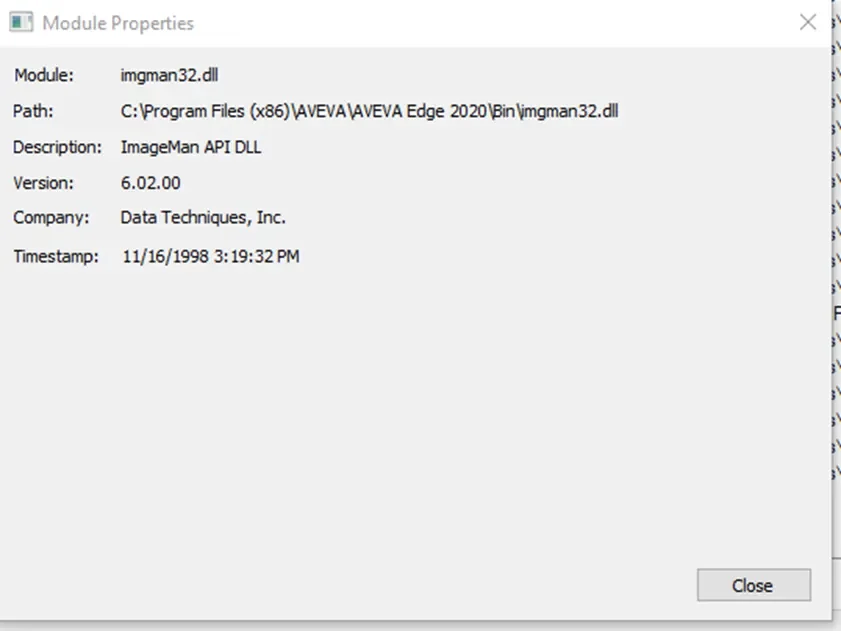
The screenshot shows imgman32.dll being loaded from Program Files, which is the trusted path.
Looking further, imgman32.dll tries to load a second file, IMHOST32.dll, but IMHOST32.dll is not part of the application package. The call used to load it is LoadLibraryA, an API with well-known abuse potential because of how it searches for the module.
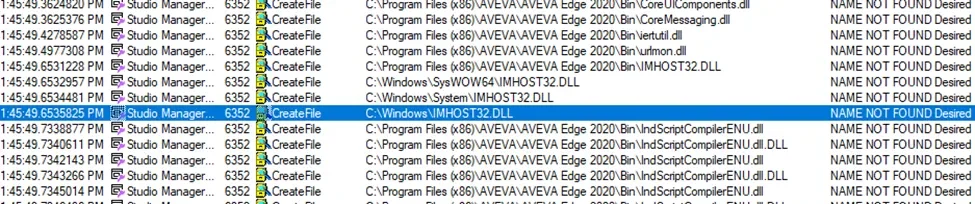
The image shows Aveva Studio Manager attempting to load IMHOST32.dll.
Exploitation
Step 1: identify the exported function that loads IMHOST32.dll
Analysis of the calling DLL, imgman32.dll, found an exported function named ImgPlugInHostLoad that attempts to load IMHOST32.dll via LoadLibraryA.
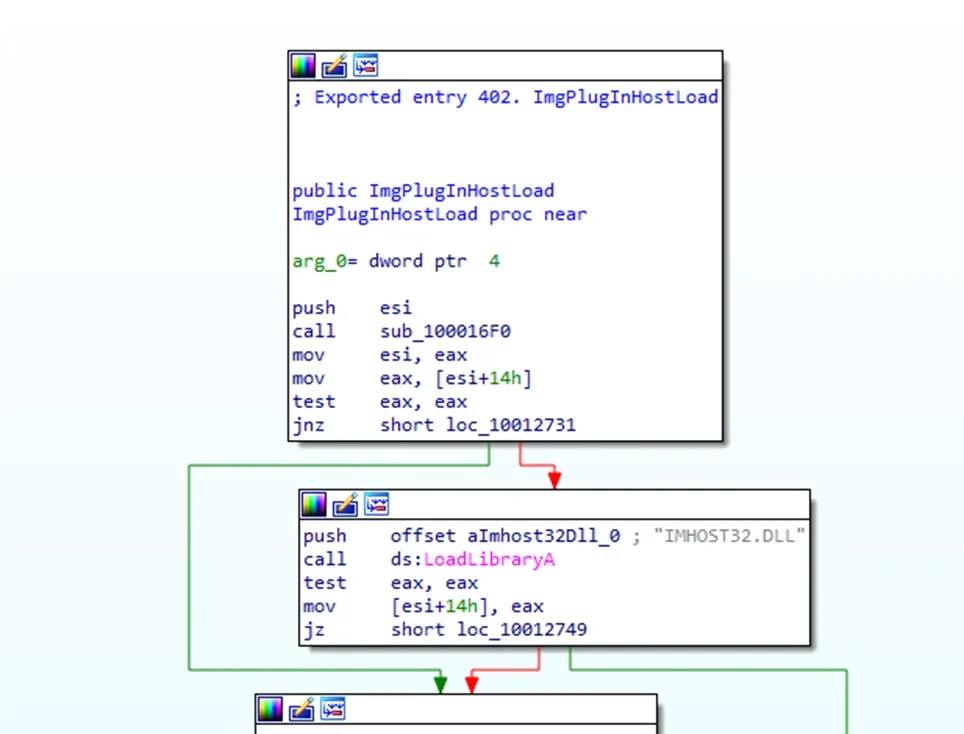
Step 2: note the second load from DllMain
Further analysis showed that imgman32.dll also attempts to load IMHOST32.dll from DllMain when the DLL is loaded. This explains why the payload (calc.exe) spawns multiple times during exploitation: there are multiple calls to IMHOST32.dll, which is backdoored in the attack payload.
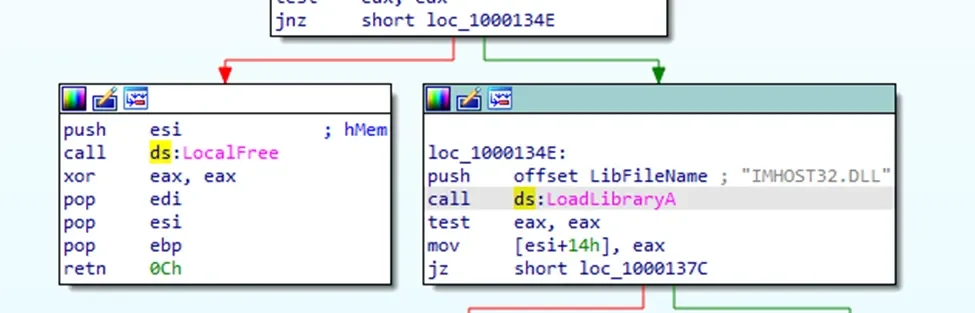
Step 3: trace who loads imgman32.dll
The library responsible for loading imgman32.dll is appbuild.dll. It uses a number of functions from imgman32.dll, all apparently related to handling images and image display within Aveva Edge.
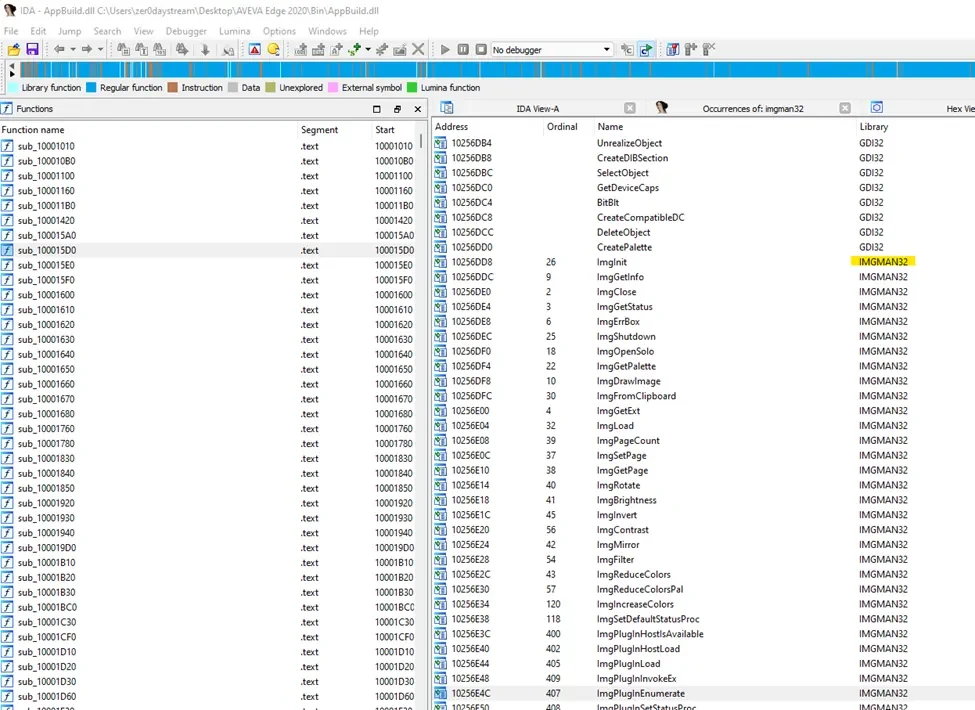
Step 4: trace the configuration that starts the chain
Reverse engineering showed that on application launch the application reads TreeView.ini from a safe path. That ini file contains a number of hardcoded DLLs to load, and AppBuild.dll is the first DLL that TreeView.ini requires.
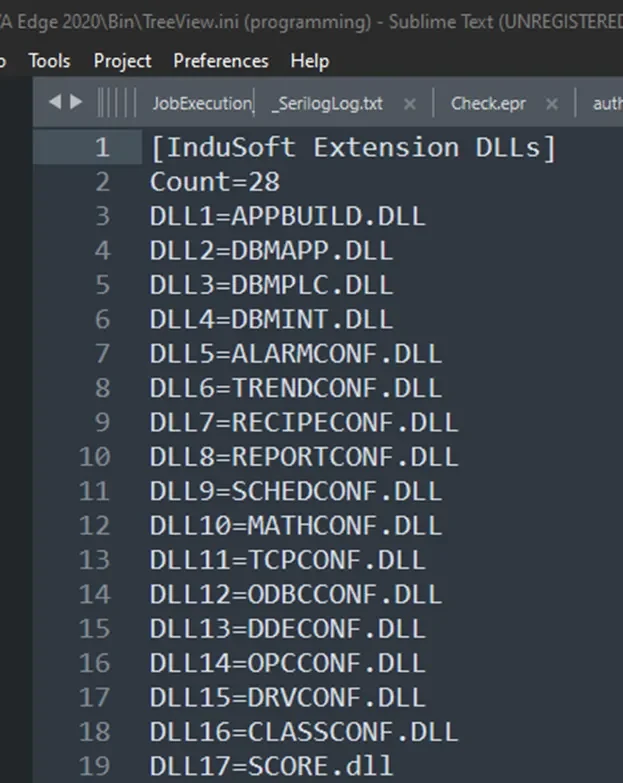
Step 5: deliver the malicious archive
Successful exploitation needs a maliciously crafted Aveva Archive plus a malicious IMHOST32.dll file alongside it. The default configuration contains code to cause imgman32.dll to load imhost32.dll. In my case the attacker includes the malicious IMHOST32.dll with an Aveva Edge .APP file, and because LoadLibraryA checks the current working directory for IMHOST32.dll, the planted file is picked up and arbitrary code runs.
Root cause
The chain is:
Studio Manager.exereadsTreeView.ini, which contains a list of DLLs to load.- The first library in
TreeView.ini(Appbuild.dll) loadsimgman32.dllbecause it uses importedimgman32.dllfunctions. imgman32.dllin turn requiresIMHOST32.dll, which is missing from the installation path.- Because
Imgman32.dllusesLoadLibraryA, the current working directory is checked to see whetherIMHOST32.dllexists. - An attacker who includes a malicious
IMHOST32.dllwith an Aveva Edge.APPfile gets arbitrary code execution.
The design mistake is a missing dependency resolved through LoadLibraryA, which checks the current working directory. The trusted loading of imgman32.dll from Program Files does not help, because the unsafe resolution happens one level down.
Impact
An attacker who can get a victim to open a crafted .APP archive can execute arbitrary code in the context of the Aveva Edge process. The proof of concept spawned calc.exe multiple times because of multiple calls to IMHOST32.dll. The write-up does not state the privileges the process runs with, so the impact beyond code execution in that process is not established here.
There were additional RCE cases in Aveva Edge that were not 0-click and were therefore outside the scope of the Pwn2Own targets.
Fix
The recommended solutions in the write-up are:
- Include
IMHOST32.dllin a trusted or preferred path. - Use a patched version of
Imgman32.dllthat uses a hardcoded DLL path, for example:
HMODULE handle = LoadLibrary("c:\\windows\\system32\\IMHOST32.dll");
The write-up notes the issue had been patched for a while before publication.
Variants to test
- Look for DLLs that the installer does not ship but that the application loads by name with
LoadLibraryAorLoadLibraryExwithoutLOAD_LIBRARY_SEARCH_SYSTEM32or an absolute path. A positive result is a missing module name in the import or string table combined with a successful load from the working directory when you plant a benign DLL there. - Check
DllMainof every loaded module for secondaryLoadLibrarycalls. A positive result is a payload executing more than once per launch, as happened here withcalc.exe. - Inspect ini and configuration files read from trusted paths for hardcoded DLL lists, such as
TreeView.ini. A positive result is a listed DLL that is either absent from the install or resolved relative to a user-writable directory. - Test archive formats that carry their own working directory or extracted content, such as
.APP, for DLL planting. A positive result is code execution from a DLL placed next to the archive rather than in the install directory. - Trace the import chain from the first configured DLL downwards. A positive result is a dependency that is not present in the package and is requested through a path-searching API.
What happened, in plain words
Aveva Edge is a Windows program used in industrial settings to display and control machinery, often called HMI/SCADA software. Think of it as the dashboard and control panel for a factory floor. The program opens project files with the extension .APP, which are archives (bundles of files, like a zip) that the Aveva Studio Manager tool loads.
When Studio Manager starts, it reads a small settings file from a trusted folder and then loads a series of helper files called DLLs. A DLL is a library of ready-made code that a program can borrow at runtime, a bit like a toolbox that the main program opens when it needs a particular tool. One of the toolboxes in that chain, a file called IMHOST32.dll, is not actually shipped with the product. The code that asks for it uses a Windows function called LoadLibraryA, which looks for the file by name in a few places, including the current working directory. That means if an attacker can put a file with that name in the right place, the program will load the attacker's file and run its code.
The write-up describes how I found this while researching Aveva Edge for Pwn2Own Miami, a security contest. The bug had been patched for a while.
Background you need first
A few ideas come up repeatedly, so here they are from zero.
- DLL: a file ending in
.dllthat contains code other programs can call. Windows programs are usually split into an.exe(the thing you double-click) and many DLLs (the parts it needs). - Loading a DLL: when a program needs a DLL, it asks Windows to find the file and bring it into memory. The function used to ask is often
LoadLibraryA(theAmeans it takes a plain text name). - Search order:
LoadLibraryAdoes not only look in one folder. It checks several locations in a set order, and the current working directory (CWD) is one of them. The CWD is the folder the program considers itself to be "in" at that moment, which is not always the folder the.exelives in. - DLL planting / arbitrary DLL loading: if a program asks for a DLL by name only, and an attacker can drop a file with that name into a folder the search checks, the attacker's file gets loaded instead of the real one. That is the vulnerability class here. It leads to arbitrary code execution, meaning the attacker's code runs on the machine.
- API: a defined way for one piece of software to ask another to do something.
LoadLibraryAis a Windows API. - Reverse engineering: taking a compiled program apart to understand what it does, using tools called disassemblers and decompilers. These turn machine code back into something closer to source code.
.APParchive: Aveva Edge's project file. It is a bundle that Studio Manager opens.
Setup
The testing was done against Aveva Edge V20 SP1 and later SP2. Successful exploitation needs a maliciously crafted Aveva Archive and a malicious IMHOST32.dll alongside it. The write-up describes reverse engineering of the DLLs and a payload that spawns calc.exe. A payload here means a DLL that does something visible when it runs, so you can tell it worked.
Finding it
While testing V20 SP1 and SP2 I found that .APP files can be configured to trigger DLL loading from unsafe paths. The starting point is benign: on startup Aveva Edge always loads imgman32.dll from a safe and trusted location.
The screenshot shows imgman32.dll being loaded from Program Files, which is the trusted path. Program Files is the standard Windows folder for installed software, and ordinary users cannot write there, so a DLL loaded from it is trustworthy.
Looking further, imgman32.dll tries to load a second file, IMHOST32.dll, but IMHOST32.dll is not part of the application package. The call used to load it is LoadLibraryA, an API with well-known abuse potential because of how it searches for the module. A module is just another word for a loaded DLL.
The image shows Aveva Studio Manager attempting to load IMHOST32.dll. This is the moment the chain goes looking for a file that is not there.
Exploitation
Step 1: identify the exported function that loads IMHOST32.dll
Analysis of the calling DLL, imgman32.dll, found an exported function named ImgPlugInHostLoad that attempts to load IMHOST32.dll via LoadLibraryA. An exported function is a function a DLL offers to other programs, like a labelled button on the toolbox that other code can press.
Step 2: note the second load from DllMain
Further analysis showed that imgman32.dll also attempts to load IMHOST32.dll from DllMain when the DLL is loaded. DllMain is a special function inside every DLL that Windows runs automatically when the DLL is loaded or unloaded, so code there runs without anyone calling it explicitly. This explains why the payload (calc.exe) spawns multiple times during exploitation: there are multiple calls to IMHOST32.dll, which is backdoored in the attack payload. calc.exe is the Windows calculator, a harmless program used to prove code ran.
Step 3: trace who loads imgman32.dll
The library responsible for loading imgman32.dll is appbuild.dll. It uses a number of functions from imgman32.dll, all apparently related to handling images and image display within Aveva Edge.
Step 4: trace the configuration that starts the chain
Reverse engineering showed that on application launch the application reads TreeView.ini from a safe path. An .ini file is a plain text settings file. That ini file contains a number of hardcoded DLLs to load, and AppBuild.dll is the first DLL that TreeView.ini requires.
Step 5: deliver the malicious archive
Successful exploitation needs a maliciously crafted Aveva Archive plus a malicious IMHOST32.dll file alongside it. The default configuration contains code to cause imgman32.dll to load imhost32.dll. In my case the attacker includes the malicious IMHOST32.dll with an Aveva Edge .APP file, and because LoadLibraryA checks the current working directory for IMHOST32.dll, the planted file is picked up and arbitrary code runs.
Root cause
The chain is:
Studio Manager.exereadsTreeView.ini, which contains a list of DLLs to load.- The first library in
TreeView.ini(Appbuild.dll) loadsimgman32.dllbecause it uses importedimgman32.dllfunctions. imgman32.dllin turn requiresIMHOST32.dll, which is missing from the installation path.- Because
Imgman32.dllusesLoadLibraryA, the current working directory is checked to see whetherIMHOST32.dllexists. - An attacker who includes a malicious
IMHOST32.dllwith an Aveva Edge.APPfile gets arbitrary code execution.
The design mistake is a missing dependency resolved through LoadLibraryA, which checks the current working directory. An absolute path is a full address like C:\Windows\System32\file.dll, which leaves no room for confusion. Asking by name alone lets the search wander into folders an attacker may control. The trusted loading of imgman32.dll from Program Files does not help, because the unsafe resolution happens one level down.
Impact
An attacker who can get a victim to open a crafted .APP archive can execute arbitrary code in the context of the Aveva Edge process. The proof of concept spawned calc.exe multiple times because of multiple calls to IMHOST32.dll. The write-up does not state the privileges the process runs with, so the impact beyond code execution in that process is not established here.
There were additional RCE cases in Aveva Edge that were not 0-click and were therefore outside the scope of the Pwn2Own targets. RCE means remote code execution, and 0-click means it happens without the victim doing anything at all.
Fix
The recommended solutions in the write-up are:
- Include
IMHOST32.dllin a trusted or preferred path. - Use a patched version of
Imgman32.dllthat uses a hardcoded DLL path, for example:
HMODULE handle = LoadLibrary("c:\\windows\\system32\\IMHOST32.dll");
Line by line: HMODULE is the type Windows uses to refer to a loaded DLL. handle is the variable name that will hold that reference. LoadLibrary is the function that loads a DLL. The string "c:\\windows\\system32\\IMHOST32.dll" is a full, absolute path, so Windows goes straight to that exact file and does not search anywhere else. The double backslashes are how a backslash is written inside a C string.
The write-up notes the issue had been patched for a while before publication.
Variants to test
- Look for DLLs that the installer does not ship but that the application loads by name with
LoadLibraryAorLoadLibraryExwithoutLOAD_LIBRARY_SEARCH_SYSTEM32or an absolute path. A positive result is a missing module name in the import or string table combined with a successful load from the working directory when you plant a benign DLL there. - Check
DllMainof every loaded module for secondaryLoadLibrarycalls. A positive result is a payload executing more than once per launch, as happened here withcalc.exe. - Inspect ini and configuration files read from trusted paths for hardcoded DLL lists, such as
TreeView.ini. A positive result is a listed DLL that is either absent from the install or resolved relative to a user-writable directory. - Test archive formats that carry their own working directory or extracted content, such as
.APP, for DLL planting. A positive result is code execution from a DLL placed next to the archive rather than in the install directory. - Trace the import chain from the first configured DLL downwards. A positive result is a dependency that is not present in the package and is requested through a path-searching API.
Glossary
- DLL: a file ending in
.dllthat contains code other programs can load and call. - LoadLibraryA: a Windows API function that loads a DLL by name, searching several folders in a set order.
- LoadLibraryEx: a variant of
LoadLibraryAwith extra options that change how the search is done. - Current working directory (CWD): the folder a running program considers itself to be in, which is not always where its
.exelives. - DLL planting: dropping a malicious DLL with an expected name into a folder the program searches, so it loads the attacker's file.
- Arbitrary DLL loading: a flaw where a program loads a DLL from a location an attacker can influence.
- Arbitrary code execution: running code of the attacker's choosing on the target machine.
- RCE: remote code execution, arbitrary code execution triggered from outside the machine.
- 0-click: an attack that needs no action from the victim.
- API: a defined way for software to ask another piece of software to do something.
- Exported function: a function a DLL offers for other programs to call.
- DllMain: a special function inside a DLL that Windows runs automatically when the DLL is loaded or unloaded.
- Module: a loaded DLL or executable in memory.
- Import table: the list inside a program of functions it expects to borrow from other DLLs.
- String table: a list of text strings stored inside a compiled program.
- Reverse engineering: taking a compiled program apart to understand what it does.
- Disassembler / decompiler: tools that turn machine code back into assembly or something closer to source code.
.APParchive: Aveva Edge's project file, a bundle that Studio Manager opens..inifile: a plain text settings file.- HMI/SCADA: software used to display and control industrial machinery.
- Absolute path: a full file address such as
C:\Windows\System32\file.dll, leaving no room for search. - Payload: the code an attacker wants to run, here a DLL that proves execution.
calc.exe: the Windows calculator, used as a harmless proof that code ran.- Pwn2Own: a security contest where researchers demonstrate exploits.
LOAD_LIBRARY_SEARCH_SYSTEM32: a flag that restricts a DLL search to the Windows system folder.


