Bypassing Homograph Attack Using /@ [ Tested On Windows ]
The Brave browser's punycode conversion only checked the part of the URL after the '@' symbol, so a homograph URL with a Cyrillic character before the '@' was not converted to punycode. An attacker could trick a user into visiting a malicious site that appears to be a trusted domain.
 Originally disclosed on HackerOne
- Triaged in 11 hours
- Fixed in 26 hours
- Paid in 26 hours
- Disclosed after 3 days
Summary:
Bypassing Homograph Attack Using /@
I look at on my previous report on #268984 and see patch code in the github https://github.com/brave/browser-laptop/commit/f2e438d6158fbc62e2641458b6002a72d223c366 I look at code at
it('returns the punycode URL when given a valid URL', function () {
        assert.equal(urlUtil.getPunycodeUrl('http://brave:brave@ebаy.com:1234/brave#brave'), 'http://brave:[email protected]:1234/brave#brave')
 })
And i think the punycode will return to ASCII just after @ before it is not checked. And i give the try. and got some homograph attack. ( Correct Me If I Wrong )
Products affected:
- Brave 0.20.27 ( Windows )
Steps To Reproduce:
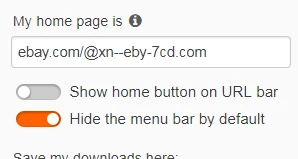
This is punycode URL ebаy.com@ebаy.com = [email protected] Add to homepage.
Attempt :
- ebаy.com@ebаy.com it'll become = ebа[email protected]
- ebаy.com/ebаy.com it'll become = xn--eby-7cd.xn--com/eby-7fg.com
- ebаy.com/@ebay.com it'll become = ebаy.com/@xn--eby-7cd.com
if user input ebаy.com/@brave.com user will be redirect to xn--eby-7cd.com
punycode failed return to ascii because brave just check after @ not all of URL
Supporting Material/References:
Video : https://youtu.be/Zz7KV_R0Wp8
SS :
Thanks
Impact
User will be tricked by attacker to visit malicious link with punycode inside it.
Not written yet. The AI write-up for this report has not been written yet. The Original tab links to the source.
How it worked
Root cause
The punycode conversion logic only processed the portion of the URL after the '@' character, leaving the userinfo section unchecked.
Impact
A user could be tricked into visiting a malicious link that appears to be a trusted domain.
What the attacker needed
Victim uses Brave browser on Windows; victim clicks a crafted homograph link
How it was found
- Enter a homograph URL with a Cyrillic character before the '@' symbol, such as [redacted], into the browser's address bar or homepage setting.
- Observe that the browser converts only the part after '@' to punycode, resulting in [redacted]
- The user is then redirected to the punycode domain xn--eby-7cd.com.
Explained by bugbounty.wiki with AI from the original and checked against quotes from it; it can still be wrong. Read the original before relying on a detail.
Not written yet. The AI write-up for this report has not been written yet. The Original tab links to the source.
A homograph attack uses lookalike characters from different alphabets to make a web address appear to belong to a trusted site. Browsers normally show such addresses in punycode (a safe ASCII form) to warn users. Here, the browser only converted the part after the '@' symbol, so the deceptive part before it stayed hidden.
What is Open redirect?
A trusted site forwards users to any address an attacker picks; rarely paid alone, often the missing link in a chain.