Homograph Attack Bypass [ Tested on Linux & Windows ]
The browser's homepage URL validation could be bypassed by adding an IDN containing an '@' symbol, causing the displayed URL to show a homograph domain that redirects to a punycode domain. An attacker could use this to trick users into visiting a malicious site that appears legitimate.
 Originally disclosed on HackerOne
- Paid in 36 hours
- Disclosed after 4 days
Summary by the researcher
If you want read guys : https://apapedulimu.click/homograph-attack-bypass-on-brave-browser/
The report
##Summary:
at #175286 you has been patched, and i try it work, but i've another way to bypass it. when we add a site to our Homepage with @, it's not validate a url properly, make sure it's display the punycode.
##Products affected:
Brave 0.18.36 ( Linux & Windows )
##Steps To Reproduce:
- In browser add homepage with IDN
@ebаy.com/ - now close and open browser again
- you can see it's redirect to http://xn--eby-7cd.com/
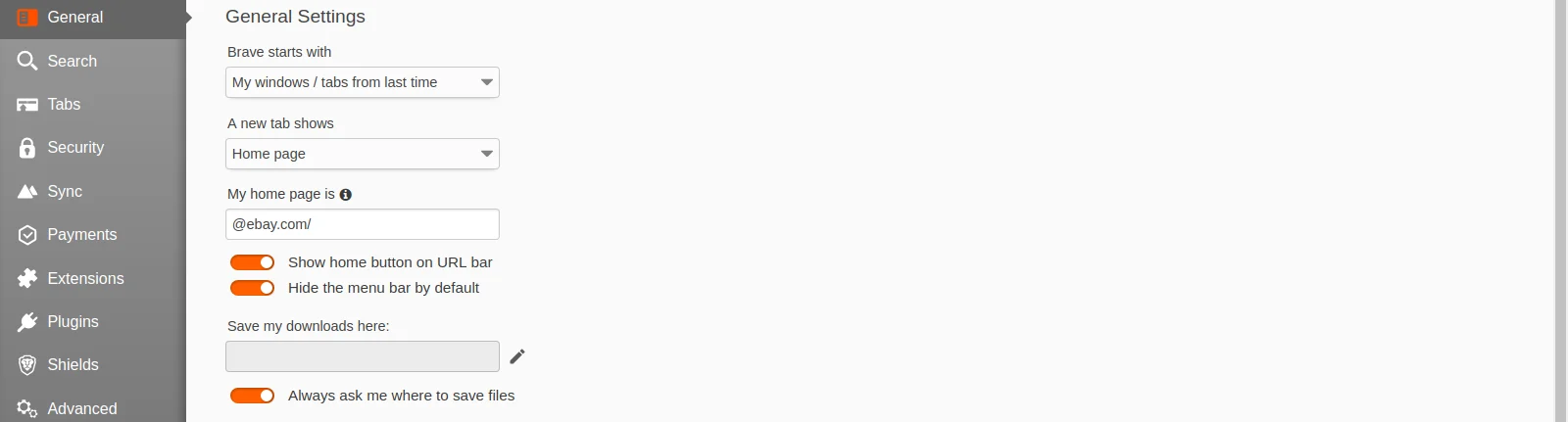
##References: https://hackerone.com/reports/175286
##Video https://youtu.be/aCDeZRdRCuk (unlisted)
Not written yet. The AI write-up for this report has not been written yet. The Original tab links to the source.
How it worked
Root cause
Likely the homepage URL validation did not properly handle the '@' character in IDN URLs, allowing a homograph domain to be displayed without punycode conversion.
Impact
An attacker could craft a homepage URL that displays a deceptive homograph domain, which redirects to a punycode domain.
What the attacker needed
User adds a homepage with a crafted IDN URL; browser restart
The fix
Homepage URL validation should correctly handle IDN and '@' characters so punycode is displayed.
How it was found
- In the browser, add a homepage using an IDN that contains an '@' symbol.
- Close and reopen the browser.
- Observe that the browser redirects to the punycode version of the domain.
Explained by bugbounty.wiki with AI from the original and checked against quotes from it; it can still be wrong. Read the original before relying on a detail.
Not written yet. The AI write-up for this report has not been written yet. The Original tab links to the source.
A homograph attack uses lookalike characters from different alphabets to make a web address appear to belong to a trusted site. Here, the browser failed to properly check a homepage address containing an '@' symbol, so it showed a fake address that looked like a real one but actually went to a different site. This could trick someone into visiting a malicious page.
What is Open redirect?
A trusted site forwards users to any address an attacker picks; rarely paid alone, often the missing link in a chain.