Command Execution because of extension handling
When Brave saves a webpage, it uses the website's name as the filename without forcing a safe extension, so a site named with a dangerous extension like .bat is saved as an executable file. An attacker could host a page with such a name and trick a user into saving and running it, leading to command execution.

- Disclosed after 8 months
Summary:
Hello,
Using this bug an attacker can execute commands as the current user using brave & gain complete shell capabilities (and all possibilities associated)
Details:
The issue is in the way the application handles website TLDs. typically in windows, .com represents an application, much similar like .exe - when Brave saves a website (Ctrl+S) - it uses the name of the website.
For PoC purpose I used .bat TLDs because they are much easier to show a poc with instead of binary application garbage data.
So Assume a user visits http://paulos.bat with the contents of:
@echo off
calc
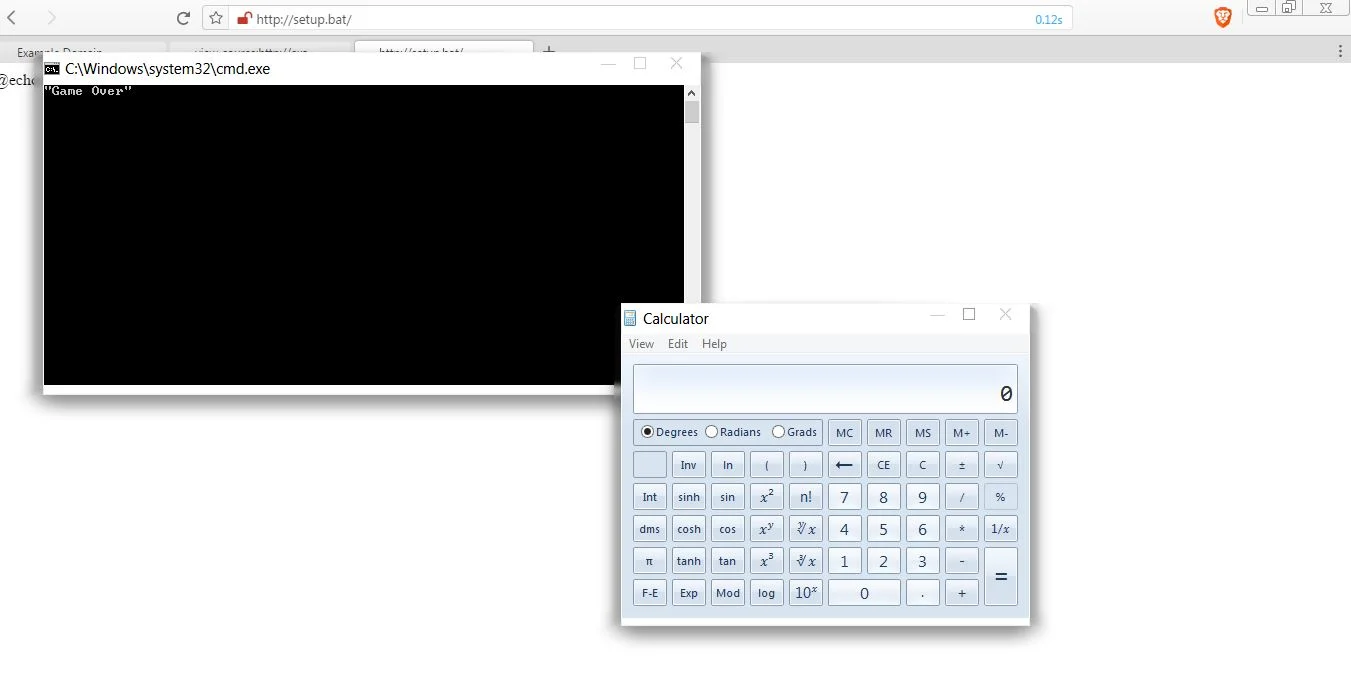
And saves the page, this will save the website as paulos.bat - which when executed - actually opens batch and executes calculator.
Bypassing Mitigations
In Windows, Microsoft warns users when they execute applications that are downloaded, this can simply be bypassed by sending filenames with words like Update or Setup... yeah, I can't believe this works too.
So say a user visits https://malicioussetup.com and saves the site - note this site changed its contents from whatever it was to binary-garbage & microsoft will allow executing it - eventually causing code execution.
This is clearly a chain of low priority issues that cause command execution. :) (POC
Products affected:
- Tested in Latest Brave Windows (I suspect OSX, iOS & Android may also be affected)
Recommended Fix:
Add .html/htm to the index page (/index.html) to mitigate this easily
Supporting Material/References:
- POC image attached
- POC video (Private): https://youtu.be/ret4pJArYSU
I think you should fix this ASAP! as anyone can register .com sites to abuse it.
Thanks, Paulos
Attachments
Not written yet. The AI write-up for this report has not been written yet. The Original tab links to the source.
How it worked
Root cause
Likely the browser did not enforce a safe file extension when saving pages, allowing the website's name to dictate the saved file's extension.
Impact
An attacker could achieve command execution as the current user, though the user must save and then run the file, and Windows may show a warning that can be bypassed with certain filenames.
What the attacker needed
Brave on Windows; victim saves the page; victim runs the saved file
The fix
The browser should append a safe extension such as .html to saved pages.
How it was found
- Visit a website whose name ends with a dangerous extension such as .bat.
- Save the page using Ctrl+S.
- The saved file keeps the dangerous extension.
- Open the saved file, which executes commands.
Explained by bugbounty.wiki with AI from the original and checked against quotes from it; it can still be wrong. Read the original before relying on a detail.
Not written yet. The AI write-up for this report has not been written yet. The Original tab links to the source.
When you save a web page, the browser usually picks a filename based on the site's address. Here, the browser did not add a safe ending like .html, so a site named something.bat was saved as a .bat file. On Windows, .bat files run commands when double-clicked, so opening the saved file could run code on your computer.
What is RCE?
Running the attacker's code on the target's servers: through command or code injection, unsafe deserialisation or template injection.