Incorrect security UI of files' download source on brave MacOS
The Brave browser's download pop-up shows the referring page's URL instead of the actual download source. An attacker could use this to make a malicious file appear to come from a trusted site.

- Triaged in 10 hours
- Fixed in 7 days
- Paid in 7 days
- Disclosed after 38 days
Summary:
This vulnerability involves the incorrect display of the download source in the Brave download alert. Instead of displaying the actual source of the downloaded file, the browser displays the referrer header value, which may mislead the user into believing that the file is from a trusted source. This behavior creates a potential security risk as it could allow attackers to trick users into downloading malicious files.
Products affected:
Brave is up to date Version 1.73.97 Chromium: 131.0.6778.108 (Official Build) (arm64)
Steps To Reproduce:
- Victim visit: https://ybt01.github.io/upload/google.html#
- Victim click
click me to download google apkand will pop up download location with wrong files origin
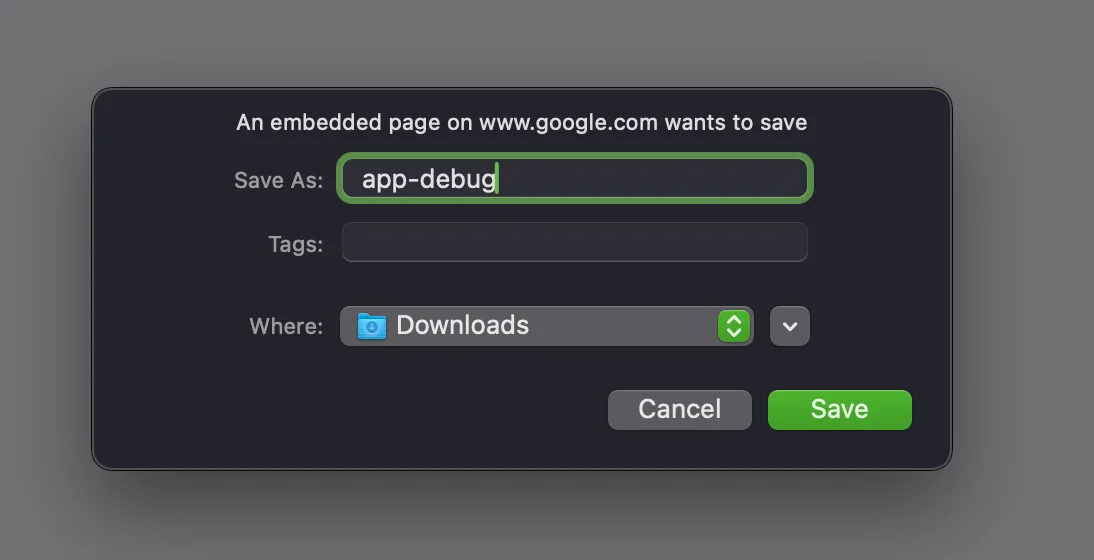
POC
Expected result
The origin source on the download pop up should accurately reflect the actual source of the downloaded file, indicating the URL from which the file was downloaded directly (e.g., https://ybt01.github.io).
Actual Result
The origin source on the pop up displays the URL of the referring page (e.g., https://google.com), thus misleading the user about the actual source of the downloaded file.
Supporting Material/References:
This issue is similar to the one in the report: https://issues.chromium.org/issues/352681108 but this is a different case because in chrome it is not affected. and in brave it is affected in the download pop up while in the chromium report it is affected in chrome: //downloads. However, in terms of impact and scenario this case is similar.
Impact
This vulnerability can significantly impact user security by providing misleading information about file downloads. Users may unknowingly trust files downloaded from malicious sources, believing they originated from reputable domains. This can facilitate the distribution of malware and other harmful software, especially in targeted attacks by Advanced Persistent Threat (APT) groups or malicious websites that employ social engineering tactics. As a result, the risk of unintentional malware installation on user systems increases, undermining the overall security posture of users.
Not written yet. The AI write-up for this report has not been written yet. The Original tab links to the source.
How it worked
Root cause
Likely the download UI uses the referrer header instead of the final download URL to display the source.
Impact
Users could be misled into trusting and running files from untrusted sources, potentially leading to malware installation.
What the attacker needed
Victim uses Brave on macOS; Victim visits a malicious page; Victim clicks a download link
The fix
The download pop-up should show the actual download URL, not the referrer.
How it was found
- Victim visits a specially crafted page.
- Victim clicks a download link.
- A download pop-up appears showing the wrong file origin.
Explained by bugbounty.wiki with AI from the original and checked against quotes from it; it can still be wrong. Read the original before relying on a detail.
Not written yet. The AI write-up for this report has not been written yet. The Original tab links to the source.
When you download a file, your browser usually shows where it came from. In this case, Brave showed the address of the page that linked to the file, not the file's real location. That could trick someone into trusting a harmful file because it looks like it came from a well-known site.
What is Info disclosure?
Data the application should keep private (personal data, internal details, other users' records) reaches someone it should not.




