Brave Shield for iOS is weak against IDN homograph attacks
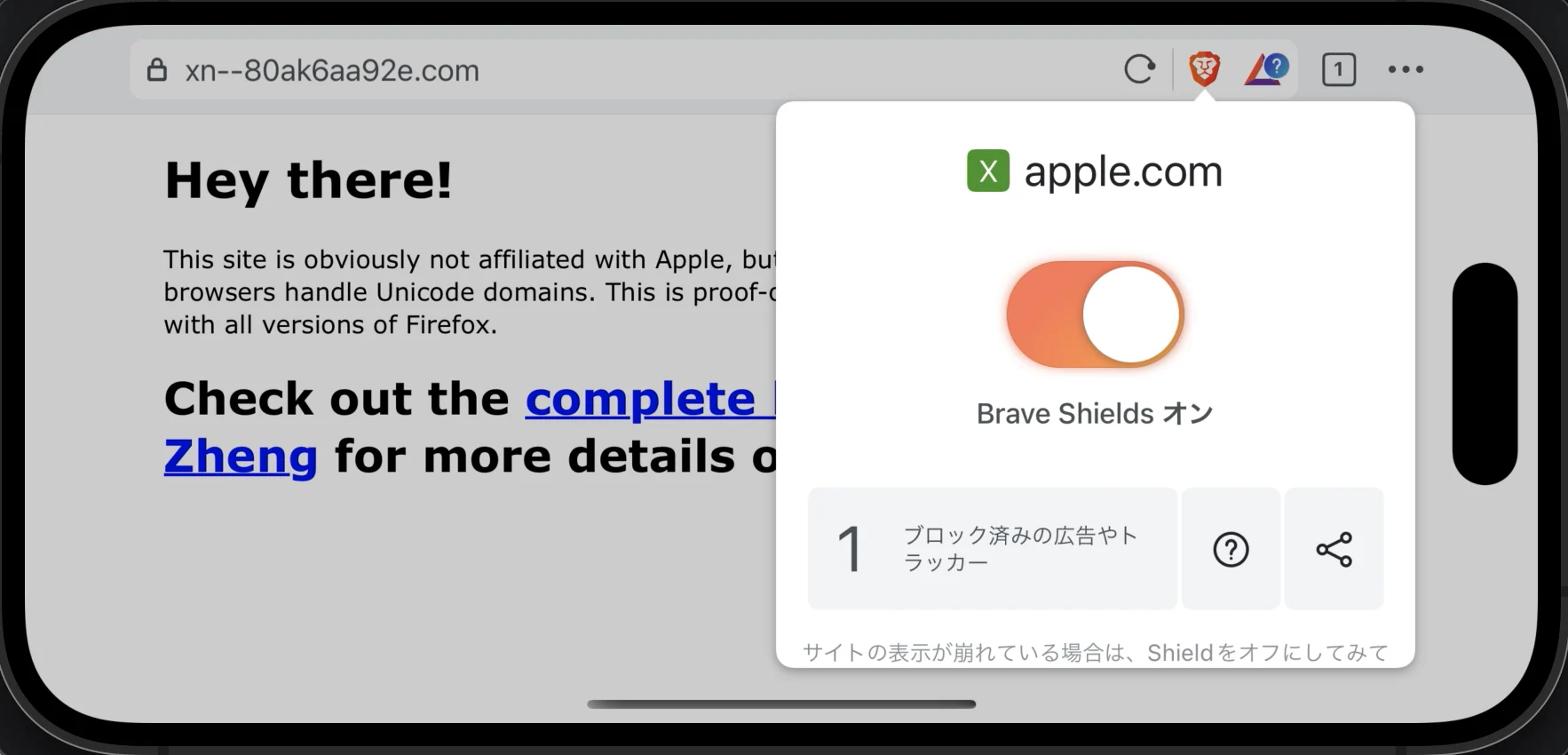
Brave Shield on iOS displays the punycode domain of a site as its Unicode equivalent, so a homograph domain that looks like apple.com is shown as apple.com. An attacker could register such a domain and trick users into believing they are on a legitimate site.
 Originally disclosed on HackerOne
- Triaged in 10 hours
- Fixed in 5 days
- Paid in 5 days
- Disclosed after 6 months
Summary:
In most parts of Brave for iOS, including the address bar, protection against IDN attacks are implemented. However, Brave Shield has no countermeasures. For example, when you visit https://www.xn--80ak6aa92e.com , Brave Shield panel in the address bar shows the domain of this site is "apple.com". This may lead users to be deceived into believing that the site is legitimate.
Products affected:
- Brave for iOS (Version 1.45.2)
Steps To Reproduce:
- Visit https://www.xn--80ak6aa92e.com
- Open Brave Shield panel from the address bar
- "apple.com" is shown in the panel
Supporting Material/References:
- See the screenshot I attached.
Impact
This may lead users to be deceived into believing that the site is legitimate.
Attachments
Not written yet. The AI write-up for this report has not been written yet. The Original tab links to the source.
How it worked
Root cause
Likely the Brave Shield panel does not apply the same IDN homograph protection that is used elsewhere in the browser, so it displays the Unicode form of a punycode domain without warning.
Impact
This may lead users to be deceived into believing that the site is legitimate.
What the attacker needed
Brave for iOS; attacker registers a homograph domain; victim visits the domain
How it was found
- Visit the punycode domain that resembles apple.com.
- Open the Brave Shield panel from the address bar.
- Observe that the panel shows "apple.com" instead of the punycode domain.
Explained by bugbounty.wiki with AI from the original and checked against quotes from it; it can still be wrong. Read the original before relying on a detail.
Not written yet. The AI write-up for this report has not been written yet. The Original tab links to the source.
Some web addresses use special characters that look like normal letters, so a fake site can appear to have a trusted name. Brave normally warns about this in the address bar, but the Brave Shield panel did not, so it showed the fake address as if it were the real one. This could make people trust a malicious site.
What is Info disclosure?
Data the application should keep private (personal data, internal details, other users' records) reaches someone it should not.




