How a Single Vulnerability Can Bring Down the JavaScript Ecosystem | 0xLupin
The npm registry was vulnerable to cache poisoning denial of service (CPDoS). By sending a request with a specific set of headers, an attacker could cause the registry to cache a 'Not Found' response for a package, making it unavailable to other users for a few minutes.
 Published on landh.tech
In the world of software development, we often take for granted the security and reliability of the tools and platforms we rely on daily. We assume that the packages we download and the registries we use are safe and trustworthy.
The full write-up lives on its author's site
It belongs to its author, so we link to it rather than copy it. The other two tabs are our own rewrites, checked against it.
Context
The target is the npm registry, registry.npmjs.org, the central package repository for the JavaScript ecosystem. The article describes it as hosting over 2.1 million packages and being relied upon by more than 17 million developers. The feature under attack is the registry's HTTP caching layer: when a client requests a package tarball such as safe-regex-1.1.0.tgz, the registry (fronted by Cloudflare, per the response headers) caches the response so that subsequent requests for the same URL are served from cache.
The vulnerability class is Cache Poisoning Denial of Service (CPDoS), as described in PortSwigger's research on responsible denial of service with web cache poisoning. The idea is to make the cache store an error response for a legitimate resource, so that later users requesting that resource receive the error instead of the package.
The research was carried out by Lupin & Holmes while building a research submodule for their tool Depi, aimed at testing cache poisoning against artifactories. The submodule explores theoretical attack vectors that could affect the integrity, confidentiality or availability of clients' software supply chains, and validates them at scale before they are implemented into Depi.
Setup
The work started as a research-mode experiment inside Depi: a module was written to test whether artifactories used by clients could be vulnerable to CPDoS. The theory was simple: could an attacker poison a page so that the content of a .tar.gz file is redirected to a malicious one, or so that the package is denied entirely?
The module was run against registry.npmjs.org and matched on the first run. The team initially assumed a false positive, but later confirmed a full CPDoS against the npm registry.
Testing was done directly from Burp Suite. To validate that the attack worked through the normal client workflow, the researchers also created a dummy package and proxied the npm CLI to observe what happened, cleaning the local cache from the current system before each run. The attack was then run in a loop for a couple of seconds.
Finding it
The first run of the Depi module flagged registry.npmjs.org as vulnerable. Because a hit on the first attempt looked suspicious, the team treated it as a probable false positive until they could reproduce it. They confirmed that the registry could indeed be made to serve a cached Not Found response for a targeted package.

The mechanism they identified: a series of different headers, sent together, trigger an error in the backend systems. A request carrying those headers causes the registry's caching system to store a Not Found response for the targeted package URL. The exact set of headers is deliberately withheld in the article because the issue was still exploitable at the time of writing.
Exploitation
Step 1: poison the cache with a crafted request
The malicious request targets a specific tarball and adds a cache buster parameter so that real users are not affected by the poisoning. The example uses the safe-regex package at version 1.1.0:
GET /safe-regex/-/safe-regex-1.1.0.tgz?lupin_E7A812DE-E09A-4906-A9E3-530E54AAEB41=cpdos_test HTTP/1.1
Host: registry.npmjs.org
User-Agent: lupin_test_cpdos
lupin: E7A812DE-E09A-4906-A9E3-530E54
The query string parameter lupin_E7A812DE-E09A-4906-A9E3-530E54AAEB41=cpdos_test acts as the cache buster: it makes the poisoned cache entry distinct from the URL real users request. The request carries a custom lupin header alongside the withheld triggering headers. The User-Agent identifies the test traffic.
Step 2: retrieve the poisoned entry
A second request is sent to the same URL, with the same cache key, but without the triggering header:
GET /safe-regex/-/safe-regex-1.1.0.tgz?lupin_E7A812DE-E09A-4906-A9E3-530E54AAEB41=cpdos_test HTTP/1.1
Host: registry.npmjs.org
User-Agent: lupin_test_cpdos
This request returns the cached error response:
HTTP/1.1 404 Not Found
Date: Tue, 21 May 2024 08:40:06 GMT
Content-Type: application/json
Content-Length: 21
Connection: keep-alive
CF-Ray: 8873427f1e301222-MRS
Access-Control-Allow-Origin: *
Vary: Accept-Encoding
Server: cloudflare

{
    "error": "Not found"
}
The response is a 404 Not Found with a JSON body, served through Cloudflare. The cache now holds this error for the cache-busted URL, and any client requesting that URL gets the error instead of the tarball.
Step 3: confirm through npm install
To show the attack works through the normal client workflow and not only from Burp Suite, the researchers created a dummy package, proxied the npm CLI to observe the traffic, cleaned the local cache, and ran the attack in a loop for a couple of seconds. They confirmed they could CPDoS a package in production after it had been uploaded:
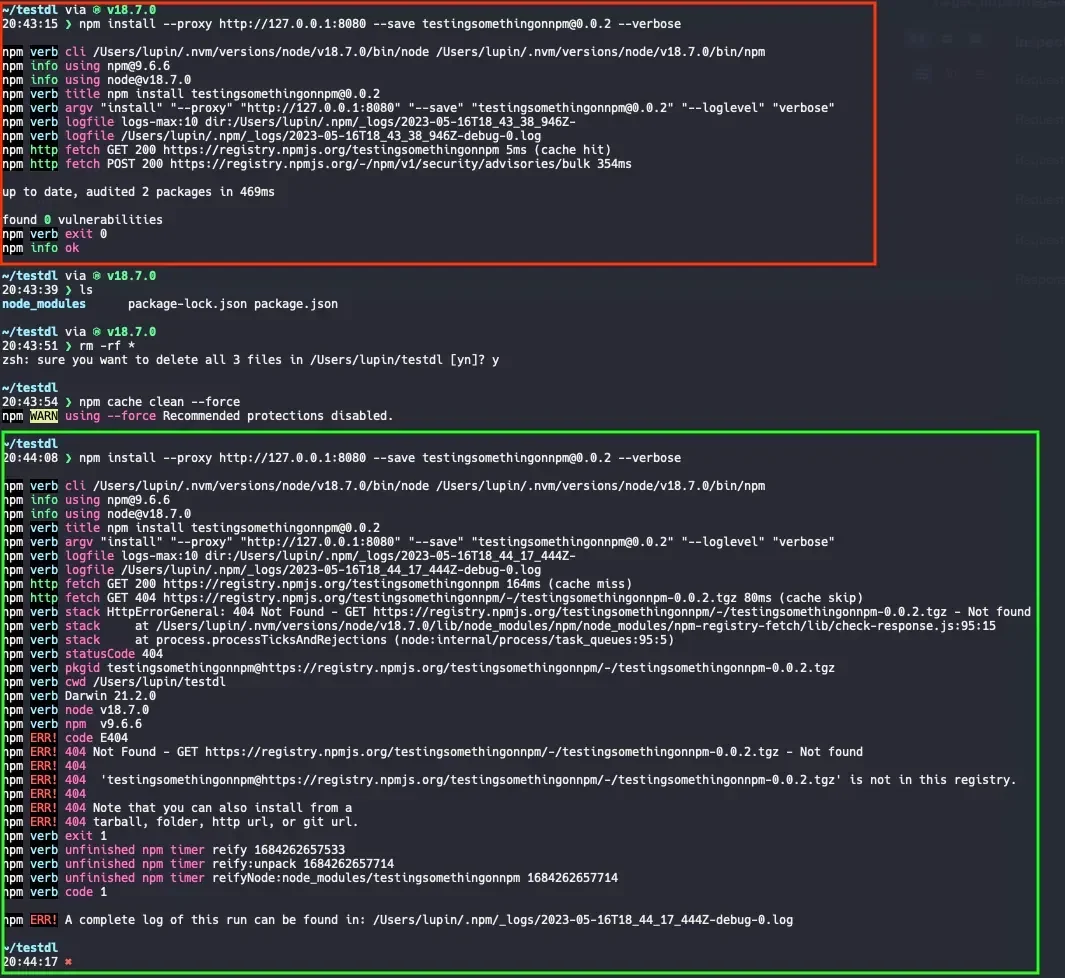
In the screenshot, red marks the period before the attack and green marks the period while the attack was running.
Conditions and limits observed
The cached error is temporary, lasting a few minutes, so an attacker has to send requests periodically to keep the poisoning in place. The registry runs multiple backend servers, so the attack has to be repeated to poison the cache on the different servers. The researchers also found that which backend gets poisoned is inconsistent, and that if the cache entry already exists, the attacker cannot use a PURGE command to poison it back. They further noted that an attacker could possibly start poisoning before a new version of a popular package is registered, in order to poison installations at the moment the version appears or when a package's cache is renewed.
Testing from various IPs and clients confirmed that the poisoning affected not only the attacker but also other users trying to access the targeted package. Based on their tests, a quarter of the requests were poisoned. The article notes that sending more requests would make the attack more reliable, but that the resources required would be nowhere near a DDoS.
Root cause
The article does not describe the backend code. What it establishes is that a particular combination of request headers causes the backend to return an error, and that the caching layer stores that error response under the request's cache key. The caching layer stores the header-triggered error under the request's cache key, so later clients sending the same key without the triggering headers receive it. The exact headers are withheld, so the precise backend fault is not public.
The registry sits behind Cloudflare and uses multiple backend servers, and the error response was still cached and served to other users. The response carries Vary: Accept-Encoding.
Impact
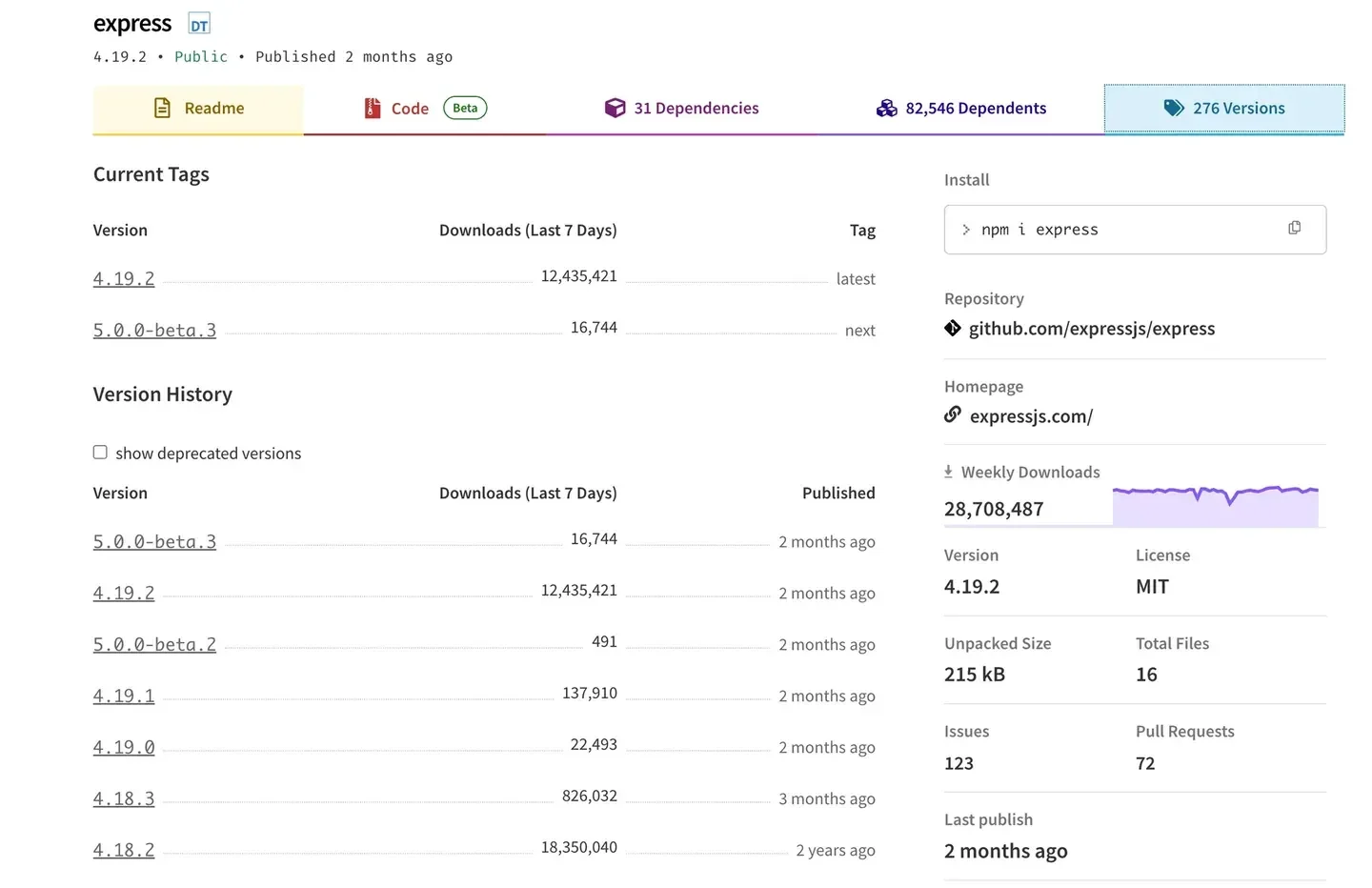
An attacker can make a chosen package unavailable to other users by poisoning the cached response for its tarball. The article frames the impact around popular packages: it cites express as an example, with over 12 million downloads per week on its latest version, and elsewhere describes it as having over 30 million downloads per week. If such a package becomes unavailable, builds fail and applications break, with a cascading effect across the projects and services that depend on it, and across multiple organisations.
The attack was demonstrated against a production package after upload, from a single machine. The article's hedges: the poisoning is temporary (a few minutes), must be refreshed periodically, must be repeated across backend servers, and which backend is poisoned is inconsistent. The researchers also raise the possibility of poisoning a package around the time a new version is registered or its cache is renewed.
GitHub's response
GitHub, as owner of npm, investigated the bug bounty report. It determined the issue did not present a significant security risk and closed the report as informative without fixing it. GitHub acknowledged the complexity and limited reliability of reproducing the attack consistently, noted that it relied on a problematic header already known to its team, and stated that executing the attack as described would require a DDoS or volumetric attack, which falls under abuse and outside the scope of the bug bounty programme. The report was not eligible for a full bounty, but GitHub offered $500 as a token of appreciation.
The researchers dispute the DDoS characterisation, quoting GitHub:
To further execute this attack as you’ve described in your latest follow up comment, a DDoS or volumetric attack is needed, in which is an abuse issue. We take abuse and spam seriously and have a dedicated team that tracks down spammy users. Please also note that submissions around volumetric DoS attacks are not in the scope of our bounty program.
They point out that they compromised a production package from a single machine, with only two reliability issues: not being able to predict which backend is impacted, and having to send a request every couple of minutes to maintain the poisoning. A quarter of requests were poisoned in their tests.
After receiving a draft of the article, GitHub's security team replied:
Thank you again for sharing with us the draft of your intended blogpost and for sending this report in, providing us the opportunity to harden our DoS protections. As we’ve discussed in the history of this issue, the reproducibility has been consistently difficult and requires a DDoS or volumetric attack to successfully exploit. In the effort to continue to improve the security of npm and our products, we are aiming to ship a fix this coming Monday that should address the issue despite its complexity. We thank you again for your contribution to our Bug Bounty program and are excited to continue to collaborate in the future.
The researchers state they have nothing against GitHub's security team, whom they met and found engaging, but disagree with the overall assessment. They argue that CPDoS issues need to be taken more seriously by a company at the centre of the software supply chain, and that calling the described attack volumetric and an abuse issue is far fetched.
Fix
At the time of writing, the vulnerability was still exploitable on the npm registry. GitHub said it aimed to ship a fix the following Monday that should address the issue despite its complexity. The article does not describe the fix itself.
Timeline
| Time (UTC) | Event |
|---|---|
| March 3, 2023, 10:14pm | Vulnerability reported by Lupin |
| March 6, 2023, 5:11pm | GitHub acknowledged the report |
| March 9, 2023, 7:48pm | GitHub closed the issue as internal duplicate |
| May 4, 2023, 9:42pm | GitHub reopened the report |
| June 6, 2023, 6:49pm | GitHub triaged the report |
| August 30, 2023, 10:24pm | GitHub closed the report as informative and paid $500 |
| May 15, 2024, 9:44am | Lupin started the coordinated disclosure process |
| May 16, 2024, 9:22pm | GitHub agreed to disclose the issue |
| May 24, 2024, 2:21pm | First draft sent to GitHub |
| June 1, 2024, 2:15am | GitHub confirmed the issue would be fixed |
Variants to test
- Header-triggered errors on other registries and artifactories. Send requests to package tarballs with unusual or malformed headers and check whether the response is an error that gets cached. A positive result is a second request, without the triggering header and with the same cache key, returning the cached error.
- Cache buster discipline. Add a unique query parameter to every test so that real users are not affected, then replay the same URL without the triggering headers. A positive result is the error appearing on the replay.
- Backend enumeration. Repeat the poisoning across requests to see whether different backend servers return different results, since the article found the affected backend inconsistent. A positive result is the same URL returning the error from some backends and the package from others.
- Cache lifetime measurement. After a successful poisoning, poll the URL over time to see how long the error persists. A positive result is a temporary window of a few minutes, as observed here.
- Client workflow validation. Proxy the package manager CLI, clear its local cache, and run the attack in a loop while installing a dummy package. A positive result is the install failing while the attack runs.
- Pre-registration timing. Attempt poisoning shortly before a new version of a package is published or its cache is renewed. A positive result is installations failing at the moment the version becomes available.
- Cross-client confirmation. Repeat the poisoning from different IPs and clients and request the URL from a separate machine. A positive result is the error being served to users other than the attacker.
More Research
-
Backdooring the next release of Codex through GitHub Action pipeline exploit chaining: a prompt injection in OpenAI Codex's issue-labeler workflow chained through a CLR sandbox escape and GitHub cache poisoning toward backdooring the Codex npm package. November 11, 2026, Worty | Madder.
-

From the original on landh.tech Find Comment, Get Shell: Command Injection in dbt's GitHub Actions: an attacker-posted issue comment raced dbt automation and landed in a Bash conditional, leaking
FISHTOWN_BOT_PAT. July 1, 2026, V.M. -
From the original on landh.tech npx Used Confusion and It's Super Effective: npx installs an unclaimed package when a bin name does not resolve locally; claiming those names on the public registry earned five-figure RCE bounties. May 21, 2026, V.M.
What happened, in plain words
A small security research team at Lupin & Holmes was building a testing tool called Depi. One of its modules was meant to check whether the package storage servers that companies use (called artifactories) could be tricked into serving error pages to everyone. While testing that module, they pointed it at the biggest JavaScript package registry in the world, npm, and it flagged a problem on the very first run.
At first they did not believe it. A hit on the first try usually means the test is wrong. But they reproduced it: by sending a request with a particular set of extra headers, they could make npm's caching system remember a "Not Found" answer for a real package file. After that, anyone asking for that file got the error instead of the package. That is a denial of service: the package is still there, but nobody can download it.
They reported it to GitHub, which owns npm. GitHub investigated, decided it was not a significant security risk, closed the report as informative without fixing it, and paid $500 as a token of appreciation. The researchers disagreed with the reasoning, published this article, and GitHub later said it would ship a fix.
The pieces you need to know
Before the details, here are the everyday ideas behind the words used in this article.
- Package registry: a huge online library of downloadable code. Developers do not write everything themselves; they fetch ready-made building blocks (packages) from it. npm is the library for JavaScript.
- Package and tarball: a package is one of those building blocks, and a tarball (a
.tgzor.tar.gzfile) is the compressed archive you actually download. Think of the registry as a warehouse and the tarball as the box you pick up. - HTTP request and response: your browser (or a tool) asks a server for something with a request, and the server answers with a response. A request has a method (
GETmeans "give me this"), a path (which thing you want), and headers (extra labels with details). A response has a status code, such as200for success or404for "not found", plus headers and a body. - Header: a small labelled line of extra information attached to a request or response, like the note on a parcel that says "fragile" or "this side up". Servers and caches read them to decide how to handle the message.
- Cache: a short-term memory in front of a server. Instead of rebuilding the same answer every time, it keeps a copy and hands it out quickly. Like a coffee shop writing the day's specials on a board so the barista does not repeat them to every customer.
- Cache key: the label under which a cached answer is stored. Usually it is the URL. Two requests with the same cache key share the same stored answer.
- Cache poisoning: putting a wrong or harmful answer into that memory on purpose, so that later visitors get the wrong answer too. Like swapping the specials board so every customer orders a dish the kitchen cannot make.
- CPDoS (Cache Poisoning Denial of Service): a cache poisoning attack whose goal is to make a real thing unavailable. The attacker does not steal data; they make the cache remember an error for something that actually exists.
- Cloudflare: a large service that sits in front of websites, including npm, and handles caching and traffic. The response headers in this article show
Server: cloudflare. - Backend server: the machine behind the cache that does the real work. npm uses several of them, which matters later.
- Burp Suite: a tool security testers use to craft and send HTTP requests by hand and inspect the responses.
- npm CLI: the command-line program developers run, for example
npm install, to download packages. It also keeps its own local cache on the developer's machine. - Proxy (as a verb): to put a tool in the middle so you can watch the traffic going back and forth.
- DDoS (Distributed Denial of Service): flooding a service with so much traffic from many machines that it collapses under the load. It is about volume.
- Bug bounty programme: a scheme where companies pay researchers for reporting security problems. Reports outside the programme's scope are usually not rewarded.
- Coordinated disclosure: agreeing with the vendor on when a problem may be made public, so users have time to be protected.
The setup: how the discovery happened
The team was developing a research submodule for Depi, their tool for testing cache poisoning against artifactories. In "research mode" they explore theoretical attack vectors that could affect the integrity, confidentiality or availability of their clients' software supply chains, and only implement into Depi what survives triage.
Their theory was simple: could the artifactories their clients use be vulnerable to CPDoS? And more specifically, could an attacker poison a page so that the content of a .tar.gz file is redirected to a malicious one, or so that the package is denied entirely?
They wrote a module to test exactly that and ran it against registry.npmjs.org. It matched on the first run. Because that looked too easy, they assumed a false positive until they could reproduce it. They did reproduce it, and confirmed a full CPDoS on the npm registry.
Testing was done directly from Burp Suite. To check that the attack also worked through the normal developer workflow, they created a dummy package, proxied the npm CLI to see what was happening, cleaned the local cache on the machine, and ran the attack in a loop for a couple of seconds.
Finding it: what the headers do
The mechanism they identified is this: a series of different headers, sent together, trigger an error in the backend systems. A request carrying those headers makes the registry's caching system store a "Not Found" response for the targeted package URL.
The article deliberately does not publish the exact set of headers, because the issue was still exploitable when it was written. So what follows shows the shape of the attack, not the full recipe.
Exploitation
Step 1: poison the cache with a crafted request
The malicious request targets one specific tarball and adds a cache buster parameter, so that real users are not affected by the poisoning. The example uses the safe-regex package at version 1.1.0:
GET /safe-regex/-/safe-regex-1.1.0.tgz?lupin_E7A812DE-E09A-4906-A9E3-530E54AAEB41=cpdos_test HTTP/1.1
Host: registry.npmjs.org
User-Agent: lupin_test_cpdos
lupin: E7A812DE-E09A-4906-A9E3-530E54
Line by line:
GET /safe-regex/-/safe-regex-1.1.0.tgz?...asks for the tarball ofsafe-regexversion1.1.0. Everything after the?is the query string, a set of extra parameters appended to the address.lupin_E7A812DE-E09A-4906-A9E3-530E54AAEB41=cpdos_testis the cache buster. It is a made-up parameter name and value that no real user would send. Because the cache key includes the URL, this makes the poisoned entry a separate entry from the URL real users request. That is why the test does not break npm for anyone else.Host: registry.npmjs.orgtells the server which site the request is for. One server can host many sites, so the request has to say which one it wants.User-Agent: lupin_test_cpdosis a label identifying the client. Here it simply marks the traffic as the team's test traffic.lupin: E7A812DE-E09A-4906-A9E3-530E54is a custom header sent alongside the withheld triggering headers.
Why this step: the goal is to make the cache store an error under a key that can be requested again later, without harming real traffic.
Step 2: retrieve the poisoned entry
A second request goes to the same URL, with the same cache key, but without the triggering header:
GET /safe-regex/-/safe-regex-1.1.0.tgz?lupin_E7A812DE-E09A-4906-A9E3-530E54AAEB41=cpdos_test HTTP/1.1
Host: registry.npmjs.org
User-Agent: lupin_test_cpdos
Line by line:
- The path and query string are identical to the first request, so the cache looks under the same key.
HostandUser-Agentare the same as before.- The
lupinheader is gone. This is the point: a normal-looking request should get the normal answer, unless the cache was poisoned.
This request returns the cached error response:
HTTP/1.1 404 Not Found
Date: Tue, 21 May 2024 08:40:06 GMT
Content-Type: application/json
Content-Length: 21
Connection: keep-alive
CF-Ray: 8873427f1e301222-MRS
Access-Control-Allow-Origin: *
Vary: Accept-Encoding
Server: cloudflare

{
    "error": "Not found"
}
Line by line:
HTTP/1.1 404 Not Foundis the status line.404means "I do not have this". For a package that exists, that is the wrong answer.Dateis when the response was produced.Content-Type: application/jsonsays the body is JSON, a structured text format.Content-Length: 21is the size of the body in bytes.Connection: keep-alivesays the network connection can stay open for further requests.CF-Rayis an identifier Cloudflare attaches to requests it handles.Access-Control-Allow-Origin: *is a browser rule that lets any website read this response.Vary: Accept-Encodingtells caches that the stored copy may differ depending on the compression format the client accepts.Server: cloudflareshows the response came through Cloudflare.- The body
{ "error": "Not found" }is the JSON error message.
Why this step: it proves the cache is now holding the error for that key, and that any client asking for that URL gets the error instead of the tarball.
Step 3: confirm through npm install
A test in Burp Suite proves the server behaves a certain way, but not that a normal developer would be hit. So the team created a dummy package, proxied the npm CLI to observe the traffic, cleaned the local cache, and ran the attack in a loop for a couple of seconds. They confirmed they could CPDoS a package in production after it had been uploaded:
In the screenshot, red marks the period before the attack and green marks the period while the attack was running.
Why this step: it shows the attack works through the ordinary tool developers use, not only through a specialist tool.
Conditions and limits observed
The cached error is temporary, lasting a few minutes, so an attacker has to send requests periodically to keep the poisoning in place. The registry runs multiple backend servers, so the attack has to be repeated to poison the cache on the different servers. Which backend gets poisoned is inconsistent, and if the cache entry already exists, the attacker cannot use a PURGE command to poison it back. The team also noted that an attacker could possibly start poisoning before a new version of a popular package is registered, in order to poison installations at the moment the version appears or when a package's cache is renewed.
Testing from various IPs and clients confirmed that the poisoning affected not only the attacker but also other users trying to access the targeted package. In their tests, a quarter of the requests were poisoned. Sending more requests would make the attack more reliable, but the resources needed would be nowhere near a DDoS.
Root cause
The article does not describe the backend code. What it establishes is that a particular combination of request headers causes the backend to return an error, and that the caching layer stores that error under the request's cache key. The caching layer stores the header-triggered error under the request's cache key, so later clients sending the same key without the triggering headers receive it. The exact headers are withheld, so the precise backend fault is not public.
The registry sits behind Cloudflare and uses multiple backend servers, and the error response was still cached and served to other users. The Vary: Accept-Encoding header shows the cache varies on encoding only, not on the headers that trigger the fault.
Impact
An attacker can make a chosen package unavailable to other users by poisoning the cached response for its tarball. The article frames the impact around popular packages: it cites express as an example, with over 12 million downloads per week on its latest version, and elsewhere describes it as having over 30 million downloads per week. If such a package becomes unavailable, builds fail and applications break, with a cascading effect across the projects and services that depend on it, and across multiple organisations.
The attack was demonstrated against a production package after upload, from a single machine. The limits are real: the poisoning is temporary (a few minutes), must be refreshed periodically, must be repeated across backend servers, and which backend is poisoned is inconsistent. The researchers also raise the possibility of poisoning a package around the time a new version is registered or its cache is renewed.
GitHub's response
GitHub, as owner of npm, investigated the bug bounty report. It determined the issue did not present a significant security risk and closed the report as informative without fixing it. GitHub acknowledged the complexity and limited reliability of reproducing the attack consistently, noted that it relied on a problematic header already known to its team, and stated that executing the attack as described would require a DDoS or volumetric attack, which falls under abuse and outside the scope of the bug bounty programme. The report was not eligible for a full bounty, but GitHub offered $500 as a token of appreciation.
The researchers dispute the DDoS characterisation, quoting GitHub:
To further execute this attack as you’ve described in your latest follow up comment, a DDoS or volumetric attack is needed, in which is an abuse issue. We take abuse and spam seriously and have a dedicated team that tracks down spammy users. Please also note that submissions around volumetric DoS attacks are not in the scope of our bounty program.
They point out that they compromised a production package from a single machine, with only two reliability issues: not being able to predict which backend is impacted, and having to send a request every couple of minutes to maintain the poisoning. A quarter of requests were poisoned in their tests.
After receiving a draft of the article, GitHub's security team replied:
Thank you again for sharing with us the draft of your intended blogpost and for sending this report in, providing us the opportunity to harden our DoS protections. As we’ve discussed in the history of this issue, the reproducibility has been consistently difficult and requires a DDoS or volumetric attack to successfully exploit. In the effort to continue to improve the security of npm and our products, we are aiming to ship a fix this coming Monday that should address the issue despite its complexity. We thank you again for your contribution to our Bug Bounty program and are excited to continue to collaborate in the future.
The researchers state they have nothing against GitHub's security team, whom they met and found engaging, but disagree with the overall assessment. They argue that CPDoS issues need to be taken more seriously by a company at the centre of the software supply chain, and that calling the described attack volumetric and an abuse issue is far fetched.
Fix
At the time of writing, the vulnerability was still exploitable on the npm registry. GitHub said it aimed to ship a fix the following Monday that should address the issue despite its complexity. The article does not describe the fix itself.
Timeline
| Time (UTC) | Event |
|---|---|
| March 3, 2023, 10:14pm | Vulnerability reported by Lupin |
| March 6, 2023, 5:11pm | GitHub acknowledged the report |
| March 9, 2023, 7:48pm | GitHub closed the issue as internal duplicate |
| May 4, 2023, 9:42pm | GitHub reopened the report |
| June 6, 2023, 6:49pm | GitHub triaged the report |
| August 30, 2023, 10:24pm | GitHub closed the report as informative and paid $500 |
| May 15, 2024, 9:44am | Lupin started the coordinated disclosure process |
| May 16, 2024, 9:22pm | GitHub agreed to disclose the issue |
| May 24, 2024, 2:21pm | First draft sent to GitHub |
| June 1, 2024, 2:15am | GitHub confirmed the issue would be fixed |
Variants to test
If you want to look for the same kind of problem elsewhere, these are the angles the article suggests.
- Header-triggered errors on other registries and artifactories. Send requests to package tarballs with unusual or malformed headers and check whether the response is an error that gets cached. A positive result is a second request, without the triggering header and with the same cache key, returning the cached error.
- Cache buster discipline. Add a unique query parameter to every test so that real users are not affected, then replay the same URL without the triggering headers. A positive result is the error appearing on the replay.
- Backend enumeration. Repeat the poisoning across requests to see whether different backend servers return different results, since the article found the affected backend inconsistent. A positive result is the same URL returning the error from some backends and the package from others.
- Cache lifetime measurement. After a successful poisoning, poll the URL over time to see how long the error persists. A positive result is a temporary window of a few minutes, as observed here.
- Client workflow validation. Proxy the package manager CLI, clear its local cache, and run the attack in a loop while installing a dummy package. A positive result is the install failing while the attack runs.
- Pre-registration timing. Attempt poisoning shortly before a new version of a package is published or its cache is renewed. A positive result is installations failing at the moment the version becomes available.
- Cross-client confirmation. Repeat the poisoning from different IPs and clients and request the URL from a separate machine. A positive result is the error being served to users other than the attacker.
More Research
-
Backdooring the next release of Codex through GitHub Action pipeline exploit chaining: a prompt injection in OpenAI Codex's issue-labeler workflow chained through a CLR sandbox escape and GitHub cache poisoning toward backdooring the Codex npm package. November 11, 2026, Worty | Madder.
-
From the original on landh.tech Find Comment, Get Shell: Command Injection in dbt's GitHub Actions: an attacker-posted issue comment raced dbt automation and landed in a Bash conditional, leaking
FISHTOWN_BOT_PAT. July 1, 2026, V.M. -
From the original on landh.tech npx Used Confusion and It's Super Effective: npx installs an unclaimed package when a bin name does not resolve locally; claiming those names on the public registry earned five-figure RCE bounties. May 21, 2026, V.M.
Glossary
- Artifactory: a storage server that holds software packages and build artifacts for an organisation.
- Backend server: the machine behind a cache or front-end service that does the actual processing.
- Bug bounty programme: a scheme where a company pays researchers for reporting security problems, usually with rules on what is in scope.
- Burp Suite: a tool for crafting HTTP requests by hand and inspecting responses.
- Cache: a short-term store of answers kept in front of a server so repeated requests can be served quickly.
- Cache buster: a unique value added to a URL so that a test gets its own cache entry and does not affect real users.
- Cache key: the label under which a cached answer is stored, usually the URL.
- Cache poisoning: deliberately putting a wrong or harmful answer into a cache so later visitors receive it.
- Cloudflare: a service that sits in front of websites and handles caching and traffic.
- Coordinated disclosure: agreeing with a vendor on when a security problem may be made public.
- CPDoS (Cache Poisoning Denial of Service): a cache poisoning attack whose goal is to make a real resource unavailable.
- DDoS (Distributed Denial of Service): overwhelming a service with traffic from many machines so it stops working.
- Denial of service: making a service or resource unavailable to its normal users.
- Depi: the Lupin & Holmes tool whose research submodule was used to test for cache poisoning.
- Header: a labelled line of extra information attached to an HTTP request or response.
- HTTP: the protocol browsers and tools use to request things from servers and receive responses.
- JSON: a structured text format used for data in request and response bodies.
- npm: the package registry and command-line tool for JavaScript packages.
- npm CLI: the command-line program developers run to install and manage packages.
- Package: a reusable piece of software published to a registry.
- Package registry: an online library of packages that developers download from.
- Proxy: to place a tool in the middle of a connection so the traffic can be observed.
- PURGE: an HTTP method used to remove an entry from a cache.
- Query string: the part of a URL after the
?, carrying extra parameters. - Status code: the three-digit number in an HTTP response saying what happened, such as
200for success or404for not found. - Tarball: a compressed archive file (
.tgzor.tar.gz) containing a package. - User-Agent: a request header identifying the client software making the request.
- Vary: a response header telling caches which request headers can change the stored answer.
- Volumetric attack: an attack that relies on sheer traffic volume, such as a DDoS.