Dropping root shell in a Crypto Exchange for Fun (and Profit?)
An unauthenticated Argo Workflow dashboard was exposed on a staging subdomain, allowing the creation of a malicious workflow that executed commands and returned a root shell. The attacker could read files, access AWS keys, and control Docker containers on the host.
 Published on tnirmal.com.np
I have been using this Crypto Exchange - changenow.io for at least a year now. I didn't realize they also had a bug bounty program which was mentioned in their footer section.
The full write-up lives on its author's site
It belongs to its author, so we link to it rather than copy it. The other two tabs are our own rewrites, checked against it.
Context
ChangeNOW is a crypto exchange, and changenow.io runs a bug bounty program that is mentioned in the site footer. The author had been a user of the exchange for at least a year before noticing the program and noting it down to look at later.
The write-up is about a recon chain that started on the public changenow.io domain, moved to two internal-looking domains, eth-btc.com and eth-btc.net, and ended on an Argo Workflows dashboard that was reachable without authentication. From there the author obtained a root shell on the host running the workflow.
Setup
No accounts were created and no credentials were obtained. The only access the author had was the guest sign-in option on a Zabbix instance, and an unauthenticated Argo Workflows dashboard. The tools implied by the narrative are subdomain enumeration, port probing on 80 and 443, whois, a netcat listener on an external server, and a modified poc.yaml workflow manifest. The report does not name specific enumeration tools or versions.
Finding it
Subdomain enumeration on changenow.io
The author enumerated subdomains of changenow.io and probed for standard web ports (80/443). Visiting the resulting URLs one by one, a few of them tried to redirect to another internal domain, eth-btc.com.
A whois lookup on eth-btc.com showed that the domain also belonged to changenow.io, with the admin email [redacted] ([redacted]). That ownership link justified enumerating subdomains of eth-btc.com as well.
Zabbix guest access
One of those subdomains, zbx.sup.eth-btc.com, was running a Zabbix instance. The author did not have login credentials and common credentials did not work, but the login page offered a "Sign in as guest" option.
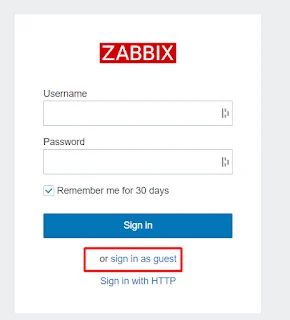
From prior CTF experience the author knew guest access could still be useful, so signed in as guest. The guest session exposed a lot of interesting data belonging to changenow.io.
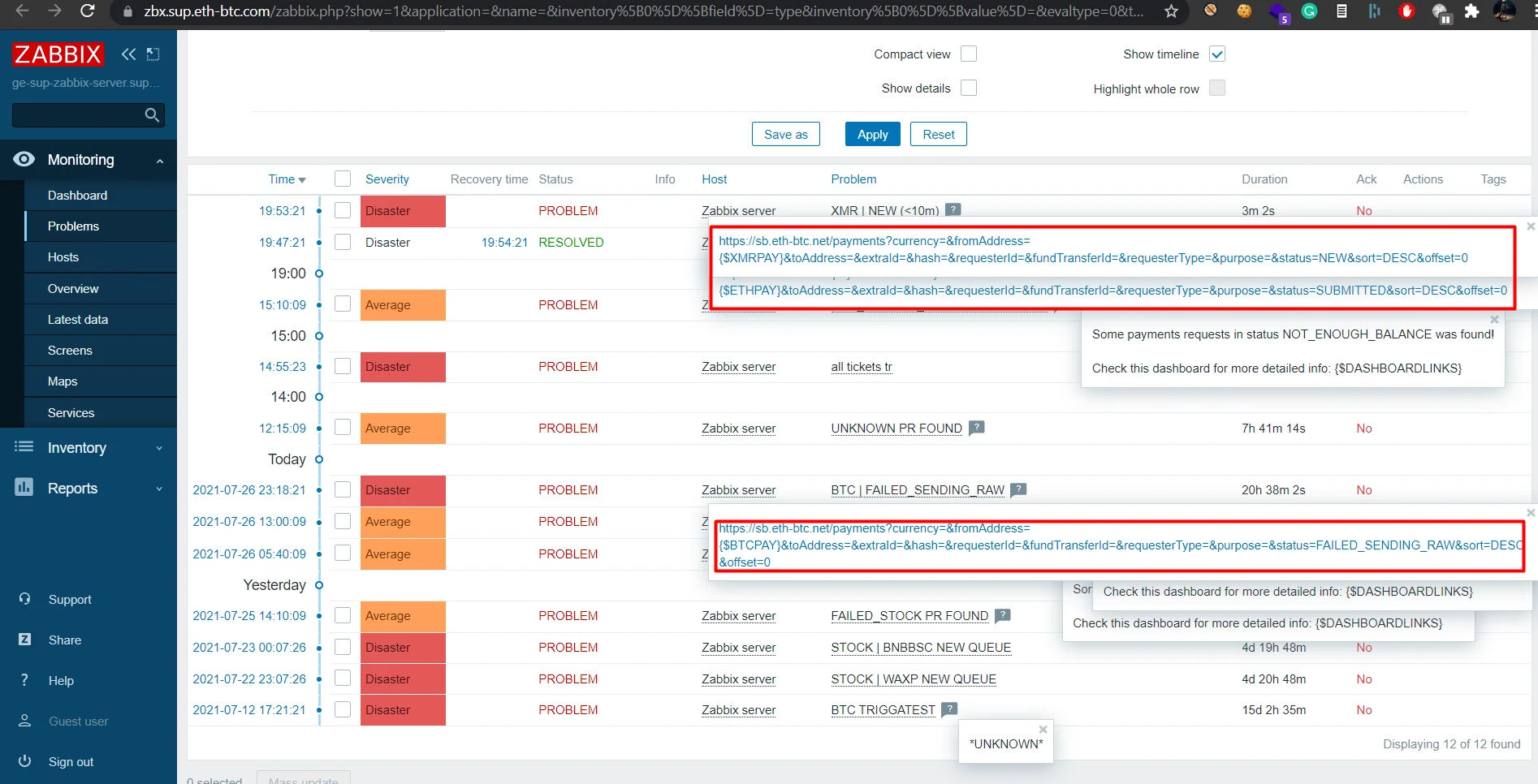
Among that data were error logs in the monitoring dashboard. Those logs led to the discovery of another internal domain, eth-btc.net. The same process was repeated: enumerate subdomains and scan for web ports 80/443.
An unauthenticated Argo Workflows dashboard
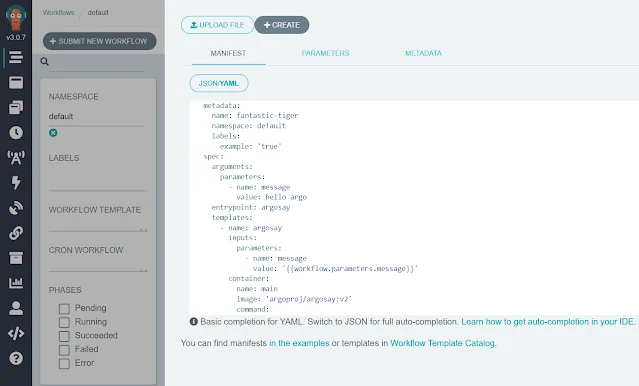
Checking the obtained URLs one by one, most returned 403 errors. One of them, argo-ws.stage.aws.eks.eu.1.eth-btc.net, returned a dashboard without any authentication. It was the Argo Workflows dashboard.
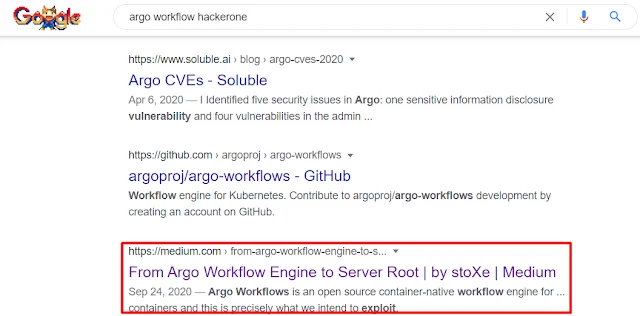
The author had seen similar DevOps dashboards many times during recon and they were not always useful. This time a search for the exact keyword argo workflow hackerone was made to look for publicly disclosed HackerOne reports on Argo Workflow. It returned no HackerOne report, but a Medium blog post appeared describing RCE and container escape as root.
Exploitation
Step 1: Build a malicious workflow
The author had little expectation that it would work, but created a workflow anyway by adjusting the poc.yaml from the blog post so that a reverse shell would be sent to an external server if the exploit worked. The report does not reproduce the contents of poc.yaml or the modified manifest.
Step 2: Catch the shell
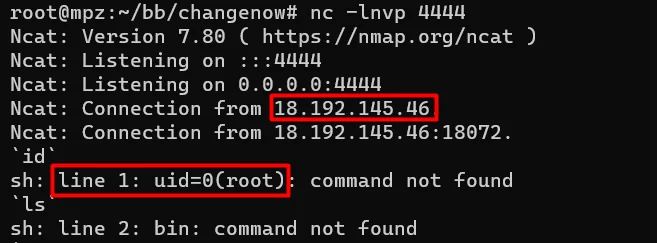
A netcat listener was set up on the external server, and the newly created malicious workflow was run. A root shell was obtained immediately.
Step 3: Get a full TTY
Commands could not be executed directly, so backticks (`) were used to get commands executed, which produced a full TTY root shell.
Step 4: Confirm the access
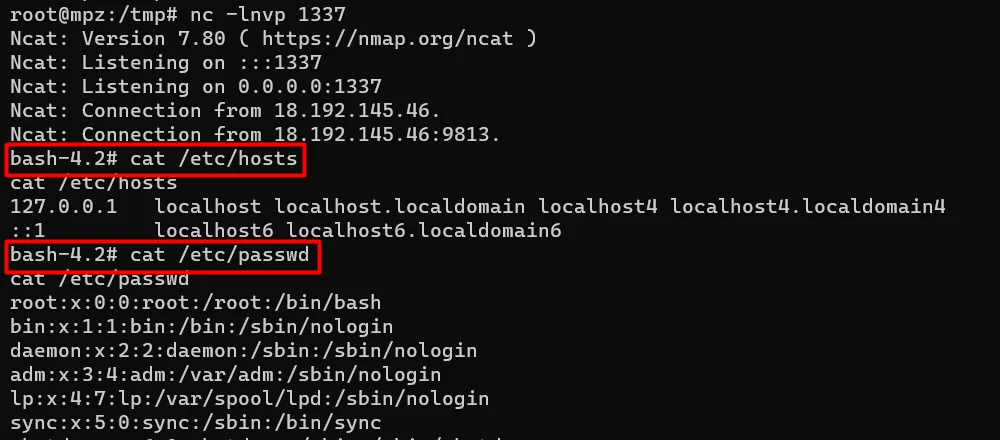
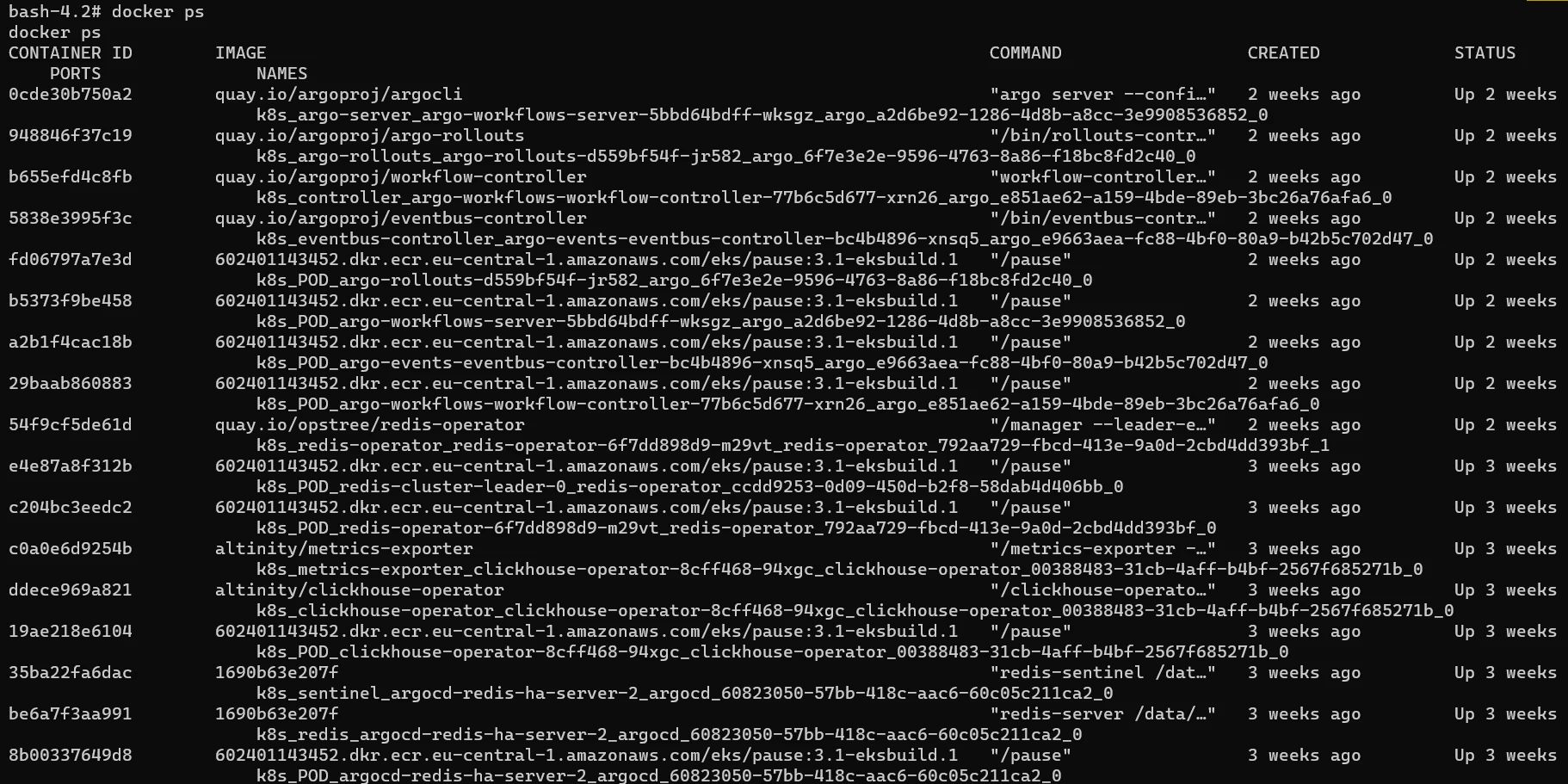
With the TTY shell, the author read a few files such as /etc/hosts and /etc/passwd, listed docker containers, and viewed the contents of the /root directory, taking screenshots for the report.
Root cause
The report does not analyse the underlying vulnerability in the Argo Workflows deployment. What it establishes is that the Argo Workflows dashboard at argo-ws.stage.aws.eks.eu.1.eth-btc.net was reachable without authentication, and that a workflow submitted through it executed with root privileges on the host, allowing a reverse shell back to an external server. The exact configuration mistake is not described in the report; likely it is a combination of an unauthenticated dashboard and workflows running with excessive privileges, but the report does not state this.
Impact
As root, an attacker could view or modify any files of the server, read AWS keys, start or stop docker containers, and plant rootkits, backdoors or keyloggers, or simply run rm -rf /. The author describes the whole chain, from zero to root shell, as taking less than an hour.
Fix
The issue was fixed silently overnight after the report was sent. According to the timeline, the Zabbix guest sign-in was disabled, the whois details were modified, and the host with the Argo workflow was taken down.
Disclosure timeline
The report includes the following timeline:
| Date | Event |
|---|---|
| July 28, 2021, 12:23 AM | Issue found and full details sent |
| Jul 28, 2021, 8:00 AM | No reply, silent fix: Zabbix guest sign-in disabled, whois details modified, host with argo workflow taken down |
| Jul 28, 2021, 9:00 AM | Follow-up in the ticket asking for updates and bounty |
| Jul 28, 2021, 9:42 AM | Response: fixed, more updates soon |
| Aug 2, 2021 | Request to explain the recon process step by step |
| Aug 2, 2021 | Full details sent |
| Aug 2 to Aug 31, 2021 | Follow-ups asking for updates and bounty |
| Aug 31, 2021, 7:30 PM | Response: non-prod environment, nothing serious, no bounty |
| Aug 31, 2021, 10:00 PM | Blog published |
| Sep 1, 2021 | Public statement that the team is taking another, closer look at the issue |
| Sept 2, 2021 | Apology for initially not rating the issue highly enough; the test environment configuration mimics production, so the bug was re-considered and a $1000 reward offered in any cryptocurrency |
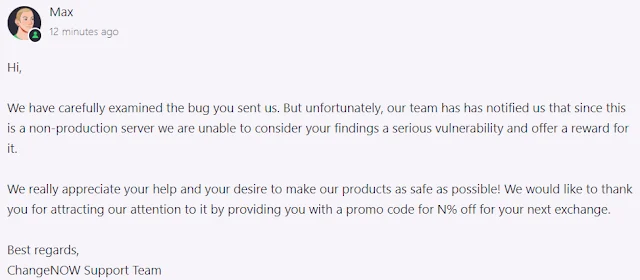
After the blog was published, the program took another look, said the test environment configuration mimics production, and awarded $1000, their maximum bounty.
Variants to test
- Guest access on monitoring systems. Look for Zabbix or similar monitoring instances exposed on subdomains and check whether a guest sign-in option is enabled. A positive result is a guest session that exposes dashboards, hosts, or error logs containing internal hostnames.
- Internal domains leaked in redirects and logs. Follow redirects from public hosts and read error logs in monitoring dashboards for internal domain names. A positive result is a new domain that resolves and belongs to the same organisation, confirmed with
whois. - Unauthenticated DevOps dashboards. Probe subdomains for Argo Workflows, Jenkins, Grafana and similar dashboards and check whether they load without authentication. A positive result is a dashboard that renders without a login prompt.
- Workflow execution privileges. On an accessible Argo Workflows dashboard, submit a benign workflow that runs
idor reads/etc/hostname. A positive result is output showing root or host-level access rather than a restricted container user. - Reverse shell via workflow. If workflow submission is possible, adapt a proof-of-concept manifest to call back to a listener you control. A positive result is a connection arriving on the listener with the privileges of the workflow pod.
What happened, in plain words
A security researcher found a way into a crypto exchange's systems and ended up with the highest level of control on one of their servers, called a root shell. He did not break any passwords and did not use any stolen accounts. He simply followed clues that were left in public places, one after another, like following a trail of breadcrumbs.
The trail started on the exchange's public website, changenow.io. From there he found two other domains that also belonged to the company, eth-btc.com and eth-btc.net. On one of those he found a monitoring tool that let visitors in as a guest, and its error logs pointed him to yet another domain. On that last domain he found a dashboard for a tool called Argo Workflows that anyone could open without logging in. That dashboard let him run a small program on the company's server, and that program gave him full control of the machine.
He reported it, the company fixed it quietly overnight, and at first they said it was only a test environment and paid nothing. After he published his write-up, they looked again, said the test environment configuration mimics production, and paid him 1000 US dollars, their maximum bounty.
This article walks through the same steps for someone who has never done security work before. Every technical idea is explained where it first appears.
Background: what a bug bounty is, and what this company does
ChangeNOW is a cryptocurrency exchange. An exchange is a service where people swap one digital currency for another, a bit like a currency exchange booth at an airport but online. The website changenow.io is the public face of that service.
Many companies run a bug bounty program: they publicly invite security researchers to look for mistakes in their systems and promise a reward, called a bounty, for reporting them responsibly. The program here was mentioned in the footer of the site, the small print at the bottom of every page. The author had been a customer of the exchange for at least a year before he noticed it, and he saved a note in his todo.txt file to check it out later.
One night he felt like doing some bug hunting, looked at his note, and started.
Setup: what access he had
It is worth being clear about how little he had. He created no accounts and obtained no passwords. The only two ways in were:
- A "Sign in as guest" button on a monitoring tool called Zabbix.
- A dashboard for Argo Workflows that opened with no login at all.
The techniques he used were: finding subdomains, checking which web ports were open on them, a whois lookup, a netcat listener on a server he controlled, and an edited workflow file called poc.yaml. The report does not name the specific tools or versions he used for finding subdomains.
A few of those terms need explaining before we go further.
Domain and subdomain. A domain is a name you type in a browser, like changenow.io. A subdomain is a name placed in front of it, like shop.changenow.io or mail.changenow.io. Companies use subdomains to give different services their own address. Think of the domain as a building's street address and subdomains as the different departments inside it.
Port. One computer can run many services at once, and each service listens on a numbered "port", like different doors into the same building. Web traffic normally uses port 80 (plain) and port 443 (encrypted, the one behind https://). Checking whether ports 80 and 443 are open on a host is a basic way to find web servers.
Recon. Short for reconnaissance: the information-gathering phase before any attack. It is the equivalent of walking around a building and noting the doors, signs and windows before trying anything.
whois. A public lookup service for domain names. You give it a domain and it returns the registration details, usually including a contact email. It is like a public phone book for websites.
Finding it
Step 1: Subdomains of changenow.io
The author started by enumerating subdomains of changenow.io and probing for standard web ports (80/443). Enumerating means producing a list of as many subdomains as possible, often by trying common names and by reading public information. Probing means simply checking whether each one answers on those ports.
He then visited the resulting URLs one by one. A few of them tried to redirect to another domain, eth-btc.com. A redirect is when a web server answers your request by telling the browser "not here, go to this other address instead". It is like a shop with a sign on the door pointing you to a different branch.
That redirect was the first clue. A public site pointing at an internal-looking domain suggests the two are connected.
Step 2: Confirming ownership with whois
To check whether eth-btc.com really belonged to the same company, he ran a whois lookup. It showed the domain also belonged to changenow.io, with the admin email [redacted] ([redacted]).
That ownership link is what justified repeating the whole process on eth-btc.com: if it is the same organisation, its subdomains are fair game for the same kind of look.
Step 3: A monitoring tool with guest access
One of the subdomains of eth-btc.com, zbx.sup.eth-btc.com, was running Zabbix. Zabbix is a monitoring system: software that watches servers and services and shows their health, graphs and error logs on a dashboard. System administrators use it to notice when something breaks.
The author did not have login credentials, and common credentials did not work. But the login page offered a "Sign in as guest" option.
From prior experience with CTF challenges he knew guest access could still be useful. CTF stands for Capture The Flag: practice competitions where people solve security puzzles on purpose-built machines. In those, a guest account is often the first small foothold that leads to more.
So he signed in as guest, and the guest session exposed a lot of interesting data belonging to changenow.io.
Why does this matter? A monitoring system is meant to be seen by administrators only. If a guest can see it, the guest can learn things about the company's infrastructure that were never meant to be public: server names, internal addresses, and error messages.
Step 4: Error logs leak another domain
Among the data visible in the guest session were error logs in the monitoring dashboard. Error logs are the records a system keeps when something goes wrong, and they often contain the names of the machines and services involved. These logs led to the discovery of another internal domain, eth-btc.net.
He repeated the same process: enumerate subdomains and scan for web ports 80/443. Notice the pattern: each clue is used to find the next one. Nothing here required breaking anything; it required reading carefully.
Step 5: An Argo Workflows dashboard with no login
Checking the obtained URLs one by one, most returned 403 errors. A 403 is the standard web response for "forbidden": the server understood the request but refuses to serve it. One URL, however, argo-ws.stage.aws.eks.eu.1.eth-btc.net, returned a dashboard without any authentication. It was the Argo Workflows dashboard.
What is Argo Workflows? It is a tool for running automated jobs, called workflows, on a cluster of computers. Companies use it to automate repetitive tasks: building software, processing data, running scheduled jobs. A workflow is described in a file, and the tool carries it out. Think of it as a to-do list for computers: you write down the steps, and the system executes them.
The important point is that a workflow is a set of instructions that the system will run. If you can submit a workflow, you can make the system run instructions of your choosing.
Step 6: Searching for known techniques
The author had seen similar DevOps dashboards many times during recon, and they were not always useful. DevOps is the practice of running and automating software infrastructure; such dashboards are common and often harmless.
This time he searched for the exact keyword argo workflow hackerone to look for publicly disclosed HackerOne reports about Argo Workflow. HackerOne is a well-known bug bounty platform where reports are sometimes published after they are fixed. The search returned no HackerOne report, but a Medium blog post appeared describing RCE and container escape as root.
Two more terms to unpack here.
RCE (remote code execution). Exactly what it sounds like: an attacker can make a remote system run code of their choosing. It is one of the most serious classes of vulnerability, because running code is the first step to doing almost anything else.
Container escape. Containers are a way of running software in isolated boxes on a shared machine, so that one program cannot interfere with another. A container escape is when code inside such a box manages to break out and reach the machine underneath. It is like a guest in a hotel room finding a way into the building's maintenance areas.
Root. On Linux and similar systems, root is the all-powerful administrator account. A root shell means a command prompt running with those full powers.
Exploitation
Step 1: Build a malicious workflow
The author had little expectation that it would work, but he created a workflow anyway. He took the poc.yaml file from the blog post and adjusted it so that a reverse shell would be sent to an external server if the exploit worked.
A reverse shell is a connection where the compromised machine calls back to the attacker and hands over a command prompt. The direction matters: instead of the attacker connecting in, which firewalls often block, the victim machine dials out, which is usually allowed. It is like asking someone to phone you rather than trying to walk into their building.
The report does not reproduce the contents of poc.yaml or the modified manifest, so there is no code to show here.
Step 2: Catch the shell
He set up a netcat listener on the external server and ran the newly created malicious workflow. A netcat listener is a small program that waits for an incoming connection on a chosen port and shows whatever arrives. It is the phone that is waiting for the callback.
A root shell was obtained immediately.
In plain terms: the dashboard accepted his workflow, the workflow ran on the company's machine, and because it ran with root privileges, the connection that came back was a root command prompt.
Step 3: Get a full TTY
Commands could not be executed directly, so backticks (`) were used to get commands executed, which produced a full TTY root shell.
A TTY is a proper interactive terminal: the kind of command prompt where you can run programs that expect a real keyboard and screen, use arrow keys, and see full output. A bare reverse shell sometimes gives you a connection where interactive programs misbehave. Backticks are a shell feature: text inside them is run as a command and its output is substituted in place. Using them was a workaround to get commands to run in that limited connection.
Step 4: Confirm the access
With the TTY shell, the author read a few files such as /etc/hosts and /etc/passwd, listed docker containers, and viewed the contents of the /root directory, taking screenshots for the report.
Why those files? /etc/hosts maps names to addresses on a machine, so it reveals internal names. /etc/passwd lists the user accounts on the system. Listing docker containers shows what else is running on the host. The /root directory is the root user's home folder, which normally only root can read. Together they are simple proof that the access is real and complete.
Root cause
The report does not analyse the underlying vulnerability in the Argo Workflows deployment. What it establishes is that the dashboard at argo-ws.stage.aws.eks.eu.1.eth-btc.net was reachable without authentication, and that a workflow submitted through it executed with root privileges on the host, allowing a reverse shell back to an external server. The exact configuration mistake is not described; likely it is a combination of an unauthenticated dashboard and workflows running with excessive privileges, but the report does not state this.
In everyday terms: a control panel that should have required a key was left open, and the jobs it ran were given far more power than they needed.
Impact
As root, an attacker could view or modify any files of the server, read AWS keys, start or stop docker containers, and plant rootkits, backdoors or keyloggers, or simply run rm -rf /.
A few of those deserve a word. AWS keys are credentials for Amazon Web Services, the cloud provider; with them an attacker could reach other cloud resources. A rootkit is software that hides an intruder's presence. A backdoor is a way back in that survives a fix. A keylogger records what is typed, including passwords. And rm -rf / is the classic destructive command that deletes everything on the system.
The author describes the whole chain, from zero to root shell, as taking less than an hour.
Fix
The issue was fixed silently overnight after the report was sent. According to the timeline, the Zabbix guest sign-in was disabled, the whois details were modified, and the host with the Argo workflow was taken down.
Disclosure timeline
A disclosure is the process of telling a company about a bug and, later, telling the public. Responsible disclosure usually means giving the company time to fix it first.
| Date | Event |
|---|---|
| July 28, 2021, 12:23 AM | Issue found and full details sent |
| Jul 28, 2021, 8:00 AM | No reply, silent fix: Zabbix guest sign-in disabled, whois details modified, host with argo workflow taken down |
| Jul 28, 2021, 9:00 AM | Follow-up in the ticket asking for updates and bounty |
| Jul 28, 2021, 9:42 AM | Response: fixed, more updates soon |
| Aug 2, 2021 | Request to explain the recon process step by step |
| Aug 2, 2021 | Full details sent |
| Aug 2 to Aug 31, 2021 | Follow-ups asking for updates and bounty |
| Aug 31, 2021, 7:30 PM | Response: non-prod environment, nothing serious, no bounty |
| Aug 31, 2021, 10:00 PM | Blog published |
| Sep 1, 2021 | Public statement that the team is taking another, closer look at the issue |
| Sept 2, 2021 | Apology for initially not rating the issue highly enough; the test environment configuration mimics production, so the bug was re-considered and a $1000 reward offered in any cryptocurrency |
After the blog was published, the program took another look, said the test environment configuration mimics production, and awarded $1000, their maximum bounty. Production means the systems real customers actually use, as opposed to a test environment.
Variants to test
If you want to practise the same thinking on systems you are allowed to test, these are the patterns worth looking for.
- Guest access on monitoring systems. Look for Zabbix or similar monitoring instances exposed on subdomains and check whether a guest sign-in option is enabled. A positive result is a guest session that exposes dashboards, hosts, or error logs containing internal hostnames.
- Internal domains leaked in redirects and logs. Follow redirects from public hosts and read error logs in monitoring dashboards for internal domain names. A positive result is a new domain that resolves and belongs to the same organisation, confirmed with
whois. - Unauthenticated DevOps dashboards. Probe subdomains for Argo Workflows, Jenkins, Grafana and similar dashboards and check whether they load without authentication. A positive result is a dashboard that renders without a login prompt.
- Workflow execution privileges. On an accessible Argo Workflows dashboard, submit a benign workflow that runs
idor reads/etc/hostname. A positive result is output showing root or host-level access rather than a restricted container user. - Reverse shell via workflow. If workflow submission is possible, adapt a proof-of-concept manifest to call back to a listener you control. A positive result is a connection arriving on the listener with the privileges of the workflow pod.
Glossary
- 403: the standard web response meaning "forbidden", the server understood the request but refuses to serve it.
- Argo Workflows: a tool for running automated jobs, called workflows, on a cluster of computers.
- AWS keys: credentials for Amazon Web Services, the cloud provider.
- Backdoor: a way back into a system that survives a fix.
- Bug bounty program: a public invitation from a company to report security mistakes in exchange for a reward.
- Bounty: the reward paid for a valid security report.
- Container: an isolated box on a shared machine in which software runs, so it cannot interfere with other programs.
- Container escape: breaking out of such a box to reach the machine underneath.
- CTF (Capture The Flag): practice security competitions where people solve puzzles on purpose-built machines.
- DevOps: the practice of running and automating software infrastructure.
- Disclosure: the process of telling a company about a bug and, later, telling the public.
- Domain: a name you type in a browser, like
changenow.io. - Error logs: records a system keeps when something goes wrong, often containing machine and service names.
- Guest access: a login option that lets visitors in without their own account.
- HackerOne: a well-known bug bounty platform where reports are sometimes published after they are fixed.
- Keylogger: software that records what is typed, including passwords.
- Netcat listener: a small program that waits for an incoming connection on a chosen port and shows whatever arrives.
- Port: a numbered door on a computer through which a particular service listens; web traffic normally uses 80 and 443.
- Production: the systems real customers actually use, as opposed to a test environment.
- RCE (remote code execution): a vulnerability that lets an attacker make a remote system run code of their choosing.
- Redirect: a web server answering a request by pointing the browser to a different address.
- Reverse shell: a connection where the compromised machine calls back to the attacker and hands over a command prompt.
- Root: the all-powerful administrator account on Linux and similar systems.
- Root shell: a command prompt running with root's full powers.
- Rootkit: software that hides an intruder's presence on a system.
- Subdomain: a name placed in front of a domain, like
shop.changenow.io, giving a service its own address. - TTY: a proper interactive terminal, where programs that expect a real keyboard and screen work normally.
- Workflow: a set of instructions, described in a file, that an automation system carries out.
whois: a public lookup service for domain names, returning registration details such as a contact email.- Zabbix: a monitoring system that watches servers and services and shows their health, graphs and error logs on a dashboard.



